lane NISSAN LEAF 2023 Owners Manual
[x] Cancel search | Manufacturer: NISSAN, Model Year: 2023, Model line: LEAF, Model: NISSAN LEAF 2023Pages: 612, PDF Size: 7.42 MB
Page 206 of 612
VDC Setting
The VDC setting menu allows the user to the adjust the VDC settings.
Some menu items shown below may not be equipped on your vehicle.
Menu ItemExplanation
System Allows user to turn the Vehicle Dynamic Control (VDC) system on or off.
Driver Assistance
The driver assistance menu allows the user to change the settings for driving, parking, and braking aids.
Some menu items shown below may not be equipped on your vehicle
Menu Item Explanation
Steering Assist Allows user to turn the steering assist feature on or off. For additional information, see “ProPILOT Assist”
(P. 5-92).
Lane Displays the available lane options.
Lane Departure Warning Allows user to turn the Lane Departure Warning on and off. For additional information, see “Lane Depar- ture Warning (LDW)” (P. 5-25).
Lane Departure Prevention Allows user to turn the Intelligent Lane Intervention (I-LI) on and off. For additional information, see “Intel- ligent Lane Intervention (I-LI)” (P. 5-30).
Blind Spot Displays the available blind spot options.
Blind Spot Warning Allows user to turn the Blind Spot Warning on and off. For additional information, see “Blind Spot Warning
(BSW)” (P. 5-36).
Blind Spot Intervention Allows user to turn the Intelligent Blind Spot Intervention (I-BSI) on and off. For additional information,
see “Intelligent Blind Spot Intervention (I-BSI)” (P. 5-45).
Side Indicator Brightness Allows user to set the brightness of the side indicator light.
Instruments and controls2-29
Page 218 of 612
cruise control or go back to the set speed. If
cruise control is on and canceled, the
speed will be displayed to show the speed
the vehicle will return to if the resume but-
ton is activated.
For additional information, see “Cruise con-
trol” (P. 5-65).
Currently not available
This message may appear when the Intel-
ligent Cruise Control (ICC) (with ProPILOT
Assist) system, Intelligent Blind Spot Inter-
vention (I-BSI), Intelligent Lane Intervention
(I-LI) or the ICC system is engaged.
Under the following condition, the ICC (with
ProPILOT Assist) system, Intelligent Blind
Spot Intervention (I-BSI), Intelligent Lane In-
tervention (I-LI) or the ICC system is auto-
matically canceled:
• When the VDC system is turned off.
The above system cannot be used in some
situations (VDC operates, wheel slip, and
VDC system is off.)
Driver Attention Alert
System Fault
This warning appears when the Intelligent
Driver Alertness (I-DA) system is not func-
tioning properly.For additional information, see “Intelligent
Driver Alertness (I-DA)” (P. 5-154).
Driver Attention Alert Take
a Break?
This alert appears when the system has
detected the driver may be displaying fa-
tigue or a lack of attention.
Forward Driving Aids Temporarily
Disabled. Front Sensor Blocked. See
Owner’s Manual
This message appears when the front ra-
dar sensor may be obstructed due to:
• mud, dirt, snow, ice, etc.
• inclement weather (rain, fog, snow, etc.)
All forward driving aids are temporarily dis-
abled until the system detects that the
front radar sensor is no longer obstructed.
For additional information, see the follow-
ing (if so equipped):
• Automatic Emergency Braking (AEB) with
Pedestrian Detection (P. 5-130)
• Intelligent Cruise Control (ICC) (P. 5-67), (P. 5-104)
• Intelligent Forward Collision Warning (I- FCW) (P. 5-141)
Lane Departure Warning
(LDW) indicator
This indicator appears when the LDW sys-
tem is engaged.
For additional information, see “Lane De-
parture Warning (LDW) system” (P. 5-25).
Intelligent Cruise Control
(ICC) indicators
This indicator shows the Intelligent Cruise
Control (ICC) system status. The status is
shown by the color. For additional informa-
tion, see “Intelligent Cruise Control (ICC)”
(P. 5-67).
Malfunction: See Owner’s Manual
This warning appears when one or more of
the following systems (if so equipped) is
not functioning properly:
• Lane Departure Warning (LDW)
• Intelligent Lane Intervention (I-LI)
• Automatic Emergency Braking (AEB) withPedestrian Detection
• Intelligent Forward Collision Warning (I-FCW)
• Rear Automatic Braking (RAB)
• Rear Cross Traffic Alert (RCTA)
Instruments and controls2-41
Page 219 of 612
If one or more of these warning appears,
have the system checked. It is recom-
mended that you visit a NISSAN certified
LEAF dealer for this service.
Not Available Bad Weather
This message may appear when the Steer-
ing Assist system is engaged.
When the wiper (HI) operates, the Steering
Assist system is automatically canceled.
The system will be available when the
above conditions no longer exist.
Not Available Parking Brake On
This message may appear when the Intel-
ligent Cruise Control (ICC) (with ProPILOT
Assist) system is engaged.
Under the following conditions, the ICC
(with ProPILOT Assist) system is automati-
cally canceled:
• The electronic parking brake is applied.
The above system cannot be used when
the electronic parking brake is activated.
Not Available Poor Road Conditions
This message may appear when the Intel-
ligent Cruise Control (ICC) (with ProPILOT
Assist) system, the ICC system, Intelligent
Blind Spot Intervention (I-BSI) or Intelligent
Lane Intervention (I-LI) is engaged.Under the following conditions, the ICC
(with ProPILOT Assist) system, ICC system,
Intelligent Blind Intervention (I-BSI) or Intel-
ligent Lane Intervention (I-LI) is automati-
cally canceled:
• When the VDC operates.
• When a wheel slips.
The above system cannot be used in some
situations (VDC operates and wheel slip).
Not Available Seat Belt Not Fastened
This indicator appears when the ProPILOT
Assist system will not engage because the
driver’s seat belt is not fastened. For addi-
tional information, see “ProPILOT Assist”
(P. 5-92).
Not Available System Malfunction
This warning appears when one or more of
the following systems (if so equipped) are
not functioning properly:
• Intelligent Blind Spot Intervention (I-BSI)
• Blind Spot Warning (BSW)
• ProPILOT Assist
If one or more of these warning appears,
have the system checked. It is recom-
mended that you visit a NISSAN certified
LEAF dealer for this service.
Not Available Visibility is Impaired
This message may appear when the Intel-
ligent Cruise Control (ICC) (with ProPILOT
Assist) system is engaged.
Under the following conditions, the ICC
(with ProPILOT Assist) system is automati-
cally canceled:
• The camera area of the windshield is
fogged up or covered with dirt, water, ice,
snow, etc.
• Strong light, such as sunlight or high beams from oncoming vehicles, enters
the front camera
The system will be available when the
above conditions no longer exist.
If the warning message continues to ap-
pear, stop the vehicle in a safe location, turn
the EV system off and clean the windshield.
Parking Sensor
This indicator illuminates when the sensor
is activated. Pressing the OK button while
the sonar screen is displayed will dismiss
this message until the next time the sen-
sors are activated. The Parking Sensor sys-
tem will remain on, unless it is disabled in
the vehicle information display. For addi-
tional information, see “Rear Sonar System
(RSS) (P. 5-169).
2-42Instruments and controls
Page 220 of 612
Parking Sensor Error: See Owner’s
Manual
This warning illuminates when there is an
error with the system. For additional infor-
mation, see “Rear Sonar System (RSS)
(P. 5-169).
ProPILOT Assist/Intelligent
Lane Intervention (I-LI)/
Intelligent Blind Spot
Intervention (I-BSI)
indicator
This indicator appears when the following
systems (if so equipped) is engaged:
• ProPILOT Assist system (if so equipped)
• Intelligent Lane Intervention (I-LI)
• Intelligent Blind Spot Intervention (I-BSI)
For additional information, see “ProPILOT
Assist” (P. 5-92), “Intelligent Lane Interven-
tion (I-LI) (P. 5-30), or “Intelligent Blind Spot
Intervention (I-BSI) (P. 5-45).
Rear Automatic Braking
(RAB) system warning
indicator
This indicator appears to indicate the sta-
tus of the Rear Automatic Braking (RAB)
system.For additional information, see "Rear Auto-
matic Braking (RAB) (P. 5-125).
Steering Assist warning
indicator
This message may appear when the Steer-
ing Assist system is engaged.
It will be displayed under the following
conditions:
• Gray — When in standby mode.
• Yellow — When there is a failure.
When the steering operation is detected,
the warning turns off and the steering as-
sist function is automatically restored.
Steering Assist warning
indicator
This message may appear when the Steer-
ing Assist system is engaged.
It will be displayed under the following
conditions:
• Red — When not holding the steering
wheel or when there is no steering wheel
operation.
• Green — When in active mode.
• Black — When the system is off.
When the steering assist warning indicator
appears red, please hold the steering
wheel immediately. When the steering op- eration is detected, the warning turns off
and the steering assist function is auto-
matically restored.
Unavailable High Cabin Temperature
This message appears when the camera
detects an interior temperature of more
than approximately 104°F (40°C).
For additional information, see “Lane De-
parture Warning (LDW)” (P. 5-25), “Intelligent
Lane Intervention (I-LI) (P. 5-30) or “Intelli-
gent Blind Spot Intervention (I-BSI) (P. 5-45).
Unavailable Side Radar Obstruction
This warning appears when there is radar
blockage detected. For additional informa-
tion, see “Blind Spot Warning (BSW)” (P. 5-36)
or “Intelligent Blind Spot Intervention (I-BSI)”
(P. 5-45).
Vehicle ahead detection
indicator
This indicator shows when the Automatic
Emergency Braking with Pedestrian Detec-
tion system is engaged and has detected a
vehicle.
For additional information, see “Automatic
Emergency Braking (AEB) with Pedestrian
Detection” (P. 5-130).
Instruments and controls2-43
Page 233 of 612
WARNING
When the LED DRL system is active, tail
lights on your vehicle are not on. It is
necessary at dusk to turn on your
headlights. Failure to do so could cause
an accident injuring yourself and
others.
INSTRUMENT BRIGHTNESS
CONTROL
Press the “+” button to increase the bright-
ness of the instrument panel lights.
Press the “-” to decrease the brightness of
the instrument panel lights.
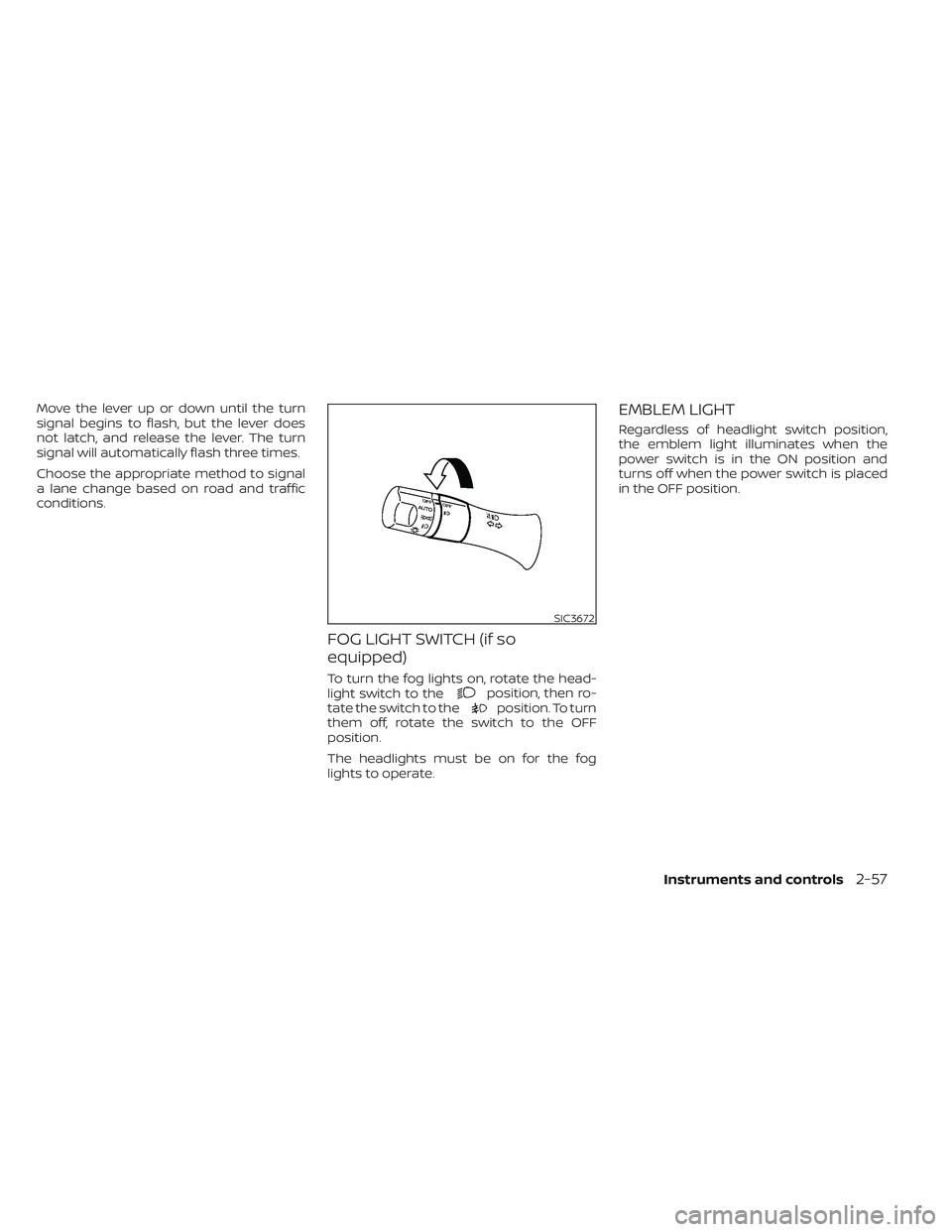
TURN SIGNAL SWITCH
Turn signal
O1Move the lever up or down until it
latches to signal the turning direction.
When the turn is completed, the turn signal
cancels automatically.
Lane change signal
O2Move the lever up or down until the turn
signal begins to flash, but the lever does
not latch, to signal a lane change. Hold the
lever until the lane change is completed.
LIC3801SIC3671
2-56Instruments and controls
Page 234 of 612
Move the lever up or down until the turn
signal begins to flash, but the lever does
not latch, and release the lever. The turn
signal will automatically flash three times.
Choose the appropriate method to signal
a lane change based on road and traffic
conditions.
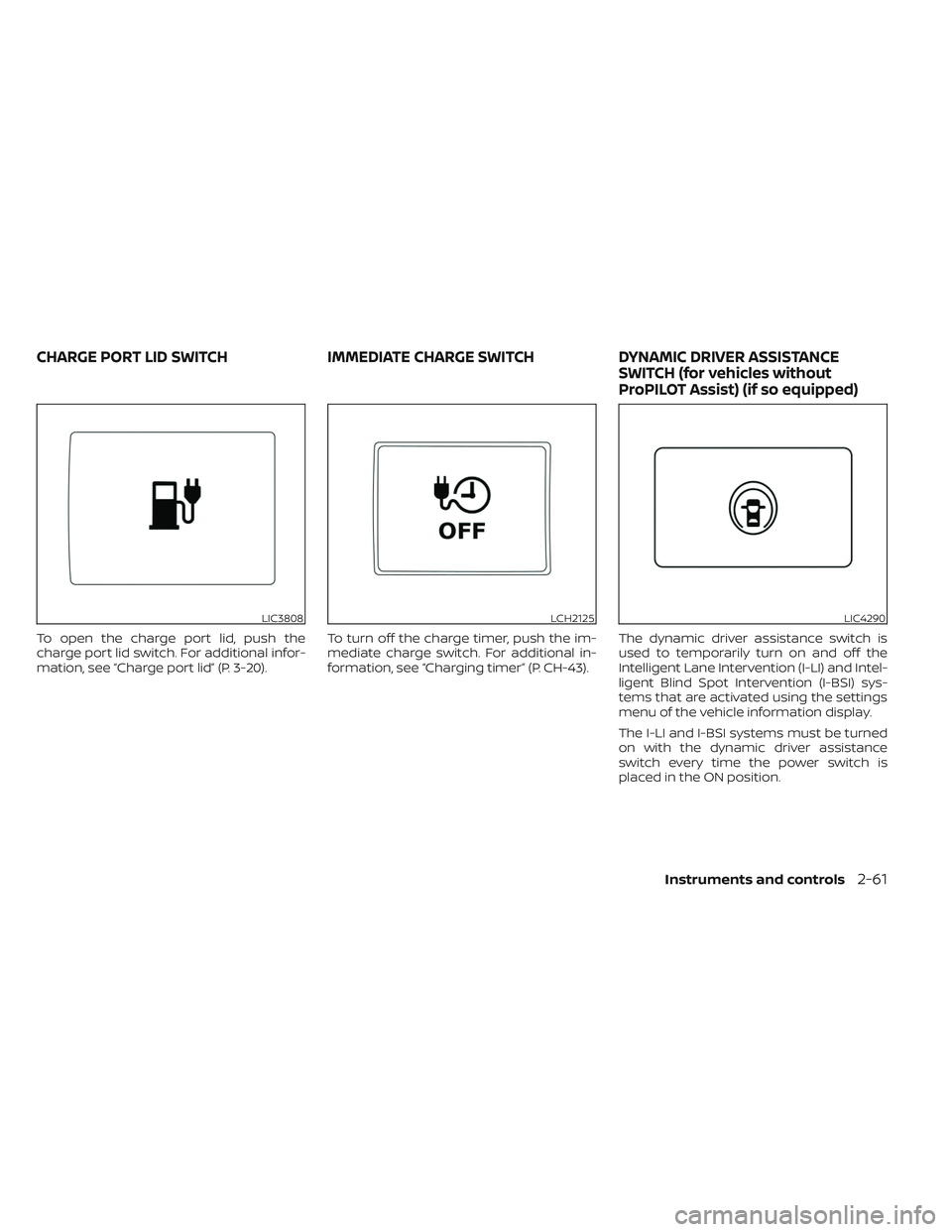
FOG LIGHT SWITCH (if so
equipped)
To turn the fog lights on, rotate the head-
light switch to theposition, then ro-
tate the switch to theposition. To turn
them off, rotate the switch to the OFF
position.
The headlights must be on for the fog
lights to operate.
EMBLEM LIGHT
Regardless of headlight switch position,
the emblem light illuminates when the
power switch is in the ON position and
turns off when the power switch is placed
in the OFF position.
SIC3672
Instruments and controls2-57
Page 238 of 612
To open the charge port lid, push the
charge port lid switch. For additional infor-
mation, see “Charge port lid” (P. 3-20).To turn off the charge timer, push the im-
mediate charge switch. For additional in-
formation, see “Charging timer” (P. CH-43).The dynamic driver assistance switch is
used to temporarily turn on and off the
Intelligent Lane Intervention (I-LI) and Intel-
ligent Blind Spot Intervention (I-BSI) sys-
tems that are activated using the settings
menu of the vehicle information display.
The I-LI and I-BSI systems must be turned
on with the dynamic driver assistance
switch every time the power switch is
placed in the ON position.
LIC3808LCH2125LIC4290
CHARGE PORT LID SWITCH
IMMEDIATE CHARGE SWITCHDYNAMIC DRIVER ASSISTANCE
SWITCH (for vehicles without
ProPILOT Assist) (if so equipped)
Instruments and controls2-61
Page 239 of 612
The I-LI system warns the driver with a
warning and a chime, and helps assist the
driver to return the vehicle to the center of
the traveling lane by applying the brakes to
the lef t or right wheels individually (for a
short period of time). For additional infor-
mation, see “Intelligent Lane Intervention
(I-LI)” (P. 5-30) and “Vehicle information dis-
play” (P. 2-26).
The I-BSI system helps alert the driver of
other vehicles in adjacent lanes when
changing lanes, and helps assist the driver
to return the vehicle to the center of the
traveling lane. For additional information,
see “Intelligent Blind Spot Intervention (I-
BSI)” (P. 5-36).The Steering Assist switch is used to en-
able and disable the Steering Assist sys-
tem that is activated using the settings
menu of the vehicle information display.
The Steering Assist system controls the
steering system, when ProPILOT Assist is
engaged, to help keep your vehicle near
the center of the lane when driving. For
additional information, see “ProPILOT As-
sist” (P. 5-92) and “Intelligent Lane Interven-
tion (I-LI)” (P. 5-30).The Rear Door Alert system functions un-
der certain conditions to indicate there
may be an object or passenger in the rear
seat(s). Check the seat(s) before exiting the
vehicle.
The Rear Door Alert system is initially dis-
abled. The driver can enable the system
using the vehicle information display. For
additional information, see “Vehicle infor-
mation display warnings and indicators”
(P. 2-36).
When the system is enabled:
• The system is activated when a rear door
is opened and closed within 10 minutes of
the vehicle being driven. When the driver
door is closed and the system is acti-
vated, a visual message appears in the
vehicle information display. For additional
information, see “Rear Door Alert is acti-
vated” (P. 2-37).
• If a rear door is opened and closed but the vehicle is not driven within approxi-
mately 10 minutes, the system will not be
activated. A rear door must be opened
and closed and the car driven within 10
minutes for the system to activate.
LIC3932
STEERING ASSIST SWITCH (for
models with ProPILOT Assist) (if so
equipped) REAR DOOR ALERT
2-62Instruments and controls
Page 257 of 612
Lockout protection
When any door is open and the power door
lock switch is moved to the lock position, all
doors will lock. If the Intelligent Key is lef t in
the vehicle af ter all the doors are closed, all
doors will unlock automatically and a
chime will sound.
These functions help to prevent the Intelli-
gent Key from being accidentally locked
inside the vehicle.
AUTOMATIC DOOR LOCKS
• All doors lock automatically when the ve-hicle speed reaches 15 mph (24 km/h).
• All doors unlock automatically when the power switch is placed in the OFF
position.
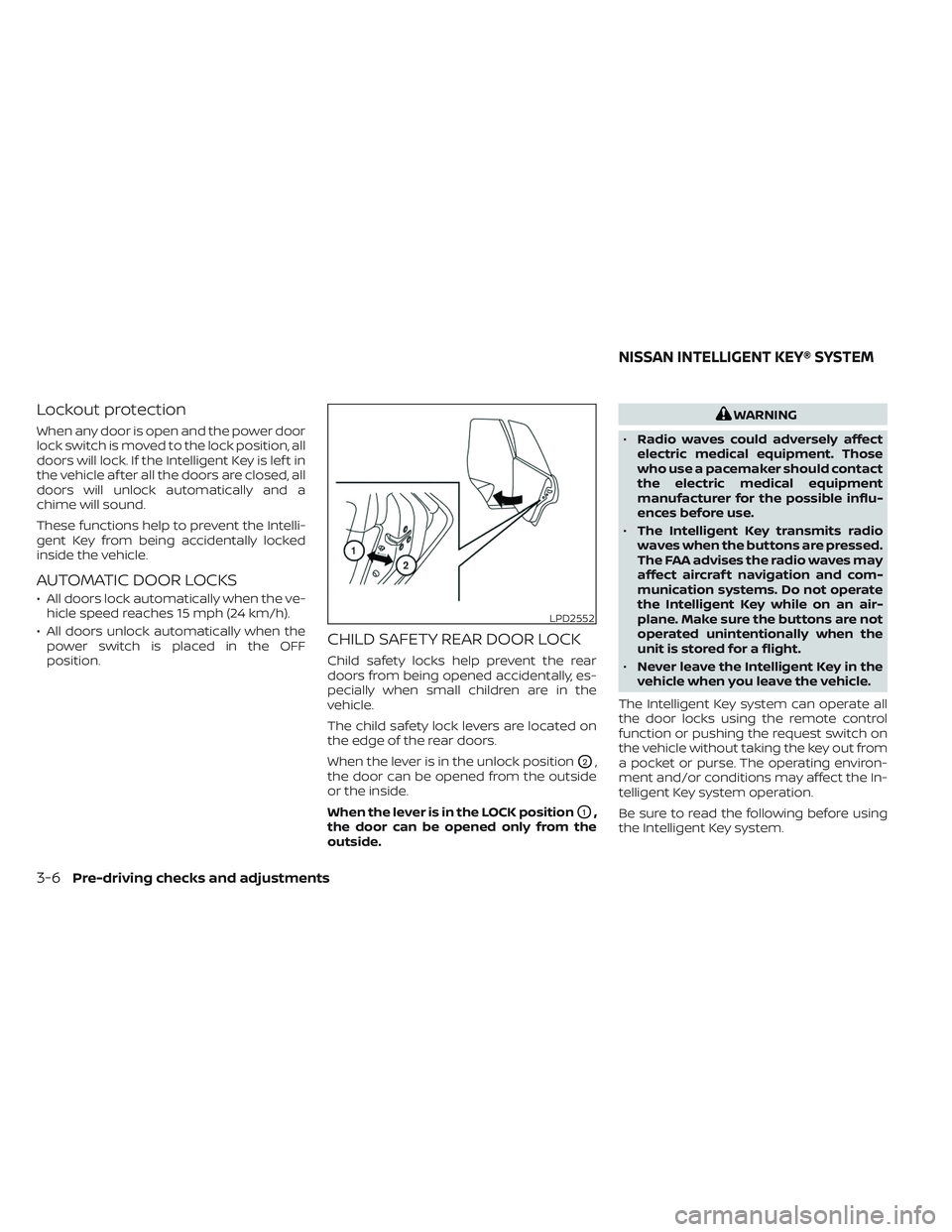
CHILD SAFETY REAR DOOR LOCK
Child safety locks help prevent the rear
doors from being opened accidentally, es-
pecially when small children are in the
vehicle.
The child safety lock levers are located on
the edge of the rear doors.
When the lever is in the unlock position
O2,
the door can be opened from the outside
or the inside.
When the lever is in the LOCK position
O1,
the door can be opened only from the
outside.
WARNING
• Radio waves could adversely affect
electric medical equipment. Those
who use a pacemaker should contact
the electric medical equipment
manufacturer for the possible influ-
ences before use.
• The Intelligent Key transmits radio
waves when the buttons are pressed.
The FAA advises the radio waves may
affect aircraf t navigation and com-
munication systems. Do not operate
the Intelligent Key while on an air-
plane. Make sure the buttons are not
operated unintentionally when the
unit is stored for a flight.
• Never leave the Intelligent Key in the
vehicle when you leave the vehicle.
The Intelligent Key system can operate all
the door locks using the remote control
function or pushing the request switch on
the vehicle without taking the key out from
a pocket or purse. The operating environ-
ment and/or conditions may affect the In-
telligent Key system operation.
Be sure to read the following before using
the Intelligent Key system.
LPD2552
NISSAN INTELLIGENT KEY® SYSTEM
3-6Pre-driving checks and adjustments
Page 263 of 612
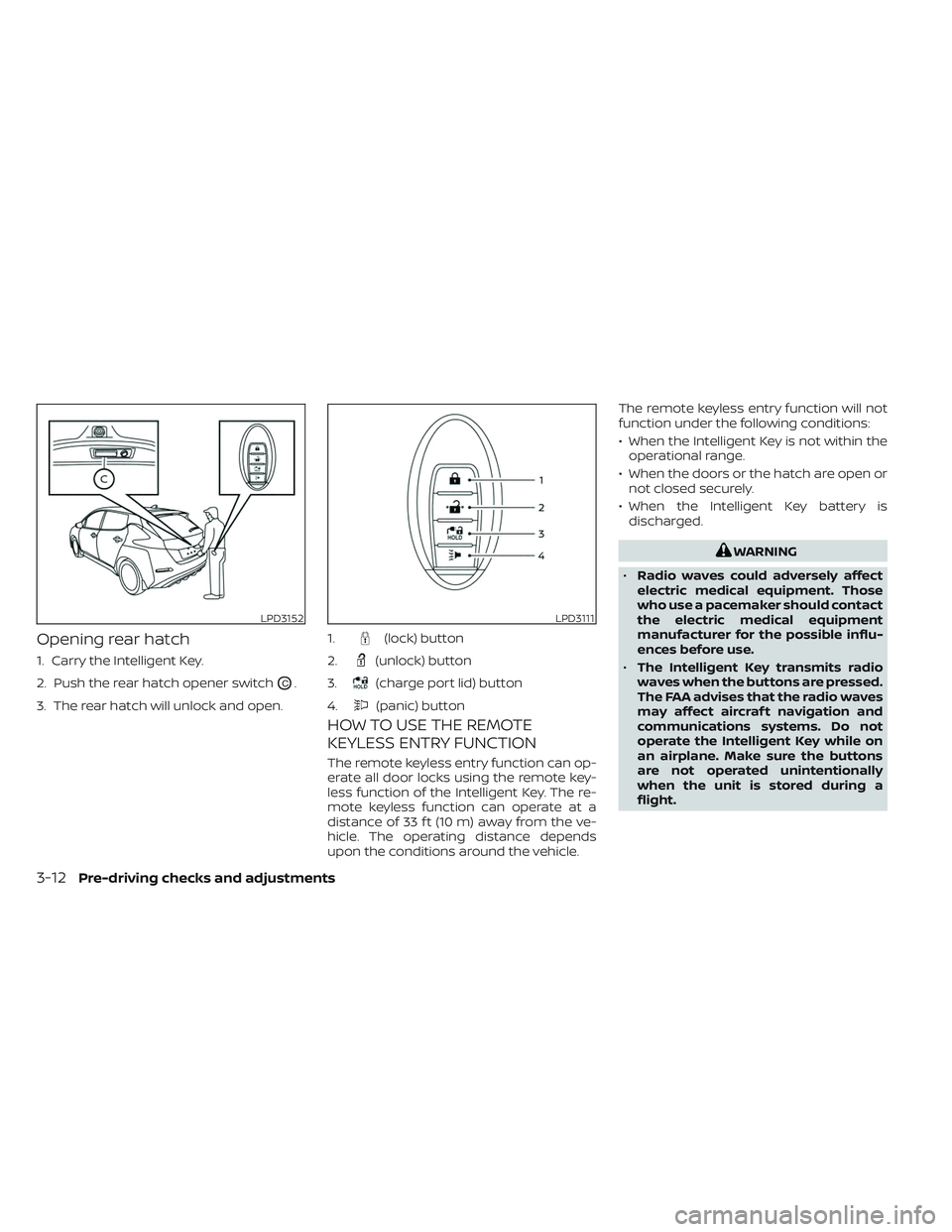
Opening rear hatch
1. Carry the Intelligent Key.
2. Push the rear hatch opener switch
OC.
3. The rear hatch will unlock and open.
HOW TO USE THE REMOTE
KEYLESS ENTRY FUNCTION
The remote keyless entry function can op-
erate all door locks using the remote key-
less function of the Intelligent Key. The re-
mote keyless function can operate at a
distance of 33 f t (10 m) away from the ve-
hicle. The operating distance depends
upon the conditions around the vehicle. The remote keyless entry function will not
function under the following conditions:
• When the Intelligent Key is not within the
operational range.
• When the doors or the hatch are open or not closed securely.
• When the Intelligent Key battery is discharged.
WARNING
• Radio waves could adversely affect
electric medical equipment. Those
who use a pacemaker should contact
the electric medical equipment
manufacturer for the possible influ-
ences before use.
• The Intelligent Key transmits radio
waves when the buttons are pressed.
The FAA advises that the radio waves
may affect aircraf t navigation and
communications systems. Do not
operate the Intelligent Key while on
an airplane. Make sure the buttons
are not operated unintentionally
when the unit is stored during a
flight.
LPD3152LPD3111
1.(lock) button
2.
(unlock) button
3.
(charge port lid) button
4.
(panic) button
3-12Pre-driving checks and adjustments