start stop button NISSAN LEAF 2023 Owners Manual
[x] Cancel search | Manufacturer: NISSAN, Model Year: 2023, Model line: LEAF, Model: NISSAN LEAF 2023Pages: 612, PDF Size: 7.42 MB
Page 59 of 612
![NISSAN LEAF 2023 Owners Manual Quick charge uses public charging sta-
tions (up to 50 kW of power [for 40 kWh
battery models] / 100 kW of power [for 60
kWh battery models]).
The time needed to charge the Li-ion bat-
tery from disch](/img/5/56727/w960_56727-58.png "NISSAN LEAF 2023 Owners Manual Quick charge uses public charging sta-
tions (up to 50 kW of power [for 40 kWh
battery models] / 100 kW of power [for 60
kWh battery models]).
The time needed to charge the Li-ion bat-
tery from disch")
Quick charge uses public charging sta-
tions (up to 50 kW of power [for 40 kWh
battery models] / 100 kW of power [for 60
kWh battery models]).
The time needed to charge the Li-ion bat-
tery from discharged (low battery charge
indicator light illuminated) to 80% charged
using the quick charger depends on many
factors including the Li-ion battery tem-
perature and the type of quick charger
used.
It may take more time to charge the Li-ion
battery using the quick charger if the ve-
hicle is parked in a cold location for a long
time.
It may take more time to charge the Li-ion
battery using the quick charger if the tem-
perature of the Li-ion battery is high or low.
The Li-ion battery temperature gauge can
be used to estimate the approximate time
needed to charge the Li-ion battery to 80%.
If charging stops mid-charge, you can re-
start charging by pressing the start button
on the quick charger station again. Quick
charging is possible (even several times a
day). If the battery temperature is near the
red zone, in order to protect the battery,
power of the quick charging will be limited.V2X charge/discharge
V2X charge/discharge capability is only
available on vehicles manufactured with
the V2X charge/discharge option, which in-
cludes the quick charge port.
A vehicle equipped with a quick charge
port is compatible with most CHAdeMO
(Japanese industry standard) connectors
on charging stations.
LHA5087
For 40 kWh battery models
LHA5635
For 60 kWh battery models*
*Subject to charging equipment capability to output 100kW
CH-8Charging
Page 62 of 612
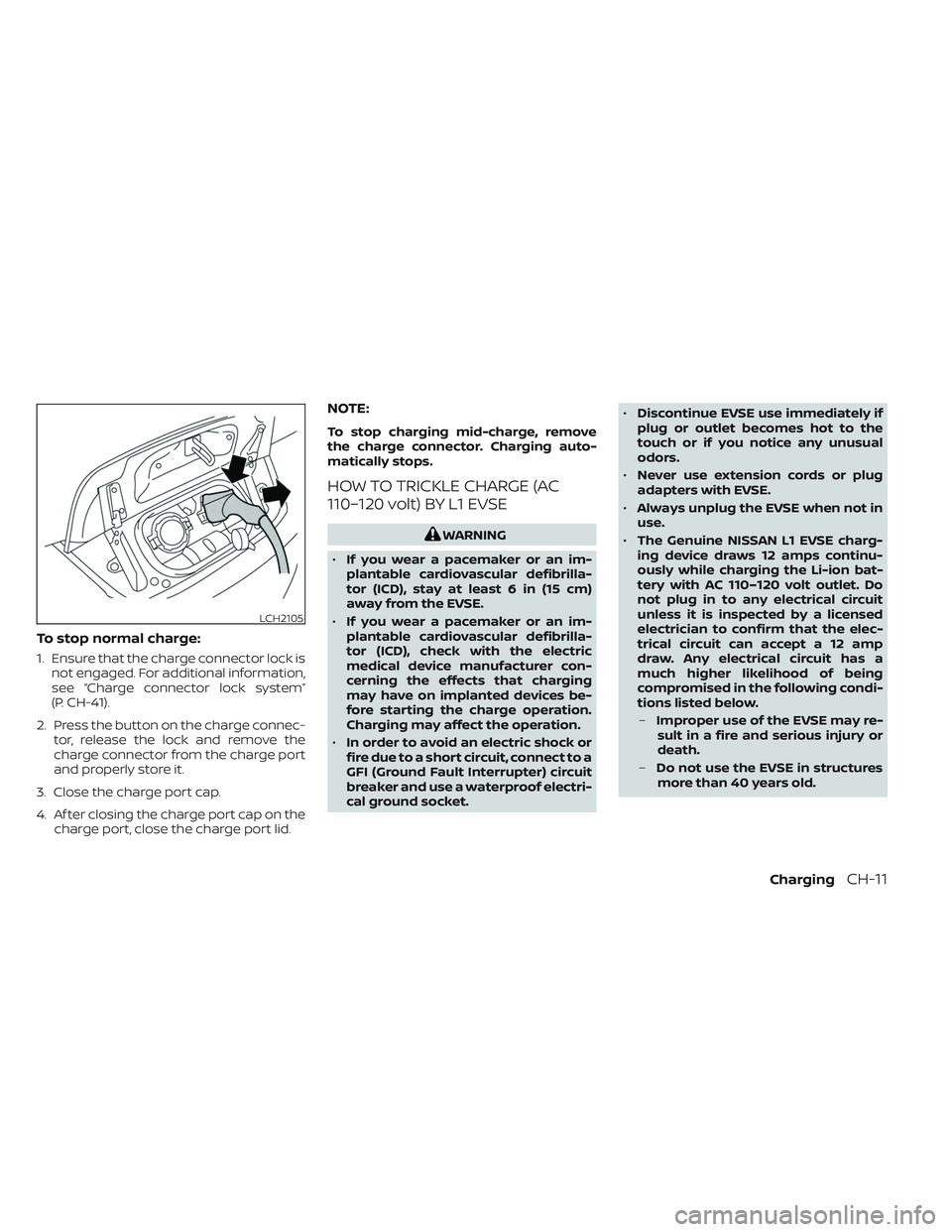
To stop normal charge:
1. Ensure that the charge connector lock isnot engaged. For additional information,
see “Charge connector lock system”
(P. CH-41).
2. Press the button on the charge connec- tor, release the lock and remove the
charge connector from the charge port
and properly store it.
3. Close the charge port cap.
4. Af ter closing the charge port cap on the charge port, close the charge port lid.
NOTE:
To stop charging mid-charge, remove
the charge connector. Charging auto-
matically stops.
HOW TO TRICKLE CHARGE (AC
110–120 volt) BY L1 EVSE
WARNING
• If you wear a pacemaker or an im-
plantable cardiovascular defibrilla-
tor (ICD), stay at least 6 in (15 cm)
away from the EVSE.
• If you wear a pacemaker or an im-
plantable cardiovascular defibrilla-
tor (ICD), check with the electric
medical device manufacturer con-
cerning the effects that charging
may have on implanted devices be-
fore starting the charge operation.
Charging may affect the operation.
• In order to avoid an electric shock or
fire due to a short circuit, connect to a
GFI (Ground Fault Interrupter) circuit
breaker and use a waterproof electri-
cal ground socket. •
Discontinue EVSE use immediately if
plug or outlet becomes hot to the
touch or if you notice any unusual
odors.
• Never use extension cords or plug
adapters with EVSE.
• Always unplug the EVSE when not in
use.
• The Genuine NISSAN L1 EVSE charg-
ing device draws 12 amps continu-
ously while charging the Li-ion bat-
tery with AC 110–120 volt outlet. Do
not plug in to any electrical circuit
unless it is inspected by a licensed
electrician to confirm that the elec-
trical circuit can accept a 12 amp
draw. Any electrical circuit has a
much higher likelihood of being
compromised in the following condi-
tions listed below.
– Improper use of the EVSE may re-
sult in a fire and serious injury or
death.
– Do not use the EVSE in structures
more than 40 years old.
LCH2105
ChargingCH-11
Page 88 of 612
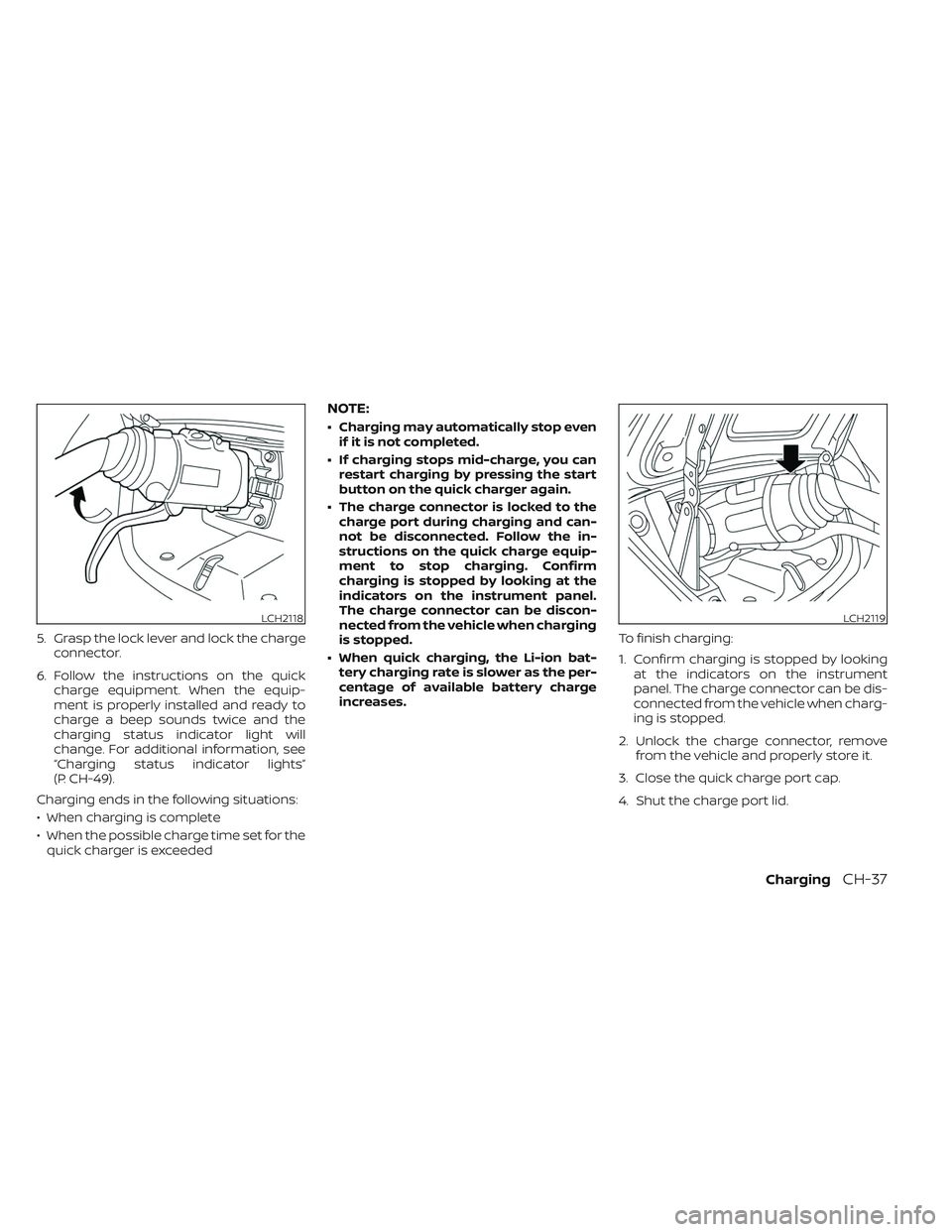
5. Grasp the lock lever and lock the chargeconnector.
6. Follow the instructions on the quick charge equipment. When the equip-
ment is properly installed and ready to
charge a beep sounds twice and the
charging status indicator light will
change. For additional information, see
“Charging status indicator lights”
(P. CH-49).
Charging ends in the following situations:
• When charging is complete
• When the possible charge time set for the quick charger is exceeded
NOTE:
• Charging may automatically stop even if it is not completed.
• If charging stops mid-charge, you can restart charging by pressing the start
button on the quick charger again.
• The charge connector is locked to the charge port during charging and can-
not be disconnected. Follow the in-
structions on the quick charge equip-
ment to stop charging. Confirm
charging is stopped by looking at the
indicators on the instrument panel.
The charge connector can be discon-
nected from the vehicle when charging
is stopped.
• When quick charging, the Li-ion bat- tery charging rate is slower as the per-
centage of available battery charge
increases. To finish charging:
1. Confirm charging is stopped by looking
at the indicators on the instrument
panel. The charge connector can be dis-
connected from the vehicle when charg-
ing is stopped.
2. Unlock the charge connector, remove from the vehicle and properly store it.
3. Close the quick charge port cap.
4. Shut the charge port lid.
LCH2118LCH2119
ChargingCH-37
Page 91 of 612
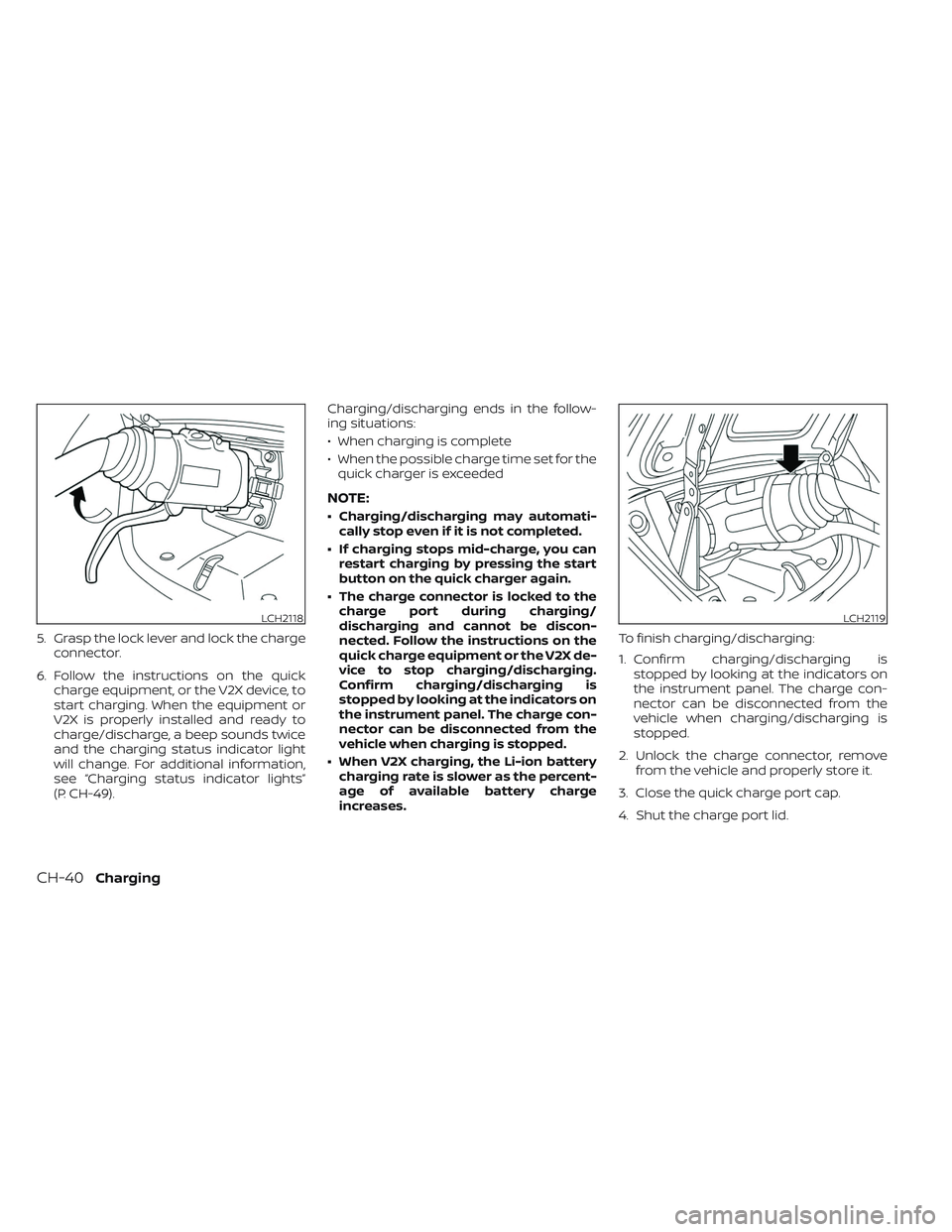
5. Grasp the lock lever and lock the chargeconnector.
6. Follow the instructions on the quick charge equipment, or the V2X device, to
start charging. When the equipment or
V2X is properly installed and ready to
charge/discharge, a beep sounds twice
and the charging status indicator light
will change. For additional information,
see “Charging status indicator lights”
(P. CH-49). Charging/discharging ends in the follow-
ing situations:
• When charging is complete
• When the possible charge time set for the
quick charger is exceeded
NOTE:
• Charging/discharging may automati- cally stop even if it is not completed.
• If charging stops mid-charge, you can restart charging by pressing the start
button on the quick charger again.
• The charge connector is locked to the charge port during charging/
discharging and cannot be discon-
nected. Follow the instructions on the
quick charge equipment or the V2X de-
vice to stop charging/discharging.
Confirm charging/discharging is
stopped by looking at the indicators on
the instrument panel. The charge con-
nector can be disconnected from the
vehicle when charging is stopped.
• When V2X charging, the Li-ion battery charging rate is slower as the percent-
age of available battery charge
increases. To finish charging/discharging:
1. Confirm charging/discharging is
stopped by looking at the indicators on
the instrument panel. The charge con-
nector can be disconnected from the
vehicle when charging/discharging is
stopped.
2. Unlock the charge connector, remove from the vehicle and properly store it.
3. Close the quick charge port cap.
4. Shut the charge port lid.
LCH2118LCH2119
CH-40Charging
Page 188 of 612
![NISSAN LEAF 2023 Owners Manual • When the currently remaining Li-ion bat-tery level exceeds each percentage level,
the charging time will be displayed as
[---].
• When the Li-ion battery was fully charge, all the charging time](/img/5/56727/w960_56727-187.png "NISSAN LEAF 2023 Owners Manual • When the currently remaining Li-ion bat-tery level exceeds each percentage level,
the charging time will be displayed as
[---].
• When the Li-ion battery was fully charge, all the charging time")
• When the currently remaining Li-ion bat-tery level exceeds each percentage level,
the charging time will be displayed as
[---].
• When the Li-ion battery was fully charge, all the charging time information will be
displayed as [---].
O3The currently selected electrical power
(supplied to the charger).
O4The estimated charge level of the Li-ion
battery to be reached when the remaining
charging time has passed.
O5The electrical power that is actually sup-
plied while quick charging.
O6The remaining charging time before the
quick charger is shut off.
When charging is not performed, pushing
the OKbutton on the steering wheel will
switch the display to the [Charge Time
Screen]. Select the electrical power that
you wish to show in the Estimated Charge
Time display.
NOTE:
• While charging, the estimated charg- ing time is calculated based on the
electrical power that is currently being
supplied to the charger.
• The electrical power for the normal charging is displayed at a fixed value.
Therefore, the displayed electrical
power may differ from the one that is
actually supplied.
• For the quick charging, the electrical power display will change to the actual
electrical power while charging. If the
charging is stopped or the power sup-
ply is stopped (unplugged, etc.), the
displayed electrical power returns to
the selected electrical power. • The displayed charging time on each
percentage level is the current estima-
tion, and the actual charging time will
vary depending on the conditions of
the vehicle or the state of charge.
• Right af ter starting or stopping charge, the estimated charging time
may differ from the actual charging
time. The actual charging time will be
displayed af ter a period of time.
LIC5003
While charging (quick charge)
Instruments and controls2-11
Page 317 of 612
5. Press thebutton to select “De-
parture time” and then press the OK
button.
6. Press the
button to set “Hour”
and then press the OK button.
7. Press the
button to set “Minute”
and then press the OK button. The set-
ting can be changed with an increment
step of 10 minutes.
8. Press the
button to select
“Climate Temperature” and then press
the OK button.
9. Press the
button to set Cli-
mate Temperature and then press the
OK button.
10. * Press the
button to select
"Days" and then press the OK button.
The current day of the week is dis-
played with an underline.
Press the
button to select the
days of the week you wish to activate
the Climate Control system and then
press the OK button. The indicator light
of the selected button will turn on. 11. * Af ter setting the day of the week, press
the Back button and return to the pre-
vious screen.
The set day of the week is lit in white.
12. Af ter the setting is complete, place the power switch in the OFF position, and
then connect the charge connector to
the vehicle.
* models with Navigation System
Info
The Climate Ctrl. Timer does not activate if
the charge connector is not connected to
the vehicle. When the “Battery Operation
OK” is turned on and the charging connec-
tor is not connected to the vehicle, the Cli-
mate Ctrl. Timer will activate for 15 minutes.
When the outside temperature is high, the
interior temperature may not reach the set
temperature within the 15 minutes.
Turn "Battery Operation OK" to OFF when it
is not necessary to operate air condition-
ing timer in order to prevent Li-ion battery
from discharging.
For models without Navigation System, the
Climate Ctrl. Timer operates repeatedly ev-
ery day once it is turned on.
Operating tips for using Climate
Ctrl. Timer
• The Climate Ctrl. Timer will only start when the power switch is in the LOCK/
OFF or ACC position.
• To turn off the Climate Ctrl. Timer func- tion, turn off the “Climate Ctrl. Timer1” and
"Climate Ctrl. Timer2" setting in the video
information display using the
button on the steering wheel. The start
and stop time settings will not be deleted
even if the Climate Ctrl. Timer function is
turned off.
• While the Climate Ctrl. Timer is operating, the Climate Ctrl. Timer indicator and the
charging status indicator lights flash. If
the Climate Ctrl. Timer is set to activate,
the Climate Ctrl. Timer indicator
illuminates.*
• If the Climate Ctrl. Timer starts operating while the vehicle is being charged, the
time required for charging will be longer.
• Operating the Climate Ctrl. Timer or re- mote climate control in an environment
where the temperature is low may de-
crease the rate of battery charge.
4-40Monitor, climate, audio, phone and voice recognition systems
Page 332 of 612
4. Gradually steer the vehicle to a safe lo-cation off the road and away from traffic
if possible.
5. Lightly apply the brake pedal to gradu- ally stop the vehicle.
6. Turn on the hazard warning flashers and contact a roadside emergency service
to change the tire. For additional infor-
mation, see “Flat tire” (P. 6-3).
DRINKING ALCOHOL/DRUGS AND
DRIVING
WARNING
Never drive under the influence of alco-
hol or drugs. Alcohol in the blood-
stream reduces coordination, delays
reaction time and impairs judgement.
Driving af ter drinking alcohol increases
the likelihood of being involved in an
accident injuring yourself and others.
Additionally, if you are injured in an ac-
cident, alcohol can increase the sever-
ity of the injury. NISSAN is committed to safe driving. How-
ever, you must choose not to drive under
the influence of alcohol. Every year thou-
sands of people are injured or killed in
alcohol-related accidents. Although the lo-
cal laws vary on what is considered to be
legally intoxicated, the fact is that alcohol
affects all people differently and most
people underestimate the effects of
alcohol.
Remember, drinking and driving don’t mix!
That is true for drugs, too (over-the-
counter, prescription, and illegal drugs). Do
not drive if your ability to operate your ve-
hicle is impaired by alcohol, drugs, or some
other physical condition.
WARNING
• Do not operate the power switch
while driving the vehicle except in an
emergency. (The EV system shuts
down when the power switch is
pushed three consecutive times or
the power switch is pushed and held
for more than 2 seconds.) If the EV
system stops while the vehicle is be-
ing driven, this could lead to a crash
and serious injury.
• When turning off the power switch,
make sure to push the P (Park) posi-
tion switch on the shif t lever even if
the vehicle is maintaining a stop and
hold using the e-pedal. This will pre-
vent the vehicle from moving or roll-
ing unexpectedly, which could result
in serious personal injury or property
damage.
Before operating the power switch, make
sure the vehicle is in the P (Park) position.
PUSH-BUTTON POWER SWITCH
Starting and driving5-9
Page 372 of 612
Perform the following steps to enable or
disable the I-BSI system:
1. Press the
button until “Settings” dis-
plays in the vehicle information display.
Use the
button to select “Driver As-
sistance.” Then press the OK button.
2. Select “Blind Spot” and press the OK button.
3. Select “Blind Spot Intervention” and use the OK button to turn the system on or
off.
4. Push the ProPILOT Assist switch (mod- els with ProPILOT Assist) or the dynamic
driver assistance switch (models with-
out ProPILOT Assist) to turn the system
on or off.
NOTE:
When Blind Spot Intervention is ON in the
settings menu, turning the ProPILOT As-
sist switch (if so equipped) ON will acti-
vate the Intelligent Blind Spot Interven-
tion (I-BSI) system at the same time. For
additional information, see “Intelligent
Lane Intervention (I-LI)” (P. 5-30).
I-BSI SYSTEM LIMITATIONS
WARNING
Listed below are the system limitations
for the I-BSI system. Failure to operate
the vehicle in accordance with these
system limitations could result in seri-
ous injury or death.
• The I-BSI system cannot detect all
vehicles under all conditions.
• The radar sensors may not be able to
detect and activate I-BSI when cer-
tain objects are present such as:
– Pedestrians, bicycles, or animals.
– Vehicles such as motorcycles, low
height vehicles, or high ground
clearance vehicles.
– Vehicles remaining in the detec-
tion zone when you accelerate
from a stop. For additional infor-
mation, see “BSI driving situa-
tions” (P. 5-50).
– Oncoming vehicles.
– A vehicle merging into an adjacent
lane at a speed approximately the
same as your vehicle.
– A vehicle approaching rapidly
from behind. –
A vehicle which your vehicle over-
takes rapidly.
– A vehicle that passes through the
detection zone quickly.
• The radar sensors’ detection zone is
designed based on a standard lane
width. When driving in a wider lane,
the radar sensors may not detect ve-
hicles in an adjacent lane. When driv-
ing in a narrow lane, the radar sen-
sors may detect vehicles driving two
lanes away.
• The radar sensors are designed to ig-
nore most stationary objects; how-
ever, objects such as guardrails,
walls, foliage and parked vehicles
may occasionally be detected. This is
a normal operation condition.
• The camera may not detect lane
markers in the following situations
and the I-BSI system may not oper-
ate properly.
– On roads where there are multiple
parallel lane markers; lane mark-
ers that are faded or not painted
clearly; yellow painted lane mark-
ers; non-standard lane markers;
lane markers covered with water,
dirt, snow, etc.
Starting and driving5-49
Page 427 of 612
3. Select “Steering Assist” and press the OKbutton (1).
NOTE:
• When the Cruise screen is displayed onthe vehicle information display, press
the OK button on the steering wheel to
call up the “Driver Assistance” setting
display.
• When enabling/disabling the system through the vehicle information dis-
play or when pressing the Steering As-
sist switch, the system retains the cur-
rent settings even if the EV system is
restarted.
How to cancel the ProPILOT Assist
system
To cancel the ProPILOT Assist system, use
one of the following methods:
• Push the CANCEL switch.
• Tap the brake pedal (except at astandstill).
• Push the ProPILOT Assist switch to turn the system off. The ProPILOT Assist status
indicator will go out. When the ProPILOT Assist system is can-
celed while the vehicle is stopped, the elec-
tronic parking brake is automatically
activated.
WARNING
To prevent the vehicle from moving or
rolling unexpectedly, which could re-
sult in serious personal injury or prop-
erty damage, before exiting the vehicle
make sure to push the ProPILOT Assist
switch to turn the system off, push the
P (Park) position switch on the shif t le-
ver, and turn the EV system off.
INTELLIGENT CRUISE CONTROL
(ICC) (for vehicles with ProPILOT
Assist)
WARNING
Failure to follow the warnings and in-
structions for proper use of the ICC sys-
tem could result in serious injury or
death. •
The ICC system is only an aid to assist
the driver and is not a collision
warning or avoidance device. It is rec-
ommended for highway use only and
it is not intended for city driving. It is
the driver’s responsibility to stay
alert, drive safely, and be in control of
the vehicle at all times.
• There are limitations to the ICC sys-
tem capability. The ICC system does
not function in all driving, traffic,
weather, and road conditions. It is the
driver’s responsibility to stay alert,
drive safely, keep the vehicle in the
traveling lane, and be in control of the
vehicle at all times.
• Always observe posted speed limits
and do not set the speed over them.
• The ICC system does not react to sta-
tionary and slow-moving vehicles.
5-104Starting and driving