radio NISSAN MAXIMA 2000 A33 / 5.G User Guide
[x] Cancel search | Manufacturer: NISSAN, Model Year: 2000, Model line: MAXIMA, Model: NISSAN MAXIMA 2000 A33 / 5.GPages: 239, PDF Size: 1.97 MB
Page 116 of 239
TUNE buttons down for more than 0.5 sec-
onds.
SEEK/SCAN tuning:
SEEK tuning:
Push the SEEK/SCAN tuning button
or
for less than 1.5 seconds. SEEK tuning
begins from high to low or low to high frequen-
cies and stops at the next broadcasting sta-
tion.
SCAN tuning:
Push the SEEK/SCAN tuning button
or
for more than 1.5 seconds. SCAN tuning
begins from high to low or low to high frequen-
cies and stops at each broadcasting station for
10 seconds. Pushing the button again during
this 10 seconds period will stop SCAN tuning
and the radio will remain tuned to that station.
If the SEEK/SCAN tuning button is not pushed
within 10 seconds, SCAN tuning moves to the
next station.Station memory operations:
Twelve stations can be set for the FM band
(six for FM1, six for FM2).
Six stations can be set for the AM band.
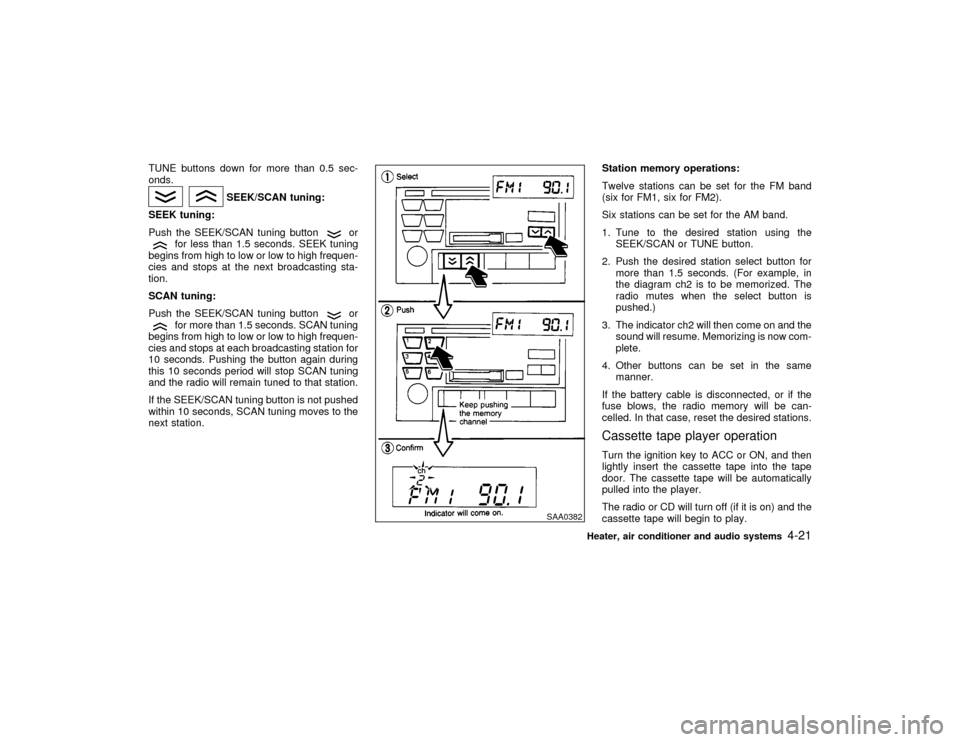
1. Tune to the desired station using the
SEEK/SCAN or TUNE button.
2. Push the desired station select button for
more than 1.5 seconds. (For example, in
the diagram ch2 is to be memorized. The
radio mutes when the select button is
pushed.)
3. The indicator ch2 will then come on and the
sound will resume. Memorizing is now com-
plete.
4. Other buttons can be set in the same
manner.
If the battery cable is disconnected, or if the
fuse blows, the radio memory will be can-
celled. In that case, reset the desired stations.
Cassette tape player operationTurn the ignition key to ACC or ON, and then
lightly insert the cassette tape into the tape
door. The cassette tape will be automatically
pulled into the player.
The radio or CD will turn off (if it is on) and the
cassette tape will begin to play.
SAA0382
Heater, air conditioner and audio systems
4-21
Z
00.1.17/A33-D/V5.0
X
Page 117 of 239
CAUTION
Do not force the cassette tape into the
tape door. This could cause player dam-
age.
If the system is turned off by pushing the
ON×OFF/VOL control knob with the cassette
tape still in the player, the tape will resume
playing when the system is turned back on.
Precautions on cassette tape player
operation:
ITo maintain good quality sound,
NISSAN recommends that you use cas-
sette tapes of 60 minutes or shorter in
length.
ICassette tapes should be removed from
the player when not in use. Store cas-
settes in their protective cases and away
from direct sunlight, heat, dust, mois-
ture or magnetic sources.
Direct sunlight can cause the cassette to
become deformed. The use of deformed
cassettes may cause the cassette to jam
in the player.
IDo not use cassettes that have peelingor loose labels. If used, the label could
jam in the player.
IIf a cassette has loose tape, insert a
pencil through one of the cassette hubs
and rewind the tape firmly. Loose tape
may cause jamming and wavering
sound quality.
IOver a period of time, the playback
head, capstan and pinch roller may
gather a tape coating residue as the tape
passes over the head. This residue ac-
cumulation can cause a weak or waver-
ing sound and should be removed peri-
odically with a head cleaning tape.
If the residue is not removed periodi-
cally, the player may need to be disas-
sembled for cleaning.
PLAY:
IWhen the TAPE button is pushed with the
system turned off and a tape loaded, the
system will come on and the tape will play.
IWhen the TAPE button is pushed with
either the radio or compact disc turned on
and the tape loaded, the compact disc or
the radio will automatically be turned off
and the tape will play.
FF (Fast Forward), REW
(Rewind):
Push the(fast forward) button to fast
forward the tape. To rewind the tape, push the
(rewind) button. Either the FF or REW
symbol illuminates on the right side of the
display window. To stop the FF or REW func-
tion, press the
(fast forward) or
(re-
wind) again, or the TAPE button.
APS (Automatic Program
Search) FF, APS REW:
When the(APS FF) button is pushed
while the tape is being played, the next pro-
gram will start to play from the beginning. Push
the
(APS FF) button several times to skip
through programs. The tape will advance the
number of times the button is pushed (up to
nine programs).
When the
(APS REW) button is pushed
once, the program being played starts over
from the beginning. Push the
(APS
REW) button several times to skip back sev-
eral selections. The tape will go back the
number of times the button is pushed. Either
the FF or REW symbol flashes on the right
side of the display window while searching for
the selection.
This system searches for the blank intervals
4-22
Heater, air conditioner and audio systems
Z
00.1.17/A33-D/V5.0
X
Page 118 of 239

between selections. If there is a blank interval
within one program or there is no interval
between programs, the system may not stop in
the desired or expected location.
PROG (Program):
Push the PROG button to change the tape
side while the tape is being played.
The cassette tape will automatically change
directions to play the other side when the first
side is completed.Dolby NR (Noise Reduction):
Push the Dolby NR
button for Dolby NR
encoded tapes to reduce high frequency tape
noise. The indicator will come on.
Dolby noise reduction manufactured under li-
cense from Dolby Laboratories Licensing Cor-
poration. Dolby NR and the double-D symbol
are trademarks of Dolby Laboratories
Licensing Corporation.
Metal or chrome tape usage:
The cassette player will be automatically set to
high performance play when playing a metal or
chrome cassette tape.TAPE EJECT:
When this button is pushed with the tape
loaded, the tape will be ejected.When the tape is ejected while it is being
played, the system will be turned off.
Compact disc (CD) player operation
CAUTION
IDuring cold weather or rainy days,
the player may malfunction due to the
humidity. If this occurs, remove the
CD and dehumidify or ventilate the
player completely.
IThe player may skip while driving on
rough roads.
IThe CD player sometimes cannot
function when the compartment tem-
perature is extremely high. Decrease
the temperature before use.
IDo not expose the CD to direct sun-
light.
ICDs that are of poor quality, dirty,
scratched, or covered with finger-
prints may not work properly.
IDo not use an 8 cm CD adapter as this
will cause malfunction.IRecordable compact discs (CD-R)
may not function properly in the CD
player.
Turn the ignition key to the ACC or ON position
and insert the compact disc into the slot with
the label side facing up. The compact disc will
be guided automatically into the slot and start
playing.
After loading the disc, the number of tracks on
the disc and the play time will appear on the
display.
If the radio or tape is already operating, it will
automatically turn off and the compact disc will
play.
CAUTION
Do not force the compact disc into the
slot. This could damage the player.
If the system has been turned off while the
compact disc was playing, pushing the
ON×OFF/VOL control knob will start the com-
pact disc.
8 cm diameter compact discs can also be used
without an adapter.
Heater, air conditioner and audio systems
4-23
Z
00.1.17/A33-D/V5.0
X
Page 119 of 239

PLAY:
When the CD/CHG button is pushed with the
system off and the compact disc loaded, the
system will turn on and the compact disc will
start to play.
When the CD/CHG button is pushed with the
compact disc loaded but the tape or the radio
playing, the tape or radio will automatically be
turned off and the compact disc will start to
play.
FF (Fast Forward), REW
(Rewind):
When the(fast forward) or
(rewind)
button is pushed while the compact disc is
being played, the compact disc will play while
fast forwarding or rewinding. When the button
is released, the compact disc will return to
normal play speed.
APS (Automatic Program
Search) FF, APS REW:
When the(APS FF) button is pushed
while the compact disc is being played, the
program next to the present one will start to
play from its beginning. Push several times to
skip through programs. The compact disc will
advance the number of times the button is
pushed. (When the last program on the com-
pact disc is skipped through, the first programwill be played.) When the
(APS REW)
button is pushed, the program being played
returns to its beginning. Push several times to
skip back through programs. The compact disc
will go back the number of times the button is
pushed.
PROG (Program):
When the PROG button is pushed while the
compact disc is being played, the play pattern
will change as follows:
no mark: All the programs will be played
repeatedly in sequence.
1: Only one program (the one being played
when the PROG button is pushed) will be
repeated.
RANDOM: Programs will be played at random,
not following the sequence on the compact
disc. The same program may be repeated
twice.
When the compact disc is ejected, the
play pattern will automatically change to
no mark.
CD EJECT:
When the CD EJECT button is pushed with the
compact disc loaded, the compact disc will be
ejected.When this button is pushed while the compact
disc is being played, the compact disc will
come out and the system will turn off.
If the compact disc comes out and is not
removed, it will be pulled back into the slot
to protect it. (without 8 cm diameter com-
pact discs)
CD IN indicator:
CD IN indicator appears on the display when
the CD is loaded with the system on.
ANTENNA
Window antennaThe antenna pattern is printed inside the rear
window.
CAUTION
IDo not place metalized film near the
rear window glass or attach any metal
parts to it. This may cause poor re-
ception or noise.
IWhen cleaning the inside of the rear
window, be careful not to scratch or
damage the rear window antenna.
4-24
Heater, air conditioner and audio systems
Z
00.1.17/A33-D/V5.0
X
Page 120 of 239

Lightly wipe along the antenna with a
dampened soft cloth.If equipped with a genuine NISSAN cellular
phone, your NISSAN features a non-
directional microphone in the steering column
cover, so it is not necessary to look at or speak
directly into the microphone when calling. To
do so could detract from the driving operation
and cause an accident. See the car phone
manual for operation.
Some models are pre-wired to accept the
genuine NISSAN cellular phone. In addition,
the same model has the phone antenna built
into the rear glass window.
When installing a CB, ham radio or car phone
in your NISSAN, be sure to observe the follow-
ing cautions, otherwise the new equipment
may adversely affect the Engine control sys-
tem and other electronic parts.
WARNING
IA cellular telephone should not be
used while driving so full attention
may be given to vehicle operation.
Some jurisdictions prohibit the use of
cellular telephones while driving.IIf you must make a call while your
vehicle is in motion, the hands free
cellular phone operational mode (if
so equipped) is highly recommended.
Exercise extreme caution at all times
so full attention may be given to ve-
hicle operation.
IIf a conversation in a moving vehicle
requires you to take notes, pull off the
road to a safe location and stop your
vehicle before doing so.
CAUTION
IKeep the antenna as far as possible
away from the Engine Control Module
(ECM).
IKeep the antenna wire more than 8 in
(20 cm) away from the Multiport Fuel
Injection harness. Do not route the
antenna wire next to any harness.
IAdjust the antenna standing-wave ra-
tio as recommended by the manufac-
turer.
CAR PHONE OR CB RADIO
Heater, air conditioner and audio systems
4-25
Z
00.1.17/A33-D/V5.0
X
Page 121 of 239

IConnect the ground wire from the CB
radio chassis to the body.
IFor details, consult an authorized
NISSAN dealer.4-26
Heater, air conditioner and audio systems
Z
00.1.17/A33-D/V5.0
X
Page 127 of 239

To lock the steering wheel, turn the key to
the LOCK position. Remove the key. To
unlock the steering wheel, insert the key
and turn it gently while rotating the steer-
ing wheel slightly right and left.
WARNING
Never remove or turn the key to the
LOCK position while driving. The steer-
ing wheel will lock. This may cause the
driver to lose control of the vehicle and
could result in serious vehicle damage
or personal injury.
KEY POSITIONSThe switch includes an anti-theft steering lock
device.
LOCK (Normal parking position) (0)
The ignition key can only be removed when
the switch is in this position.
OFF (1)
The engine can be turned off without locking
the steering wheel.
ACC (Accessories) (2)
This position activates electrical accessories
such as the radio when the engine is not
running.
ON (Normal operating position) (3)
This position turns on the ignition system and
the electrical accessories.
START (4)
This position activates the starter motor, start-
ing the engine.NISSAN VEHICLE IMMOBILIZER
SYSTEMThe Nissan Vehicle Immobilizer System will
not allow the engine to start without the use ofthe registered Nissan Vehicle Immobilizer Sys-
tem key.
If the engine fails to start using the registered
Nissan Vehicle Immobilizer System key, it may
be due to interference caused by another
Nissan Vehicle Immobilizer System key, an
automated toll road device or automated pay-
ment device on the key ring. Restart the en-
gine using the following procedures:
1. Leave the ignition switch in the ON position
for approximately 5 seconds.
2. Turn the ignition switch to the OFF or LOCK
position and wait approximately 5 seconds.
3. Repeat step 1 and 2 again.
4. Restart the engine while holding the device
(which may have caused the interference)
separate from the registered Nissan Ve-
hicle Immobilizer System key.
If this procedure allows the engine to start,
NISSAN recommends placing the registered
Nissan Vehicle Immobilizer System key on a
separate key ring to avoid interference from
other devices.
5-6
Starting and driving
Z
00.1.17/A33-D/V5.0
X
Page 161 of 239

and a soft cloth will easily remove this film.
CAUTION
When cleaning the inside of the window,
do not use sharp-edged tools, abrasive
cleaners or chlorine based disinfectant
cleaners. They could damage the elec-
trical conductors, radio antenna ele-
ments or rear window defogger ele-
ments.ALUMINUM ALLOY WHEELSWash regularly, especially during winter
months in areas where road salt is used. Salt
could discolor the wheel if not removed.CHROME PARTSClean all chrome parts regularly with a non-
abrasive chrome polish to maintain the finish.Occasionally remove loose dust from the inte-
rior trim, plastic parts and seats using a
vacuum cleaner or soft brush. Wipe the vinyl
and leather surfaces with a clean, soft cloth
dampened in mild soap solution, then wipe
clean with a dry soft cloth. Before using any
fabric protector, read the manufacturer's rec-
ommendations. Some fabric protectors con-
tain chemicals that may stain or bleach the
seat material.
Use a cloth dampened only with water, to
clean the meter and gauge lens.
CAUTION
INever use gasoline, thinner, or any
similar material.
IThe leather seats should be regularly
coated with a leather wax like saddle
soap. Never use car wax.
INever use fabric protectors unless
recommended by the manufacturer.
IDo not use glass or plastic cleaner on
meter or gauge lens covers. It may
damage the lens cover.
FLOOR MATSThe use of Genuine Nissan floor mats can
extend the life of your vehicle carpet and make
it easier to clean the interior.No matter what
mats are used, be sure they are fitted for
your vehicle and are properly positioned in
the footwell to prevent interference with
pedal operation.Mats should be maintained
with regular cleaning and replaced if they
become excessively worn.
CLEANING INTERIOR
7-4
Appearance and care
Z
00.1.17/A33-D/V5.0
X
Page 232 of 239

11 Index
A
ABS (Anti-lock brake system) ......................... 5-19
Air bag
Warning labels........................................... 1-18
Warning light ...................................... 1-19, 2-8
Air bag system
(See supplemental restraint system) ........ 1-13
Side (See supplemental side air bag
system) ...................................................... 1-15
Air cleaner housing filter ................................. 8-17
Air conditioner
Air conditioner operation ............................. 4-3
Air conditioner service ....................... 4-3, 4-11
Air conditioner specification label .... 4-3, 10-12
Air conditioner system refrigerant and
lubrication recommendations ...................... 4-3
Heater and air conditioner controls ............. 4-3
Servicing air conditioner .............................. 4-3
Air conditioning system refrigerant and lubricant
recommendations ........................................... 10-6
Air flow charts ................................................... 4-6
Alcohol, drugs and driving ................................ 5-4
AM-FM radio with cassette player .................. 4-12
AM-FM radio with cassette player and compact
disc player....................................................... 4-12
AM-FM radio with compact disc player .......... 4-12
Ambient temperature switch (AMB), Air
conditioner ...................................................... 4-11Anchor point locations, Top tether strap ........ 1-35
Antenna
Manual ....................................................... 4-24
Power ........................................................ 4-24
Anti-lock Brake System (ABS) ........................ 5-19
Anti-lock brake warning light............................. 2-9
Appearance care
Exterior appearance care ............................ 7-2
Interior appearance care ............................. 7-4
Armrest ............................................................. 1-8
Audio system .................................................. 4-12
Automatic
Automatic transmission fluid (ATF) ........... 8-10
Driving with automatic transmission............ 5-8
Sunroof ...................................................... 2-29
Transmission selector lever lock release .... 5-9
Avoiding collision and rollover .......................... 5-3
B
Battery............................................................. 8-13
Battery replacement, (See multi-remote control
system) ............................................................. 3-7
Battery, Battery saver system ........................ 2-18
Before starting the engine ................................ 5-7
Belts (See drive belts) .................................... 8-15
Brake
Anti-lock brake system (ABS) ................... 5-19Brake and clutch fluid................................ 8-12
Brake booster ............................................ 8-21
Brake pedal ............................................... 8-20
Brake pedal check..................................... 8-20
Parking brake check ........................ 5-13, 8-20
Parking brake operation ............................ 5-13
System....................................................... 5-18
Warning light ............................................... 2-9
Break-in schedule ........................................... 5-16
Bulb check/instrument panel ............................ 2-7
Bulb replacement ............................................ 8-25
C
Capacities and recommended
fuel/lubricants .................................................. 10-2
Car phone ....................................................... 4-25
Car phone or CB radio ................................... 4-25
Cassette player (See audio system) .............. 4-16
Cassette tape operation ................................. 4-12
Catalytic converter, Three way catalyst............ 5-3
Child restraints ................................................ 1-28
Installation on front passenger seat .......... 1-36
Installation on rear seat outboard or center
positions .................................................... 1-30
Precautions on child restraints .................. 1-28
Top tether strap anchor point locations .... 1-35
Child safety ..................................................... 1-22
Z
00.1.17/A33-D/V5.0
X
Page 235 of 239

Replacement ............................................. 8-25
Trunk light.................................................. 2-33
Vanity mirror light ...................................... 2-32
Warning/indicator lights and chimes .... 2-7, 2-9
Lights, Exterior and interior light
replacement .................................................... 8-27
Loading information (See vehicle loading
information) ................................................... 10-14
Lock
Door locks ................................................... 3-2
Glove box lock........................................... 2-25
Power door lock .......................................... 3-2
Trunk lid lock opener lever.......................... 3-9
Low fuel warning light ....................................... 2-9
Luggage net .................................................... 2-26
M
Maintenance
Battery ....................................................... 8-13
Explanation of maintenance items..... 9-3, 9-10
General maintenance........................... 9-2, 9-3
Inside the vehicle ................................. 9-2, 9-3
Maintenance precautions ............................ 8-2
Outside the vehicle .............................. 9-2, 9-3
Periodic maintenance schedules ................ 9-5
Seat belt maintenance .............................. 1-27
Under the hood and vehicle ........................ 9-4
Manual front seat adjustment ........................... 1-2
Meters and gauges ........................................... 2-3
Mirror
Inside mirror .............................................. 3-13
Outside mirror............................................ 3-13Outside mirror control................................ 3-13
Outside mirrors .......................................... 3-13
Multi-remote control system.............................. 3-4
N
Net, Luggage net ............................................ 2-26
New vehicle break-in ...................................... 5-15
Nissan vehicle Immobilizer System ................ 2-12
Engine start ................................................. 5-6
O
Odometer .......................................................... 2-4
Oil
Capacities and recommended fuel/
lubricants ................................................... 10-2
Changing engine oil .................................... 8-8
Changing engine oil filter ............................ 8-9
Checking engine oil level ............................ 8-7
Engine oil..................................................... 8-7
Engine oil viscosity .................................... 10-5
Outside mirror ................................................. 3-13
Outside mirror control ..................................... 3-13
Outside mirrors ............................................... 3-13
Overdrive switch ............................................. 5-10
Overheat, If your vehicle overheats................ 6-10P
Parking
Brake check............................................... 8-20
Parking brake check.................................. 5-13
Parking brake operation ............................ 5-13
Parking on hills .......................................... 5-13
Parking/parking on hills .................................. 5-17
Periodic maintenance schedules ...................... 9-5
Personal light .................................................. 2-31
Power
Front seat adjustment ................................. 1-4
Power door lock .......................................... 3-2
Power steering fluid................................... 8-11
Power steering system .............................. 5-18
Power windows ......................................... 2-27
Pre-tensioner seat belt system ....................... 1-17
Precautions
Braking precautions................................... 5-18
Cruise control precautions ........................ 5-13
Maintenance precautions ............................ 8-2
On child restraints ..................................... 1-28
On seat belt usage .................................... 1-20
On supplemental restraint system .............. 1-8
Precautions when starting and driving ........ 5-2
Push starting ..................................................... 6-9
R
Radio, car phone or CB radio......................... 4-25
Readiness for inspection/maintenance (I/M) test
(USA only) .................................................... 10-21
Z
00.1.17/A33-D/V5.0
X
11-4