steering NISSAN MAXIMA 2004 A34 / 6.G User Guide
[x] Cancel search | Manufacturer: NISSAN, Model Year: 2004, Model line: MAXIMA, Model: NISSAN MAXIMA 2004 A34 / 6.GPages: 280, PDF Size: 3.99 MB
Page 86 of 280

NOTE:
If the surface temperature of the steering
wheel is above 68°F (20°C) when the switch
is turned on, the system will not heat the
steering wheel. This is not a malfunction.
The vehicle should be driven with the Traction Con-
trol System (TCS) on for most driving conditions.
When the vehicle is stuck in mud or snow, the
TCS reduces the engine output to reduce wheel
spin. The engine speed will be reduced even if
the accelerator is depressed to the floor. If maxi-
mum engine power is needed to free a stuck
vehicle, turn the TCS off.
To turn off the TCS, push the TCS OFF switch.
The
indicator will come on.
Push the “TCS OFF” switch again or restart the
engine and the system will operate normally. See
“Traction control system (TCS)” in the “Starting
and driving” section.The vehicle should be driven with the Vehicle
Dynamic Control (VDC) system on for most driv-
ing conditions.
If the vehicle is stuck in mud or snow, the VDC
system reduces the engine output to reduce
wheel spin. The engine speed will be reduced
even if the accelerator is depressed to the floor. If
maximum engine power is needed to free a stuck
vehicle, turn the VDC system off.
To turn off the VDC system, push the VDC OFF
switch. The
indicator will come on.
Push the VDC OFF switch again or restart the
engine and the system will operate normally. See
LIC0451WIC0534
TRACTION CONTROL SYSTEM (TCS)
OFF SWITCH (if so equipped)VEHICLE DYNAMIC CONTROL (VDC)
OFF SWITCH (if so equipped)
2-26Instruments and controls
ZREVIEW COPY:Ð2004 Maxima(max)
Owners Manual(owners)ÐUSA English(nna)
10/07/03Ðtbrooks
X
Page 107 of 280
3 Pre-driving checks and adjustments
Keys .............................................3-2
Nissan vehicle immobilizer system (NVIS)
keys..........................................3-2
Doors............................................3-3
Locking with key................................3-3
Locking with inside lock knob....................3-4
Locking with power door lock switch.............3-4
Child safety rear door lock.......................3-5
Remote keyless entry system.......................3-5
How to use remote keyless entry system..........3-6
Battery replacement............................3-9
Hood...........................................3-10
Trunk lid.........................................3-10
Opener operation..............................3-10
Secondary trunk lid release.....................3-11
Interior trunk lid release........................3-12Fuel filler lid......................................3-13
Opener operation..............................3-13
Fuel filler cap..................................3-13
Tilting telescopic steering column..................3-14
Automatic operation (if so equipped).............3-14
Manual operation..............................3-15
Sun visors.......................................3-16
Vanity mirrors.................................3-16
Mirrors..........................................3-17
Automatic anti-glare inside mirror................3-17
Outside mirrors...............................3-17
Automatic drive positioner (if so equipped)..........3-19
Memory storage function.......................3-19
Entry/exit function (for automatic
transmission model)...........................3-20
System operation..............................3-21
ZREVIEW COPY:Ð2004 Maxima(max)
Owners Manual(owners)ÐUSA English(nna)
10/20/03Ðarosenma
X
Page 120 of 280

cDo not fill a portable fuel container in
the vehicle or trailer. Static electricity
can cause an explosion of flammable
liquid, vapor or gas in any vehicle or
trailer. To reduce the risk of serious
injury or death when filling portable fuel
containers:
– Always place the container on the
ground when filling.
– Do not use electronic devices when
filling.
– Keep the pump nozzle in contact
with the container while you are fill-
ing it.
– Use only approved portable fuel con-
tainers for flammable liquid.
CAUTION
cIf fuel is spilled on the vehicle body,
flush it away with water to avoid paint
damage.cTighten until the fuel filler cap clicks.
Failure to tighten the fuel filler cap
properly may cause the
mal-
function indicator lamp (MIL) to illumi-
nate. If the
lamp illuminates be-
cause the fuel filler cap is loose or
missing, tighten or install the cap and
continue to drive the vehicle.
The
lamp should turn off after a
few driving trips. If the
lamp
does not turn off after a few driving
trips, have the vehicle inspected by a
NISSAN dealer.
cFor additional information, see the
“Malfunction indicator lamp (MIL)” in
the “Instruments and Controls” section
earlier in this manual.
AUTOMATIC OPERATION (if so
equipped)
Tilt operation
Push the switchs1to adjust the steering wheel
up or down
s2to the desired position.
WARNING
Do not adjust the steering wheel while
driving. You could lose control of your
vehicle and cause an accident.
WPD0235
TILTING TELESCOPIC STEERING
COLUMN
3-14Pre-driving checks and adjustments
ZREVIEW COPY:Ð2004 Maxima(max)
Owners Manual(owners)ÐUSA English(nna)
10/20/03Ðarosenma
X
Page 121 of 280
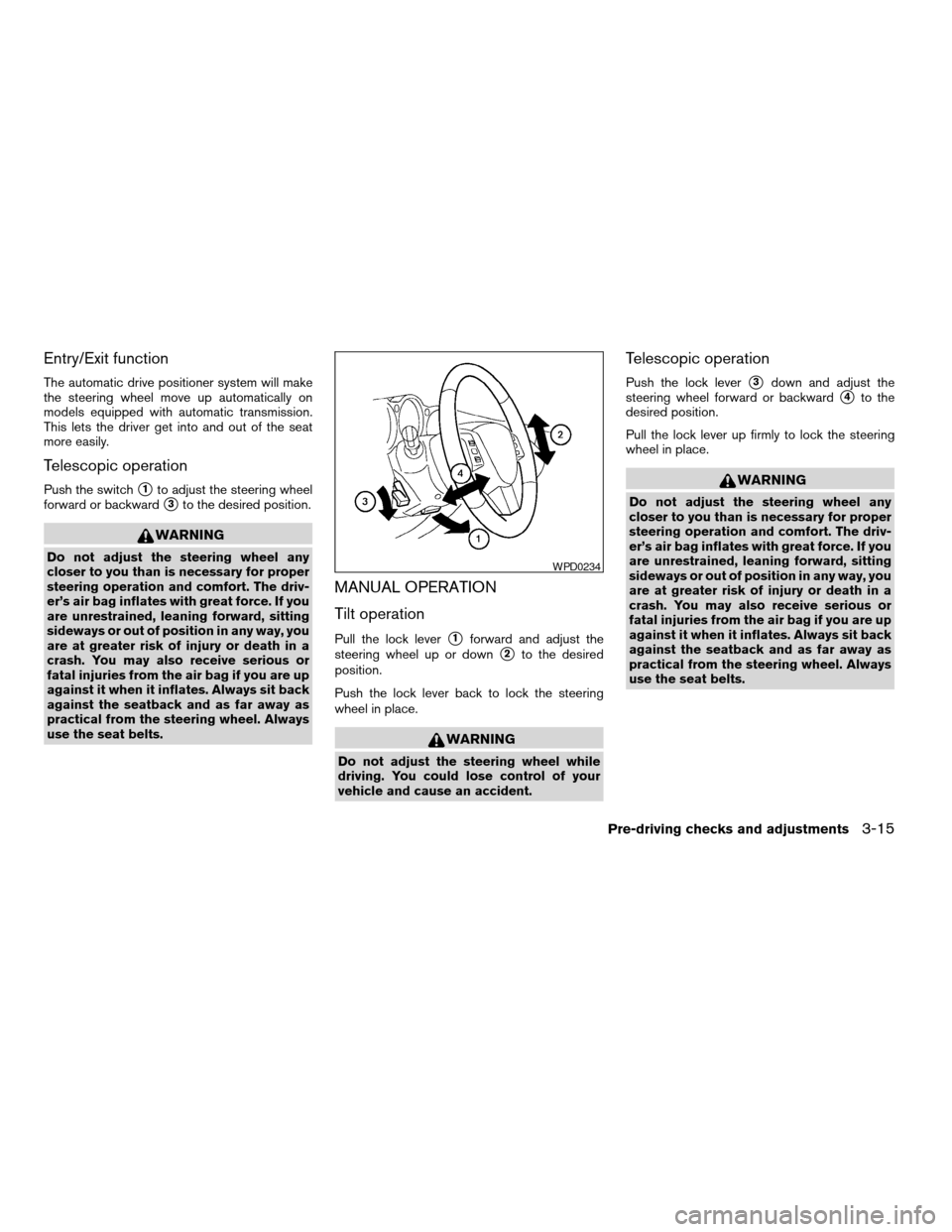
Entry/Exit function
The automatic drive positioner system will make
the steering wheel move up automatically on
models equipped with automatic transmission.
This lets the driver get into and out of the seat
more easily.
Telescopic operation
Push the switchs1to adjust the steering wheel
forward or backward
s3to the desired position.
WARNING
Do not adjust the steering wheel any
closer to you than is necessary for proper
steering operation and comfort. The driv-
er’s air bag inflates with great force. If you
are unrestrained, leaning forward, sitting
sideways or out of position in any way, you
are at greater risk of injury or death in a
crash. You may also receive serious or
fatal injuries from the air bag if you are up
against it when it inflates. Always sit back
against the seatback and as far away as
practical from the steering wheel. Always
use the seat belts.
MANUAL OPERATION
Tilt operation
Pull the lock levers1forward and adjust the
steering wheel up or down
s2to the desired
position.
Push the lock lever back to lock the steering
wheel in place.
WARNING
Do not adjust the steering wheel while
driving. You could lose control of your
vehicle and cause an accident.
Telescopic operation
Push the lock levers3down and adjust the
steering wheel forward or backward
s4to the
desired position.
Pull the lock lever up firmly to lock the steering
wheel in place.
WARNING
Do not adjust the steering wheel any
closer to you than is necessary for proper
steering operation and comfort. The driv-
er’s air bag inflates with great force. If you
are unrestrained, leaning forward, sitting
sideways or out of position in any way, you
are at greater risk of injury or death in a
crash. You may also receive serious or
fatal injuries from the air bag if you are up
against it when it inflates. Always sit back
against the seatback and as far away as
practical from the steering wheel. Always
use the seat belts.
WPD0234
Pre-driving checks and adjustments3-15
ZREVIEW COPY:Ð2004 Maxima(max)
Owners Manual(owners)ÐUSA English(nna)
10/20/03Ðarosenma
X
Page 125 of 280

function. Press the switch again to deactivate, or
the heating function will automatically turn off
after approximately 15 minutes.The automatic drive positioner system has two
features:
cMemory storage function
cEntry/exit function (for automatic transmis-
sion model only)
MEMORY STORAGE FUNCTION
Two positions for the driver’s seat, steering col-
umn, and outside mirrors can be stored in the
automatic drive positioner memory. Follow these
procedures to use the memory system.
1. For vehicles equipped with automatic trans-
mission, set the shift selector lever to the P
(Park) position.
For vehicles equipped with manual trans-
mission, place the shift lever in the N (Neu-
tral) position and set the parking brake.
2. Turn the ignition ON.
LPD0197
AUTOMATIC DRIVE POSITIONER (if
so equipped)
Pre-driving checks and adjustments3-19
ZREVIEW COPY:Ð2004 Maxima(max)
Owners Manual(owners)ÐUSA English(nna)
10/20/03Ðarosenma
X
Page 126 of 280

3. Adjust the driver’s seat, steering column and
outside mirrors to the desired positions by
manually operating each adjusting switch.
For additional information, see “Seats” in the
“Safety—Seats, seat belts and supplemen-
tal air bags” section and “Steering wheel”
and “Outside mirrors” earlier in this section.
During this step, do not turn the ignition to
any positions other than ON.
4. Push the SET switch and, within 5 seconds,
push the memory switch (1 or 2) fully for at
least 1 second.
The indicator light for the pushed memory
switch will come on and stay on for approxi-
mately 5 seconds after pushing the switch.
After the indicator light goes off, the se-
lected positions are stored in the selected
memory (1 or 2) .
If memory is stored in the same memory switch,
the previous memory will be deleted.
Linking a keyfob to a stored memory
position
A keyfob can be linked to a stored memory posi-
tion with the following procedure.
1. Follow the steps for storing a memory posi-
tion.2. While the indicator light for the memory
switch being set is illuminated for 5 sec-
onds, press the
button on the keyfob.
The indicator light will blink. After the indica-
tor light goes off, the keyfob is linked to that
memory setting.
With the key removed from the ignition switch,
press the
button on the keyfob. The driv-
er’s seat and outside mirrors will move to the
memorized position.
Confirming memory storage
cTurn the ignition ON and push the SET
switch. If the main memory has not been
stored, the indicator light will come on for
approximately 0.5 seconds. When the
memory has stored the position, the indica-
tor light will stay on for approximately 5 sec-
onds.
cIf the battery cable is disconnected, or if the
fuse blows, the memory will be canceled. In
such a case, reset the desired positions
using the following procedures.
1. Open and close the driver’s door more than
two times with the ignition key in the LOCK
position.
2. Reset the desired position using the previ-
ous procedure.
Selecting the memorized position
1. Set the automatic transmission selector le-
ver to the P (Park) position.
2. Turn the ignition ON.
3. Push the memory switch (1 or 2) fully for at
least 1 second.
The driver’s seat, steering column and out-
side mirrors will move to the memorized po-
sition with the indicator light flashing, and
then the light will stay on for approximately 5
seconds.
ENTRY/EXIT FUNCTION (for
automatic transmission model)
This system is designed so that the driver’s seat
and steering column will automatically move
when the automatic transmission selector lever is
in the P (Park) position. This allows the driver to
get into and out of the driver’s seat more easily.
(This feature is not available on manual transmis-
sion model.)
The driver’s seat will slide backward and the
steering wheel will move up:
cWhen the key is removed from the ignition
switch.
cWhen the driver’s door is opened with the
key turned to LOCK.
3-20Pre-driving checks and adjustments
ZREVIEW COPY:Ð2004 Maxima(max)
Owners Manual(owners)ÐUSA English(nna)
10/20/03Ðarosenma
X
Page 127 of 280

cWhen the key is turned from ACC to LOCK
with the driver’s door open while the auto-
matic transmission selector lever is in the P
(Park) position.
The driver’s seat and steering wheel will return to
the previous position:
cWhen the key is inserted into the ignition
switch.
cWhen the driver’s door is closed with the key
turned to LOCK.
cWhen the key is turned from ACC to ON
while the automatic transmission selector
lever is in the P (Park) position.
The entry/exit feature can be adjusted or can-
celed. See “Vehicle electronic systems” in the
“Display screen, heater, air conditioner and audio
systems” section of this manual.
SYSTEM OPERATION
The automatic drive positioner system will not
work or will stop operating under the following
conditions:
cwhen the vehicle speed is above 4 MPH (7
km/h) .
cwhen any two or more of the memory
switches are simultaneously pushed while
the automatic drive positioner is operating.cwhen the adjusting switch for the driver’s
seat is turned on while the automatic drive
positioner is operating.
cwhen the memory switch (1 or 2) is not
pushed for at least 1 second.
cwhen the seat has been already moved to
the memorized position.
cwhen no seat position is stored in the
memory switch.
The automatic drive positioner system can be
adjusted and canceled. See “Vehicle electronic
systems” in the “Display screen, heater, air con-
ditioner and audio systems” section of this
manual.
Pre-driving checks and adjustments3-21
ZREVIEW COPY:Ð2004 Maxima(max)
Owners Manual(owners)ÐUSA English(nna)
10/20/03Ðarosenma
X
Page 129 of 280

4 Display screen, heater, air conditioner
and audio systems
Control panel buttons — without navigation system....4-2
Names of components..........................4-3
How to use JOYSTICK and “ENTER” button.......4-3
How to use “PREV” button......................4-3
How to use “TRIP” button.......................4-3
How to use “FUEL ECON” button................4-4
Clock.........................................4-4
How to use “E/M” button........................4-4
How to use
(maintenance) button..........4-5
How to use the “SETTING” button................4-5
button...................................4-6
Control panel buttons — with navigation system.......4-7
Names of the components.......................4-7
How to use joystick and “ENTER” button..........4-8
How to use “PREV” button......................4-8
Setting up the start-up screen...................4-8
How to use the “TRIP” button....................4-8
How to use the “SETTING” button...............4-10
button..................................4-14Ventilators.......................................4-14
Heater and air conditioner (automatic)..............4-16
Automatic operation...........................4-16
Manual operation..............................4-17
Operating tips.................................4-18
Servicing air conditioner...........................4-18
Audio system....................................4-19
Radio........................................4-19
FM radio reception............................4-19
AM radio reception............................4-19
Satellite radio reception........................4-19
Audio operation precautions....................4-20
FM-AM-SAT radio with cassette player and
compact disc (CD) player (Type A)/CD
changer (Type B)..............................4-23
CD care and cleaning..........................4-30
Steering wheel switch for audio control..........4-31
Antenna......................................4-32
Car phone or CB radio............................4-32
ZREVIEW COPY:Ð2004 Maxima(max)
Owners Manual(owners)ÐUSA English(nna)
10/20/03Ðarosenma
X
Page 139 of 280
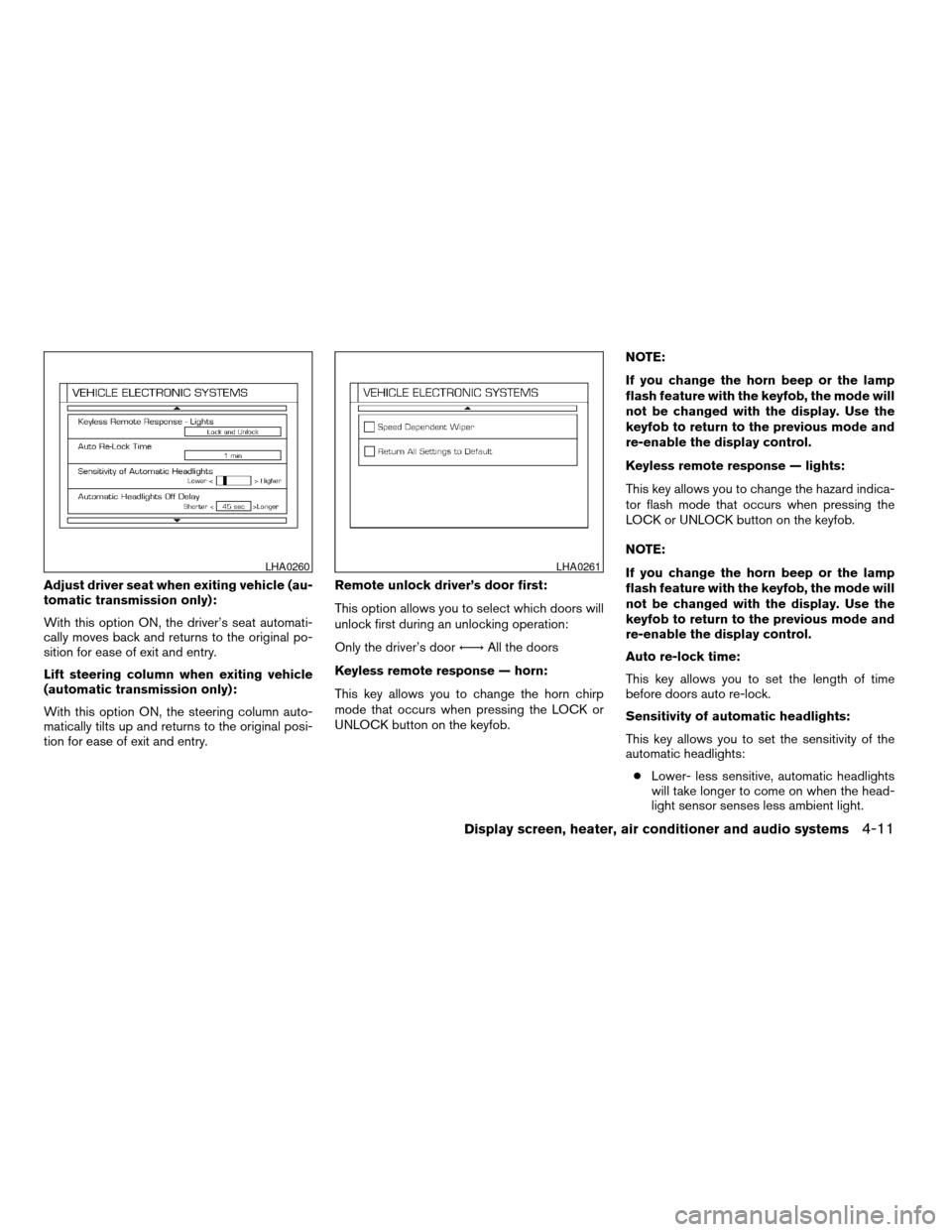
Adjust driver seat when exiting vehicle (au-
tomatic transmission only):
With this option ON, the driver’s seat automati-
cally moves back and returns to the original po-
sition for ease of exit and entry.
Lift steering column when exiting vehicle
(automatic transmission only):
With this option ON, the steering column auto-
matically tilts up and returns to the original posi-
tion for ease of exit and entry.Remote unlock driver’s door first:
This option allows you to select which doors will
unlock first during an unlocking operation:
Only the driver’s doorÃ!All the doors
Keyless remote response — horn:
This key allows you to change the horn chirp
mode that occurs when pressing the LOCK or
UNLOCK button on the keyfob.NOTE:
If you change the horn beep or the lamp
flash feature with the keyfob, the mode will
not be changed with the display. Use the
keyfob to return to the previous mode and
re-enable the display control.
Keyless remote response — lights:
This key allows you to change the hazard indica-
tor flash mode that occurs when pressing the
LOCK or UNLOCK button on the keyfob.
NOTE:
If you change the horn beep or the lamp
flash feature with the keyfob, the mode will
not be changed with the display. Use the
keyfob to return to the previous mode and
re-enable the display control.
Auto re-lock time:
This key allows you to set the length of time
before doors auto re-lock.
Sensitivity of automatic headlights:
This key allows you to set the sensitivity of the
automatic headlights:
cLower- less sensitive, automatic headlights
will take longer to come on when the head-
light sensor senses less ambient light.
LHA0260LHA0261
Display screen, heater, air conditioner and audio systems4-11
ZREVIEW COPY:Ð2004 Maxima(max)
Owners Manual(owners)ÐUSA English(nna)
10/07/03Ðtbrooks
X
Page 159 of 280
cA new disc may be rough on the inner and
outer edges. Remove the rough edges by
rubbing the inner and outer edges with the
side of a pen or pencil as illustrated.
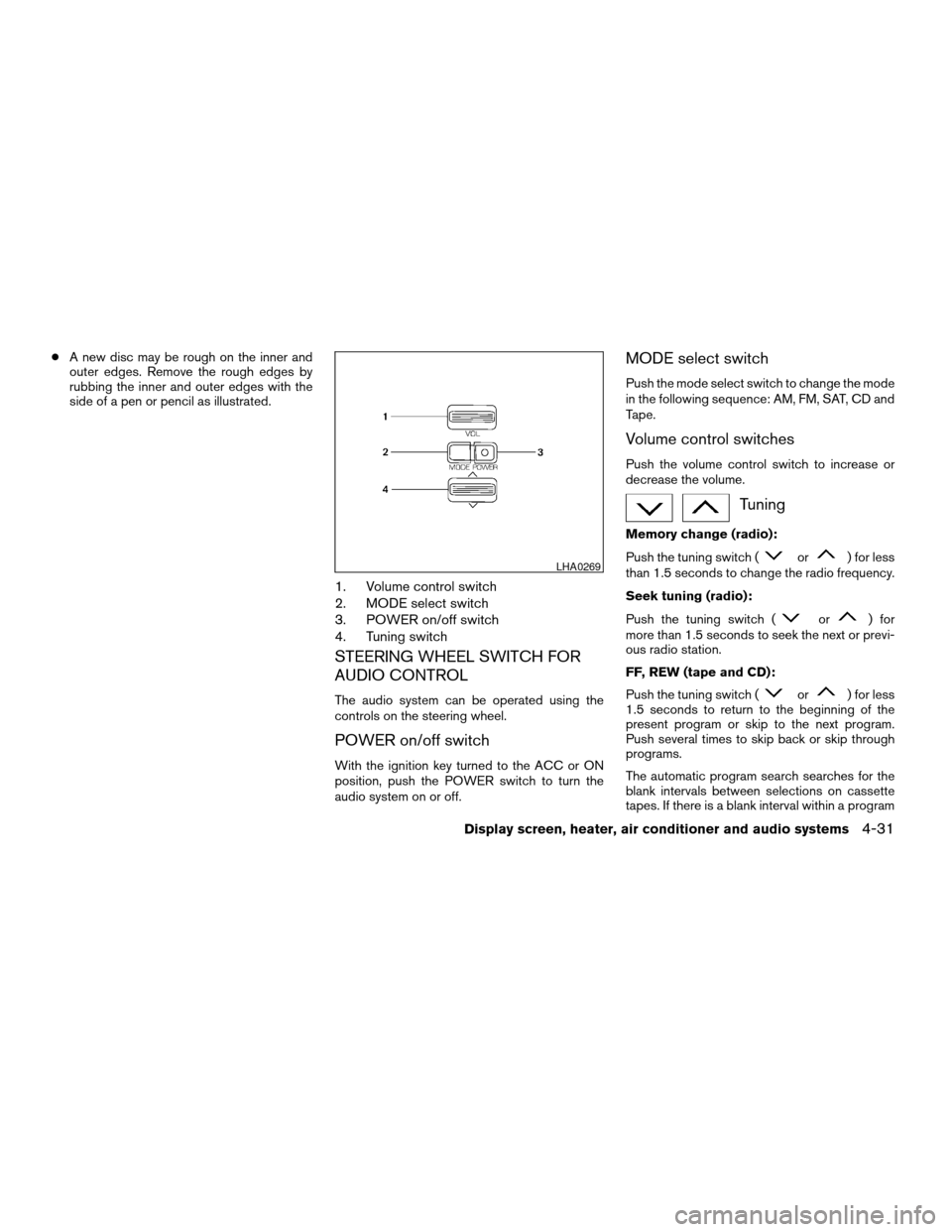
1. Volume control switch
2. MODE select switch
3. POWER on/off switch
4. Tuning switch
STEERING WHEEL SWITCH FOR
AUDIO CONTROL
The audio system can be operated using the
controls on the steering wheel.
POWER on/off switch
With the ignition key turned to the ACC or ON
position, push the POWER switch to turn the
audio system on or off.
MODE select switch
Push the mode select switch to change the mode
in the following sequence: AM, FM, SAT, CD and
Tape.
Volume control switches
Push the volume control switch to increase or
decrease the volume.
Tuning
Memory change (radio):
Push the tuning switch (
or) for less
than 1.5 seconds to change the radio frequency.
Seek tuning (radio):
Push the tuning switch (
or) for
more than 1.5 seconds to seek the next or previ-
ous radio station.
FF, REW (tape and CD):
Push the tuning switch (
or) for less
1.5 seconds to return to the beginning of the
present program or skip to the next program.
Push several times to skip back or skip through
programs.
The automatic program search searches for the
blank intervals between selections on cassette
tapes. If there is a blank interval within a program
LHA0269
Display screen, heater, air conditioner and audio systems4-31
ZREVIEW COPY:Ð2004 Maxima(max)
Owners Manual(owners)ÐUSA English(nna)
10/07/03Ðtbrooks
X