steering NISSAN MAXIMA 2005 A34 / 6.G User Guide
[x] Cancel search | Manufacturer: NISSAN, Model Year: 2005, Model line: MAXIMA, Model: NISSAN MAXIMA 2005 A34 / 6.GPages: 288, PDF Size: 4.71 MB
Page 71 of 288

18. Vehicle dynamic control (VDC) off
switch (if so equipped) or Traction
control system (TCS) off switch
(if so equipped) (P. 2-27, P. 2-26)
19. Heated steering wheel switch
(if so equipped) (P. 2-26)
20. Outside mirror controls (P. 3-17)
21. Instrument brightness control (P. 2-22)
22. Heated seat switches (if so equipped)
(P. 2-25)
23. Rear sunshade switch (if so equipped)
(P. 2-40)
*: Refer to the separate Navigation System Own-
er’s Manual (if so equipped) .
See the page number indicated in paren-
theses for operating details.
1. Warning/indicator lights
2. Speedometer
3. Tachometer
4. Warning/indicator lights
5. Change button for trip odometer
6. Engine coolant temperature gauge7. Odometer (total/twin trip)
8. Fuel gauge
LIC0381
METERS AND GAUGES
Instruments and controls2-3
ZREVIEW COPYÐ2005 Maxima(max)
Owners ManualÐUSA_English(nna)
09/01/04Ðtbrooks
X
Page 92 of 288
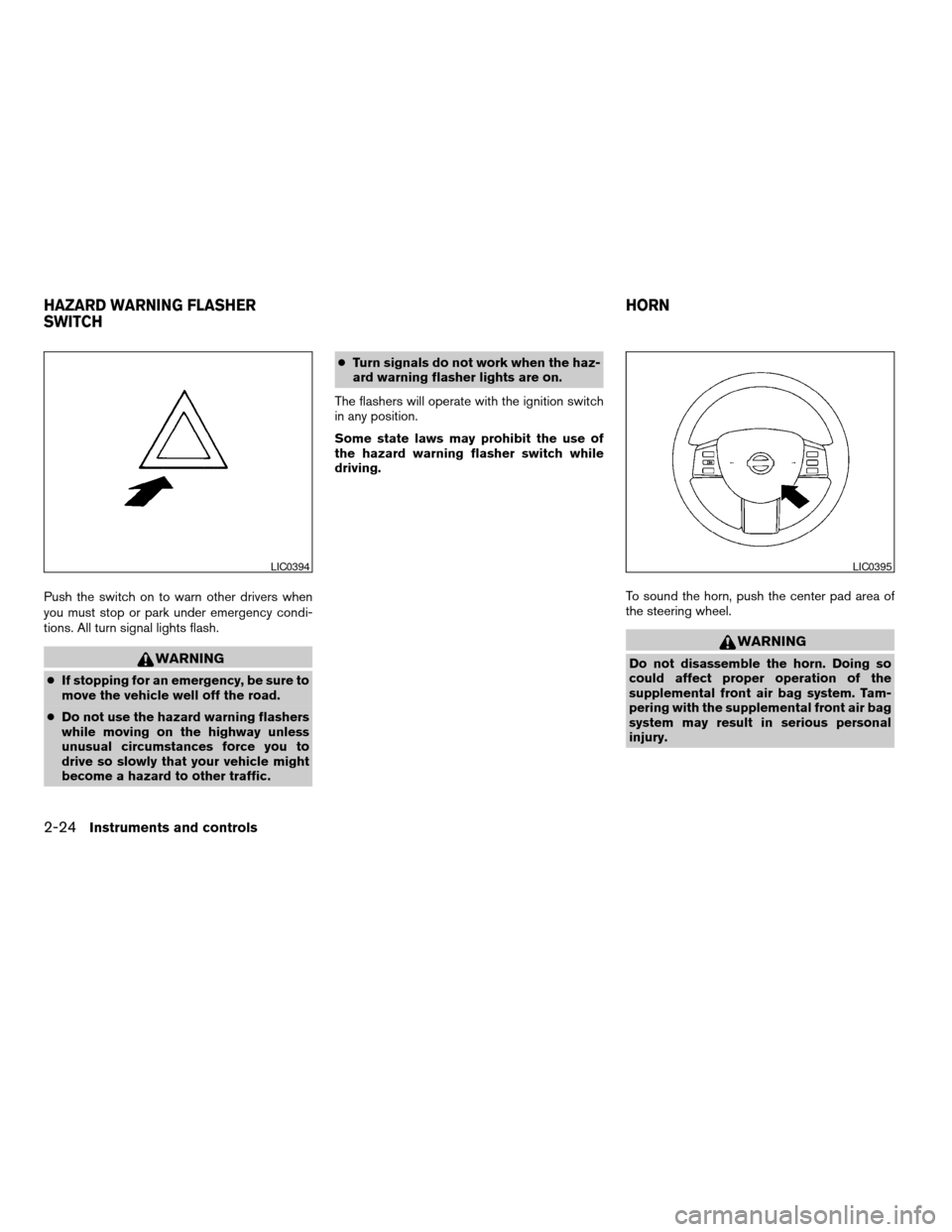
Push the switch on to warn other drivers when
you must stop or park under emergency condi-
tions. All turn signal lights flash.
WARNING
cIf stopping for an emergency, be sure to
move the vehicle well off the road.
cDo not use the hazard warning flashers
while moving on the highway unless
unusual circumstances force you to
drive so slowly that your vehicle might
become a hazard to other traffic.cTurn signals do not work when the haz-
ard warning flasher lights are on.
The flashers will operate with the ignition switch
in any position.
Some state laws may prohibit the use of
the hazard warning flasher switch while
driving.
To sound the horn, push the center pad area of
the steering wheel.
WARNING
Do not disassemble the horn. Doing so
could affect proper operation of the
supplemental front air bag system. Tam-
pering with the supplemental front air bag
system may result in serious personal
injury.
LIC0394LIC0395
HAZARD WARNING FLASHER
SWITCHHORN
2-24Instruments and controls
ZREVIEW COPYÐ2005 Maxima(max)
Owners ManualÐUSA_English(nna)
09/01/04Ðtbrooks
X
Page 94 of 288

The heated steering wheel system is designed to
operate only when the surface temperature of the
steering wheel is below approximately 68°F
(20°C) .
Push the heated steering wheel switch to warm
the steering wheel after the engine starts. The
indicator light will come on.
If the surface temperature of the steering wheel is
below 68°F (20°C) , the system will heat the
steering wheel to approximately 86°F (30°C) ,
then turn off automatically.
Push the switch again to turn the heated steering
off manually. The indicator light will go off.NOTE:
If the surface temperature of the steering
wheel is above 68°F (20°C) when the switch
is turned on, the system will not heat the
steering wheel. This is not a malfunction.The vehicle should be driven with the Traction Con-
trol System (TCS) on for most driving conditions.
If the vehicle is stuck in mud or snow, the TCS
reduces the engine output to reduce wheel spin.
The engine speed will be reduced even if the
accelerator is depressed to the floor. If maximum
engine power is needed to free a stuck vehicle,
turn the TCS off.
To turn off the TCS, push the TCS OFF switch.
The
indicator will come on.
Push the “TCS OFF” switch again or restart the
engine to turn ON the system. See “Traction
control system (TCS)” in the “Starting and driv-
ing” section.
LIC0421LIC0451
HEATED STEERING WHEEL (if so
equipped)TRACTION CONTROL SYSTEM (TCS)
OFF SWITCH (if so equipped)
2-26Instruments and controls
ZREVIEW COPYÐ2005 Maxima(max)
Owners ManualÐUSA_English(nna)
09/01/04Ðtbrooks
X
Page 115 of 288

3 Pre-driving checks and adjustments
Keys .............................................3-2
Nissan vehicle immobilizer system (NVIS)
keys..........................................3-2
Doors............................................3-3
Locking with key................................3-3
Locking with inside lock knob....................3-4
Locking with power door lock switch.............3-4
Child safety rear door lock.......................3-5
Remote keyless entry system.......................3-5
How to use remote keyless entry system..........3-6
Hood............................................3-9
Trunk lid..........................................3-9
Opener operation...............................3-9
Secondary trunk lid release.....................3-10
Interior trunk lid release........................3-11
Fuel filler lid......................................3-12Opener operation..............................3-12
Fuel filler cap..................................3-12
Tilting telescopic steering column..................3-13
Automatic operation (if so equipped).............3-13
Manual operation..............................3-14
Sun visors.......................................3-15
Vanity mirrors.................................3-16
Mirrors..........................................3-16
Automatic anti-glare inside mirror................3-16
Outside mirrors...............................3-17
Automatic drive positioner (if so equipped)..........3-19
Memory storage function.......................3-19
Entry/exit function
(for automatic transmission model)..............3-20
System operation..............................3-21
ZREVIEW COPYÐ2005 Maxima(max)
Owners ManualÐUSA_English(nna)
09/01/04Ðtbrooks
X
Page 127 of 288
cDo not fill a portable fuel container in
the vehicle or trailer. Static electricity
can cause an explosion of flammable
liquid, vapor or gas in any vehicle or
trailer. To reduce the risk of serious
injury or death when filling portable fuel
containers:
– Always place the container on the
ground when filling.
– Do not use electronic devices when
filling.
– Keep the pump nozzle in contact
with the container while you are fill-
ing it.
– Use only approved portable fuel con-
tainers for flammable liquid.
CAUTION
cIf fuel is spilled on the vehicle body,
flush it away with water to avoid paint
damage.cTighten until the fuel filler cap clicks.
Failure to tighten the fuel filler cap
properly may cause the
mal-
function indicator lamp (MIL) to illumi-
nate. If the
lamp illuminates be-
cause the fuel filler cap is loose or
missing, tighten or install the cap and
continue to drive the vehicle.
The
lamp should turn off after a
few driving trips. If the
lamp
does not turn off after a few driving
trips, have the vehicle inspected by a
NISSAN dealer.
cFor additional information, see the
“Malfunction indicator lamp (MIL)” in
the “Instruments and Controls” section
earlier in this manual.
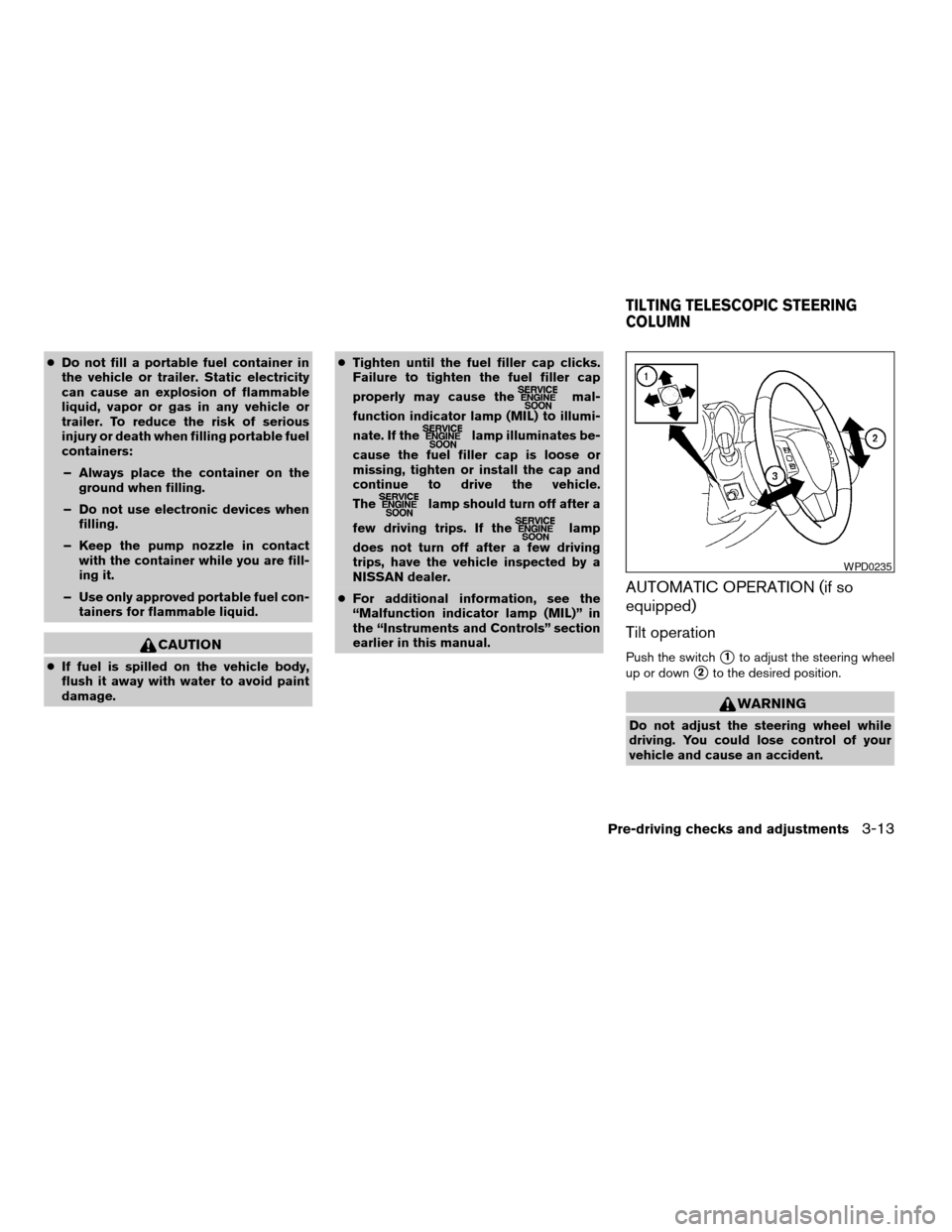
AUTOMATIC OPERATION (if so
equipped)
Tilt operation
Push the switchs1to adjust the steering wheel
up or down
s2to the desired position.
WARNING
Do not adjust the steering wheel while
driving. You could lose control of your
vehicle and cause an accident.
WPD0235
TILTING TELESCOPIC STEERING
COLUMN
Pre-driving checks and adjustments3-13
ZREVIEW COPYÐ2005 Maxima(max)
Owners ManualÐUSA_English(nna)
09/01/04Ðtbrooks
X
Page 128 of 288
Entry/Exit function
The automatic drive positioner system will make
the steering wheel move up automatically on
models equipped with automatic transmission
when the key is removed from the ignition switch.
This lets the driver get into and out of the seat
more easily. The steering wheel moves back into
position when the key is inserted into the ignition
switch.
For more information, see “Automatic drive posi-
tioner” later in this section.
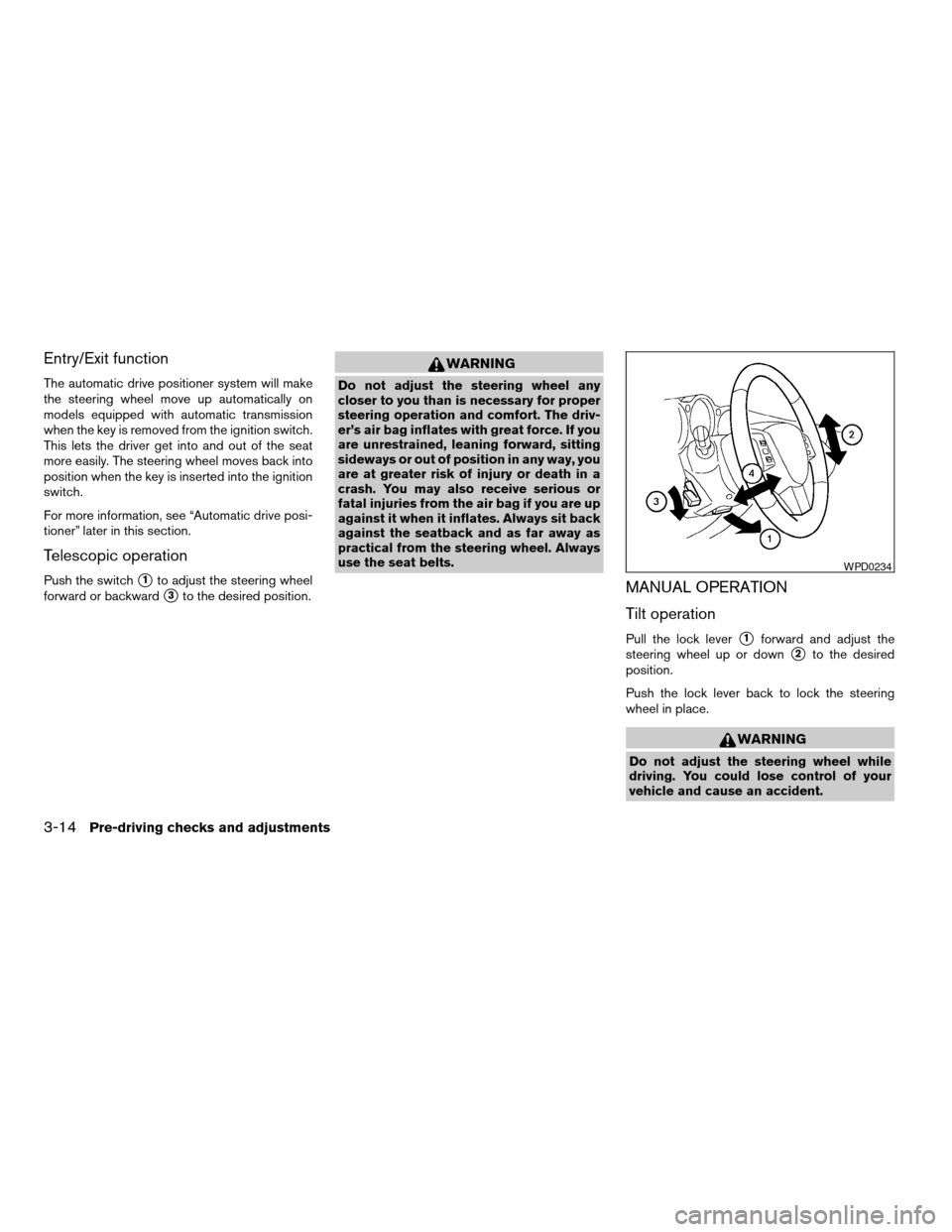
Telescopic operation
Push the switchs1to adjust the steering wheel
forward or backward
s3to the desired position.
WARNING
Do not adjust the steering wheel any
closer to you than is necessary for proper
steering operation and comfort. The driv-
er’s air bag inflates with great force. If you
are unrestrained, leaning forward, sitting
sideways or out of position in any way, you
are at greater risk of injury or death in a
crash. You may also receive serious or
fatal injuries from the air bag if you are up
against it when it inflates. Always sit back
against the seatback and as far away as
practical from the steering wheel. Always
use the seat belts.
MANUAL OPERATION
Tilt operation
Pull the lock levers1forward and adjust the
steering wheel up or down
s2to the desired
position.
Push the lock lever back to lock the steering
wheel in place.
WARNING
Do not adjust the steering wheel while
driving. You could lose control of your
vehicle and cause an accident.
WPD0234
3-14Pre-driving checks and adjustments
ZREVIEW COPYÐ2005 Maxima(max)
Owners ManualÐUSA_English(nna)
09/01/04Ðtbrooks
X
Page 129 of 288
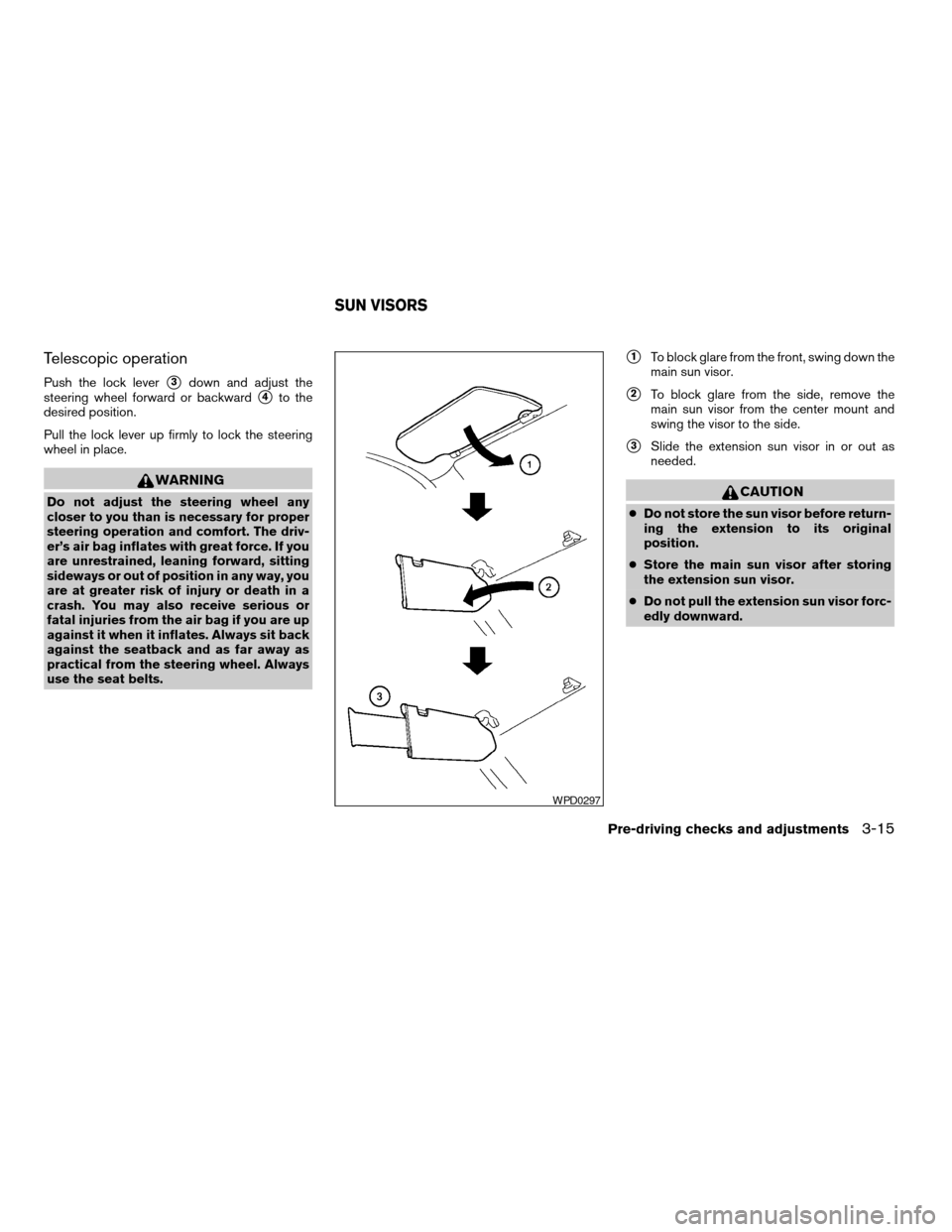
Telescopic operation
Push the lock levers3down and adjust the
steering wheel forward or backward
s4to the
desired position.
Pull the lock lever up firmly to lock the steering
wheel in place.
WARNING
Do not adjust the steering wheel any
closer to you than is necessary for proper
steering operation and comfort. The driv-
er’s air bag inflates with great force. If you
are unrestrained, leaning forward, sitting
sideways or out of position in any way, you
are at greater risk of injury or death in a
crash. You may also receive serious or
fatal injuries from the air bag if you are up
against it when it inflates. Always sit back
against the seatback and as far away as
practical from the steering wheel. Always
use the seat belts.
s1To block glare from the front, swing down the
main sun visor.
s2To block glare from the side, remove the
main sun visor from the center mount and
swing the visor to the side.
s3Slide the extension sun visor in or out as
needed.
CAUTION
cDo not store the sun visor before return-
ing the extension to its original
position.
cStore the main sun visor after storing
the extension sun visor.
cDo not pull the extension sun visor forc-
edly downward.
WPD0297
SUN VISORS
Pre-driving checks and adjustments3-15
ZREVIEW COPYÐ2005 Maxima(max)
Owners ManualÐUSA_English(nna)
09/01/04Ðtbrooks
X
Page 133 of 288

Heated mirrors (if so equipped)
The electric control type outside mirrors (if so
equipped) can be heated to defrost, defog, or
de-ice for improved visibility. Press the rear win-
dow defogger switch to activate the heating
function. Press the switch again to deactivate, or
the heating function will automatically turn off
after approximately 15 minutes.The automatic drive positioner system has two
features:
cMemory storage function
cEntry/exit function (for automatic transmis-
sion model only)
MEMORY STORAGE FUNCTION
Two positions for the driver’s seat, steering col-
umn, and outside mirrors can be stored in the
automatic drive positioner memory. Follow these
procedures to use the memory system.
1. For vehicles equipped with automatic trans-
mission, set the shift selector lever to the P
(Park) position.
For vehicles equipped with manual trans-
mission, place the shift lever in the N (Neu-
tral) position and set the parking brake.
2. Turn the ignition ON.
LPD0197
AUTOMATIC DRIVE POSITIONER (if
so equipped)
Pre-driving checks and adjustments3-19
ZREVIEW COPYÐ2005 Maxima(max)
Owners ManualÐUSA_English(nna)
09/01/04Ðtbrooks
X
Page 134 of 288

3. Adjust the driver’s seat, steering column and
outside mirrors to the desired positions by
manually operating each adjusting switch.
For additional information, see “Seats” in the
“Safety—Seats, seat belts and supplemen-
tal restraint system” section and “Tilting tele-
scopic steering column” and “Outside mir-
rors” earlier in this section.
During this step, do not turn the ignition to
any positions other than ON.
4. Push the SET switch and, within 5 seconds,
push the memory switch (1 or 2) fully for at
least 1 second.
The indicator light for the pushed memory
switch will come on and stay on for approxi-
mately 5 seconds after pushing the switch.
After the indicator light goes off, the se-
lected positions are stored in the selected
memory (1 or 2) .
If memory is stored in the same memory switch,
the previous memory will be deleted.
Linking a keyfob to a stored memory
position
Each keyfob can be linked to a stored memory
position (memory switch 1 or 2) with the follow-
ing procedure.1. Follow the steps for storing a memory posi-
tion.
2. While the indicator light for the memory
switch being set is illuminated for 5 sec-
onds, press the
button on the keyfob.
The indicator light will blink. After the indica-
tor light goes off, the keyfob is linked to that
memory setting.
With the key removed from the ignition switch,
press the
button on the keyfob. The driv-
er’s seat and outside mirrors will move to the
memorized position.
NOTE:
If a new memory is saved to the memory
switch, the keyfob must be re-linked.
Confirming memory storage
cTurn the ignition ON and push the SET
switch. If the main memory has not been
stored, the indicator light will come on for
approximately 0.5 seconds. When the
memory has stored the position, the indica-
tor light will stay on for approximately 5 sec-
onds.
cIf the battery cable is disconnected, or if the
fuse opens, the memory will be canceled. In
such a case, reset the desired positions
using the following procedures.1. Open and close the driver’s door more than
two times with the ignition key in the LOCK
position.
2. Reset the desired position using the previ-
ous procedure.
Selecting the memorized position
1. For vehicles equipped with automatic trans-
mission, set the shift selector lever to the P
(Park) position.
For vehicles equipped with manual trans-
mission, place the shift lever in the N (Neu-
tral) position and set the parking brake.
2. Turn the ignition ON.
3. Push the memory switch (1 or 2) fully for at
least 1 second.
The driver’s seat, steering column and out-
side mirrors will move to the memorized po-
sition with the indicator light flashing, and
then the light will stay on for approximately 5
seconds.
ENTRY/EXIT FUNCTION (for
automatic transmission model)
This system is designed so that the driver’s seat
and steering column will automatically move
when the automatic transmission selector lever is
in the P (Park) position. This allows the driver to
3-20Pre-driving checks and adjustments
ZREVIEW COPYÐ2005 Maxima(max)
Owners ManualÐUSA_English(nna)
09/01/04Ðtbrooks
X
Page 135 of 288

get into and out of the driver’s seat more easily.
(This feature is not available on manual transmis-
sion model.)
The driver’s seat will slide backward and the
steering wheel will move up:
cWhen the key is removed from the ignition
switch.
cWhen the driver’s door is opened with the
key turned to LOCK.
cWhen the key is turned from ACC to LOCK
with the driver’s door open while the auto-
matic transmission selector lever is in the P
(Park) position.
The driver’s seat and steering wheel will return to
the previous position:
cWhen the key is inserted into the ignition
switch.
cWhen the driver’s door is closed with the key
turned to LOCK.
cWhen the key is turned from ACC to ON
while the automatic transmission selector
lever is in the P (Park) position.
The entry/exit feature can be adjusted or can-
celed. See “Vehicle electronic systems” in the
“Display screen, heater, air conditioner and audio
systems” section of this manual.SYSTEM OPERATION
The automatic drive positioner system will not
work or will stop operating under the following
conditions:
cwhen the vehicle speed is above 4 MPH (7
km/h) .
cwhen any two or more of the memory
switches are simultaneously pushed while
the automatic drive positioner is operating.
cwhen the adjusting switch for the driver’s
seat is turned on while the automatic drive
positioner is operating.
cwhen the memory switch (1 or 2) is not
pushed for at least 1 second.
cwhen the seat has been already moved to
the memorized position.
cwhen no seat position is stored in the
memory switch.
The automatic drive positioner system can be
adjusted and canceled. See “Vehicle electronic
systems” in the “Display screen, heater, air con-
ditioner and audio systems” section of this
manual.
Pre-driving checks and adjustments3-21
ZREVIEW COPYÐ2005 Maxima(max)
Owners ManualÐUSA_English(nna)
09/01/04Ðtbrooks
X