mirror controls NISSAN MAXIMA 2005 A34 / 6.G Owners Manual
[x] Cancel search | Manufacturer: NISSAN, Model Year: 2005, Model line: MAXIMA, Model: NISSAN MAXIMA 2005 A34 / 6.GPages: 288, PDF Size: 4.71 MB
Page 13 of 288

18. Vehicle dynamic control (VDC) off
switch (if so equipped) or Traction
control system (TCS) off switch
(if so equipped) (P. 2-27, P. 2-26)
19. Heated steering wheel switch
(if so equipped) (P. 2-26)
20. Outside mirror controls (P. 3-17)
21. Instrument brightness control (P. 2-22)
22. Heated seat switches (if so equipped)
(P. 2-25)
23. Rear sunshade switch (if so equipped)
(P. 2-40)
*: Refer to the separate Navigation System Own-
er’s Manual (if so equipped) .
See the page number indicated in paren-
theses for operating details.
Illustrated table of contents0-7
ZREVIEW COPYÐ2005 Maxima(max)
Owners ManualÐUSA_English(nna)
09/01/04Ðtbrooks
X
Page 68 of 288

2 Instruments and controls
Instrument panel...................................2-2
Meters and gauges................................2-3
Speedometer and odometer.....................2-4
Tachometer....................................2-5
Engine coolant temperature gauge...............2-5
Fuel gauge....................................2-6
Compass display (if so equipped)...................2-6
Zone variation change procedure.................2-7
Warning/indicator lights and audible reminders.......2-9
Checking bulbs................................2-9
Warning lights.................................2-9
Indicator lights................................2-12
Audible reminders.............................2-14
Security systems.................................2-14
Vehicle security system.........................2-14
Nissan vehicle immobilizer system (NVIS)........2-16
Windshield wiper and washer switch...............2-18
Switch operation..............................2-18
Rear window and outside mirror (if so equipped)
defroster switch..................................2-19
Headlight and turn signal switch....................2-19
Xenon headlights (if so equipped)...............2-19
Headlight control switch........................2-20Daytime running light system (Canada only)......2-22
Instrument brightness control...................2-22
Turn signal switch.............................2-23
Fog light switch...............................2-23
Cornering light................................2-23
Hazard warning flasher switch.....................2-24
Horn............................................2-24
Heated seats (if so equipped)......................2-25
Heated steering wheel (if so equipped).............2-26
Traction control system (TCS) off switch
(if so equipped)..................................2-26
Vehicle dynamic control (VDC) off switch
(if so equipped)..................................2-27
Power outlet.....................................2-27
Cigarette lighter..................................2-28
Storage.........................................2-29
Map pockets..................................2-29
Seatback pockets.............................2-29
Sunglasses holder.............................2-30
Cup holders..................................2-30
Glove box....................................2-32
Console box..................................2-32
Rear center console (if so equipped).............2-33
ZREVIEW COPYÐ2005 Maxima(max)
Owners ManualÐUSA_English(nna)
09/01/04Ðtbrooks
X
Page 71 of 288

18. Vehicle dynamic control (VDC) off
switch (if so equipped) or Traction
control system (TCS) off switch
(if so equipped) (P. 2-27, P. 2-26)
19. Heated steering wheel switch
(if so equipped) (P. 2-26)
20. Outside mirror controls (P. 3-17)
21. Instrument brightness control (P. 2-22)
22. Heated seat switches (if so equipped)
(P. 2-25)
23. Rear sunshade switch (if so equipped)
(P. 2-40)
*: Refer to the separate Navigation System Own-
er’s Manual (if so equipped) .
See the page number indicated in paren-
theses for operating details.
1. Warning/indicator lights
2. Speedometer
3. Tachometer
4. Warning/indicator lights
5. Change button for trip odometer
6. Engine coolant temperature gauge7. Odometer (total/twin trip)
8. Fuel gauge
LIC0381
METERS AND GAUGES
Instruments and controls2-3
ZREVIEW COPYÐ2005 Maxima(max)
Owners ManualÐUSA_English(nna)
09/01/04Ðtbrooks
X
Page 75 of 288

ZONE VARIATION CHANGE
PROCEDURE
The difference between magnetic north and geo-
graphical north is known as variance. In some
areas, this difference can sometimes be great
enough to cause false compass readings. Follow
these instructions to set the variance for your
particular location if this happens:
1. Press the COMPASS switch for more than 3
seconds. The current zone number will ap-
pear in the display.
2. Find your current location on the zone map.
Refer to the illustration. Record the zone
number.
3. Press the COMPASS switch until the new
zone number appears in the display. After
you stop pressing the switch in, the display
will show a compass direction within a few
seconds.
Inaccurate compass direction:
1. With the display turned on, push the COM-
PASS switch for 3 seconds, until the zone
selection comes up (a number will be dis-
played in the mirror compass window) .
2. Toggle until correct zone is found and re-
lease switch.
WIC0355
Instruments and controls2-7
ZREVIEW COPYÐ2005 Maxima(max)
Owners ManualÐUSA_English(nna)
09/01/04Ðtbrooks
X
Page 76 of 288
3. The display will show all segments, and re-
turn to the normal compass mode within 10
seconds of no switch activity.
4. If the vehicle changes zone, repeat steps 1
through 3. See map.
cIf the compass deviates from the correct
indication soon after repeated adjustment,
have the compass checked at an authorized
dealer.
cThe compass may not indicate the correct
compass point in tunnels or while driving up
or down a steep hill. (The compass returns
to the correct compass point when the ve-
hicle moves to an area where the geomag-
netism is stabilized.)
CAUTION
cDo not install a ski rack, antenna, etc.,
which are attached to the vehicle by
means of a magnet. They affect the op-
eration of the compass.
cWhen cleaning the mirror, use a paper
towel or similar material dampened
with glass cleaner. Do not spray glass
cleaner directly on the mirror as it may
cause the liquid cleaner to enter the
mirror housing.
2-8Instruments and controls
ZREVIEW COPYÐ2005 Maxima(max)
Owners ManualÐUSA_English(nna)
09/01/04Ðtbrooks
X
Page 87 of 288
To defrost the rear window glass and outside
mirrors (if so equipped) , start the engine and
push the rear window defroster switch on. The
rear window defroster indicator light on the
switch comes on. Push the switch again to turn
the defroster off.
The rear window defroster automatically turns off
after approximately 15 minutes.
CAUTION
When cleaning the inner side of the rear
window, be careful not to scratch or dam-
age the rear window defroster.NOTE:
The top few rows of wires on the rear win-
dow are not part of the rear window de-
froster system. These wires make up the
antenna for the audio system.
XENON HEADLIGHTS (if so
equipped)
WARNING
cHIGH VOLTAGE
cWhen xenon headlights are on, they
produce a high voltage. To prevent an
electric shock, never attempt to modify
or disassemble. Always have your xe-
non headlights replaced at a NISSAN
dealer.
cXenon headlights provide considerably
more light than conventional head-
lights. If they are not correctly aimed,
they might temporarily blind an oncom-
ing driver or the driver ahead of you and
cause a serious accident. If headlights
are not aimed correctly, immediately
take your vehicle to a NISSAN dealer
and have the headlights adjusted
correctly.
When the xenon headlight is initially turned on, its
brightness or color varies slightly. However, the
color and brightness will soon stabilize.
cThe life of xenon headlights will be
shortened by frequent on-off opera-
tion. It is generally desirable not to turn
off the headlights for short intervals
LIC0388
REAR WINDOW AND OUTSIDE
MIRROR (if so equipped)
DEFROSTER SWITCHHEADLIGHT AND TURN SIGNAL
SWITCH
Instruments and controls2-19
ZREVIEW COPYÐ2005 Maxima(max)
Owners ManualÐUSA_English(nna)
09/01/04Ðtbrooks
X
Page 131 of 288
For information on HomeLinkTUniversal Trans-
ceiver operation, see the “HomeLinkTUniversal
Transceiver” in the “Instrument and controls” sec-
tion of this manual.
For information on the compass display (if so
equipped) , see “Compass display” in the “Instru-
ments and controls” section of this manual.
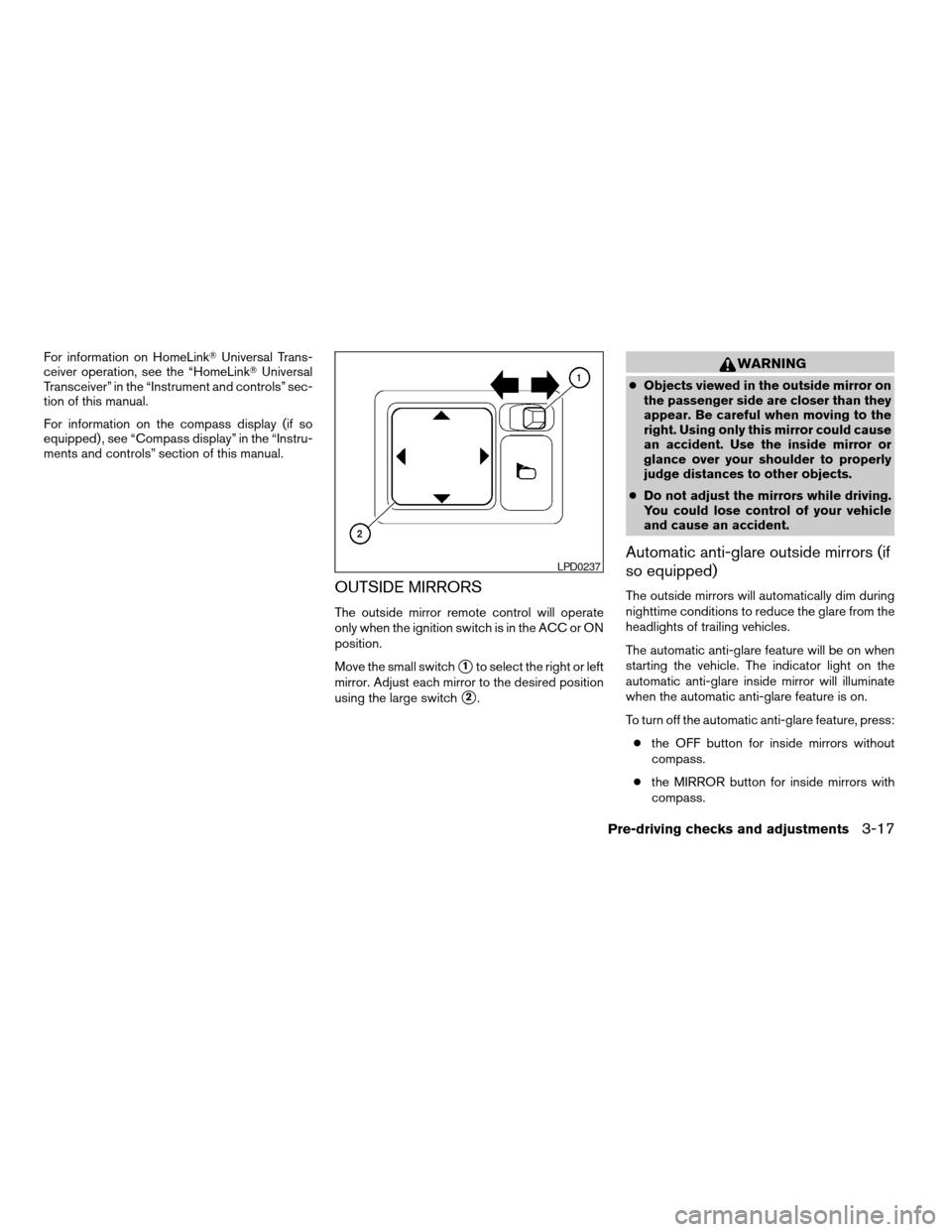
OUTSIDE MIRRORS
The outside mirror remote control will operate
only when the ignition switch is in the ACC or ON
position.
Move the small switch
s1to select the right or left
mirror. Adjust each mirror to the desired position
using the large switch
s2.
WARNING
cObjects viewed in the outside mirror on
the passenger side are closer than they
appear. Be careful when moving to the
right. Using only this mirror could cause
an accident. Use the inside mirror or
glance over your shoulder to properly
judge distances to other objects.
cDo not adjust the mirrors while driving.
You could lose control of your vehicle
and cause an accident.
Automatic anti-glare outside mirrors (if
so equipped)
The outside mirrors will automatically dim during
nighttime conditions to reduce the glare from the
headlights of trailing vehicles.
The automatic anti-glare feature will be on when
starting the vehicle. The indicator light on the
automatic anti-glare inside mirror will illuminate
when the automatic anti-glare feature is on.
To turn off the automatic anti-glare feature, press:
cthe OFF button for inside mirrors without
compass.
cthe MIRROR button for inside mirrors with
compass.
LPD0237
Pre-driving checks and adjustments3-17
ZREVIEW COPYÐ2005 Maxima(max)
Owners ManualÐUSA_English(nna)
09/01/04Ðtbrooks
X
Page 176 of 288

cMake sure the area around the vehicle is
clear.
cCheck fluid levels such as engine oil, cool-
ant, brake and clutch fluid, and window
washer fluid as frequently as possible, or at
least whenever you refuel.
cCheck that all windows and lights are clean.
cVisually inspect tires for their appearance
and condition. Also check tires for proper
inflation.
cLock all doors.
cPosition seat and adjust head restraints.
cAdjust inside and outside mirrors.
cFasten seat belts and ask all passengers to
do likewise.
cCheck the operation of warning lights when
the key is turned to the ON (3) position. See
“Warning/indicator lights and audible re-
minders” in the “Instruments and controls”
section of this manual.1. Apply the parking brake.
2.Automatic transmission:
Move the shift selector lever to P (Park) or N
(Neutral) . P (Park) is recommended.
The shift selector lever cannot be
moved out of P (Park) and into any of
the other gear positions if the ignition
key is turned to the OFF position or if
the key is removed from the ignition
switch.
The starter is designed not to operate if
the shift selector lever is in any of the
driving positions.
Manual transmission:
Move the shift lever to N (Neutral) . Depress
the clutch pedal to the floor while cranking
the engine.
The starter is designed not to operate
unless the clutch pedal is fully de-
pressed.
3. Crank the enginewith your foot off the
accelerator pedalby turning the ignition
key to START. Release the key when the
engine starts. If the engine starts, but fails to
run, repeat the above procedure.cIf the engine is very hard to start in ex-
tremely cold weather or when restarting,
depress the accelerator pedal a little (ap-
proximately 1/3 to the floor) and hold it
and then crank the engine. Release the
key and the accelerator pedal when the
engine starts.
cIf the engine is very hard to start because
it is flooded, depress the accelerator
pedal all the way to the floor and hold it.
Crank the engine for 5-6 seconds. After
cranking the engine, release the accel-
erator pedal. Crank the enginewith your
foot off the accelerator pedalby turn-
ing the ignition key to START. Release the
key when the engine starts. If the engine
starts, but fails to run, repeat the above
procedure.
CAUTION
Do not operate the starter for more than
15 seconds at a time. If the engine does
not start, turn the key off and wait 10
seconds before cranking again, otherwise
the starter could be damaged.
BEFORE STARTING THE ENGINE STARTING THE ENGINE
5-6Starting and driving
ZREVIEW COPYÐ2005 Maxima(max)
Owners ManualÐUSA_English(nna)
09/01/04Ðtbrooks
X
Page 238 of 288
HEADLIGHTS
Replacing the xenon headlight bulb
WARNING
cHIGH VOLTAGE
When xenon headlights are on, they pro-
duce a high voltage. To prevent an electric
shock, never attempt to modify or disas-
semble. Always have your xenon head-
lights replaced at a NISSAN dealer. For
additional information, see “Headlight
and turn signal switch” in the “Instru-
ments and controls” section.
Replacing the halogen headlight bulb
The headlight is a semi-sealed beam type which
uses a replaceable headlight (halogen) bulb. Be-
cause the headlight assembly must be removed
from the vehicle for bulb replacement, see your
NISSAN dealer.
CAUTION
cAiming is not necessary after replacing
the bulb. When aiming adjustment is
necessary, contact a NISSAN dealer.cDo not leave the headlight assembly
open without a bulb installed for a long
period of time. Dust, moisture, smoke,
etc. entering the headlight body may
affect bulb performance. Remove the
bulb from the headlight assembly just
before a replacement bulb is installed.
cOnly touch the plastic base when han-
dling the bulb. Never touch the glass
envelope. Touching the glass could sig-
nificantly affect bulb life and/or head-
light performance.
cHigh pressure halogen gas is sealed
inside the halogen bulb. The bulb may
break if the glass envelope is scratched
or the bulb is dropped.
cUse the same number and wattage as
originally installed:
Low beam:
Wattage: 55
Bulb no.: 9012*
High beam:
Wattage: 55
Bulb no.: 9012*
*: Always check with the Parts Depart-
ment at a NISSAN dealer for the latest
parts information.
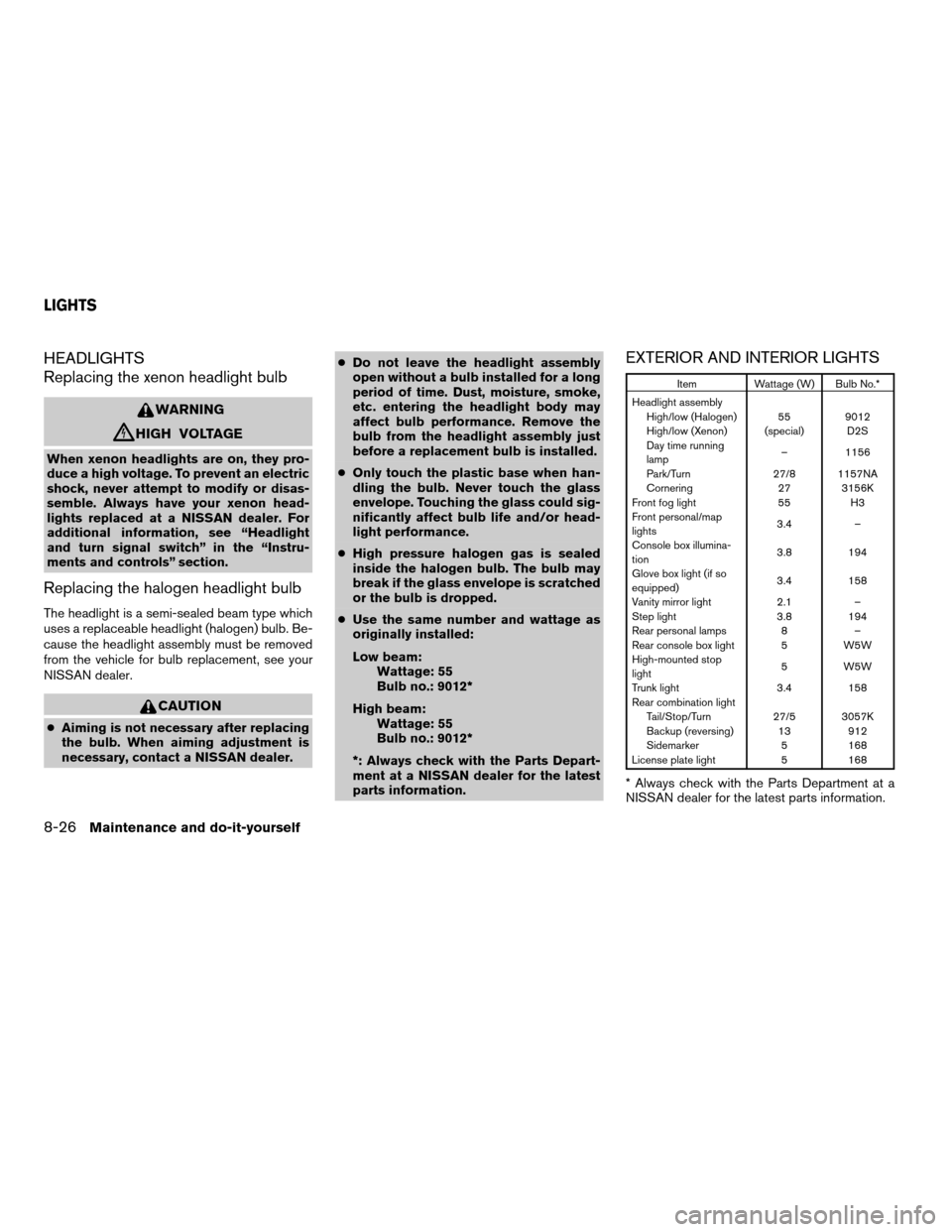
EXTERIOR AND INTERIOR LIGHTS
Item Wattage (W) Bulb No.*
Headlight assembly
High/low (Halogen) 55 9012
High/low (Xenon) (special) D2S
Day time running
lamp– 1156
Park/Turn 27/8 1157NA
Cornering 27 3156K
Front fog light 55 H3
Front personal/map
lights3.4 –
Console box illumina-
tion3.8 194
Glove box light (if so
equipped)3.4 158
Vanity mirror light 2.1 –
Step light 3.8 194
Rear personal lamps 8 –
Rear console box light 5 W5W
High-mounted stop
light5 W5W
Trunk light 3.4 158
Rear combination light
Tail/Stop/Turn 27/5 3057K
Backup (reversing) 13 912
Sidemarker 5 168
License plate light 5 168
* Always check with the Parts Department at a
NISSAN dealer for the latest parts information.
LIGHTS
8-26Maintenance and do-it-yourself
ZREVIEW COPYÐ2005 Maxima(max)
Owners ManualÐUSA_English(nna)
09/01/04Ðtbrooks
X
Page 280 of 288

Clutch
Clutch fluid.................8-12
Cold weather driving..............5-21
Compact disc (CD) player...........4-28
Compass display.................2-6
Console box...................2-32
Control panel buttons
With navigation system...........4-7
Without navigation system..........4-2
Controls
Audio controls (steering wheel)......4-32
Coolant
Capacities and recommended
fuel/lubricants.................9-2
Changing engine coolant..........8-8
Checking engine coolant level........8-7
Engine coolant temperature gauge.....2-5
Cornering light.................2-23
Corrosion protection...............7-5
Cruise control..................5-13
Cup holders...................2-30
D
Daytime running light system
(Canada only)..................2-22
Defroster switch
Rear window and outside mirror defroster
switch....................2-19
Dimensions and weights.............9-8
Display controls
(see control panel buttons).........4-2, 4-7
Door locks....................3-3
Door open warning light............2-10
Drive belts....................8-15Drive positioner, Automatic...........3-19
Driving
Cold weather driving............5-21
Driving with automatic transmission.....5-7
Driving with manual transmission.....5-11
Precautions when starting and driving . . .5-2
E
Economy - fuel.................5-15
Emission control information label.......9-10
Emission control system warranty.......9-19
Engine
Before starting the engine..........5-6
Capacities and recommended
fuel/lubricants.................9-2
Changing engine coolant..........8-8
Changing engine oil.............8-9
Changing engine oil filter..........8-10
Checking engine coolant level........8-7
Checking engine oil level..........8-8
Engine compartment check locations. . . .8-7
Engine coolant temperature gauge.....2-5
Engine cooling system............8-7
Engine oil...................8-8
Engine oil and oil filter recommendation . .9-5
Engine oil viscosity..............9-5
Engine serial number............9-10
Engine specifications.............9-7
Starting the engine..............5-6
Engine oil pressure low/engine coolant
temperature high warning light.........2-10
English/Metric button...........4-4, 4-14
Control panel buttons.........4-4, 4-14
ENTER button.............4-2, 4-3, 4-7Enter button
Control panel buttons.......4-2, 4-3, 4-7
Event data recorders..............9-21
Exhaust gas (Carbon monoxide)........5-2
Eyeglass case..................2-30
F
Flashers
(See hazard warning flasher switch)......2-24
Flat tire......................6-2
Floor mat positioning aid.............7-4
Fluid
Brake fluid..................8-11
Capacities and recommended
fuel/lubricants.................9-2
Clutch fluid.................8-12
Engine coolant................8-7
Engine oil...................8-8
Power steering fluid.............8-11
Window washer fluid............8-12
F.M.V.S.S. certification label..........9-10
Fog light switch.................2-23
Folding rear seat.................1-6
Front air bag system
(See supplemental restraint system).....1-42
Front seats....................1-2
Fuel
Capacities and recommended
fuel/lubricants.................9-2
Fuel economy................5-15
Fuel filler cap................3-12
Fuel filler lid.................3-12
Fuel filler lid and cap............3-12
Fuel gauge..................2-6
Fuel octane rating..............9-4
10-2
ZREVIEW COPYÐ2005 Maxima(max)
Owners ManualÐUSA_English(nna)
09/01/04Ðtbrooks
X