buttons NISSAN MAXIMA 2010 Owner´s Manual
[x] Cancel search | Manufacturer: NISSAN, Model Year: 2010, Model line: MAXIMA, Model: NISSAN MAXIMA 2010Pages: 457, PDF Size: 4.66 MB
Page 203 of 457
Fresh air intake
Push thefresh air intake button to draw
outside air into the passenger compartment.
The
indicator light on the button will come
on.
Automatic intake air control
In the AUTO mode, the intake air will be con-
trolled automatically. To manually control the in-
take air, push the
air recirculation button.
To return to the automatic control mode, push
and hold the
air recirculation button or
push and hold the
fresh air intake button
for about 2 seconds. The indicator lights (both air
recirculation and fresh air intake buttons) will
flash twice, and then the intake air will be con-
trolled automatically.
Air flow control
Pushing the MODE button manually controls air
flow and selects the air outlet:
— Air flows from center and side
vents.
— Air flows from center and side
vents and foot outlets.
— Air flows mainly from foot outlets.
— Air flows from defroster and foot
outlets.
— Air flows from defroster outlets.
To turn system off
Press the OFF button.
OPERATING TIPS
cWhen the engine coolant temperature and
outside air temperature are low, the air flow
from the foot outlets may not operate for a
maximum of 150 seconds. However, this is
not a malfunction. After the coolant tempera-
ture warms up, air flow from the foot outlets
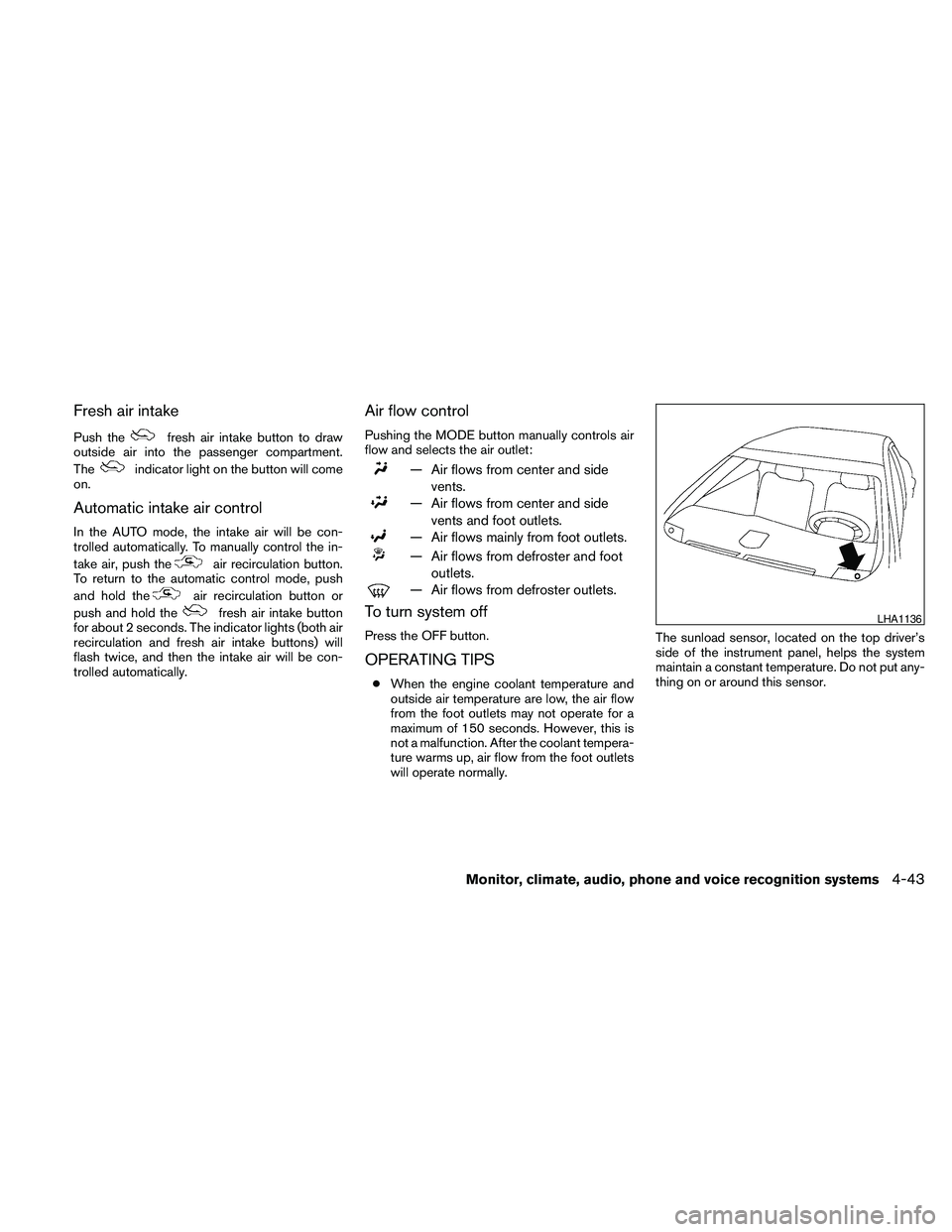
will operate normally.The sunload sensor, located on the top driver’s
side of the instrument panel, helps the system
maintain a constant temperature. Do not put any-
thing on or around this sensor.
LHA1136
Monitor, climate, audio, phone and voice recognition systems4-43
Page 204 of 457
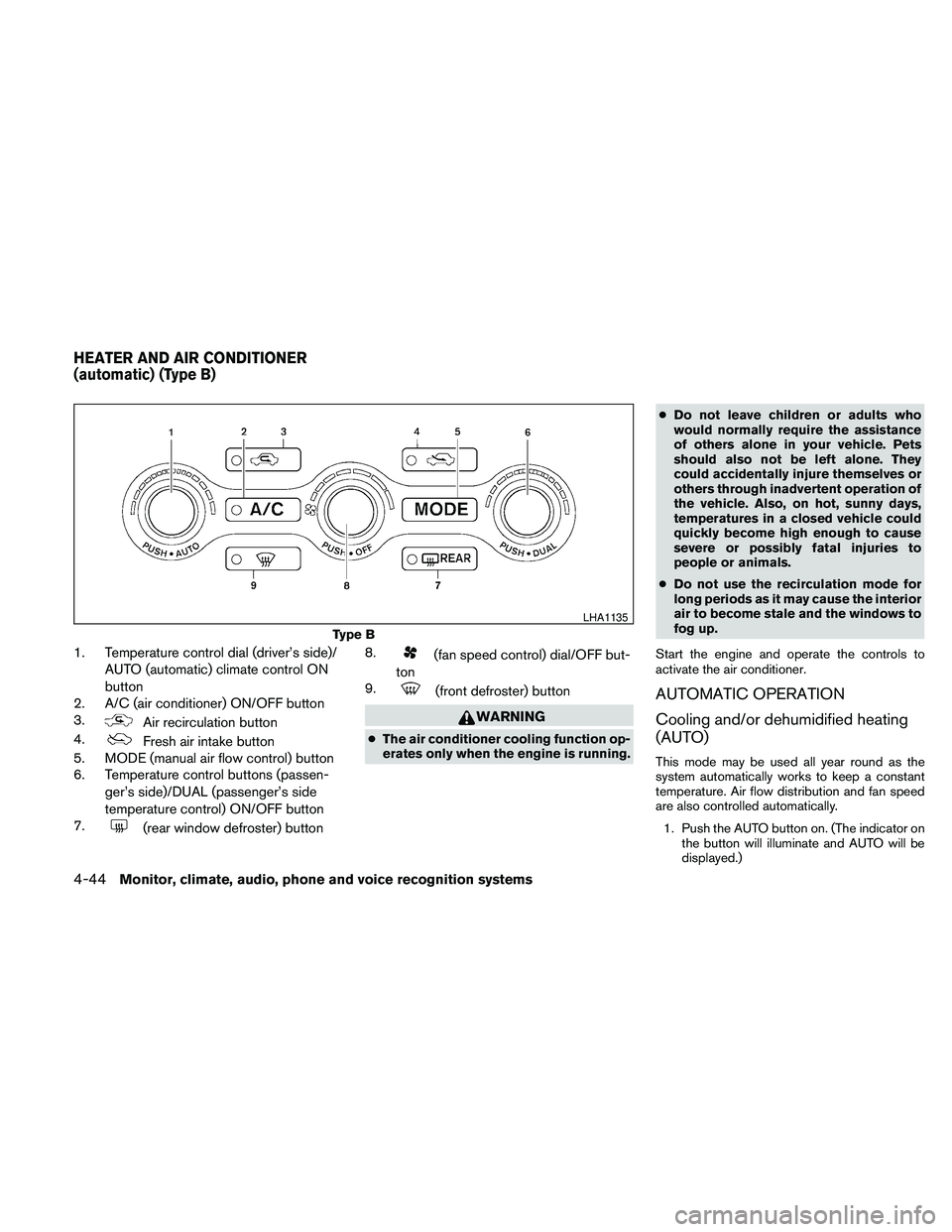
1. Temperature control dial (driver’s side)/
AUTO (automatic) climate control ON
button
2. A/C (air conditioner) ON/OFF button
3.
Air recirculation button
4.
Fresh air intake button
5. MODE (manual air flow control) button
6. Temperature control buttons (passen-
ger’s side)/DUAL (passenger’s side
temperature control) ON/OFF button
7.
(rear window defroster) button8.
(fan speed control) dial/OFF but-
ton
9.
(front defroster) button
WARNING
cThe air conditioner cooling function op-
erates only when the engine is running.cDo not leave children or adults who
would normally require the assistance
of others alone in your vehicle. Pets
should also not be left alone. They
could accidentally injure themselves or
others through inadvertent operation of
the vehicle. Also, on hot, sunny days,
temperatures in a closed vehicle could
quickly become high enough to cause
severe or possibly fatal injuries to
people or animals.
cDo not use the recirculation mode for
long periods as it may cause the interior
air to become stale and the windows to
fog up.
Start the engine and operate the controls to
activate the air conditioner.
AUTOMATIC OPERATION
Cooling and/or dehumidified heating
(AUTO)
This mode may be used all year round as the
system automatically works to keep a constant
temperature. Air flow distribution and fan speed
are also controlled automatically.
1. Push the AUTO button on. (The indicator on
the button will illuminate and AUTO will be
displayed.)
Type B
LHA1135
HEATER AND AIR CONDITIONER
(automatic) (Type B)
4-44Monitor, climate, audio, phone and voice recognition systems
Page 206 of 457
Fresh air intake
Push thefresh air intake button to draw
outside air into the passenger compartment.
The
indicator light on the button will come
on.
Automatic intake air control
In the AUTO mode, the intake air will be con-
trolled automatically. To manually control the in-
take air, push the
air recirculation button.
To return to the automatic control mode, push
and hold the
air recirculation button or
push and hold the
fresh air intake button
for about 2 seconds. The indicator lights (both air
recirculation and fresh air intake buttons) will
flash twice, and then the intake air will be con-
trolled automatically.
Air flow control
Pushing the MODE button manually controls air
flow and selects the air outlet:
— Air flows from center and side
vents.
— Air flows from center and side
vents and foot outlets.
— Air flows mainly from foot outlets.
— Air flows from defroster and foot
outlets.
— Air flows from defroster outlets.
To turn system off
Press the OFF button.
OPERATING TIPS
cWhen the engine coolant temperature and
outside air temperature are low, the air flow
from the foot outlets may not operate for a
maximum of 150 seconds. However, this is
not a malfunction. After the coolant tempera-
ture warms up, air flow from the foot outlets
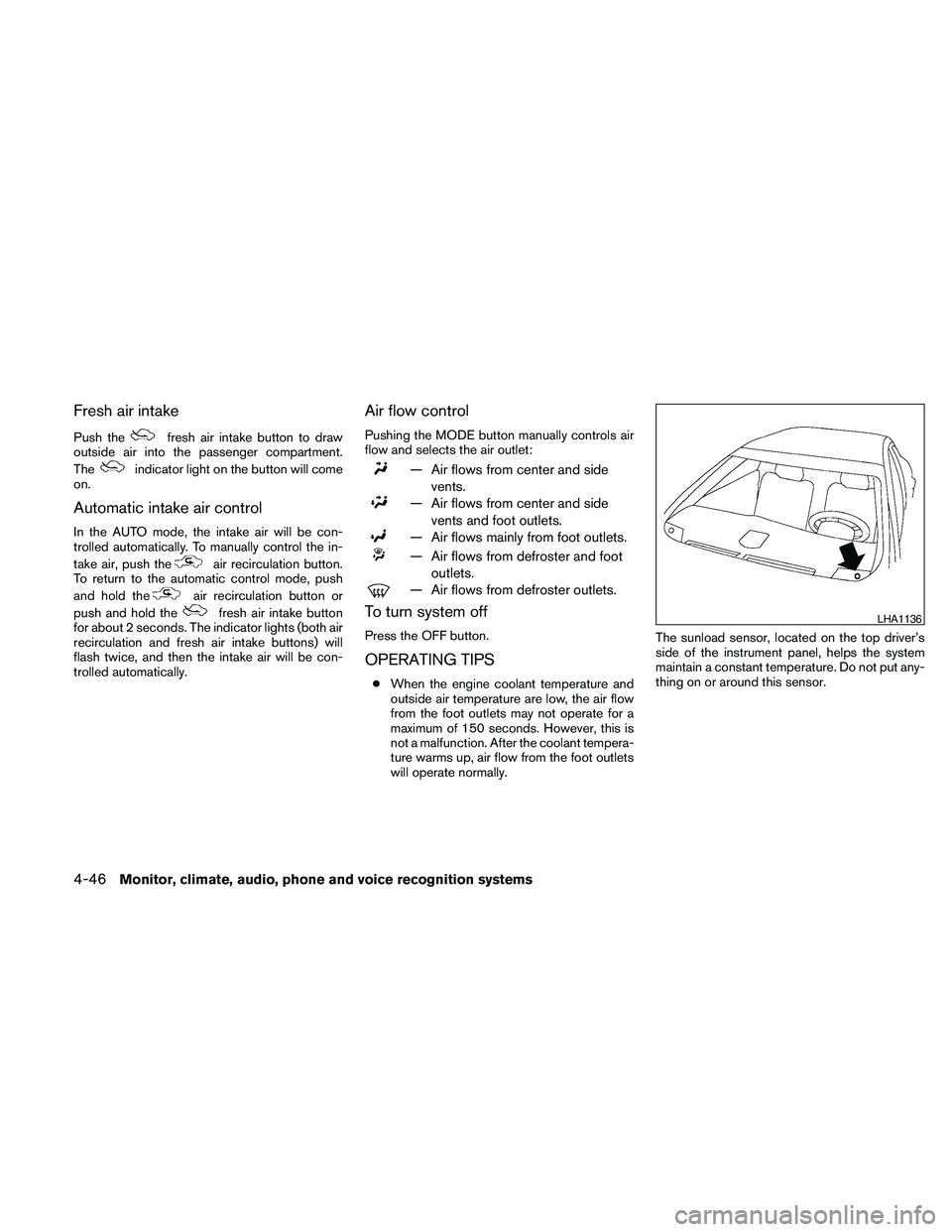
will operate normally.The sunload sensor, located on the top driver’s
side of the instrument panel, helps the system
maintain a constant temperature. Do not put any-
thing on or around this sensor.
LHA1136
4-46Monitor, climate, audio, phone and voice recognition systems
Page 224 of 457
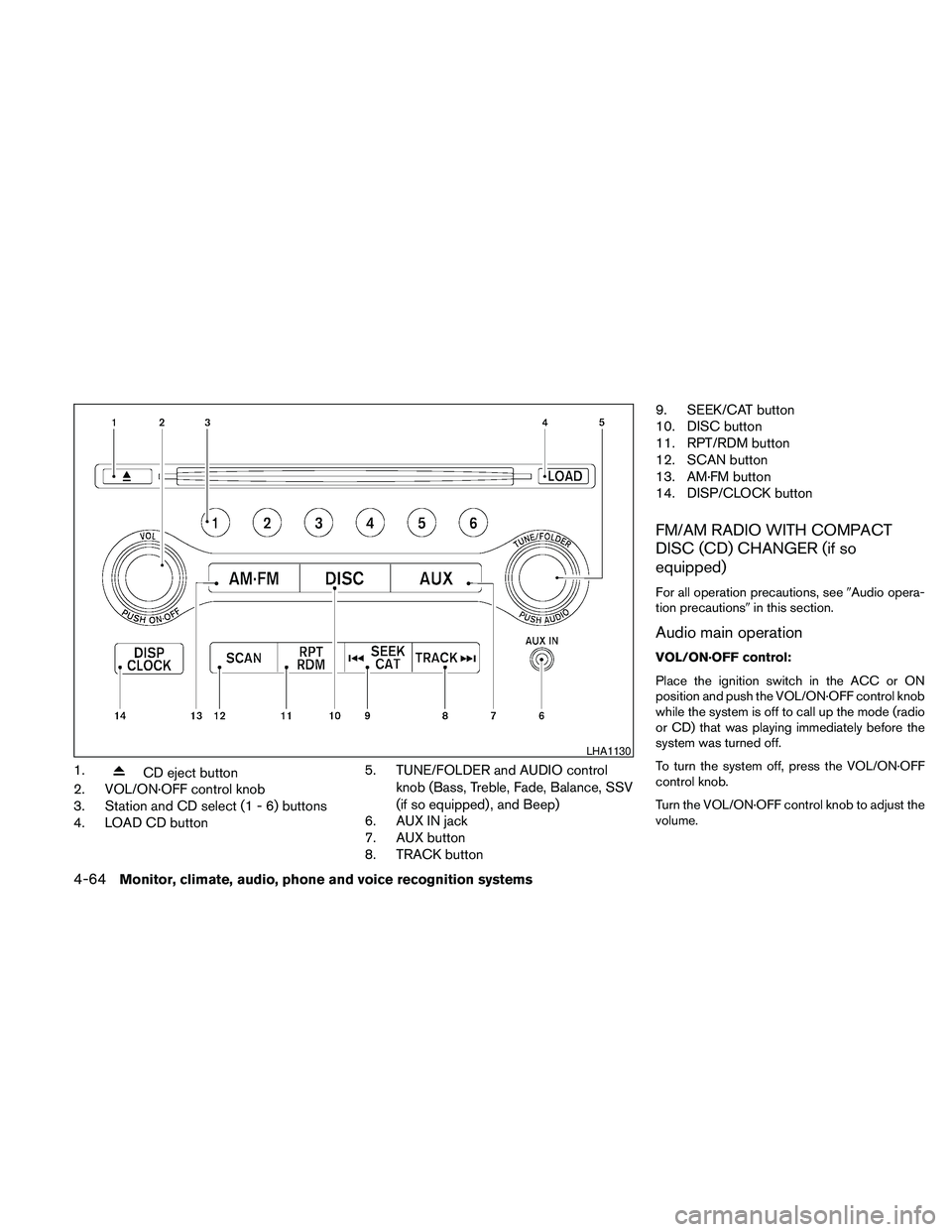
1.CD eject button
2. VOL/ON·OFF control knob
3. Station and CD select (1 - 6) buttons
4. LOAD CD button5. TUNE/FOLDER and AUDIO control
knob (Bass, Treble, Fade, Balance, SSV
(if so equipped) , and Beep)
6. AUX IN jack
7. AUX button
8. TRACK button9. SEEK/CAT button
10. DISC button
11. RPT/RDM button
12. SCAN button
13. AM·FM button
14. DISP/CLOCK button
FM/AM RADIO WITH COMPACT
DISC (CD) CHANGER (if so
equipped)
For all operation precautions, see9Audio opera-
tion precautions9in this section.
Audio main operation
VOL/ON·OFF control:
Place the ignition switch in the ACC or ON
position and push the VOL/ON·OFF control knob
while the system is off to call up the mode (radio
or CD) that was playing immediately before the
system was turned off.
To turn the system off, press the VOL/ON·OFF
control knob.
Turn the VOL/ON·OFF control knob to adjust the
volume.
LHA1130
4-64Monitor, climate, audio, phone and voice recognition systems
Page 226 of 457
cArtist name displays the name of the artist of
the song playing.
cAlbum title displays the title of the album of
the song playing.
FM/AM radio operation
FM/AM band select:
Pressing the AM·FM button will change the band
as follows:
AM!FM1!FM2!AM
When the AM·FM button is pressed while the
ignition switch is in the ACC or ON position, the
radio will come on at the station last played.
The last station played will also come on when
the VOL/ON·OFF control knob is pressed ON.
If a compact disc is playing when the AM·FM
button is pressed, the compact disc will auto-
matically be turned off and the last radio station
played will come on.
The FM stereo indicator ST will illuminate during
FM stereo reception. When the stereo broadcast
signal is weak, the radio will automatically change
from stereo to monaural reception.
TUNE/FOLDER (Tuning) knob:
To manually tune the radio, turn the
TUNE/FOLDER knob to the right or left.
SEEK/CAT and TRACK
tuning buttons:
Press the SEEK/CAT
button or the
TRACK
button to tune from high to low or
low to high frequencies and stop at the next
broadcasting station.
SCAN tuning:
Press the SCAN button to stop at each broad-
casting station for 5 seconds. Pressing the
SCAN button again during this 5-second period
will stop scan tuning and the radio will remain
tuned to that station. If the SCAN button is not
pressed within 5 seconds, scan tuning moves to
the next station.
1 to 6 Station memory operations:
Twelve stations can be set for the FM band (6 for
FM1, 6 for FM2) and six stations can be set for
the AM band.
1. Choose the radio band AM, FM1 or FM2
using the AM·FM select button.
2. Tune to the desired station using manual,
SEEK or SCAN tuning. Press and hold any
of the desired station memory buttons (1 –
6) until a beep sound is heard.3. The channel indicator will then come on and
the sound will resume. Programming is now
complete.
4. Other buttons can be set in the same man-
ner.
If the battery cable is disconnected or if the fuse
opens, the radio memory will be canceled. In that
case, reset the desired stations.
Compact disc (CD) changer operation
Place the ignition switch in the ACC or ON
position and press the LOAD button, then press
one of the CD insert (1 – 6) slots. Insert the
compact disc into the slot with the label side
facing up. The compact disc will be guided auto-
matically into the slot and start playing.
If the radio is already operating, it will automati-
cally turn off and the compact disc will play.
If the system has been turned off while a compact
disc was playing, pressing the VOL/ON·OFF
control knob will start the compact disc.
LOAD button:
To insert a CD in the CD changer, press the
LOAD button for less than 1.5 seconds. Select
the loading slot by pressing the CD insert select
button (1 – 6) , then insert the CD.
4-66Monitor, climate, audio, phone and voice recognition systems
Page 227 of 457
To insert 6 CDs to the CD changer, press the
LOAD button for more than 1.5 seconds.
The slot numbers (1 – 6) will illuminate on the
display when CDs are loaded into the changer.
DISC button:
When the DISC button is pressed with the sys-
tem off and a compact disc loaded, the system
will turn on and the compact disc will start to play.
When the DISC button is pressed with a com-
pact disc loaded with the radio playing, the radio
will automatically be turned off and the compact
disc will start to play.
SEEK/CAT and TRACK
buttons:
When the SEEK/CAT
button is pressed
while a compact disc is playing, the track being
played returns to its beginning. Press several
times to skip back through tracks. The compact
disc will go back the number of times the button
is pressed.When the TRACK
button is pressed while
the compact disc is playing, the next track will
start to play from its beginning. Press several
times to skip through tracks. The compact disc
will advance the number of times the button is
pressed. (When the last track on the compact
disc is skipped through, the first track will be
played.)
SEEK/CAT and TRACK
(Rewind·Fast Forward)
buttons:
Press and hold the SEEK/CAT
(rewind)
button or the TRACK
(fast forward) button
while a compact disc is playing, the compact disc
will play while rewinding or fast forwarding. When
the button is released, the compact disc will
return to normal play speed.
TUNE/FOLDER knob
While playing an MP3/WMA CD, turn the
TUNE/FOLDER knob right or left to scan forward
or backward through available folders.
CD select buttons:
To play another CD that has been loaded, press a
CD select button (1 – 6) .RPT/RDM button:
When the RPT/RDM button is pressed while the
compact disc is playing, the play pattern can be
changed as follows:
CD:
All Disc Repeat!1 Disc Repeat!1 Track
Repeat!All Disc Random!1 Disc Random!
All Disc Repeat
MP3/WMA CD:
All Disc Repeat!1 Disc Repeat!1 Folder
Repeat!1 Track Repeat!All Disc Random!
1 Disc Random!1 Folder Random!All Disc
Repeat
All Disc Repeat: All discs loaded will be re-
peated.
1 Disc Repeat: The disc that is currently playing
will be repeated.
1 Track Repeat: The track that is currently playing
will be repeated.
1 Folder Repeat: The folder that is currently being
accessed will be repeated.
All Disc Random: All discs loaded will be played
in a mixed order.
1 Disc Random: The tracks on the disc that is
currently playing will be played in a mixed order.
1 Folder Random: The tracks in the folder that is
currently being accessed will be played in a
mixed order.
Monitor, climate, audio, phone and voice recognition systems4-67
Page 229 of 457
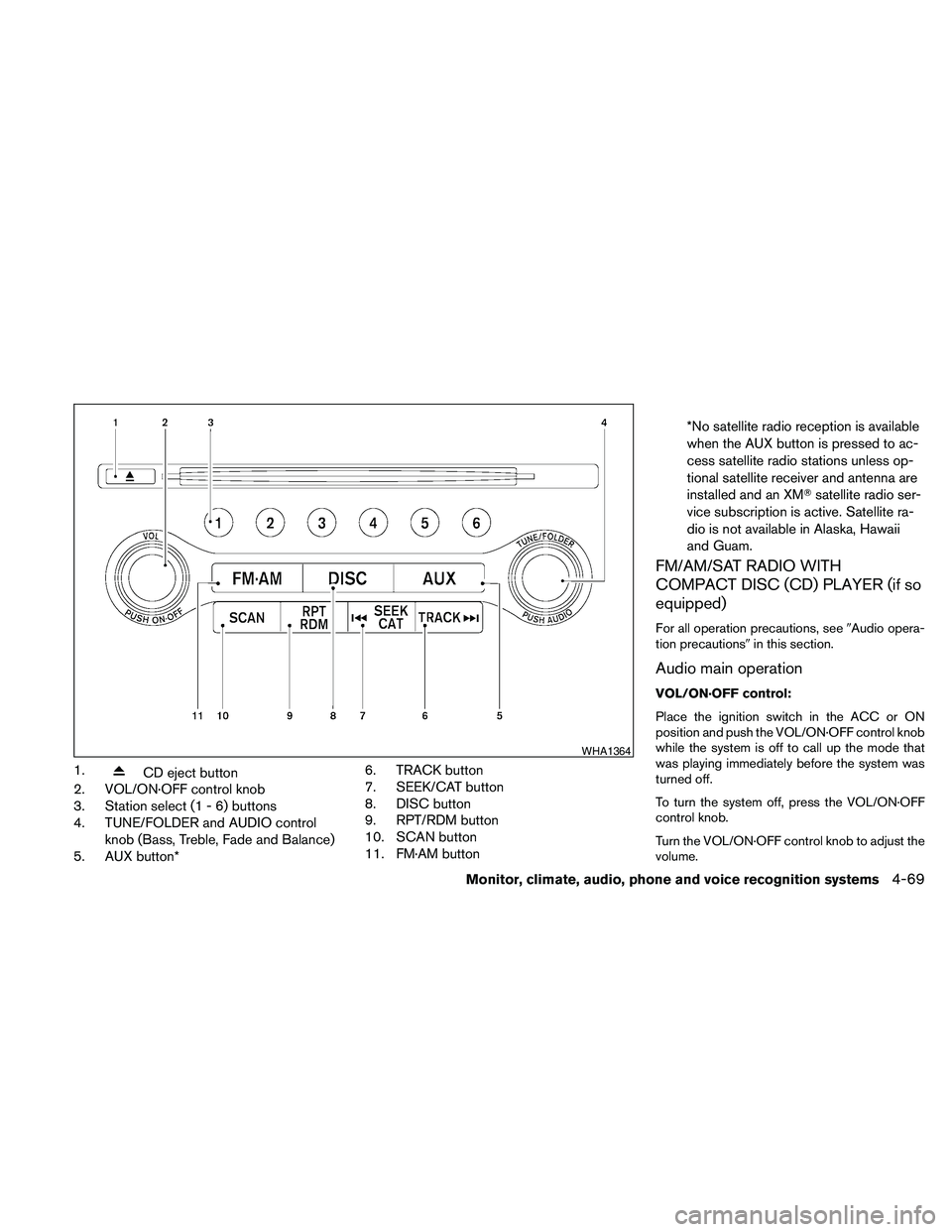
1.CD eject button
2. VOL/ON·OFF control knob
3. Station select (1 - 6) buttons
4. TUNE/FOLDER and AUDIO control
knob (Bass, Treble, Fade and Balance)
5. AUX button*6. TRACK button
7. SEEK/CAT button
8. DISC button
9. RPT/RDM button
10. SCAN button
11. FM·AM button*No satellite radio reception is available
when the AUX button is pressed to ac-
cess satellite radio stations unless op-
tional satellite receiver and antenna are
installed and an XMTsatellite radio ser-
vice subscription is active. Satellite ra-
dio is not available in Alaska, Hawaii
and Guam.
FM/AM/SAT RADIO WITH
COMPACT DISC (CD) PLAYER (if so
equipped)
For all operation precautions, see9Audio opera-
tion precautions9in this section.
Audio main operation
VOL/ON·OFF control:
Place the ignition switch in the ACC or ON
position and push the VOL/ON·OFF control knob
while the system is off to call up the mode that
was playing immediately before the system was
turned off.
To turn the system off, press the VOL/ON·OFF
control knob.
Turn the VOL/ON·OFF control knob to adjust the
volume.
WHA1364
Monitor, climate, audio, phone and voice recognition systems4-69
Page 232 of 457
When the AUX button is pressed while the igni-
tion switch is in the ACC or ON position, the
radio will come on at the station last played.
The last station played will also come on when
the VOL/ON·OFF control knob is pressed ON.
*When the AUX button is pressed, the satellite
radio mode will be skipped unless an optional
satellite receiver and antenna are installed and an
XMTsatellite radio service subscription is active.
Satellite radio is not available in Alaska, Hawaii
and Guam.
If a compact disc is playing when the AUX button
is pressed, the compact disc will automatically be
turned off and the last radio station played will
come on.
TUNE/FOLDER (Tuning) knob:
To manually tune the radio, turn the
TUNE/FOLDER knob to the right or left.
SEEK/CAT and TRACK
tuning buttons:
Press the SEEK/CAT
button or the
TRACK
button to tune from high to low or
low to high frequencies and stop at the next
broadcasting station.SCAN tuning:
Press the SCAN button to stop at each broad-
casting station for 5 seconds. Pressing the
SCAN button again during this five second pe-
riod will stop scan tuning and the radio will remain
tuned to that station. If the SCAN button is not
pressed within 5 seconds, scan tuning moves to
the next station.
1 to 6 Station memory operations:
Six stations can be set for the AM band. Twelve
stations can be set for the FM band (6 for FM1, 6
for FM2) . Eighteen stations can be set for the XM
band (6 for XM1, 6 for XM2, 6 for XM3) .
1. Choose the radio band AM, FM1 or FM2
using the FM·AM select button. Or choose
the satellite band SAT1 or SAT2 using the
AUX button.
2. Tune to the desired station using manual,
SEEK or SCAN tuning. Press and hold any
of the desired station memory buttons (1 –
6) until a beep sound is heard.
3. The channel indicator will then come on and
the sound will resume. Programming is now
complete.
4. Other buttons can be set in the same man-
ner.If the battery cable is disconnected, or if the fuse
opens, the radio memory will be canceled. In that
case, reset the desired stations.
Radio data system (RDS):
RDS stands for Radio Data System, and is a data
information service transmitted by some radio
stations on the FM band (not AM band) . Cur-
rently, most RDS stations are in large cities, but
many stations are now considering broadcasting
RDS data.
RDS can display:
cStation call sign, such as “WHFR 98.3”.
cStation name, such as “The Groove”.
cMusic or programming type such as “Clas-
sical”, “Country”, or “Rock”.
When the “Text” key is selected with the NISSAN
controller on the display while the radio is playing,
additional information is displayed on the screen.
If the station broadcasts RDS information, the
RDS icon is displayed.Compact disc (CD) player operation
Place the ignition in the ACC or ON position and
insert the compact disc into the slot with the label
side facing up. The compact disc will be guided
automatically into the slot and start playing.
4-72Monitor, climate, audio, phone and voice recognition systems
Page 233 of 457
If the radio is already operating, it will automati-
cally turn off and the compact disc will play.
If the system has been turned off while the com-
pact disc was playing, pressing the
VOL/ON·OFF control knob will start the compact
disc.
DISC button:
When the DISC button is pressed with the sys-
tem off and a compact disc loaded, the system
will turn on and the compact disc will start to play.
When the DISC button is pressed with a com-
pact disc loaded with the radio playing, the radio
will automatically be turned off and the compact
disc will start to play.
SEEK/CAT and TRACK
buttons:
When the SEEK/CAT
button is pressed
while a compact disc is playing, the track being
played returns to its beginning. Press several
times to skip back through tracks. The compact
disc will go back the number of times the button
is pressed.
When the TRACK
button is pressed while
a compact disc is playing, the next track will start
to play from its beginning. Press several times to
skip through tracks. The compact disc will ad-vance the number of times the button is pressed.
(When the last track on the compact disc is
skipped through, the first track will be played.)
The NISSAN controller can also be used to se-
lect tracks when a CD is playing.
SEEK/CAT and TRACK
(Rewind and Fast
Forward) buttons:
Press and hold the SEEK/CAT
(rewind)
button or the TRACK
(fast forward) button
while a compact disc is playing; the compact disc
will play while rewinding or fast forwarding. When
the button is released, the compact disc will
return to normal play speed.
TUNE/FOLDER knob
While playing an MP3/WMA CD, turn the
TUNE/FOLDER knob right or left to scan forward
or backward through available folders.
RPT/RDM button:
When the RPT/RDM button is pressed while the
compact disc is playing, the play pattern can be
changed as follows:
CD:
Repeat All!1 Track Repeat!1 Disc Random
!Repeat AllCD with compressed audio files:
Repeat All!1 Folder Repeat!1 Track Repeat
!1 Disc Random!1 Folder Random!Re-
peat All
Repeat All: Normal play mode. All tracks will
constantly play in sequential order.
1 Folder Repeat: The folder that is currently being
accessed will be repeated.
1 Track Repeat: The track that is currently playing
will be repeated.
1 Disc Random: The tracks on the disc that is
currently playing will be played in a mixed order.
1 Folder Random: The tracks in the folder that is
currently playing will be played in a mixed order.
CD EJECT button:
When the
button is pressed with the com-
pact disc loaded, the compact disc will be
ejected.
When the
button is pressed while the
compact disc is being played, the compact disc
will eject and the system will turn off.
Monitor, climate, audio, phone and voice recognition systems4-73
Page 235 of 457
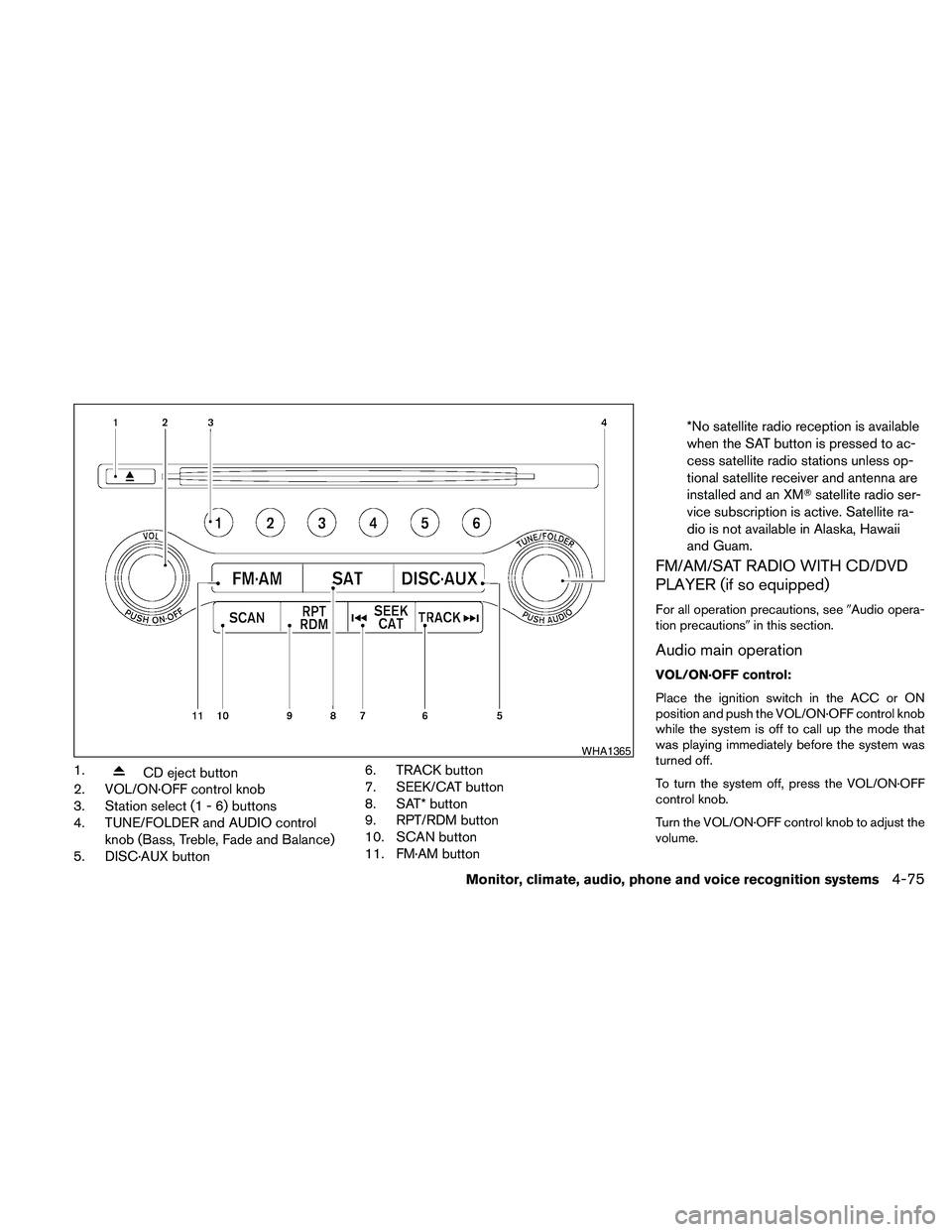
1.CD eject button
2. VOL/ON·OFF control knob
3. Station select (1 - 6) buttons
4. TUNE/FOLDER and AUDIO control
knob (Bass, Treble, Fade and Balance)
5. DISC·AUX button6. TRACK button
7. SEEK/CAT button
8. SAT* button
9. RPT/RDM button
10. SCAN button
11. FM·AM button*No satellite radio reception is available
when the SAT button is pressed to ac-
cess satellite radio stations unless op-
tional satellite receiver and antenna are
installed and an XMTsatellite radio ser-
vice subscription is active. Satellite ra-
dio is not available in Alaska, Hawaii
and Guam.
FM/AM/SAT RADIO WITH CD/DVD
PLAYER (if so equipped)
For all operation precautions, see9Audio opera-
tion precautions9in this section.
Audio main operation
VOL/ON·OFF control:
Place the ignition switch in the ACC or ON
position and push the VOL/ON·OFF control knob
while the system is off to call up the mode that
was playing immediately before the system was
turned off.
To turn the system off, press the VOL/ON·OFF
control knob.
Turn the VOL/ON·OFF control knob to adjust the
volume.
WHA1365
Monitor, climate, audio, phone and voice recognition systems4-75