mirror NISSAN MAXIMA 2010 Owner´s Manual
[x] Cancel search | Manufacturer: NISSAN, Model Year: 2010, Model line: MAXIMA, Model: NISSAN MAXIMA 2010Pages: 457, PDF Size: 4.66 MB
Page 9 of 457
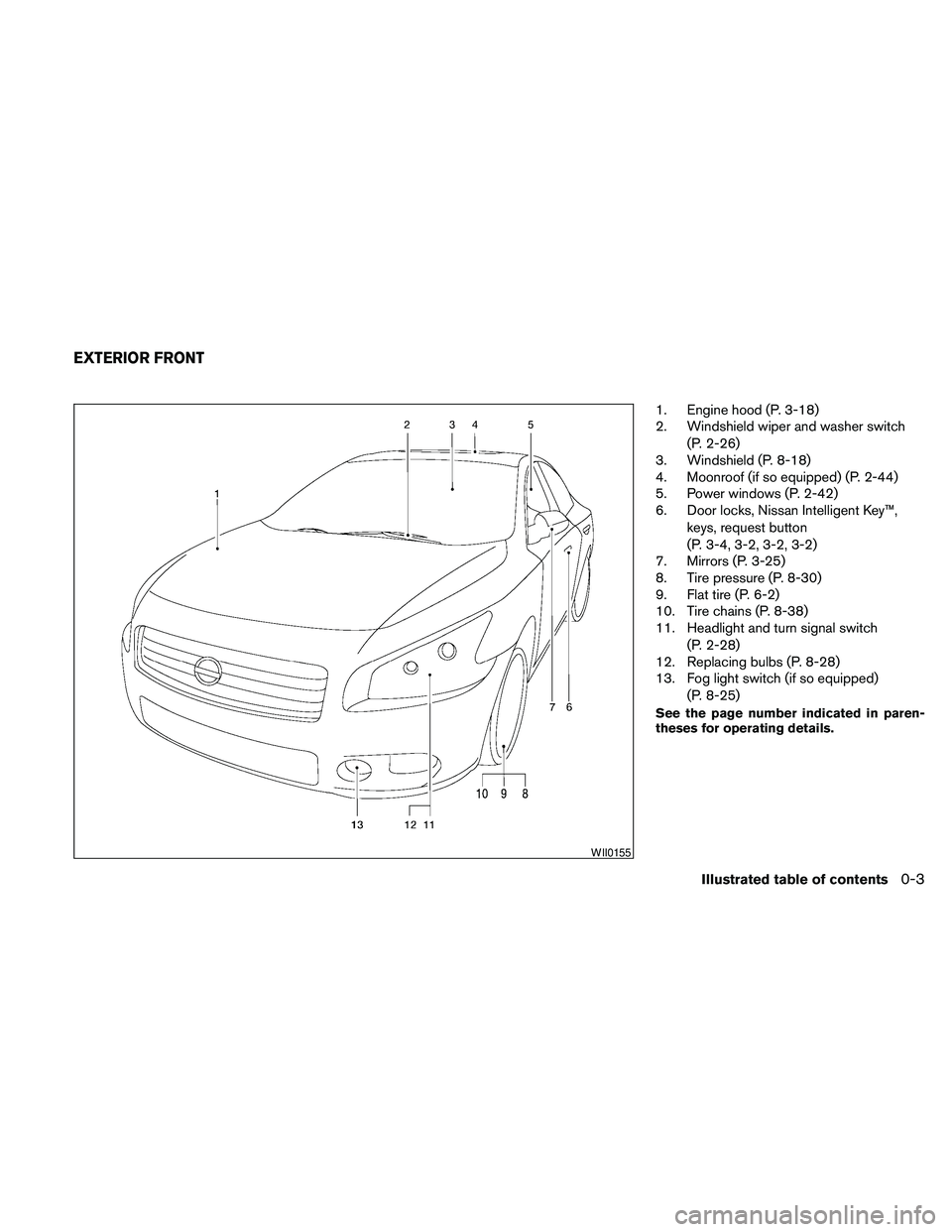
1. Engine hood (P. 3-18)
2. Windshield wiper and washer switch
(P. 2-26)
3. Windshield (P. 8-18)
4. Moonroof (if so equipped) (P. 2-44)
5. Power windows (P. 2-42)
6. Door locks, Nissan Intelligent Key™,
keys, request button
(P. 3-4, 3-2, 3-2, 3-2)
7. Mirrors (P. 3-25)
8. Tire pressure (P. 8-30)
9. Flat tire (P. 6-2)
10. Tire chains (P. 8-38)
11. Headlight and turn signal switch
(P. 2-28)
12. Replacing bulbs (P. 8-28)
13. Fog light switch (if so equipped)
(P. 8-25)
See the page number indicated in paren-
theses for operating details.
WII0155
EXTERIOR FRONT
Illustrated table of contents0-3
Page 11 of 457
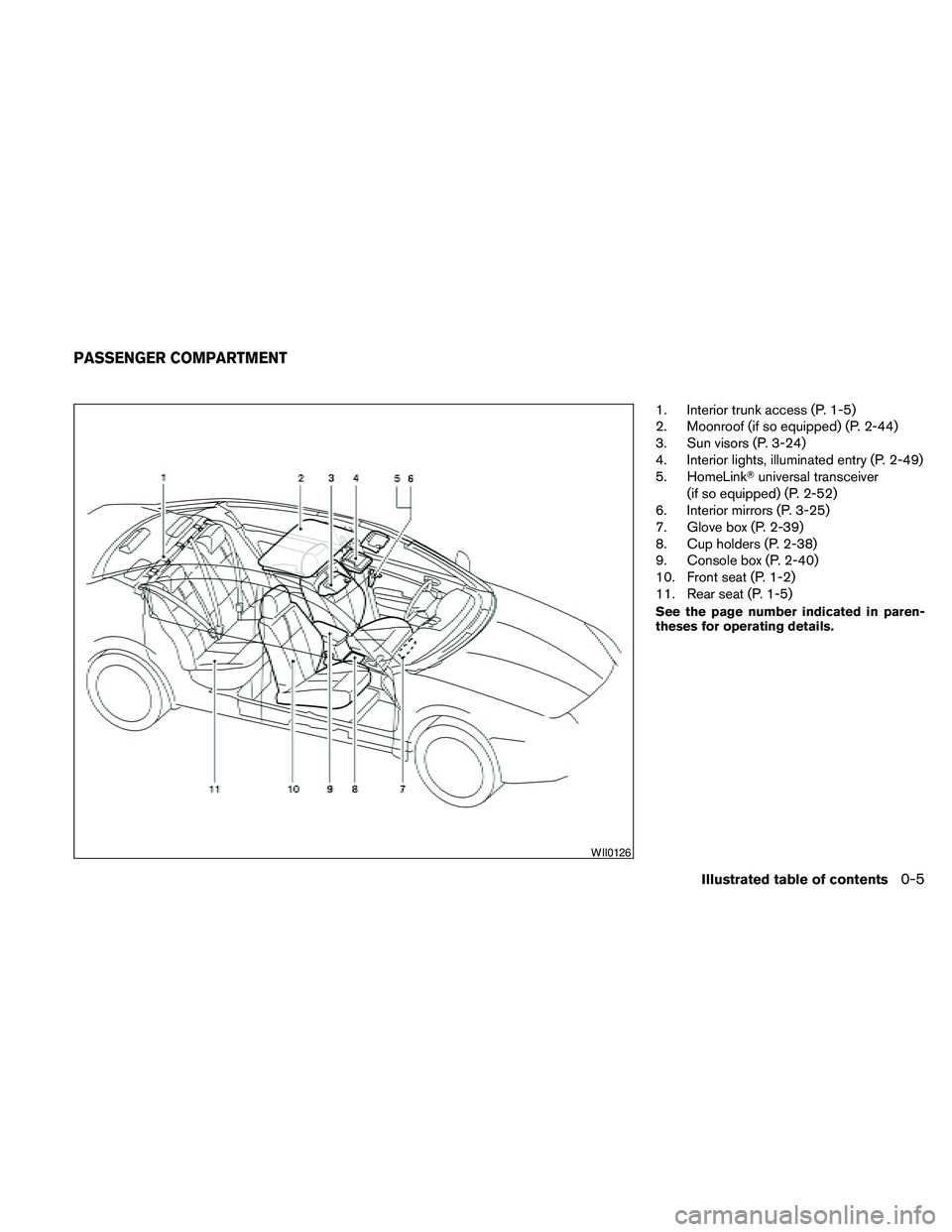
1. Interior trunk access (P. 1-5)
2. Moonroof (if so equipped) (P. 2-44)
3. Sun visors (P. 3-24)
4. Interior lights, illuminated entry (P. 2-49)
5. HomeLinkTuniversal transceiver
(if so equipped) (P. 2-52)
6. Interior mirrors (P. 3-25)
7. Glove box (P. 2-39)
8. Cup holders (P. 2-38)
9. Console box (P. 2-40)
10. Front seat (P. 1-2)
11. Rear seat (P. 1-5)
See the page number indicated in paren-
theses for operating details.
WII0126
PASSENGER COMPARTMENT
Illustrated table of contents0-5
Page 13 of 457
24. Vehicle Dynamic Control (VDC) OFF
switch (P. 2-36)
Outside mirror controls (P. 3-27)
Heated steering wheel switch
(if so equipped) (P. 2-35)
Trunk lid release switch (P. 3-20)
Rear control cancel switch
(if so equipped) (P. 2-48)
* Refer to the separate Navigation System
Owner’s Manual (if so equipped) .
See the page number indicated in paren-
theses for operating details.
Illustrated table of contents0-7
Page 72 of 457
2 Instruments and controls
Instrument panel...................................2-2
Meters and gauges................................2-3
Speedometer and odometer.....................2-4
Tachometer....................................2-5
Engine coolant temperature gauge...............2-5
Fuel gauge....................................2-6
Compass display (if so equipped)...................2-6
Compass display...............................2-7
Warning/indicator lights and audible reminders......2-10
Checking bulbs...............................2-10
Warning lights................................2-10
Indicator lights................................2-14
Audible reminders.............................2-16
Vehicle information display.........................2-17
How to use the vehicle information display.......2-17
Security systems.................................2-24
Vehicle security system.........................2-24
NISSAN vehicle immobilizer system.............2-25
Windshield wiper and washer switch...............2-26
Switch operation..............................2-26
Rear window and outside mirror (if so equipped)
defroster switch..................................2-27
Headlight and turn signal switch....................2-28Xenon headlights (if so equipped)...............2-28
Headlight control switch........................2-29
Daytime running light system (Canada only)......2-31
Instrument brightness control...................2-32
Turn signal switch.............................2-32
Fog light switch (if so equipped)................2-32
Hazard warning flasher switch.....................2-33
Horn............................................2-33
Climate control seat switch (if so equipped).........2-34
Heated seats (if so equipped)......................2-35
Heated steering wheel (if so equipped).............2-35
Vehicle Dynamic Control (VDC) OFF switch.........2-36
Power outlet.....................................2-36
Storage.........................................2-37
Map pockets..................................2-37
Seatback pockets.............................2-37
Sunglasses holder (if so equipped)..............2-38
Cup holders..................................2-38
Glove box....................................2-39
Console box..................................2-40
Grocery hooks................................2-40
Cargo net (if so equipped)......................2-41
Windows........................................2-42
Page 75 of 457
24. Vehicle Dynamic Control (VDC) OFF
switch (P. 2-36)
Outside mirror controls (P. 3-27)
Heated steering wheel switch
(if so equipped) (P. 2-35)
Trunk lid release switch (P. 3-20)
Rear control cancel switch
(if so equipped) (P. 2-48)
* Refer to the separate Navigation System
Owner’s Manual (if so equipped) .
See the page number indicated in paren-
theses for operating details.
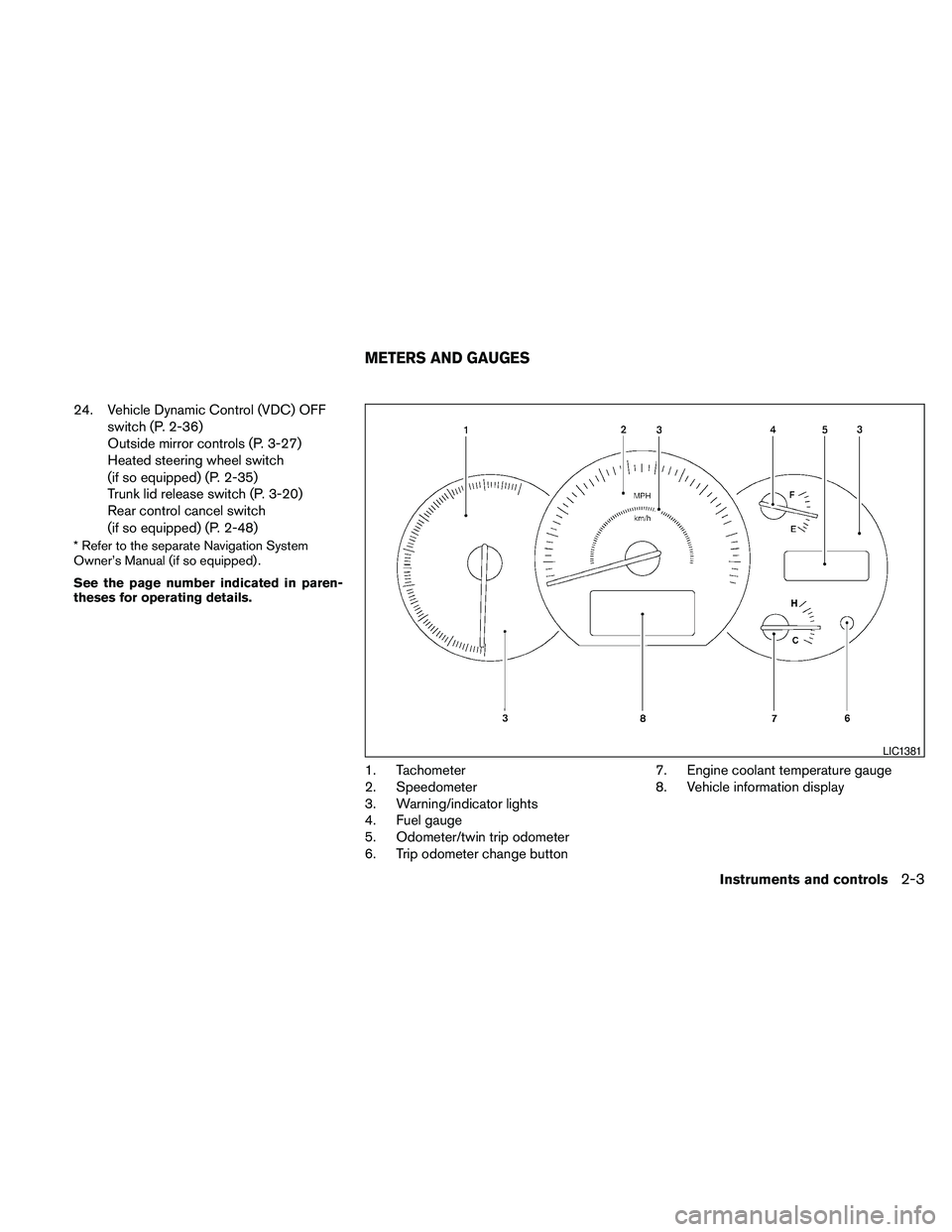
1. Tachometer
2. Speedometer
3. Warning/indicator lights
4. Fuel gauge
5. Odometer/twin trip odometer
6. Trip odometer change button7. Engine coolant temperature gauge
8. Vehicle information display
LIC1381
METERS AND GAUGES
Instruments and controls2-3
Page 78 of 457

FUEL GAUGE
The gauge indicates theapproximatefuel level
in the tank.
The gauge may move slightly during braking,
turning, acceleration, or going up or down hills.
The gauge needle returns to E (Empty) after the
ignition is placed in the OFF position.
The low fuel warning light comes on when the
amount of fuel in the tank is getting low.
Refill the fuel tank before the gauge regis-
ters E (Empty) .The
indicates that the fuel-filler door is
located on the driver’s side of the vehicle.
CAUTION
cIf the vehicle runs out of fuel,
the
Malfunction Indicator Light
(MIL) may come on. Refuel as soon as
possible. After a few driving trips,
the
light should turn off. If the
light remains on after a few driving
trips, have the vehicle inspected by a
NISSAN dealer.
cFor additional information, see “Mal-
function Indicator Light (MIL)” later in
this section.This unit measures terrestrial magnetism and in-
dicates the heading direction of the vehicle.
With the ignition placed in the ON position, press
the
button as described in the charts be-
low to activate various features of the automatic
anti-glare rearview mirror.
Push and hold
the
button for about:Feature:
(Push button again for about 1 sec-
ond to change settings)
1 second Compass display toggles on/off
8 secondsCompass zone can be changed to
correct false compass readings
10 seconds Compass enters calibration mode
For information about the automatic anti-glare
feature, refer to “Automatic anti-glare rearview
mirror” in the “Pre-driving checks and adjust-
ments” section.
LIC1385
COMPASS DISPLAY (if so equipped)
2-6Instruments and controls
Page 81 of 457

1. With the display turned on, press and hold
the
for about 10 seconds. The “C”
icon in the compass display will illuminate.
2. Calibrate the compass by driving the vehicle
in three complete circles at a maximum
speed of 5 MPH (8 km/h) .
3. After completing the circles, the display
should return to normal.
CAUTION
cDo not install a ski rack, antenna, etc.,
which are attached to the vehicle by
means of a magnet. They affect the op-
eration of the compass.
cWhen cleaning the mirror, use a paper
towel or similar material dampened
with glass cleaner. Do not spray glass
cleaner directly on the mirror as it may
cause the liquid cleaner to enter the
mirror housing.
Instruments and controls2-9
Page 99 of 457
NOTE:
You can turn on or turn off the driving
speed dependent intermittent wiper func-
tion for vehicles with navigation system.
Refer to “Comfort settings” in the “Monitor,
climate, audio, phone and voice recogni-
tion systems” section.
s2Low — continuous low speed operation
s3High — continuous high speed operation
Push the lever up
s4to have one sweep opera-
tion of the wiper.
Pull the lever toward you
s5to operate the
washer. The wiper will also operate several times.
WARNING
In freezing temperatures the washer solu-
tion may freeze on the windshield and
obscure your vision which may lead to an
accident. Warm the windshield with the
defroster before you wash the windshield.
CAUTION
cDo not operate the washer continu-
ously for more than 30 seconds.
cDo not operate the washer if the reser-
voir tank is empty.
cDo not fill the window washer reservoir
tank with washer fluid concentrates at
full strength. Some methyl alcohol
based washer fluid concentrates may
permanently stain the grille if spilled
while filling the window washer reser-
voir tank.
cPre-mix washer fluid concentrates with
water to the manufacturer’s recom-
mended levels before pouring the fluid
into the window washer reservoir tank.
Do not use the window washer reservoir
tank to mix the washer fluid concen-
trate and water.To defrost the rear window glass and outside
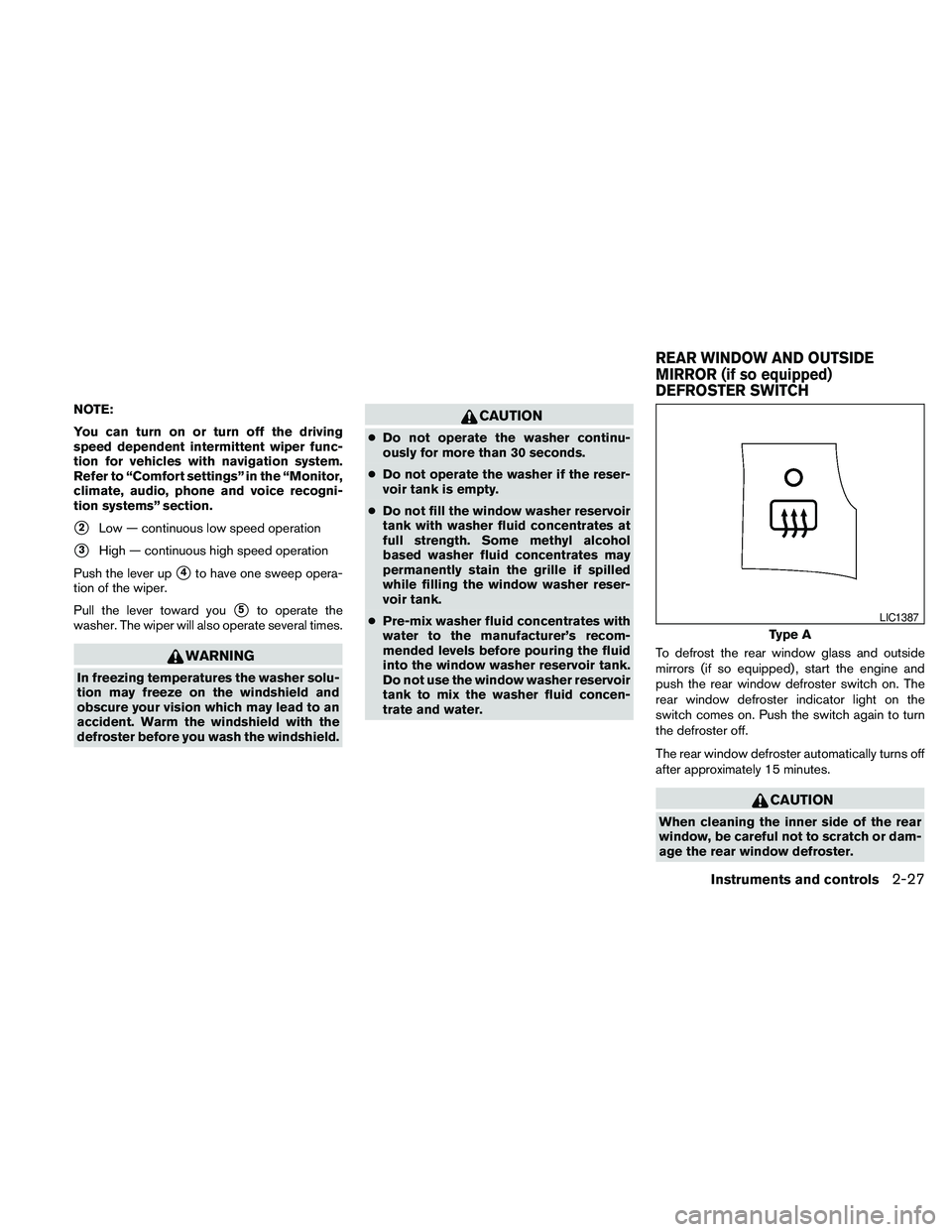
mirrors (if so equipped) , start the engine and
push the rear window defroster switch on. The
rear window defroster indicator light on the
switch comes on. Push the switch again to turn
the defroster off.
The rear window defroster automatically turns off
after approximately 15 minutes.
CAUTION
When cleaning the inner side of the rear
window, be careful not to scratch or dam-
age the rear window defroster.
Type A
LIC1387
REAR WINDOW AND OUTSIDE
MIRROR (if so equipped)
DEFROSTER SWITCH
Instruments and controls2-27
Page 129 of 457
3 Pre-driving checks and adjustments
Keys .............................................3-2
NISSAN Intelligent Key™........................3-2
NISSAN Vehicle Immobilizer System keys.........3-3
Doors............................................3-4
Locking with key................................3-4
Locking with inside lock knob....................3-5
Locking with power door lock switch.............3-5
Automatic door locks...........................3-6
Child safety rear door lock.......................3-6
NISSAN Intelligent Key™...........................3-7
Operating range................................3-9
Door locks/unlocks precaution...................3-9
NISSAN Intelligent Key™ Operation..............3-10
How to use the remote keyless entry
function......................................3-13
Warning signals...............................3-16
Troubleshooting guide.........................3-16
Hood...........................................3-18
Trunk lid.........................................3-18Opener operation..............................3-19
Secondary trunk lid release.....................3-20
Interior trunk lid release........................3-20
Fuel-filler door...................................3-21
Opening the fuel-filler door.....................3-21
Fuel-filler cap.................................3-21
Tilt/telescopic steering............................3-23
Automatic operation (if so equipped).............3-23
Manual operation (if so equipped)...............3-24
Sun visors.......................................3-24
Vanity mirrors.................................3-25
Mirrors..........................................3-25
Automatic anti-glare rearview mirror.............3-25
Outside mirrors...............................3-27
Automatic drive positioner (if so equipped)..........3-29
Memory storage function.......................3-29
Entry/exit function.............................3-31
System operation..............................3-31
Page 153 of 457
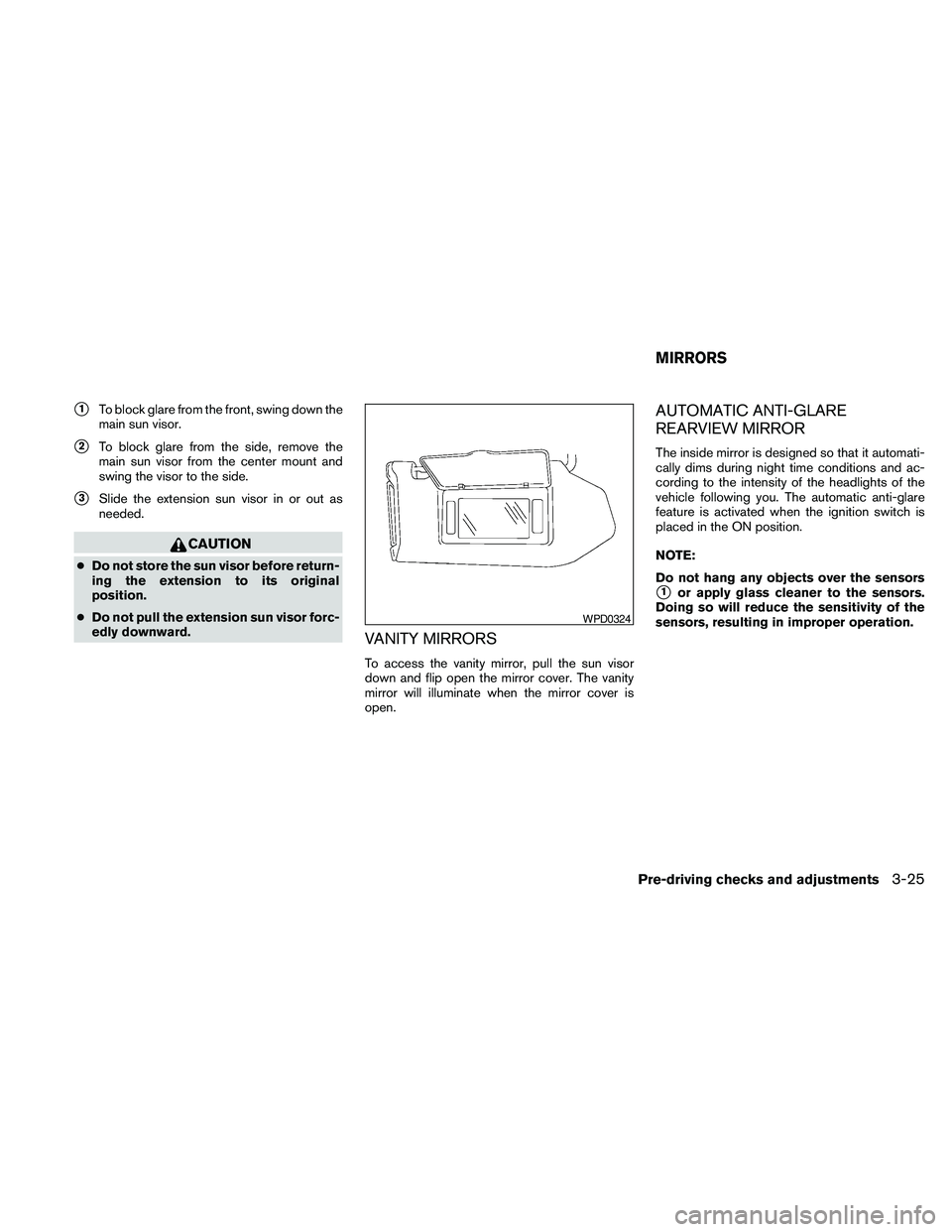
s1To block glare from the front, swing down the
main sun visor.
s2To block glare from the side, remove the
main sun visor from the center mount and
swing the visor to the side.
s3Slide the extension sun visor in or out as
needed.
CAUTION
cDo not store the sun visor before return-
ing the extension to its original
position.
cDo not pull the extension sun visor forc-
edly downward.
VANITY MIRRORS
To access the vanity mirror, pull the sun visor
down and flip open the mirror cover. The vanity
mirror will illuminate when the mirror cover is
open.
AUTOMATIC ANTI-GLARE
REARVIEW MIRROR
The inside mirror is designed so that it automati-
cally dims during night time conditions and ac-
cording to the intensity of the headlights of the
vehicle following you. The automatic anti-glare
feature is activated when the ignition switch is
placed in the ON position.
NOTE:
Do not hang any objects over the sensors
s1or apply glass cleaner to the sensors.
Doing so will reduce the sensitivity of the
sensors, resulting in improper operation.
WPD0324
MIRRORS
Pre-driving checks and adjustments3-25