lock NISSAN MAXIMA 2010 Owner´s Manual
[x] Cancel search | Manufacturer: NISSAN, Model Year: 2010, Model line: MAXIMA, Model: NISSAN MAXIMA 2010Pages: 457, PDF Size: 4.66 MB
Page 173 of 457
cNewfoundland
cAleutian
cHawaii
cAlaska
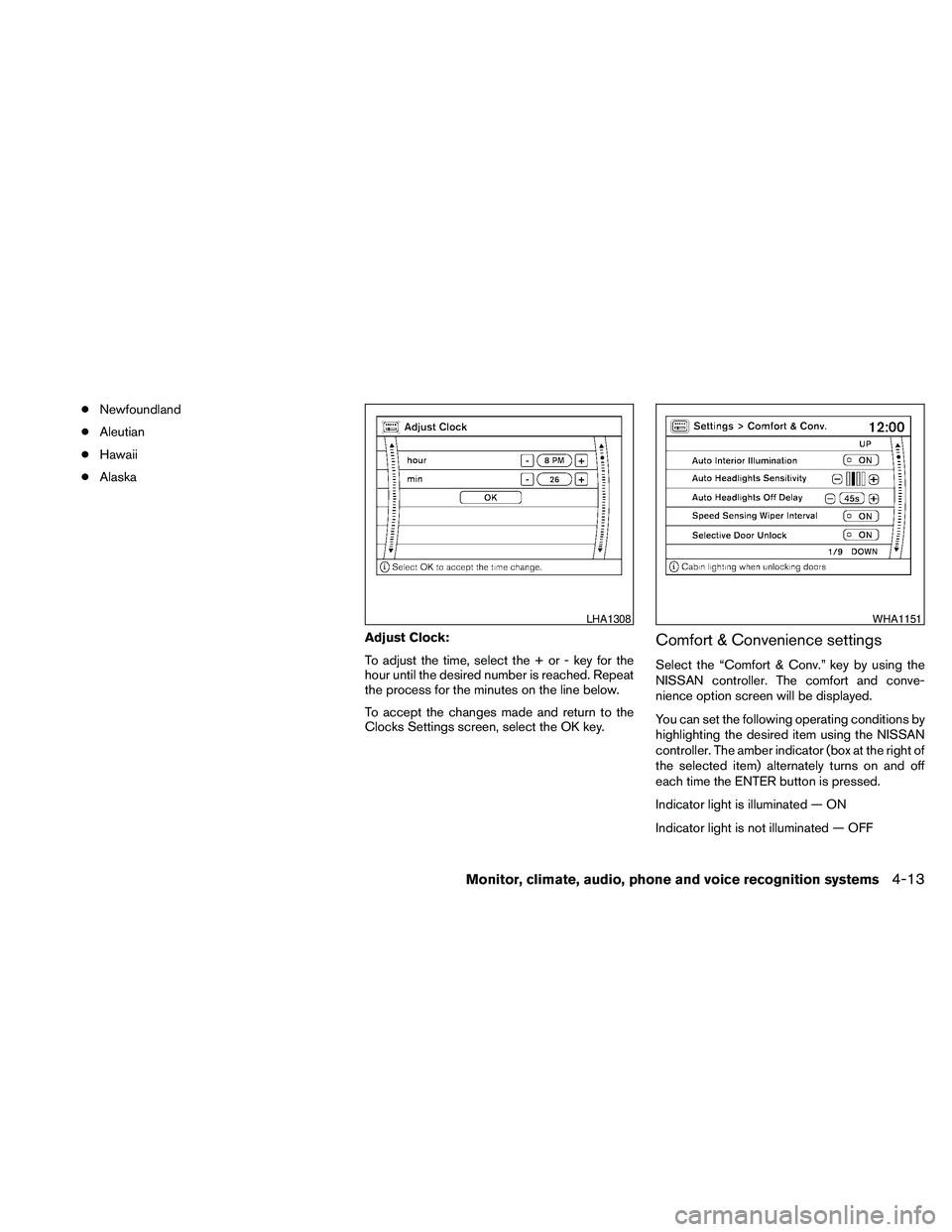
Adjust Clock:
To adjust the time, select the + or - key for the
hour until the desired number is reached. Repeat
the process for the minutes on the line below.
To accept the changes made and return to the
Clocks Settings screen, select the OK key.
Comfort & Convenience settings
Select the “Comfort & Conv.” key by using the
NISSAN controller. The comfort and conve-
nience option screen will be displayed.
You can set the following operating conditions by
highlighting the desired item using the NISSAN
controller. The amber indicator (box at the right of
the selected item) alternately turns on and off
each time the ENTER button is pressed.
Indicator light is illuminated — ON
Indicator light is not illuminated — OFF
LHA1308WHA1151
Monitor, climate, audio, phone and voice recognition systems4-13
Page 174 of 457
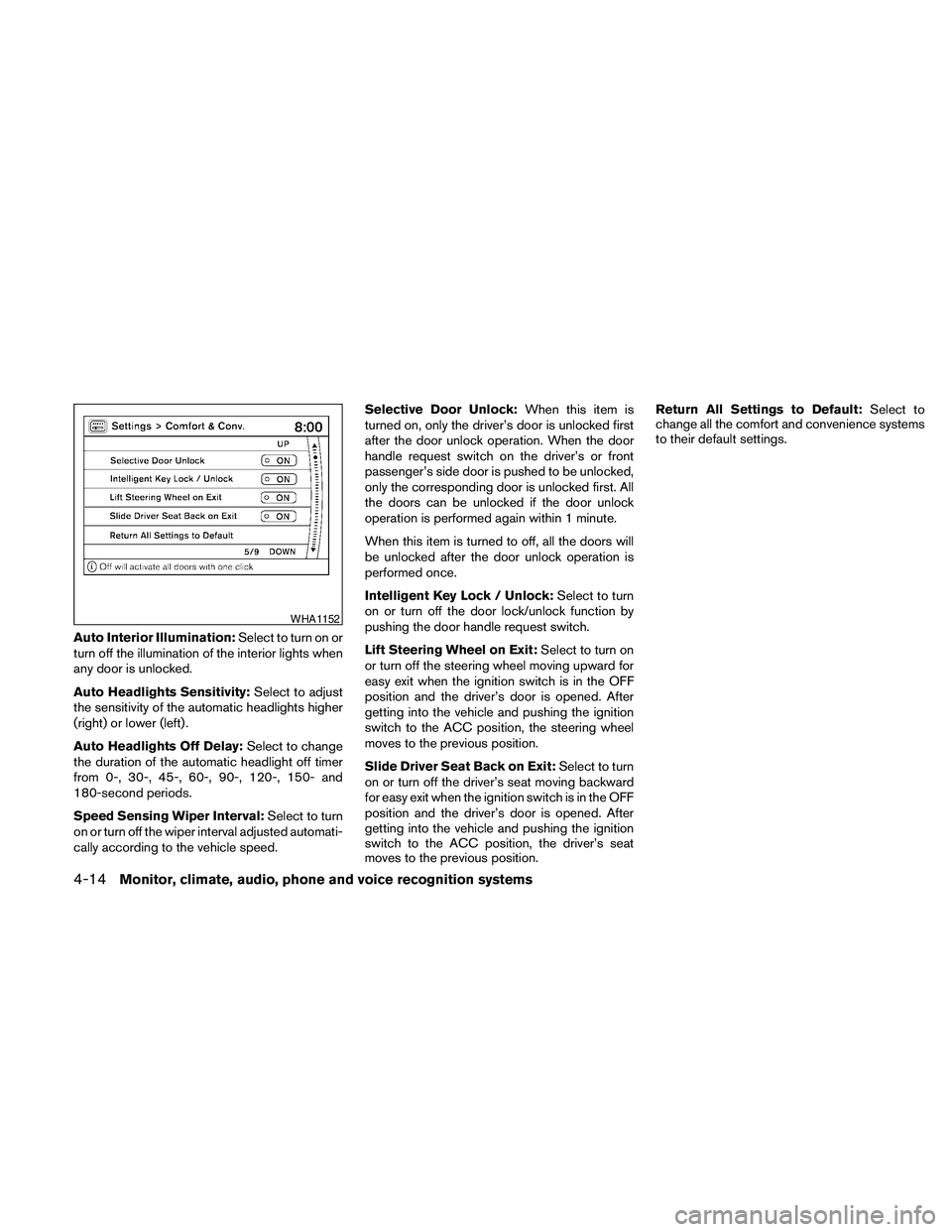
Auto Interior Illumination:Select to turn on or
turn off the illumination of the interior lights when
any door is unlocked.
Auto Headlights Sensitivity:Select to adjust
the sensitivity of the automatic headlights higher
(right) or lower (left) .
Auto Headlights Off Delay:Select to change
the duration of the automatic headlight off timer
from 0-, 30-, 45-, 60-, 90-, 120-, 150- and
180-second periods.
Speed Sensing Wiper Interval:Select to turn
on or turn off the wiper interval adjusted automati-
cally according to the vehicle speed.Selective Door Unlock:When this item is
turned on, only the driver’s door is unlocked first
after the door unlock operation. When the door
handle request switch on the driver’s or front
passenger’s side door is pushed to be unlocked,
only the corresponding door is unlocked first. All
the doors can be unlocked if the door unlock
operation is performed again within 1 minute.
When this item is turned to off, all the doors will
be unlocked after the door unlock operation is
performed once.
Intelligent Key Lock / Unlock:Select to turn
on or turn off the door lock/unlock function by
pushing the door handle request switch.
Lift Steering Wheel on Exit:Select to turn on
or turn off the steering wheel moving upward for
easy exit when the ignition switch is in the OFF
position and the driver’s door is opened. After
getting into the vehicle and pushing the ignition
switch to the ACC position, the steering wheel
moves to the previous position.
Slide Driver Seat Back on Exit:Select to turn
on or turn off the driver’s seat moving backward
for easy exit when the ignition switch is in the OFF
position and the driver’s door is opened. After
getting into the vehicle and pushing the ignition
switch to the ACC position, the driver’s seat
moves to the previous position.Return All Settings to Default:Select to
change all the comfort and convenience systems
to their default settings.
WHA1152
4-14Monitor, climate, audio, phone and voice recognition systems
Page 180 of 457
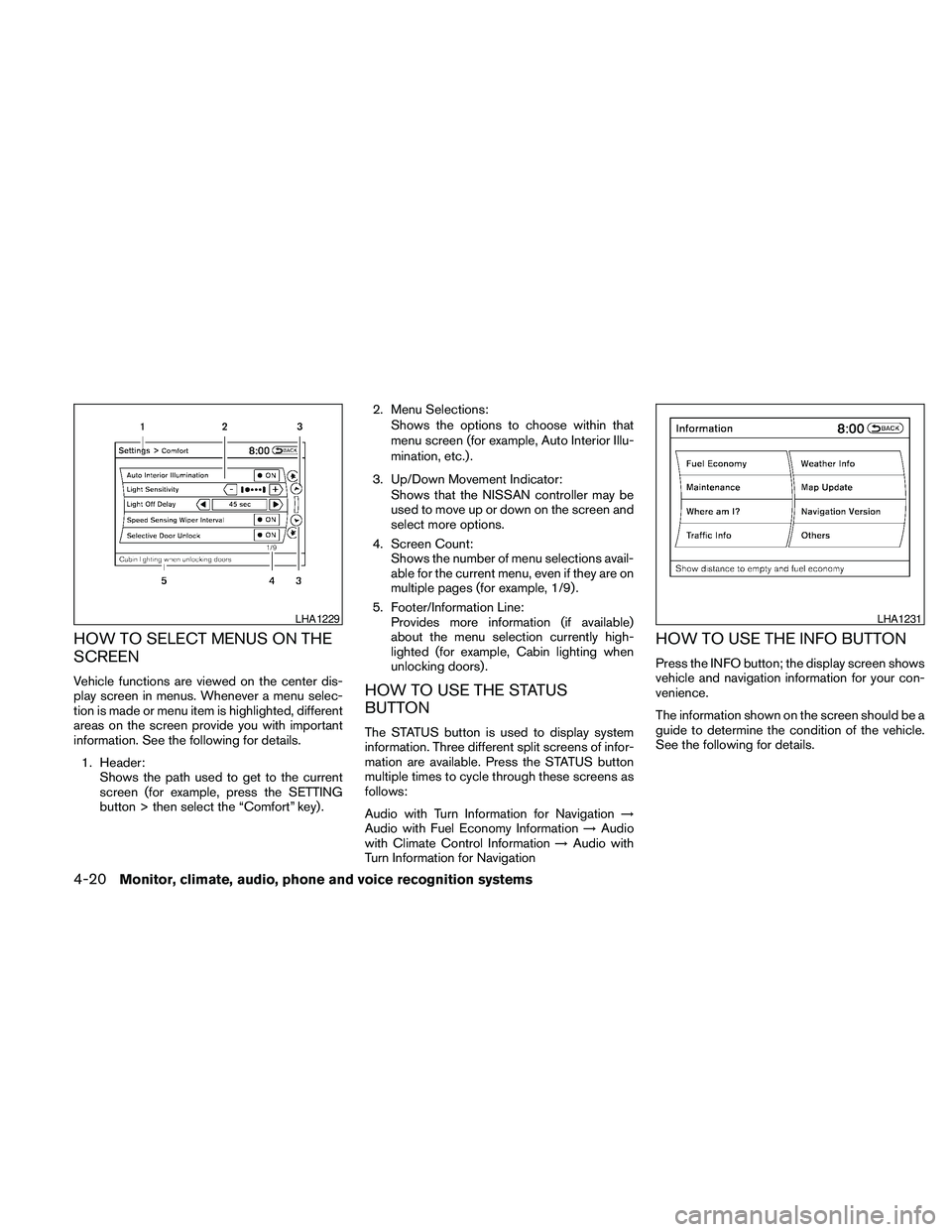
HOW TO SELECT MENUS ON THE
SCREEN
Vehicle functions are viewed on the center dis-
play screen in menus. Whenever a menu selec-
tion is made or menu item is highlighted, different
areas on the screen provide you with important
information. See the following for details.
1. Header:
Shows the path used to get to the current
screen (for example, press the SETTING
button > then select the “Comfort” key) .2. Menu Selections:
Shows the options to choose within that
menu screen (for example, Auto Interior Illu-
mination, etc.) .
3. Up/Down Movement Indicator:
Shows that the NISSAN controller may be
used to move up or down on the screen and
select more options.
4. Screen Count:
Shows the number of menu selections avail-
able for the current menu, even if they are on
multiple pages (for example, 1/9) .
5. Footer/Information Line:
Provides more information (if available)
about the menu selection currently high-
lighted (for example, Cabin lighting when
unlocking doors) .HOW TO USE THE STATUS
BUTTON
The STATUS button is used to display system
information. Three different split screens of infor-
mation are available. Press the STATUS button
multiple times to cycle through these screens as
follows:
Audio with Turn Information for Navigation!
Audio with Fuel Economy Information!Audio
with Climate Control Information!Audio with
Turn Information for Navigation
HOW TO USE THE INFO BUTTON
Press the INFO button; the display screen shows
vehicle and navigation information for your con-
venience.
The information shown on the screen should be a
guide to determine the condition of the vehicle.
See the following for details.
LHA1229LHA1231
4-20Monitor, climate, audio, phone and voice recognition systems
Page 186 of 457
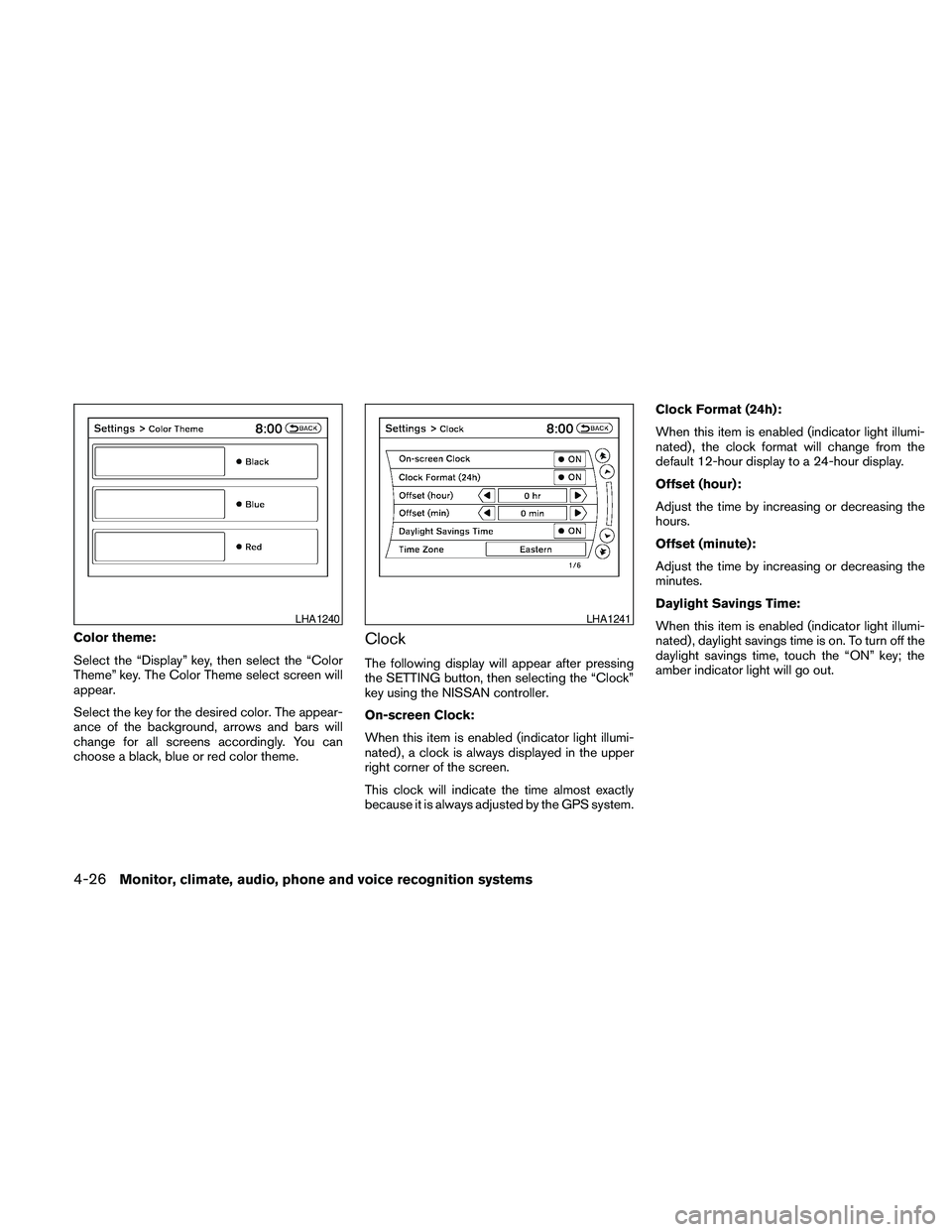
Color theme:
Select the “Display” key, then select the “Color
Theme” key. The Color Theme select screen will
appear.
Select the key for the desired color. The appear-
ance of the background, arrows and bars will
change for all screens accordingly. You can
choose a black, blue or red color theme.Clock
The following display will appear after pressing
the SETTING button, then selecting the “Clock”
key using the NISSAN controller.
On-screen Clock:
When this item is enabled (indicator light illumi-
nated) , a clock is always displayed in the upper
right corner of the screen.
This clock will indicate the time almost exactly
because it is always adjusted by the GPS system.Clock Format (24h):
When this item is enabled (indicator light illumi-
nated) , the clock format will change from the
default 12-hour display to a 24-hour display.
Offset (hour):
Adjust the time by increasing or decreasing the
hours.
Offset (minute):
Adjust the time by increasing or decreasing the
minutes.
Daylight Savings Time:
When this item is enabled (indicator light illumi-
nated) , daylight savings time is on. To turn off the
daylight savings time, touch the “ON” key; the
amber indicator light will go out.
LHA1240LHA1241
4-26Monitor, climate, audio, phone and voice recognition systems
Page 188 of 457
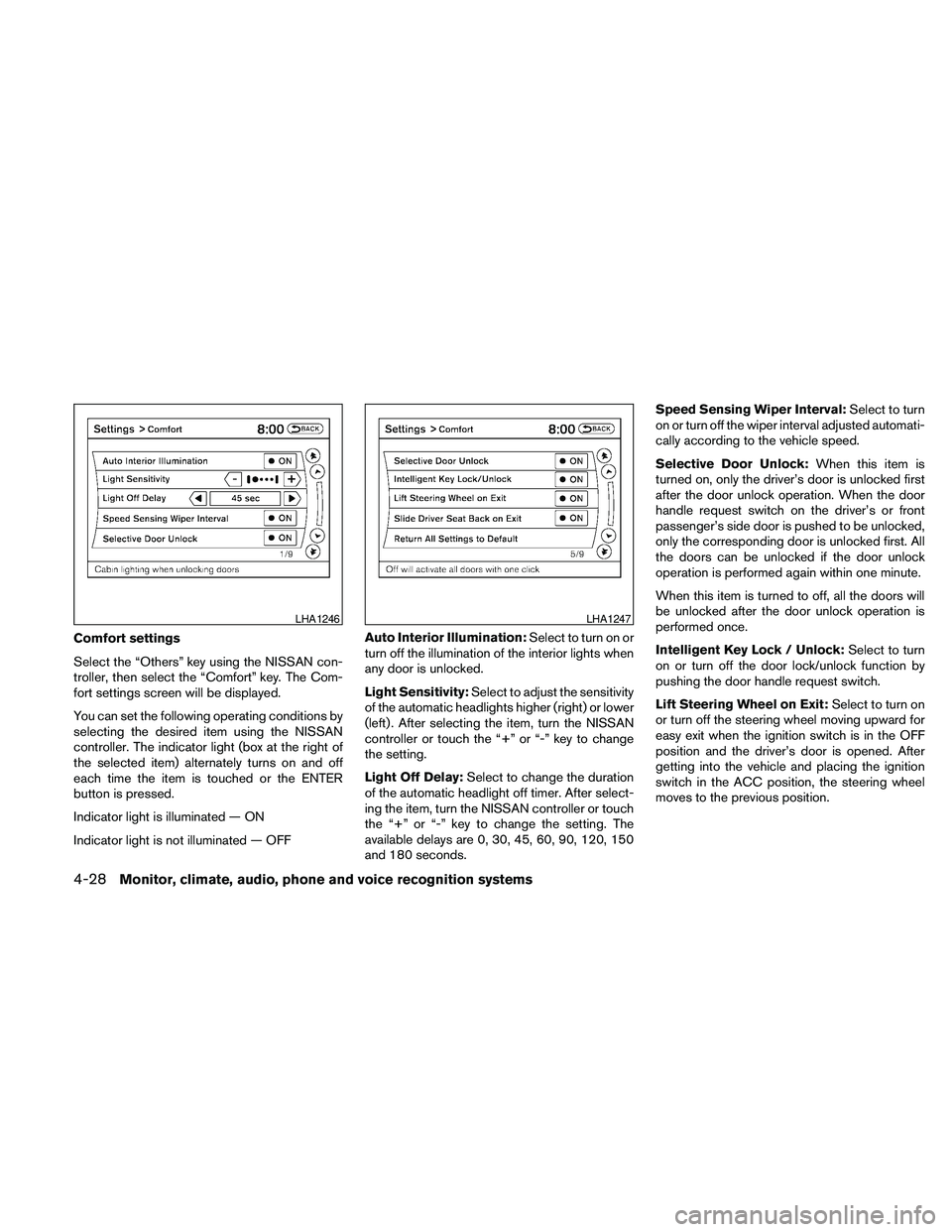
Comfort settings
Select the “Others” key using the NISSAN con-
troller, then select the “Comfort” key. The Com-
fort settings screen will be displayed.
You can set the following operating conditions by
selecting the desired item using the NISSAN
controller. The indicator light (box at the right of
the selected item) alternately turns on and off
each time the item is touched or the ENTER
button is pressed.
Indicator light is illuminated — ON
Indicator light is not illuminated — OFFAuto Interior Illumination:Select to turn on or
turn off the illumination of the interior lights when
any door is unlocked.
Light Sensitivity:Select to adjust the sensitivity
of the automatic headlights higher (right) or lower
(left) . After selecting the item, turn the NISSAN
controller or touch the “+” or “-” key to change
the setting.
Light Off Delay:Select to change the duration
of the automatic headlight off timer. After select-
ing the item, turn the NISSAN controller or touch
the “+” or “-” key to change the setting. The
available delays are 0, 30, 45, 60, 90, 120, 150
and 180 seconds.Speed Sensing Wiper Interval:Select to turn
on or turn off the wiper interval adjusted automati-
cally according to the vehicle speed.
Selective Door Unlock:When this item is
turned on, only the driver’s door is unlocked first
after the door unlock operation. When the door
handle request switch on the driver’s or front
passenger’s side door is pushed to be unlocked,
only the corresponding door is unlocked first. All
the doors can be unlocked if the door unlock
operation is performed again within one minute.
When this item is turned to off, all the doors will
be unlocked after the door unlock operation is
performed once.
Intelligent Key Lock / Unlock:Select to turn
on or turn off the door lock/unlock function by
pushing the door handle request switch.
Lift Steering Wheel on Exit:Select to turn on
or turn off the steering wheel moving upward for
easy exit when the ignition switch is in the OFF
position and the driver’s door is opened. After
getting into the vehicle and placing the ignition
switch in the ACC position, the steering wheel
moves to the previous position.
LHA1246LHA1247
4-28Monitor, climate, audio, phone and voice recognition systems
Page 195 of 457
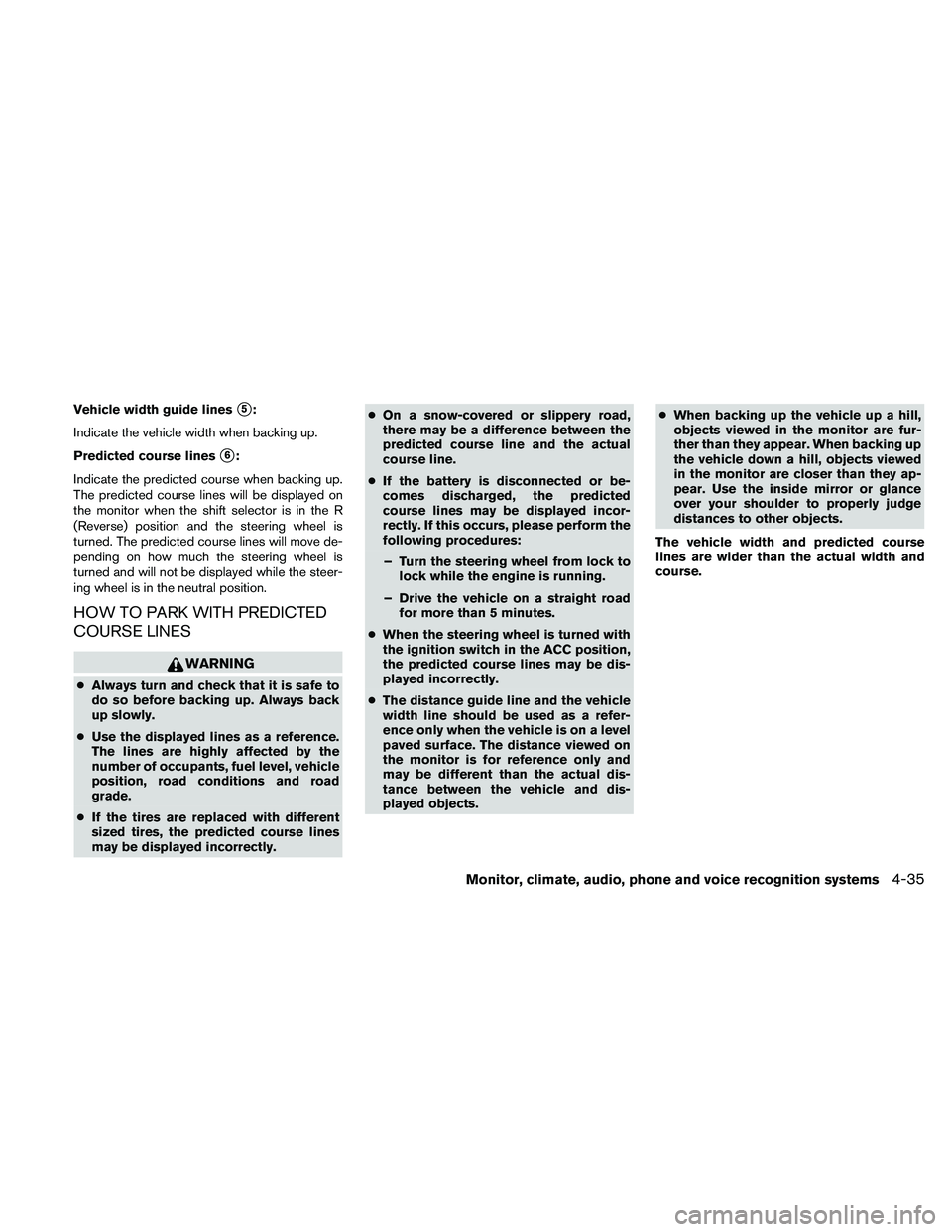
Vehicle width guide liness5:
Indicate the vehicle width when backing up.
Predicted course lines
s6:
Indicate the predicted course when backing up.
The predicted course lines will be displayed on
the monitor when the shift selector is in the R
(Reverse) position and the steering wheel is
turned. The predicted course lines will move de-
pending on how much the steering wheel is
turned and will not be displayed while the steer-
ing wheel is in the neutral position.
HOW TO PARK WITH PREDICTED
COURSE LINES
WARNING
cAlways turn and check that it is safe to
do so before backing up. Always back
up slowly.
cUse the displayed lines as a reference.
The lines are highly affected by the
number of occupants, fuel level, vehicle
position, road conditions and road
grade.
cIf the tires are replaced with different
sized tires, the predicted course lines
may be displayed incorrectly.cOn a snow-covered or slippery road,
there may be a difference between the
predicted course line and the actual
course line.
cIf the battery is disconnected or be-
comes discharged, the predicted
course lines may be displayed incor-
rectly. If this occurs, please perform the
following procedures:
– Turn the steering wheel from lock to
lock while the engine is running.
– Drive the vehicle on a straight road
for more than 5 minutes.
cWhen the steering wheel is turned with
the ignition switch in the ACC position,
the predicted course lines may be dis-
played incorrectly.
cThe distance guide line and the vehicle
width line should be used as a refer-
ence only when the vehicle is on a level
paved surface. The distance viewed on
the monitor is for reference only and
may be different than the actual dis-
tance between the vehicle and dis-
played objects.cWhen backing up the vehicle up a hill,
objects viewed in the monitor are fur-
ther than they appear. When backing up
the vehicle down a hill, objects viewed
in the monitor are closer than they ap-
pear. Use the inside mirror or glance
over your shoulder to properly judge
distances to other objects.
The vehicle width and predicted course
lines are wider than the actual width and
course.
Monitor, climate, audio, phone and voice recognition systems4-35
Page 209 of 457
Static and flutter: During signal interference from
buildings, large hills or due to antenna position
(usually in conjunction with increased distance
from the station transmitter) , static or flutter can
be heard. This can be reduced by adjusting the
treble control to reduce treble response.
Multipath reception: Because of the reflective
characteristics of FM signals, direct and reflected
signals reach the receiver at the same time. The
signals may cancel each other, resulting in mo-
mentary flutter or loss of sound.
AM RADIO RECEPTION
AM signals, because of their low frequency, can
bend around objects and skip along the ground.
In addition, the signals can be bounced off the
ionosphere and bent back to earth. Because of
these characteristics, AM signals are also sub-
ject to interference as they travel from transmitter
to receiver.
Fading: Occurs while the vehicle is passing
through freeway underpasses or in areas with
many tall buildings. It can also occur for several
seconds during ionospheric turbulence even in
areas where no obstacles exist.
Static: Caused by thunderstorms, electrical
power lines, electric signs and even traffic lights.
SATELLITE RADIO RECEPTION (if so
equipped)
When the satellite radio is used for the first time
or the battery has been replaced, the satellite
radio may not work properly. This is not a mal-
function. Wait more than 10 minutes with satellite
radio ON and the vehicle outside of any metal or
large building for satellite radio to receive all of
the necessary data.
The satellite radio mode will be skipped unless an
optional satellite receiver and antenna are in-
stalled and an XMT* satellite radio service sub-
scription is active. Satellite radio is not available
in Alaska, Hawaii and Guam.
Satellite radio performance may be affected if
cargo carried on the roof blocks the satellite radio
signal.
If possible, do not put cargo over the satellite
antenna.
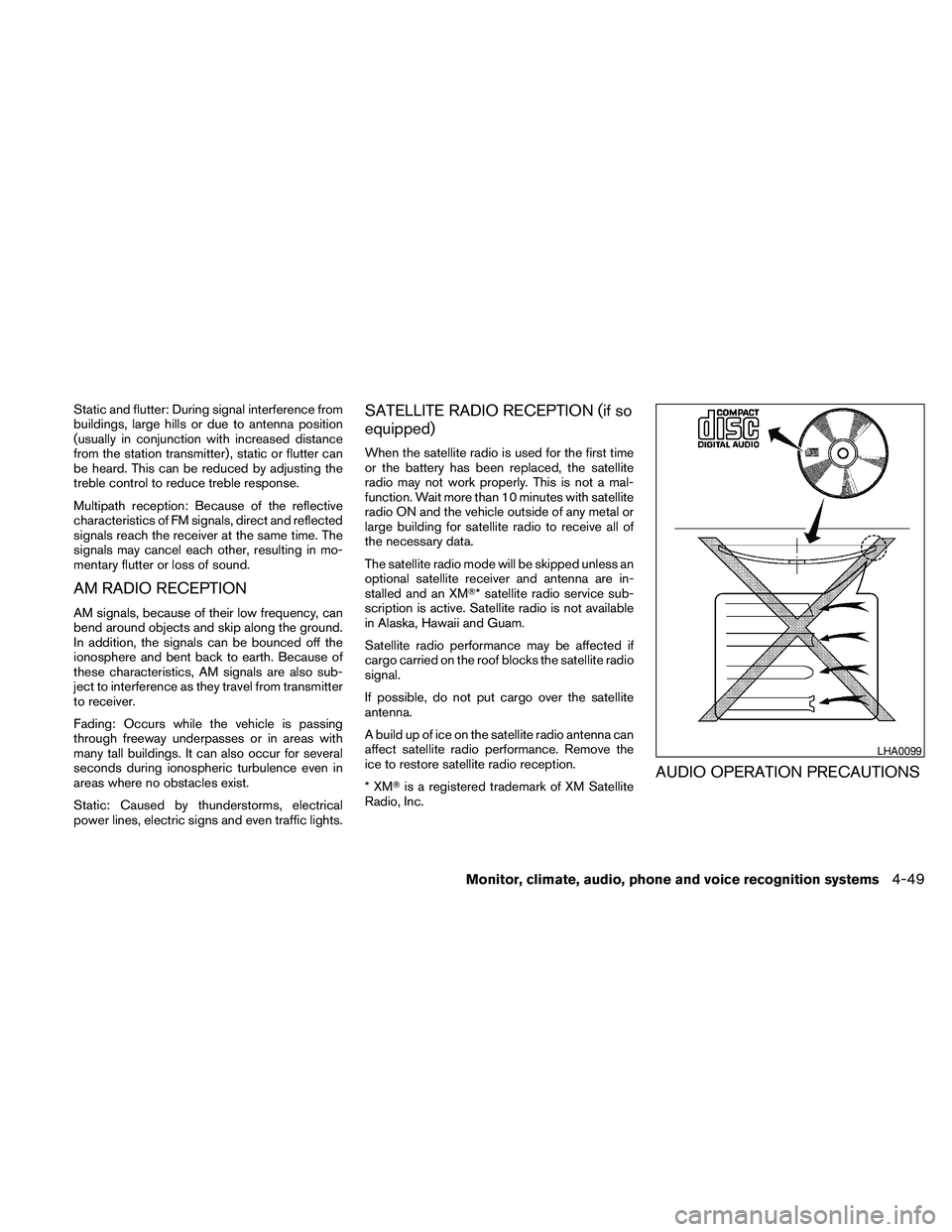
A build up of ice on the satellite radio antenna can
affect satellite radio performance. Remove the
ice to restore satellite radio reception.
*XMTis a registered trademark of XM Satellite
Radio, Inc.
AUDIO OPERATION PRECAUTIONS
LHA0099
Monitor, climate, audio, phone and voice recognition systems4-49
Page 224 of 457
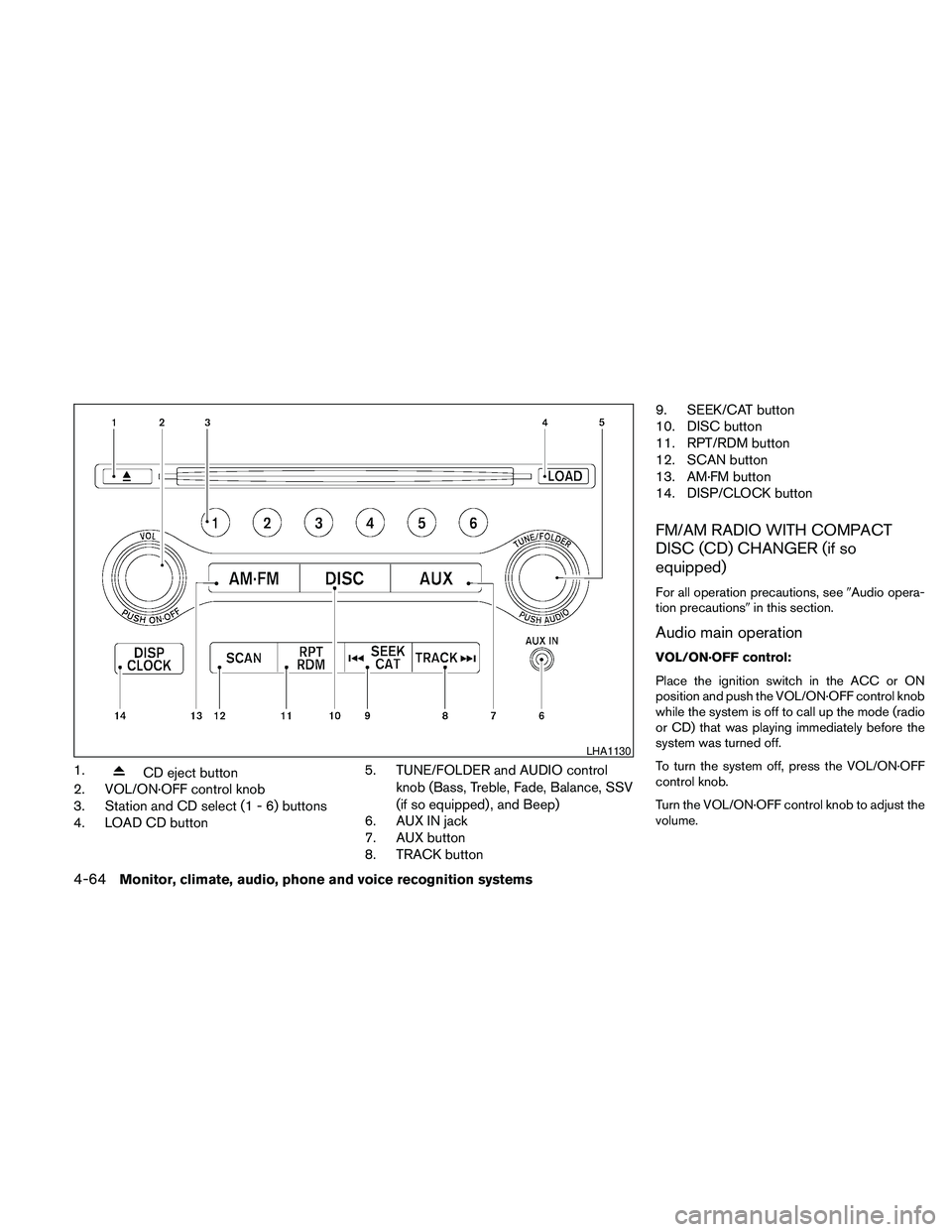
1.CD eject button
2. VOL/ON·OFF control knob
3. Station and CD select (1 - 6) buttons
4. LOAD CD button5. TUNE/FOLDER and AUDIO control
knob (Bass, Treble, Fade, Balance, SSV
(if so equipped) , and Beep)
6. AUX IN jack
7. AUX button
8. TRACK button9. SEEK/CAT button
10. DISC button
11. RPT/RDM button
12. SCAN button
13. AM·FM button
14. DISP/CLOCK button
FM/AM RADIO WITH COMPACT
DISC (CD) CHANGER (if so
equipped)
For all operation precautions, see9Audio opera-
tion precautions9in this section.
Audio main operation
VOL/ON·OFF control:
Place the ignition switch in the ACC or ON
position and push the VOL/ON·OFF control knob
while the system is off to call up the mode (radio
or CD) that was playing immediately before the
system was turned off.
To turn the system off, press the VOL/ON·OFF
control knob.
Turn the VOL/ON·OFF control knob to adjust the
volume.
LHA1130
4-64Monitor, climate, audio, phone and voice recognition systems
Page 225 of 457

AUDIO control knob (Bass, Treble, Fade,
Balance and Beep):
Press the AUDIO control knob to change the
mode as follows:
Bass!Treble!Fade!Balance!Beep
ON/OFF!Bass
To adjust Bass, Treble, Fade and Balance, press
the AUDIO control knob until the desired mode
appears on the display. Turn the TUNE/FOLDER
knob to adjust Bass and Treble to the desired
level. You can also use the TUNE/FOLDER knob
to adjust Fade and Balance modes. Fade adjusts
the sound level between the front and rear speak-
ers and Balance adjusts the sound between the
right and left speakers.
To change the Beep to ON or OFF, turn the
TUNE/FOLDER knob left or right. This will enable
or disable the beep sound heard during menu
selection.
Once you have adjusted the sound quality to the
desired level, press the AUDIO control knob re-
peatedly until the radio or CD display reappears.
Otherwise, the radio or CD display will automati-
cally reappear after about five seconds.
Clock set
The clock displays the time when the ignition
switch is placed in the ACC or ON position.Adjusting the time
1. Push and hold the DISP/CLOCK button for
more than 2 seconds until the display shows
“Hour Adjust”.
2. Turn the TUNE/FOLDER knob to adjust the
hour.
3. Press the DISP/CLOCK button again; the
display will show “Minute Adjust”.
4. Turn the TUNE/FOLDER knob to adjust the
minutes.
5. Press the DISP/CLOCK button again to exit
the clock set mode.
Press the DISP/CLOCK button again to return to
the regular clock display. If no action is taken, the
display will return to the regular clock display
after 10 seconds.
If the power supply is disconnected, the clock will
not indicate the correct time.
Readjust the time.
CD display mode
To change the text displayed while playing a CD
with text, press the DISP/CLOCK button. The
DISP/CLOCK button will allow you to scroll
through CD text as follows: Track number and
Track timeÃ!Album titleÃ!Song title.cTrack number displays the track number se-
lected on the disc.
cTrack time displays the amount of time the
track has played.
cAlbum title displays the title of the CD being
played.
cSong title displays the title of the selected
CD track.
MP3 display mode
To change the text displayed when listening to a
CD with MP3s and ID3 tags, press the
DISP/CLOCK button. The DISP/CLOCK button
will scroll through the CD text as follows: Disc
number, Track number and Folder numberÃ!
Folder titleÃ!Song titleÃ!Artist nameÃ!
Album title.
cDisc number displays the number of the
current disc playing.
cTrack number displays the number of the
track playing on the selected disc.
cFolder number displays the number of the
current folder on the MP3 CD.
cFolder title displays the title of the folder.
cSong title displays the title of the song play-
ing.
Monitor, climate, audio, phone and voice recognition systems4-65
Page 230 of 457

This vehicle has Speed Sensitive Volume (SSV)
for audio. The audio volume changes as the driv-
ing speed changes.
AUDIO control knob (Bass, Treble, Balance
and Fade):
Press the AUDIO control knob to change the
mode as follows:
Bass!Treble!Balance!Fade
To adjust Bass, Treble, Balance and Fade, press
the AUDIO control knob until the desired mode
appears in the display. Turn the tuning knob to
adjust Bass and Treble to the desired level. You
can also use the tuning knob to adjust Fade and
Balance modes. Fade adjusts the sound level
between the front and rear speakers and Balance
adjusts the sound between the right and left
speakers.
Once you have adjusted the sound quality to the
desired level, press the AUDIO control knob re-
peatedly until the radio or CD display reappears.
If the control knob is not pressed for approxi-
mately 10 seconds, the radio or CD display will
automatically reappear.Speed Sensitive Volume (SSV):
To change the SSV mode from OFF to 5, press
the SETTING button. Then select the “Audio” key
using the NISSAN controller; the audio settings
screen will be displayed. Select the “–” key or “+”
key to change the SSV.
While in this screen you can also adjust the other
audio settings by selecting the corresponding key.
Once you have adjusted the sound quality to the
desired level, press the BACK button.
For information on how to use the NISSAN con-
troller, see “How to use the NISSAN controller” in
this section.Clock operation
For additional information on setting the clock,
see “Adjusting the time” in this section.
LHA1304LHA1314
4-70Monitor, climate, audio, phone and voice recognition systems