lock NISSAN MAXIMA 2010 Owner´s Manual
[x] Cancel search | Manufacturer: NISSAN, Model Year: 2010, Model line: MAXIMA, Model: NISSAN MAXIMA 2010Pages: 457, PDF Size: 4.66 MB
Page 147 of 457
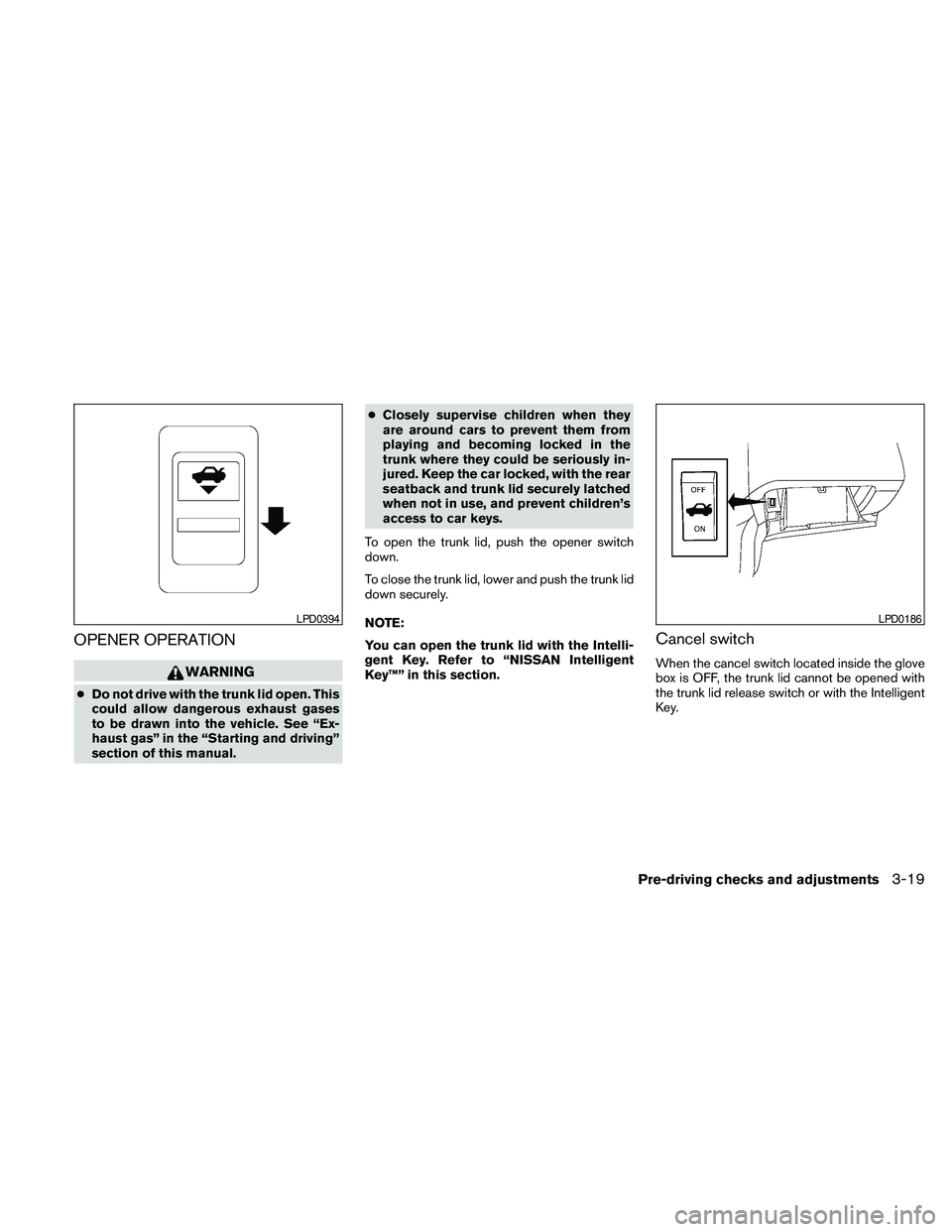
OPENER OPERATION
WARNING
cDo not drive with the trunk lid open. This
could allow dangerous exhaust gases
to be drawn into the vehicle. See “Ex-
haust gas” in the “Starting and driving”
section of this manual.cClosely supervise children when they
are around cars to prevent them from
playing and becoming locked in the
trunk where they could be seriously in-
jured. Keep the car locked, with the rear
seatback and trunk lid securely latched
when not in use, and prevent children’s
access to car keys.
To open the trunk lid, push the opener switch
down.
To close the trunk lid, lower and push the trunk lid
down securely.
NOTE:
You can open the trunk lid with the Intelli-
gent Key. Refer to “NISSAN Intelligent
Key™” in this section.
Cancel switch
When the cancel switch located inside the glove
box is OFF, the trunk lid cannot be opened with
the trunk lid release switch or with the Intelligent
Key.
LPD0394LPD0186
Pre-driving checks and adjustments3-19
Page 148 of 457
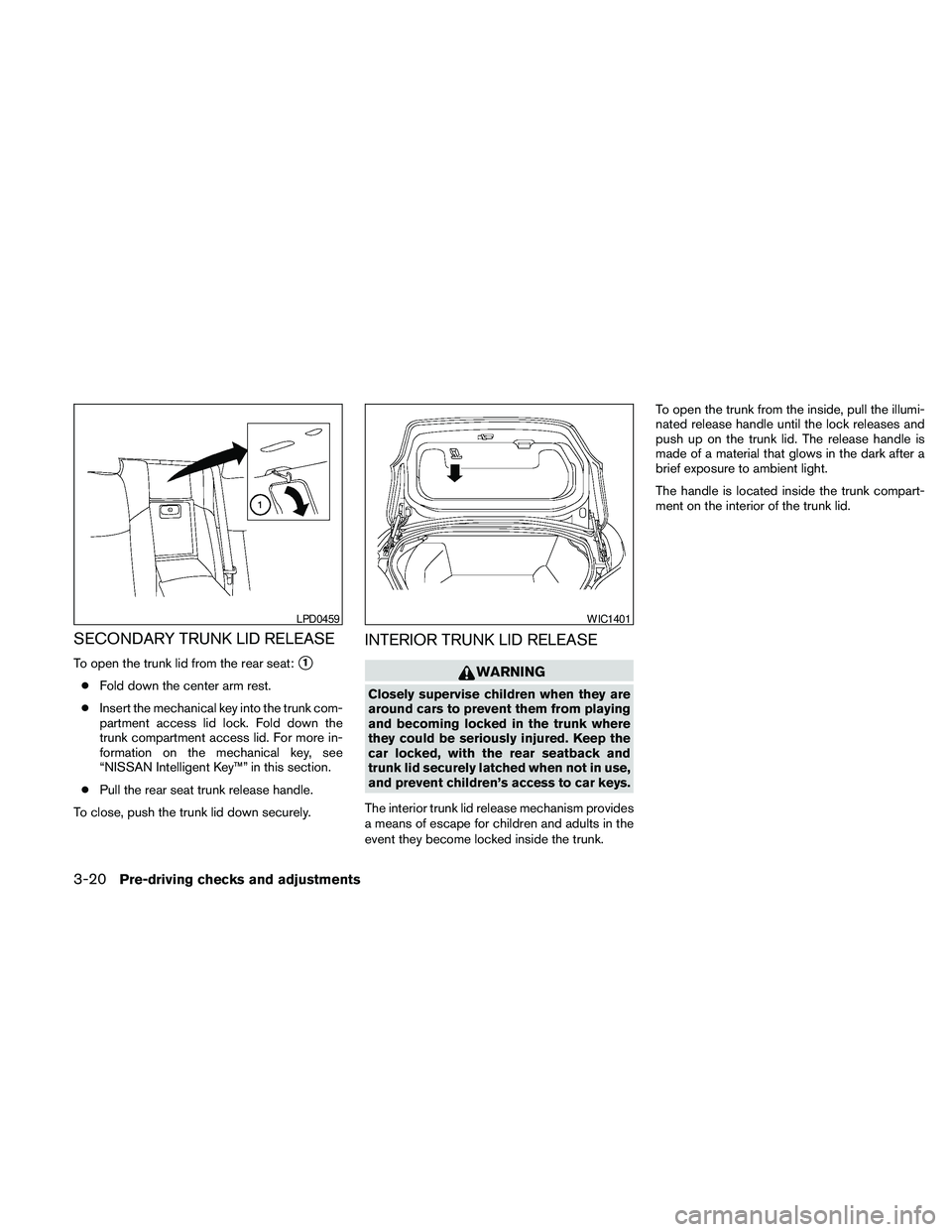
SECONDARY TRUNK LID RELEASE
To open the trunk lid from the rear seat:s1
cFold down the center arm rest.
cInsert the mechanical key into the trunk com-
partment access lid lock. Fold down the
trunk compartment access lid. For more in-
formation on the mechanical key, see
“NISSAN Intelligent Key™” in this section.
cPull the rear seat trunk release handle.
To close, push the trunk lid down securely.
INTERIOR TRUNK LID RELEASE
WARNING
Closely supervise children when they are
around cars to prevent them from playing
and becoming locked in the trunk where
they could be seriously injured. Keep the
car locked, with the rear seatback and
trunk lid securely latched when not in use,
and prevent children’s access to car keys.
The interior trunk lid release mechanism provides
a means of escape for children and adults in the
event they become locked inside the trunk.To open the trunk from the inside, pull the illumi-
nated release handle until the lock releases and
push up on the trunk lid. The release handle is
made of a material that glows in the dark after a
brief exposure to ambient light.
The handle is located inside the trunk compart-
ment on the interior of the trunk lid.
LPD0459WIC1401
3-20Pre-driving checks and adjustments
Page 149 of 457

OPENING THE FUEL-FILLER DOOR
The fuel-filler door automatically unlocks when all
doors are unlocked.
1. Unlock the fuel-filler door using one of the
following operations.
cUnlock all doors with the keyfob.
cUnlock all doors with the key.
cPush the power door lock switch to the
unlock position.
2. To open the fuel filler door, push the right
side of the fuel filler door to release.To lock, close the fuel-filler door securely and
lock the doors.
FUEL-FILLER CAP
The fuel-filler cap is a ratcheting type. Turn the
cap counterclockwise to remove. To tighten, turn
the cap clockwise until ratcheting clicks are
heard.
Put the fuel-filler cap on the cap holder
s1while
refueling.
WPD0454LPD0482
FUEL-FILLER DOOR
Pre-driving checks and adjustments3-21
Page 151 of 457
WARNING
Do not adjust the steering wheel while
driving. You could lose control of your
vehicle and cause an accident.
CAUTION
Do not adjust the steering wheel any
closer to you than is necessary for proper
steering operation and comfort. The driv-
er’s air bag inflates with great force. If you
are unrestrained, leaning forward, sitting
sideways or out of position in any way, you
are at greater risk of injury or death in a
crash. You may also receive serious or
fatal injuries from the air bag if you are up
against it when it inflates. Always sit back
against the seatback and as far away as
practical from the steering wheel. Always
use the seat belts.
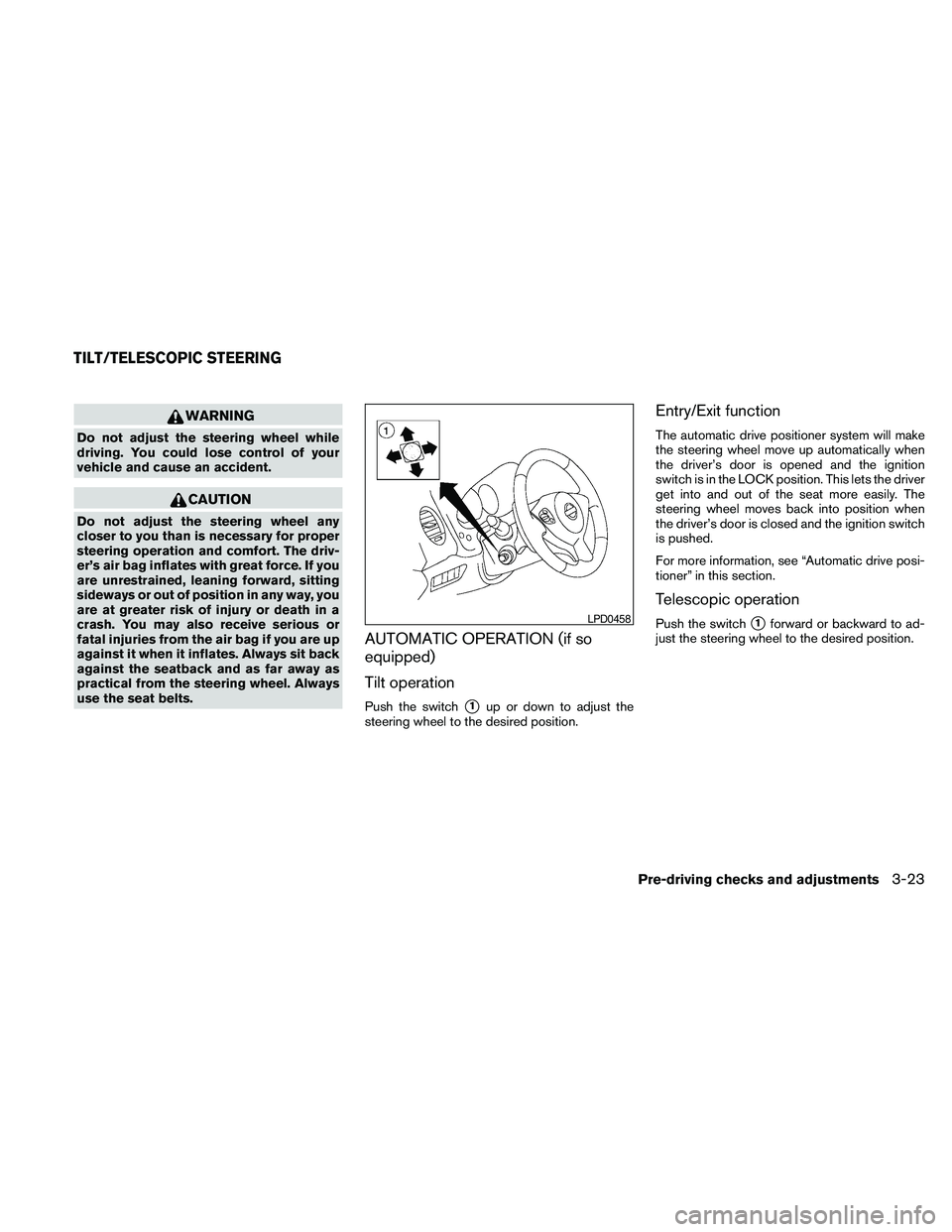
AUTOMATIC OPERATION (if so
equipped)
Tilt operation
Push the switchs1up or down to adjust the
steering wheel to the desired position.
Entry/Exit function
The automatic drive positioner system will make
the steering wheel move up automatically when
the driver’s door is opened and the ignition
switch is in the LOCK position. This lets the driver
get into and out of the seat more easily. The
steering wheel moves back into position when
the driver’s door is closed and the ignition switch
is pushed.
For more information, see “Automatic drive posi-
tioner” in this section.
Telescopic operation
Push the switchs1forward or backward to ad-
just the steering wheel to the desired position.LPD0458
TILT/TELESCOPIC STEERING
Pre-driving checks and adjustments3-23
Page 152 of 457
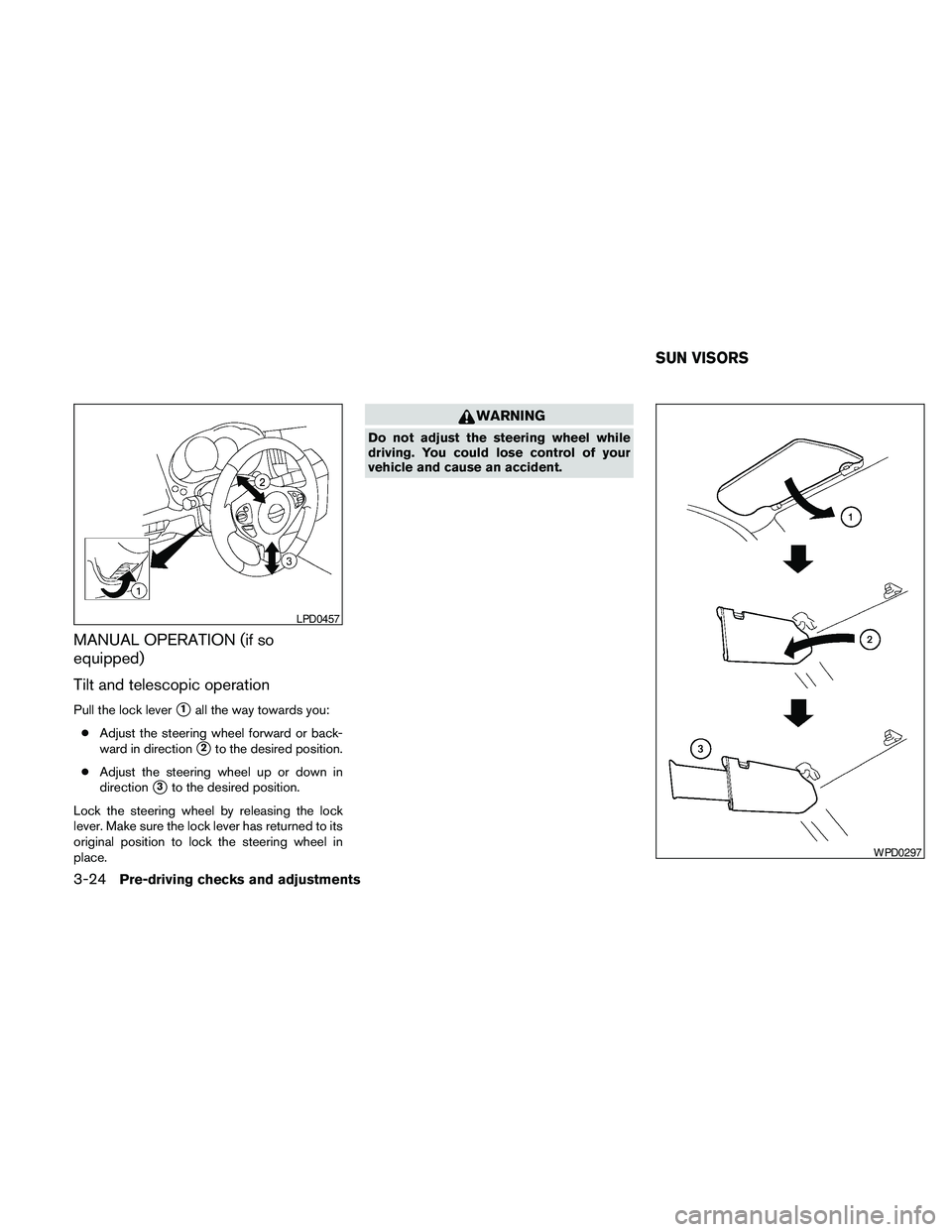
MANUAL OPERATION (if so
equipped)
Tilt and telescopic operation
Pull the lock levers1all the way towards you:
cAdjust the steering wheel forward or back-
ward in direction
s2to the desired position.
cAdjust the steering wheel up or down in
direction
s3to the desired position.
Lock the steering wheel by releasing the lock
lever. Make sure the lock lever has returned to its
original position to lock the steering wheel in
place.
WARNING
Do not adjust the steering wheel while
driving. You could lose control of your
vehicle and cause an accident.
LPD0457
WPD0297
SUN VISORS
3-24Pre-driving checks and adjustments
Page 153 of 457
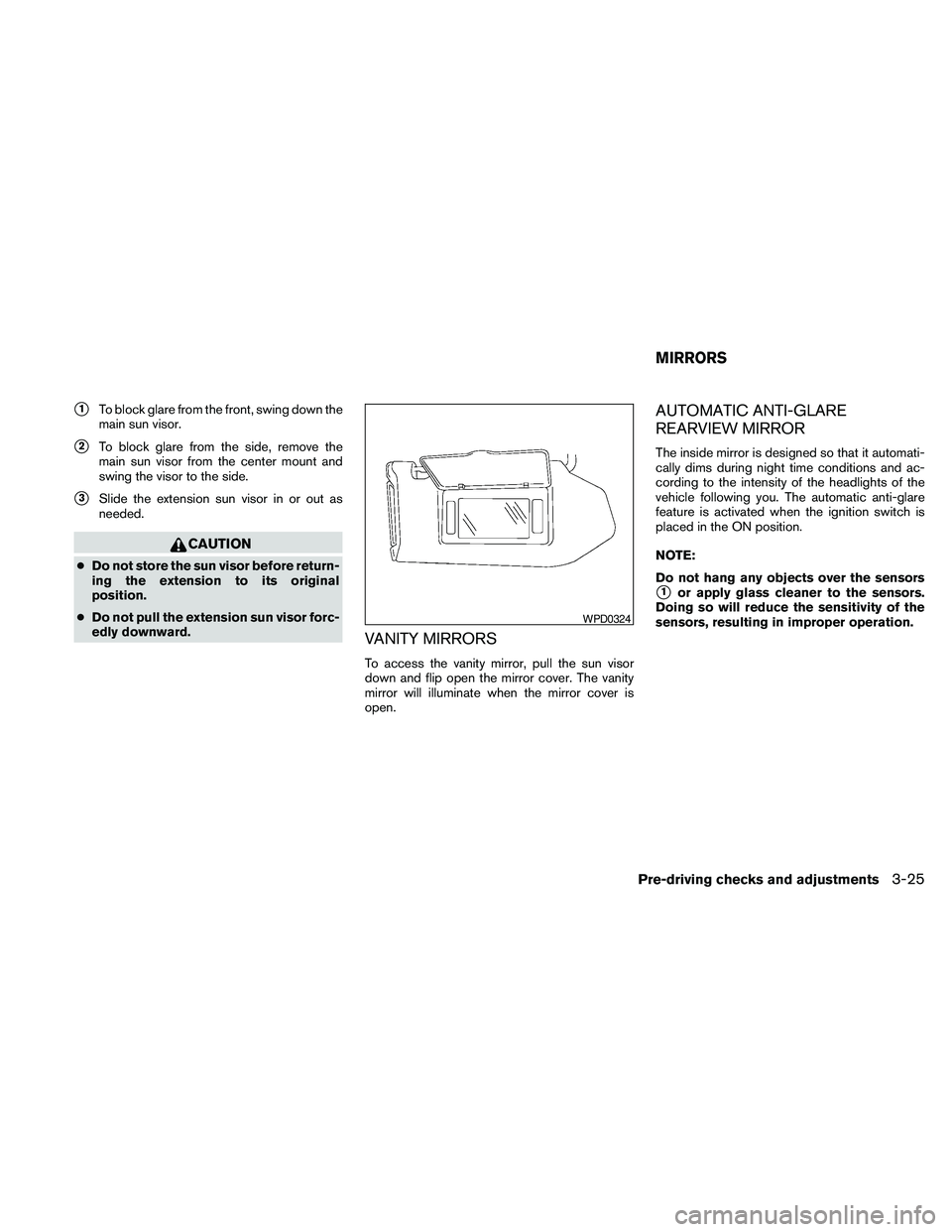
s1To block glare from the front, swing down the
main sun visor.
s2To block glare from the side, remove the
main sun visor from the center mount and
swing the visor to the side.
s3Slide the extension sun visor in or out as
needed.
CAUTION
cDo not store the sun visor before return-
ing the extension to its original
position.
cDo not pull the extension sun visor forc-
edly downward.
VANITY MIRRORS
To access the vanity mirror, pull the sun visor
down and flip open the mirror cover. The vanity
mirror will illuminate when the mirror cover is
open.
AUTOMATIC ANTI-GLARE
REARVIEW MIRROR
The inside mirror is designed so that it automati-
cally dims during night time conditions and ac-
cording to the intensity of the headlights of the
vehicle following you. The automatic anti-glare
feature is activated when the ignition switch is
placed in the ON position.
NOTE:
Do not hang any objects over the sensors
s1or apply glass cleaner to the sensors.
Doing so will reduce the sensitivity of the
sensors, resulting in improper operation.
WPD0324
MIRRORS
Pre-driving checks and adjustments3-25
Page 158 of 457
3. Adjust the driver’s seat, steering column,
and outside mirrors to the desired positions
by manually operating each adjusting
switch. For additional information, see
“Seats” in the “Safety—Seats, seat belts and
supplemental restraint system” section and
“Outside mirrors” in this section.
During this step, do not place the ignition
switch in any position other than ON.
4. Push the SET switch and, within 5 seconds,
push the memory switch (1 or 2) .
The indicator light for the pushed memory
switch will come on and stay on for approxi-
mately 5 seconds after pushing the switch.
After the indicator light goes off, the se-
lected positions are stored in the selected
memory (1 or 2) .
If a new memory is stored in the same memory
switch, the previous memory will be deleted.
Linking a keyfob to a stored memory
position
Each keyfob can be linked to a stored memory
position (memory switch 1 or 2) with the follow-
ing procedure.
1. Follow the steps for storing a memory posi-
tion.2. While the indicator light for the memory
switch being set is illuminated for 5 sec-
onds, press the
button on the keyfob.
The indicator light will blink. After the indica-
tor light goes off, the keyfob is linked to that
memory setting.
With the ignition switch placed in the OFF posi-
tion, press the
button on the keyfob. The
driver’s seat and outside mirrors will move to the
memorized position.
NOTE:
If a new memory position is saved to the
memory switch, the keyfob automatically
re-links.
Confirming memory storage
cPlace the ignition switch in the ON position
and push the SET switch. If the main memory
has not been stored, the indicator light will
come on for approximately 0.5 seconds.
When the memory has stored the position,
the indicator light will stay on for approxi-
mately 5 seconds.cIf the battery cable is disconnected, or if the
fuse opens, the memory storage function will
be canceled and must be restarted before a
stored memory position can be set again.
Drive the vehicle over 25 MPH (40 km/h) to
restart the memory storage function. You
can also restart the memory storage function
using the following procedure.
1. Connect the battery cable or replace the
fuse.
2. Open and close the driver’s door more than
2 times with the ignition switch in the LOCK
position.
Once the memory storage function has been
restarted, you can store a memory position.
See “Memory storage function” in this sec-
tion.Selecting the memorized position
Set the shift selector to the P (Park) position,
then:
cWithin 45 seconds of opening the driver’s
door, push the memory switch (1 or 2) or
cPlace the ignition switch in the ON position
and push the memory switch (1 or 2) .
3-30Pre-driving checks and adjustments
Page 159 of 457
The driver’s seat, steering column, and outside
mirrors will move to the memorized position with
the indicator light blinking, and then the light will
stay on for approximately 5 seconds.
ENTRY/EXIT FUNCTION
This system is designed so that the driver’s seat
and automatic operation steering column will au-
tomatically move when the shift selector is in the
P (Park) position. This allows the driver to get into
and out of the driver’s seat more easily.
The driver’s seat will slide backward and the
steering wheel will move up when the driver’s
door is opened and the ignition switch is in the
LOCK position.
The driver’s seat and steering wheel will return to
the previous position when the driver’s door is
closed and the ignition switch is pushed.
The entry/exit function can be adjusted or can-
celed. See “Comfort & Convenience settings” in
the “Monitor, climate, audio, phone and voice
recognition systems” section of this manual.
Restarting the entry/exit function
If the battery cable is disconnected or if the fuse
opens, the entry/exit function will be disabled.
Drive the vehicle over 25 MPH (40 km/h) to
restart the entry/exit function. You can also restart
the entry/exit function using the following proce-
dure.
1. Connect the battery cable or replace the
fuse.
2. Open and close the driver’s door more than
2 times with the ignition switch in the LOCK
position.
The entry/exit function should now work properly.
SYSTEM OPERATION
The automatic drive positioner system will not
work or will stop operating under the following
conditions:
cWhen the vehicle speed is above 4 MPH (7
km/h) .
cWhen any of the memory switches are
pushed while the automatic drive positioner
is operating.cWhen the adjusting switch for the driver’s
seat is turned on while the automatic drive
positioner is operating.
cWhen the seat has been already moved to
the memorized position.
cWhen no seat position is stored in the
memory switch.
cWhen the shift selector is moved from P
(Park) to any other position.
cWhen the driver’s door remains open more
than 45 seconds and the ignition switch is
not in the ON position.
The automatic drive positioner system can be
adjusted and canceled for vehicles with naviga-
tion system. See “Comfort & Convenience set-
tings” in the “Monitor, climate, audio, phone and
voice recognition systems” section of this
manual.
Pre-driving checks and adjustments3-31
Page 166 of 457
If you press the BACK buttons4during setup,
the setup will be canceled and/or the display will
return to the previous screen.
cFinish setup.
In some screens pressing the BACK button
s4
accepts the changes made during setup.
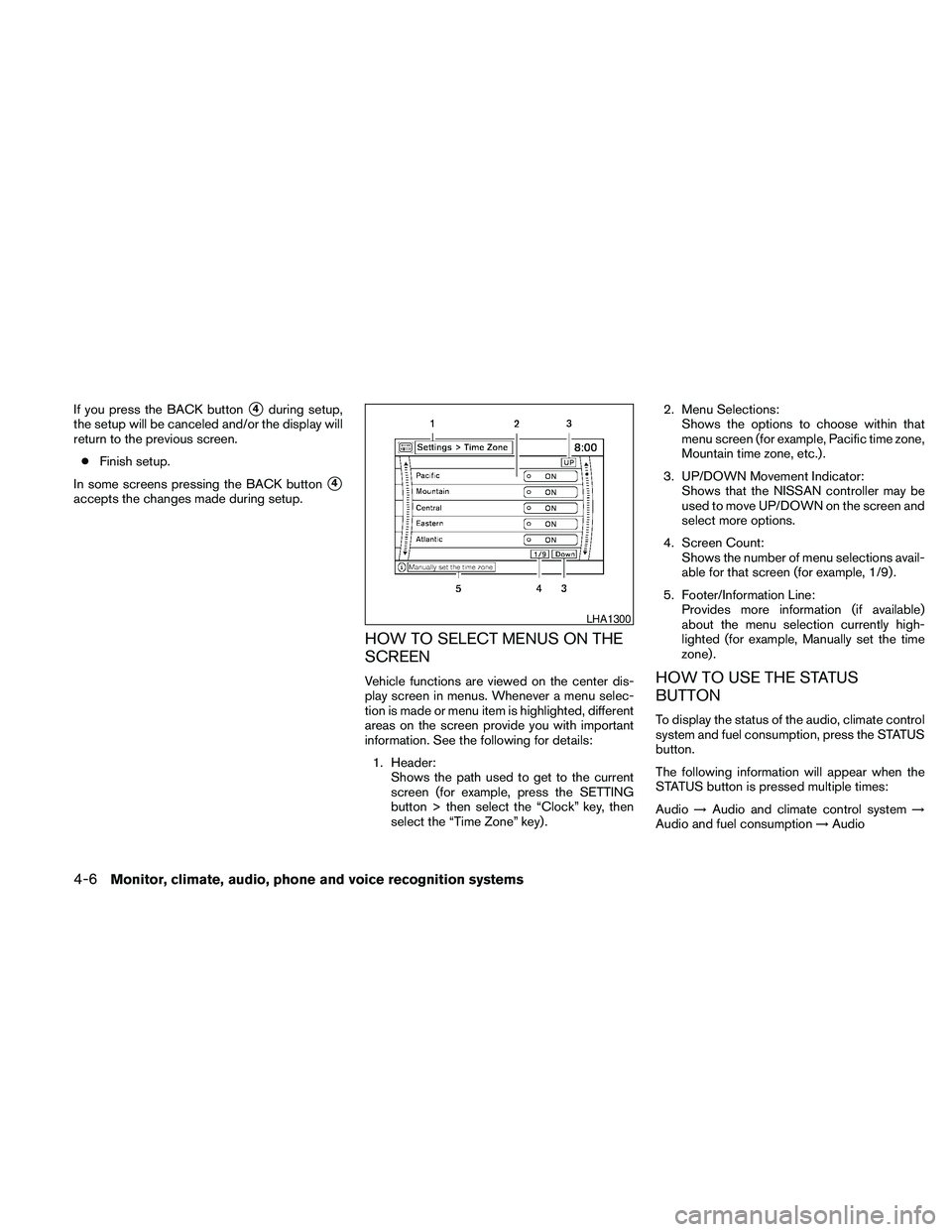
HOW TO SELECT MENUS ON THE
SCREEN
Vehicle functions are viewed on the center dis-
play screen in menus. Whenever a menu selec-
tion is made or menu item is highlighted, different
areas on the screen provide you with important
information. See the following for details:
1. Header:
Shows the path used to get to the current
screen (for example, press the SETTING
button > then select the “Clock” key, then
select the “Time Zone” key) .2. Menu Selections:
Shows the options to choose within that
menu screen (for example, Pacific time zone,
Mountain time zone, etc.) .
3. UP/DOWN Movement Indicator:
Shows that the NISSAN controller may be
used to move UP/DOWN on the screen and
select more options.
4. Screen Count:
Shows the number of menu selections avail-
able for that screen (for example, 1/9) .
5. Footer/Information Line:
Provides more information (if available)
about the menu selection currently high-
lighted (for example, Manually set the time
zone) .HOW TO USE THE STATUS
BUTTON
To display the status of the audio, climate control
system and fuel consumption, press the STATUS
button.
The following information will appear when the
STATUS button is pressed multiple times:
Audio!Audio and climate control system!
Audio and fuel consumption!Audio
LHA1300
4-6Monitor, climate, audio, phone and voice recognition systems
Page 172 of 457

Clock
The following display will appear after pressing
the SETTING button, then selecting the “Clock”
key using the NISSAN controller.
On-screen Clock:
When this item is enabled (indicator light illumi-
nated) , a clock is always displayed in the upper
right corner of the screen.
Clock Format:
Choose either the 12h (12-hour) clock display or
the 24h (24-hour) clock display.Daylight Savings Time:
When this item is enabled (indicator light illumi-
nated) , daylight savings time is on. To turn off the
daylight savings time, touch the “ON” key; the
amber indicator light will go out.
Time Zone:
Select the “Time Zone” key; the Time Zone
screen will appear.
Select one of the following zones, depending on
the current location, by selecting the correct time
zone key to enable that time zone (indicator light
will illuminate for that location) .
cPacific
cMountain
cCentral
cEastern
cAtlantic
LHA1307LHA0933
4-12Monitor, climate, audio, phone and voice recognition systems