fog light NISSAN MAXIMA 2010 Owner´s Manual
[x] Cancel search | Manufacturer: NISSAN, Model Year: 2010, Model line: MAXIMA, Model: NISSAN MAXIMA 2010Pages: 457, PDF Size: 4.66 MB
Page 9 of 457
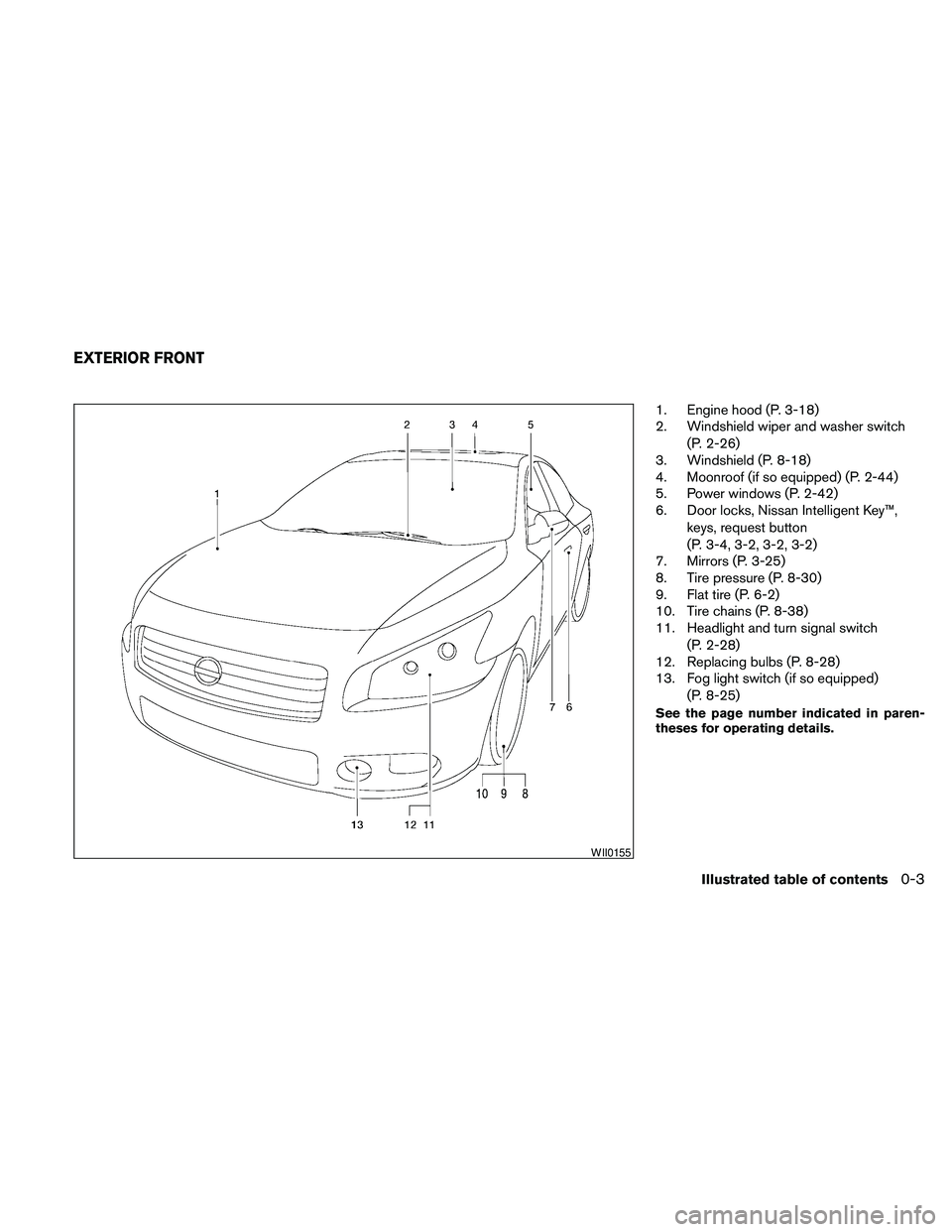
1. Engine hood (P. 3-18)
2. Windshield wiper and washer switch
(P. 2-26)
3. Windshield (P. 8-18)
4. Moonroof (if so equipped) (P. 2-44)
5. Power windows (P. 2-42)
6. Door locks, Nissan Intelligent Key™,
keys, request button
(P. 3-4, 3-2, 3-2, 3-2)
7. Mirrors (P. 3-25)
8. Tire pressure (P. 8-30)
9. Flat tire (P. 6-2)
10. Tire chains (P. 8-38)
11. Headlight and turn signal switch
(P. 2-28)
12. Replacing bulbs (P. 8-28)
13. Fog light switch (if so equipped)
(P. 8-25)
See the page number indicated in paren-
theses for operating details.
WII0155
EXTERIOR FRONT
Illustrated table of contents0-3
Page 12 of 457
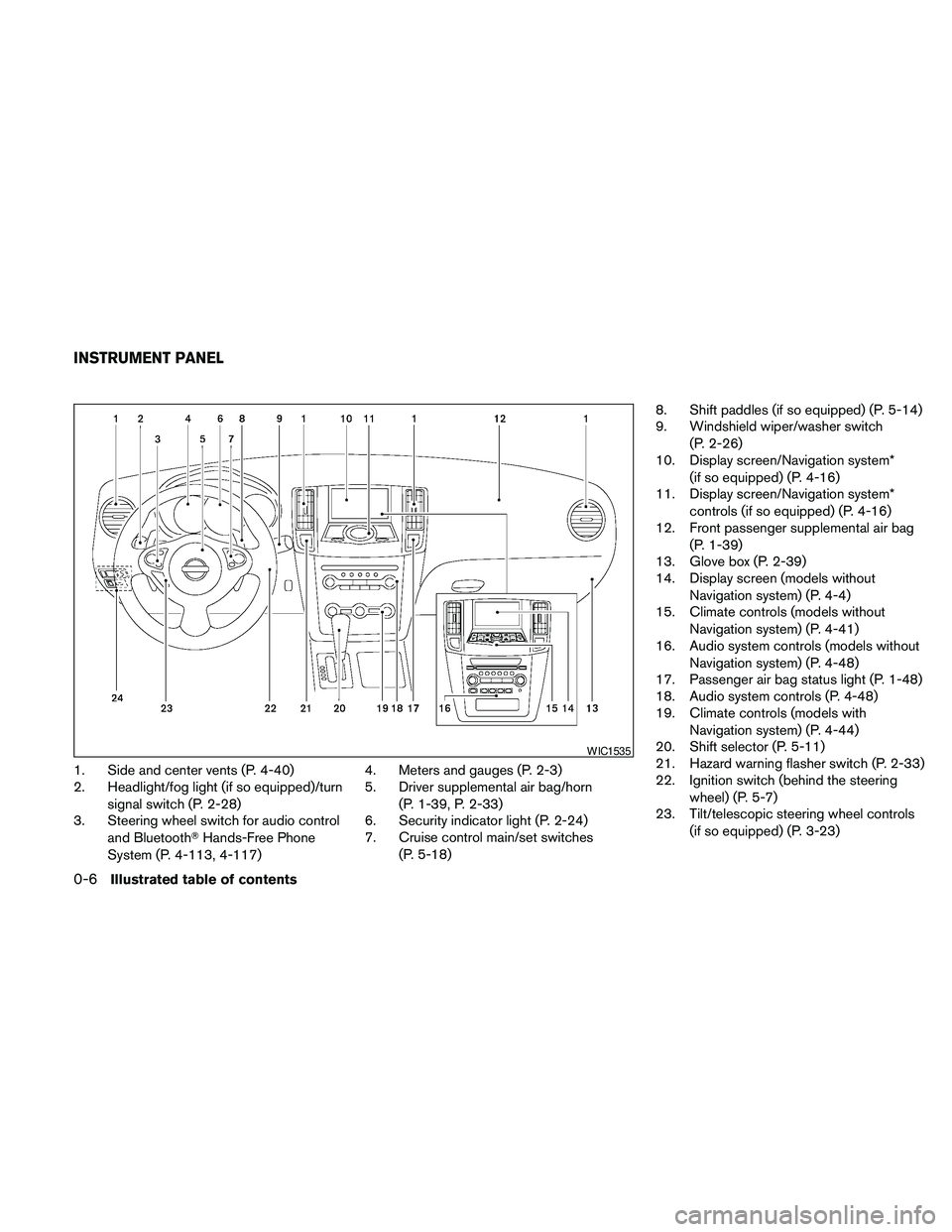
1. Side and center vents (P. 4-40)
2. Headlight/fog light (if so equipped)/turn
signal switch (P. 2-28)
3. Steering wheel switch for audio control
and BluetoothTHands-Free Phone
System (P. 4-113, 4-117)4. Meters and gauges (P. 2-3)
5. Driver supplemental air bag/horn
(P. 1-39, P. 2-33)
6. Security indicator light (P. 2-24)
7. Cruise control main/set switches
(P. 5-18)8. Shift paddles (if so equipped) (P. 5-14)
9. Windshield wiper/washer switch
(P. 2-26)
10. Display screen/Navigation system*
(if so equipped) (P. 4-16)
11. Display screen/Navigation system*
controls (if so equipped) (P. 4-16)
12. Front passenger supplemental air bag
(P. 1-39)
13. Glove box (P. 2-39)
14. Display screen (models without
Navigation system) (P. 4-4)
15. Climate controls (models without
Navigation system) (P. 4-41)
16. Audio system controls (models without
Navigation system) (P. 4-48)
17. Passenger air bag status light (P. 1-48)
18. Audio system controls (P. 4-48)
19. Climate controls (models with
Navigation system) (P. 4-44)
20. Shift selector (P. 5-11)
21. Hazard warning flasher switch (P. 2-33)
22. Ignition switch (behind the steering
wheel) (P. 5-7)
23. Tilt/telescopic steering wheel controls
(if so equipped) (P. 3-23)
WIC1535
INSTRUMENT PANEL
0-6Illustrated table of contents
Page 15 of 457
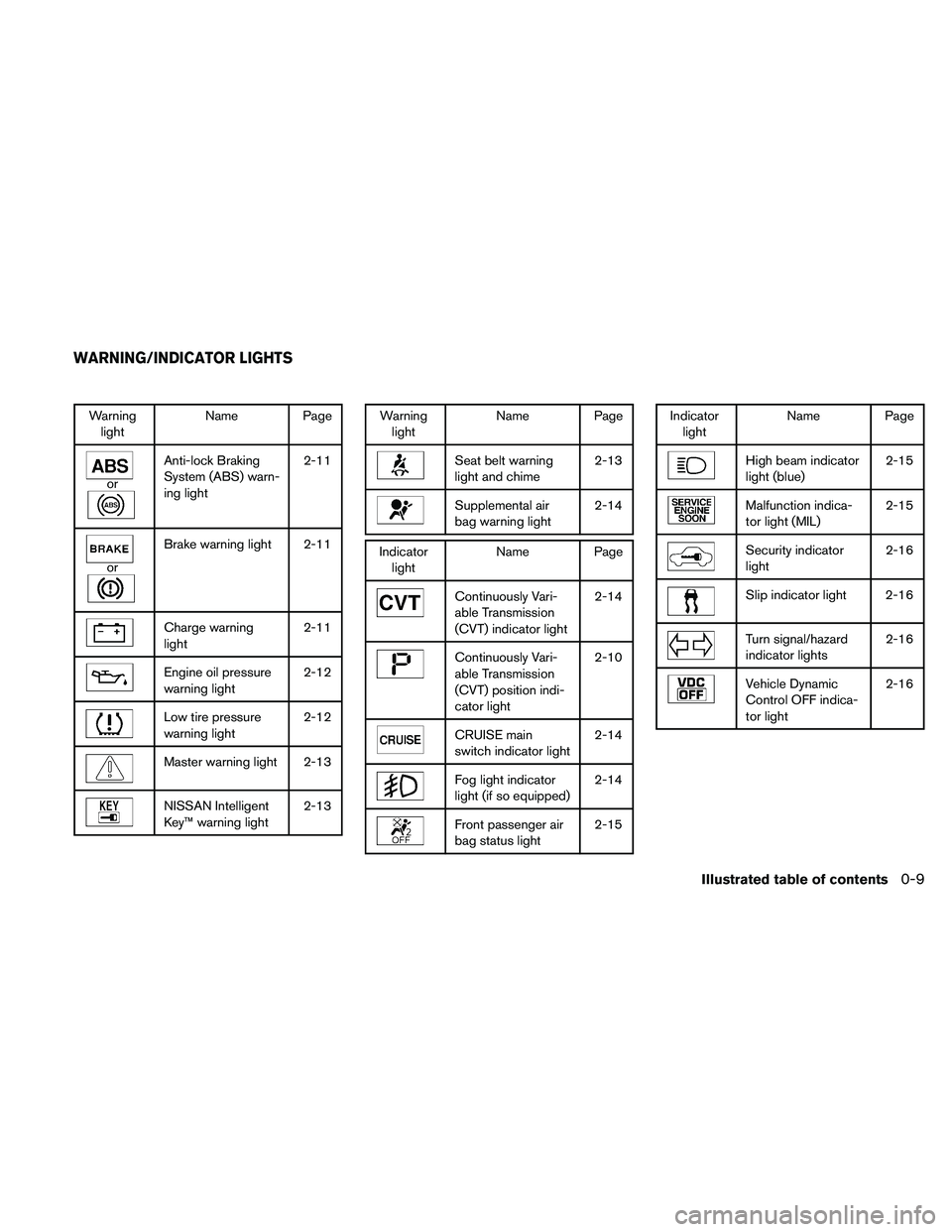
Warning
lightName Page
or
Anti-lock Braking
System (ABS) warn-
ing light2-11
or
Brake warning light 2-11
Charge warning
light2-11
Engine oil pressure
warning light2-12
Low tire pressure
warning light2-12
Master warning light 2-13
NISSAN Intelligent
Key™ warning light2-13
Warning
lightName Page
Seat belt warning
light and chime2-13
Supplemental air
bag warning light2-14
Indicator
lightName Page
Continuously Vari-
able Transmission
(CVT) indicator light2-14
Continuously Vari-
able Transmission
(CVT) position indi-
cator light2-10
CRUISE main
switch indicator light2-14
Fog light indicator
light (if so equipped)2-14
Front passenger air
bag status light2-15
Indicator
lightName Page
High beam indicator
light (blue)2-15
Malfunction indica-
tor light (MIL)2-15
Security indicator
light2-16
Slip indicator light 2-16
Turn signal/hazard
indicator lights2-16
Vehicle Dynamic
Control OFF indica-
tor light2-16
WARNING/INDICATOR LIGHTS
Illustrated table of contents0-9
Page 72 of 457
2 Instruments and controls
Instrument panel...................................2-2
Meters and gauges................................2-3
Speedometer and odometer.....................2-4
Tachometer....................................2-5
Engine coolant temperature gauge...............2-5
Fuel gauge....................................2-6
Compass display (if so equipped)...................2-6
Compass display...............................2-7
Warning/indicator lights and audible reminders......2-10
Checking bulbs...............................2-10
Warning lights................................2-10
Indicator lights................................2-14
Audible reminders.............................2-16
Vehicle information display.........................2-17
How to use the vehicle information display.......2-17
Security systems.................................2-24
Vehicle security system.........................2-24
NISSAN vehicle immobilizer system.............2-25
Windshield wiper and washer switch...............2-26
Switch operation..............................2-26
Rear window and outside mirror (if so equipped)
defroster switch..................................2-27
Headlight and turn signal switch....................2-28Xenon headlights (if so equipped)...............2-28
Headlight control switch........................2-29
Daytime running light system (Canada only)......2-31
Instrument brightness control...................2-32
Turn signal switch.............................2-32
Fog light switch (if so equipped)................2-32
Hazard warning flasher switch.....................2-33
Horn............................................2-33
Climate control seat switch (if so equipped).........2-34
Heated seats (if so equipped)......................2-35
Heated steering wheel (if so equipped).............2-35
Vehicle Dynamic Control (VDC) OFF switch.........2-36
Power outlet.....................................2-36
Storage.........................................2-37
Map pockets..................................2-37
Seatback pockets.............................2-37
Sunglasses holder (if so equipped)..............2-38
Cup holders..................................2-38
Glove box....................................2-39
Console box..................................2-40
Grocery hooks................................2-40
Cargo net (if so equipped)......................2-41
Windows........................................2-42
Page 74 of 457
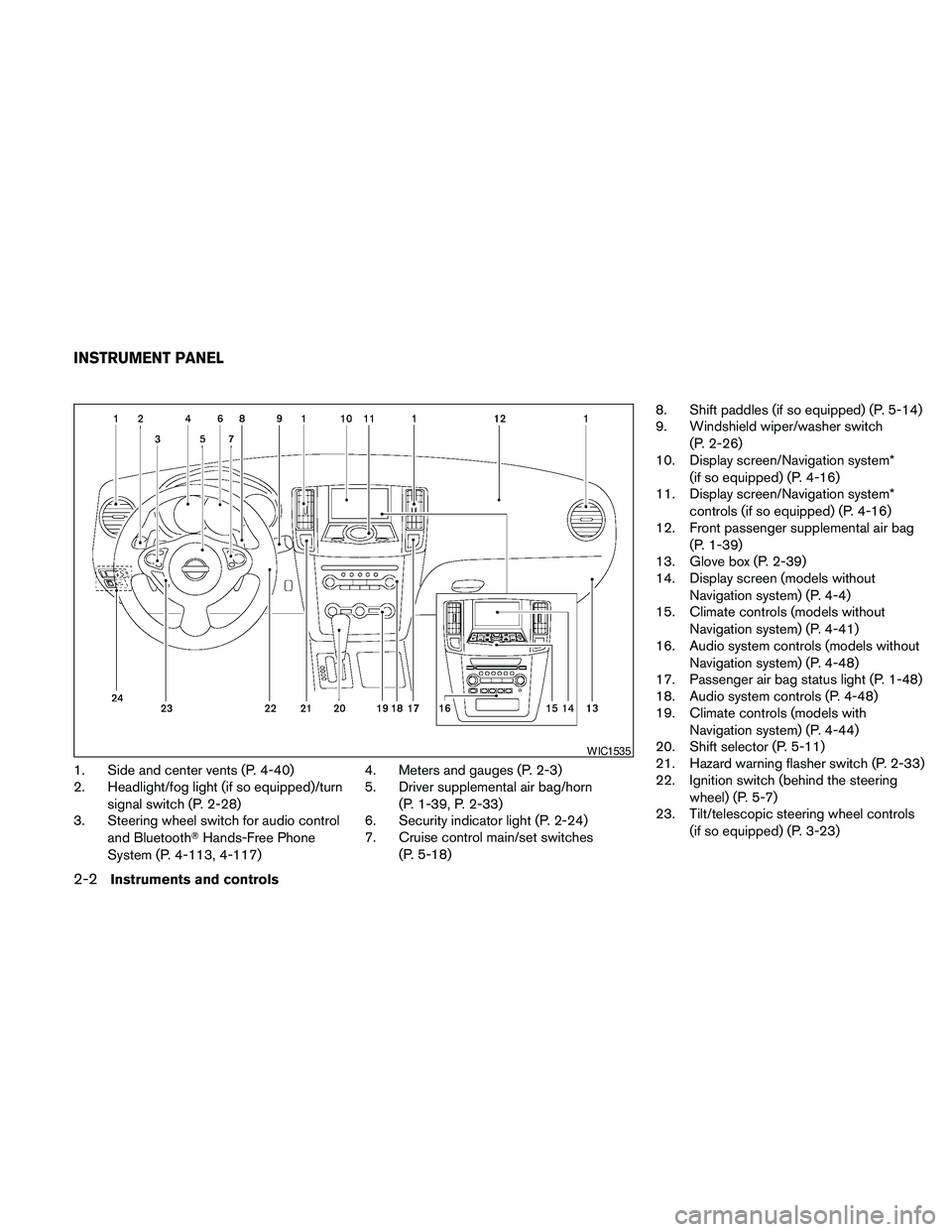
1. Side and center vents (P. 4-40)
2. Headlight/fog light (if so equipped)/turn
signal switch (P. 2-28)
3. Steering wheel switch for audio control
and BluetoothTHands-Free Phone
System (P. 4-113, 4-117)4. Meters and gauges (P. 2-3)
5. Driver supplemental air bag/horn
(P. 1-39, P. 2-33)
6. Security indicator light (P. 2-24)
7. Cruise control main/set switches
(P. 5-18)8. Shift paddles (if so equipped) (P. 5-14)
9. Windshield wiper/washer switch
(P. 2-26)
10. Display screen/Navigation system*
(if so equipped) (P. 4-16)
11. Display screen/Navigation system*
controls (if so equipped) (P. 4-16)
12. Front passenger supplemental air bag
(P. 1-39)
13. Glove box (P. 2-39)
14. Display screen (models without
Navigation system) (P. 4-4)
15. Climate controls (models without
Navigation system) (P. 4-41)
16. Audio system controls (models without
Navigation system) (P. 4-48)
17. Passenger air bag status light (P. 1-48)
18. Audio system controls (P. 4-48)
19. Climate controls (models with
Navigation system) (P. 4-44)
20. Shift selector (P. 5-11)
21. Hazard warning flasher switch (P. 2-33)
22. Ignition switch (behind the steering
wheel) (P. 5-7)
23. Tilt/telescopic steering wheel controls
(if so equipped) (P. 3-23)
WIC1535
INSTRUMENT PANEL
2-2Instruments and controls
Page 82 of 457
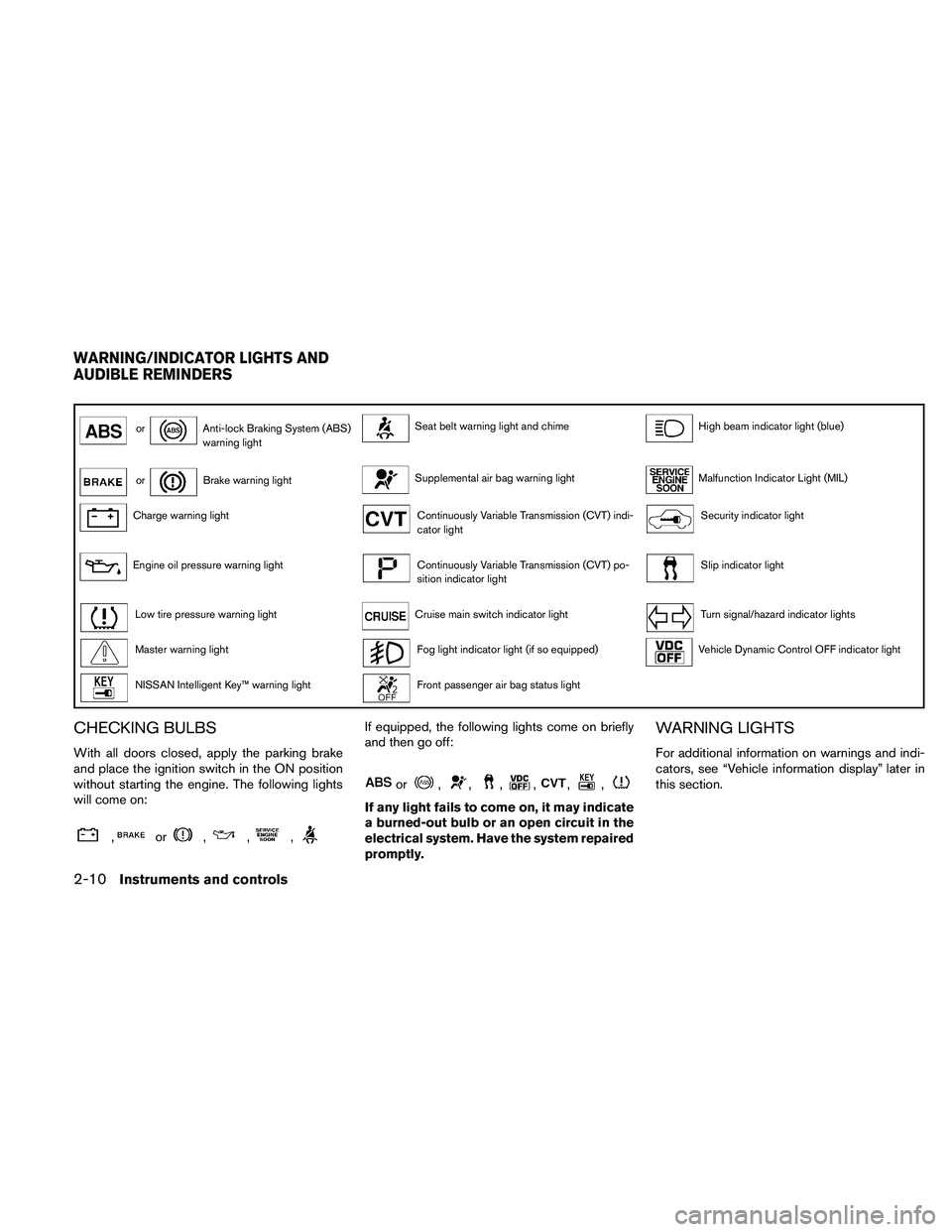
orAnti-lock Braking System (ABS)
warning lightSeat belt warning light and chimeHigh beam indicator light (blue)
orBrake warning lightSupplemental air bag warning lightMalfunction Indicator Light (MIL)
Charge warning lightContinuously Variable Transmission (CVT) indi-
cator lightSecurity indicator light
Engine oil pressure warning lightContinuously Variable Transmission (CVT) po-
sition indicator lightSlip indicator light
Low tire pressure warning lightCruise main switch indicator lightTurn signal/hazard indicator lights
Master warning lightFog light indicator light (if so equipped)Vehicle Dynamic Control OFF indicator light
NISSAN Intelligent Key™ warning lightFront passenger air bag status light
CHECKING BULBS
With all doors closed, apply the parking brake
and place the ignition switch in the ON position
without starting the engine. The following lights
will come on:
,or,,,
If equipped, the following lights come on briefly
and then go off:
or,,,,,,
If any light fails to come on, it may indicate
a burned-out bulb or an open circuit in the
electrical system. Have the system repaired
promptly.
WARNING LIGHTS
For additional information on warnings and indi-
cators, see “Vehicle information display” later in
this section.
WARNING/INDICATOR LIGHTS AND
AUDIBLE REMINDERS
2-10Instruments and controls
Page 86 of 457
The seat belt warning light may also illuminate if
the front passenger’s seat belt is not fastened
when the front passenger’s seat is occupied. For
7 seconds after the ignition switch is placed in
the ON position, the system does not activate the
warning light for the front passenger.
Refer to “Seat belts” in the “Safety—Seats, seat
belts and supplemental restraint system” section
for precautions on seat belt usage.
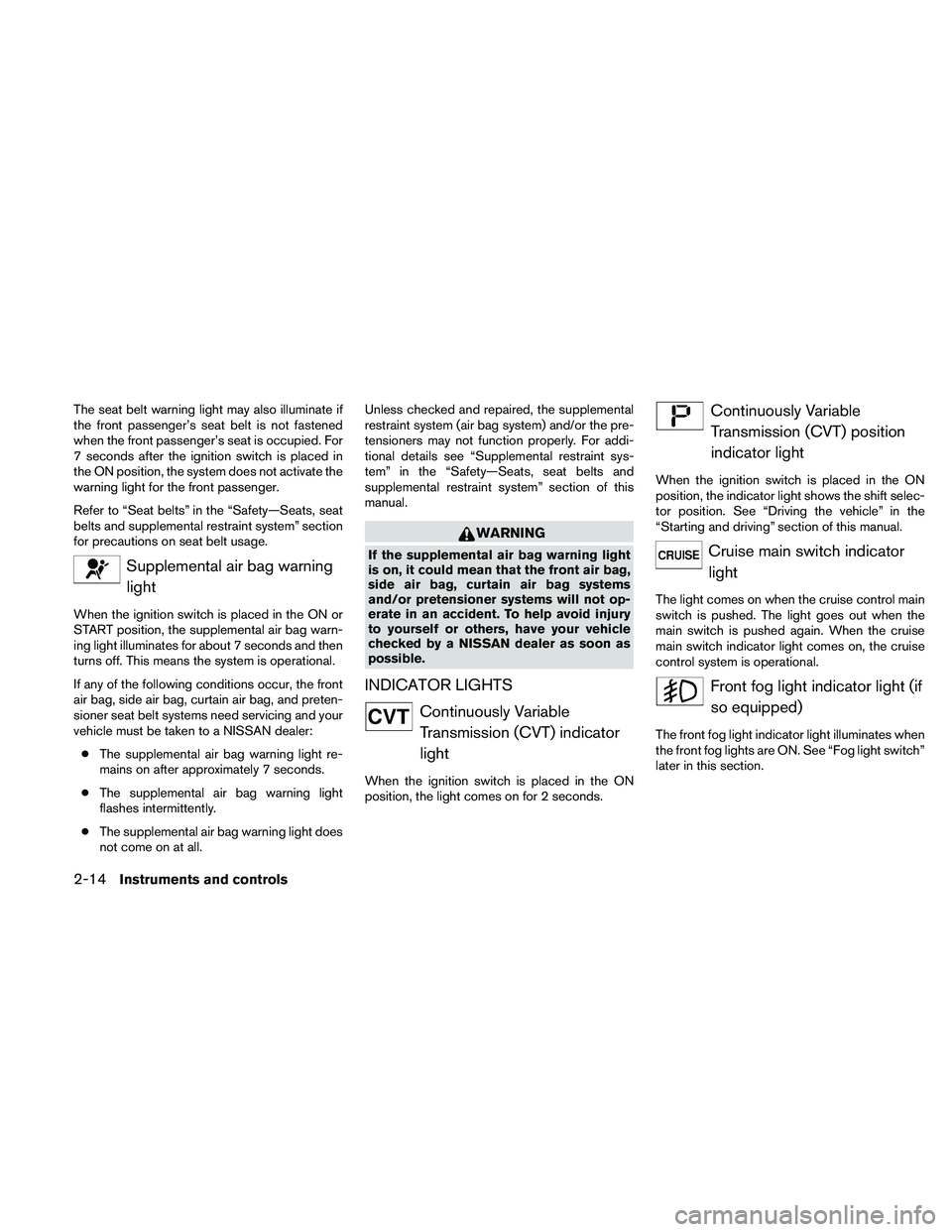
Supplemental air bag warning
light
When the ignition switch is placed in the ON or
START position, the supplemental air bag warn-
ing light illuminates for about 7 seconds and then
turns off. This means the system is operational.
If any of the following conditions occur, the front
air bag, side air bag, curtain air bag, and preten-
sioner seat belt systems need servicing and your
vehicle must be taken to a NISSAN dealer:
cThe supplemental air bag warning light re-
mains on after approximately 7 seconds.
cThe supplemental air bag warning light
flashes intermittently.
cThe supplemental air bag warning light does
not come on at all.Unless checked and repaired, the supplemental
restraint system (air bag system) and/or the pre-
tensioners may not function properly. For addi-
tional details see “Supplemental restraint sys-
tem” in the “Safety—Seats, seat belts and
supplemental restraint system” section of this
manual.
WARNING
If the supplemental air bag warning light
is on, it could mean that the front air bag,
side air bag, curtain air bag systems
and/or pretensioner systems will not op-
erate in an accident. To help avoid injury
to yourself or others, have your vehicle
checked by a NISSAN dealer as soon as
possible.
INDICATOR LIGHTS
Continuously Variable
Transmission (CVT) indicator
light
When the ignition switch is placed in the ON
position, the light comes on for 2 seconds.
Continuously Variable
Transmission (CVT) position
indicator light
When the ignition switch is placed in the ON
position, the indicator light shows the shift selec-
tor position. See “Driving the vehicle” in the
“Starting and driving” section of this manual.
Cruise main switch indicator
light
The light comes on when the cruise control main
switch is pushed. The light goes out when the
main switch is pushed again. When the cruise
main switch indicator light comes on, the cruise
control system is operational.
Front fog light indicator light (if
so equipped)
The front fog light indicator light illuminates when
the front fog lights are ON. See “Fog light switch”
later in this section.
2-14Instruments and controls
Page 104 of 457
INSTRUMENT BRIGHTNESS
CONTROL
The instrument cluster illuminates when the igni-
tion switch is in the ON position.
The instrument brightness control operates when
the headlight control switch is in the
AUTO,
orposition.
Turn the control left or right to adjust the bright-
ness of the instrument panel lights when driving
at night.
The instrument brightness control will not adjust
the brightness when the headlights or parking
lights are off.
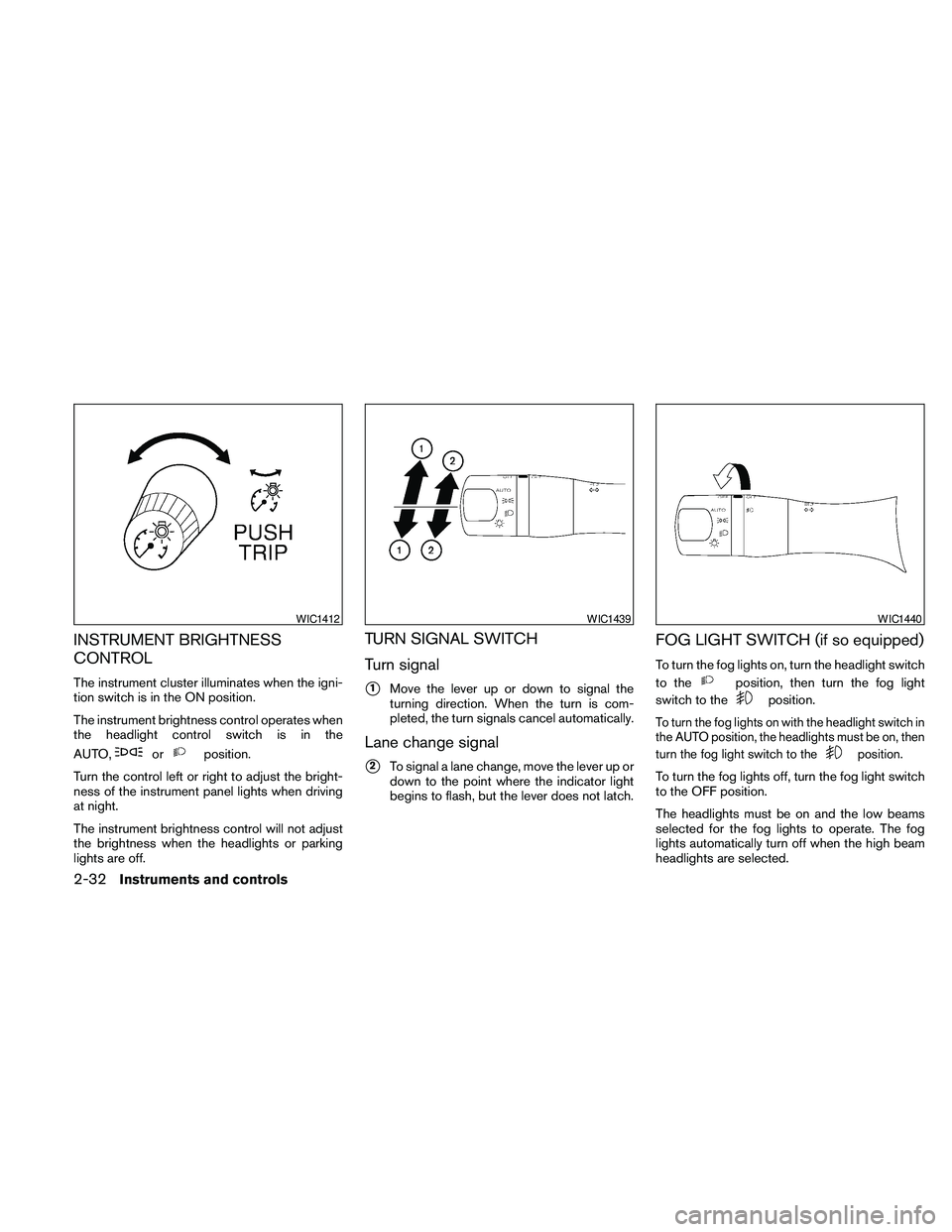
TURN SIGNAL SWITCH
Turn signal
s1Move the lever up or down to signal the
turning direction. When the turn is com-
pleted, the turn signals cancel automatically.
Lane change signal
s2To signal a lane change, move the lever up or
down to the point where the indicator light
begins to flash, but the lever does not latch.
FOG LIGHT SWITCH (if so equipped)
To turn the fog lights on, turn the headlight switch
to the
position, then turn the fog light
switch to the
position.
To turn the fog lights on with the headlight switch in
the AUTO position, the headlights must be on, then
turn the fog light switch to the
position.
To turn the fog lights off, turn the fog light switch
to the OFF position.
The headlights must be on and the low beams
selected for the fog lights to operate. The fog
lights automatically turn off when the high beam
headlights are selected.
WIC1412WIC1439WIC1440
2-32Instruments and controls
Page 156 of 457
WARNING
cObjects viewed in the outside mirror on
the passenger side are closer than they
appear. Be careful when moving to the
right. Using only this mirror could cause
an accident. Use the inside mirror or
glance over your shoulder to properly
judge distances to other objects.
cDo not adjust the mirrors while driving.
You could lose control of your vehicle
and cause an accident.
Automatic anti-glare outside mirrors (if
so equipped)
The driver’s outside mirror will automatically dim
during nighttime conditions to reduce the glare
from the headlights of trailing vehicles. The auto-
matic anti-glare feature operates only when the
ignition switch is placed in the ON position.
The automatic anti-glare feature will be on when
starting the vehicle. The indicator light on the
automatic anti-glare rearview mirror will illuminate
when the automatic anti-glare feature is on.
To turn off the automatic anti-glare feature, press:
cthe O button on rearview mirror without
compass (Type B) .cthe
button on rearview mirror with
compass (Type C) .
The indicator light will turn off.
To turn on the automatic anti-glare feature again,
press:
cthe | button on rearview mirror without
compass (Type B) .
cthe
button on rearview mirror
equipped with compass (Type C) .
The indicator light will turn on.
For information on the automatic anti-glare rear-
view mirror, see “Automatic anti-glare rearview
mirror” in this section.
Reverse tilt-down feature (if so
equipped)
The reverse tilt-down feature will turn both out-
side mirror surfaces downward to provide better
rear visibility close to the vehicle when the small
switch is in either the L or R position.
NOTE:
If the outside mirror control switch is in the
neutral position, neither mirror will turn
downward when the shift selector is moved
to R (Reverse) .Move the shift selector to R (Reverse) . Both
mirrors will turn downward.
The mirror surfaces will return to their original
position when any of the following have occurred:
cThe shift selector is moved to any position
other than R (Reverse) .
cThe outside mirror control switch is set to the
neutral or center position.
cThe ignition switch is placed in the OFF
position.
Heated mirrors (if so equipped)
The electric control type outside mirrors (if so
equipped) can be heated to defrost, defog, or
de-ice for improved visibility. Push the rear win-
dow defogger switch to activate the heating
function. Push the switch again to deactivate, or
the heating function will automatically turn off
after approximately 15 minutes.
3-28Pre-driving checks and adjustments
Page 202 of 457
2. Operate the driver’s side temperature con-
trol buttons.
cAdjust the temperature display to about
75°F (24°C) for normal operation.
cThe temperature of the passenger compart-
ment will be maintained automatically. Air
flow distribution and fan speed are also con-
trolled automatically.
cA visible mist may be seen coming from the
ventilators in hot, humid conditions as the air
is cooled rapidly. This does not indicate a
malfunction.
3. You can individually set driver’s and front
passenger’s side temperature using each
temperature control button. When the DUAL
button or passenger’s side temperature but-
ton is pressed, the DUAL indicator will come
on. To turn off the passenger’s side tempera-
ture control, push the DUAL button.
Heating (A/C OFF)
The air conditioner does not activate. When you
need to heat only, use this mode.
1. Push the A/C button. (A/C OFF will be dis-
played and A/C indicator will turn off.)
2. Operate the temperature control buttons to
set the desired temperature.cThe temperature of the passenger compart-
ment will be maintained automatically. Air
flow distribution and fan speed are also con-
trolled automatically.
cDo not set the temperature lower than the
outside air temperature. Otherwise the sys-
tem may not work properly.
cNot recommended if windows fog up.
Dehumidified defrosting or defogging
1. Push thefront defroster button on.
(The indicator light on the button will come
on.)
2. Operate the temperature control buttons to
set the desired temperature.
cTo quickly remove ice from the outside of the
windows, use the fan speed control dial to
set the fan speed to maximum.
cAs soon as possible after the windshield is
clean, push the AUTO button to return to the
automatic mode.cWhen the
front defroster button is
pushed, the air conditioner will automatically
be turned on at outside temperatures above
36°F (2°C) . The air recirculate mode auto-
matically turns off, allowing outside air to be
drawn into the passenger compartment to
further improve the defogging performance.
MANUAL OPERATION
Fan speed control
Turn thefan speed control dial to manually
control the fan speed.
Push the AUTO button to return to automatic
control of the fan speed.
Air recirculation
Push theair recirculation button to recir-
culate interior air inside the vehicle. The
indicator light on the button will come on.
The air recirculation cannot be activated when
the air conditioner is in the
front defrosting
mode or the
front defrosting and foot out-
let mode.
4-42Monitor, climate, audio, phone and voice recognition systems