glove box NISSAN MAXIMA 2010 Owner´s Manual
[x] Cancel search | Manufacturer: NISSAN, Model Year: 2010, Model line: MAXIMA, Model: NISSAN MAXIMA 2010Pages: 457, PDF Size: 4.66 MB
Page 11 of 457
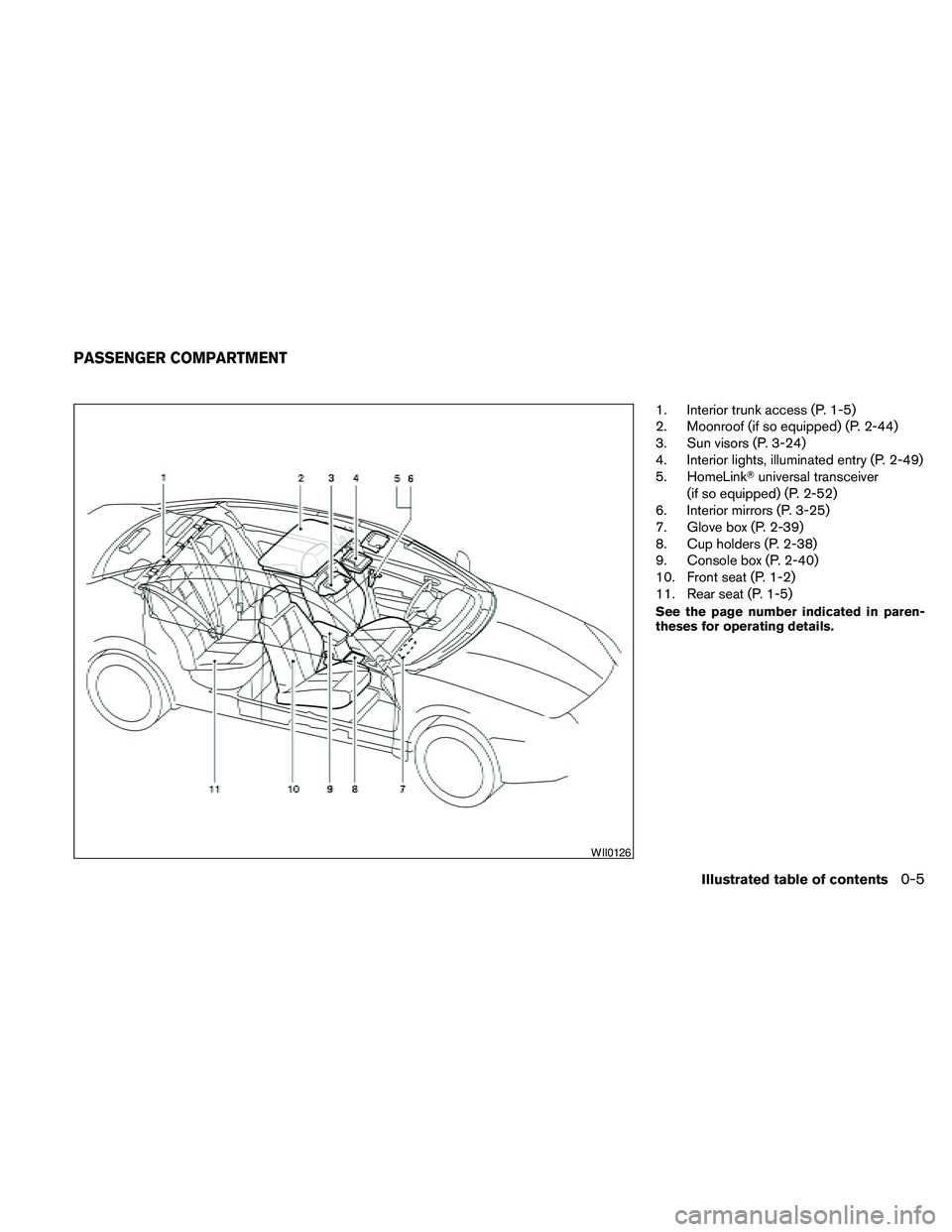
1. Interior trunk access (P. 1-5)
2. Moonroof (if so equipped) (P. 2-44)
3. Sun visors (P. 3-24)
4. Interior lights, illuminated entry (P. 2-49)
5. HomeLinkTuniversal transceiver
(if so equipped) (P. 2-52)
6. Interior mirrors (P. 3-25)
7. Glove box (P. 2-39)
8. Cup holders (P. 2-38)
9. Console box (P. 2-40)
10. Front seat (P. 1-2)
11. Rear seat (P. 1-5)
See the page number indicated in paren-
theses for operating details.
WII0126
PASSENGER COMPARTMENT
Illustrated table of contents0-5
Page 12 of 457
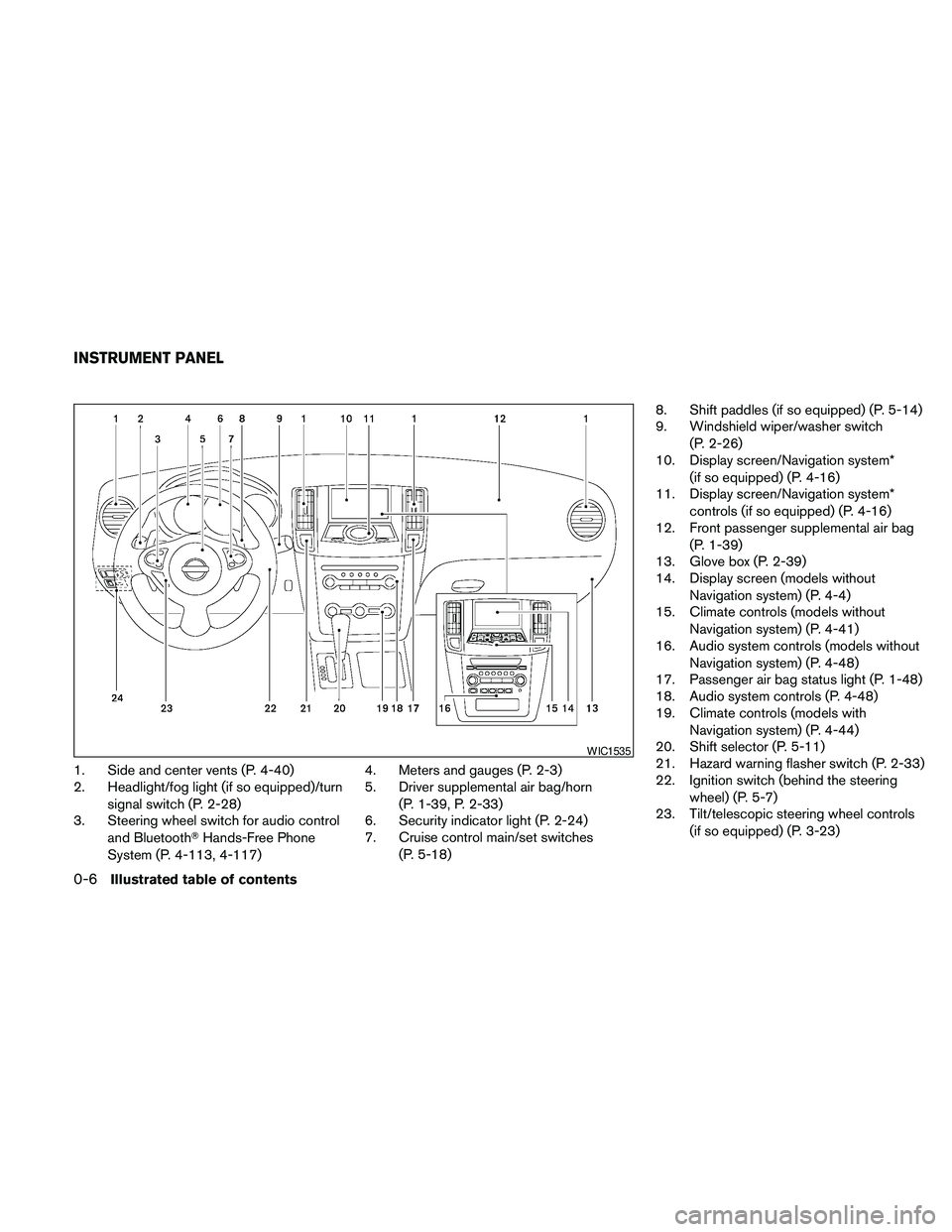
1. Side and center vents (P. 4-40)
2. Headlight/fog light (if so equipped)/turn
signal switch (P. 2-28)
3. Steering wheel switch for audio control
and BluetoothTHands-Free Phone
System (P. 4-113, 4-117)4. Meters and gauges (P. 2-3)
5. Driver supplemental air bag/horn
(P. 1-39, P. 2-33)
6. Security indicator light (P. 2-24)
7. Cruise control main/set switches
(P. 5-18)8. Shift paddles (if so equipped) (P. 5-14)
9. Windshield wiper/washer switch
(P. 2-26)
10. Display screen/Navigation system*
(if so equipped) (P. 4-16)
11. Display screen/Navigation system*
controls (if so equipped) (P. 4-16)
12. Front passenger supplemental air bag
(P. 1-39)
13. Glove box (P. 2-39)
14. Display screen (models without
Navigation system) (P. 4-4)
15. Climate controls (models without
Navigation system) (P. 4-41)
16. Audio system controls (models without
Navigation system) (P. 4-48)
17. Passenger air bag status light (P. 1-48)
18. Audio system controls (P. 4-48)
19. Climate controls (models with
Navigation system) (P. 4-44)
20. Shift selector (P. 5-11)
21. Hazard warning flasher switch (P. 2-33)
22. Ignition switch (behind the steering
wheel) (P. 5-7)
23. Tilt/telescopic steering wheel controls
(if so equipped) (P. 3-23)
WIC1535
INSTRUMENT PANEL
0-6Illustrated table of contents
Page 62 of 457
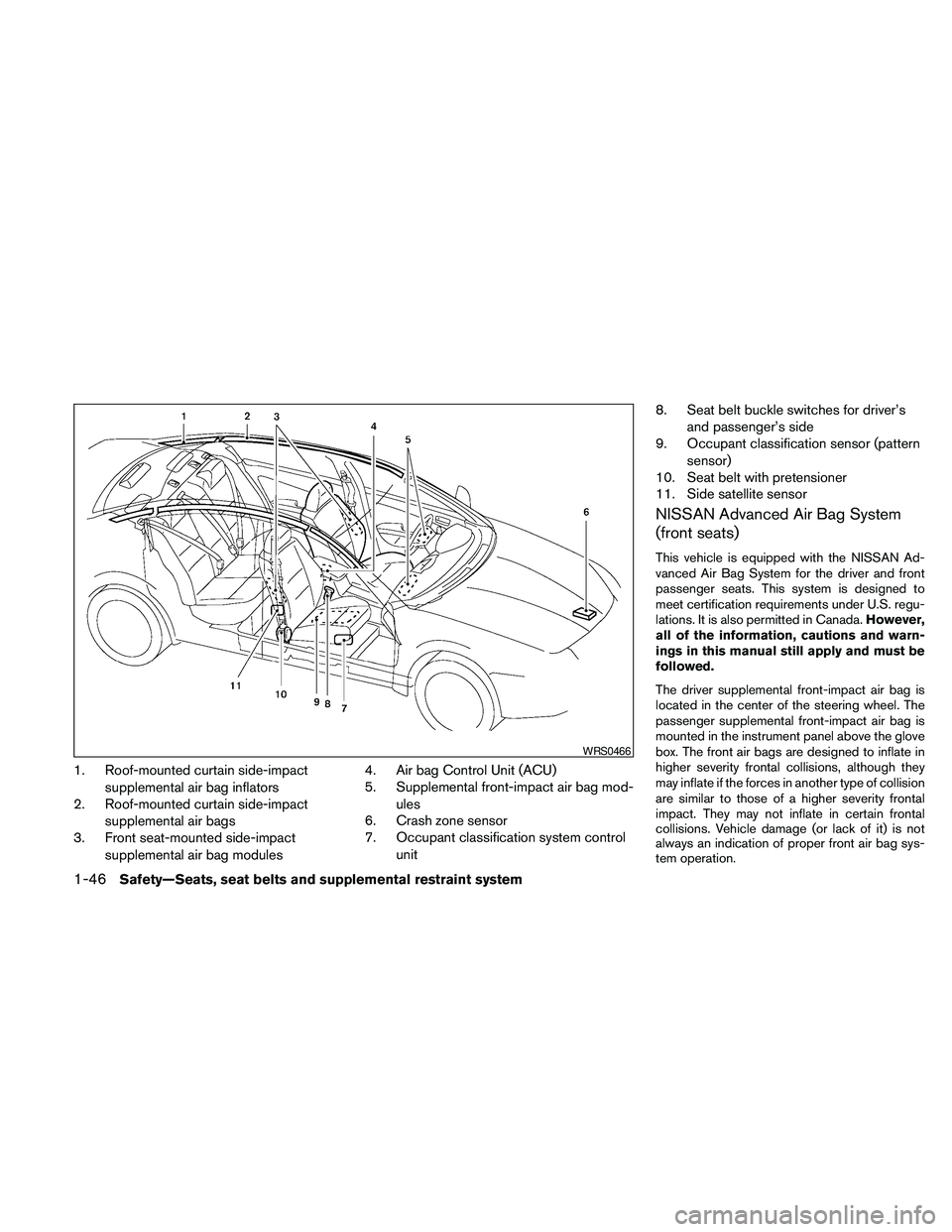
1. Roof-mounted curtain side-impact
supplemental air bag inflators
2. Roof-mounted curtain side-impact
supplemental air bags
3. Front seat-mounted side-impact
supplemental air bag modules4. Air bag Control Unit (ACU)
5. Supplemental front-impact air bag mod-
ules
6. Crash zone sensor
7. Occupant classification system control
unit8. Seat belt buckle switches for driver’s
and passenger’s side
9. Occupant classification sensor (pattern
sensor)
10. Seat belt with pretensioner
11. Side satellite sensor
NISSAN Advanced Air Bag System
(front seats)
This vehicle is equipped with the NISSAN Ad-
vanced Air Bag System for the driver and front
passenger seats. This system is designed to
meet certification requirements under U.S. regu-
lations. It is also permitted in Canada.However,
all of the information, cautions and warn-
ings in this manual still apply and must be
followed.
The driver supplemental front-impact air bag is
located in the center of the steering wheel. The
passenger supplemental front-impact air bag is
mounted in the instrument panel above the glove
box. The front air bags are designed to inflate in
higher severity frontal collisions, although they
may inflate if the forces in another type of collision
are similar to those of a higher severity frontal
impact. They may not inflate in certain frontal
collisions. Vehicle damage (or lack of it) is not
always an indication of proper front air bag sys-
tem operation.
WRS0466
1-46Safety—Seats, seat belts and supplemental restraint system
Page 72 of 457
2 Instruments and controls
Instrument panel...................................2-2
Meters and gauges................................2-3
Speedometer and odometer.....................2-4
Tachometer....................................2-5
Engine coolant temperature gauge...............2-5
Fuel gauge....................................2-6
Compass display (if so equipped)...................2-6
Compass display...............................2-7
Warning/indicator lights and audible reminders......2-10
Checking bulbs...............................2-10
Warning lights................................2-10
Indicator lights................................2-14
Audible reminders.............................2-16
Vehicle information display.........................2-17
How to use the vehicle information display.......2-17
Security systems.................................2-24
Vehicle security system.........................2-24
NISSAN vehicle immobilizer system.............2-25
Windshield wiper and washer switch...............2-26
Switch operation..............................2-26
Rear window and outside mirror (if so equipped)
defroster switch..................................2-27
Headlight and turn signal switch....................2-28Xenon headlights (if so equipped)...............2-28
Headlight control switch........................2-29
Daytime running light system (Canada only)......2-31
Instrument brightness control...................2-32
Turn signal switch.............................2-32
Fog light switch (if so equipped)................2-32
Hazard warning flasher switch.....................2-33
Horn............................................2-33
Climate control seat switch (if so equipped).........2-34
Heated seats (if so equipped)......................2-35
Heated steering wheel (if so equipped).............2-35
Vehicle Dynamic Control (VDC) OFF switch.........2-36
Power outlet.....................................2-36
Storage.........................................2-37
Map pockets..................................2-37
Seatback pockets.............................2-37
Sunglasses holder (if so equipped)..............2-38
Cup holders..................................2-38
Glove box....................................2-39
Console box..................................2-40
Grocery hooks................................2-40
Cargo net (if so equipped)......................2-41
Windows........................................2-42
Page 74 of 457
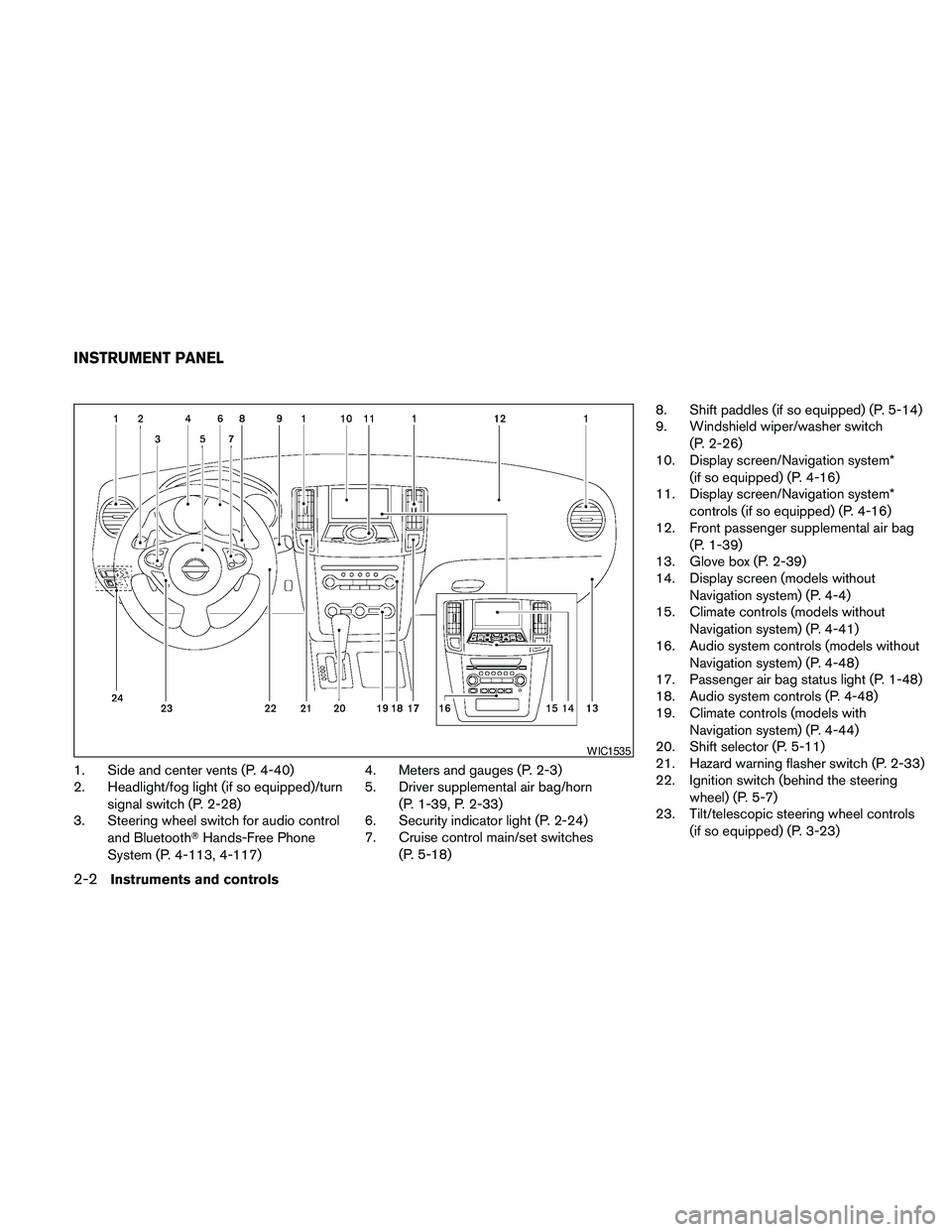
1. Side and center vents (P. 4-40)
2. Headlight/fog light (if so equipped)/turn
signal switch (P. 2-28)
3. Steering wheel switch for audio control
and BluetoothTHands-Free Phone
System (P. 4-113, 4-117)4. Meters and gauges (P. 2-3)
5. Driver supplemental air bag/horn
(P. 1-39, P. 2-33)
6. Security indicator light (P. 2-24)
7. Cruise control main/set switches
(P. 5-18)8. Shift paddles (if so equipped) (P. 5-14)
9. Windshield wiper/washer switch
(P. 2-26)
10. Display screen/Navigation system*
(if so equipped) (P. 4-16)
11. Display screen/Navigation system*
controls (if so equipped) (P. 4-16)
12. Front passenger supplemental air bag
(P. 1-39)
13. Glove box (P. 2-39)
14. Display screen (models without
Navigation system) (P. 4-4)
15. Climate controls (models without
Navigation system) (P. 4-41)
16. Audio system controls (models without
Navigation system) (P. 4-48)
17. Passenger air bag status light (P. 1-48)
18. Audio system controls (P. 4-48)
19. Climate controls (models with
Navigation system) (P. 4-44)
20. Shift selector (P. 5-11)
21. Hazard warning flasher switch (P. 2-33)
22. Ignition switch (behind the steering
wheel) (P. 5-7)
23. Tilt/telescopic steering wheel controls
(if so equipped) (P. 3-23)
WIC1535
INSTRUMENT PANEL
2-2Instruments and controls
Page 111 of 457
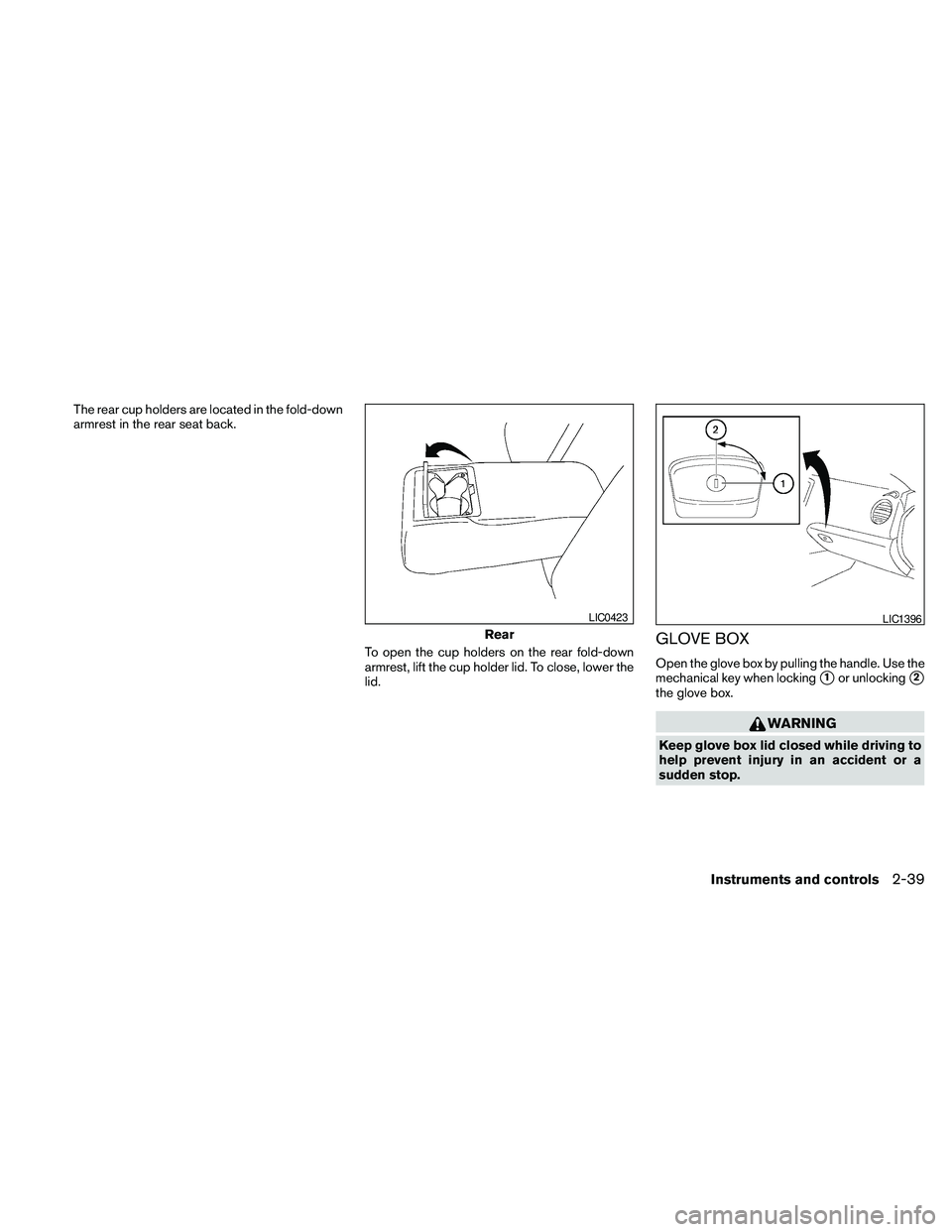
The rear cup holders are located in the fold-down
armrest in the rear seat back.
To open the cup holders on the rear fold-down
armrest, lift the cup holder lid. To close, lower the
lid.
GLOVE BOX
Open the glove box by pulling the handle. Use the
mechanical key when locking
s1or unlockings2
the glove box.
WARNING
Keep glove box lid closed while driving to
help prevent injury in an accident or a
sudden stop.
Rear
LIC0423LIC1396
Instruments and controls2-39
Page 131 of 457
Mechanical key
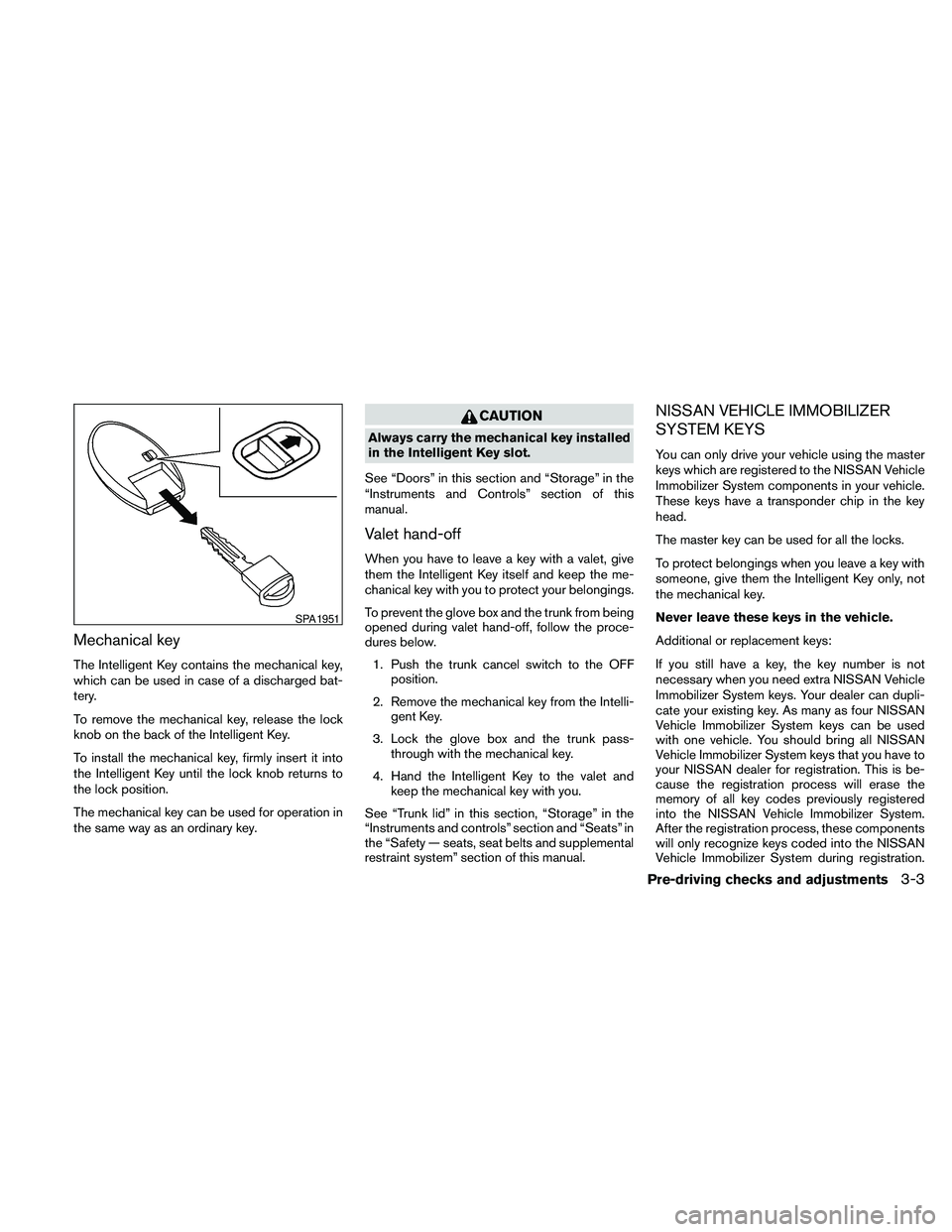
The Intelligent Key contains the mechanical key,
which can be used in case of a discharged bat-
tery.
To remove the mechanical key, release the lock
knob on the back of the Intelligent Key.
To install the mechanical key, firmly insert it into
the Intelligent Key until the lock knob returns to
the lock position.
The mechanical key can be used for operation in
the same way as an ordinary key.
CAUTION
Always carry the mechanical key installed
in the Intelligent Key slot.
See “Doors” in this section and “Storage” in the
“Instruments and Controls” section of this
manual.
Valet hand-off
When you have to leave a key with a valet, give
them the Intelligent Key itself and keep the me-
chanical key with you to protect your belongings.
To prevent the glove box and the trunk from being
opened during valet hand-off, follow the proce-
dures below.
1. Push the trunk cancel switch to the OFF
position.
2. Remove the mechanical key from the Intelli-
gent Key.
3. Lock the glove box and the trunk pass-
through with the mechanical key.
4. Hand the Intelligent Key to the valet and
keep the mechanical key with you.
See “Trunk lid” in this section, “Storage” in the
“Instruments and controls” section and “Seats” in
the “Safety — seats, seat belts and supplemental
restraint system” section of this manual.
NISSAN VEHICLE IMMOBILIZER
SYSTEM KEYS
You can only drive your vehicle using the master
keys which are registered to the NISSAN Vehicle
Immobilizer System components in your vehicle.
These keys have a transponder chip in the key
head.
The master key can be used for all the locks.
To protect belongings when you leave a key with
someone, give them the Intelligent Key only, not
the mechanical key.
Never leave these keys in the vehicle.
Additional or replacement keys:
If you still have a key, the key number is not
necessary when you need extra NISSAN Vehicle
Immobilizer System keys. Your dealer can dupli-
cate your existing key. As many as four NISSAN
Vehicle Immobilizer System keys can be used
with one vehicle. You should bring all NISSAN
Vehicle Immobilizer System keys that you have to
your NISSAN dealer for registration. This is be-
cause the registration process will erase the
memory of all key codes previously registered
into the NISSAN Vehicle Immobilizer System.
After the registration process, these components
will only recognize keys coded into the NISSAN
Vehicle Immobilizer System during registration.
SPA1951
Pre-driving checks and adjustments3-3
Page 139 of 457
NOTE:
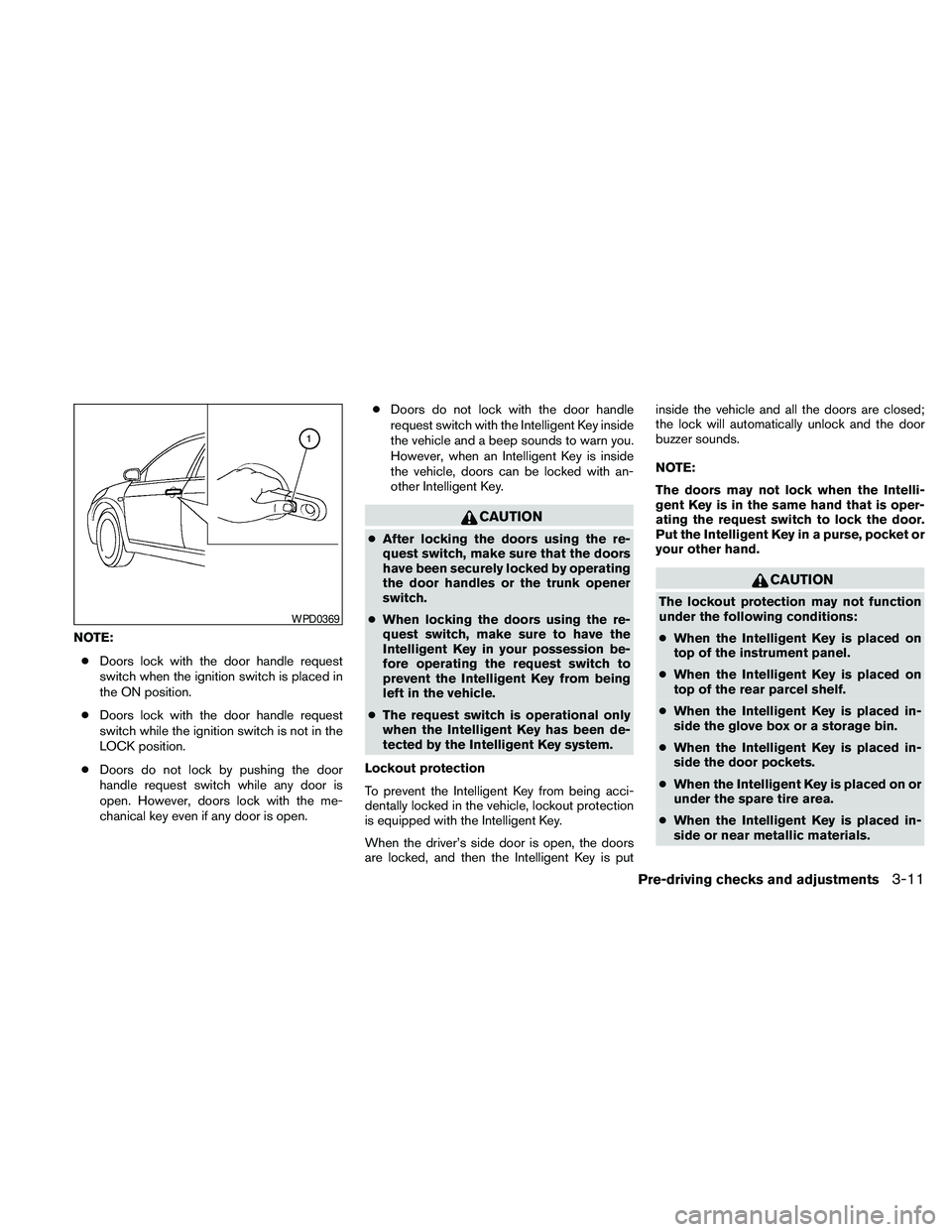
cDoors lock with the door handle request
switch when the ignition switch is placed in
the ON position.
cDoors lock with the door handle request
switch while the ignition switch is not in the
LOCK position.
cDoors do not lock by pushing the door
handle request switch while any door is
open. However, doors lock with the me-
chanical key even if any door is open.cDoors do not lock with the door handle
request switch with the Intelligent Key inside
the vehicle and a beep sounds to warn you.
However, when an Intelligent Key is inside
the vehicle, doors can be locked with an-
other Intelligent Key.
CAUTION
cAfter locking the doors using the re-
quest switch, make sure that the doors
have been securely locked by operating
the door handles or the trunk opener
switch.
cWhen locking the doors using the re-
quest switch, make sure to have the
Intelligent Key in your possession be-
fore operating the request switch to
prevent the Intelligent Key from being
left in the vehicle.
cThe request switch is operational only
when the Intelligent Key has been de-
tected by the Intelligent Key system.
Lockout protection
To prevent the Intelligent Key from being acci-
dentally locked in the vehicle, lockout protection
is equipped with the Intelligent Key.
When the driver’s side door is open, the doors
are locked, and then the Intelligent Key is putinside the vehicle and all the doors are closed;
the lock will automatically unlock and the door
buzzer sounds.
NOTE:
The doors may not lock when the Intelli-
gent Key is in the same hand that is oper-
ating the request switch to lock the door.
Put the Intelligent Key in a purse, pocket or
your other hand.
CAUTION
The lockout protection may not function
under the following conditions:
cWhen the Intelligent Key is placed on
top of the instrument panel.
cWhen the Intelligent Key is placed on
top of the rear parcel shelf.
cWhen the Intelligent Key is placed in-
side the glove box or a storage bin.
cWhen the Intelligent Key is placed in-
side the door pockets.
cWhen the Intelligent Key is placed on or
under the spare tire area.
cWhen the Intelligent Key is placed in-
side or near metallic materials.
WPD0369
Pre-driving checks and adjustments3-11
Page 147 of 457
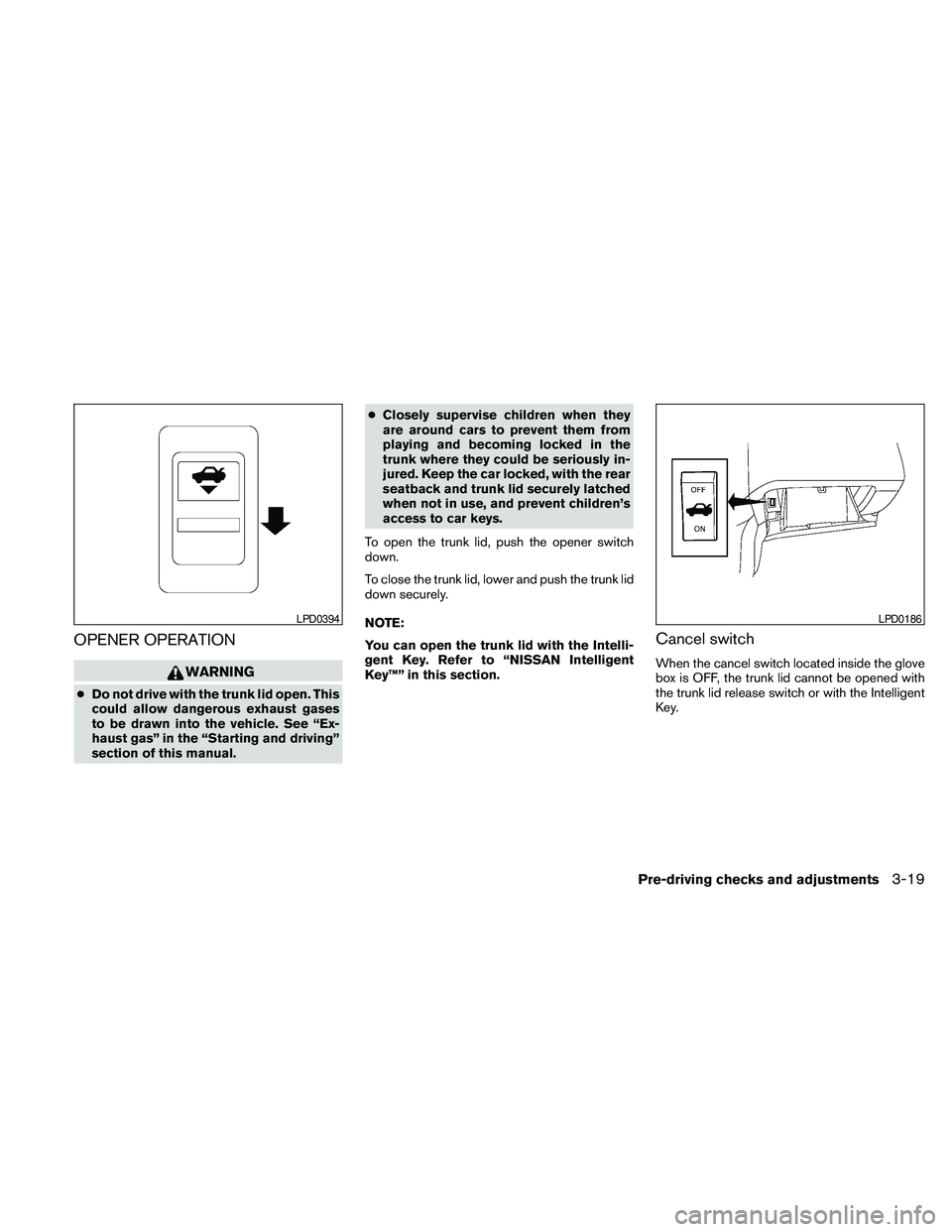
OPENER OPERATION
WARNING
cDo not drive with the trunk lid open. This
could allow dangerous exhaust gases
to be drawn into the vehicle. See “Ex-
haust gas” in the “Starting and driving”
section of this manual.cClosely supervise children when they
are around cars to prevent them from
playing and becoming locked in the
trunk where they could be seriously in-
jured. Keep the car locked, with the rear
seatback and trunk lid securely latched
when not in use, and prevent children’s
access to car keys.
To open the trunk lid, push the opener switch
down.
To close the trunk lid, lower and push the trunk lid
down securely.
NOTE:
You can open the trunk lid with the Intelli-
gent Key. Refer to “NISSAN Intelligent
Key™” in this section.
Cancel switch
When the cancel switch located inside the glove
box is OFF, the trunk lid cannot be opened with
the trunk lid release switch or with the Intelligent
Key.
LPD0394LPD0186
Pre-driving checks and adjustments3-19
Page 395 of 457
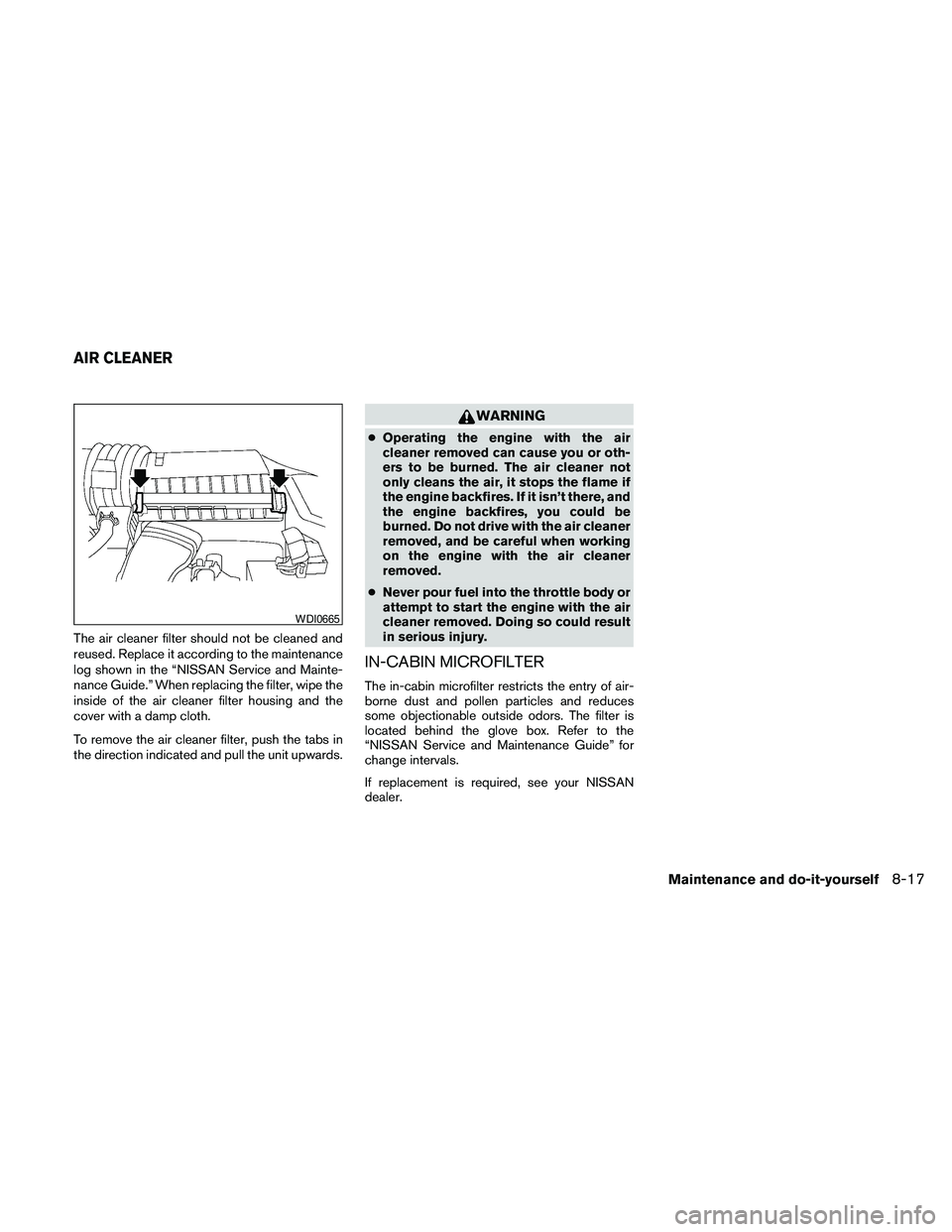
The air cleaner filter should not be cleaned and
reused. Replace it according to the maintenance
log shown in the “NISSAN Service and Mainte-
nance Guide.” When replacing the filter, wipe the
inside of the air cleaner filter housing and the
cover with a damp cloth.
To remove the air cleaner filter, push the tabs in
the direction indicated and pull the unit upwards.
WARNING
cOperating the engine with the air
cleaner removed can cause you or oth-
ers to be burned. The air cleaner not
only cleans the air, it stops the flame if
the engine backfires. If it isn’t there, and
the engine backfires, you could be
burned. Do not drive with the air cleaner
removed, and be careful when working
on the engine with the air cleaner
removed.
cNever pour fuel into the throttle body or
attempt to start the engine with the air
cleaner removed. Doing so could result
in serious injury.
IN-CABIN MICROFILTER
The in-cabin microfilter restricts the entry of air-
borne dust and pollen particles and reduces
some objectionable outside odors. The filter is
located behind the glove box. Refer to the
“NISSAN Service and Maintenance Guide” for
change intervals.
If replacement is required, see your NISSAN
dealer.
WDI0665
AIR CLEANER
Maintenance and do-it-yourself8-17