turn signal NISSAN MAXIMA 2010 Owner´s Manual
[x] Cancel search | Manufacturer: NISSAN, Model Year: 2010, Model line: MAXIMA, Model: NISSAN MAXIMA 2010Pages: 457, PDF Size: 4.66 MB
Page 9 of 457
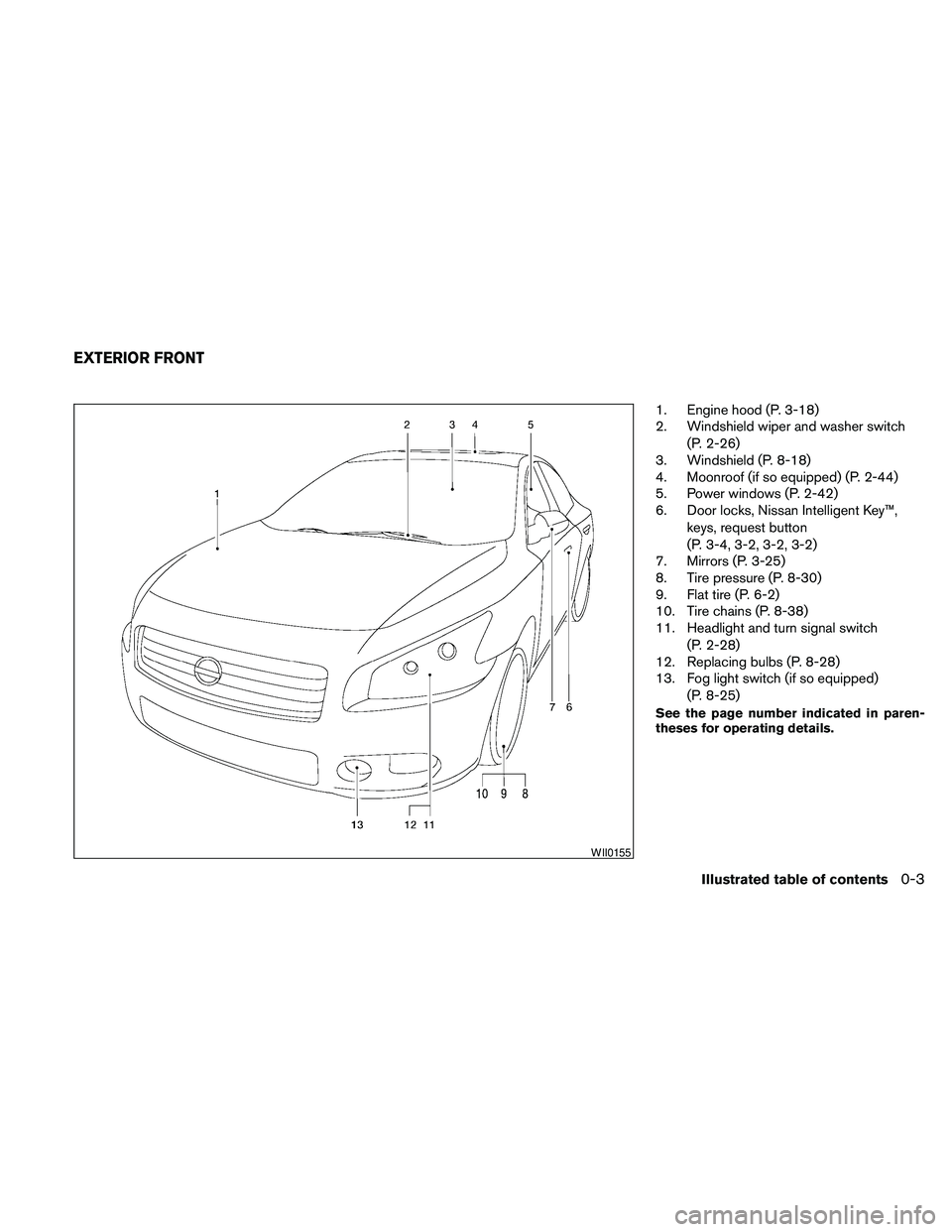
1. Engine hood (P. 3-18)
2. Windshield wiper and washer switch
(P. 2-26)
3. Windshield (P. 8-18)
4. Moonroof (if so equipped) (P. 2-44)
5. Power windows (P. 2-42)
6. Door locks, Nissan Intelligent Key™,
keys, request button
(P. 3-4, 3-2, 3-2, 3-2)
7. Mirrors (P. 3-25)
8. Tire pressure (P. 8-30)
9. Flat tire (P. 6-2)
10. Tire chains (P. 8-38)
11. Headlight and turn signal switch
(P. 2-28)
12. Replacing bulbs (P. 8-28)
13. Fog light switch (if so equipped)
(P. 8-25)
See the page number indicated in paren-
theses for operating details.
WII0155
EXTERIOR FRONT
Illustrated table of contents0-3
Page 12 of 457
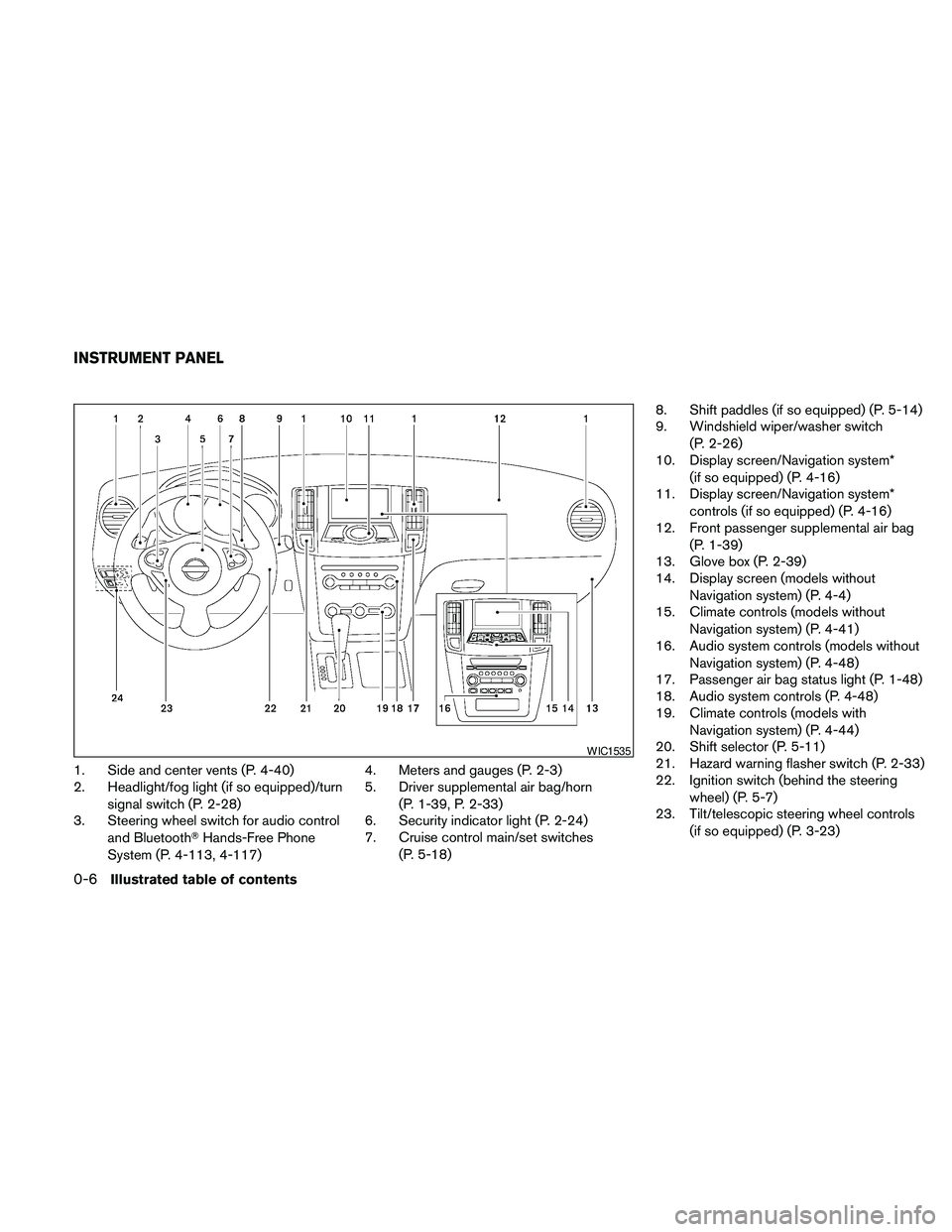
1. Side and center vents (P. 4-40)
2. Headlight/fog light (if so equipped)/turn
signal switch (P. 2-28)
3. Steering wheel switch for audio control
and BluetoothTHands-Free Phone
System (P. 4-113, 4-117)4. Meters and gauges (P. 2-3)
5. Driver supplemental air bag/horn
(P. 1-39, P. 2-33)
6. Security indicator light (P. 2-24)
7. Cruise control main/set switches
(P. 5-18)8. Shift paddles (if so equipped) (P. 5-14)
9. Windshield wiper/washer switch
(P. 2-26)
10. Display screen/Navigation system*
(if so equipped) (P. 4-16)
11. Display screen/Navigation system*
controls (if so equipped) (P. 4-16)
12. Front passenger supplemental air bag
(P. 1-39)
13. Glove box (P. 2-39)
14. Display screen (models without
Navigation system) (P. 4-4)
15. Climate controls (models without
Navigation system) (P. 4-41)
16. Audio system controls (models without
Navigation system) (P. 4-48)
17. Passenger air bag status light (P. 1-48)
18. Audio system controls (P. 4-48)
19. Climate controls (models with
Navigation system) (P. 4-44)
20. Shift selector (P. 5-11)
21. Hazard warning flasher switch (P. 2-33)
22. Ignition switch (behind the steering
wheel) (P. 5-7)
23. Tilt/telescopic steering wheel controls
(if so equipped) (P. 3-23)
WIC1535
INSTRUMENT PANEL
0-6Illustrated table of contents
Page 15 of 457
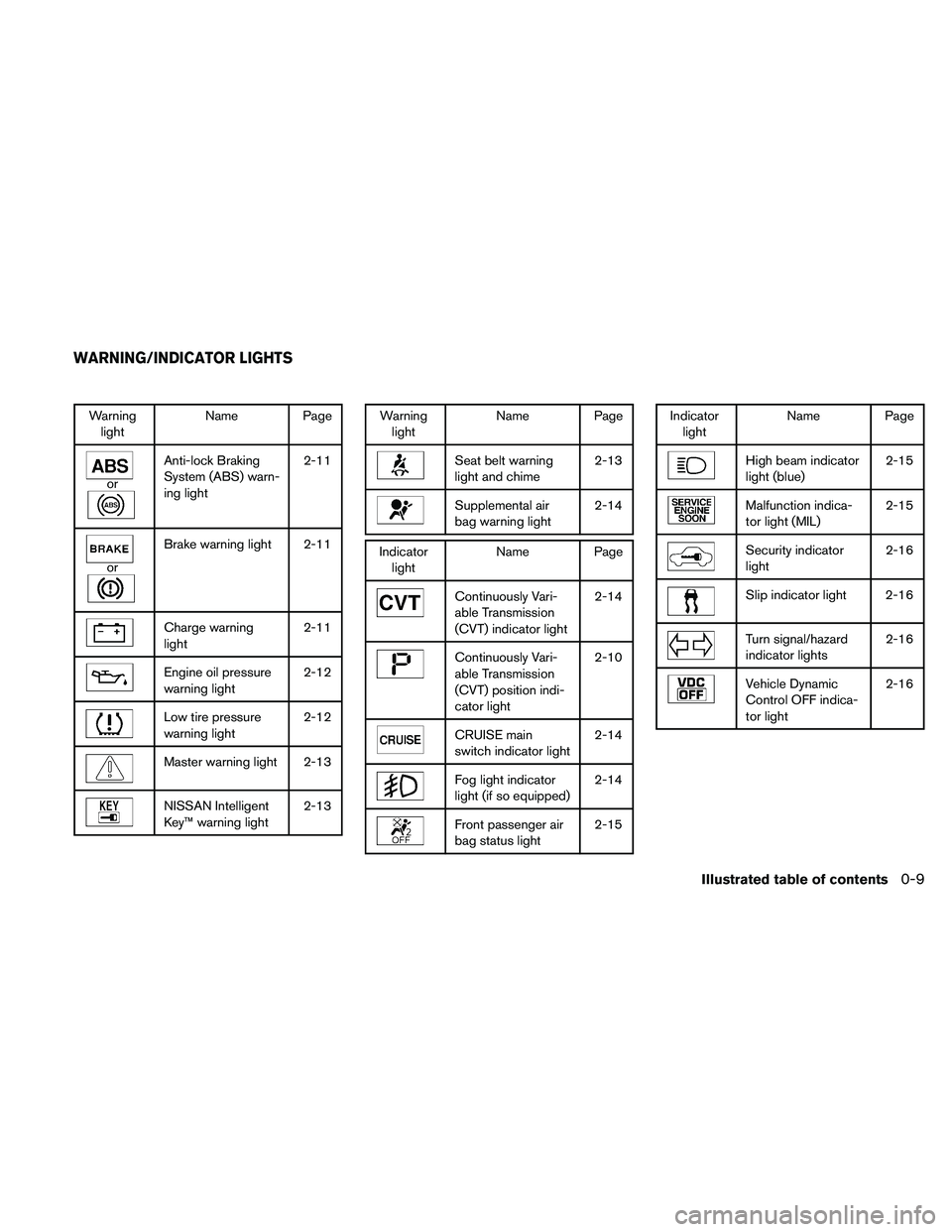
Warning
lightName Page
or
Anti-lock Braking
System (ABS) warn-
ing light2-11
or
Brake warning light 2-11
Charge warning
light2-11
Engine oil pressure
warning light2-12
Low tire pressure
warning light2-12
Master warning light 2-13
NISSAN Intelligent
Key™ warning light2-13
Warning
lightName Page
Seat belt warning
light and chime2-13
Supplemental air
bag warning light2-14
Indicator
lightName Page
Continuously Vari-
able Transmission
(CVT) indicator light2-14
Continuously Vari-
able Transmission
(CVT) position indi-
cator light2-10
CRUISE main
switch indicator light2-14
Fog light indicator
light (if so equipped)2-14
Front passenger air
bag status light2-15
Indicator
lightName Page
High beam indicator
light (blue)2-15
Malfunction indica-
tor light (MIL)2-15
Security indicator
light2-16
Slip indicator light 2-16
Turn signal/hazard
indicator lights2-16
Vehicle Dynamic
Control OFF indica-
tor light2-16
WARNING/INDICATOR LIGHTS
Illustrated table of contents0-9
Page 72 of 457
2 Instruments and controls
Instrument panel...................................2-2
Meters and gauges................................2-3
Speedometer and odometer.....................2-4
Tachometer....................................2-5
Engine coolant temperature gauge...............2-5
Fuel gauge....................................2-6
Compass display (if so equipped)...................2-6
Compass display...............................2-7
Warning/indicator lights and audible reminders......2-10
Checking bulbs...............................2-10
Warning lights................................2-10
Indicator lights................................2-14
Audible reminders.............................2-16
Vehicle information display.........................2-17
How to use the vehicle information display.......2-17
Security systems.................................2-24
Vehicle security system.........................2-24
NISSAN vehicle immobilizer system.............2-25
Windshield wiper and washer switch...............2-26
Switch operation..............................2-26
Rear window and outside mirror (if so equipped)
defroster switch..................................2-27
Headlight and turn signal switch....................2-28Xenon headlights (if so equipped)...............2-28
Headlight control switch........................2-29
Daytime running light system (Canada only)......2-31
Instrument brightness control...................2-32
Turn signal switch.............................2-32
Fog light switch (if so equipped)................2-32
Hazard warning flasher switch.....................2-33
Horn............................................2-33
Climate control seat switch (if so equipped).........2-34
Heated seats (if so equipped)......................2-35
Heated steering wheel (if so equipped).............2-35
Vehicle Dynamic Control (VDC) OFF switch.........2-36
Power outlet.....................................2-36
Storage.........................................2-37
Map pockets..................................2-37
Seatback pockets.............................2-37
Sunglasses holder (if so equipped)..............2-38
Cup holders..................................2-38
Glove box....................................2-39
Console box..................................2-40
Grocery hooks................................2-40
Cargo net (if so equipped)......................2-41
Windows........................................2-42
Page 74 of 457
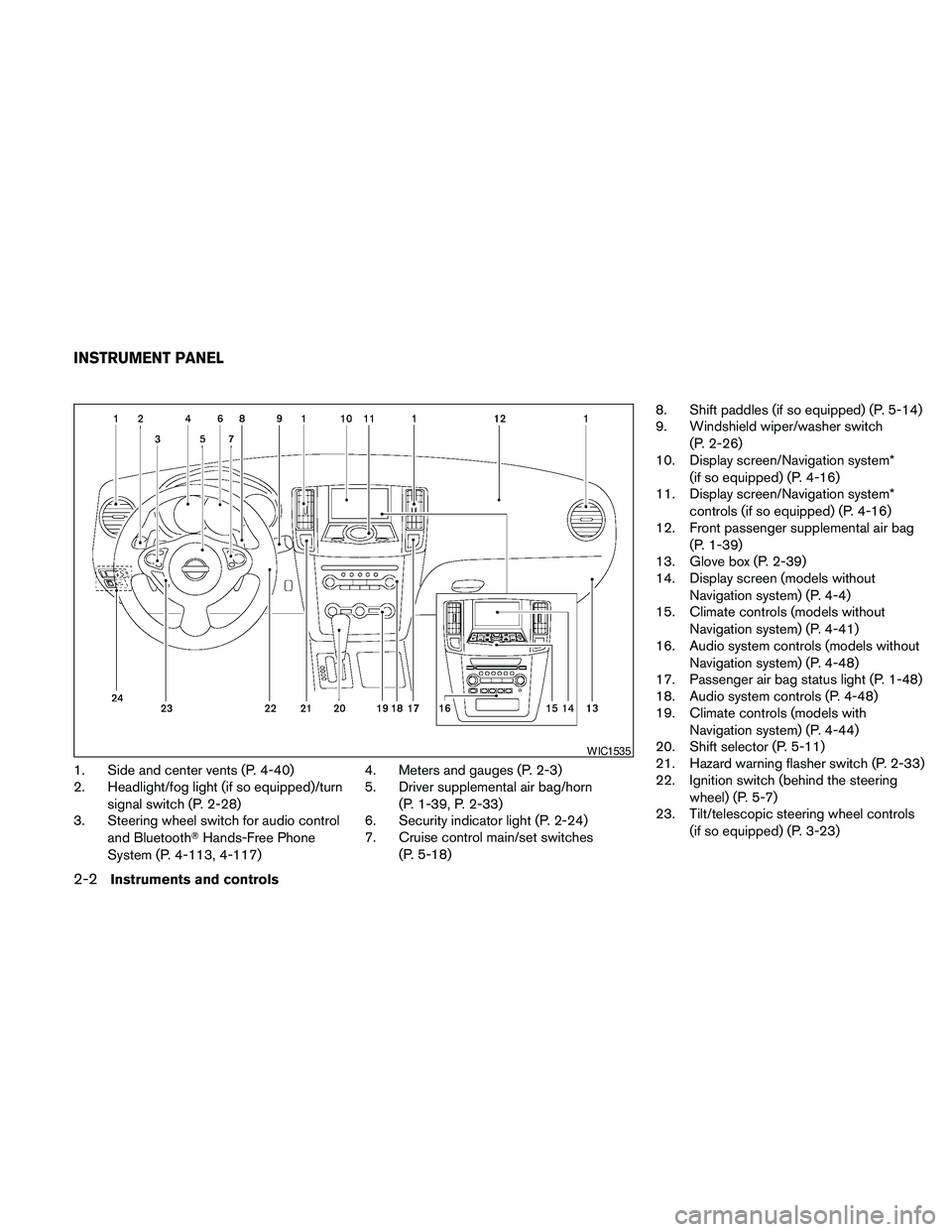
1. Side and center vents (P. 4-40)
2. Headlight/fog light (if so equipped)/turn
signal switch (P. 2-28)
3. Steering wheel switch for audio control
and BluetoothTHands-Free Phone
System (P. 4-113, 4-117)4. Meters and gauges (P. 2-3)
5. Driver supplemental air bag/horn
(P. 1-39, P. 2-33)
6. Security indicator light (P. 2-24)
7. Cruise control main/set switches
(P. 5-18)8. Shift paddles (if so equipped) (P. 5-14)
9. Windshield wiper/washer switch
(P. 2-26)
10. Display screen/Navigation system*
(if so equipped) (P. 4-16)
11. Display screen/Navigation system*
controls (if so equipped) (P. 4-16)
12. Front passenger supplemental air bag
(P. 1-39)
13. Glove box (P. 2-39)
14. Display screen (models without
Navigation system) (P. 4-4)
15. Climate controls (models without
Navigation system) (P. 4-41)
16. Audio system controls (models without
Navigation system) (P. 4-48)
17. Passenger air bag status light (P. 1-48)
18. Audio system controls (P. 4-48)
19. Climate controls (models with
Navigation system) (P. 4-44)
20. Shift selector (P. 5-11)
21. Hazard warning flasher switch (P. 2-33)
22. Ignition switch (behind the steering
wheel) (P. 5-7)
23. Tilt/telescopic steering wheel controls
(if so equipped) (P. 3-23)
WIC1535
INSTRUMENT PANEL
2-2Instruments and controls
Page 82 of 457
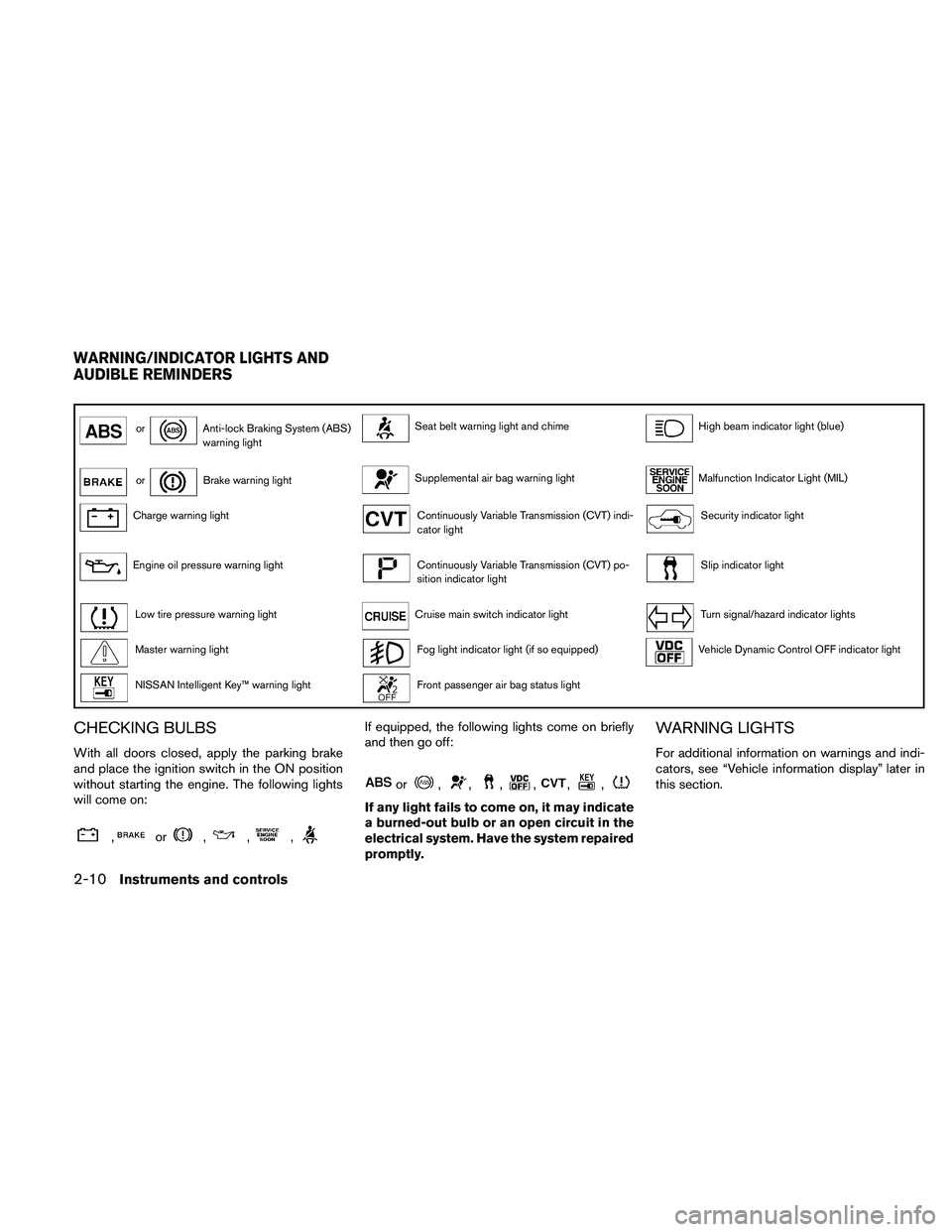
orAnti-lock Braking System (ABS)
warning lightSeat belt warning light and chimeHigh beam indicator light (blue)
orBrake warning lightSupplemental air bag warning lightMalfunction Indicator Light (MIL)
Charge warning lightContinuously Variable Transmission (CVT) indi-
cator lightSecurity indicator light
Engine oil pressure warning lightContinuously Variable Transmission (CVT) po-
sition indicator lightSlip indicator light
Low tire pressure warning lightCruise main switch indicator lightTurn signal/hazard indicator lights
Master warning lightFog light indicator light (if so equipped)Vehicle Dynamic Control OFF indicator light
NISSAN Intelligent Key™ warning lightFront passenger air bag status light
CHECKING BULBS
With all doors closed, apply the parking brake
and place the ignition switch in the ON position
without starting the engine. The following lights
will come on:
,or,,,
If equipped, the following lights come on briefly
and then go off:
or,,,,,,
If any light fails to come on, it may indicate
a burned-out bulb or an open circuit in the
electrical system. Have the system repaired
promptly.
WARNING LIGHTS
For additional information on warnings and indi-
cators, see “Vehicle information display” later in
this section.
WARNING/INDICATOR LIGHTS AND
AUDIBLE REMINDERS
2-10Instruments and controls
Page 87 of 457

Front passenger air bag status
light
The front passenger air bag status light will be lit
and the passenger front air bag will be OFF
depending on how the front passenger seat is
being used.
For front passenger air bag status light operation,
see “Front passenger air bag and status light” in
the “Safety — Seats, seat belts and supplemental
restraint system” section of this manual.
High beam indicator light
(blue)
This blue light comes on when the headlight high
beams are on and goes out when the low beams
are selected.
The high beam indicator light also comes on
when the passing signal is activated.
Malfunction indicator light
(MIL)
If the malfunction indicator light comes on steady
or blinks while the engine is running, it may indi-
cate a potential emission control and/or CVT
malfunction.The malfunction indicator light may also come on
steady if the fuel-filler cap is loose or missing, or if
the vehicle runs out of fuel. Check to make sure
the fuel-filler cap is installed and closed tightly,
and that the vehicle has at least 3 gallons (11.4
liters) of fuel in the fuel tank.
After a few driving trips, the
light should
turn off if no other potential emission control
system malfunction exists.
If this indicator light comes on steady for 20
seconds and then blinks for 10 seconds when
the engine is not running, it indicates that the
vehicle is not ready for an emission control sys-
tem inspection/maintenance test. See “Readi-
ness for inspection/maintenance (I/M) test” in the
“Technical and consumer information” section of
this manual.
Operation
The malfunction indicator light will come on in
one of two ways:cMalfunction indicator light on steady — An
emission control system and/or CVT mal-
function has been detected. Check the fuel-
filler cap. If the fuel-filler cap is loose or
missing, tighten or install the cap and con-
tinue to drive the vehicle. The
light
should turn off after a few driving trips. If
the
light does not turn off after a few
driving trips, have the vehicle inspected by a
NISSAN dealer. You do not need to have
your vehicle towed to the dealer.
cMalfunction indicator light blinking — An en-
gine misfire has been detected which may
damage the emission control system. To re-
duce or avoid emission control system dam-
age:
– do not drive at speeds above 45 MPH
(72 km/h) .
– avoid hard acceleration or deceleration.
– avoid steep uphill grades.
– if possible, reduce the amount of cargo
being hauled or towed.
The malfunction indicator light may stop blinking
and come on steady. Have the vehicle inspected
by a NISSAN dealer. You do not need to have
your vehicle towed to the dealer.
Instruments and controls2-15
Page 88 of 457
CAUTION
Continued vehicle operation without hav-
ing the emission control system checked
and repaired as necessary could lead to
poor driveability, reduced fuel economy,
and possible damage to the emission con-
trol system.
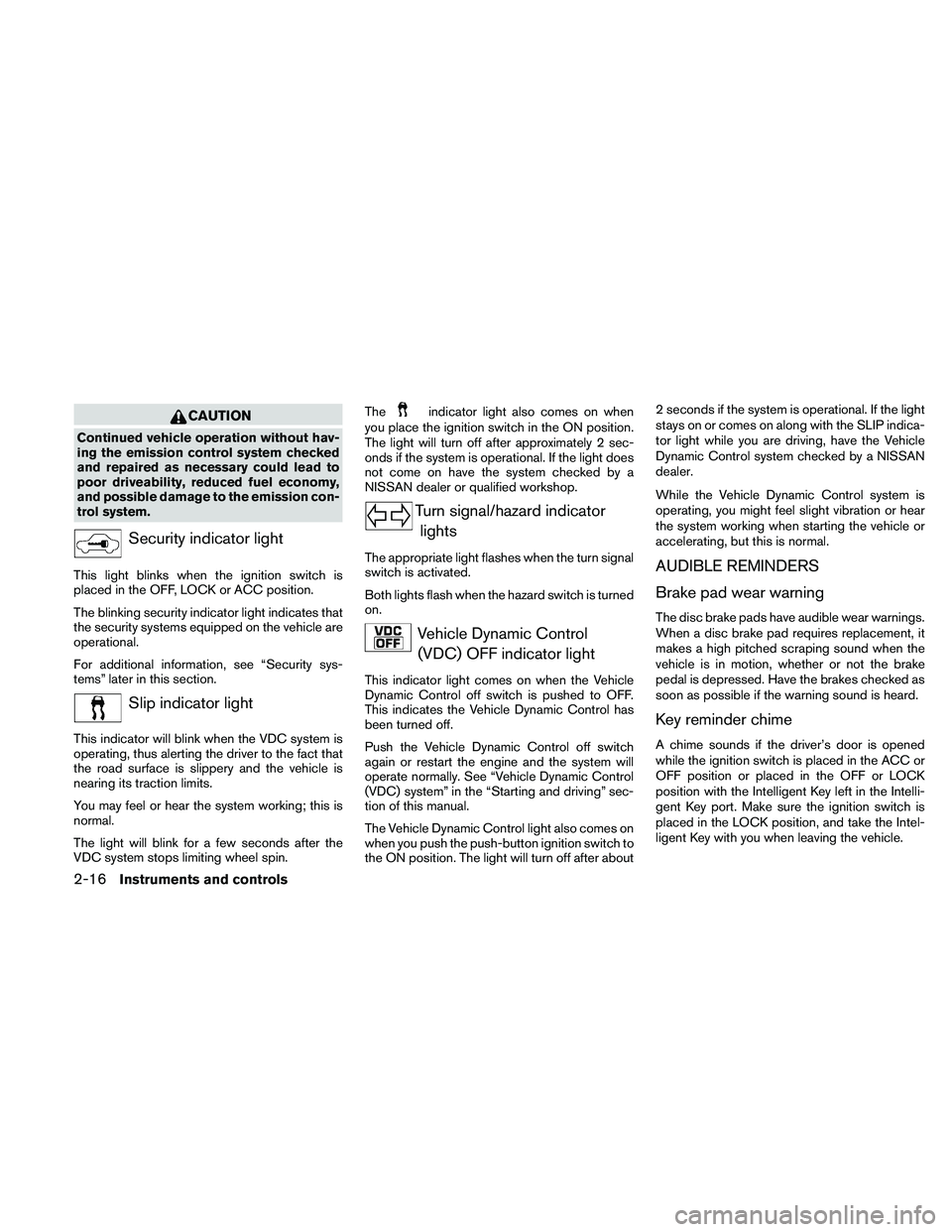
Security indicator light
This light blinks when the ignition switch is
placed in the OFF, LOCK or ACC position.
The blinking security indicator light indicates that
the security systems equipped on the vehicle are
operational.
For additional information, see “Security sys-
tems” later in this section.
Slip indicator light
This indicator will blink when the VDC system is
operating, thus alerting the driver to the fact that
the road surface is slippery and the vehicle is
nearing its traction limits.
You may feel or hear the system working; this is
normal.
The light will blink for a few seconds after the
VDC system stops limiting wheel spin.The
indicator light also comes on when
you place the ignition switch in the ON position.
The light will turn off after approximately 2 sec-
onds if the system is operational. If the light does
not come on have the system checked by a
NISSAN dealer or qualified workshop.
Turn signal/hazard indicator
lights
The appropriate light flashes when the turn signal
switch is activated.
Both lights flash when the hazard switch is turned
on.
Vehicle Dynamic Control
(VDC) OFF indicator light
This indicator light comes on when the Vehicle
Dynamic Control off switch is pushed to OFF.
This indicates the Vehicle Dynamic Control has
been turned off.
Push the Vehicle Dynamic Control off switch
again or restart the engine and the system will
operate normally. See “Vehicle Dynamic Control
(VDC) system” in the “Starting and driving” sec-
tion of this manual.
The Vehicle Dynamic Control light also comes on
when you push the push-button ignition switch to
the ON position. The light will turn off after about2 seconds if the system is operational. If the light
stays on or comes on along with the SLIP indica-
tor light while you are driving, have the Vehicle
Dynamic Control system checked by a NISSAN
dealer.
While the Vehicle Dynamic Control system is
operating, you might feel slight vibration or hear
the system working when starting the vehicle or
accelerating, but this is normal.
AUDIBLE REMINDERS
Brake pad wear warning
The disc brake pads have audible wear warnings.
When a disc brake pad requires replacement, it
makes a high pitched scraping sound when the
vehicle is in motion, whether or not the brake
pedal is depressed. Have the brakes checked as
soon as possible if the warning sound is heard.
Key reminder chime
A chime sounds if the driver’s door is opened
while the ignition switch is placed in the ACC or
OFF position or placed in the OFF or LOCK
position with the Intelligent Key left in the Intelli-
gent Key port. Make sure the ignition switch is
placed in the LOCK position, and take the Intel-
ligent Key with you when leaving the vehicle.
2-16Instruments and controls
Page 96 of 457
NISSAN Intelligent Key™ insertion indica-
tor
This indicator illuminates when the Intelligent Key
needs to be inserted into the Intelligent Key port.
(For example, the Intelligent Key battery is dis-
charged.)
If this indicator illuminates, insert the Intelligent
Key into the Intelligent Key port in the correct
direction. See “Push-button ignition switch” in
the “Starting and driving” section.
NISSAN Intelligent Key™ removal indicator
This indicator illuminates when the driver’s door
is opened with the ignition switch placed in the
OFF position and the Intelligent Key placed in the
Intelligent Key port. A key reminder chime also
sounds.
If this indicator illuminates, remove the Intelligent
Key from the Intelligent Key port and take it with
you when leaving the vehicle.
NISSAN Intelligent Key™ battery discharge
indicator
This indicator illuminates when the Intelligent Key
battery is running out of power.
If this indicator illuminates, replace the battery
with a new one. See “NISSAN Intelligent Key™” in
the “Maintenance and do-it-yourself” section.Steering lock release malfunction indica-
tor (if so equipped)
This indicator illuminates when the steering
wheel cannot be released from the LOCK posi-
tion.
If this indicator illuminates, push the ignition
switch while lightly turning the steering wheel
right and left.
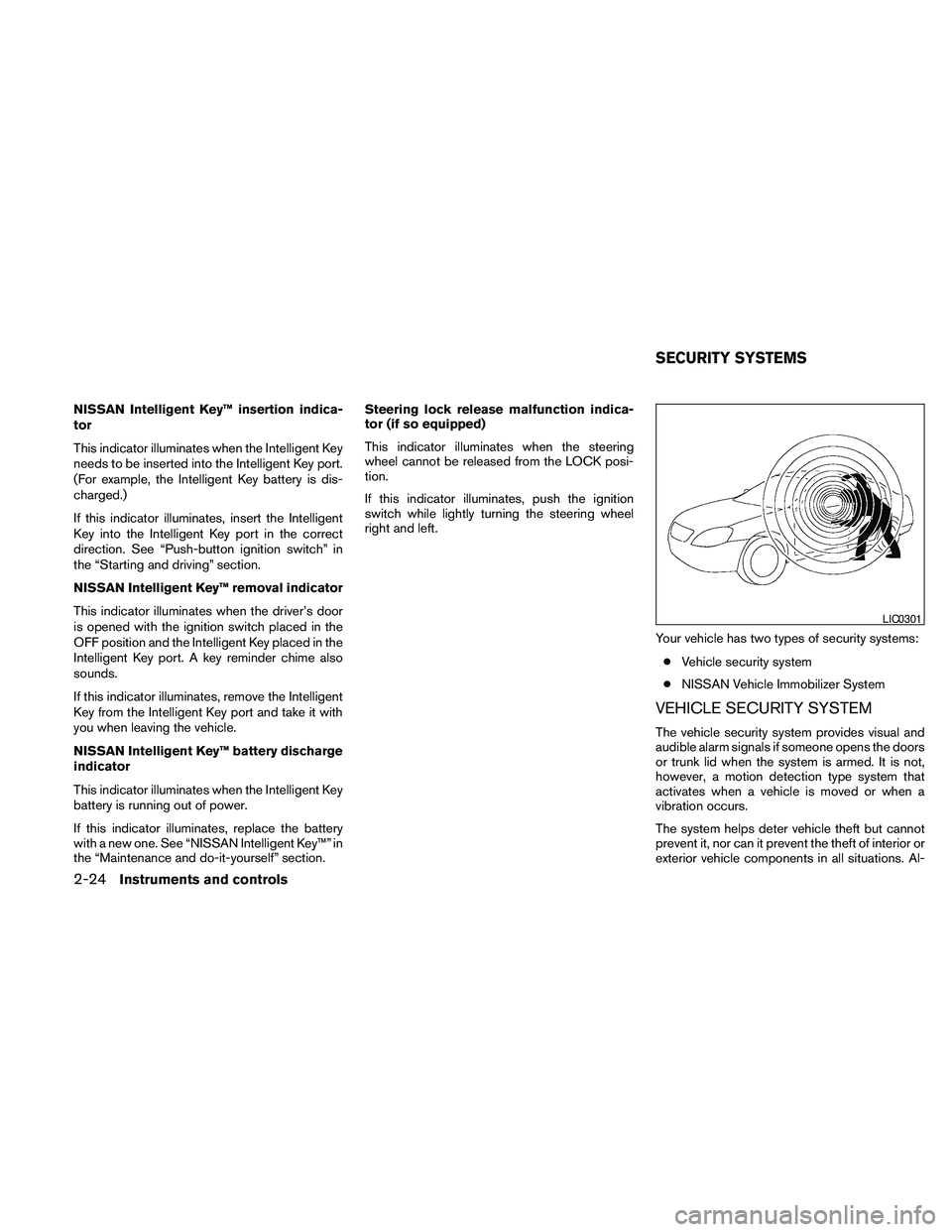
Your vehicle has two types of security systems:
cVehicle security system
cNISSAN Vehicle Immobilizer System
VEHICLE SECURITY SYSTEM
The vehicle security system provides visual and
audible alarm signals if someone opens the doors
or trunk lid when the system is armed. It is not,
however, a motion detection type system that
activates when a vehicle is moved or when a
vibration occurs.
The system helps deter vehicle theft but cannot
prevent it, nor can it prevent the theft of interior or
exterior vehicle components in all situations. Al-
LIC0301
SECURITY SYSTEMS
2-24Instruments and controls
Page 100 of 457

NOTE:
The top few rows of wires on the rear win-
dow are not part of the rear window de-
froster system. These wires make up the
antenna for the audio system.
XENON HEADLIGHTS (if so
equipped)
WARNING
cHIGH VOLTAGE
cWhen xenon headlights are on, they
produce a high voltage. To prevent an
electric shock, never attempt to modify
or disassemble. Always have your xe-
non headlights replaced at a NISSAN
dealer.
cXenon headlights provide considerably
more light than conventional head-
lights. If they are not correctly aimed,
they might temporarily blind an oncom-
ing driver or the driver ahead of you and
cause a serious accident. If headlights
are not aimed correctly, immediately
take your vehicle to a NISSAN dealer
and have the headlights adjusted
correctly.
When the xenon headlight is initially turned on, its
brightness or color varies slightly. However, the
color and brightness will soon stabilize.cThe life of xenon headlights will be
shortened by frequent on-off opera-
tion. It is generally desirable not to turn
off the headlights for short intervals
(for example, when the vehicle stops at
a traffic signal) .
cIf the xenon headlight bulb is close to
burning out, the brightness will drasti-
cally decrease, the light will start blink-
ing, or the color of the light will be-
come reddish. If one or more of the
above signs appear, contact a NISSAN
dealer.
Type B
LIC1388
HEADLIGHT AND TURN SIGNAL
SWITCH
2-28Instruments and controls