brake NISSAN MAXIMA 2020 Owner´s Manual
[x] Cancel search | Manufacturer: NISSAN, Model Year: 2020, Model line: MAXIMA, Model: NISSAN MAXIMA 2020Pages: 500, PDF Size: 6.37 MB
Page 4 of 500
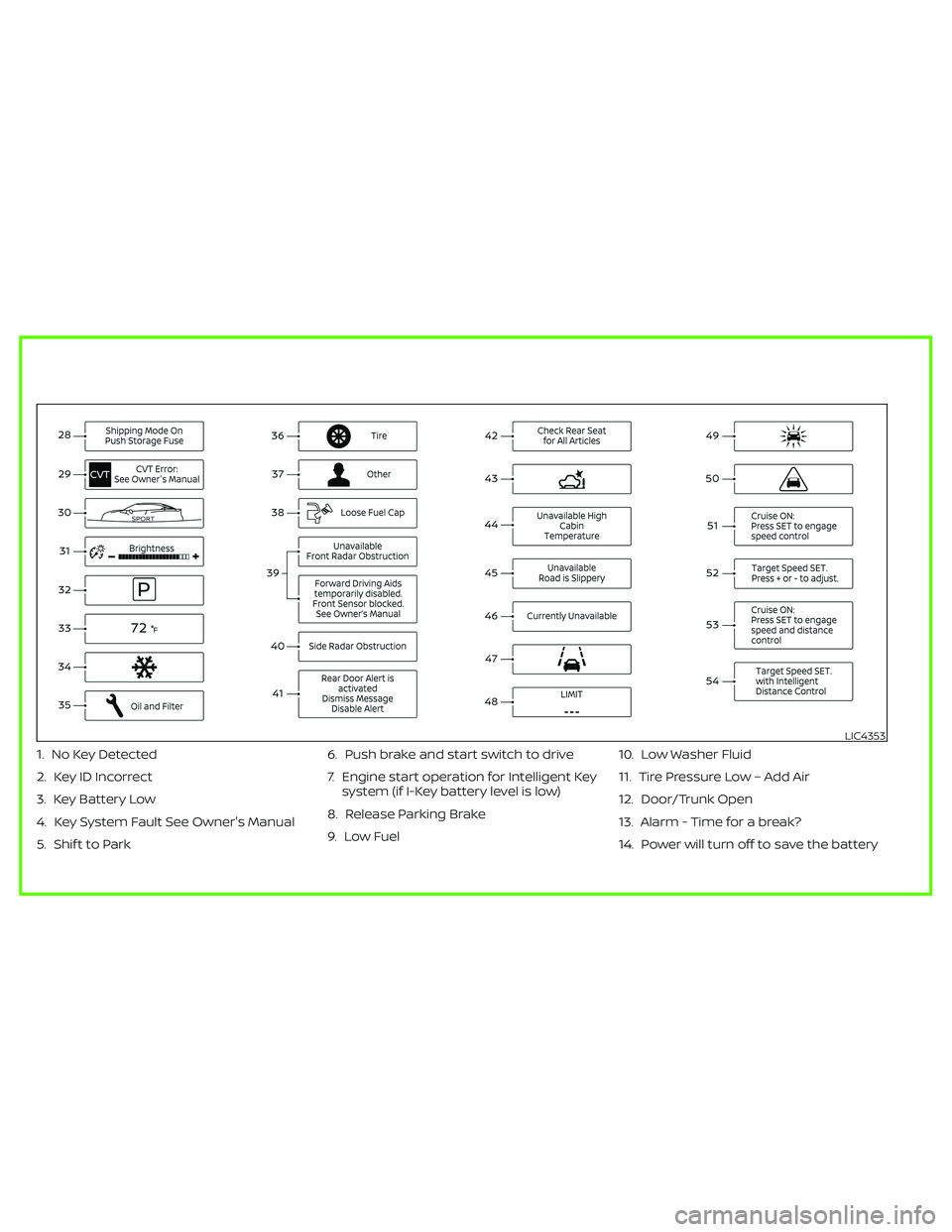
1. No Key Detected
2. Key ID Incorrect
3. Key Battery Low
4. Key System Fault See Owner's Manual
5. Shif t to Park6. Push brake and start switch to drive
7. Engine start operation for Intelligent Key
system (if I-Key battery level is low)
8. Release Parking Brake
9. Low Fuel10. Low Washer Fluid
11. Tire Pressure Low – Add Air
12. Door/Trunk Open
13. Alarm - Time for a break?
14. Power will turn off to save the battery
LIC4353
Page 7 of 500
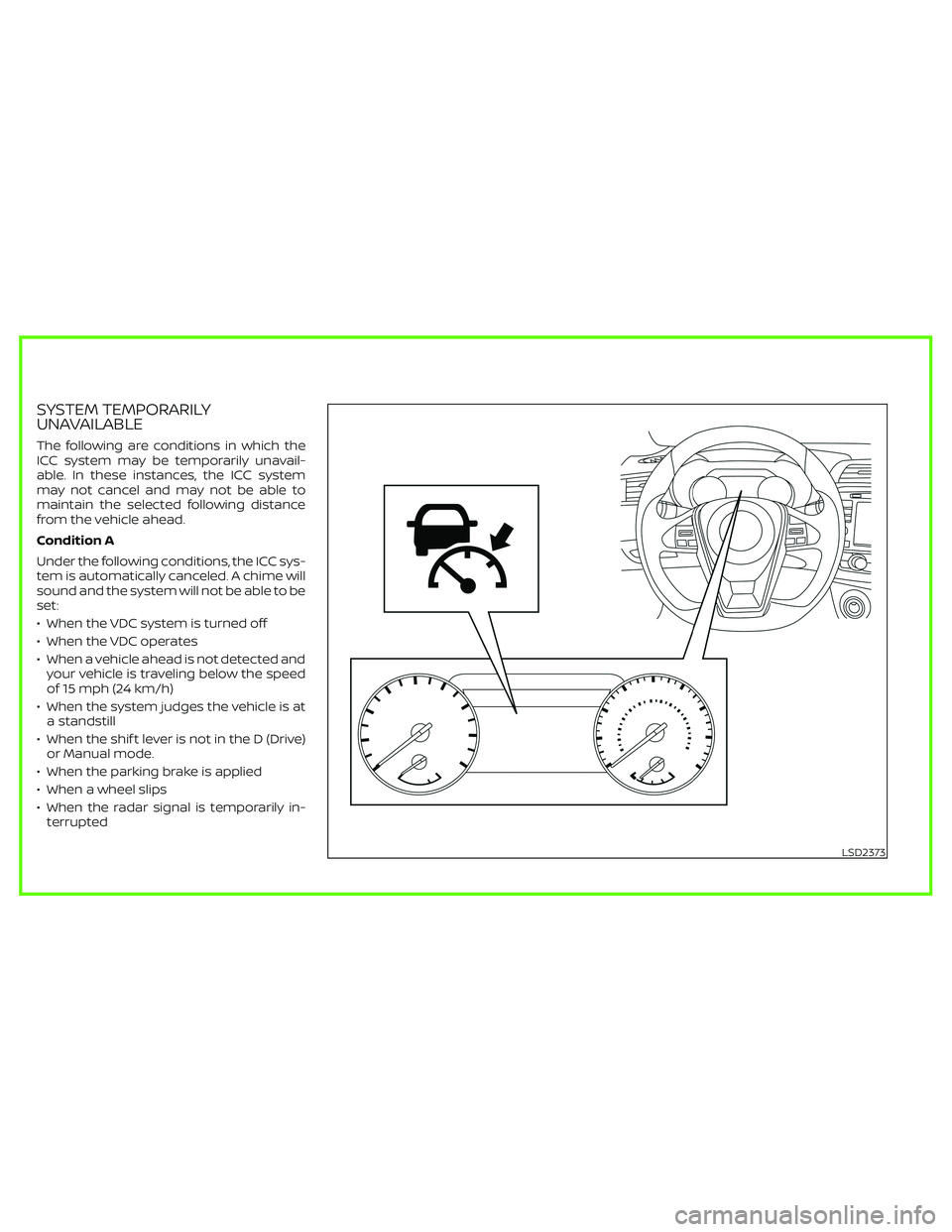
SYSTEM TEMPORARILY
UNAVAILABLE
The following are conditions in which the
ICC system may be temporarily unavail-
able. In these instances, the ICC system
may not cancel and may not be able to
maintain the selected following distance
from the vehicle ahead.
Condition A
Under the following conditions, the ICC sys-
tem is automatically canceled. A chime will
sound and the system will not be able to be
set:
• When the VDC system is turned off
• When the VDC operates
• When a vehicle ahead is not detected and
your vehicle is traveling below the speed
of 15 mph (24 km/h)
• When the system judges the vehicle is at
a standstill
• When the shif t lever is not in the D (Drive)
or Manual mode.
• When the parking brake is applied
• When a wheel slips
• When the radar signal is temporarily in-
terrupted
LSD2373
Page 32 of 500
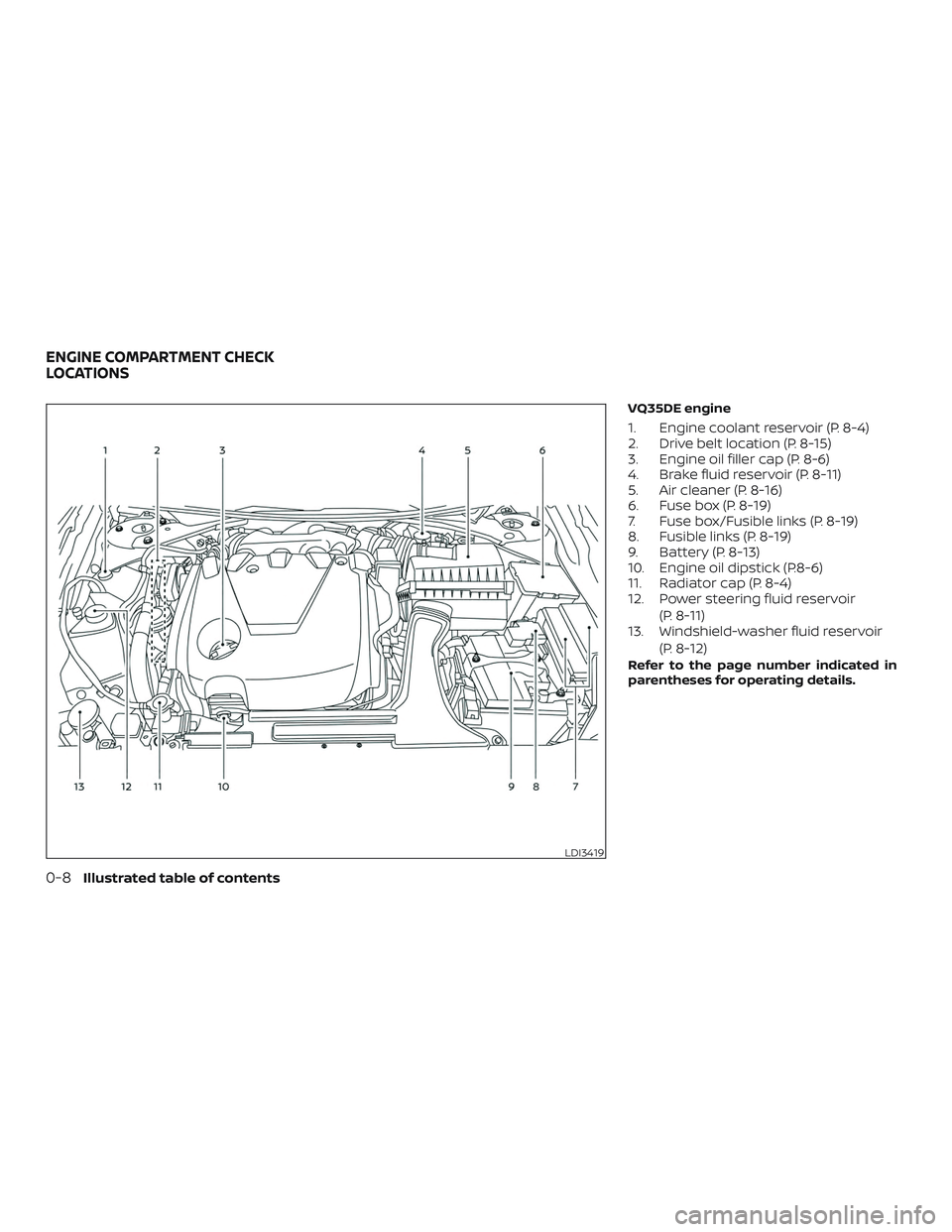
VQ35DE engine
1. Engine coolant reservoir (P. 8-4)
2. Drive belt location (P. 8-15)
3. Engine oil filler cap (P. 8-6)
4. Brake fluid reservoir (P. 8-11)
5. Air cleaner (P. 8-16)
6. Fuse box (P. 8-19)
7. Fuse box/Fusible links (P. 8-19)
8. Fusible links (P. 8-19)
9. Battery (P. 8-13)
10. Engine oil dipstick (P.8-6)
11. Radiator cap (P. 8-4)
12. Power steering fluid reservoir(P. 8-11)
13. Windshield-washer fluid reservoir
(P. 8-12)
Refer to the page number indicated in
parentheses for operating details.
LDI3419
ENGINE COMPARTMENT CHECK
LOCATIONS
0-8Illustrated table of contents
Page 33 of 500
Warninglight Name Page
or
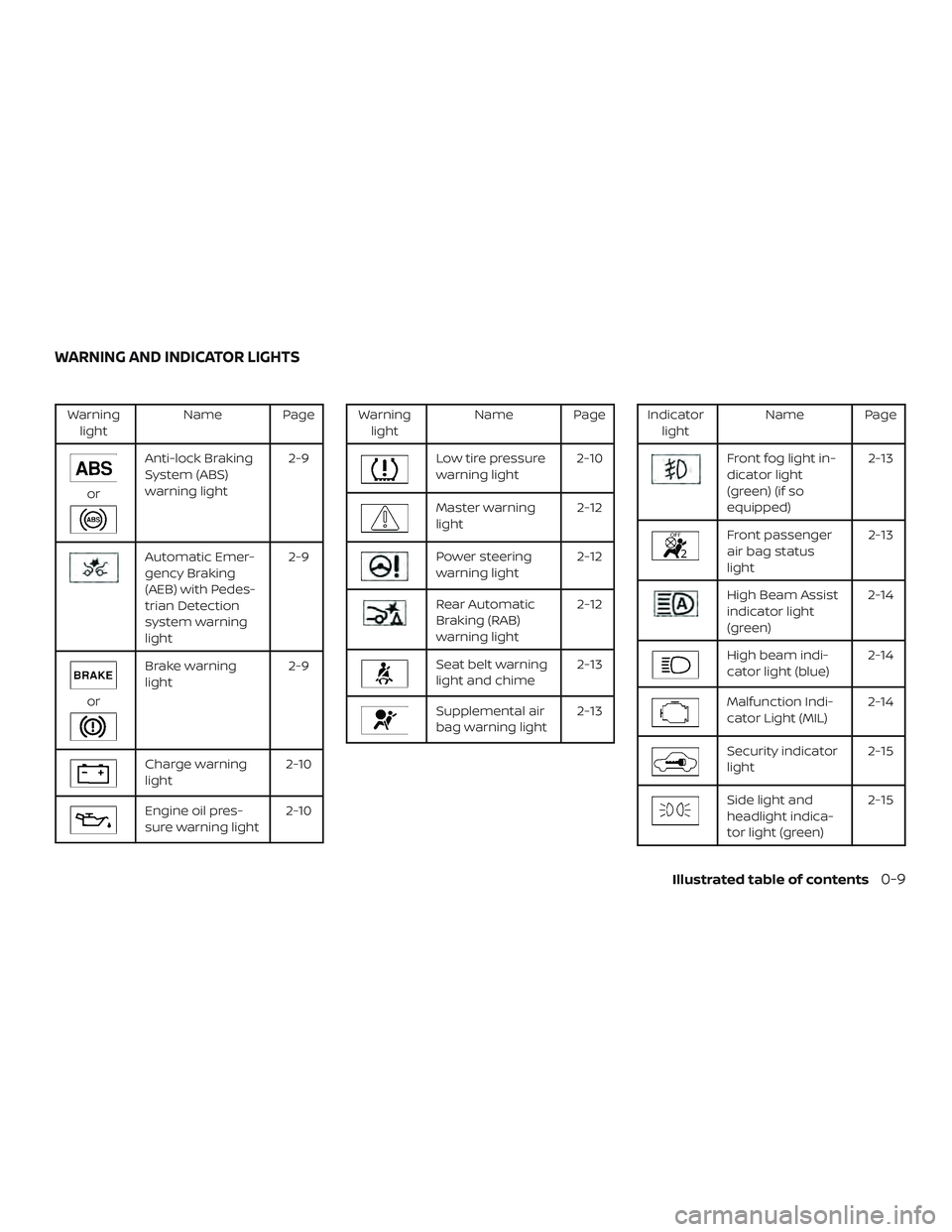
Anti-lock Braking
System (ABS)
warning light 2-9
Automatic Emer-
gency Braking
(AEB) with Pedes-
trian Detection
system warning
light2-9
or
Brake warning
light
2-9
Charge warning
light2-10
Engine oil pres-
sure warning light2-10
Warning
light Name Page
Low tire pressure
warning light 2-10
Master warning
light 2-12
Power steering
warning light2-12
Rear Automatic
Braking (RAB)
warning light2-12
Seat belt warning
light and chime
2-13
Supplemental air
bag warning light2-13
Indicator
light Name Page
Front fog light in-
dicator light
(green) (if so
equipped) 2-13
Front passenger
air bag status
light
2-13
High Beam Assist
indicator light
(green)2-14
High beam indi-
cator light (blue)
2-14
Malfunction Indi-
cator Light (MIL)2-14
Security indicator
light 2-15
Side light and
headlight indica-
tor light (green)2-15
WARNING AND INDICATOR LIGHTS
Illustrated table of contents0-9
Page 110 of 500
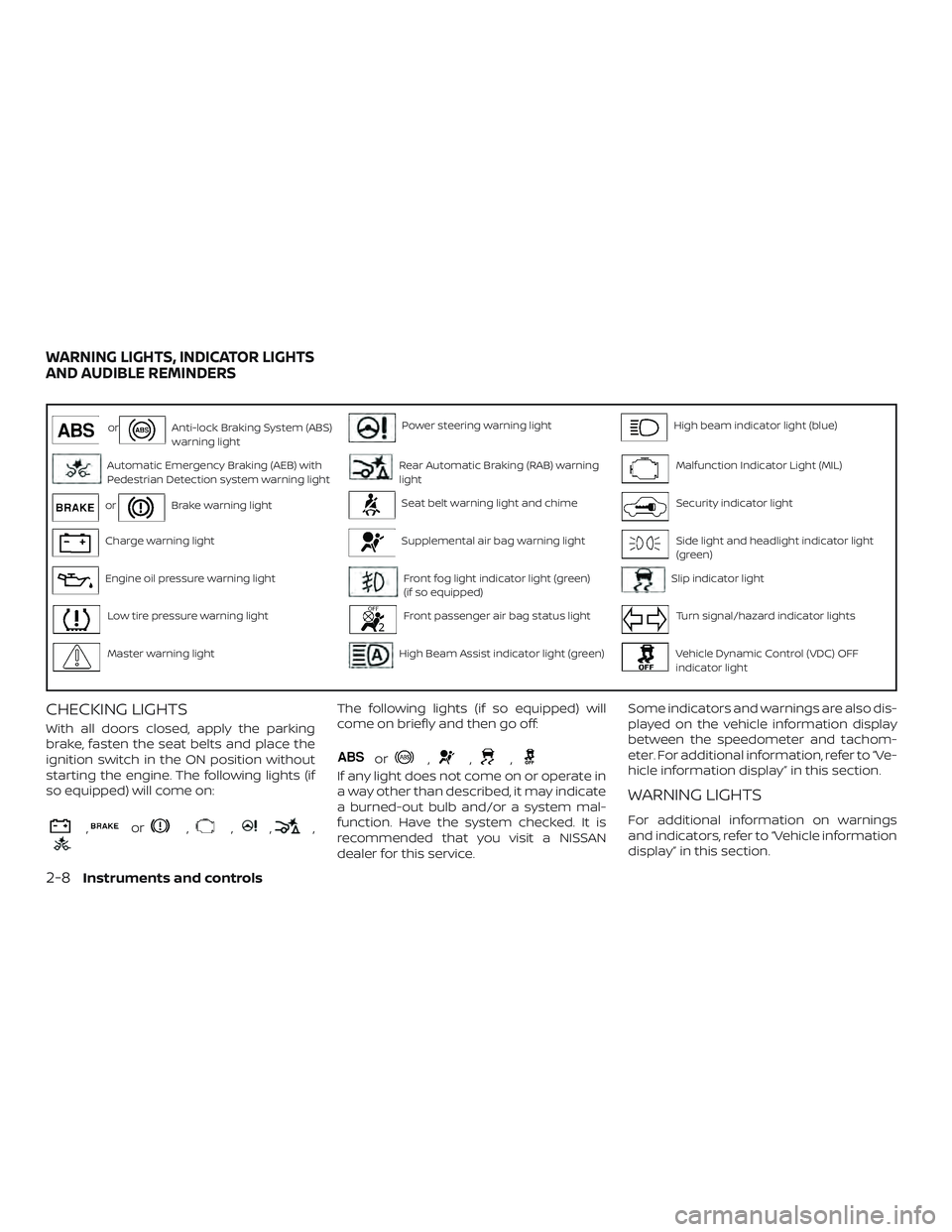
orAnti-lock Braking System (ABS)
warning lightPower steering warning lightHigh beam indicator light (blue)
Automatic Emergency Braking (AEB) with
Pedestrian Detection system warning lightRear Automatic Braking (RAB) warning
lightMalfunction Indicator Light (MIL)
orBrake warning lightSeat belt warning light and chimeSecurity indicator light
Charge warning lightSupplemental air bag warning lightSide light and headlight indicator light
(green)
Engine oil pressure warning lightFront fog light indicator light (green)
(if so equipped)Slip indicator light
Low tire pressure warning lightFront passenger air bag status lightTurn signal/hazard indicator lights
Master warning lightHigh Beam Assist indicator light (green)Vehicle Dynamic Control (VDC) OFF
indicator light
CHECKING LIGHTS
With all doors closed, apply the parking
brake, fasten the seat belts and place the
ignition switch in the ON position without
starting the engine. The following lights (if
so equipped) will come on:
,or,,,,
The following lights (if so equipped) will
come on briefly and then go off:
or,,,
If any light does not come on or operate in
a way other than described, it may indicate
a burned-out bulb and/or a system mal-
function. Have the system checked. It is
recommended that you visit a NISSAN
dealer for this service.Some indicators and warnings are also dis-
played on the vehicle information display
between the speedometer and tachom-
eter. For additional information, refer to “Ve-
hicle information display” in this section.
WARNING LIGHTS
For additional information on warnings
and indicators, refer to “Vehicle information
display” in this section.
WARNING LIGHTS, INDICATOR LIGHTS
AND AUDIBLE REMINDERS
2-8Instruments and controls
Page 111 of 500
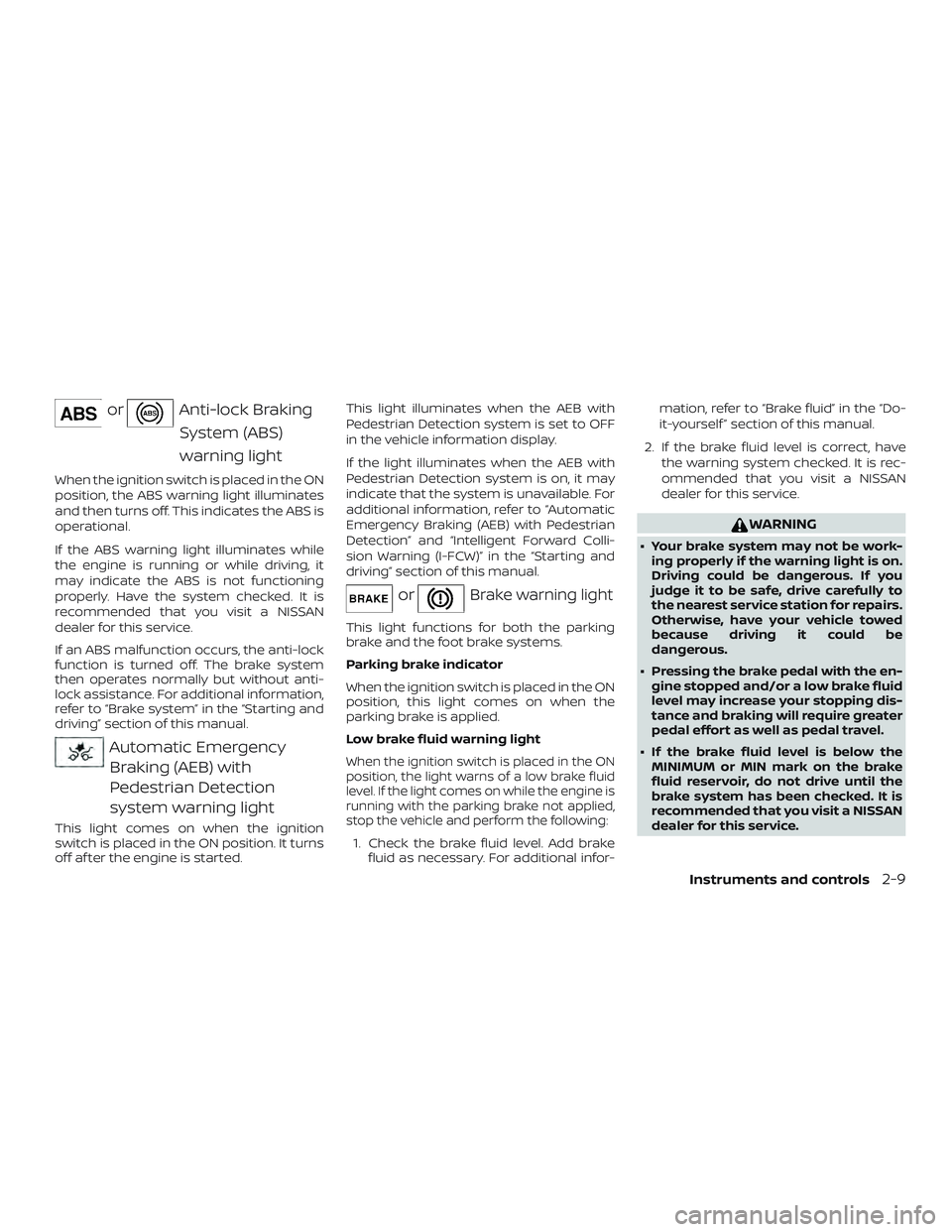
orAnti-lock BrakingSystem (ABS)
warning light
When the ignition switch is placed in the ON
position, the ABS warning light illuminates
and then turns off. This indicates the ABS is
operational.
If the ABS warning light illuminates while
the engine is running or while driving, it
may indicate the ABS is not functioning
properly. Have the system checked. It is
recommended that you visit a NISSAN
dealer for this service.
If an ABS malfunction occurs, the anti-lock
function is turned off. The brake system
then operates normally but without anti-
lock assistance. For additional information,
refer to “Brake system” in the “Starting and
driving” section of this manual.
Automatic EmergencyBraking (AEB) with
Pedestrian Detection
system warning light
This light comes on when the ignition
switch is placed in the ON position. It turns
off af ter the engine is started. This light illuminates when the AEB with
Pedestrian Detection system is set to OFF
in the vehicle information display.
If the light illuminates when the AEB with
Pedestrian Detection system is on, it may
indicate that the system is unavailable. For
additional information, refer to “Automatic
Emergency Braking (AEB) with Pedestrian
Detection” and “Intelligent Forward Colli-
sion Warning (I-FCW)” in the “Starting and
driving” section of this manual.
orBrake warning light
This light functions for both the parking
brake and the foot brake systems.
Parking brake indicator
When the ignition switch is placed in the ON
position, this light comes on when the
parking brake is applied.
Low brake fluid warning light
When the ignition switch is placed in the ON
position, the light warns of a low brake fluid
level. If the light comes on while the engine is
running with the parking brake not applied,
stop the vehicle and perform the following:
1. Check the brake fluid level. Add brake
fluid as necessary. For additional infor- mation, refer to “Brake fluid” in the “Do-
it-yourself ” section of this manual.
2. If the brake fluid level is correct, have the warning system checked. It is rec-
ommended that you visit a NISSAN
dealer for this service.
WARNING
∙ Your brake system may not be work-ing properly if the warning light is on.
Driving could be dangerous. If you
judge it to be safe, drive carefully to
the nearest service station for repairs.
Otherwise, have your vehicle towed
because driving it could be
dangerous.
∙ Pressing the brake pedal with the en- gine stopped and/or a low brake fluid
level may increase your stopping dis-
tance and braking will require greater
pedal effort as well as pedal travel.
∙ If the brake fluid level is below the MINIMUM or MIN mark on the brake
fluid reservoir, do not drive until the
brake system has been checked. It is
recommended that you visit a NISSAN
dealer for this service.
Instruments and controls2-9
Page 114 of 500
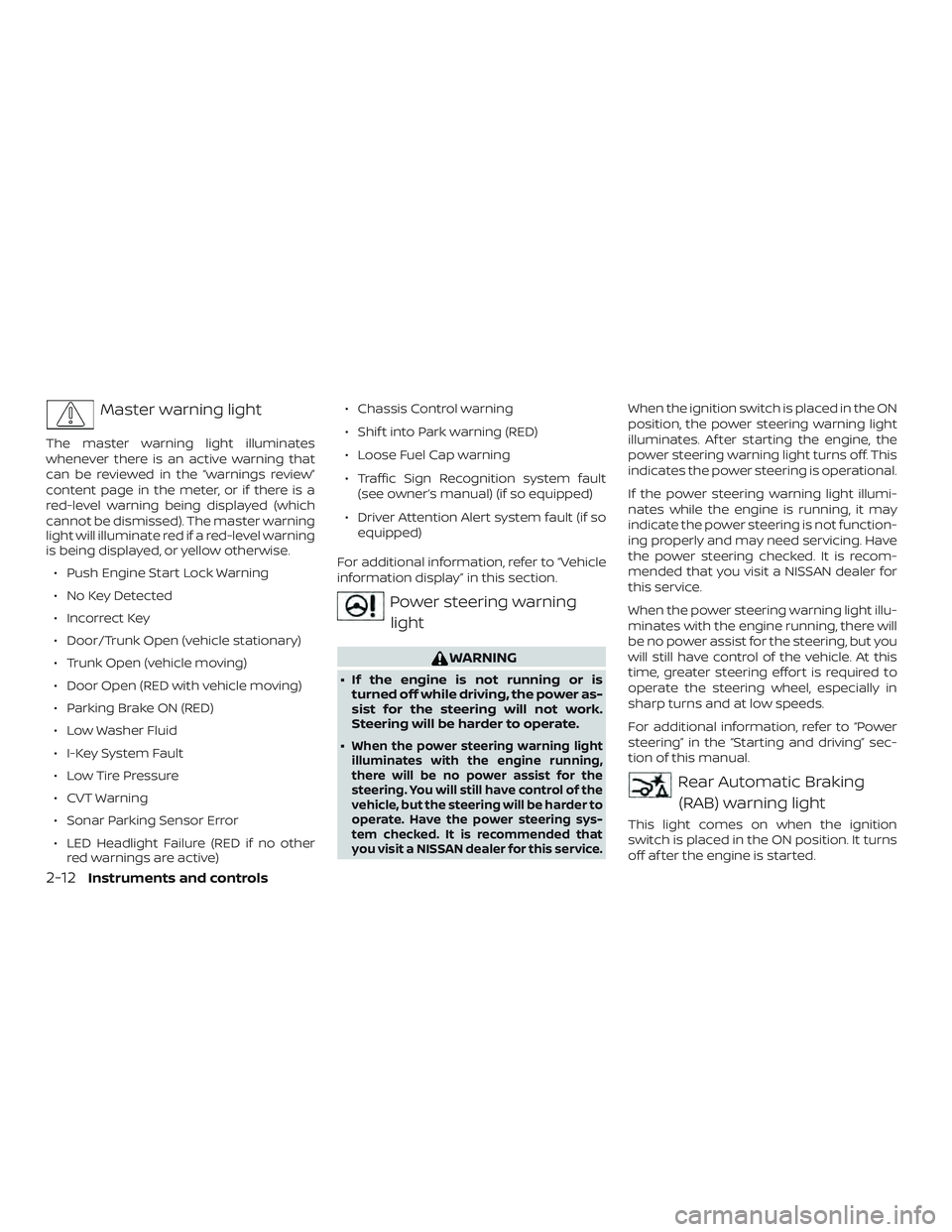
Master warning light
The master warning light illuminates
whenever there is an active warning that
can be reviewed in the “warnings review”
content page in the meter, or if there is a
red-level warning being displayed (which
cannot be dismissed). The master warning
light will illuminate red if a red-level warning
is being displayed, or yellow otherwise.∙ Push Engine Start Lock Warning
∙ No Key Detected
∙ Incorrect Key
∙ Door/Trunk Open (vehicle stationary)
∙ Trunk Open (vehicle moving)
∙ Door Open (RED with vehicle moving)
∙ Parking Brake ON (RED)
∙ Low Washer Fluid
∙ I-Key System Fault
∙ Low Tire Pressure
∙ CVT Warning
∙ Sonar Parking Sensor Error
∙ LED Headlight Failure (RED if no other red warnings are active) ∙ Chassis Control warning
∙ Shif t into Park warning (RED)
∙ Loose Fuel Cap warning
∙ Traffic Sign Recognition system fault
(see owner’s manual) (if so equipped)
∙ Driver Attention Alert system fault (if so equipped)
For additional information, refer to “Vehicle
information display” in this section.
Power steering warning light
WARNING
∙ If the engine is not running or is turned off while driving, the power as-
sist for the steering will not work.
Steering will be harder to operate.
∙
When the power steering warning light
illuminates with the engine running,
there will be no power assist for the
steering. You will still have control of the
vehicle, but the steering will be harder to
operate. Have the power steering sys-
tem checked. It is recommended that
you visit a NISSAN dealer for this service.
When the ignition switch is placed in the ON
position, the power steering warning light
illuminates. Af ter starting the engine, the
power steering warning light turns off. This
indicates the power steering is operational.
If the power steering warning light illumi-
nates while the engine is running, it may
indicate the power steering is not function-
ing properly and may need servicing. Have
the power steering checked. It is recom-
mended that you visit a NISSAN dealer for
this service.
When the power steering warning light illu-
minates with the engine running, there will
be no power assist for the steering, but you
will still have control of the vehicle. At this
time, greater steering effort is required to
operate the steering wheel, especially in
sharp turns and at low speeds.
For additional information, refer to “Power
steering” in the “Starting and driving” sec-
tion of this manual.
Rear Automatic Braking
(RAB) warning light
This light comes on when the ignition
switch is placed in the ON position. It turns
off af ter the engine is started.
2-12Instruments and controls
Page 118 of 500
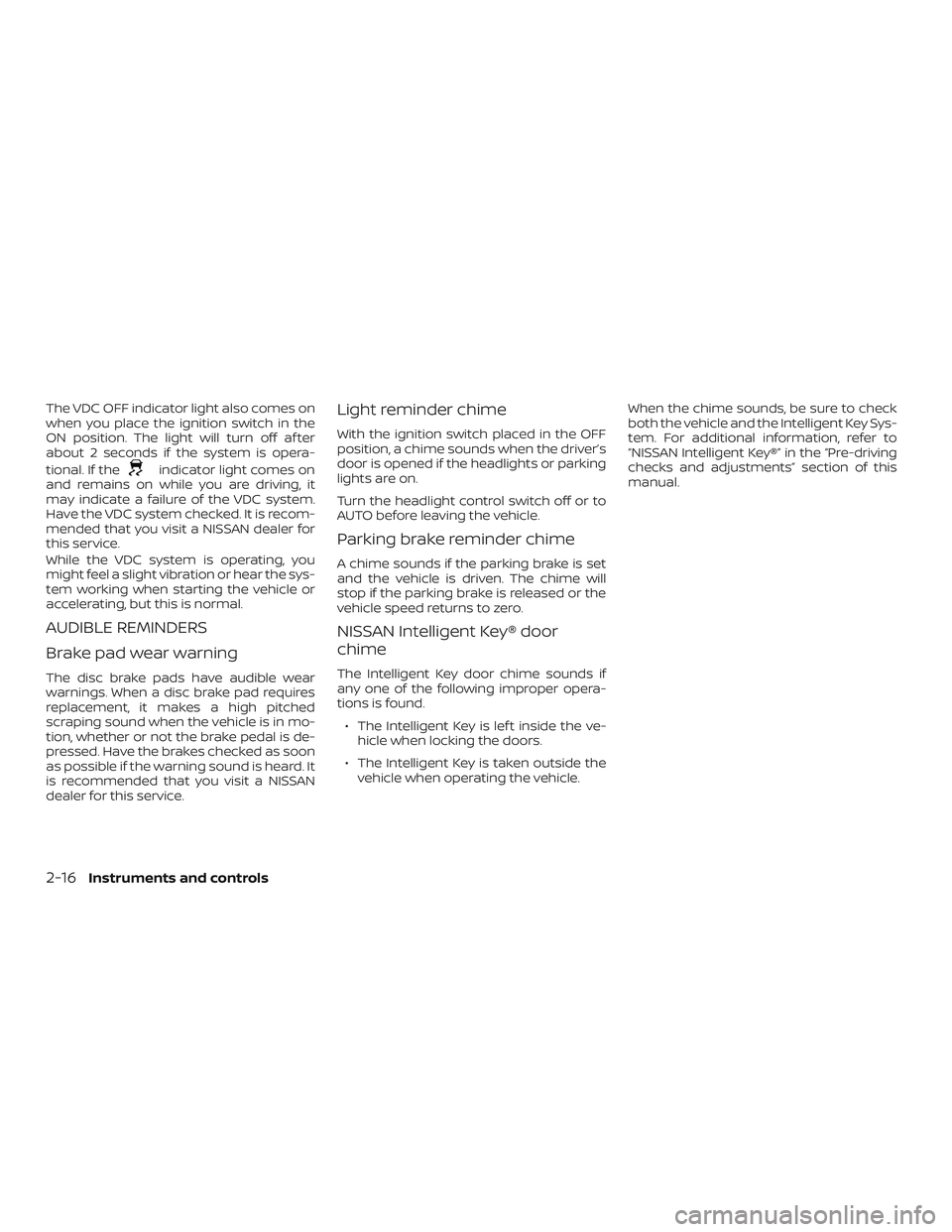
The VDC OFF indicator light also comes on
when you place the ignition switch in the
ON position. The light will turn off af ter
about 2 seconds if the system is opera-
tional. If the
indicator light comes on
and remains on while you are driving, it
may indicate a failure of the VDC system.
Have the VDC system checked. It is recom-
mended that you visit a NISSAN dealer for
this service.
While the VDC system is operating, you
might feel a slight vibration or hear the sys-
tem working when starting the vehicle or
accelerating, but this is normal.
AUDIBLE REMINDERS
Brake pad wear warning
The disc brake pads have audible wear
warnings. When a disc brake pad requires
replacement, it makes a high pitched
scraping sound when the vehicle is in mo-
tion, whether or not the brake pedal is de-
pressed. Have the brakes checked as soon
as possible if the warning sound is heard. It
is recommended that you visit a NISSAN
dealer for this service.
Light reminder chime
With the ignition switch placed in the OFF
position, a chime sounds when the driver’s
door is opened if the headlights or parking
lights are on.
Turn the headlight control switch off or to
AUTO before leaving the vehicle.
Parking brake reminder chime
A chime sounds if the parking brake is set
and the vehicle is driven. The chime will
stop if the parking brake is released or the
vehicle speed returns to zero.
NISSAN Intelligent Key® door
chime
The Intelligent Key door chime sounds if
any one of the following improper opera-
tions is found.
∙ The Intelligent Key is lef t inside the ve- hicle when locking the doors.
∙ The Intelligent Key is taken outside the vehicle when operating the vehicle. When the chime sounds, be sure to check
both the vehicle and the Intelligent Key Sys-
tem. For additional information, refer to
“NISSAN Intelligent Key®” in the “Pre-driving
checks and adjustments” section of this
manual.
2-16Instruments and controls
Page 122 of 500
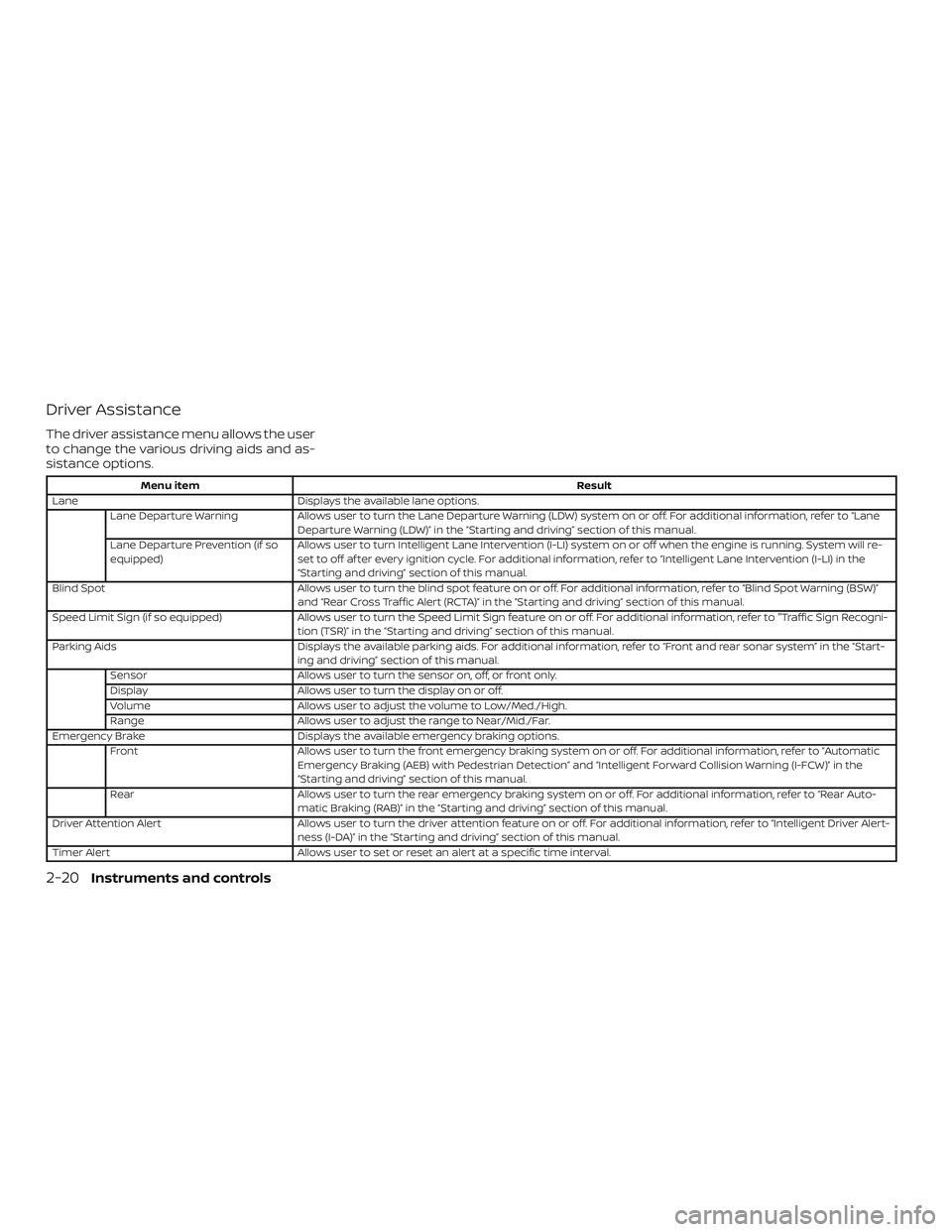
Driver Assistance
The driver assistance menu allows the user
to change the various driving aids and as-
sistance options.
Menu itemResult
Lane Displays the available lane options.
Lane Departure Warning Allows user to turn the Lane Departure Warning (LDW) system on or off. For additional information, refer to “Lane
Departure Warning (LDW)” in the “Starting and driving” section of this manual.
Lane Departure Prevention (if so
equipped) Allows user to turn Intelligent Lane Intervention (I-LI) system on or off when the engine is running. System will re-
set to off af ter every ignition cycle. For additional information, refer to “Intelligent Lane Intervention (I-LI) in the
“Starting and driving” section of this manual.
Blind Spot Allows user to turn the blind spot feature on or off. For additional information, refer to “Blind Spot Warning (BSW)”
and “Rear Cross Traffic Alert (RCTA)” in the “Starting and driving” section of this manual.
Speed Limit Sign (if so equipped) Allows user to turn the Speed Limit Sign feature on or off. For additional information, refer to "Traffic Sign Recogni -
tion (TSR)” in the “Starting and driving” section of this manual.
Parking Aids Displays the available parking aids. For additional information, refer to “Front and rear sonar system” in the “Start-
ing and driving” section of this manual.
Sensor Allows user to turn the sensor on, off, or front only.
Display Allows user to turn the display on or off.
Volume Allows user to adjust the volume to Low/Med./High.
Range Allows user to adjust the range to Near/Mid./Far.
Emergency Brake Displays the available emergency braking options.
Front Allows user to turn the front emergency braking system on or off. For additional information, refer to “Automatic
Emergency Braking (AEB) with Pedestrian Detection” and “Intelligent Forward Collision Warning (I-FCW)” in the
“Starting and driving” section of this manual.
Rear Allows user to turn the rear emergency braking system on or off. For additional information, refer to “Rear Auto-
matic Braking (RAB)” in the “Starting and driving” section of this manual.
Driver Attention Alert Allows user to turn the driver attention feature on or off. For additional information, refer to “Intelligent Driver Alert-
ness (I-DA)” in the “Starting and driving” section of this manual.
Timer Alert Allows user to set or reset an alert at a specific time interval.
2-20Instruments and controls
Page 123 of 500
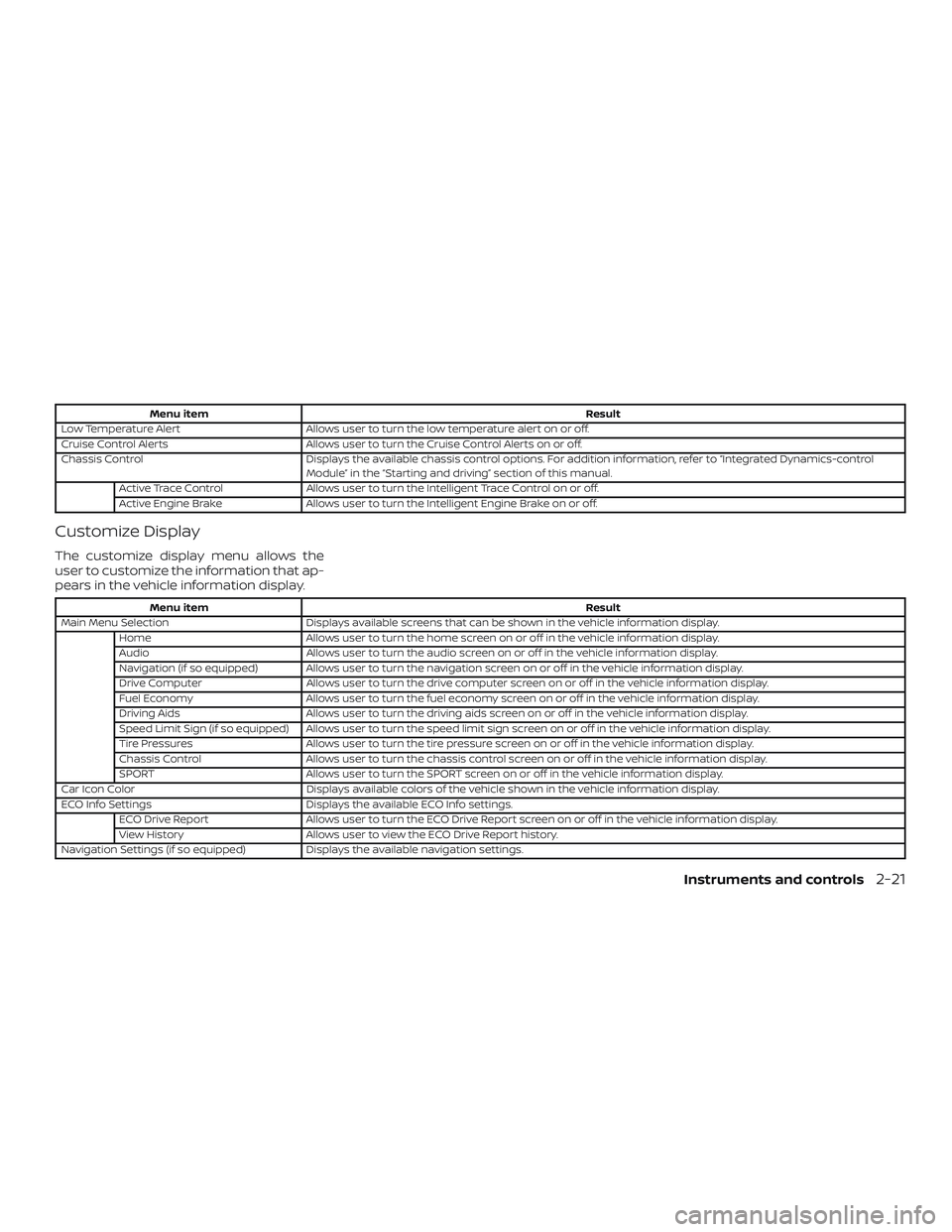
Menu itemResult
Low Temperature Alert Allows user to turn the low temperature alert on or off.
Cruise Control Alerts Allows user to turn the Cruise Control Alerts on or off.
Chassis Control Displays the available chassis control options. For addition information, refer to “Integrated Dynamics-control
Module” in the “Starting and driving” section of this manual.
Active Trace Control Allows user to turn the Intelligent Trace Control on or off.
Active Engine Brake Allows user to turn the Intelligent Engine Brake on or off.
Customize Display
The customize display menu allows the
user to customize the information that ap-
pears in the vehicle information display.
Menu item Result
Main Menu Selection Displays available screens that can be shown in the vehicle information display.
Home Allows user to turn the home screen on or off in the vehicle information display.
Audio Allows user to turn the audio screen on or off in the vehicle information display.
Navigation (if so equipped) Allows user to turn the navigation screen on or off in the vehicle information display.
Drive Computer Allows user to turn the drive computer screen on or off in the vehicle information display.
Fuel Economy Allows user to turn the fuel economy screen on or off in the vehicle information display.
Driving Aids Allows user to turn the driving aids screen on or off in the vehicle information display.
Speed Limit Sign (if so equipped) Allows user to turn the speed limit sign screen on or off in the vehicle information display.
Tire Pressures Allows user to turn the tire pressure screen on or off in the vehicle information display.
Chassis Control Allows user to turn the chassis control screen on or off in the vehicle information display.
SPORT Allows user to turn the SPORT screen on or off in the vehicle information display.
Car Icon Color Displays available colors of the vehicle shown in the vehicle information display.
ECO Info Settings Displays the available ECO Info settings.
ECO Drive Report Allows user to turn the ECO Drive Report screen on or off in the vehicle information display.
View History Allows user to view the ECO Drive Report history.
Navigation Settings (if so equipped) Displays the available navigation settings.
Instruments and controls2-21