service NISSAN MAXIMA 2021 Owner´s Manual
[x] Cancel search | Manufacturer: NISSAN, Model Year: 2021, Model line: MAXIMA, Model: NISSAN MAXIMA 2021Pages: 476, PDF Size: 3.32 MB
Page 140 of 476

The front seats are warmed by built-in
heaters.
1. Start the engine.
2. Push the LO or HI position of the switch,as desired. The indicator light in the
switch will illuminate.
The heater is controlled by a thermostat,
automatically turning the heater on and
off. The indicator light will remain on as
long as the switch is on.
3. When the seat is warmed or before you leave the vehicle, be sure to turn the
switch off.
WARNING
Do not use or allow occupants to use
the seat heater if you or the occupants
cannot monitor elevated seat tem-
peratures or have an inability to feel
pain in body parts that contact the
seat. Use of the seat heater by such
people could result in serious injury.
CAUTION
• The battery could run down if the
seat heater is operated while the en-
gine is not running.
• Do not use the seat heater for ex-
tended periods or when no one is us-
ing the seat.
•
Do not put anything on the seat which
insulates heat, such as a blanket,
cushion, seat cover, etc. Otherwise, the
seat may become overheated.
• Do not place anything hard or heavy
on the seat or pierce it with a pin or
similar object. This may result in
damage to the heater.
• Any liquid spilled on the heated seat
should be removed immediately with
a dry cloth. •
When cleaning the seat, never use
gasoline, benzine, thinner, or any
similar materials.
• If any malfunctions are found or the
heated seat does not operate, turn
the switch off and have the system
checked. It is recommended that you
visit a NISSAN dealer for this service.
LIC3037
HEATED SEAT SWITCHES (if so
equipped)
2-54Instruments and controls
Page 141 of 476

WARNING
Do not use or allow occupants to use
the seat heater if you or the occupants
cannot monitor elevated seat tem-
peratures or have an inability to feel
pain in body parts that contact the
seat. Use of the seat heater by such
people could result in serious injury.
CAUTION
• The battery could run down if the
seat heater is operated while the en-
gine is not running.
• Do not use the seat heater for ex-
tended periods or when no one is us-
ing the seat.
• Do not put anything on the seat
which insulates heat, such as a blan-
ket, cushion, seat cover, etc. Other-
wise, the seat may become
overheated.
• Do not place anything hard or heavy
on the seat or pierce it with a pin or
similar object. This may result in
damage to the heater.
• Any liquid spilled on the heated seat
should be removed immediately with
a dry cloth.
• When cleaning the seat, never use
gasoline, benzine, thinner, or any
similar materials.
• If any malfunctions are found or the
heated seat does not operate, turn
the switch off and have the system
checked. It is recommended you visit
a NISSAN dealer for this service. The rear seats are warmed by built-in heat-
ers. The switches are located on the rear of
the front center console and can be oper-
ated independently of each other.
1. Start the engine.
2. Push the LO or HI position of the switch,
as desired. The indicator light in the
switch will illuminate.
The heater is controlled by a thermostat,
automatically turning the heater on and
off. The indicator light will remain on as
long as the switch is on.
3. When the seat is warmed or before you leave the vehicle, be sure to turn the
switch off.
LIC3037
HEATED REAR SEAT SWITCHES (if so
equipped)
Instruments and controls2-55
Page 145 of 476
The E-call (SOS) button is used in combina-
tion with a NissanConnect® Services sub-
scription to call for assistance in case of an
emergency.
Pressing the button will (with a paid sub-
scription) reach a response specialist that
will provide assistance based on the situa-
tion described by the vehicle’s occupant.
For additional information, or to enroll your
vehicle, refer to www.NissanUSA.com/
connect, www.Nissan.ca/NissanConnect,
or www.Nissan.ca/NissanConnect/fr or
call 855–426–6628.The power outlet is for powering electrical
accessories such as cellular telephones. It
is rated at 12 volt, 120W (10A) maximum.
The power outlet is powered only when the
ignition switch is in the ACC or ON position.
CAUTION
• The outlet and plug may be hot dur-
ing or immediately af ter use.
•
Only certain power outlets are designed
for use with a cigarette lighter unit. Do not
use any other power outlet for an acces-
sory lighter. It is recommended that you
visit a NISSAN dealer for additional
information.
•Do not use with accessories that exceed a
12 volt, 120W (10A) power draw.
•Do not use double adapters or more than
one electrical accessory.
•Use power outlets with the engine running
to avoid discharging the vehicle battery.
•Avoid using power outlets when the air
conditioner, headlights, or rear window
defroster is on.
•Before inserting or disconnecting a plug,
be sure the electrical accessory being
used is turned off.
•Push the plug in as far as it will go. If good
contact is not made, the plug may over-
heat or the internal temperature fuse may
open.
•When not in use, be sure to close the cap.
Do not allow water or any other liquid to
contact the outlet.
LIC3357LIC4257
Console Box
E-CALL (SOS) BUTTON POWER OUTLET
Instruments and controls2-59
Page 154 of 476
If the windows do not close
automatically
If the power window automatic function
(closing only) does not operate properly,
perform the following procedure to initial-
ize the power window system.
1. Place the ignition switch in the ONposition.
2. Close the door.
3. Open the window more than half way by operating the power window switch.
4. Pull the power window switch and hold it to close the window, and then hold the
switch for more than 3 seconds af ter
the window is closed completely.
5. Release the power window switch. Op- erate the window by automatic function
to confirm the initialization is complete.
6. Perform steps 2 through 5 above for other windows.
If the power window automatic function
does not operate properly af ter perform-
ing the above procedure, have your vehicle
checked. It is recommended that you visit a
NISSAN dealer for this service.
POWER MOONROOF
The moonroof will only operate when the
ignition switch is in the ON position. The
power moonroof is operational for a period
of time, even if the ignition switch is placed
in the ACC or OFF position. If the driver's
door or the front passenger's door is
opened during this period of time, the
power to the moonroof is canceled.
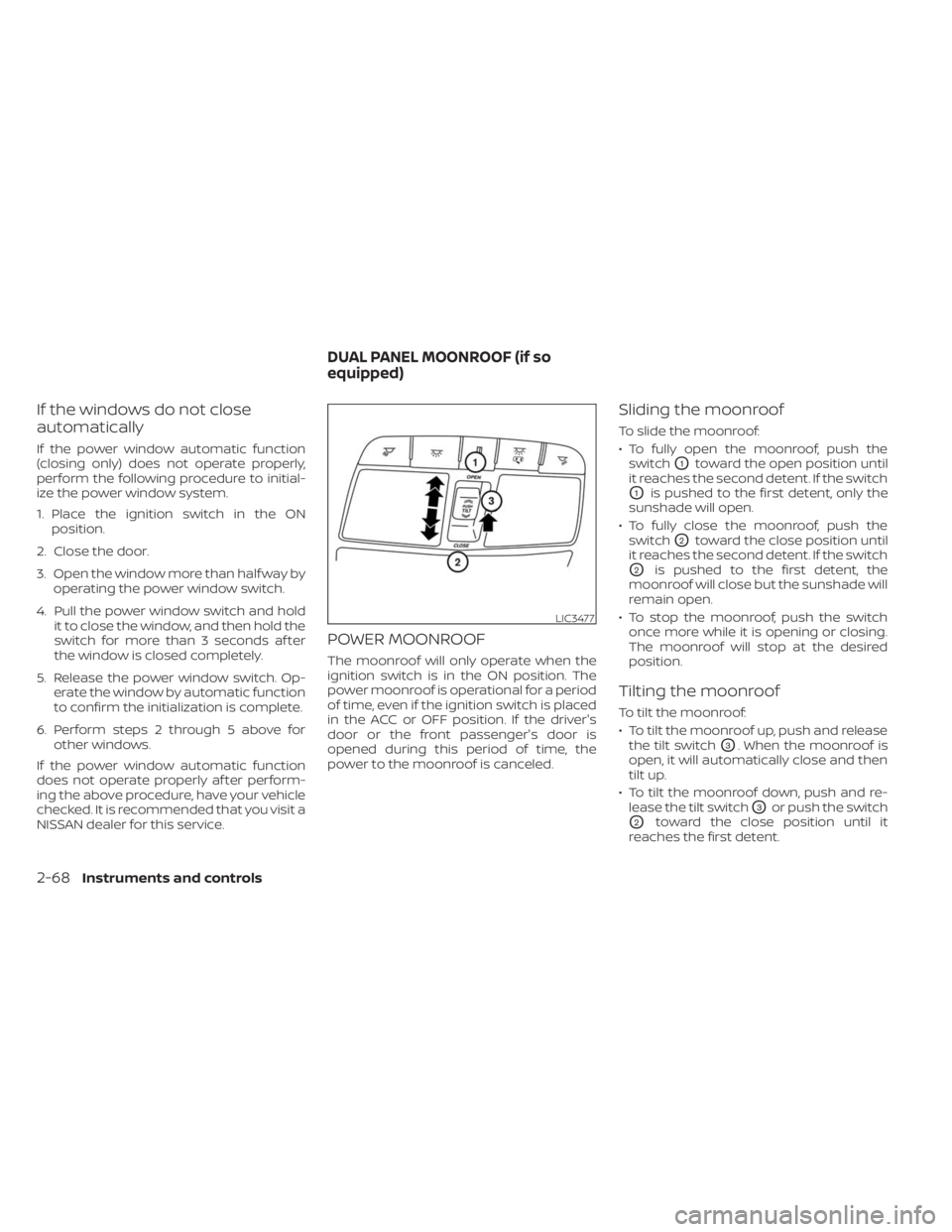
Sliding the moonroof
To slide the moonroof:
• To fully open the moonroof, push the switch
O1toward the open position until
it reaches the second detent. If the switch
O1is pushed to the first detent, only the
sunshade will open.
• To fully close the moonroof, push the switch
O2toward the close position until
it reaches the second detent. If the switch
O2is pushed to the first detent, the
moonroof will close but the sunshade will
remain open.
• To stop the moonroof, push the switch once more while it is opening or closing.
The moonroof will stop at the desired
position.
Tilting the moonroof
To tilt the moonroof:
• To tilt the moonroof up, push and releasethe tilt switch
O3. When the moonroof is
open, it will automatically close and then
tilt up.
• To tilt the moonroof down, push and re- lease the tilt switch
O3or push the switch
O2toward the close position until it
reaches the first detent.
LIC3477
DUAL PANEL MOONROOF (if so
equipped)
2-68Instruments and controls
Page 156 of 476
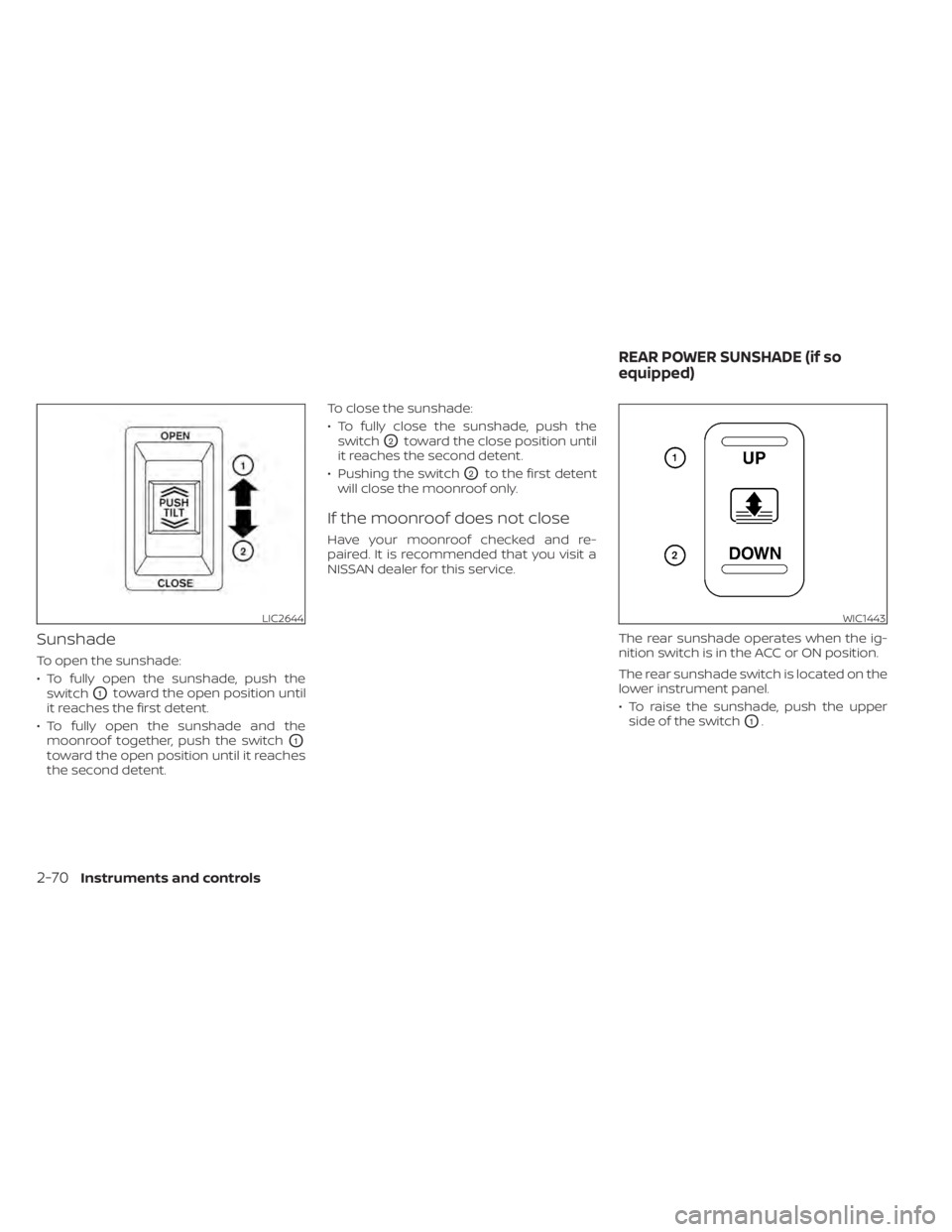
Sunshade
To open the sunshade:
• To fully open the sunshade, push theswitch
O1toward the open position until
it reaches the first detent.
• To fully open the sunshade and the moonroof together, push the switch
O1
toward the open position until it reaches
the second detent. To close the sunshade:
• To fully close the sunshade, push the
switch
O2toward the close position until
it reaches the second detent.
• Pushing the switch
O2to the first detent
will close the moonroof only.
If the moonroof does not close
Have your moonroof checked and re-
paired. It is recommended that you visit a
NISSAN dealer for this service.
The rear sunshade operates when the ig-
nition switch is in the ACC or ON position.
The rear sunshade switch is located on the
lower instrument panel.
• To raise the sunshade, push the upperside of the switch
O1.
LIC2644WIC1443
REAR POWER SUNSHADE (if so
equipped)
2-70Instruments and controls
Page 187 of 476

FUEL-FILLER CAP
WARNING
• Gasoline is extremely flammable and
highly explosive under certain condi-
tions. You could be burned or seri-
ously injured if it is misused or mis-
handled. Always stop the engine and
do not smoke or allow open flames or
sparks near the vehicle when
refueling.
• Do not attempt to top off the fuel
tank af ter the fuel pump nozzle
shuts off automatically. Continued
refueling may cause fuel overflow,
resulting in fuel spray and possibly a
fire.
• Use only an original equipment type
fuel-filler cap as a replacement. It has
a built-in safety valve needed for
proper operation of the fuel system
and emission control system. An in-
correct cap can result in a serious
malfunction and possible injury. It
could also cause the
Malfunc-
tion Indicator Light (MIL) to come on.
• Never pour fuel into the throttle body
to attempt to start your vehicle. •
Do not fill a portable fuel container in
the vehicle or trailer. Static electricity
can cause an explosion of flammable
liquid, vapor or gas in any vehicle or
trailer. To reduce the risk of serious
injury or death when filling portable
fuel containers:
– Always place the container on the
ground when filling.
– Do not use electronic devices
when filling.
– Keep the pump nozzle in contact
with the container while you are
filling it.
– Use only approved portable fuel
containers for flammable liquid.
CAUTION
• Do not use a fuel containing more
than 15% ethanol in your vehicle. For
additional information, see “Fuel rec-
ommendation” (P. 10-3). •
The Loose Fuel Cap warning will ap-
pear if the fuel-filler cap is not prop-
erly tightened. It may take a few driv-
ing trips for the message to be
displayed. Failure to tighten the fuel-
filler cap properly af ter the Loose
Fuel Cap warning appears may cause
the
Malfunction Indicator Light
(MIL) to illuminate.
• Failure to tighten the fuel-filler cap
properly may cause the
Mal-
function Indicator Light (MIL) to illu-
minate. If the
light illuminates
because the fuel-filler cap is loose or
missing, tighten or install the cap and
continue to drive the vehicle. The
light should turn off af ter a few
driving trips. If thelight does not
turn off af ter a few driving trips, have
the vehicle inspected. It is recom-
mended that you visit a NISSAN
dealer for this service.
• For additional information, see “Mal-
function Indicator Light (MIL)”
(P. 2-13).
• If fuel is spilled on the vehicle body,
flush it away with water to avoid
paint damage.
Pre-driving checks and adjustments3-23
Page 196 of 476

5. If there is a desire to change to anotherIntelligent Key while in the vehicle, the
user must place the ignition switch in
the OFF position and initiate communi-
cation from the desired Intelligent Key.
6. Ignition from ON position to the OFF
7. Unlock door with the desired Intelligent Key
8. The desired Intelligent Key number should appear on the meter display.
ENTRY/EXIT FUNCTION
This system is designed so that the driver's
seat and steering column will automati-
cally move when the shif t lever is in the P
(Park) position. This allows the driver to
easily get in and out of the driver’s seat.
The driver’s seat will slide backward and
the steering wheel will move up:
• When the driver's door is opened and theignition switch is in the OFF position.
• When the ignition switch is turned from ACC to OFF with the driver’s door open. The driver’s seat and steering wheel will
return to the previous position:
• When the ignition switch is turned to ACC
or ON while the shif t lever is in the P (Park)
position.
The entry/exit function can be adjusted or
canceled through the “Vehicle Settings” in
the vehicle information display by perform-
ing the following:
• Switch the Exit Seat Slide from ON to OFF.
• Switch the Exit Steering Up from ON to OFF.SYSTEM OPERATION
The memory seat system will not work or
will stop operating under the following
conditions:
• When the vehicle speed is above 4 mph (7km/h).
• When any of the memory switches are pushed while the memory seat is
operating.
• When the switch for the driver’s seat and steering column is pushed while the
memory seat is operating. • When the seat has already been moved
to the memorized position.
• When no seat position is stored in the memory switch.
• When the shif t lever is moved from P (Park) to any other position.
The memory seat system can be adjusted
and canceled. It is recommended you visit
a NISSAN dealer for this service.
3-32Pre-driving checks and adjustments
Page 198 of 476

Refer to the NissanConnect® Owner’s
Manual that includes the following infor-
mation.
• NissanConnect® Services (if so equipped)
• Navigation system (if so equipped)
• Audio system
• Apple CarPlay®
• Android Auto
TM
• Bluetooth® Hands-Free Phone system
• Viewing information
• Other settings
• Voice recognition
• General system information
NISSANCONNECT® OWNER’S
MANUAL
4-2Monitor, climate, audio, phone and voice recognition systems
Page 216 of 476
•Do not strike the cameras. They are
precision instruments. Doing so
could cause a malfunction or cause
damage resulting in a fire or an elec-
tric shock.
There are some areas where the system
will not show objects and the system does
not warn of moving objects. When in the
front or rear view display, an object below
the bumper or on the ground may not be
viewed
O1. When in the bird’s-eye view, a tall
object near the seam
O2of the camera
viewing areas will not appear in the
monitor.
The following are operating limitations and
do not represent a system malfunction:
• There may be a delay when switching between views.
• When the temperature is extremely high or low, the screen may not display objects
clearly.
• When strong light directly shines on the camera, objects may not be displayed
clearly.
• The screen may flicker under fluorescent light. • The colors of objects on the Intelligent
Around View Monitor may differ some-
what from the actual color of objects.
• Objects on the Intelligent Around View Monitor may not be clear and the color of
the object may differ in a dark
environment.
• There may be differences in sharpness between each camera view of the bird's-
eye view.
• Do not use wax on the camera lens. Wipe off any wax with a clean cloth that has
been dampened with a diluted mild
cleaning agent, then wipe with a dry
cloth.
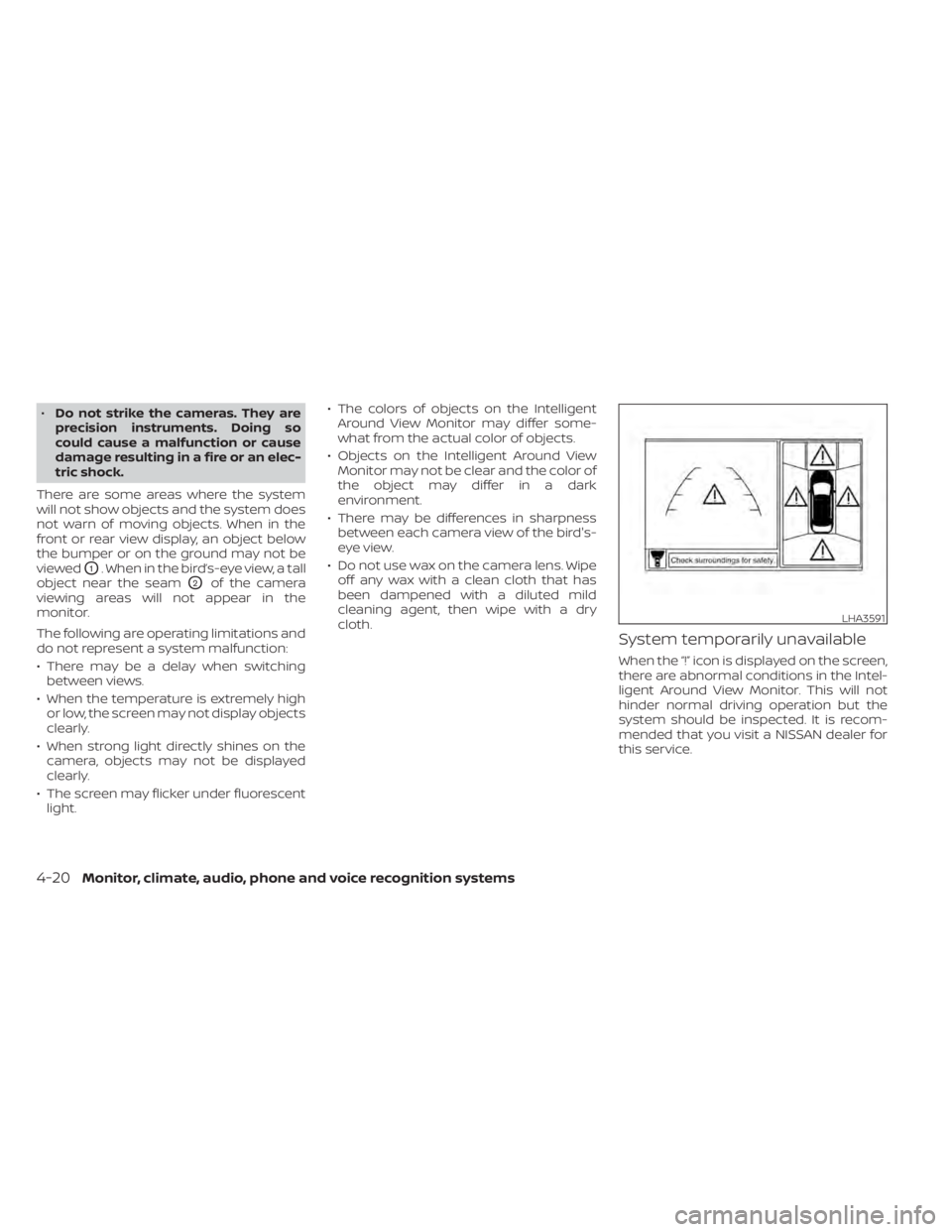
System temporarily unavailable
When the “!” icon is displayed on the screen,
there are abnormal conditions in the Intel-
ligent Around View Monitor. This will not
hinder normal driving operation but the
system should be inspected. It is recom-
mended that you visit a NISSAN dealer for
this service.
LHA3591
4-20Monitor, climate, audio, phone and voice recognition systems
Page 217 of 476
![NISSAN MAXIMA 2021 Owner´s Manual When the “[X]” icon is displayed on the
screen, the camera image may be receiv-
ing temporary electronic disturbances
from surrounding devices. This will not hin-
der normal driving operation but](/img/5/40345/w960_40345-216.png "NISSAN MAXIMA 2021 Owner´s Manual When the “[X]” icon is displayed on the
screen, the camera image may be receiv-
ing temporary electronic disturbances
from surrounding devices. This will not hin-
der normal driving operation but")
When the “[X]” icon is displayed on the
screen, the camera image may be receiv-
ing temporary electronic disturbances
from surrounding devices. This will not hin-
der normal driving operation but the sys-
tem should be inspected if it occurs fre-
quently. It is recommended that you visit a
NISSAN dealer for this service.SYSTEM MAINTENANCE
CAUTION
• Do not use alcohol, benzine or thin-
ner to clean the camera. This will
cause discoloration.
• Do not damage the cameras as the
monitor screen may be adversely
affected. If dirt, rain or snow accumulates on any of
the cameras
O1, the Intelligent Around
View Monitor may not display objects
clearly. Clean the camera by wiping with a
cloth dampened with a diluted mild clean-
ing agent and then wiping with a dry cloth.
LHA3592LHA5026
Monitor, climate, audio, phone and voice recognition systems4-21