air condition NISSAN MAXIMA 2023 User Guide
[x] Cancel search | Manufacturer: NISSAN, Model Year: 2023, Model line: MAXIMA, Model: NISSAN MAXIMA 2023Pages: 494, PDF Size: 5.7 MB
Page 80 of 494
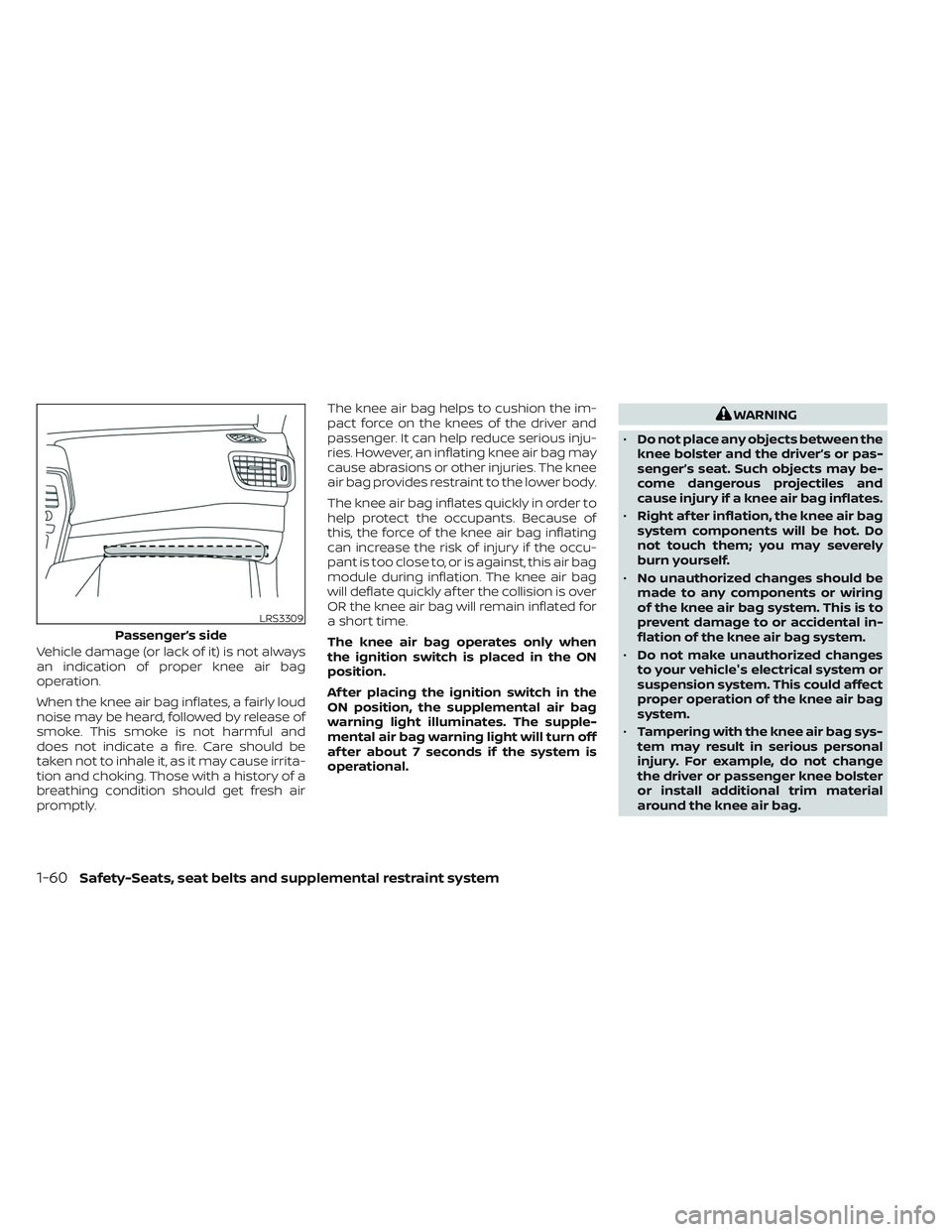
Vehicle damage (or lack of it) is not always
an indication of proper knee air bag
operation.
When the knee air bag inflates, a fairly loud
noise may be heard, followed by release of
smoke. This smoke is not harmful and
does not indicate a fire. Care should be
taken not to inhale it, as it may cause irrita-
tion and choking. Those with a history of a
breathing condition should get fresh air
promptly.The knee air bag helps to cushion the im-
pact force on the knees of the driver and
passenger. It can help reduce serious inju-
ries. However, an inflating knee air bag may
cause abrasions or other injuries. The knee
air bag provides restraint to the lower body.
The knee air bag inflates quickly in order to
help protect the occupants. Because of
this, the force of the knee air bag inflating
can increase the risk of injury if the occu-
pant is too close to, or is against, this air bag
module during inflation. The knee air bag
will deflate quickly af ter the collision is over
OR the knee air bag will remain inflated for
a short time.
The knee air bag operates only when
the ignition switch is placed in the ON
position.
Af ter placing the ignition switch in the
ON position, the supplemental air bag
warning light illuminates. The supple-
mental air bag warning light will turn off
af ter about 7 seconds if the system is
operational.
WARNING
• Do not place any objects between the
knee bolster and the driver’s or pas-
senger’s seat. Such objects may be-
come dangerous projectiles and
cause injury if a knee air bag inflates.
• Right af ter inflation, the knee air bag
system components will be hot. Do
not touch them; you may severely
burn yourself.
• No unauthorized changes should be
made to any components or wiring
of the knee air bag system. This is to
prevent damage to or accidental in-
flation of the knee air bag system.
• Do not make unauthorized changes
to your vehicle's electrical system or
suspension system. This could affect
proper operation of the knee air bag
system.
• Tampering with the knee air bag sys-
tem may result in serious personal
injury. For example, do not change
the driver or passenger knee bolster
or install additional trim material
around the knee air bag.
LRS3309
Passenger’s side
1-60Safety-Seats, seat belts and supplemental restraint system
Page 81 of 494
•It is recommended that you visit a
NISSAN dealer for work on and
around the knee air bag. It is also rec-
ommended that you visit a NISSAN
dealer for installation of electrical
equipment. The SRS wiring har-
nesses* should not be modified or
disconnected. Unauthorized electri-
cal test equipment and probing de-
vices should not be used on the knee
air bag system.
*The SRS wiring harness or connectors are
yellow or orange for easy identification.
When selling your vehicle, we request that
you inform the buyer about the knee air
bag system and guide the buyer to the
appropriate sections in this manual.
Seat belt with pretensioner(s)
(front and rear outboard seats)
WARNING
• The pretensioner(s) cannot be re-
used af ter activation. They must be
replaced together with the retractor
and buckle as a unit. •
If the vehicle becomes involved in a
collision but pretensioner(s) are not
activated, be sure to have the preten-
sioner system checked and, if neces-
sary, replaced. It is recommended
that you visit a NISSAN dealer for this
service.
• No unauthorized changes should be
made to any components or wiring
of the pretensioner system. This is to
prevent damage to or accidental ac-
tivation of the pretensioner(s). Tam-
pering with the pretensioner system
may result in serious personal injury.
• It is recommended that you visit a
NISSAN dealer for work on and
around the pretensioner system. It is
also recommended that you visit a
NISSAN dealer for installation of elec-
trical equipment. Unauthorized elec-
trical test equipment and probing
devices should not be used on the
pretensioner system.
• If you need to dispose of the preten-
sioner(s) or scrap the vehicle, it is rec-
ommended that you visit a NISSAN
dealer for this service. Incorrect dis-
posal procedures could cause per-
sonal injury. The pretensioner system may activate
with the supplemental air bag system in
certain types of collisions. Working with the
seat belt retractor, the pretensioner(s) help
tighten the seat belt when the vehicle be-
comes involved in certain types of colli-
sions, helping to restrain front and rear out-
board seat occupants.
The pretensioner(s) are encased within the
seat belt retractor and to the seat belt an-
chor affixed to the floor of the vehicle.
These seat belts are used the same way as
conventional seat belts.
When pretensioner(s) activate, smoke is re-
leased and a loud noise may be heard. This
smoke is not harmful and does not indi-
cate a fire. Care should be taken not to
inhale it, as it may cause irritation and
choking. Those with a history of a breath-
ing condition should get fresh air promptly.
Af ter the pretensioner(s’) activation, load
limiters allow the seat belt to release web-
bing (if necessary) to reduce forces against
the chest.
The supplemental air bag warning light
is used to indicate malfunctions in the
pretensioner system. For additional infor-
mation, see "Supplemental air bag warning
Safety-Seats, seat belts and supplemental restraint system1-61
Page 83 of 494
If any of the following conditions occur, the
front air bag, side air bag, curtain air bag,
knee air bag and pretensioner systems
need servicing:
•
The supplemental air bag warning light re-
mains on af ter approximately 7 seconds.
• The supplemental air bag warning light flashes intermittently.
• The supplemental air bag warning light does not come on at all.
Under these conditions, the front air bags,
side air bags, curtain air bags, knee air bags
or pretensioner systems may not operate
properly. They must be checked and re-
paired. It is recommended that you visit a
NISSAN dealer for this service.
WARNING
If the supplemental air bag warning
light is on, it could mean that the front
air bags, side air bags, curtain air bags,
knee air bags and/or pretensioner sys-
tems will not operate in an accident. To
help avoid injury to yourself or others,
have your vehicle checked as soon as
possible. It is recommended that you
visit a NISSAN dealer for this service.
Repair and replacement
procedure
The front air bags, side air bags, curtain air
bags, knee air bags and pretensioner(s) are
designed to inflate on a one-time-only
basis. As a reminder, unless it is damaged,
the supplemental air bag warning light
remains illuminated af ter inflation has
occurred. These systems should be re-
paired and/or replaced as soon as pos-
sible. It is recommended that you visit a
NISSAN dealer for this service.
When maintenance work is required on the
vehicle, the front air bags, side air bags,
curtain air bags, knee air bags, pretension-
er(s) and related parts should be pointed
out to the person performing the mainte-
nance. The ignition switch should always
be placed in the LOCK position when work-
ing under the hood or inside the vehicle.
WARNING
• Once a front air bag, side air bag, cur-
tain air bag or knee air bag has in-
flated, the air bag module will not
function again and must be replaced.
Additionally, the activated preten-
sioner(s) must also be replaced. The
air bag module and pretensioner(s)
should be replaced. It is recom-
mended that you visit a NISSAN
dealer for this service. However, the
air bag module and pretensioner(s)
cannot be repaired.
• The front air bag, side air bag, curtain
air bag, knee air bag systems and the
pretensioner system should be in-
spected if there is any damage to the
front end or side portion of the ve-
hicle. It is recommended that you
visit a NISSAN dealer for this service.
• If you need to dispose of the supple-
mental air bag or pretensioner sys-
tems or scrap the vehicle, it is recom-
mended that you contact a NISSAN
dealer for this service. Incorrect dis-
posal procedures could cause per-
sonal injury.
Safety-Seats, seat belts and supplemental restraint system1-63
Page 88 of 494
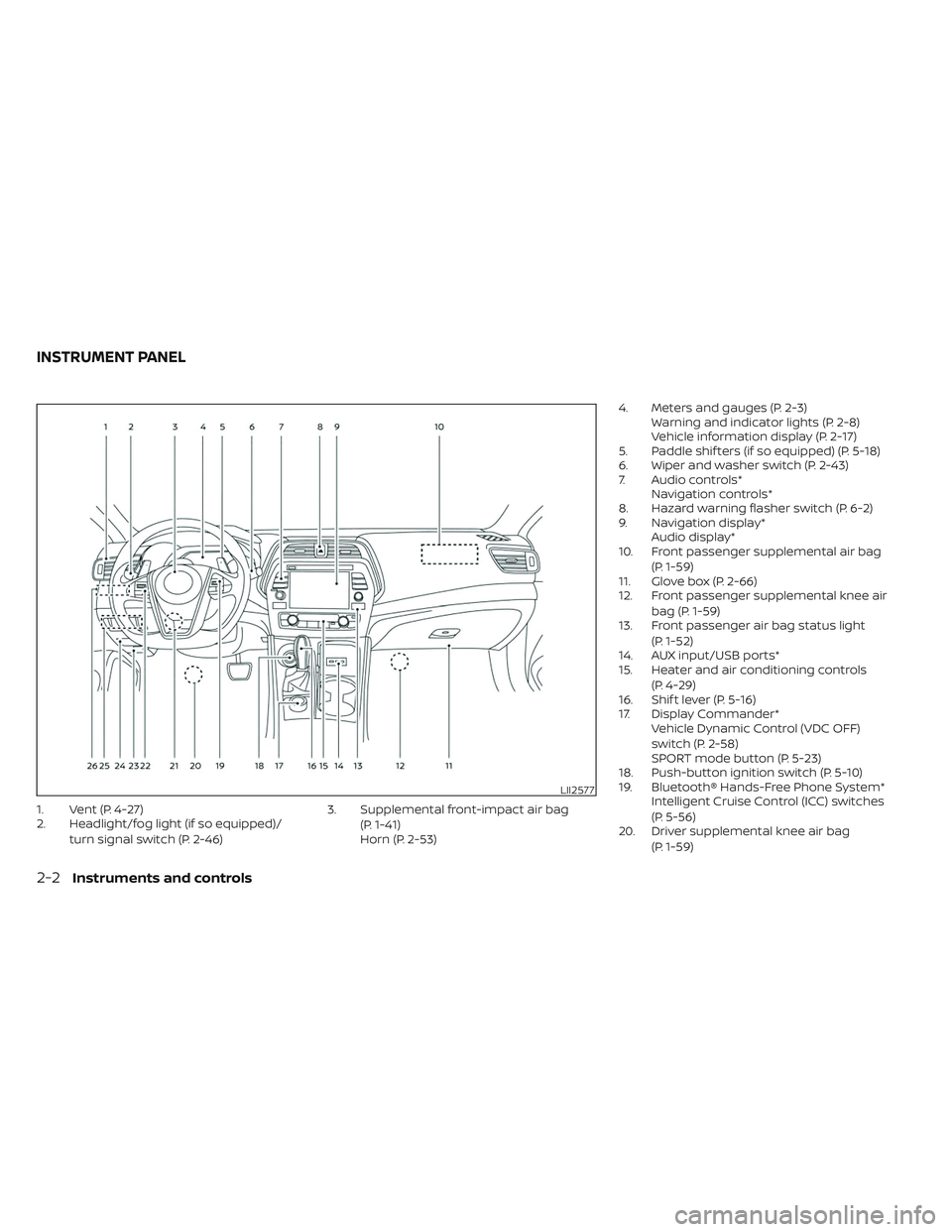
1. Vent (P. 4-27)
2. Headlight/fog light (if so equipped)/turn signal switch (P. 2-46) 3. Supplemental front-impact air bag
(P. 1-41)
Horn (P. 2-53) 4. Meters and gauges (P. 2-3)
Warning and indicator lights (P. 2-8)
Vehicle information display (P. 2-17)
5. Paddle shif ters (if so equipped) (P. 5-18)
6. Wiper and washer switch (P. 2-43)
7. Audio controls* Navigation controls*
8. Hazard warning flasher switch (P. 6-2)
9. Navigation display* Audio display*
10. Front passenger supplemental air bag
(P. 1-59)
11. Glove box (P. 2-66)
12. Front passenger supplemental knee air
bag (P. 1-59)
13. Front passenger air bag status light
(P. 1-52)
14. AUX input/USB ports*
15. Heater and air conditioning controls
(P. 4-29)
16. Shif t lever (P. 5-16)
17. Display Commander* Vehicle Dynamic Control (VDC OFF)
switch (P. 2-58)
SPORT mode button (P. 5-23)
18. Push-button ignition switch (P. 5-10)
19. Bluetooth® Hands-Free Phone System* Intelligent Cruise Control (ICC) switches
(P. 5-56)
20. Driver supplemental knee air bag
(P. 1-59)
LII2577
INSTRUMENT PANEL
2-2Instruments and controls
Page 91 of 494
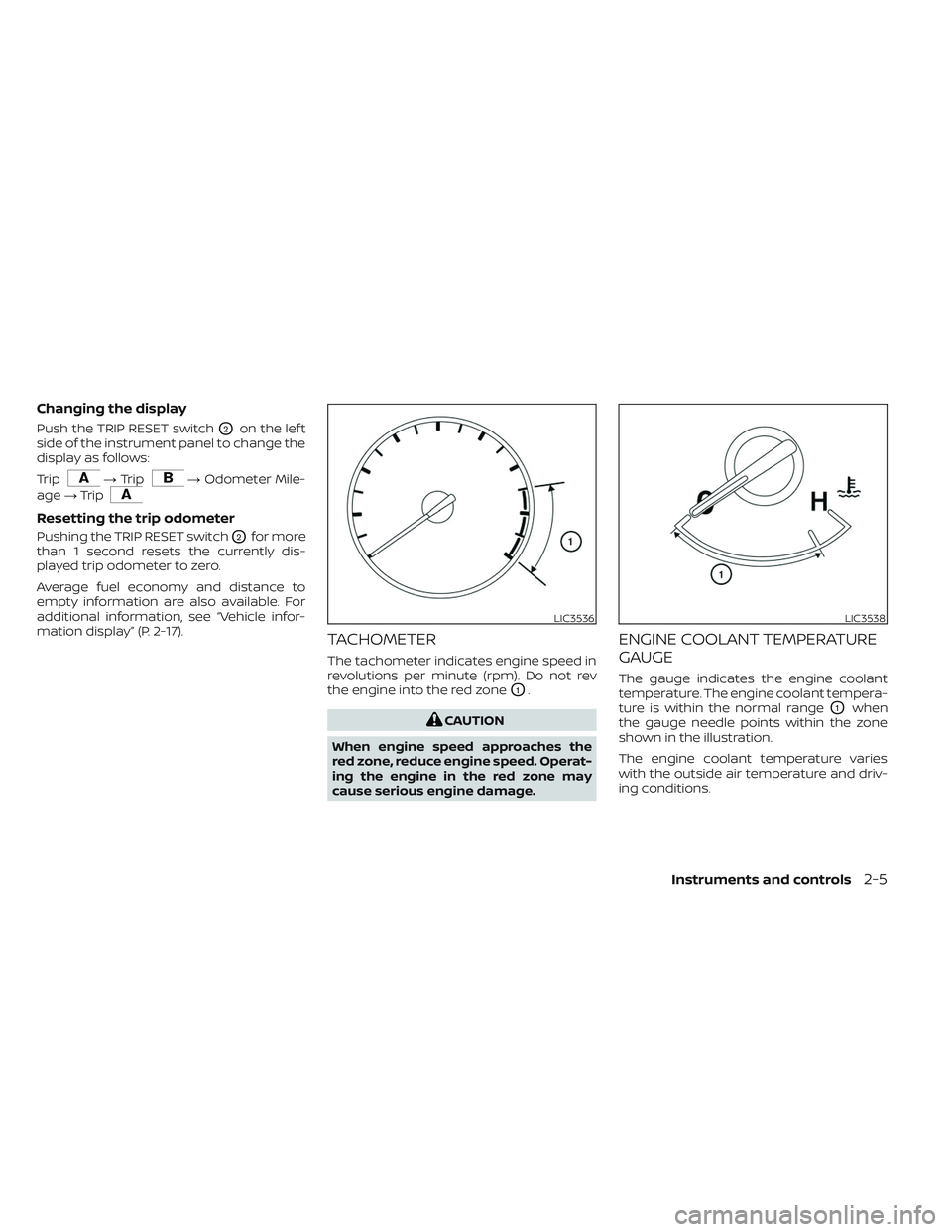
Changing the display
Push the TRIP RESET switchO2on the lef t
side of the instrument panel to change the
display as follows:
Trip
→ Trip→ Odometer Mile-
age →Trip
Resetting the trip odometer
Pushing the TRIP RESET switchO2for more
than 1 second resets the currently dis-
played trip odometer to zero.
Average fuel economy and distance to
empty information are also available. For
additional information, see “Vehicle infor-
mation display” (P. 2-17).
TACHOMETER
The tachometer indicates engine speed in
revolutions per minute (rpm). Do not rev
the engine into the red zone
O1.
CAUTION
When engine speed approaches the
red zone, reduce engine speed. Operat-
ing the engine in the red zone may
cause serious engine damage.
ENGINE COOLANT TEMPERATURE
GAUGE
The gauge indicates the engine coolant
temperature. The engine coolant tempera-
ture is within the normal range
O1when
the gauge needle points within the zone
shown in the illustration.
The engine coolant temperature varies
with the outside air temperature and driv-
ing conditions.
LIC3536LIC3538
Instruments and controls2-5
Page 96 of 494
Charge warning light
If this light comes on while the engine is
running, it may indicate the charging sys-
tem is not functioning properly. Turn the
engine off and check the generator belt. If
the belt is loose, broken, or missing, or if the
light remains on, have the system checked.
It is recommended that you visit a NISSAN
dealer for this service.
CAUTION
Do not continue driving if the generator
belt is loose, broken or missing.
Engine oil pressure
warning light
This light warns of low engine oil pressure.
If the light flickers or comes on during nor-
mal driving, pull off the road in a safe area,
stop the engine immediatelyand call a
NISSAN dealer or other authorized repair
shop.
The engine oil pressure warning light is
not designed to indicate a low oil level.
Use the dipstick to check the oil level. For
additional information, see “Engine oil” (P. 8-6).
CAUTION
Running the engine with the engine oil
pressure warning light on could cause
serious damage to the engine almost
immediately. Such damage is not cov-
ered by the NISSAN New Vehicle Limited
Warranty. Turn off the engine as soon
as it is safe to do so.
Master warning light
The master warning light illuminates
whenever there is an active warning that
can be reviewed in the “warnings review”
content page in the meter, or if there is a
red-level warning being displayed (which
cannot be dismissed). The master warning
light will illuminate red if a red-level warning
is being displayed, or yellow otherwise.
• Door Open (with vehicle moving)
• Parking Brake ON
• LED Headlight Failure (if no other red warnings are active)
• Shif t into Park warning
For additional information, see “Vehicle in-
formation display” (P. 2-17).
Seat belt warning light and
chime
• The light and chime remind you to fasten the seat belts.
• The seat belt warning light will illuminate when the ignition switch is pushed to the
ON position if the driver’s seat belt is not
fastened, or if the front passenger seat
belt is not fastened when occupied.
• The seat belt warning light will also illumi- nate if a rear passenger seat belt is
changed from fastened to unfastened.
• If the driver’s seat belt is not fastened when the ignition switch is pushed to the
ON position, the chime will sound shortly.
• If the vehicle is driven above 9 mph (15 km/h) in the conditions that illuminate
the seat belt warning light, the lamp will
begin to blink and the chime will sound
for over one minute, or until the seat belt
is fastened again.
NOTE:
•The warning light and/or chime may
activate if an object is placed in the un-
occupied front passenger seat. In this
case, please remove the object from
the front passenger seat.
2-10Instruments and controls
Page 97 of 494
•The warning light and/or chime may
activate if any seat belt is unfastened
before the vehicle comes to a complete
stop. Please remain fastened until the
vehicle has come to a complete stop.
Security indicator light
This light blinks when the ignition switch is
placed in the OFF, LOCK or ACC position.
The blinking security indicator light indi-
cates that the security systems equipped
on the vehicle are operational.
For additional information, see “Security
systems” (P. 2-40).
Supplemental air bag
warning light
When the ignition switch is placed in the ON
position, the supplemental air bag warning
light illuminates for about 7 seconds and
then turns off. This means the system is
operational. If any of the following conditions occur, the
front air bag, side air bag, curtain air bag,
and pretensioner seat belt systems need
servicing:
•
The supplemental air bag warning light re-
mains on af ter approximately 7 seconds.
• The supplemental air bag warning light flashes intermittently.
• The supplemental air bag warning light does not come on at all.
It is recommended that you visit a NISSAN
dealer for these services.
Unless checked and repaired, the supple-
mental restraint system (air bag system)
and/or the pretensioner(s) may not func-
tion properly. For additional information,
see “Supplemental Restraint System (SRS)”
(P. 1-41).
WARNING
If the supplemental air bag warning
light is on, it could mean that the front
air bag, side air bag, curtain air bag
and/or pretensioner systems will not
operate in an accident. To help avoid
injury to yourself or others, have your
vehicle checked as soon as possible.
It is recommended that you visit a
NISSAN dealer for this service.
WARNING/INDICATOR LIGHTS
(yellow)
For additional information, see “Vehicle in-
formation display” (P. 2-17).
orAnti-lock Braking
System (ABS)
warning light
When the ignition switch is placed in the ON
position, the ABS warning light illuminates
and then turns off. This indicates the ABS is
operational.
If the ABS warning light illuminates while
the engine is running or while driving, it
may indicate the ABS is not functioning
properly. Have the system checked. It is
recommended that you visit a NISSAN
dealer for this service.
If an ABS malfunction occurs, the anti-lock
function is turned off. The brake system
then operates normally but without anti-
lock assistance. For additional information,
see “Brake system” (P. 5-113).
Instruments and controls2-11
Page 149 of 494
•Only certain power outlets are de-
signed for use with a cigarette lighter
unit. Do not use any other power out-
let for an accessory lighter. It is rec-
ommended that you visit a NISSAN
dealer for additional information.
• Do not use with accessories that ex-
ceed a 12 volt, 120W (10A) power draw.
• Do not use double adapters or more
than one electrical accessory.
• Use power outlets with the engine
running to avoid discharging the
vehicle battery.
• Avoid using power outlets when the
air conditioner, headlights, or rear
window defroster is on.
• Before inserting or disconnecting a
plug, be sure the electrical accessory
being used is turned off.
• Push the plug in as far as it will go. If
good contact is not made, the plug
may overheat or the internal tem-
perature fuse may open.
• When not in use, be sure to close the
cap. Do not allow water or any other
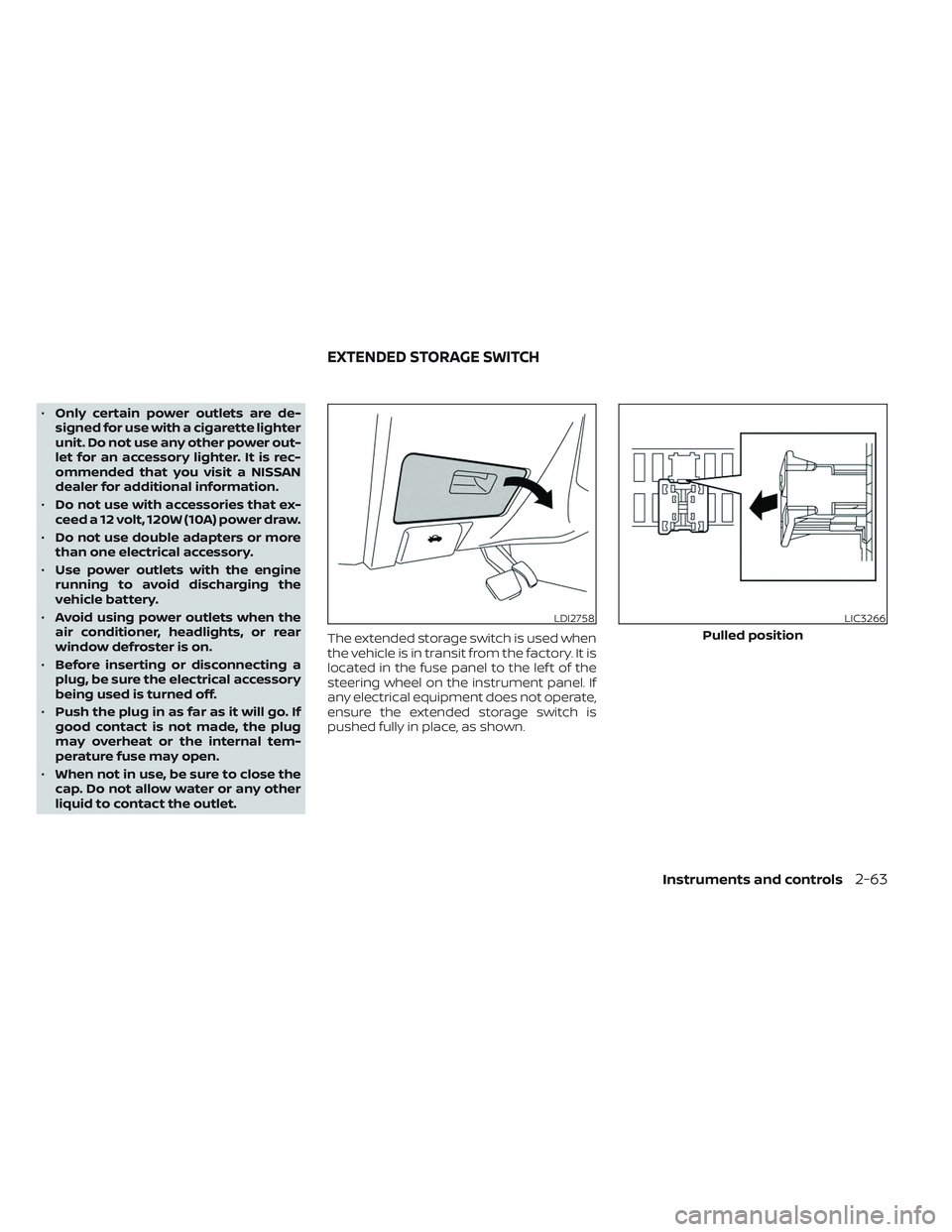
liquid to contact the outlet. The extended storage switch is used when
the vehicle is in transit from the factory. It is
located in the fuse panel to the lef t of the
steering wheel on the instrument panel. If
any electrical equipment does not operate,
ensure the extended storage switch is
pushed fully in place, as shown.
LDI2758LIC3266
Pulled position
EXTENDED STORAGE SWITCH
Instruments and controls2-63
Page 174 of 494
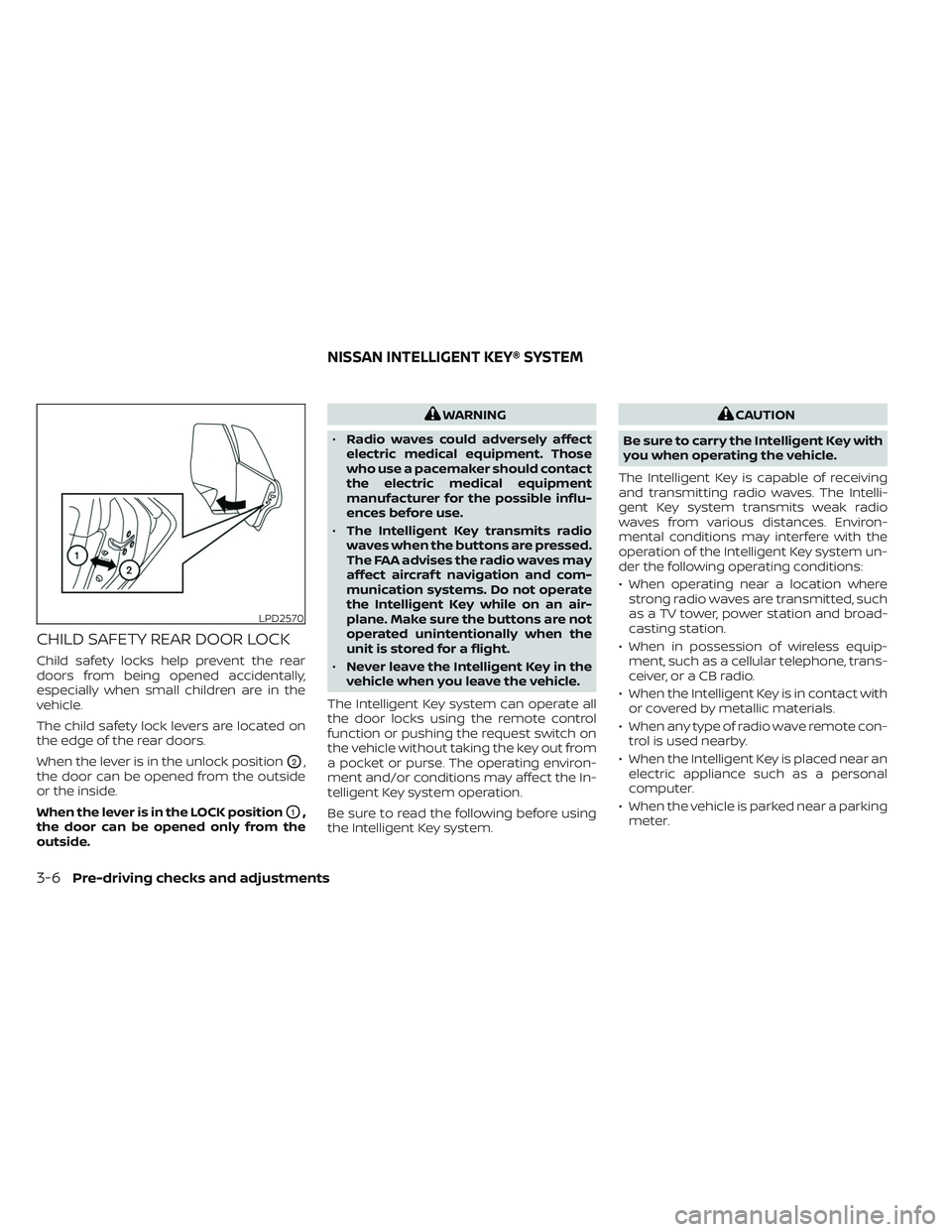
CHILD SAFETY REAR DOOR LOCK
Child safety locks help prevent the rear
doors from being opened accidentally,
especially when small children are in the
vehicle.
The child safety lock levers are located on
the edge of the rear doors.
When the lever is in the unlock position
O2,
the door can be opened from the outside
or the inside.
When the lever is in the LOCK position
O1,
the door can be opened only from the
outside.
WARNING
• Radio waves could adversely affect
electric medical equipment. Those
who use a pacemaker should contact
the electric medical equipment
manufacturer for the possible influ-
ences before use.
• The Intelligent Key transmits radio
waves when the buttons are pressed.
The FAA advises the radio waves may
affect aircraf t navigation and com-
munication systems. Do not operate
the Intelligent Key while on an air-
plane. Make sure the buttons are not
operated unintentionally when the
unit is stored for a flight.
• Never leave the Intelligent Key in the
vehicle when you leave the vehicle.
The Intelligent Key system can operate all
the door locks using the remote control
function or pushing the request switch on
the vehicle without taking the key out from
a pocket or purse. The operating environ-
ment and/or conditions may affect the In-
telligent Key system operation.
Be sure to read the following before using
the Intelligent Key system.CAUTION
Be sure to carry the Intelligent Key with
you when operating the vehicle.
The Intelligent Key is capable of receiving
and transmitting radio waves. The Intelli-
gent Key system transmits weak radio
waves from various distances. Environ-
mental conditions may interfere with the
operation of the Intelligent Key system un-
der the following operating conditions:
• When operating near a location where strong radio waves are transmitted, such
as a TV tower, power station and broad-
casting station.
• When in possession of wireless equip- ment, such as a cellular telephone, trans-
ceiver, or a CB radio.
• When the Intelligent Key is in contact with or covered by metallic materials.
• When any type of radio wave remote con- trol is used nearby.
• When the Intelligent Key is placed near an electric appliance such as a personal
computer.
• When the vehicle is parked near a parking meter.
LPD2570
NISSAN INTELLIGENT KEY® SYSTEM
3-6Pre-driving checks and adjustments
Page 201 of 494
4 Monitor, climate, audio, phone and
voice recognition systems
NissanConnect® Owner’s Manual...............4-2
RearView Monitor (if so equipped) ...............4-3
RearView Monitor system operation ..........4-4
How to read the displayed lines ..............4-5
Difference between predicted and
actual distances .............................4-5
How to park with predicted course
lines ..........................................4-7
Adjusting the screen .........................4-8
How to turn on and off predicted
course lines ..................................4-8
RearView Monitor system limitations .........4-9
System maintenance ....................... 4-10
Intelligent Around View® Monitor (if so
equipped) ....................................... 4-11
Intelligent Around View® Monitor
system operation ........................... 4-12
Difference between predicted and
actual distances ............................ 4-16
How to park with predicted course lines ......4-18How to switch the display ...................4-19Adjusting the screen
........................ 4-19
Intelligent Around View® Monitor
system limitations .......................... 4-20
System maintenance .......................4-22
Moving Object Detection (MOD) (if so
equipped) ...................................... 4-23
MOD system operation ......................4-24
Turning MOD on and off .....................4-26
MOD system limitations .....................4-26
System maintenance .......................4-27
Vents .......................................... 4-27
Heater and Air Conditioner (automatic) .........4-29
Automatic operation ........................ 4-30
Manual operation ........................... 4-31
Operating tips ............................... 4-32
Servicing air conditioner ........................4-33
Antenna ........................................ 4-33
Roof Mounted Antenna ......................4-33
Car phone or CB radio .......................... 4-34
iPod®/iPhone® ................................. 4-34