power steering NISSAN MICRA 2016 Owner´s Manual
[x] Cancel search | Manufacturer: NISSAN, Model Year: 2016, Model line: MICRA, Model: NISSAN MICRA 2016Pages: 299, PDF Size: 3.54 MB
Page 13 of 299
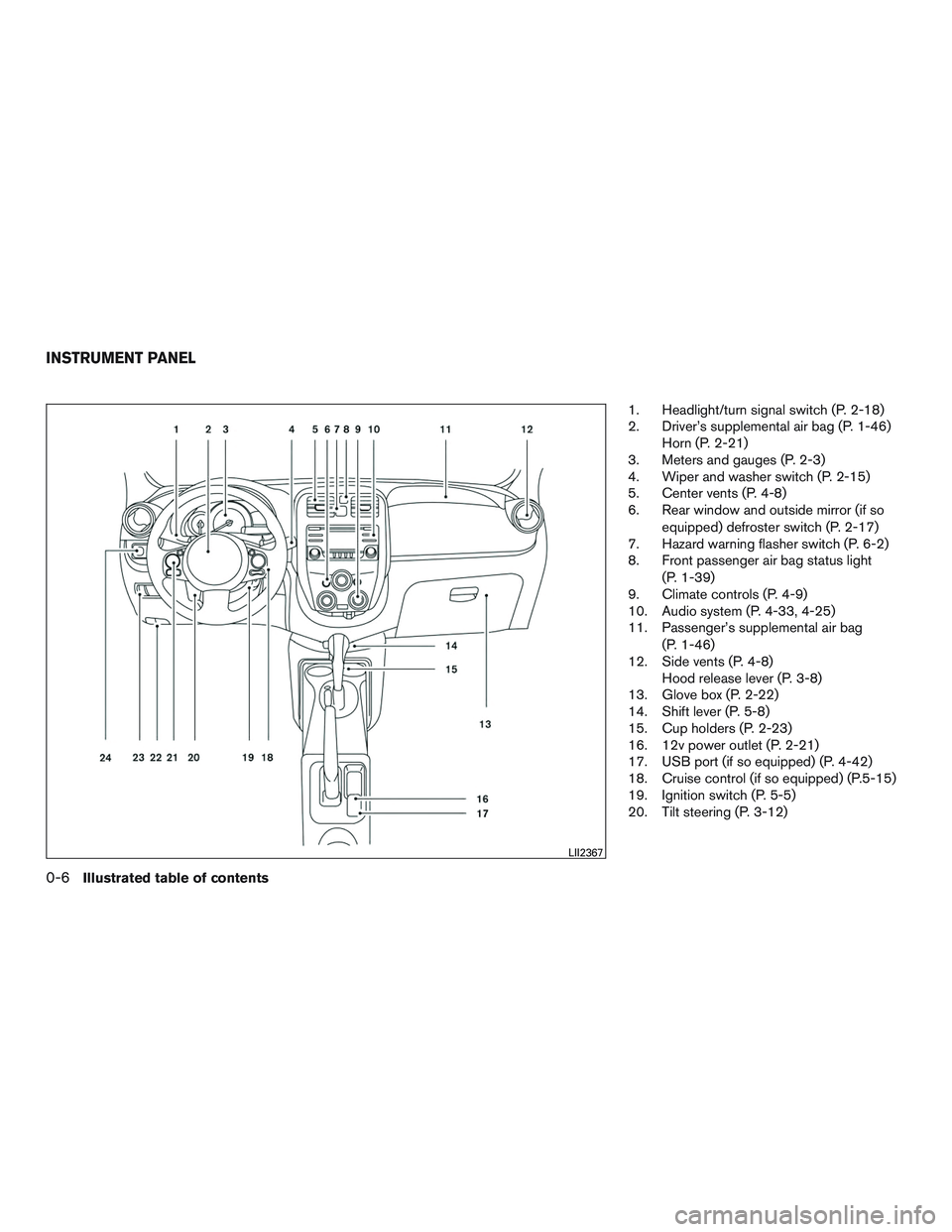
1. Headlight/turn signal switch (P. 2-18)
2. Driver’s supplemental air bag (P. 1-46)Horn (P. 2-21)
3. Meters and gauges (P. 2-3)
4. Wiper and washer switch (P. 2-15)
5. Center vents (P. 4-8)
6. Rear window and outside mirror (if so
equipped) defroster switch (P. 2-17)
7. Hazard warning flasher switch (P. 6-2)
8. Front passenger air bag status light
(P. 1-39)
9. Climate controls (P. 4-9)
10. Audio system (P. 4-33, 4-25)
11. Passenger’s supplemental air bag
(P. 1-46)
12. Side vents (P. 4-8) Hood release lever (P. 3-8)
13. Glove box (P. 2-22)
14. Shift lever (P. 5-8)
15. Cup holders (P. 2-23)
16. 12v power outlet (P. 2-21)
17. USB port (if so equipped) (P. 4-42)
18. Cruise control (if so equipped) (P.5-15)
19. Ignition switch (P. 5-5)
20. Tilt steering (P. 3-12)
LII2367
INSTRUMENT PANEL
0-6Illustrated table of contents
Page 16 of 299
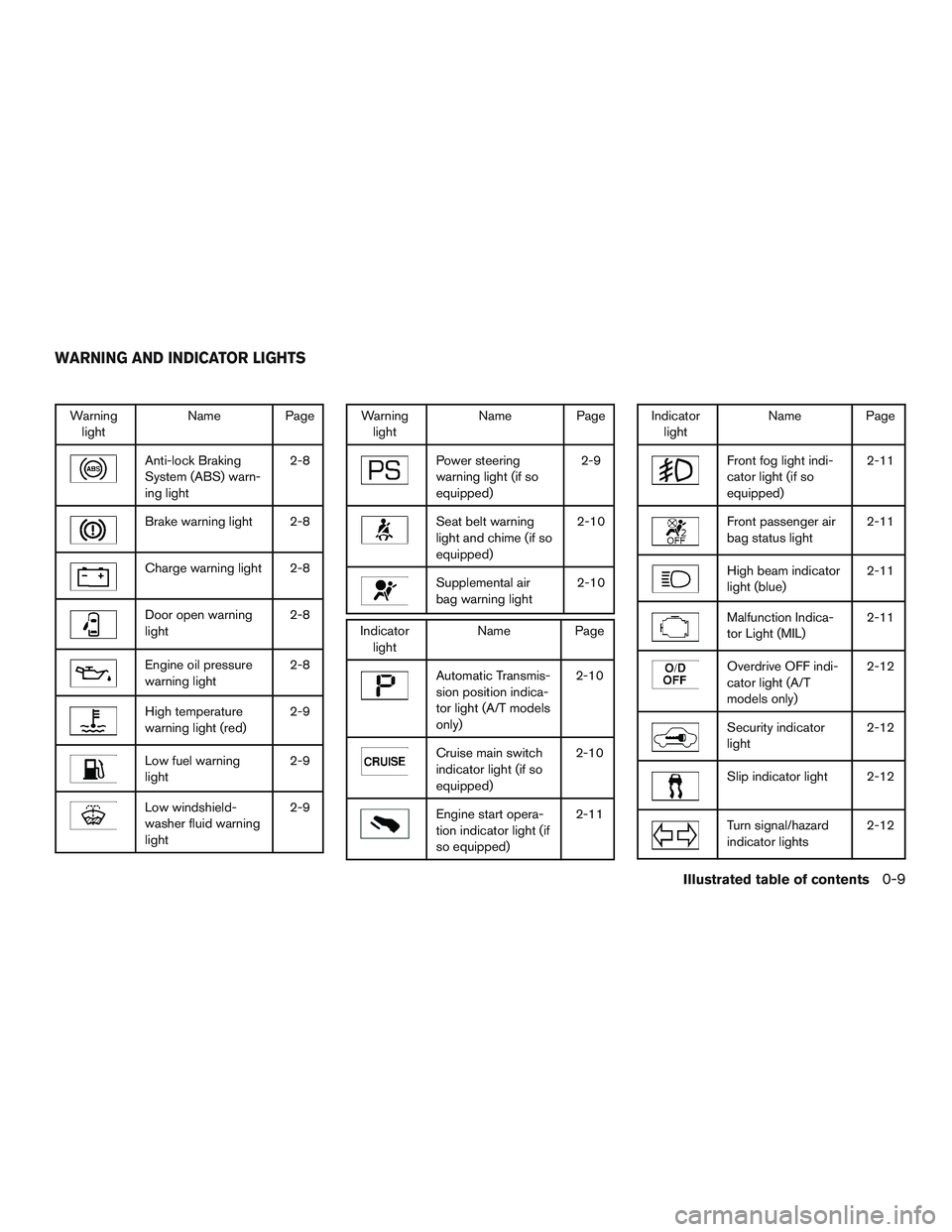
Warninglight Name Page
Anti-lock Braking
System (ABS) warn-
ing light 2-8
Brake warning light 2-8
Charge warning light 2-8
Door open warning
light
2-8
Engine oil pressure
warning light2-8
High temperature
warning light (red)2-9
Low fuel warning
light2-9
Low windshield-
washer fluid warning
light2-9
Warning
light Name Page
Power steering
warning light (if so
equipped) 2-9
Seat belt warning
light and chime (if so
equipped)2-10
Supplemental air
bag warning light
2-10
Indicator
light Name Page
Automatic Transmis-
sion position indica-
tor light (A/T models
only) 2-10
Cruise main switch
indicator light (if so
equipped)
2-10
Engine start opera-
tion indicator light (if
so equipped)2-11
Indicator
light Name Page
Front fog light indi-
cator light (if so
equipped) 2-11
Front passenger air
bag status light
2-11
High beam indicator
light (blue)2-11
Malfunction Indica-
tor Light (MIL)2-11
Overdrive OFF indi-
cator light (A/T
models only)2-12
Security indicator
light
2-12
Slip indicator light 2-12
Turn signal/hazard
indicator lights2-12
WARNING AND INDICATOR LIGHTS
Illustrated table of contents0-9
Page 77 of 299
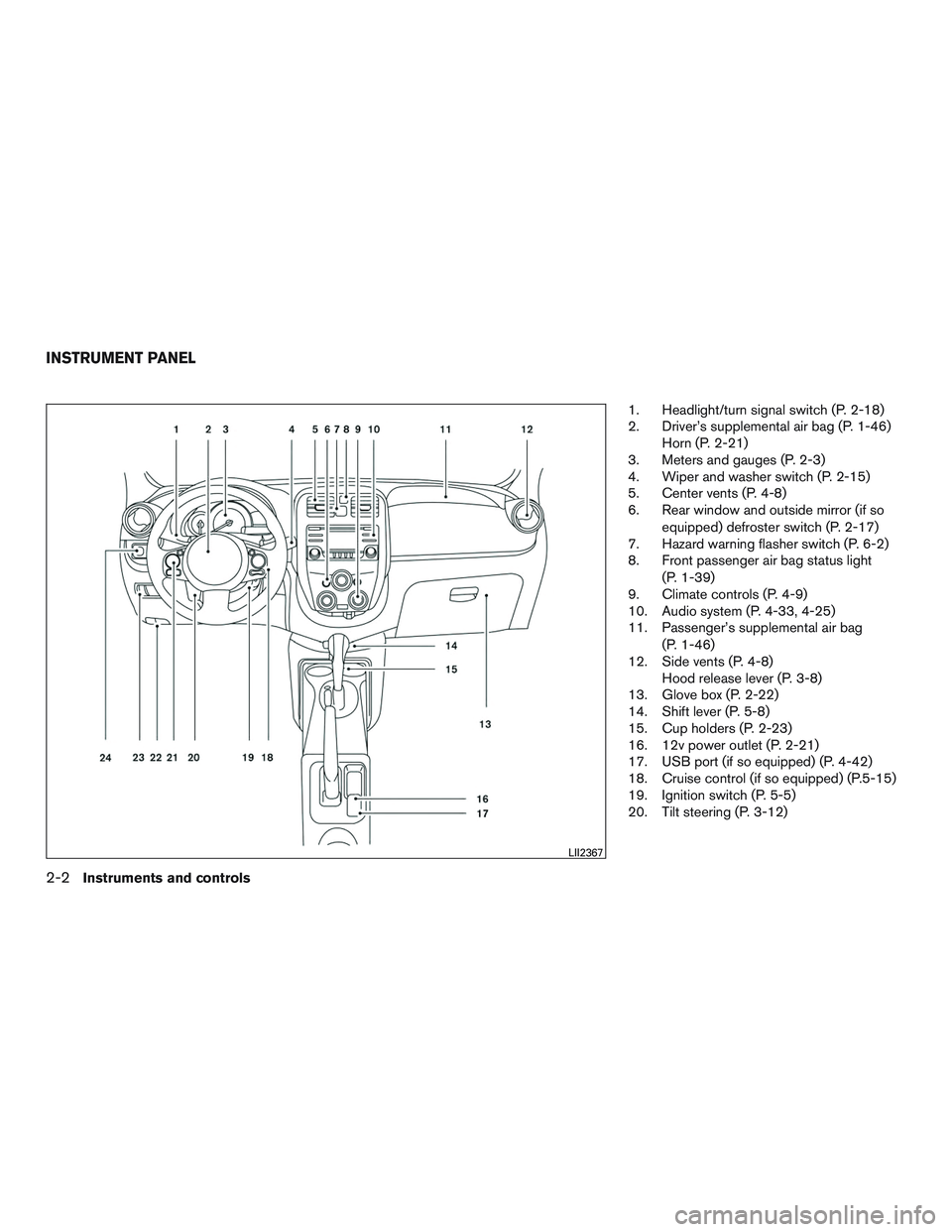
1. Headlight/turn signal switch (P. 2-18)
2. Driver’s supplemental air bag (P. 1-46)Horn (P. 2-21)
3. Meters and gauges (P. 2-3)
4. Wiper and washer switch (P. 2-15)
5. Center vents (P. 4-8)
6. Rear window and outside mirror (if so
equipped) defroster switch (P. 2-17)
7. Hazard warning flasher switch (P. 6-2)
8. Front passenger air bag status light
(P. 1-39)
9. Climate controls (P. 4-9)
10. Audio system (P. 4-33, 4-25)
11. Passenger’s supplemental air bag
(P. 1-46)
12. Side vents (P. 4-8) Hood release lever (P. 3-8)
13. Glove box (P. 2-22)
14. Shift lever (P. 5-8)
15. Cup holders (P. 2-23)
16. 12v power outlet (P. 2-21)
17. USB port (if so equipped) (P. 4-42)
18. Cruise control (if so equipped) (P.5-15)
19. Ignition switch (P. 5-5)
20. Tilt steering (P. 3-12)
LII2367
INSTRUMENT PANEL
2-2Instruments and controls
Page 82 of 299
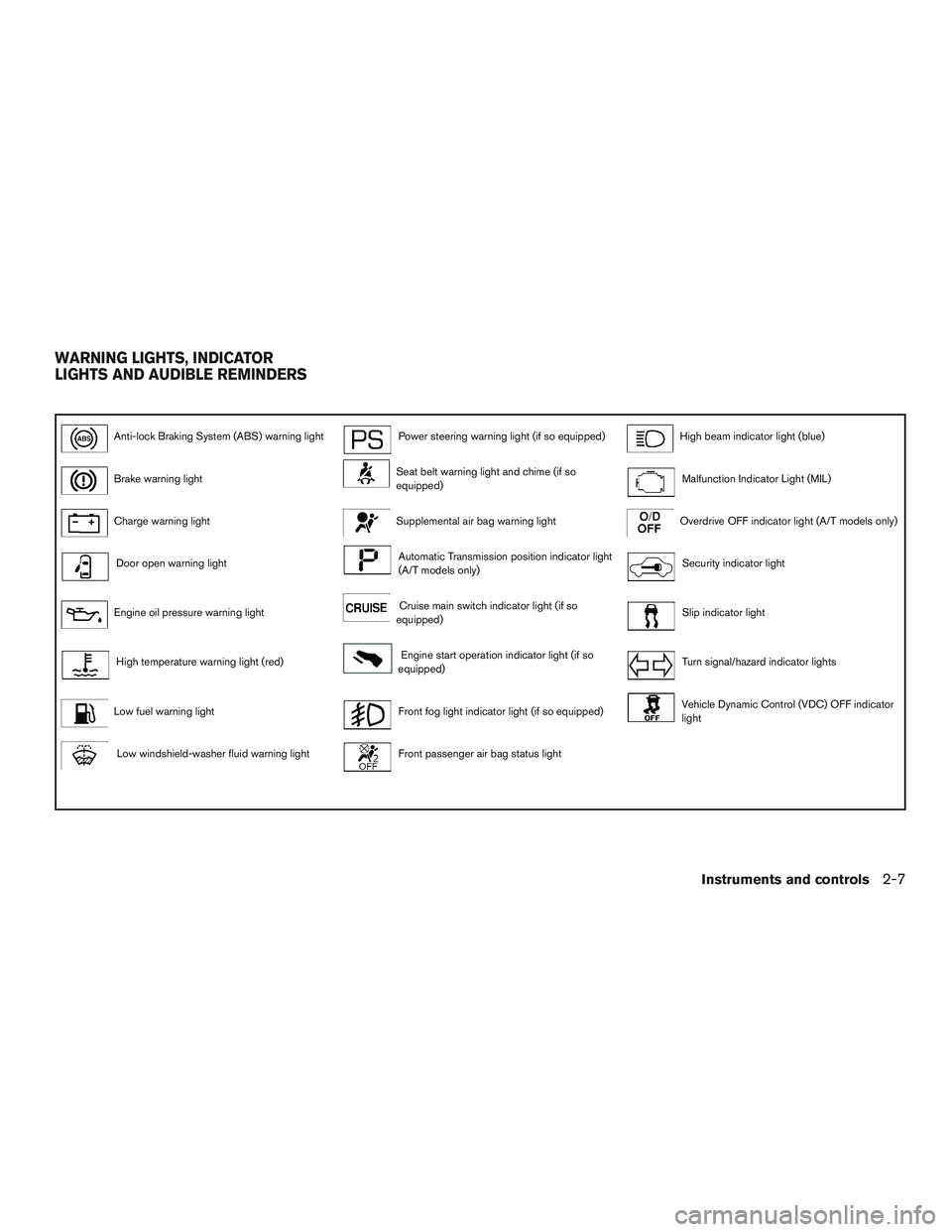
Anti-lock Braking System (ABS) warning lightPower steering warning light (if so equipped)High beam indicator light (blue)
Brake warning lightSeat belt warning light and chime (if so
equipped)Malfunction Indicator Light (MIL)
Charge warning lightSupplemental air bag warning lightOverdrive OFF indicator light (A/T models only)
Door open warning lightAutomatic Transmission position indicator light
(A/T models only)Security indicator light
Engine oil pressure warning lightCruise main switch indicator light (if so
equipped)Slip indicator light
High temperature warning light (red)Engine start operation indicator light (if so
equipped)Turn signal/hazard indicator lights
Low fuel warning lightFront fog light indicator light (if so equipped)Vehicle Dynamic Control (VDC) OFF indicator
light
Low windshield-washer fluid warning lightFront passenger air bag status light
WARNING LIGHTS, INDICATOR
LIGHTS AND AUDIBLE REMINDERS
Instruments and controls2-7
Page 84 of 299
The engine oil pressure warning light is not
designed to indicate a low oil level.Use the
dipstick to check the oil level. For additional in-
formation, refer to “Engine oil” in the “Mainte-
nance and do-it-yourself” section of this manual.
CAUTION
Running the engine with the engine oil
pressure warning light on could cause se-
rious damage to the engine almost imme-
diately. Such damage is not covered by
warranty. Turn off the engine as soon as it
is safe to do so.
High temperature warning light
(red)
When the ignition switch is placed in the ON
position, the high temperature warning light illu-
minates and then turns off. This indicates that the
high temperature sensor in the engine coolant
system is operational.
CAUTION
If the high temperature warning light illu-
minates while the engine is running, it
may indicate the engine temperature is
extremely high. Stop the vehicle safely as
soon as possible. If the vehicle is over-
heated, continuing vehicle operation may
seriously damage the engine. For addi-
tional information, refer to “If your vehicle
overheats” in the “In case of emergency”
section of this manual.
Low fuel warning light
This light comes on when the fuel level in the fuel
tank is getting low. Refuel as soon as it is conve-
nient, preferably before the fuel gauge reaches 0
(Empty) . There will be a small reserve of fuel
in the tank when the fuel gauge reaches 0
(Empty) .
Low windshield-washer fluid
warning light
This light comes on when the windshield-washer
fluid is at a low level. Add windshield-washer
fluid, as necessary. For additional information,
refer to “Windshield-washer fluid” in the “Mainte-
nance and do-it-yourself” section of this manual.
Power steering warning light (ifso equipped)
WARNING
● If the engine is not running or is turned
off while driving, the power assist for
the steering will not work. Steering will
be harder to operate.
● When the power steering warning light
illuminates with the engine running,
there will be no power assist for the
steering. You will still have control of
the vehicle but the steering will be
harder to operate. Have the power
steering system checked by a NISSAN
dealer.
When the ignition switch is placed in the ON
position, the power steering warning light illumi-
nates. After starting the engine, the power steer-
ing warning light turns off. This indicates the
power steering system is operational.
If the power steering warning light illuminates
while the engine is running, it may indicate the
power steering system is not functioning properly
and may need servicing. Have the power steering
system checked by a NISSAN dealer.
Instruments and controls2-9
Page 85 of 299
When the power steering warning light illumi-
nates with the engine running, there will be no
power assist for the steering but you will still have
control of the vehicle. At this time, greater steer-
ing effort is required to operate the steering
wheel, especially in sharp turns and at low
speeds.
For additional information, refer to “Power steer-
ing” in the “Starting and driving” section of this
manual.
Seat belt warning light andchime (if so equipped)
The light and chime remind you to fasten your
seat belts. The light illuminates whenever the
ignition switch is placed in the ON or START
position and remains illuminated until the driver’s
seat belt is fastened.
The seat belt warning light may also illuminate if
the front passenger’s seat belt is not fastened
when the front passenger’s seat is occupied .
For additional information, refer to “Seat belts” in
the “Safety—Seats, seat belts and supplemental
restraint system” section of this manual.
Supplemental air bag warning
light
When the ignition switch is placed in the ON or
START position, the supplemental air bag warn-
ing light illuminates for about 7 seconds and then
turns off if the SRS air bag systems are opera-
tional. This means the system is operational.
If any of the following conditions occur, the
supplemental front air bags and/or pretensioner
systems need servicing and your vehicle must be
taken to a NISSAN dealer:
● The supplemental air bag warning light re-
mains on after approximately 7 seconds.
● The supplemental air bag warning light
flashes intermittently.
● The supplemental air bag warning light does
not come on at all.
Unless checked and repaired, the supplemental
restraint systems (air bag systems) may not func-
tion properly. For additional information, refer to
“Supplemental Restraint System (SRS)” in the
“Safety—Seats, seat belts and supplemental re-
straint system” section of this manual.
WARNING
If the supplemental air bag warning light
is on, it could mean that the supplemental
front air bag and/or pretensioner systems
will not operate in an accident. To help
avoid injury to yourself or others, have
your vehicle checked by a NISSAN dealer
as soon as possible.
INDICATOR LIGHTS
Automatic Transmission position indicator light (A/T
models only)
When the ignition switch is in the ON position,
this indicator light shows the shift lever position.
For additional information, refer to “Driving the
vehicle” in the “Starting and driving” section of
this manual.
Cruise main switch indicatorlight (if so equipped)
The light comes on when the cruise control main
switch is pushed. The light goes out when the
main switch is pushed again. When the cruise
main switch indicator light comes on, the cruise
control system is operational.
2-10Instruments and controls
Page 96 of 299

To sound the horn, push near the horn icon on the
steering wheel.
WARNING
Do not disassemble the horn. Doing so
could affect proper operation of the
supplemental front air bag system. Tam-
pering with the supplemental front air bag
system may result in serious personal
injury.The vehicle should be driven with the VDC sys-
tem on for most driving conditions.
If the vehicle is stuck in mud or snow, the VDC
system reduces the engine output to reduce
wheel spin. The engine speed will be reduced
even if the accelerator is depressed to the floor. If
maximum engine power is needed to free a stuck
vehicle, turn the VDC system off.
To turn off the VDC system, push the VDC OFF
switch. The
indicator will come on.
Push the VDC OFF switch again or restart the
engine to turn on the system. For additional infor-
mation, refer to “Vehicle Dynamic Control (VDC)
system” in the “Starting and driving” section of
this manual. The power outlet is for powering electrical acces-
sories such as cellular telephones. The outlet is
rated at 12 volt, 120W (10A) maximum.
CAUTION
●
The outlet and plug may be hot during
or immediately after use.
● Only certain power outlets are designed
for use with a cigarette lighter unit. Do
not use any other power outlet for an
accessory lighter. For additional infor-
mation, see a NISSAN dealer.
LIC2163LIC1548LIC2715
HORN VEHICLE DYNAMIC CONTROL (VDC)
OFF SWITCHPOWER OUTLET
Instruments and controls2-21
Page 106 of 299
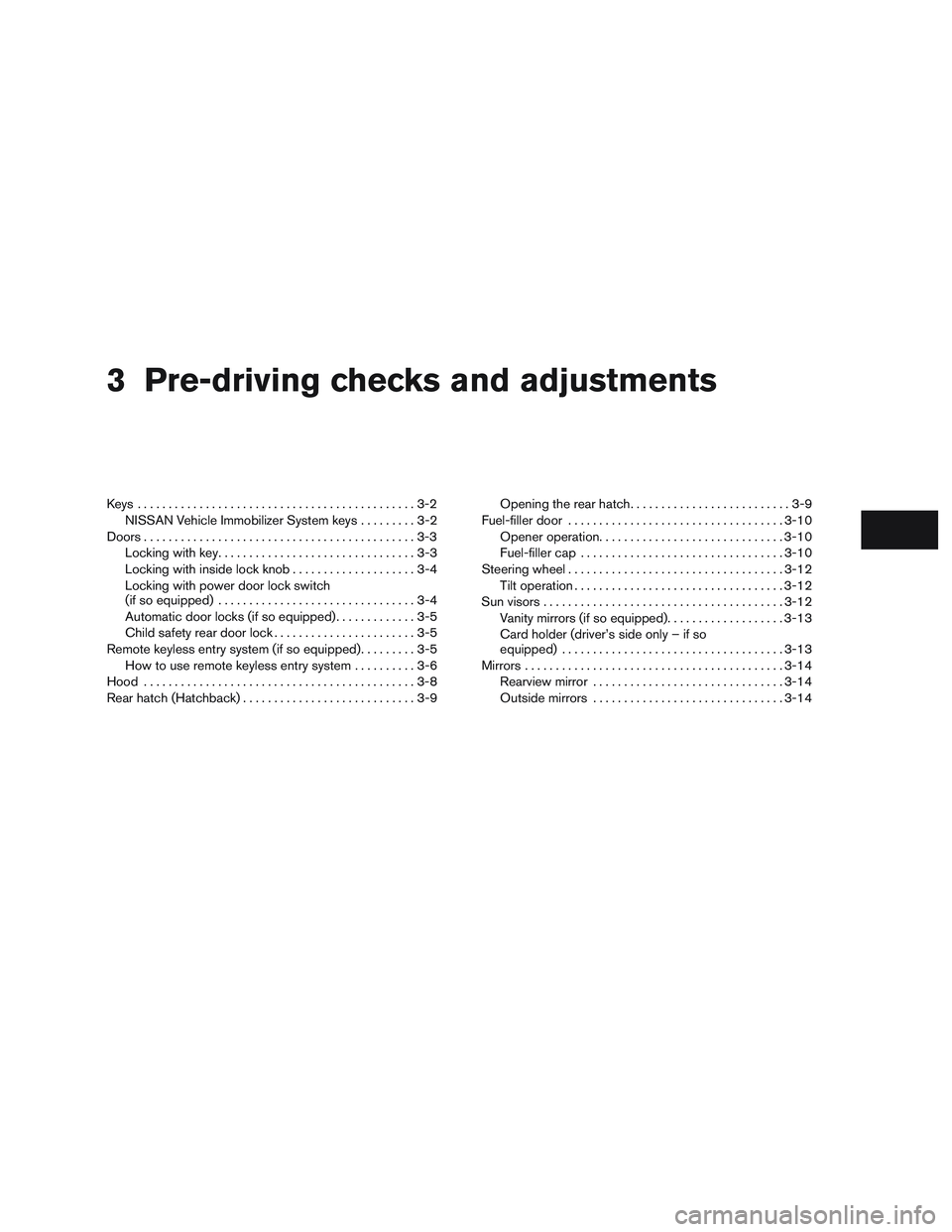
3 Pre-driving checks and adjustments
Keys .............................................3-2NISSAN Vehicle Immobilizer System keys .........3-2
Doors ............................................3-3
Locking with key ................................3-3
Locking with inside lock knob ....................3-4
Locking with power door lock switch
(if so equipped) ................................3-4
Automatic door locks (if so equipped). . . ..........3-5
Child safety rear door lock .......................3-5
Remote keyless entry system (if so equipped) .........3-5
How to use remote keyless entry system ..........3-6
Hood ............................................3-8
Rear hatch (Hatchback) ............................3-9 Opening the rear hatch
..........................3-9
Fuel-filler door ................................... 3-10
Opener operation .............................. 3-10
Fuel-filler cap ................................. 3-10
Steering wheel ................................... 3-12
Tilt operation .................................. 3-12
Sun visors ....................................... 3-12
Vanity mirrors (if so equipped) ...................3-13
Card holder (driver’s side only – if so
equipped) .................................... 3-13
Mirrors .......................................... 3-14
Rearview mirror ............................... 3-14
Outside mirrors ............................... 3-14
Page 171 of 299
– Your cellular phone is locked to prevent itfrom being dialed.
● When the radio wave condition is not ideal
or ambient sound is too loud, it may be
difficult to hear the other person’s voice dur-
ing a call.
● Do not place the cellular phone in an area
surrounded by metal or far away from the
in-vehicle phone module to prevent tone
quality degradation and wireless connection
disruption.
● While a cellular phone is connected through
the Bluetooth® wireless connection, the
battery power of the cellular phone may dis-
charge quicker than usual. The Bluetooth®
Hands-Free Phone System cannot charge
cellular phones.
● Some cellular phones or other devices may
cause interference or a buzzing noise to
come from the audio system speakers. Stor-
ing the device in a different location may
reduce or eliminate the noise.
● Some Bluetooth® enabled cellular phones
may not be recognized by the in-vehicle
phone module. Please visit
www.nissan.ca/bluetooth for a recom-
mended phone list and connecting. ●
Refer to the cellular phone Owner’s Manual
regarding the telephone charges, cellular
phone antenna and body, etc.
REGULATORY INFORMATION
FCC Regulatory information
– CAUTION: To maintain compliance with FCC’s RF exposure guidelines, use only the
supplied antenna. Unauthorized antenna,
modification, or attachments could damage
the transmitter and may violate FCC regula-
tions.
– Operation is subject to the following two con- ditions:
1. This device may not cause interference and
2. this device must accept any interference, including interference that may cause unde-
sired operation of the device.
IC Regulatory information
– Operation is subject to the following two con- ditions: (1) this device may not cause interfer-
ence, and (2) this device must accept any
interference, including interference that may
cause undesired operation of the device.
– This Class B digital apparatus meets all re- quirements of the Canadian Interference-
Causing Equipment Regulations.
BLUETOOTH® is a
trademark owned by
Bluetooth SIG, Inc.
and licensed to
Visteon.
USING THE SYSTEM
The system allows hands-free operation of the
Bluetooth® Phone System.
If the vehicle is in motion, some commands may
not be available so full attention may be given to
vehicle operation.
Initialization
When the ignition switch is placed in the ON
position, NISSAN Voice Recognition is initialized,
which takes a few seconds. If the
button is
pressed before the initialization completes, the
system will announce “Hands-free phone system
not ready” and will not react to voice commands.
Giving voice commands
To operate NISSAN Voice Recognition, press
and release the
button located on the
steering wheel. After the tone sounds, speak a
command.
4-50Display screen, heater, air conditioner, audio and phone systems
Page 180 of 299
5 Starting and driving
Precautions when starting and driving................5-2
Exhaust gas (carbon monoxide) ..................5-2
Three-way catalyst ..............................5-2
Avoiding collision and rollover . . ..................5-3
Off-road recovery ...............................5-3
Rapid air pressure loss ..........................5-4
Drinking alcohol/drugs and driving ................5-4
Ignition switch .....................................5-5
Automatic transmission (if so equipped) ...........5-5
Manual transmission (if so equipped) .............5-6
Ignition switch positions .........................5-6
NISSAN Vehicle Immobilizer System ..............5-7
Before starting the engine ..........................5-7
Starting the engine ................................5-7
Driving the vehicle .................................5-8
Automatic transmission (if so equipped) ...........5-8
Manual transmission (if so equipped) ............5-13
Parking brake .................................... 5-14
Cruise control (if so equipped) .....................5-15
Precautions on cruise control . . .................5-15
Cruise control operations .......................5-15Break-in schedule
................................ 5-16
Fuel efficient driving tips ........................... 5-17
Increasing fuel economy ........................... 5-18
Parking/parking on hills ............................ 5-19
Power steering ................................... 5-20
Brake system .................................... 5-21
Brake precautions ............................. 5-21
Anti-lock Braking System (ABS) .................5-21
Brake assist .................................. 5-22
Vehicle Dynamic Control (VDC) system .............5-23
Brake force distribution ........................ 5-24
Cold weather driving .............................. 5-25
Freeing a frozen door lock ......................5-25
Antifreeze ..................................... 5-25
Battery ....................................... 5-25
Draining of coolant water .......................5-26
Tire equipment ................................ 5-26
Special winter equipment .......................5-26
Driving on snow or ice ......................... 5-26
Engine
block heater ............................ 5-26