seats NISSAN MICRA 2017 Owner´s Manual
[x] Cancel search | Manufacturer: NISSAN, Model Year: 2017, Model line: MICRA, Model: NISSAN MICRA 2017Pages: 318, PDF Size: 3.73 MB
Page 76 of 318
If any of the following conditions occur, the front
air bag needs servicing:● The supplemental air bag warning light re-
mains on after approximately 7 seconds.
● The supplemental air bag warning light
flashes intermittently.
● The supplemental air bag warning light does
not come on at all.
Under these conditions, the front air bag may not
operate properly. It must be checked and re-
paired. It is recommended that you visit a
NISSAN dealer for this service.
WARNING
If the supplemental air bag warning light
is on, it could mean that the front air bag
will not operate in an accident. To help
avoid injury to yourself or others, have
your vehicle checked as soon as possible.
It is recommended that you visit a NISSAN
dealer for this service.
Repair and replacement procedure
The front air bags, side air bags, curtain air bags
and pretensioner(s) are designed to inflate on a
one-time-only basis. As a reminder, unless it is
damaged, the supplemental air bag warning light
remains illuminated after inflation has occurred.
These systems should be repaired and/or re-
placed as soon as possible. It is recommended
that you visit a NISSAN dealer for this service.
When maintenance work is required on the ve-
hicle, the front air bags, side air bags, curtain air
bags, pretensioner(s) and related parts should be
pointed out to the person performing the mainte-
nance. The ignition switch should always be
placed in the LOCK position when working under
the hood or inside the vehicle.
WARNING
● Once a front air bag, side air bag, or
curtain air bag has inflated, the air bag
module will not function again and
must be replaced. Additionally, the acti-
vated pretensioner(s) must also be re-
placed. The air bag module and preten-
sioner(s) should be replaced. It is
recommended that you visit a NISSAN
dealer for this service. However, the air
bag module and pretensioner(s) cannot
be repaired. ●
The front air bag, side air bag, curtain
air bag systems and the pretensioner
system should be inspected if there is
any damage to the front end or side
portion of the vehicle. It is recom-
mended that you visit a NISSAN dealer
for this service.
● If you need to dispose of the supple-
mental air bag or pretensioner systems
or scrap the vehicle, it is recommended
that you visit a NISSAN dealer. Incorrect
disposal procedures could cause per-
sonal injury.
● If there is an impact to your vehicle from
any direction, your Occupant Classifica-
tion Sensor (OCS) should be checked to
verify it is still functioning correctly. It is
recommended that you visit a NISSAN
dealer for this service. The OCS should
be checked even if no air bags deploy as
a result of the impact. Failure to verify
proper OCS function may result in an
improper air bag deployment resulting
in injury or death.
Safety—Seats, seat belts and supplemental restraint system1-59
Page 77 of 318
MEMO
1-60Safety—Seats, seat belts and supplemental restraint system
Page 87 of 318
When the power steering warning light illumi-
nates with the engine running, there will be no
power assist for the steering, but you will still
have control of the vehicle. At this time, greater
steering effort is required to operate the steering
wheel, especially in sharp turns and at low
speeds.
For additional information, refer to “Power steer-
ing” in the “Starting and driving” section of this
manual.
Seat belt warning light andchime
The light and chime remind you to fasten your
seat belts. The light illuminates whenever the
ignition switch is placed in the ON or START
position and remains illuminated until the driver’s
seat belt is fastened.
The seat belt warning light may also illuminate if
the front passenger’s seat belt is not fastened
when the front passenger’s seat is occupied .
For additional information, refer to “Seat belts” in
the “Safety—Seats, seat belts and supplemental
restraint system” section of this manual.
Supplemental air bag warning
light
When the ignition switch is placed in the ON or
START position, the supplemental air bag warn-
ing light illuminates for about 7 seconds and then
turns off. This means the system is operational.
If any of the following conditions occur, the front
air bag, side air bag, curtain air bag, and preten-
sioner seat belt systems need servicing:
● The supplemental air bag warning light re-
mains on after approximately 7 seconds.
● The supplemental air bag warning light
flashes intermittently.
● The supplemental air bag warning light does
not come on at all.
It is recommended that you visit a NISSAN dealer
for these services.
Unless checked and repaired, the supplemental
restraint system (air bag system) and/or the pre-
tensioner(s) may not function properly. For addi-
tional information, refer to “Supplemental Re-
straint System (SRS)” in the “Safety—Seats, seat
belts and supplemental restraint system” section
of this manual.
WARNING
If the supplemental air bag warning light
is on, it could mean that the front air bag,
side air bag, curtain air bag and/or preten-
sioner systems will not operate in an acci-
dent. To help avoid injury to yourself or
others, have your vehicle checked as soon
as possible. It is recommended that you
visit a NISSAN dealer for this service.
INDICATOR LIGHTS
This vehicle has various indicator lights that may
illuminate to indicate a system status. For addi-
tional information, refer to the specific light in this
section.
Automatic Transmission position indicator light (A/T
models only)
When the ignition switch is in the ON position,
this indicator light shows the shift lever position.
For additional information, refer to “Driving the
vehicle” in the “Starting and driving” section of
this manual.
2-10Instruments and controls
Page 88 of 318
Cruise main switch indicatorlight (if so equipped)
The light comes on when the cruise control main
switch is pushed. The light goes out when the
main switch is pushed again. When the cruise
main switch indicator light comes on, the cruise
control system is operational.
For additional information, refer to “Cruise con-
trol” in the “Starting and driving” section of this
manual.
Front fog light indicator light (ifso equipped)
The front fog light indicator light illuminates when
the front fog lights are on. For additional informa-
tion, refer to “Fog light switch” in this section.
Front passenger air bag statuslight
The front passenger air bag status lightwill
be lit and the passenger front air bag will be OFF
depending on how the front passenger seat is
being used.
For additional information, refer to “Front passen-
ger air bag and status light” in the “Safety —
Seats, seat belts and supplemental restraint sys-
tem” section of this manual.
High beam indicator light
(blue)
This blue light comes on when the headlight high
beams are on and goes out when the low beams
are selected.
The high beam indicator light also comes on
when the passing signal is activated.
Malfunction Indicator Light(MIL)
If this indicator light comes on steady or blinks
while the engine is running, it may indicate a
potential emission control malfunction.
The
may also come on steady if the fuel-
filler cap is loose or missing, or if the vehicle runs
out of fuel. Check to make sure the fuel-filler cap
is installed and closed tightly, and that the vehicle
has at least 3 gal (11.4 L) of fuel in the fuel tank.
After a few driving trips, the
light should
turn off if no other potential emission control
system malfunction exists.
If this indicator light comes on steady for 20 sec-
onds and then blinks for 10 seconds when the
engine is not running, it indicates that the vehicle
is not ready for an emission control system
inspection/maintenance test. For additional infor-
mation, refer to “Readiness for inspection/maintenance (I/M) test” in the “Tech-
nical and consumer information” section of this
manual.
Operation
The MIL will come on in one of two ways:
● MIL on steady — An emission control system
malfunction has been detected. Check the
fuel-filler cap if the LOOSE FUEL CAP
warning appears in the trip computer. If the
fuel-filler cap is loose or missing, tighten or
install the cap and continue to drive the
vehicle. The
light should turn off after
a few driving trips. If the
light does not
turn off after a few driving trips, have the
vehicle inspected. It is recommended that
you visit a NISSAN dealer for this service.
You do not need to have your vehicle towed
to the dealer.
● MIL blinking — An engine misfire has been
detected which may damage the emission
control system. To reduce or avoid emission
control system damage:
– do not drive at speeds above 45 mph (72 km/h).
– avoid hard acceleration or deceleration.
– avoid steep uphill grades.
Instruments and controls2-11
Page 153 of 318
USB (Universal Serial Bus)
Connection Port (if so equipped)
WARNING
Do not connect, disconnect or operate the
USB device while driving. Doing so can be
a distraction. If distracted you could lose
control of your vehicle and cause an acci-
dent or serious injury.
CAUTION
●Do not force the USB device into the
USB port. Inserting the USB device
tilted or up-side-down into the port may
damage the port. Make sure that the
USB device is connected correctly into
the USB port.
● Do not grab the USB port cover (if so
equipped) when pulling the USB device
out of the port. This could damage the
port and the cover.
● Do not leave the USB cable in a place
where it can be pulled unintentionally.
Pulling the cable may damage the port.
The vehicle is not equipped with a USB device.
USB devices should be purchased separately as
necessary. This system cannot be used to format USB de-
vices. To format a USB device, use a personal
computer.
In some jurisdictions, the USB device for the front
seats plays only sound without images for regu-
latory reasons, even when the vehicle is parked.
This system supports various USB memory de-
vices, USB hard drives and iPod® players. Some
USB devices may not be supported by this sys-
tem.
● Partitioned USB devices may not play cor-
rectly.
● Some characters used in other languages
(Chinese, Japanese, etc.) may not appear
properly in the display. Using English lan-
guage characters with a USB device is rec-
ommended.
General notes for USB use: ● For additional information, refer to your de-
vice manufacturer’s owner information re-
garding the proper use and care of the de-
vice. Notes for iPod® use (if so equipped):
iPod® is a trademark of Apple Inc., registered in
the U.S. and other countries.
● Improperly plugging in the iPod® may cause
a checkmark to be displayed on and off
(flickering) . Always make sure that the
iPod® is connected properly.
● An iPod® nano (1st Generation) may remain
in fast forward or rewind mode if it is con-
nected during a seek operation. In this case,
please manually reset the iPod®.
● An iPod® nano (2nd Generation) will con-
tinue to fast-forward or rewind if it is discon-
nected during a seek operation.
● An incorrect song title may appear when the
Play Mode is changed while using an iPod®
nano (2nd Generation) .
● Audiobooks may not play in the same order
as they appear on an iPod®.
● Large video files cause slow responses in an
iPod®. The vehicle center display may mo-
mentarily black out, but will soon recover.
● If an iPod® automatically selects large video
files while in the shuffle mode, the vehicle
center display may momentarily black out,
but will soon recover.
4-30Heater, air conditioner, audio and phone systems
Page 184 of 318
CAUTION
●Do not use leaded gasoline. Deposits
from leaded gasoline will seriously re-
duce the three-way catalyst’s ability to
help reduce exhaust pollutants.
● Keep your engine tuned up. Malfunc-
tions in the ignition, fuel injection, or
electrical systems can cause overrich
fuel flow into the three-way catalyst,
causing it to overheat. Do not keep driv-
ing if the engine misfires, or if notice-
able loss of performance or other un-
usual operating conditions are
detected. Have the vehicle inspected
promptly. It is recommended that you
visit a NISSAN dealer for this service.
● Avoid driving with an extremely low fuel
level. Running out of fuel could cause
the engine to misfire, damaging the
three-way catalyst.
● Do not race the engine while warming it
up.
● Do not push or tow your vehicle to start
the engine.
AVOIDING COLLISION AND
ROLLOVER
WARNING
Failure to operate this vehicle in a safe
and prudent manner may result in loss of
control or an accident.
Be alert and drive defensively at all times. Obey
all traffic regulations. Avoid excessive speed,
high speed cornering, or sudden steering ma-
neuvers, because these driving practices could
cause you to lose control of your vehicle.
As with any vehicle, loss of control could
result in a collision with other vehicles or
objects or cause the vehicle to roll over,
particularly if the loss of control causes the
vehicle to slide sideways.
Be attentive at all times, and avoid driving when
tired. Never drive when under the influence of
alcohol or drugs (including prescription or over-
the-counter drugs which may cause drowsi-
ness) . Always wear your seat belt as outlined in
the “Safety – Seats, seat belts and supplemental
restraint system” section of this manual, and also
instruct your passengers to do so.
Seat belts help reduce the risk of injury in colli-
sions and rollovers. In a rollover crash, an
unbelted or improperly belted person is significantly more likely to be injured or
killed than a person properly wearing a
seat belt.
OFF-ROAD RECOVERY
While driving, the right side or left side wheels
may unintentionally leave the road surface. If this
occurs, maintain control of the vehicle by follow-
ing the procedure below. Please note that this
procedure is only a general guide. The vehicle
must be driven as appropriate based on the con-
ditions of the vehicle, road and traffic.
1. Remain calm and do not overreact.
2. Do not apply the brakes.
3. Maintain a firm grip on the steering wheel with both hands and try to hold a straight
course.
4. When appropriate, slowly release the accel- erator pedal to gradually slow the vehicle.
5. If there is nothing in the way, steer the ve- hicle to follow the road while vehicle speed
is reduced. Do not attempt to drive the ve-
hicle back onto the road surface until vehicle
speed is reduced.
6. When it is safe to do so, gradually turn the steering wheel until both tires return to the
Starting and driving5-3
Page 229 of 318
Occasionally remove loose dust from the interior
trim, plastic parts and seats using a vacuum
cleaner or soft bristled brush. Wipe the vinyl and
leather surfaces with a clean, soft cloth damp-
ened in mild soap solution, then wipe clean with a
dry, soft cloth.
Regular care and cleaning is required in order to
maintain the appearance of the leather.
Before using any fabric protector, read the manu-
facturer’s recommendations. Some fabric pro-
tectors contain chemicals that may stain or
bleach the seat material.
Use a cloth dampened only with water to clean
the meter and gauge lens.
WARNING
Do not use water or acidic cleaners (hot
steam cleaners) on the seat. This can dam-
age the seat or occupant classification
sensor. This can also affect the operation
of the air bag system and result in serious
personal injury.
CAUTION
●Never use benzine, thinner or any simi-
lar material.
● Small dirt particles can be abrasive and
damaging to leather surfaces and
should be removed promptly. Do not
use saddle soap, car waxes, polishes,
oils, cleaning fluids, solvents, deter-
gents or ammonia-based cleaners as
they may damage the leather’s natural
finish.
● Never use fabric protectors unless rec-
ommended by the manufacturer.
● Do not use glass or plastic cleaner on
meter or gauge lens covers. It may dam-
age the lens cover.
AIR FRESHENERS
Most air fresheners use a solvent that could affect
the vehicle interior. If you use an air freshener,
take the following precautions:
● Hanging-type air fresheners can cause per-
manent discoloration when they contact ve-
hicle interior surfaces. Place the air fresh-
ener in a location that allows it to hang free
and not contact an interior surface.
● Liquid-type air fresheners typically clip on
the vents. These products can cause imme-
diate damage and discoloration when
spilled on interior surfaces.
Carefully read and follow the manufacturer’s in-
structions before using the air fresheners.
CLEANING INTERIOR
7-4Appearance and care
Page 231 of 318
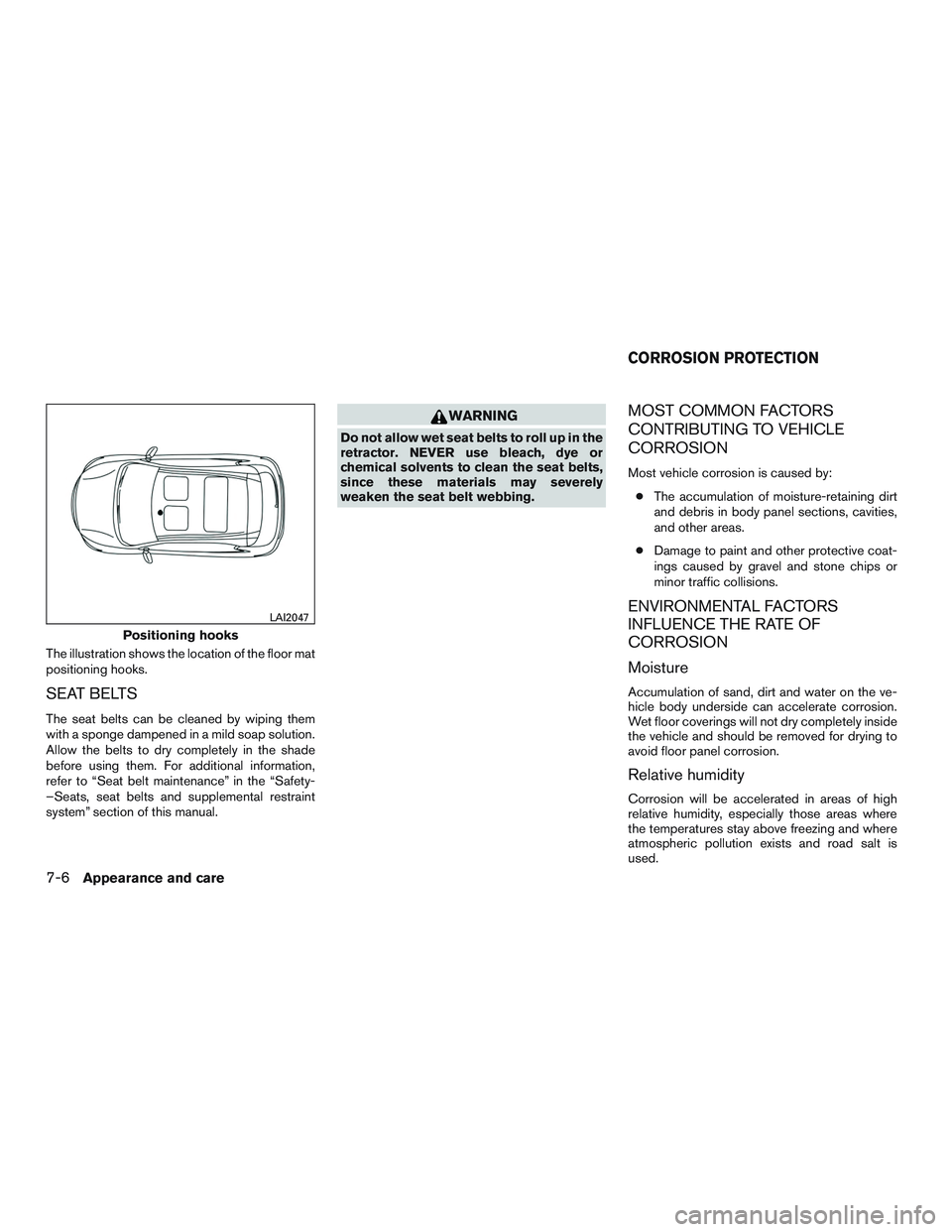
The illustration shows the location of the floor mat
positioning hooks.
SEAT BELTS
The seat belts can be cleaned by wiping them
with a sponge dampened in a mild soap solution.
Allow the belts to dry completely in the shade
before using them. For additional information,
refer to “Seat belt maintenance” in the “Safety-
–Seats, seat belts and supplemental restraint
system” section of this manual.
WARNING
Do not allow wet seat belts to roll up in the
retractor. NEVER use bleach, dye or
chemical solvents to clean the seat belts,
since these materials may severely
weaken the seat belt webbing.
MOST COMMON FACTORS
CONTRIBUTING TO VEHICLE
CORROSION
Most vehicle corrosion is caused by:● The accumulation of moisture-retaining dirt
and debris in body panel sections, cavities,
and other areas.
● Damage to paint and other protective coat-
ings caused by gravel and stone chips or
minor traffic collisions.
ENVIRONMENTAL FACTORS
INFLUENCE THE RATE OF
CORROSION
Moisture
Accumulation of sand, dirt and water on the ve-
hicle body underside can accelerate corrosion.
Wet floor coverings will not dry completely inside
the vehicle and should be removed for drying to
avoid floor panel corrosion.
Relative humidity
Corrosion will be accelerated in areas of high
relative humidity, especially those areas where
the temperatures stay above freezing and where
atmospheric pollution exists and road salt is
used.
Positioning hooks
LAI2047
CORROSION PROTECTION
7-6Appearance and care
Page 277 of 318
Seats:Check seat position controls such as
seat adjusters, seatback recliner, etc., to ensure
they operate smoothly and all latches lock se-
curely in every position. Check that the head
restraints/headrests move up and down
smoothly and the locks (if so equipped) hold
securely in all latched positions.
Seat belts: Check that all parts of the seat belt
system (for example, buckles, anchors, adjusters
and retractors) operate properly and smoothly,
and are installed securely. Check the belt web-
bing for cuts, fraying, wear or damage.
Steering wheel: Check for changes in the
steering system, such as excessive free play,
hard steering or strange noises.
Warning lights and chimes: Make sure all
warning lights and chimes are operating properly.
Windshield defroster: Check that the air
comes out of the defroster outlets properly and in
sufficient quantity when operating the heater or
air conditioner.
Windshield wiper and washer*: Check that
the wipers and washer operate properly and that
the wipers do not streak.Under the hood and vehicle
The maintenance items listed here should be
checked periodically (for example, each time you
check the engine oil or refuel) .
Battery* (for serviceable batteries): Check
the fluid level in each cell. It should be between
the MAX and MIN lines. Vehicles operated in high
temperatures or under severe conditions require
frequent checks of the battery fluid level.
NOTE:
Care should be taken to avoid situations
that can lead to potential battery discharge
and potential no-start conditions such as:
1. Installation or extended use of electronic accessories that consume battery power
when the engine is not running (Phone char-
gers, GPS, DVD players, etc.) .
2. Vehicle is not driven regularly and/or only driven short distances.
In these cases, the battery may need to be
charged to maintain battery health.
Brake and clutch (if so equipped) fluid
level*: Make sure that the brake and clutch fluid
levels are between the MIN and MAX lines on the
reservoir. Engine coolant level*:
Check the coolant level
when the engine is cold.
Engine drive belts*: Make sure the drive belts
are not frayed, worn, cracked or oily.
Engine oil level*: Check the level after parking
the vehicle on a level surface with the engine off.
Wait more than 15 minutes for the oil to drain
back into the oil pan.
Exhaust system: Make sure there are no loose
supports, cracks or holes. If the sound of the
exhaust seems unusual or there is a smell of
exhaust fumes, immediately have the exhaust
system inspected. It is recommended that you
visit a NISSAN dealer for this service. For addi-
tional information, refer to “Exhaust gas (carbon
monoxide)” in the “Starting and driving” section of
this manual.
Fluid leaks: Check under the vehicle for fuel, oil,
water or other fluid leaks after the vehicle has
been parked for a while. Water dripping from the
air conditioner after use is normal. If you should
notice any leaks or if fuel fumes are evident,
check for the cause and have it corrected imme-
diately.
9-4Maintenance and schedules
Page 302 of 318
WARNING
● It is extremely dangerous to ride
in a cargo area inside a vehicle. In
a collision, people riding in these
areas are more likely to be seri-
ously injured or killed.
● Do not allow people to ride in any
area of your vehicle that is not
equipped with seats and seat
belts.
● Be sure everyone in your vehicle
is in a seat and using a seat belt
properly.
TERMS
It is important to familiarize yourself with
the following terms before loading your
vehicle:
● Curb Weight (actual weight of your
vehicle) - vehicle weight including:
standard and optional equipment, flu-
ids, emergency tools, and spare tire
assembly. This weight does notin-
clude passengers and cargo. ●
GVW (Gross Vehicle Weight) - curb
weight plus the combined weight of
passengers and cargo.
● GVWR (Gross Vehicle Weight Rat-
ing) - maximum total combined
weight of the unloaded vehicle, pas-
sengers, luggage, hitch, trailer
tongue load and any other optional
equipment. This information is lo-
cated on the C.M.V.S.S. certification
label.
● GAWR (Gross Axle Weight Rating) -
maximum weight (load) limit specified
for the front or rear axle. This informa-
tion is located on the C.M.V.S.S. cer-
tification label.
● GCWR (Gross Combined Weight
rating) - The maximum total weight
rating of the vehicle, passengers,
cargo, and trailer. ●
Vehicle Capacity Weight, Load limit,
Total load capacity - maximum total
weight limit specified of the load
(passengers and cargo) for the ve-
hicle. This is the maximum combined
weight of occupants and cargo that
can be loaded into the vehicle. If the
vehicle is used to tow a trailer, the
trailer tongue weight must be in-
cluded as part of the cargo load. This
information is located on the Tire and
Loading Information label.
● Cargo capacity - permissible weight
of cargo, the subtracted weight of
occupants from the load limit.
VEHICLE LOADING INFORMATION
Technical and consumer information10-13