cooling NISSAN MICRA 2018 Owner´s Manual
[x] Cancel search | Manufacturer: NISSAN, Model Year: 2018, Model line: MICRA, Model: NISSAN MICRA 2018Pages: 330, PDF Size: 3.9 MB
Page 138 of 330
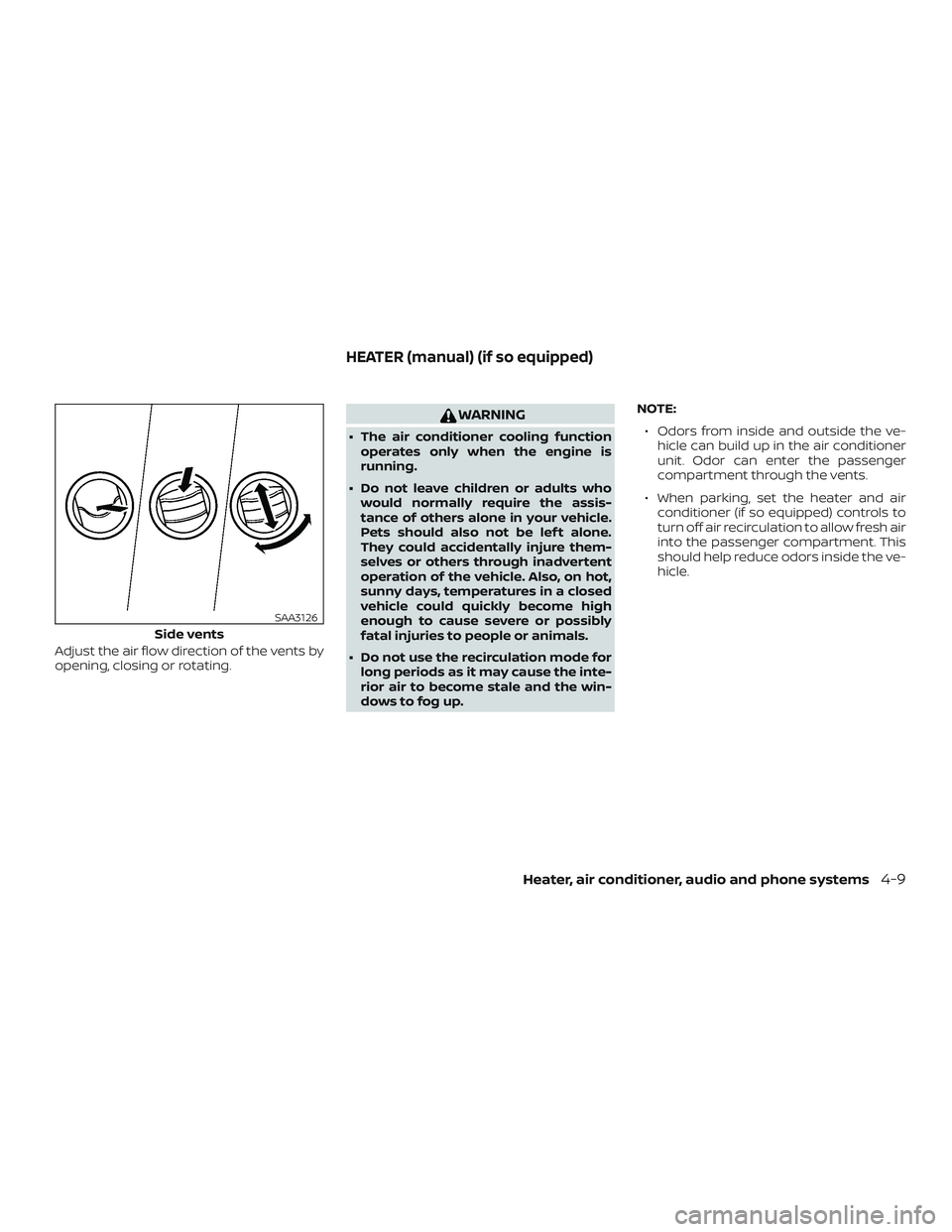
Adjust the air flow direction of the vents by
opening, closing or rotating.
WARNING
∙ The air conditioner cooling functionoperates only when the engine is
running.
∙ Do not leave children or adults who would normally require the assis-
tance of others alone in your vehicle.
Pets should also not be lef t alone.
They could accidentally injure them-
selves or others through inadvertent
operation of the vehicle. Also, on hot,
sunny days, temperatures in a closed
vehicle could quickly become high
enough to cause severe or possibly
fatal injuries to people or animals.
∙ Do not use the recirculation mode for long periods as it may cause the inte-
rior air to become stale and the win-
dows to fog up. NOTE:
∙ Odors from inside and outside the ve- hicle can build up in the air conditioner
unit. Odor can enter the passenger
compartment through the vents.
∙ When parking, set the heater and air conditioner (if so equipped) controls to
turn off air recirculation to allow fresh air
into the passenger compartment. This
should help reduce odors inside the ve-
hicle.
Side vents
SAA3126
HEATER (manual) (if so equipped)
Heater, air conditioner, audio and phone systems4-9
Page 140 of 330
Fresh airMove the air intake lever to theposi-
tion. The air flow is drawn from outside the
vehicle.
Air recirculation
Move the air intake lever to theposi-
tion to recirculate air inside the vehicle.
Use the
selection:
∙ when driving on a dusty road.
∙ to prevent traffic fumes from entering passenger compartment.
∙ for maximum cooling when using the air conditioner.
Rear window defroster switch
For additional information about the rear
window defroster switch, refer to “Rear win-
dow and outside mirror (if so equipped)
defroster switch” in the “Instruments and
controls” section of this manual.
HEATER OPERATION
Heating
This mode is used to direct heated air to
the foot outlets. Some air also flows from
the defrost outlets.
1. Move the air intake lever to the
position for normal heating.
2. Turn the air flow control dial to the
position.
3. Turn the
fan control dial to the
desired position.
4. Turn the temperature control dial to the desired position between the
middle and the hot position.
Ventilation
This mode directs outside air to the side
and center vents.
1. Move the air intake lever to the
position.
2. Turn the air flow control dial to the
position.
3. Turn the
fan control dial to the
desired position. 4. Turn the temperature control dial to
the desired position.
Defrosting or defogging
This mode directs the air to the defrost
outlets to defrost/defog the windows.
1. Move the air intake lever to the
position.
2. Turn the air flow control dial to the
position.
3. Turn the
fan control dial to the
desired position.
4. Turn the temperature control dial to the desired position between the
middle and the hot position.
5. Align lef t and right vents to direct air flow toward the front side windows.
∙ To quickly remove ice or fog from the windows, turn the fan control dial to the
maximum position and the tempera-
ture control dial to the full hot position.
Heater, air conditioner, audio and phone systems4-11
Page 144 of 330
WARNING
∙ The air conditioner cooling functionoperates only when the engine is
running.
∙ Do not leave children or adults who would normally require the assis-
tance of others alone in your vehicle.
Pets should also not be lef t alone.
They could accidentally injure them-
selves or others through inadvertent
operation of the vehicle. Also, on hot,
sunny days, temperatures in a closed
vehicle could quickly become high
enough to cause severe or possibly
fatal injuries to people or animals.
∙ Do not use the recirculation mode for long periods as it may cause the inte-
rior air to become stale and the win-
dows to fog up. NOTE:
∙ Odors from inside and outside the ve- hicle can build up in the air conditioner
unit. Odor can enter the passenger
compartment through the vents.
∙ When parking, set the heater and air conditioner controls to turn off air recir-
culation to allow fresh air into the pas-
senger compartment. This should help
reduce odors inside the vehicle.
HEATER AND AIR CONDITIONER
(manual) (if so equipped)
Heater, air conditioner, audio and phone systems4-15
Page 145 of 330
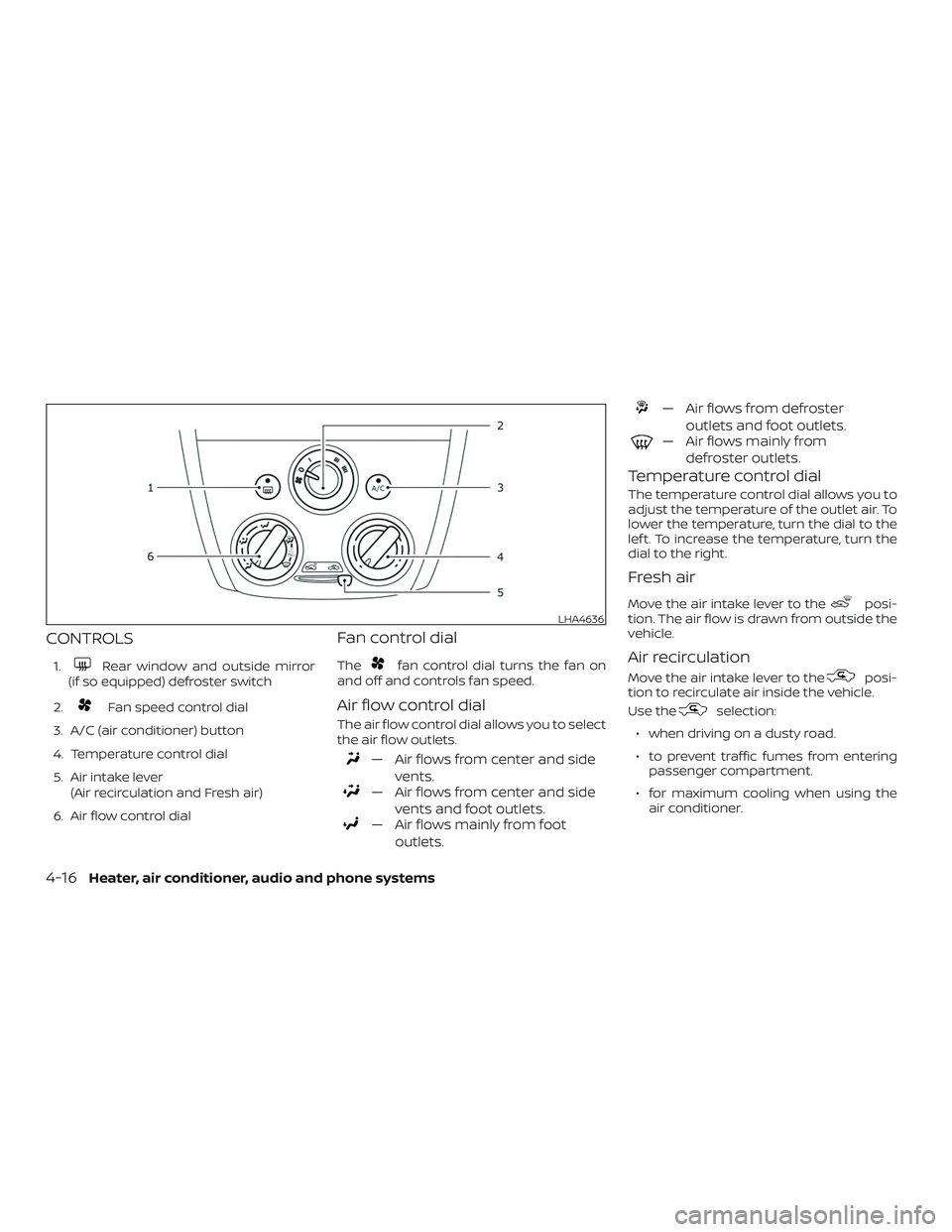
CONTROLS
1.Rear window and outside mirror
(if so equipped) defroster switch
2.
Fan speed control dial
3. A/C (air conditioner) button
4. Temperature control dial
5. Air intake lever (Air recirculation and Fresh air)
6. Air flow control dial
Fan control dial
Thefan control dial turns the fan on
and off and controls fan speed.
Air flow control dial
The air flow control dial allows you to select
the air flow outlets.
— Air flows from center and side
vents.
— Air flows from center and sidevents and foot outlets.
— Air flows mainly from footoutlets.
— Air flows from defroster outlets and foot outlets.
— Air flows mainly fromdefroster outlets.
Temperature control dial
The temperature control dial allows you to
adjust the temperature of the outlet air. To
lower the temperature, turn the dial to the
lef t. To increase the temperature, turn the
dial to the right.
Fresh air
Move the air intake lever to theposi-
tion. The air flow is drawn from outside the
vehicle.
Air recirculation
Move the air intake lever to theposi-
tion to recirculate air inside the vehicle.
Use the
selection:
∙ when driving on a dusty road.
∙ to prevent traffic fumes from entering passenger compartment.
∙ for maximum cooling when using the air conditioner.
LHA4636
4-16Heater, air conditioner, audio and phone systems
Page 146 of 330
Air conditioner button
Start the engine, turn the fan control dial to
the desired position and press the
button to turn on the air conditioner. The
indicator light comes on when the air con-
ditioner is operating. To turn off the air con-
ditioner, press the
button again.
The air conditioner cooling function op-
erates only when the engine is running.
Rear window and outside mirror
(if so equipped) defroster switch
For additional information, refer to “Rear
window and outside mirror (if so equipped)
defroster switch” in the “Instruments and
controls” section of this manual.
HEATER OPERATION
Heating
This mode is used to direct heated air to
the foot outlets. Some air also flows from
the defrost outlets.
1. Move the air intake lever to the
position for normal heating.
2. Turn the air flow control dial to the
position. 3. Turn the
fan control dial to the
desired position.
4. Turn the temperature control dial to the desired position between the
middle and the hot position.
Ventilation
This mode directs outside air to the side
and center vents.
1. Move the air intake lever to the
position.
2. Turn the air flow control dial to the
position.
3. Turn the
fan control dial to the
desired position.
4. Turn the temperature control dial to the desired position.
Defrosting or defogging
This mode directs the air to the defrost
outlets to defrost/defog the windows.
1. Move the air intake lever to the
position.
2. Turn the air flow control dial to the
position. 3. Turn the
fan control dial to the
desired position.
4. Turn the temperature control dial to the desired position between the
middle and the hot position.
∙ To quickly remove ice or fog from the windows, turn the fan control dial to the
maximum position and the tempera-
ture control dial to the full hot position.
When the
orposition is se-
lected, press the
button to turn on
the air conditioner for better performance.
This will dehumidif y the air and help defog
the windows.
Bi-level heating
This mode directs cooler air from the side
and center vents and warmer air from the
floor outlets. When the temperature con-
trol dial is moved to the full hot or full cool
position, the air between the vents and the
floor outlets is the same temperature.
1. Move the air intake lever to the
position.
2. Turn the air flow control dial to the
position.
Heater, air conditioner, audio and phone systems4-17
Page 147 of 330
3. Turn thefan control dial to the
desired position.
4. Turn the temperature control dial to the desired position.
Heating and defogging
This mode heats the cabin and defogs the
windshield.
1. Move the air intake lever to the
position.
2. Turn the air flow control dial to the
position.
3. Turn the
fan control dial to the
desired position.
4. Turn the temperature control dial to the desired position between the
middle and the hot position.
When the
orposition is se-
lected, press the
button to turn on
the air conditioner for better performance.
This will dehumidif y the air and help defog
the windows.
Operating tips
Clear snow and ice from the wiper blades
and air inlet in front of the windshield.
This improves heater operation.
AIR CONDITIONER OPERATION
Start the engine, turn thefan control
dial to the desired position, and press
the
button to activate the air condi-
tioner. When the air conditioner is on, cool-
ing and dehumidif ying functions are
added to the heater operation.
The air conditioner cooling function op-
erates only when the engine is running.
Cooling
This mode is used to cool and dehumidif y
the air.
1. Move the air intake lever to the
position.
2. Turn the air flow control dial to the
position.
3. Turn the
fan control dial to the
desired position.
4. Press the
button. The indicator
light comes on. 5. Turn the temperature control dial to
the desired position.
∙ For quick cooling when the outside temperature is high, move the air intake
lever to the
position. Be sure to
return to the
position for normal
cooling.
Dehumidified heating
This mode is used to heat and dehumidif y
the air.
1. Move the air intake lever to the
position.
2. Turn the air flow control dial to the
position.
3. Turn the
fan control dial to the
desired position.
4. Press the
button. The indicator
light comes on.
5. Turn the temperature control dial to the desired position.
Dehumidified defogging
This mode is used to defog the windows
and dehumidif y the air.
1. Move the air intake lever to the
position.
4-18Heater, air conditioner, audio and phone systems
Page 148 of 330
2. Turn the air flow control dial tothe
position.
3. Turn the
fan control dial to the de-
sired position.
4. Turn the temperature control dial to the desired position.
Operating tips
∙ Keep the windows closed while the airconditioner is in operation.
∙ Af ter parking in the sun, drive for 2 or 3 minutes with the windows open to
vent hot air from the passenger com-
partment. Then, close the windows.
This allows the air conditioner to cool
the interior more quickly.
∙ The air conditioning system should
be operated for approximately
10 minutes at least once a month.
This helps prevent damage to the
system due to lack of lubrication. ∙ A visible mist may be seen coming from
the ventilators in hot, humid conditions
as the air is cooled rapidly. This does not
indicate a malfunction.
∙ If the engine coolant temperature
gauge indicates engine coolant tem-
perature over the normal range, turn
the air conditioner off. For additional
information, refer to “If your vehicle
overheats” in the “In case of emer-
gency ” section of this manual.
AIR FLOW CHARTS
The following charts show the button and
dial positions for MAXIMUM AND QUICK
heating, cooling or defrosting. The air in-
take lever should always be in the
position for heating and defrosting.
Heater, air conditioner, audio and phone systems4-19
Page 205 of 330
Follow these easy-to-use Fuel Efficient
Driving Tips to help you achieve the most
fuel economy from your vehicle.1. Use Smooth Accelerator and
Brake Pedal Application
∙ Avoid rapid starts and stops.
∙ Use smooth, gentle accelerator and brake application whenever possible.
∙ Maintain constant speed while com- muting and coast whenever pos-
sible.
2. Maintain Constant Speed
∙ Look ahead to try and anticipate and minimize stops.
∙ Synchronizing your speed with traffic lights allows you to reduce your num-
ber of stops.
∙ Maintaining a steady speed can mini- mize red light stops and improve fuel
efficiency. 3.
Use Air Conditioning (A/C) at Higher
Vehicle Speeds
∙ Below 64 km/h (40 mph), it is more efficient to open windows to cool the
vehicle due to reduced engine load.
∙ Above 64 km/h (40 mph), it is more efficient to use A/C to cool the vehicle
due to increased aerodynamic drag.
∙ Recirculating the cool air in the cabin when the A/C is on reduces cooling
load.
4. Drive at Economical Speeds and
Distances
∙ Observing the speed limit and not exceeding 97 km/h (60 mph) (where
legally allowed) can improve fuel effi-
ciency due to reduced aerodynamic
drag.
∙ Maintaining a safe following distance behind other vehicles reduces un-
necessary braking.
∙ Safely monitoring traffic to anticipate changes in speed permits reduced
braking and smooth acceleration
changes.
∙ Select a gear range suitable to road conditions. 5.
Use Cruise Control
∙ Using cruise control during highway driving helps maintain a steady
speed.
∙ Cruise control is particularly effective in providing fuel savings when driving
on flat terrains.
6. Plan for the Shortest Route
∙ Utilize a map or navigation system to determine the best route to save
time.
7. Avoid Idling
∙ Shutting off your engine when safe for stops exceeding 30–60 seconds
saves fuel and reduces emissions.
8. Buy an Automated Pass for
Toll Roads
∙ Automated passes permit drivers to use special lanes to maintain cruis-
ing speed through the toll and avoid
stopping and starting.
FUEL EFFICIENT DRIVING TIPS
5-18Starting and driving
Page 213 of 330
WARNING
∙ The VDC system is designed to helpthe driver maintain stability but does
not prevent accidents due to abrupt
steering operation at high speeds or
by careless or dangerous driving
techniques. Reduce vehicle speed and
be especially careful when driving and
cornering on slippery surfaces and al-
ways drive carefully.
∙ Do not modif y the vehicle’s suspen- sion. If suspension parts such as
shock absorbers, struts, springs, sta-
bilizer bars, bushings and wheels are
not NISSAN recommended for your
vehicle or are extremely deteriorated,
the VDC system may not operate
properly. This could adversely affect
vehicle handling performance, and
the
indicator may flash.
∙ If brake related parts such as brake pads, rotors and calipers are not
NISSAN recommended or are ex-
tremely deteriorated, the VDC system
may not operate properly and
the
indicator light may
illuminate. ∙ If engine control related parts are not
NISSAN recommended or are ex-
tremely deteriorated, the
indi-
cator light may illuminate.
∙ When driving on extremely inclined surfaces such as higher banked cor-
ners, the VDC system may not operate
properly and the
indicator may
flash or the
indicator light may
illuminate. Do not drive on these types
of roads.
∙ When driving on an unstable surface such as a turntable, ferry, elevator or
ramp, the
indicator may flash or
the
indicator light may illumi-
nate. This is not a malfunction. Re-
start the engine af ter driving onto a
stable surface.
∙ If wheels or tires other than the NISSAN recommended ones are used,
the VDC system may not operate
properly and the
indicator may
flash and the
indicator light may
illuminate.
∙ The VDC system is not a substitute for winter tires or tire chains on a snow
covered road.
FREEING A FROZEN DOOR LOCK
To prevent a door lock from freezing, apply
de-icer through the key hole. If the lock
becomes frozen, heat the key before in-
serting it into the key hole or use the re-
mote keyless entry key fob (if so equipped).
ANTIFREEZE
In the winter when it is anticipated that the
temperature will drop below 0°C (32°F),
check the anti-freeze to assure proper win-
ter protection. For additional information,
refer to “Engine cooling system” in the “Do-
it-yourself ” section of this manual.
BATTERY
If the battery is not fully charged during
extremely cold weather conditions, the
battery fluid may freeze and damage the
battery. To maintain maximum efficiency,
the battery should be checked regularly.
For additional information, refer to “Battery”
in the “Do-it-yourself ” section of this
manual.
COLD WEATHER DRIVING
5-26Starting and driving
Page 214 of 330
DRAINING OF COOLANT WATER
If the vehicle is to be lef t outside without
anti-freeze, drain the cooling system, in-
cluding the engine block. Refill before oper-
ating the vehicle. For additional informa-
tion, refer to “Changing engine coolant” in
the “Do-it-yourself ” section of this manual.
TIRE EQUIPMENT
1. SUMMER tires have a tread designed toprovide superior performance on dry
pavement. However, the performance
of these tires will be substantially re-
duced in snowy and icy conditions. If
you operate your vehicle on snowy or
icy roads, NISSAN recommends the use
of MUD & SNOW or ALL SEASON TIRES
on all four wheels. It is recommended
that you visit a NISSAN dealer for the tire
type, size, speed rating and availability
information.
2. For additional traction on icy roads, studded tires may be used. However,
some U.S. states and Canadian prov-
inces prohibit their use. Check local,
state and provincial laws before install-
ing studded tires. Skid and traction capabilities of studded
snow tires on wet or dry surfaces may be
poorer than that of non-studded snow
tires.
3. Tire chains may be used. For additional information, refer to “Tire chains” in the
“Do-it-yourself ” section of this manual.
SPECIAL WINTER EQUIPMENT
It is recommended that the following items
be carried in the vehicle during winter:
∙ A scraper and stiff-bristled brush to re- move ice and snow from the windows
and wiper blades.
∙ A sturdy, flat board to be placed under the jack to give it firm support.
∙ A shovel to dig the vehicle out of snow- drif ts.
∙ Extra washer fluid to refill the windshield-washer fluid reservoir.
DRIVING ON SNOW OR ICE
WARNING
∙ Wet ice (0°C, 32°F and freezing rain),very cold snow or ice can be slick and
very hard to drive on. The vehicle will
have much less traction or “grip” un-
der these conditions. Try to avoid driv-
ing on wet ice until the road is salted
or sanded.
∙ Whatever the condition, drive with caution. Accelerate and slow down
with care. If accelerating or down-
shif ting too fast, the drive wheels will
lose even more traction.
∙ Allow more stopping distance under these conditions. Braking should be
started sooner than on dry pavement.
∙ Allow greater following distances on slippery roads.
∙ Watch for slippery spots (glare ice). These may appear on an otherwise
clear road in shaded areas. If a patch
of ice is seen ahead, brake before
reaching it. Try not to brake while on
the ice, and avoid any sudden steering
maneuvers.
Starting and driving5-27