Key NISSAN MURANO 2005 1.G Workshop Manual
[x] Cancel search | Manufacturer: NISSAN, Model Year: 2005, Model line: MURANO, Model: NISSAN MURANO 2005 1.GPages: 192, PDF Size: 4.45 MB
Page 80 of 192

1. Select thePriorities key.
The screen for setting calculation conditions will
appear. The conditions with the indicator light
ON will have high priority.
INFO:
When the ROUTE button is pressed on the
map and the
Edit Route key is selected, the
[EDIT ROUTE] screen will be displayed.2. Select the conditions with high priorities.
Select each key on the screen to turn its re-
spective indicator light ON or OFF.
Shortest Time key:
The route to the destination is calculated so that
you can reach the destination in the shortest
time. In some cases, a freeway or toll road with
detours may be recommended.
NOTE:
It may not be the shortest time in all cases.
Shortest Distance key:
The route to the destination is calculated so that
it is the shortest distance.
NOTE:
It may not be the shortest distance in all
cases.
Minimize Toll Road key:
The route to the destination is calculated with
minimum use of toll roads.
Minimize FWY key:
The route to the destination is calculated with
minimum use of freeways.
Use Time Restricted Roads key:
The route using time restricted roads is
calculated.
INV1860INV1861
5-34How do I program a destination?
ZREVIEW COPYÐ2005(nav)
Navigation System OMÐUSA_English(nna)
07/10/04Ðdebbie
X
Page 81 of 192
NOTE:
If the “Use Time Restricted Roads” is not
selected, the navigation system calculates
a route without including carpool lanes.
The auto reroute function is activated and
recalculates a route including carpool
lanes if both of the following conditions
are met:
cthe auto reroute function is turned ON.
cyou deviate from suggested road and
drive on a carpool lane. With this auto
reroute calculation, a suggested route
including carpool lanes will be
displayed, and the message “The route
has changed to include time restricted
roads. Please be sure to obey traffic
regulations.” will be displayed on the
screen. Because the suggested route
provided at this time is calculated with-
out taking regulations and limitations of
time restricted roads into consideration
at all, please drive safely and follow the
actual roads and regulations when
driving.
NOTE:
When driving on a time restricted road, be
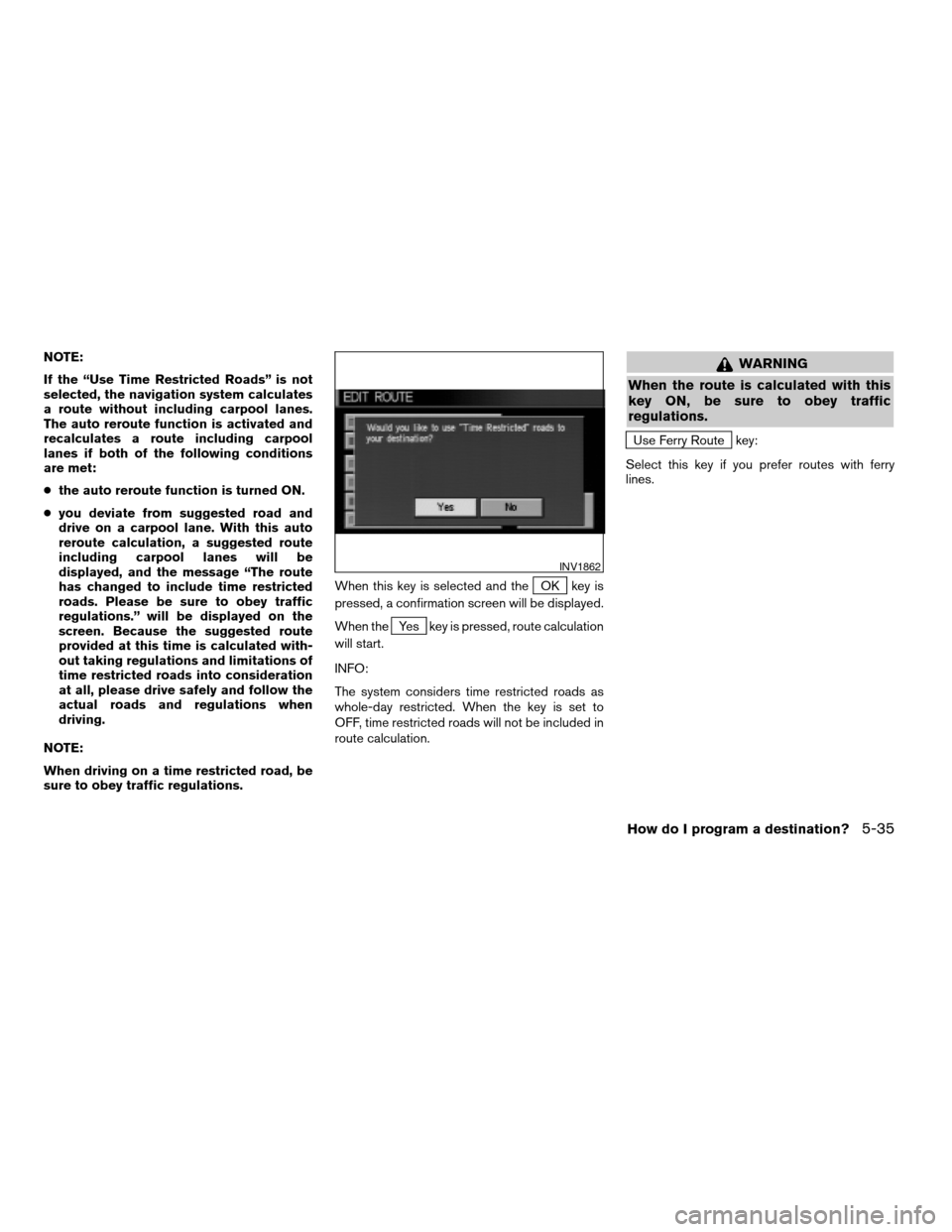
sure to obey traffic regulations.When this key is selected and the
OK key is
pressed, a confirmation screen will be displayed.
When the
Yes key is pressed, route calculation
will start.
INFO:
The system considers time restricted roads as
whole-day restricted. When the key is set to
OFF, time restricted roads will not be included in
route calculation.
WARNING
When the route is calculated with this
key ON, be sure to obey traffic
regulations.
Use Ferry Route key:
Select this key if you prefer routes with ferry
lines.
INV1862
How do I program a destination?5-35
ZREVIEW COPYÐ2005(nav)
Navigation System OMÐUSA_English(nna)
07/22/04Ðmarlene
X
Page 82 of 192
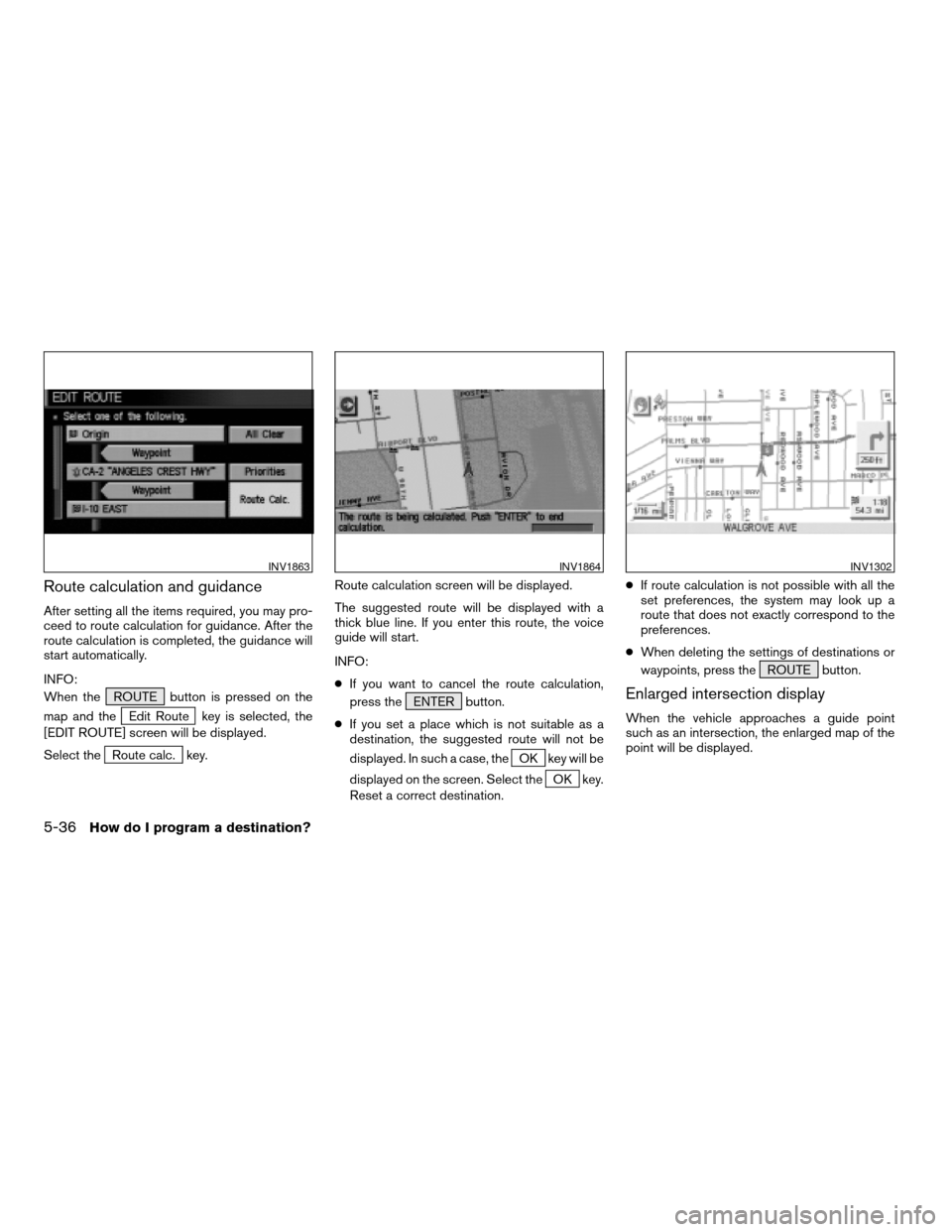
Route calculation and guidance
After setting all the items required, you may pro-
ceed to route calculation for guidance. After the
route calculation is completed, the guidance will
start automatically.
INFO:
When the ROUTE button is pressed on the
map and the
Edit Route key is selected, the
[EDIT ROUTE] screen will be displayed.
Select the
Route calc. key.Route calculation screen will be displayed.
The suggested route will be displayed with a
thick blue line. If you enter this route, the voice
guide will start.
INFO:
cIf you want to cancel the route calculation,
press the ENTER button.
cIf you set a place which is not suitable as a
destination, the suggested route will not be
displayed. In such a case, theOK key will be
displayed on the screen. Select the
OK key.
Reset a correct destination.cIf route calculation is not possible with all the
set preferences, the system may look up a
route that does not exactly correspond to the
preferences.
cWhen deleting the settings of destinations or
waypoints, press the ROUTE button.
Enlarged intersection display
When the vehicle approaches a guide point
such as an intersection, the enlarged map of the
point will be displayed.
INV1863INV1864INV1302
5-36How do I program a destination?
ZREVIEW COPYÐ2005(nav)
Navigation System OMÐUSA_English(nna)
07/10/04Ðdebbie
X
Page 84 of 192
![NISSAN MURANO 2005 1.G Workshop Manual Using the joystick, you canadjust the destina-
tion(waypoints) .
1. Press the ROUTE button.
2. Select the
Edit Route key. 3. Choose the destination (waypoints) you
want to adjust on the [EDIT ROUTE] s](/img/5/686/w960_686-83.png "NISSAN MURANO 2005 1.G Workshop Manual Using the joystick, you canadjust the destina-
tion(waypoints) .
1. Press the ROUTE button.
2. Select the
Edit Route key. 3. Choose the destination (waypoints) you
want to adjust on the [EDIT ROUTE] s")
Using the joystick, you canadjust the destina-
tion(waypoints) .
1. Press the ROUTE button.
2. Select the
Edit Route key. 3. Choose the destination (waypoints) you
want to adjust on the [EDIT ROUTE] screen.
INV1868INV1869
ADJUSTING AND DELETING THE PRE-
SET DESTINATION (waypoints)
5-38How do I program a destination?
ZREVIEW COPYÐ2005(nav)
Navigation System OMÐUSA_English(nna)
07/10/04Ðdebbie
X
Page 85 of 192
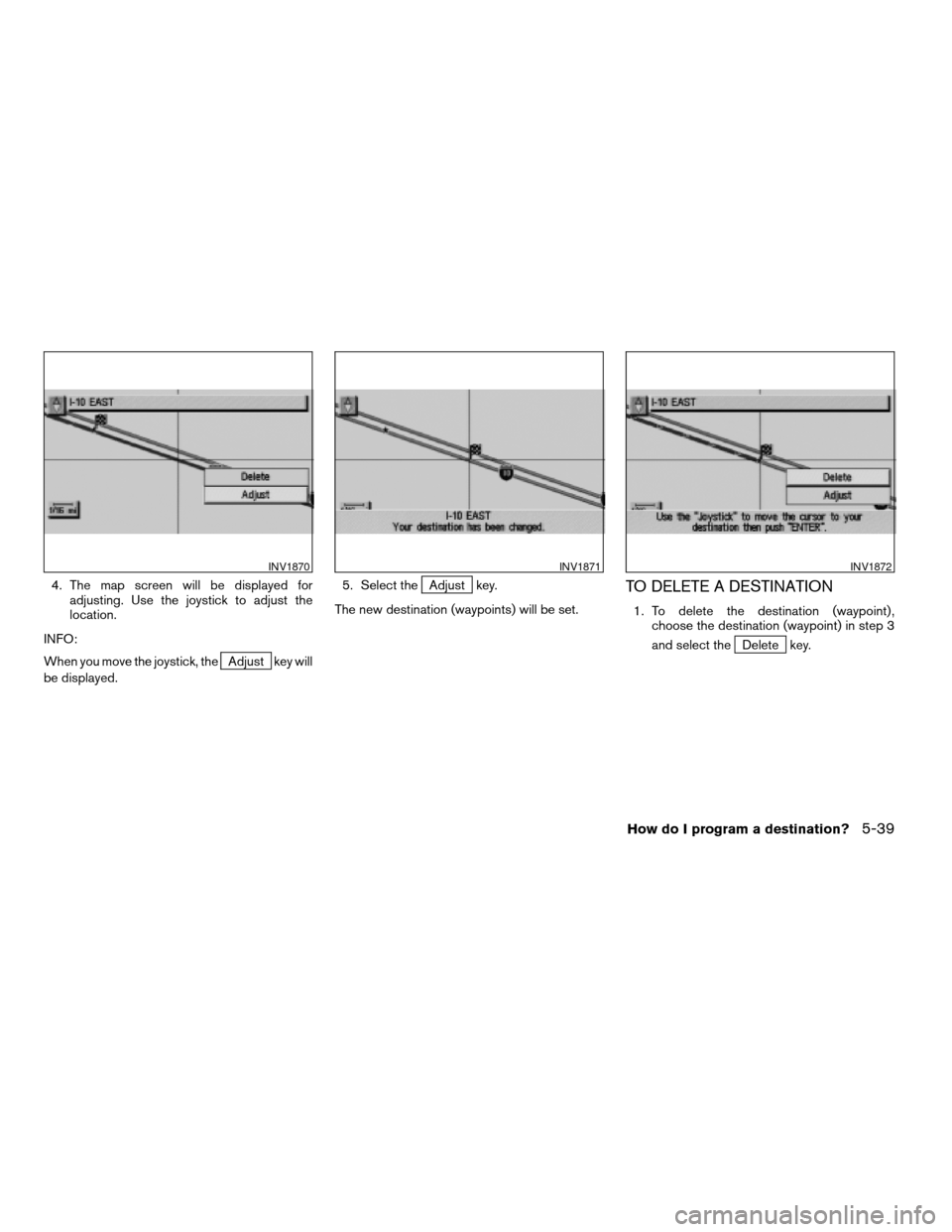
4. The map screen will be displayed for
adjusting. Use the joystick to adjust the
location.
INFO:
When you move the joystick, the
Adjust key will
be displayed.5. Select the
Adjust key.
The new destination (waypoints) will be set.TO DELETE A DESTINATION
1. To delete the destination (waypoint) ,
choose the destination (waypoint) in step 3
and select the
Delete key.
INV1870INV1871INV1872
How do I program a destination?5-39
ZREVIEW COPYÐ2005(nav)
Navigation System OMÐUSA_English(nna)
07/10/04Ðdebbie
X
Page 86 of 192
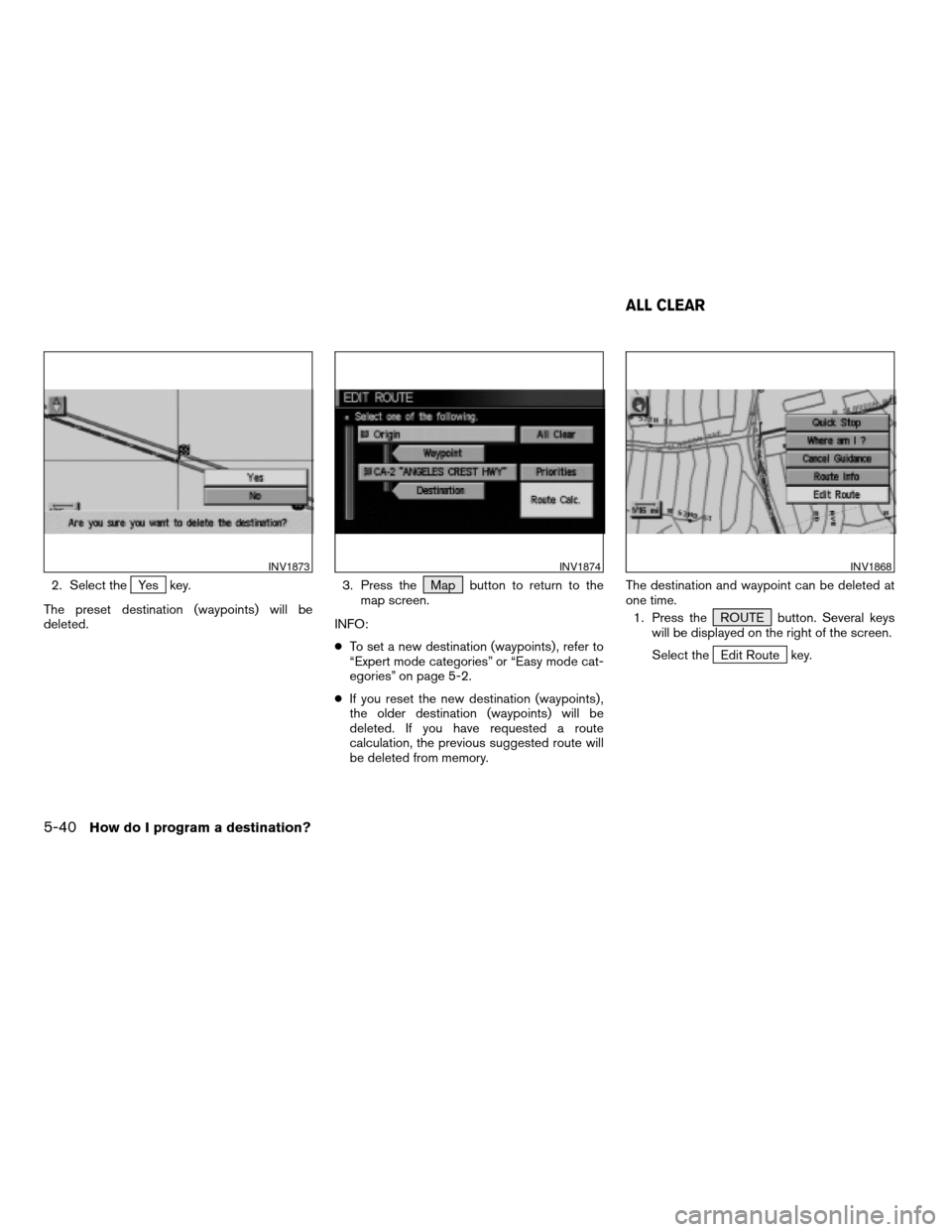
2. Select theYes key.
The preset destination (waypoints) will be
deleted.3. Press the Map button to return to the
map screen.
INFO:
cTo set a new destination (waypoints) , refer to
“Expert mode categories” or “Easy mode cat-
egories” on page 5-2.
cIf you reset the new destination (waypoints) ,
the older destination (waypoints) will be
deleted. If you have requested a route
calculation, the previous suggested route will
be deleted from memory.The destination and waypoint can be deleted at
one time.
1. Press the ROUTE button. Several keys
will be displayed on the right of the screen.
Select the
Edit Route key.
INV1873INV1874INV1868
ALL CLEAR
5-40How do I program a destination?
ZREVIEW COPYÐ2005(nav)
Navigation System OMÐUSA_English(nna)
07/10/04Ðdebbie
X
Page 87 of 192
![NISSAN MURANO 2005 1.G Workshop Manual 2. The [EDIT ROUTE] screen will be displayed.
Select the
All Clear key.3. Select the
Yes key. The system will display pre-defined POI’s
(Points of Interest) in the current vicinity of the
vehicle an](/img/5/686/w960_686-86.png "NISSAN MURANO 2005 1.G Workshop Manual 2. The [EDIT ROUTE] screen will be displayed.
Select the
All Clear key.3. Select the
Yes key. The system will display pre-defined POI’s
(Points of Interest) in the current vicinity of the
vehicle an")
2. The [EDIT ROUTE] screen will be displayed.
Select the
All Clear key.3. Select the
Yes key. The system will display pre-defined POI’s
(Points of Interest) in the current vicinity of the
vehicle and the distances to them. These POI’s
can be gas stations, hotels, restaurants, ATM’s
or customer-programmed facilities. This function
will operate while the vehicle is moving.
1. Press the ROUTE button.
The display shows several keys on the right of
the screen.
Select the
Quick Stop key.
INV1875INV1876INV1314
QUICK STOP
How do I program a destination?5-41
ZREVIEW COPYÐ2005(nav)
Navigation System OMÐUSA_English(nna)
07/10/04Ðdebbie
X
Page 88 of 192
![NISSAN MURANO 2005 1.G Workshop Manual 2. The display shows the [QUICK STOP]
screen.
Select the category of your choice.
INFO:
Five categories are displayed on the screen. The
last one can be customized. When you use a
POI category frequen](/img/5/686/w960_686-87.png "NISSAN MURANO 2005 1.G Workshop Manual 2. The display shows the [QUICK STOP]
screen.
Select the category of your choice.
INFO:
Five categories are displayed on the screen. The
last one can be customized. When you use a
POI category frequen")
2. The display shows the [QUICK STOP]
screen.
Select the category of your choice.
INFO:
Five categories are displayed on the screen. The
last one can be customized. When you use a
POI category frequently, it is convenient to use
the quick stop function. Please refer to “Quick
stop customer setting” on page 5-43.3. The cuisine selection screen is displayed
only when the
RESTAURANT key is se-
lected. Select the
All key or
Fast Food key.4. The display shows the direction and dis-
tance from the current vehicle position to
the selected facility.
Select the facility name you want to set as a
destination (waypoints) .
INV1878INV1879INV1880
5-42How do I program a destination?
ZREVIEW COPYÐ2005(nav)
Navigation System OMÐUSA_English(nna)
07/10/04Ðdebbie
X
Page 89 of 192
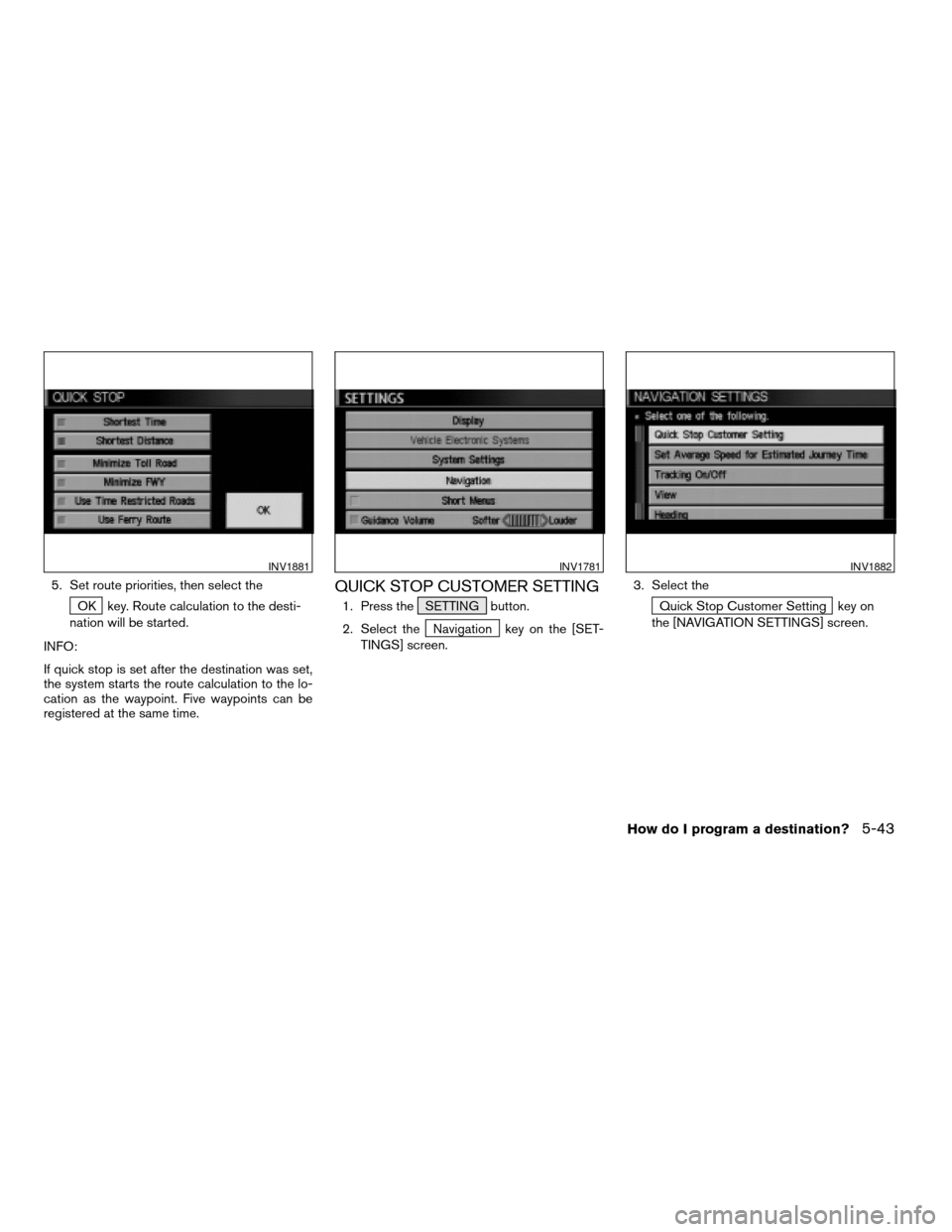
5. Set route priorities, then select the
OK key. Route calculation to the desti-
nation will be started.
INFO:
If quick stop is set after the destination was set,
the system starts the route calculation to the lo-
cation as the waypoint. Five waypoints can be
registered at the same time.
QUICK STOP CUSTOMER SETTING
1. Press the SETTING button.
2. Select the
Navigation key on the [SET-
TINGS] screen.3. Select the
Quick Stop Customer Setting key on
the [NAVIGATION SETTINGS] screen.
INV1881INV1781INV1882
How do I program a destination?5-43
ZREVIEW COPYÐ2005(nav)
Navigation System OMÐUSA_English(nna)
07/10/04Ðdebbie
X
Page 90 of 192
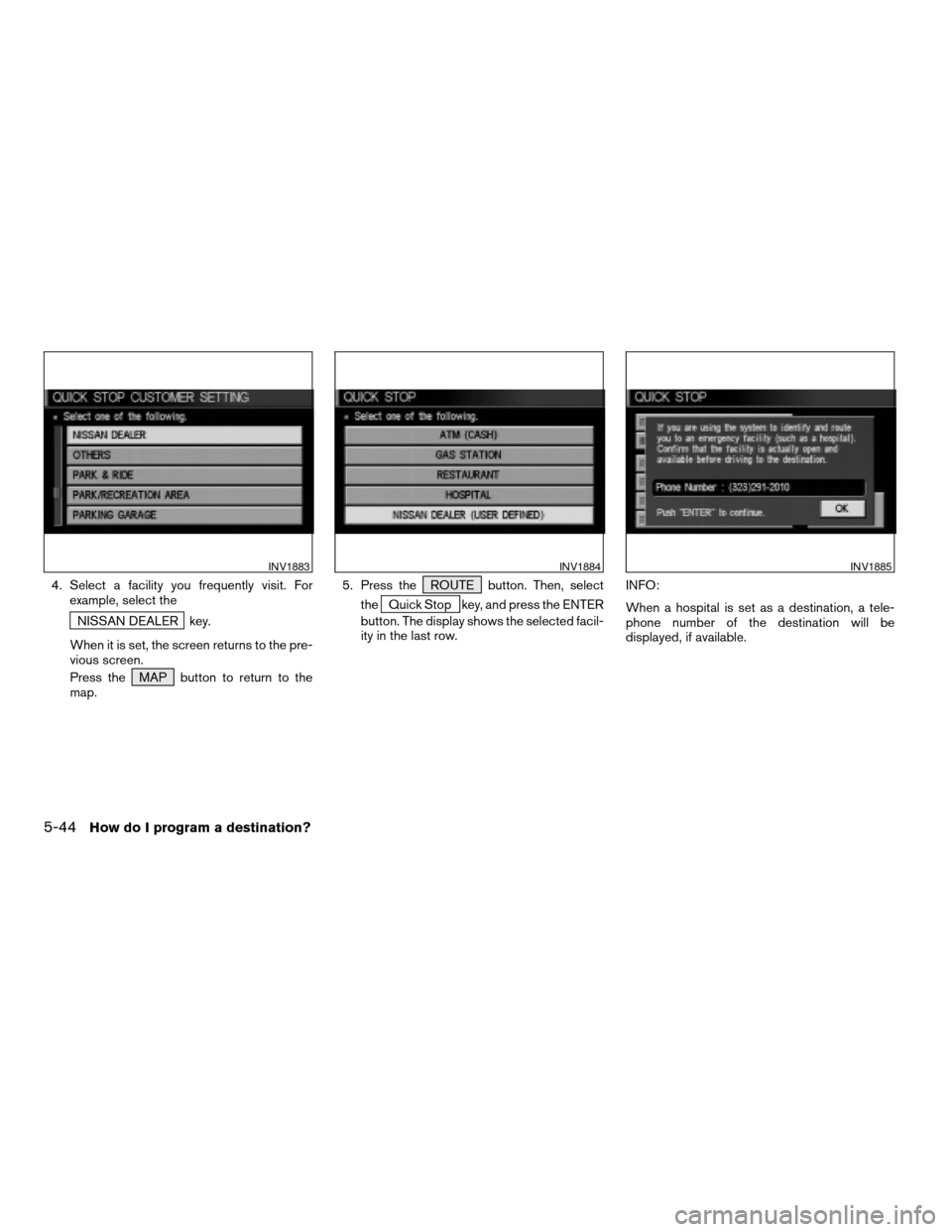
4. Select a facility you frequently visit. For
example, select the
NISSAN DEALER key.
When it is set, the screen returns to the pre-
vious screen.
Press the MAP button to return to the
map.5. Press the ROUTE button. Then, select
the
Quick Stop key, and press the ENTER
button. The display shows the selected facil-
ity in the last row.INFO:
When a hospital is set as a destination, a tele-
phone number of the destination will be
displayed, if available.
INV1883INV1884INV1885
5-44How do I program a destination?
ZREVIEW COPYÐ2005(nav)
Navigation System OMÐUSA_English(nna)
07/10/04Ðdebbie
X