display on off button NISSAN MURANO 2005 1.G Owners Manual
[x] Cancel search | Manufacturer: NISSAN, Model Year: 2005, Model line: MURANO, Model: NISSAN MURANO 2005 1.GPages: 192, PDF Size: 4.45 MB
Page 14 of 192

The main feature of the NISSAN Navigation Sys-
tem is Visual and Audio Route Guidance in se-
lected detailed map coverage areas. Utilizing a
network of GPS (Global Positioning System)
satellites, the NISSAN Navigation System tracks
your location on the map and directs you where
you want to go.
Once you program a destination covered by a
detailed map, The NISSAN Navigation System
will determine a route from your current location
to your destination. The moving map display and
turn-by-turn voice commands help the driver de-
termine upcoming turns.
This feature can be especially helpful in finding
unfamiliar locations or businesses. The system
may be unable to set a destination and/or calcu-
late distance when a destination is outside a de-
tailed map coverage area. Additionally, audio
route guidance may not be available if the desti-
nation is outside a detailed map coverage area.
For more information on how to program a
destination, please refer to section 5.The NISSAN Navigation System offers an exten-
sive Point of Interest (POI) directory in detailed
map coverage areas for your convenience. This
directory includes a wide variety of destinations
ranging from gas stations, ATMs, and restau-
rants to casinos, ski resorts, shopping centers
and businesses. By accessing the Point of Inter-
est directory, you can search for addresses and
phone numbers for a destination, and with a
press of a button, the NISSAN Navigation Sys-
tem will calculate a route to the destination.
The Point of Interest directory offers many uses.
For example, the directory can be sorted by the
various types of restaurants near your current
location. If you need an ATM or gas station, the
NISSAN Navigation System can point you to the
closest one or the closest one of your favorite
brand.
For more information on how to use the Point of
Interest directory, please refer to section 6.Using the Address Book feature, you will have
the ability to store up to 50 locations in detailed
map coverage areas into a personal directory.
This is especially useful for frequently visited
locations, such as your clients, relatives, or
friends. The Address Book feature will provide
you with easy access to frequently visited loca-
tions when setting them as your destination.
For more information on how to use your Ad-
dress Book, please refer to section 7.
ROUTE GUIDANCE POINT OF INTEREST (POI) DIREC-
TORYADDRESS BOOK
3-2What features are available on the Nissan navigation system?
ZREVIEW COPYÐ2005(nav)
Navigation System OMÐUSA_English(nna)
07/10/04Ðdebbie
X
Page 17 of 192
![NISSAN MURANO 2005 1.G Owners Manual cTerm [Expert Mode] is used in this manual
when the
Short Menus key indicator is
turned off. When the amber indicator is high-
lighted, the system is set to [Easy Mode].
cWhen the SETTING , DEST or
RO](/img/5/686/w960_686-16.png "NISSAN MURANO 2005 1.G Owners Manual cTerm [Expert Mode] is used in this manual
when the
Short Menus key indicator is
turned off. When the amber indicator is high-
lighted, the system is set to [Easy Mode].
cWhen the SETTING , DEST or
RO")
cTerm [Expert Mode] is used in this manual
when the
Short Menus key indicator is
turned off. When the amber indicator is high-
lighted, the system is set to [Easy Mode].
cWhen the SETTING , DEST or
ROUTE button is pressed in the [Easy
Mode] screen, the
Help key is displayed.
For more information on the Short Menu feature,
please refer to section 4.
What features are available on the Nissan navigation system?3-5
ZREVIEW COPYÐ2005(nav)
Navigation System OMÐUSA_English(nna)
07/10/04Ðdebbie
X
Page 27 of 192
Guidance Volumekey:
Adjusts or turns off volume of the voice
guidance.
Please refer to “Adjusting the guide volume” on
page 10-2.
Helpkey:
Available only in easy mode (Short menus) .
You can see the explanation of navigational
functions.
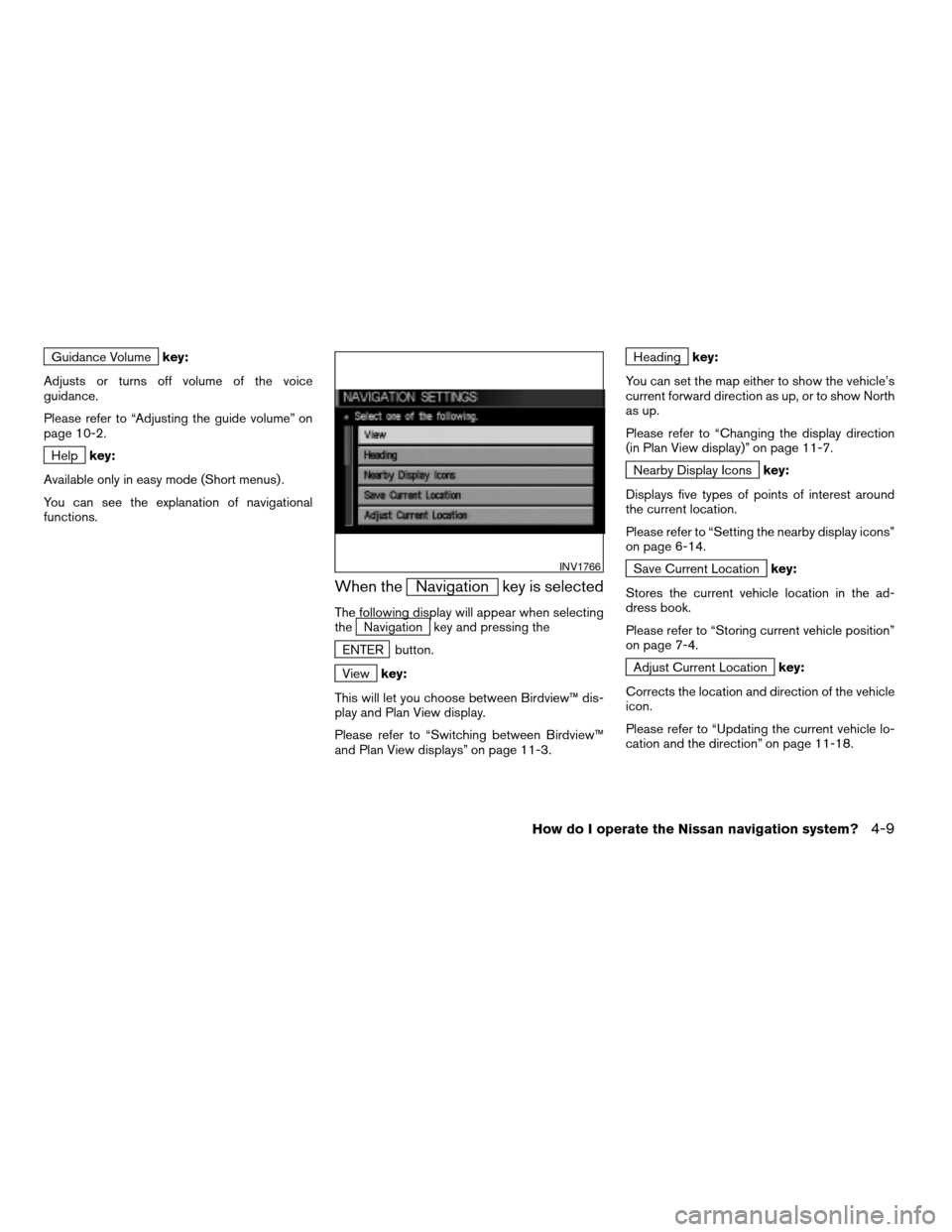
When theNavigation key is selected
The following display will appear when selecting
theNavigation key and pressing the
ENTER button.
Viewkey:
This will let you choose between Birdview™ dis-
play and Plan View display.
Please refer to “Switching between Birdview™
and Plan View displays” on page 11-3.
Headingkey:
You can set the map either to show the vehicle’s
current forward direction as up, or to show North
as up.
Please refer to “Changing the display direction
(in Plan View display)” on page 11-7.
Nearby Display Iconskey:
Displays five types of points of interest around
the current location.
Please refer to “Setting the nearby display icons”
on page 6-14.
Save Current Locationkey:
Stores the current vehicle location in the ad-
dress book.
Please refer to “Storing current vehicle position”
on page 7-4.
Adjust Current Locationkey:
Corrects the location and direction of the vehicle
icon.
Please refer to “Updating the current vehicle lo-
cation and the direction” on page 11-18.
INV1766
How do I operate the Nissan navigation system?4-9
ZREVIEW COPYÐ2005(nav)
Navigation System OMÐUSA_English(nna)
07/10/04Ðdebbie
X
Page 38 of 192
![NISSAN MURANO 2005 1.G Owners Manual CONFIRMATION OF DESTINATION
OR WAYPOINT
When the engine is turned off during route cal-
culation and then turned on, the [CONFIRMA-
TION OF DEST./WAYPOINT] screen will be dis-
played after the [START-](/img/5/686/w960_686-37.png "NISSAN MURANO 2005 1.G Owners Manual CONFIRMATION OF DESTINATION
OR WAYPOINT
When the engine is turned off during route cal-
culation and then turned on, the [CONFIRMA-
TION OF DEST./WAYPOINT] screen will be dis-
played after the [START-")
CONFIRMATION OF DESTINATION
OR WAYPOINT
When the engine is turned off during route cal-
culation and then turned on, the [CONFIRMA-
TION OF DEST./WAYPOINT] screen will be dis-
played after the [START-UP] screen.
In the [CONFIRMATION OF DEST./ WAY-
POINT] screen, the following four keys are
displayed.
cTo All Destinations
cFrom Next Waypoint
cCancel Guidance
cChange (only in Expert Mode)
INFO:
When the PREV or MAP button is pressed
in this screen, the [Turn by turn] screen will be
displayed.
When theTo All Destinations key is
selected
Route guidance will start to all
destinations/waypoints from the current location.
INV1774
4-20How do I operate the Nissan navigation system?
ZREVIEW COPYÐ2005(nav)
Navigation System OMÐUSA_English(nna)
07/10/04Ðdebbie
X
Page 44 of 192
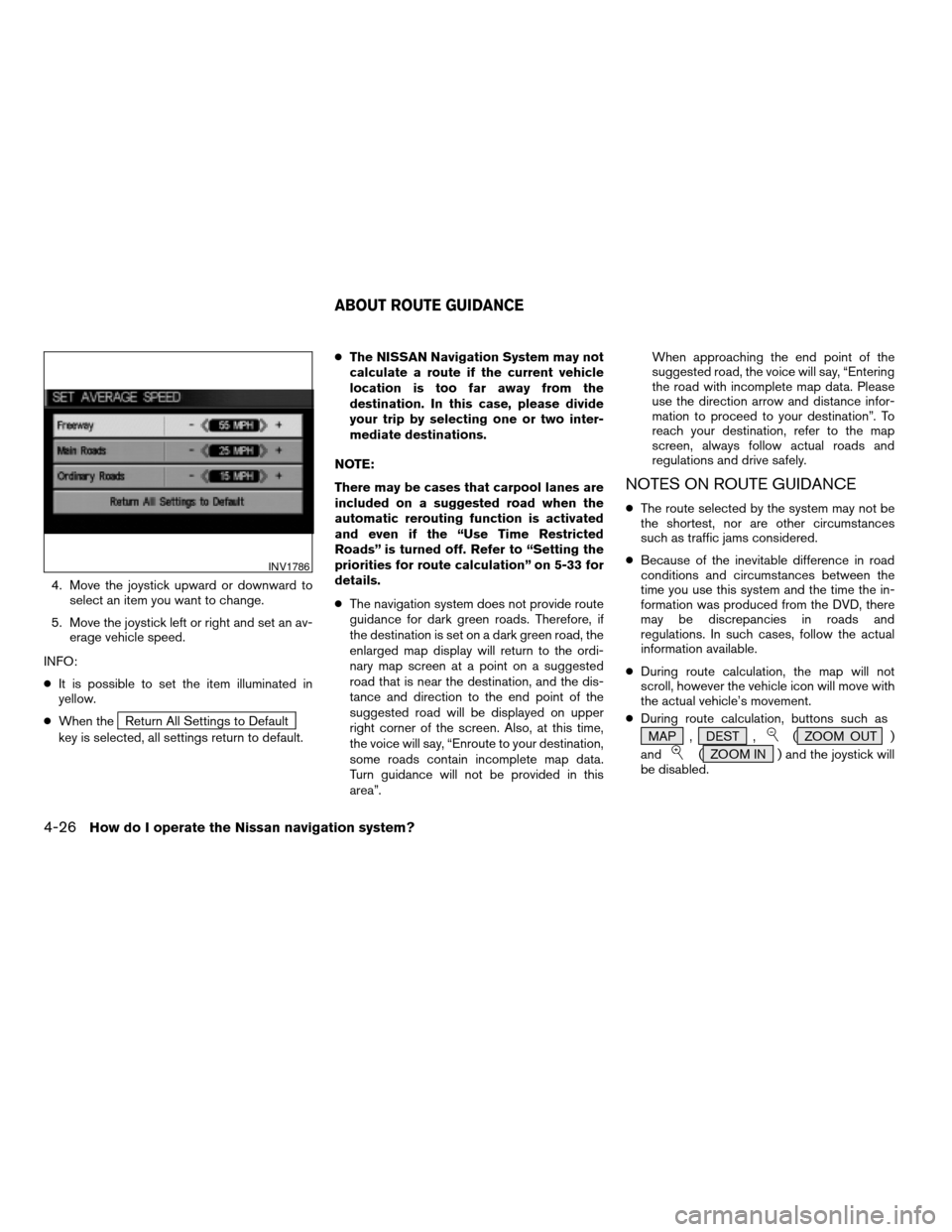
4. Move the joystick upward or downward to
select an item you want to change.
5. Move the joystick left or right and set an av-
erage vehicle speed.
INFO:
cIt is possible to set the item illuminated in
yellow.
cWhen the
Return All Settings to Default
key is selected, all settings return to default.cThe NISSAN Navigation System may not
calculate a route if the current vehicle
location is too far away from the
destination. In this case, please divide
your trip by selecting one or two inter-
mediate destinations.
NOTE:
There may be cases that carpool lanes are
included on a suggested road when the
automatic rerouting function is activated
and even if the “Use Time Restricted
Roads” is turned off. Refer to “Setting the
priorities for route calculation” on 5-33 for
details.
cThe navigation system does not provide route
guidance for dark green roads. Therefore, if
the destination is set on a dark green road, the
enlarged map display will return to the ordi-
nary map screen at a point on a suggested
road that is near the destination, and the dis-
tance and direction to the end point of the
suggested road will be displayed on upper
right corner of the screen. Also, at this time,
the voice will say, “Enroute to your destination,
some roads contain incomplete map data.
Turn guidance will not be provided in this
area”.When approaching the end point of the
suggested road, the voice will say, “Entering
the road with incomplete map data. Please
use the direction arrow and distance infor-
mation to proceed to your destination”. To
reach your destination, refer to the map
screen, always follow actual roads and
regulations and drive safely.
NOTES ON ROUTE GUIDANCE
cThe route selected by the system may not be
the shortest, nor are other circumstances
such as traffic jams considered.
cBecause of the inevitable difference in road
conditions and circumstances between the
time you use this system and the time the in-
formation was produced from the DVD, there
may be discrepancies in roads and
regulations. In such cases, follow the actual
information available.
cDuring route calculation, the map will not
scroll, however the vehicle icon will move with
the actual vehicle’s movement.
cDuring route calculation, buttons such as
MAP , DEST ,
( ZOOM OUT )
and
( ZOOM IN ) and the joystick will
be disabled.
INV1786
ABOUT ROUTE GUIDANCE
4-26How do I operate the Nissan navigation system?
ZREVIEW COPYÐ2005(nav)
Navigation System OMÐUSA_English(nna)
07/22/04Ðmarlene
X
Page 79 of 192
![NISSAN MURANO 2005 1.G Owners Manual The [EDIT ROUTE] screen will be displayed.
2. Select a waypoint destination using one of
the destination selection procedures out-
lined earlier in the chapter.Select the conditions with high prioriti](/img/5/686/w960_686-78.png "NISSAN MURANO 2005 1.G Owners Manual The [EDIT ROUTE] screen will be displayed.
2. Select a waypoint destination using one of
the destination selection procedures out-
lined earlier in the chapter.Select the conditions with high prioriti")
The [EDIT ROUTE] screen will be displayed.
2. Select a waypoint destination using one of
the destination selection procedures out-
lined earlier in the chapter.Select the conditions with high priorities.
If you want to get to your destination in the short-
est time, select the
Shortest Time key.
Selecting the key will turn the indicator light in
the key ON; selecting it again will turn it OFF.
INFO:
cWhen you select the
OK key at this point,
route calculation will start without any addi-
tional waypoints.
cPress the PREV button to display the [EDIT
ROUTE] screen.cIt is also possible to set a waypoint by select-
ing the
Waypoint key in the [DEST. SET-
TING] screen.
Setting the priorities for route calcula-
tion
After the setting of destinations and waypoints is
completed, set the calculation conditions such
as route type with high priorities.
INV2343INV1857
How do I program a destination?5-33
ZREVIEW COPYÐ2005(nav)
Navigation System OMÐUSA_English(nna)
07/10/04Ðdebbie
X
Page 80 of 192

1. Select thePriorities key.
The screen for setting calculation conditions will
appear. The conditions with the indicator light
ON will have high priority.
INFO:
When the ROUTE button is pressed on the
map and the
Edit Route key is selected, the
[EDIT ROUTE] screen will be displayed.2. Select the conditions with high priorities.
Select each key on the screen to turn its re-
spective indicator light ON or OFF.
Shortest Time key:
The route to the destination is calculated so that
you can reach the destination in the shortest
time. In some cases, a freeway or toll road with
detours may be recommended.
NOTE:
It may not be the shortest time in all cases.
Shortest Distance key:
The route to the destination is calculated so that
it is the shortest distance.
NOTE:
It may not be the shortest distance in all
cases.
Minimize Toll Road key:
The route to the destination is calculated with
minimum use of toll roads.
Minimize FWY key:
The route to the destination is calculated with
minimum use of freeways.
Use Time Restricted Roads key:
The route using time restricted roads is
calculated.
INV1860INV1861
5-34How do I program a destination?
ZREVIEW COPYÐ2005(nav)
Navigation System OMÐUSA_English(nna)
07/10/04Ðdebbie
X
Page 92 of 192
![NISSAN MURANO 2005 1.G Owners Manual The [CONFIRMATION] screen is displayed with
the following three keys.
cAll Destinations
cWaypoint 1 or Waypoint
cDo not Cancel
WHEN THEAll Destinations KEY IS
SELECTED
The route guidance is turned off](/img/5/686/w960_686-91.png "NISSAN MURANO 2005 1.G Owners Manual The [CONFIRMATION] screen is displayed with
the following three keys.
cAll Destinations
cWaypoint 1 or Waypoint
cDo not Cancel
WHEN THEAll Destinations KEY IS
SELECTED
The route guidance is turned off")
The [CONFIRMATION] screen is displayed with
the following three keys.
cAll Destinations
cWaypoint 1 or Waypoint
cDo not Cancel
WHEN THEAll Destinations KEY IS
SELECTED
The route guidance is turned off temporarily.1. Select the
All Destinations key.
2. When the
Yes key is selected, the route
guidance is turned off.
INFO:
cWhen the
No key is selected, the map will
be displayed. When the PREV button is
pressed, the previous screen will be displayed.
cTo restart the route guidance, press the
GUIDE VOICE button.
WHEN THEWaypoint 1 KEY IS SE-
LECTED
INFO:
This key can be selected only when a waypoint is
set.
Route guidance to the next waypoint is deleted.
INV1890INV1891
5-46How do I program a destination?
ZREVIEW COPYÐ2005(nav)
Navigation System OMÐUSA_English(nna)
07/10/04Ðdebbie
X
Page 109 of 192
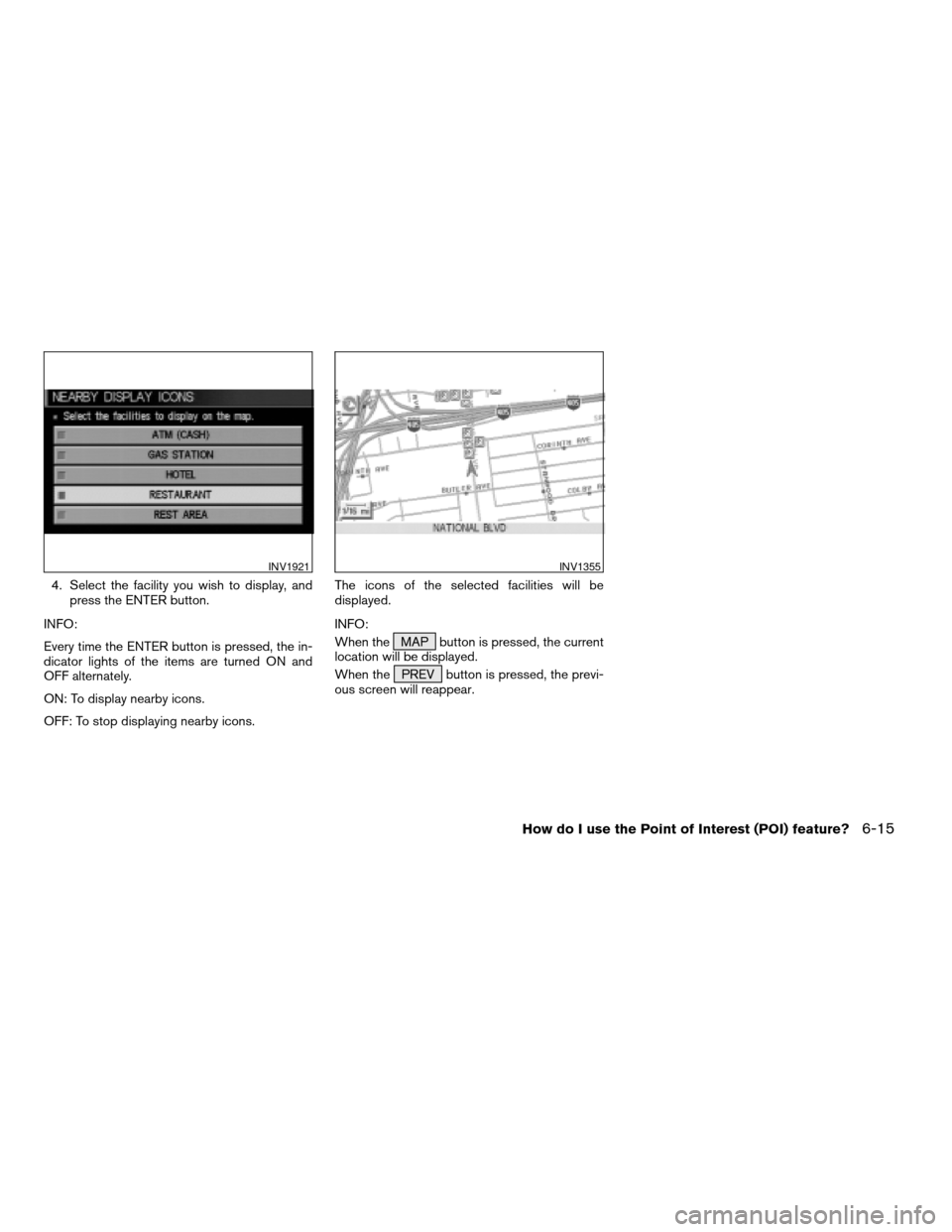
4. Select the facility you wish to display, and
press the ENTER button.
INFO:
Every time the ENTER button is pressed, the in-
dicator lights of the items are turned ON and
OFF alternately.
ON: To display nearby icons.
OFF: To stop displaying nearby icons.The icons of the selected facilities will be
displayed.
INFO:
When the MAP button is pressed, the current
location will be displayed.
When the PREV button is pressed, the previ-
ous screen will reappear.
INV1921INV1355
How do I use the Point of Interest (POI) feature?6-15
ZREVIEW COPYÐ2005(nav)
Navigation System OMÐUSA_English(nna)
07/10/04Ðdebbie
X
Page 113 of 192
![NISSAN MURANO 2005 1.G Owners Manual 3. Select theEdit Address Book key.
The [EDIT ADDRESS BOOK] screen will be
displayed.4. Choose an unused number location on the
address book list.5. Store location.
Set a location to be stored in the](/img/5/686/w960_686-112.png "NISSAN MURANO 2005 1.G Owners Manual 3. Select theEdit Address Book key.
The [EDIT ADDRESS BOOK] screen will be
displayed.4. Choose an unused number location on the
address book list.5. Store location.
Set a location to be stored in the")
3. Select theEdit Address Book key.
The [EDIT ADDRESS BOOK] screen will be
displayed.4. Choose an unused number location on the
address book list.5. Store location.
Set a location to be stored in the same way as
when setting a destination (waypoints) .
Please refer to “Expert Mode Categories” on
page 5-2.
INFO:
cPress the MAP button to go back to get the
current vehicle display.
cThe maximum number of the stored locations
is 50, including your home and office.
INV1924INV1925INV2344
How do I use the address book feature?7-3
ZREVIEW COPYÐ2005(nav)
Navigation System OMÐUSA_English(nna)
07/10/04Ðdebbie
X