light NISSAN MURANO 2008 Owners Manual
[x] Cancel search | Manufacturer: NISSAN, Model Year: 2008, Model line: MURANO, Model: NISSAN MURANO 2008Pages: 444, PDF Size: 6.09 MB
Page 296 of 444
Black plate (292,1)
Model "Z51-D" EDITED: 2008/ 6/ 26
Continuous Learning:
When this item is turned to ON, you can have
the system learn the voice commands in
succession, without selecting commands one
by one.MINIMIZE VOICE FEEDBACK1. Push theSETTINGbutton on the instrument
panel, highlight the “Others” key on the
display and then push theENTERbutton.
2. Highlight the “Voice Recognition” key and
then push theENTERbutton.
3. Highlight the “Minimize Voice Feedback” key
and push theENTERbutton.
4. The item is turned to ON and the vocal
feedback is reduces if the voice recognition
system is activated.4-130
Monitor, heater, air conditioner, audio, phone and voice recognition systems
Page 298 of 444
Black plate (294,1)
Model "Z51-D" EDITED: 2008/ 6/ 26
NISSAN Voice Recognition allows hands-free
operation of the systems equipped on this
vehicle, such as the display, audio, climate
control, phone and optional navigation systems.
To operate NISSAN Voice Recognition, push
and release the TALK
switch located on the
steering wheel. Then speak the command for the
system you wish to activate. The command given
is picked up by the microphone, and it is
performed when it is properly recognized. At
this time NISSAN Voice Recognition will provide
a voice and message (in the center display) to
inform you of the command results.
COMMAND LIST
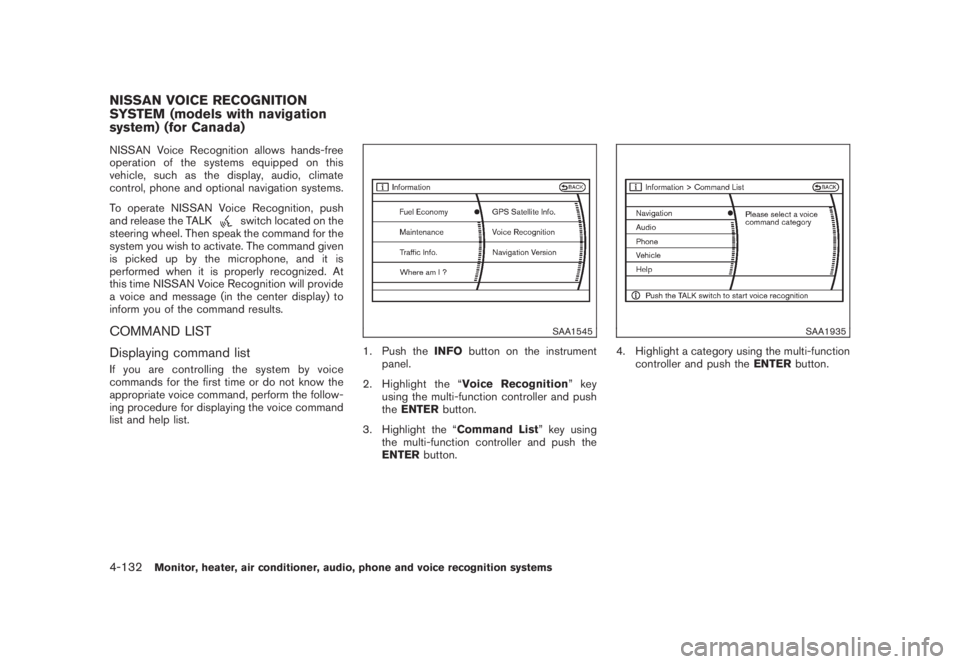
Displaying command listIf you are controlling the system by voice
commands for the first time or do not know the
appropriate voice command, perform the follow-
ing procedure for displaying the voice command
list and help list.
SAA1545
1. Push theINFObutton on the instrument
panel.
2. Highlight the “Voice Recognition”key
using the multi-function controller and push
theENTERbutton.
3. Highlight the “Command List” key using
the multi-function controller and push the
ENTERbutton.
SAA1935
4. Highlight a category using the multi-function
controller and push theENTERbutton.
NISSAN VOICE RECOGNITION
SYSTEM (models with navigation
system) (for Canada)4-132
Monitor, heater, air conditioner, audio, phone and voice recognition systems
Page 299 of 444
Black plate (295,1)
Model "Z51-D" EDITED: 2008/ 6/ 26
SAA1593
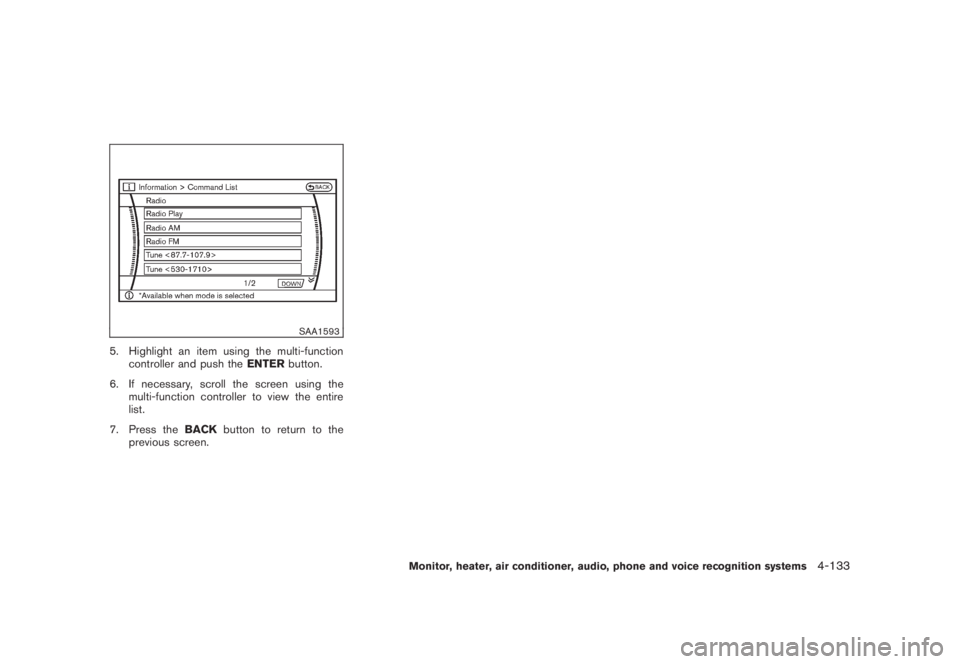
5. Highlight an item using the multi-function
controller and push theENTERbutton.
6. If necessary, scroll the screen using the
multi-function controller to view the entire
list.
7. Press theBACKbutton to return to the
previous screen.
Monitor, heater, air conditioner, audio, phone and voice recognition systems
4-133
Page 307 of 444
Black plate (303,1)
Model "Z51-D" EDITED: 2008/ 6/ 26
SAA1783
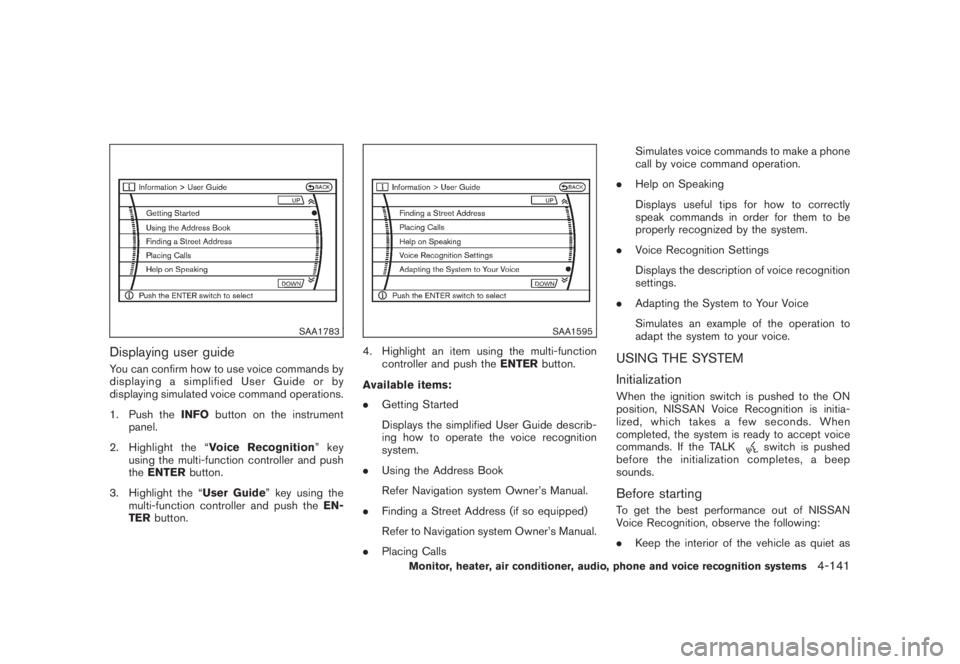
Displaying user guideYou can confirm how to use voice commands by
displaying a simplified User Guide or by
displaying simulated voice command operations.
1. Push theINFObutton on the instrument
panel.
2. Highlight the “Voice Recognition”key
using the multi-function controller and push
theENTERbutton.
3. Highlight the “User Guide” key using the
multi-function controller and push theEN-
TERbutton.
SAA1595
4. Highlight an item using the multi-function
controller and push theENTERbutton.
Available items:
.Getting Started
Displays the simplified User Guide describ-
ing how to operate the voice recognition
system.
.Using the Address Book
Refer Navigation system Owner’s Manual.
.Finding a Street Address (if so equipped)
Refer to Navigation system Owner’s Manual.
.Placing CallsSimulates voice commands to make a phone
call by voice command operation.
.Help on Speaking
Displays useful tips for how to correctly
speak commands in order for them to be
properly recognized by the system.
.Voice Recognition Settings
Displays the description of voice recognition
settings.
.Adapting the System to Your Voice
Simulates an example of the operation to
adapt the system to your voice.
USING THE SYSTEM
InitializationWhen the ignition switch is pushed to the ON
position, NISSAN Voice Recognition is initia-
lized, which takes a few seconds. When
completed, the system is ready to accept voice
commands. If the TALK
switch is pushed
before the initialization completes, a beep
sounds.
Before startingTo get the best performance out of NISSAN
Voice Recognition, observe the following:
.Keep the interior of the vehicle as quiet as
Monitor, heater, air conditioner, audio, phone and voice recognition systems
4-141
Page 310 of 444
Black plate (306,1)
Model "Z51-D" EDITED: 2008/ 6/ 26
— “Temperature twenty one and a half.”
.19.08C
— “Temperature nineteen point zero.”
— “Temperature nineteen point oh.”
— “Temperature nineteen.”
Phone numbers:
Speak phone numbers according to the follow-
ing examples:
.1-800-662-6200
— “Dial one eight oh oh six six two six two oh
oh.”
— “Dial one eight hundred six six two six two
oh oh.”
— “Dial one eight zero zero six six two oh
oh.”
Note 1: For the best voice recognition phone
dialing results, say phone numbers as single
digits.
Note 2: You cannot say 555-6000 as “five five
five six thousands”.
Personal vocabulary (voicetags)NISSAN Voice Recognition provides the func-
tion called “voicetags,” which can be associated
with the phone and the navigation system (if soequipped) . Using your own voice, 40 voicetags
can be registered in the “Phonebook” (phone)
and 10 locations can be registered in the
“Address Book” (navigation system) .
See “BLUETOOTH
®HANDS-FREE PHONE
SYSTEM WITH NAVIGATION SYSTEM” earlier
in this section and/or the separate Navigation
System Owner’s Manual (if so equipped) for the
method of “voicetag” registration.
SAA1601
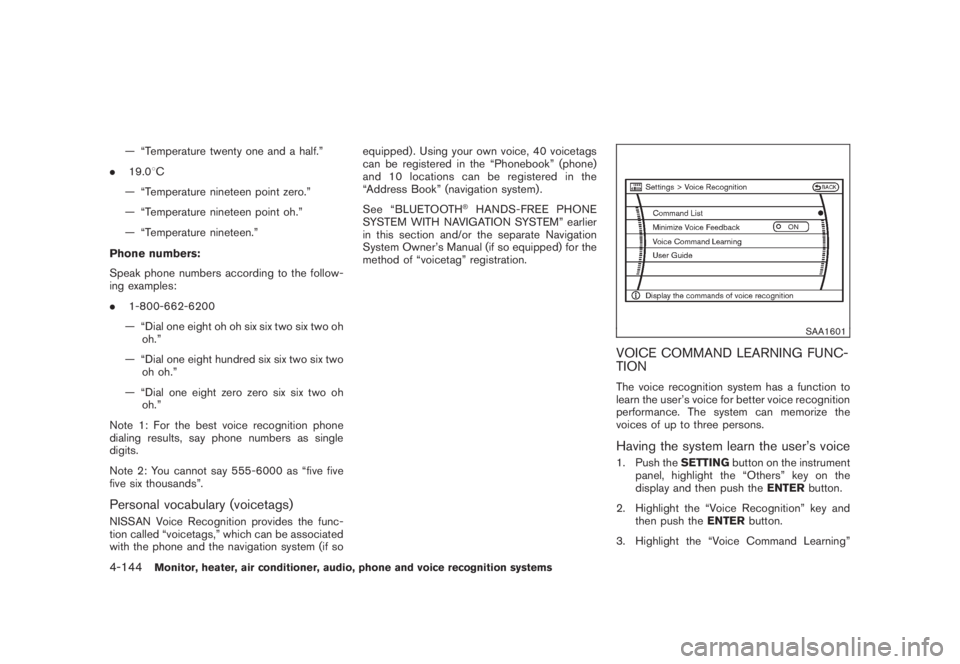
VOICE COMMAND LEARNING FUNC-
TIONThe voice recognition system has a function to
learn the user’s voice for better voice recognition
performance. The system can memorize the
voices of up to three persons.Having the system learn the user’s voice1. Push theSETTINGbutton on the instrument
panel, highlight the “Others” key on the
display and then push theENTERbutton.
2. Highlight the “Voice Recognition” key and
then push theENTERbutton.
3. Highlight the “Voice Command Learning”
4-144
Monitor, heater, air conditioner, audio, phone and voice recognition systems
Page 315 of 444
Black plate (16,1)
5 Starting and driving
Model "Z51-D" EDITED: 2008/ 6/ 23
Precautions when starting and driving..................... 5-2
Exhaust gas (carbon monoxide)......................... 5-2
Three-way catalyst.......................................... 5-2
Tire Pressure Monitoring System (TPMS)............. 5-3
Avoiding collision and rollover........................... 5-5
On-pavement and off-road driving precautions...... 5-5
Off-road recovery........................................... 5-6
Rapid air pressure loss.................................... 5-6
Drinking alcohol/drugs and driving...................... 5-7
Driving safety precautions................................ 5-7
Push-button ignition switch.................................. 5-9
Intelligent Key system (if so equipped)................ 5-9
Push-button ignition switch operation................ 5-11
Push-button ignition switch positions................ 5-11
Key port..................................................... 5-12
Before starting the engine.................................. 5-13
Starting the engine........................................... 5-13
Driving the vehicle............................................ 5-14
Continuously Variable Transmission (CVT).......... 5-14
Parking brake.................................................. 5-18
Cruise control................................................. 5-19
Precautions on cruise control.......................... 5-19Cruise control operations............................... 5-19
Break-in schedule............................................ 5-21
Increasing fuel economy.................................... 5-21
All-Wheel Drive (AWD) (if so equipped)................ 5-22
All-Wheel Drive (AWD) lock switch operations.... 5-22
AWD warning light....................................... 5-23
Parking/parking on hills...................................... 5-25
Power steering................................................ 5-26
Brake system.................................................. 5-26
Braking precautions...................................... 5-26
Parking brake break-in................................... 5-26
Anti-lock Braking System (ABS)...................... 5-27
Vehicle Dynamic Control (VDC) system................. 5-28
Cold weather driving......................................... 5-29
Freeing a frozen door lock.............................. 5-29
Anti-freeze.................................................. 5-29
Battery...................................................... 5-29
Draining of coolant water............................... 5-29
Tire equipment............................................ 5-30
Special winter equipment............................... 5-30
Driving on SNOW or ice................................ 5-30
Engine block heater (if so equipped)................. 5-30
Page 318 of 444
Black plate (316,1)
Model "Z51-D" EDITED: 2008/ 6/ 26
alternate tires and wheels allow the TPMS to
continue to function properly.Additional information.The TPMS does not monitor the tire
pressure of the spare tire.
.The TPMS will activate only when the
vehicle is driven at speeds above 16 MPH
(25 km/h) . Also, this system may not detect
a sudden drop in tire pressure (for example a
flat tire while driving) .
.The low tire pressure warning light does not
automatically turn off when the tire pressure
is adjusted. After the tire is inflated to the
recommended pressure, the vehicle must be
driven at speeds above 16 MPH (25 km/h)
to activate the TPMS and turn off the low tire
pressure warning light. Use a tire pressure
gauge to check the tire pressure.
.Tire pressure rises and falls depending on
the heat caused by the vehicle’s operation
and the outside temperature. Low outside
temperature can lower the temperature of
the air inside the tire which can cause a
lower tire inflation pressure. This may cause
the low tire pressure warning light to
illuminate. If the warning light illuminates in
low ambient temperature, check the tire
pressure for all four tires.
For additional information, see “Low tire pres-sure warning light” in the “2. Instruments and
controls” section and “TIRE PRESSURE MON-
ITORING SYSTEM (TPMS)” in the “6. In case of
emergency” section.
WARNING
.If the low tire pressure warning light
illuminates while driving, avoid sud-
den steering maneuvers or abrupt
braking, reduce vehicle speed, pull
off the road to a safe location and
stop the vehicle as soon as possi-
ble. Driving with under-inflated tires
may permanently damage the tires
and increase the likelihood of tire
failure. Serious vehicle damage
could occur and may lead to an
accident and could result in serious
personal injury. Check the tire pres-
sure for all four tires. Adjust the tire
pressure to the recommended COLD
tire pressure shown on the Tire and
Loading Information label to turn
the low tire pressure warning light
OFF. If you have a flat tire, replace it
with a spare tire as soon as possi-
ble. (See “FLAT TIRE” in the “6. In
case of emergency” section for
changing a flat tire.).When a spare tire is mounted or a
wheel is replaced, the TPMS will not
function and the low tire pressure
warning light will flash for approxi-
mately 1 minute. The light will
remain on after 1 minute. Contact
your NISSAN dealer as soon as
possible for tire replacement and/
or system resetting.
.Replacing tires with those not ori-
ginally specified by NISSAN could
affect the proper operation of the
TPMS.
.Do not inject any tire liquid or
aerosol tire sealant into the tires,
as this may cause a malfunction of
the tire pressure sensors.
CAUTION
.The TPMS may not function properly
when the wheels are equipped with
tire chains or the wheels are buried
in snow.
.Do not place metalized film or any
metal parts (antenna, etc.) on the
windows. This may cause poor re-
ception of the signals from the tire
5-4
Starting and driving
Page 319 of 444
Black plate (317,1)
Model "Z51-D" EDITED: 2008/ 6/ 26
pressure sensors, and the TPMS will
not function properly.
Some devices and transmitters may temporarily
interfere with the operation of the TPMS and
cause the low tire pressure warning light to
illuminate. Some examples are:
.Facilities or electric devices using similar
radio frequencies are near the vehicle.
.If a transmitter set to similar frequencies is
being used in or near the vehicle.
.If a computer (or similar equipment) or a DC/
AC converter is being used in or near the
vehicle.
FCC Notice:
Changes or modifications not expressly
approved by the party responsible for
compliance could void the user’s authority
to operate the equipment.
This device complies with Part 15 of the
FCC Rules and RSS-210 of Industry Cana-
da.
Operation is subject to the following two
conditions: (1) This device may not cause
harmful interference, and (2) this device
must accept any interference received,
including interference that may cause un-
desired operation of the device.
AVOIDING COLLISION AND ROLL-
OVER
WARNING
Failure to operate this vehicle in a safe
and prudent manner may result in loss
of control or an accident.
Be alert and drive defensively at all times. Obey
all traffic regulations. Avoid excessive speed,
high speed cornering, or sudden steering
maneuvers, because these driving practices
could cause you to lose control of your vehicle.
As with any vehicle, a loss of control could
result in a collision with other vehicles or
objects, or cause the vehicle to rollover,
particularly if the loss of control causes the
vehicle to slide sideways.Be attentive at all
times, and avoid driving when tired. Never drive
when under the influence of alcohol or drugs
(including prescription or over-the-counter
drugs which may cause drowsiness) . Always
wear your seat belt as outlined in the “SEAT
BELTS” in the “1. Safety — Seats, seat belts and
supplemental restraint system” section of this
manual, and also instruct your passengers to do
so.
Seat belts help reduce the risk of injury in
collisions and rollovers.In a rollover crash, an
unbelted or improperly belted person issignificantly more likely to be injured or
killed than a person properly wearing a
seat belt.
ON-PAVEMENT AND OFF-ROAD
DRIVING PRECAUTIONSUtility vehicles have a significantly higher
rollover rate than other types of vehicles.
They have higher ground clearance than pas-
senger cars to make them capable of performing
in a variety of on-pavement and off-road
applications. This gives them a higher center of
gravity than ordinary cars. An advantage of
higher ground clearance is a better view of the
road, allowing you to anticipate problems.
However, they are not designed for cornering
at the same speeds as conventional passenger
cars any more than low-slung sports cars are
designed to perform satisfactorily under off-road
conditions. If at all possible, avoid sharp turns or
abrupt maneuvers, particularly at high speeds.
As with other vehicles of this type, failure to
operate this vehicle correctly may result in loss
of control or vehicle rollover. Seat belts help
reduce the risk of injury in collisions and
rollovers. In a rollover crash, an unbelted or
improperly belted person is significantly more
likely to be injured or killed than a person
properly wearing a seat belt.
Be sure to read “DRIVING SAFETY PRECAU-
TIONS” later in this section.
Starting and driving
5-5
Page 320 of 444
Black plate (318,1)
Model "Z51-D" EDITED: 2008/ 6/ 26
OFF-ROAD RECOVERYWhile driving, the right side or left side wheels
may unintentionally leave the road surface. If this
occurs, maintain control of the vehicle by
following the procedure below. Please note that
this procedure is only a general guide. The
vehicle must be driven as appropriate based on
the conditions of the vehicle, road and traffic.
1. Remain calm and do not overreact.
2. Do not apply the brakes.
3. Maintain a firm grip on the steering wheel
with both hands and try to hold a straight
course.
4. When appropriate, slowly release the accel-
erator pedal to gradually slow the vehicle.
5. If there is nothing in the way, steer the
vehicle to follow the road while the vehicle
speed is reduced. Do not attempt to drive
the vehicle back onto the road surface until
vehicle speed is reduced.
6. When it is safe to do so, gradually turn the
steering wheel until both tires return to the
road surface. When all tires are on the road
surface, steer the vehicle to stay in the
appropriate driving lane.
.If you decide that it is not safe to return
the vehicle to the road surface based on
vehicle, road or traffic conditions, gra-dually slow the vehicle to a stop in a safe
place off the road.
RAPID AIR PRESSURE LOSSRapid air pressure loss or a “blow-out” can
occur if the tire is punctured or is damaged due
to hitting a curb or pothole. Rapid air pressure
loss can also be caused by driving on under-
inflated tires.
Rapid air pressure loss can affect the handling
and stability of the vehicle, especially at highway
speeds.
Help prevent rapid air pressure loss by main-
taining the correct air pressure and visually
inspect the tires for wear and damage. See
“WHEELS AND TIRES” in the “8. Maintenance
and do-it-yourself” section of this manual.
If a tire rapidly loses air pressure or “blows-out”
while driving maintain control of the vehicle by
following the procedure below. Please note that
this procedure is only a general guide. The
vehicle must be driven as appropriate based on
the conditions of the vehicle, road and traffic.
WARNING
The following actions can increase the
chance of losing control of the vehicle if
there is a sudden loss of tire air
pressure. Losing control of the vehiclemay cause a collision and result in
personal injury.
.The vehicle generally moves or pulls
in the direction of the flat tire.
.Do not rapidly apply the brakes.
.Do not rapidly release the accelera-
tor pedal.
.Do not rapidly turn the steering
wheel.
1. Remain calm and do not overreact.
2. Maintain a firm grip on the steering wheel
with both hands and try to hold a straight
course.
3. When appropriate, slowly release the accel-
erator pedal to gradually slow the vehicle.
4. Gradually steer the vehicle to a safe location
off the road and away from traffic if possible.
5. Lightly apply the brake pedal to gradually
stop the vehicle.
6. Turn on the hazard warning flashers and
either contact a roadside emergency service
to change the tire or see “CHANGING A
FLAT TIRE” in the “6. In case of emergency”
section of this Owner’s Manual.
5-6
Starting and driving
Page 321 of 444
Black plate (319,1)
Model "Z51-D" EDITED: 2008/ 6/ 26
DRINKING ALCOHOL/DRUGS AND
DRIVING
WARNING
Never drive under the influence of
alcohol or drugs. Alcohol in the blood-
stream reduces coordination, delays
reaction time and impairs judgement.
Driving after drinking alcohol increases
the likelihood of being involved in an
accident injuring yourself and others.
Additionally, if you are injured in an
accident, alcohol can increase the se-
verity of the injury.
NISSAN is committed to safe driving. However,
you must choose not to drive under the influence
of alcohol. Every year thousands of people are
injured or killed in alcohol-related accidents.
Although the local laws vary on what is
considered to be legally intoxicated, the fact is
that alcohol affects all people differently and
most people underestimate the effects of
alcohol.
Remember, drinking and driving don’t mix! And
that is true for drugs, too (over-the-counter,
prescription, and illegal drugs) . Don’t drive if
your ability to operate your vehicle is impaired by
alcohol, drugs, or some other physical condition.
DRIVING SAFETY PRECAUTIONSYour NISSAN is designed for both normal and
off-road use. However, avoid driving in deep
water or mud as your NISSAN is mainly
designed for leisure use, unlike a conventional
off-road vehicle.
Remember that Two-Wheel Drive (2WD) mod-
els are less capable than All-Wheel Drive
(AWD) models for rough road driving and
extrication when stuck in deep snow, mud, or
the like.
Please observe the following precautions:
WARNING
.Drive carefully when off the road
and avoid dangerous areas. Every
person who drives or rides in this
vehicle should be seated with their
seat belt fastened. This will keep
you and your passengers in position
when driving over rough terrain.
.Do not drive across steep slopes.
Instead drive either straight up or
straight down the slopes. Off-road
vehicles can tip over sideways much
more easily than they can forward or
backward.
.Many hills are too steep for anyvehicle. If you drive up them, you
may stall. If you drive down them,
you may not be able to control your
speed. If you drive across them, you
may roll over.
.Do not shift ranges while driving on
downhill grades as this could cause
loss of control of the vehicle.
.Stay alert when driving to the top of
a hill. At the top there could be a
drop-off or other hazard that could
cause an accident.
.If your engine stalls or you cannot
make it to the top of a steep hill,
never attempt to turn around. Your
vehicle could tip or roll over. Always
back straight down in R (Reverse)
range. Never back down in N (Neu-
tral) , using only the brake, as this
could cause loss of control.
.Heavy braking going down a hill
could cause your brakes to overheat
and fade, resulting in loss of control
and an accident. Apply brakes
lightly and use a low range to
control your speed.
.Unsecured cargo can be thrown
around when driving over rough
Starting and driving
5-7