display NISSAN MURANO 2008 Owners Manual
[x] Cancel search | Manufacturer: NISSAN, Model Year: 2008, Model line: MURANO, Model: NISSAN MURANO 2008Pages: 444, PDF Size: 6.09 MB
Page 293 of 444
Black plate (289,1)
Model "Z51-D" EDITED: 2008/ 6/ 26
SAA1932
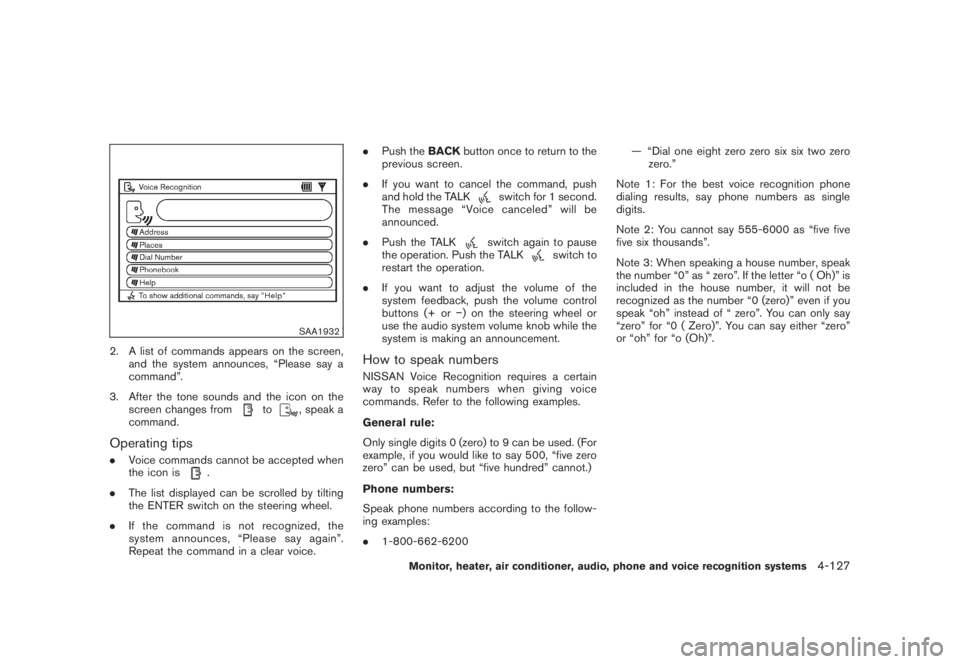
2. A list of commands appears on the screen,
and the system announces, “Please say a
command”.
3. After the tone sounds and the icon on the
screen changes from
to
, speak a
command.
Operating tips.Voice commands cannot be accepted when
the icon is
.
.The list displayed can be scrolled by tilting
the ENTER switch on the steering wheel.
.If the command is not recognized, the
system announces, “Please say again”.
Repeat the command in a clear voice..Push theBACKbutton once to return to the
previous screen.
.If you want to cancel the command, push
and hold the TALK
switch for 1 second.
The message “Voice canceled” will be
announced.
.Push the TALKswitch again to pause
the operation. Push the TALK
switch to
restart the operation.
.If you want to adjust the volume of the
system feedback, push the volume control
buttons (+ or) on the steering wheel or
use the audio system volume knob while the
system is making an announcement.
How to speak numbersNISSAN Voice Recognition requires a certain
way to speak numbers when giving voice
commands. Refer to the following examples.
General rule:
Only single digits 0 (zero) to 9 can be used. (For
example, if you would like to say 500, “five zero
zero” can be used, but “five hundred” cannot.)
Phone numbers:
Speak phone numbers according to the follow-
ing examples:
.1-800-662-6200— “Dial one eight zero zero six six two zero
zero.”
Note 1: For the best voice recognition phone
dialing results, say phone numbers as single
digits.
Note 2: You cannot say 555-6000 as “five five
five six thousands”.
Note 3: When speaking a house number, speak
the number “0” as “ zero”. If the letter “o ( Oh)” is
included in the house number, it will not be
recognized as the number “0 (zero)” even if you
speak “oh” instead of “ zero”. You can only say
“zero” for “0 ( Zero)”. You can say either “zero”
or “oh” for “o (Oh)”.
Monitor, heater, air conditioner, audio, phone and voice recognition systems
4-127
Page 294 of 444
Black plate (290,1)
Model "Z51-D" EDITED: 2008/ 6/ 26
SAA1907
SPEAKER ADAPTATION FUNCTIONThe voice recognition system has a function to
learn the user’s voice for better voice recognition
performance. The system can memorize the
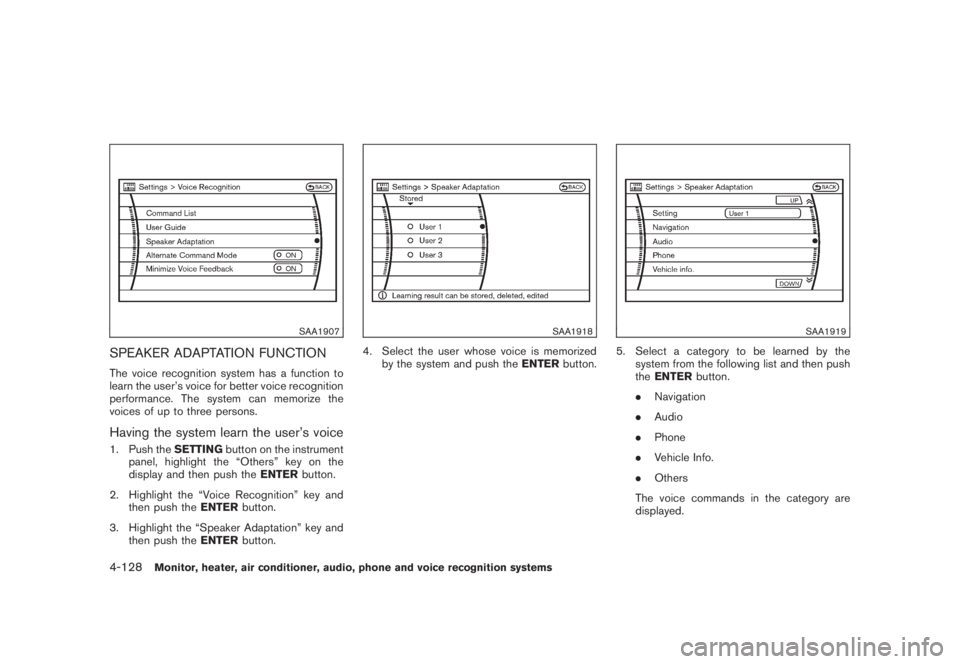
voices of up to three persons.Having the system learn the user’s voice1. Push theSETTINGbutton on the instrument
panel, highlight the “Others” key on the
display and then push theENTERbutton.
2. Highlight the “Voice Recognition” key and
then push theENTERbutton.
3. Highlight the “Speaker Adaptation” key and
then push theENTERbutton.
SAA1918
4. Select the user whose voice is memorized
by the system and push theENTERbutton.
SAA1919
5. Select a category to be learned by the
system from the following list and then push
theENTERbutton.
.Navigation
.Audio
.Phone
.Vehicle Info.
.Others
The voice commands in the category are
displayed.
4-128
Monitor, heater, air conditioner, audio, phone and voice recognition systems
Page 295 of 444
Black plate (291,1)
Model "Z51-D" EDITED: 2008/ 6/ 26
6. Select a voice command and then push the
ENTERbutton.
The voice recognition system starts.
SAA1921
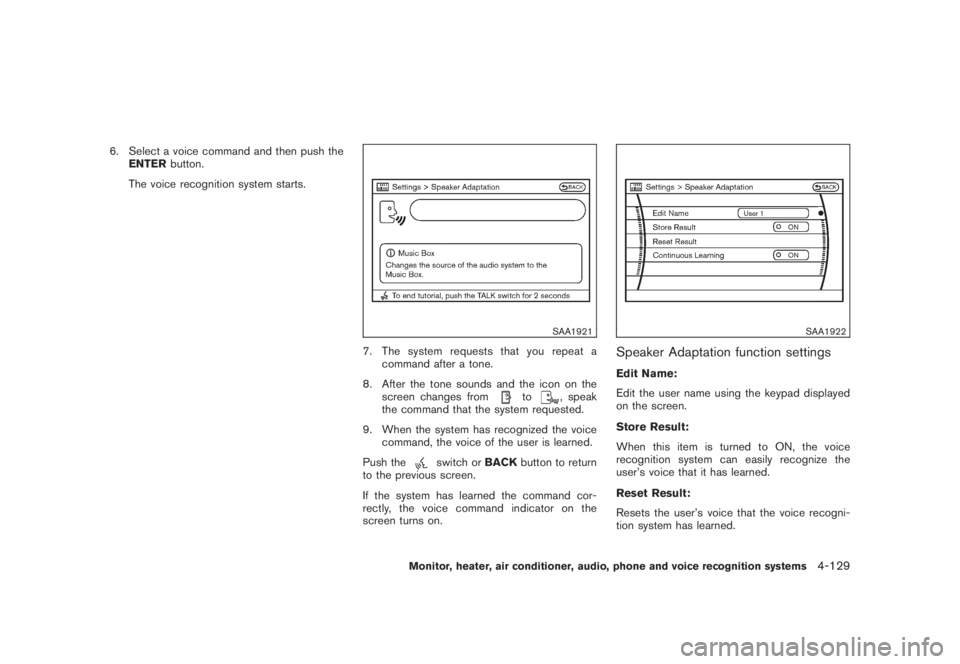
7. The system requests that you repeat a
command after a tone.
8. After the tone sounds and the icon on the
screen changes from
to
, speak
the command that the system requested.
9. When the system has recognized the voice
command, the voice of the user is learned.
Push the
switch orBACKbutton to return
to the previous screen.
If the system has learned the command cor-
rectly, the voice command indicator on the
screen turns on.
SAA1922
Speaker Adaptation function settingsEdit Name:
Edit the user name using the keypad displayed
on the screen.
Store Result:
When this item is turned to ON, the voice
recognition system can easily recognize the
user’s voice that it has learned.
Reset Result:
Resets the user’s voice that the voice recogni-
tion system has learned.
Monitor, heater, air conditioner, audio, phone and voice recognition systems
4-129
Page 296 of 444
Black plate (292,1)
Model "Z51-D" EDITED: 2008/ 6/ 26
Continuous Learning:
When this item is turned to ON, you can have
the system learn the voice commands in
succession, without selecting commands one
by one.MINIMIZE VOICE FEEDBACK1. Push theSETTINGbutton on the instrument
panel, highlight the “Others” key on the
display and then push theENTERbutton.
2. Highlight the “Voice Recognition” key and
then push theENTERbutton.
3. Highlight the “Minimize Voice Feedback” key
and push theENTERbutton.
4. The item is turned to ON and the vocal
feedback is reduces if the voice recognition
system is activated.4-130
Monitor, heater, air conditioner, audio, phone and voice recognition systems
Page 297 of 444
Black plate (293,1)
Model "Z51-D" EDITED: 2008/ 6/ 26
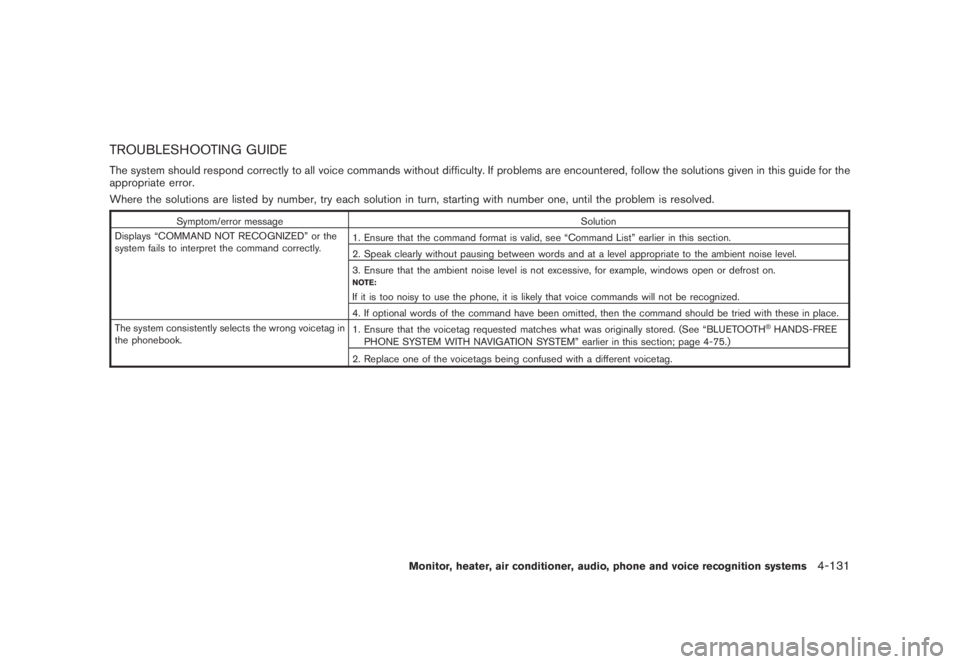
TROUBLESHOOTING GUIDEThe system should respond correctly to all voice commands without difficulty. If problems are encountered, follow the solutions given in this guide for the
appropriate error.
Where the solutions are listed by number, try each solution in turn, starting with number one, until the problem is resolved.
Symptom/error message Solution
Displays “COMMAND NOT RECOGNIZED” or the
system fails to interpret the command correctly.1. Ensure that the command format is valid, see “Command List” earlier in this section.
2. Speak clearly without pausing between words and at a level appropriate to the ambient noise level.
3. Ensure that the ambient noise level is not excessive, for example, windows open or defrost on.
NOTE:If it is too noisy to use the phone, it is likely that voice commands will not be recognized.
4. If optional words of the command have been omitted, then the command should be tried with these in place.
The system consistently selects the wrong voicetag in
the phonebook.1. Ensure that the voicetag requested matches what was originally stored. (See “BLUETOOTH
®HANDS-FREE
PHONE SYSTEM WITH NAVIGATION SYSTEM” earlier in this section; page 4-75.)
2. Replace one of the voicetags being confused with a different voicetag.
Monitor, heater, air conditioner, audio, phone and voice recognition systems
4-131
Page 298 of 444
Black plate (294,1)
Model "Z51-D" EDITED: 2008/ 6/ 26
NISSAN Voice Recognition allows hands-free
operation of the systems equipped on this
vehicle, such as the display, audio, climate
control, phone and optional navigation systems.
To operate NISSAN Voice Recognition, push
and release the TALK
switch located on the
steering wheel. Then speak the command for the
system you wish to activate. The command given
is picked up by the microphone, and it is
performed when it is properly recognized. At
this time NISSAN Voice Recognition will provide
a voice and message (in the center display) to
inform you of the command results.
COMMAND LIST
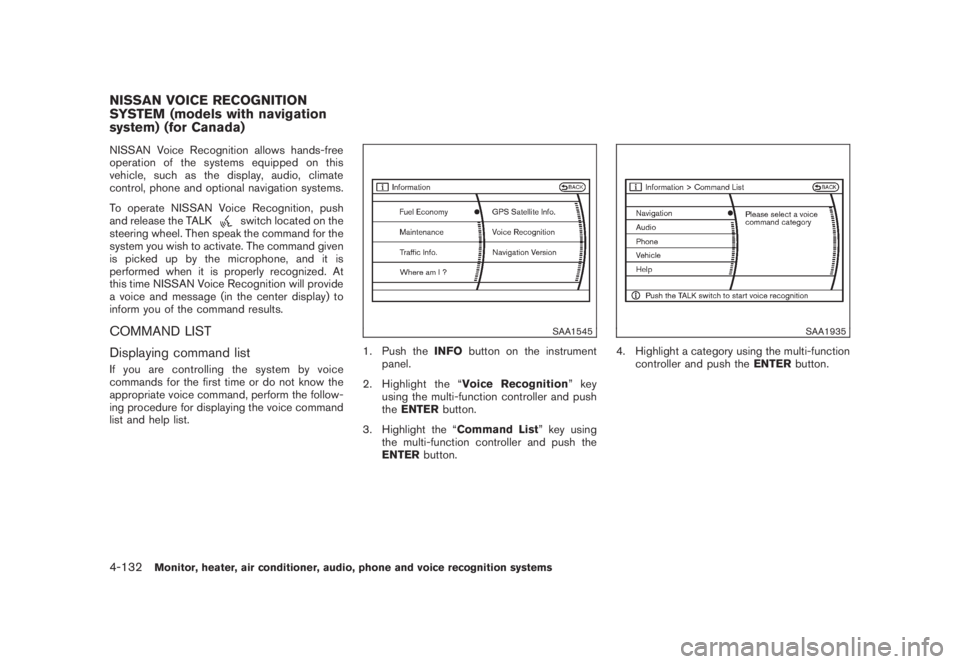
Displaying command listIf you are controlling the system by voice
commands for the first time or do not know the
appropriate voice command, perform the follow-
ing procedure for displaying the voice command
list and help list.
SAA1545
1. Push theINFObutton on the instrument
panel.
2. Highlight the “Voice Recognition”key
using the multi-function controller and push
theENTERbutton.
3. Highlight the “Command List” key using
the multi-function controller and push the
ENTERbutton.
SAA1935
4. Highlight a category using the multi-function
controller and push theENTERbutton.
NISSAN VOICE RECOGNITION
SYSTEM (models with navigation
system) (for Canada)4-132
Monitor, heater, air conditioner, audio, phone and voice recognition systems
Page 301 of 444
Black plate (297,1)
Model "Z51-D" EDITED: 2008/ 6/ 26
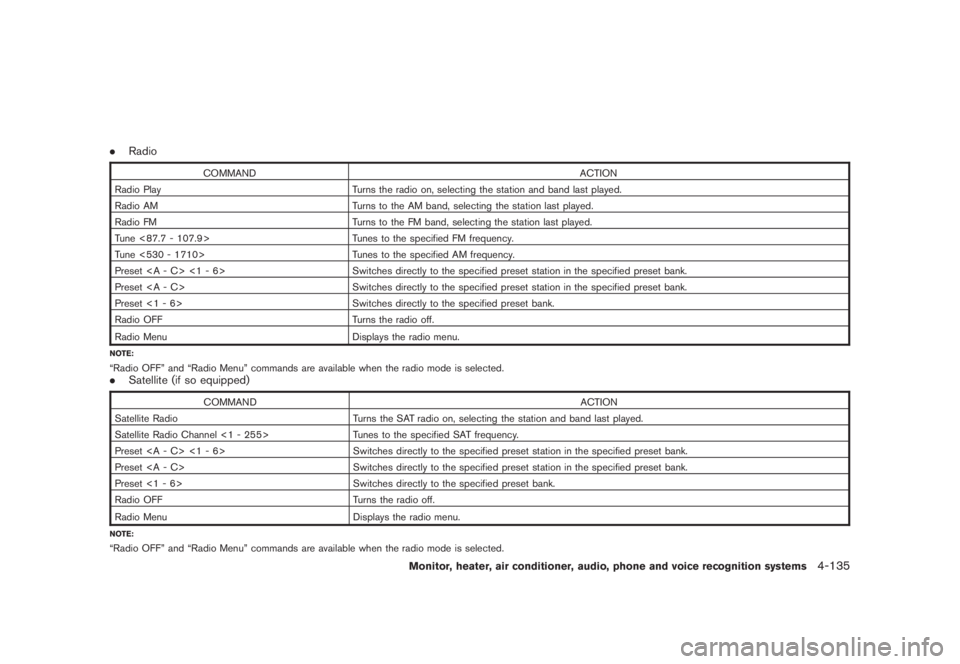
.Radio
COMMAND ACTION
Radio Play Turns the radio on, selecting the station and band last played.
Radio AM Turns to the AM band, selecting the station last played.
Radio FM Turns to the FM band, selecting the station last played.
Tune <87.7 - 107.9> Tunes to the specified FM frequency.
Tune <530 - 1710> Tunes to the specified AM frequency.
Preset <1 - 6> Switches directly to the specified preset station in the specified preset bank.
Preset Switches directly to the specified preset station in the specified preset bank.
Preset <1 - 6> Switches directly to the specified preset bank.
Radio OFF Turns the radio off.
Radio Menu
Displays the radio menu.
NOTE:“Radio OFF” and “Radio Menu” commands are available when the radio mode is selected..Satellite (if so equipped)
COMMAND ACTION
Satellite Radio Turns the SAT radio on, selecting the station and band last played.
Satellite Radio Channel <1 - 255> Tunes to the specified SAT frequency.
Preset <1 - 6> Switches directly to the specified preset station in the specified preset bank.
Preset Switches directly to the specified preset station in the specified preset bank.
Preset <1 - 6> Switches directly to the specified preset bank.
Radio OFF Turns the radio off.
Radio Menu
Displays the radio menu.
NOTE:“Radio OFF” and “Radio Menu” commands are available when the radio mode is selected.
Monitor, heater, air conditioner, audio, phone and voice recognition systems
4-135
Page 302 of 444
Black plate (298,1)
Model "Z51-D" EDITED: 2008/ 6/ 26
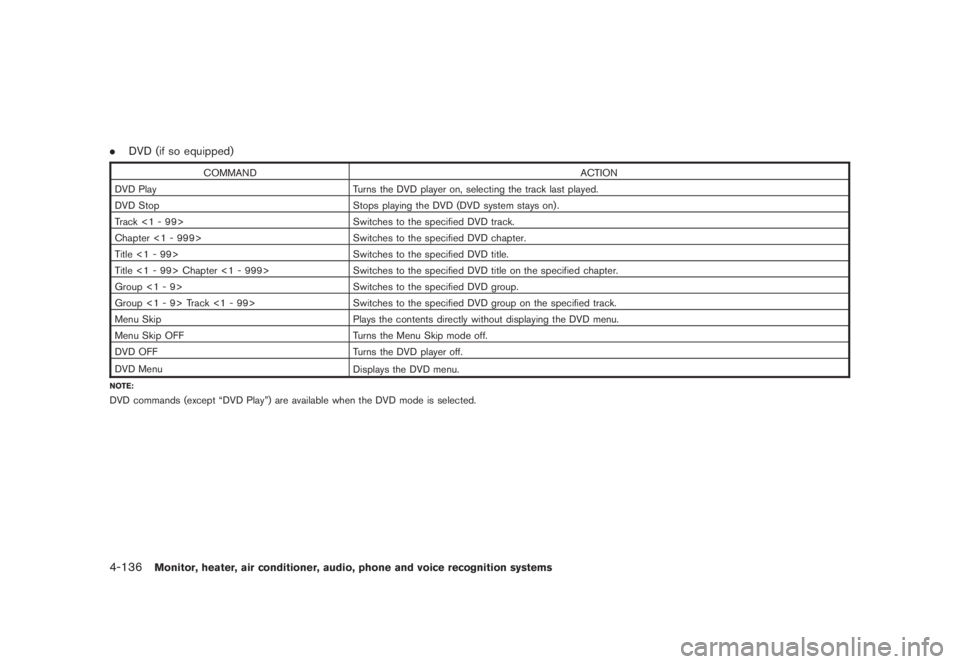
.DVD (if so equipped)
COMMAND ACTION
DVD Play Turns the DVD player on, selecting the track last played.
DVD Stop Stops playing the DVD (DVD system stays on) .
Track <1 - 99> Switches to the specified DVD track.
Chapter <1 - 999> Switches to the specified DVD chapter.
Title <1 - 99> Switches to the specified DVD title.
Title <1 - 99> Chapter <1 - 999> Switches to the specified DVD title on the specified chapter.
Group <1 - 9> Switches to the specified DVD group.
Group <1 - 9> Track <1 - 99> Switches to the specified DVD group on the specified track.
Menu Skip Plays the contents directly without displaying the DVD menu.
Menu Skip OFF Turns the Menu Skip mode off.
DVD OFF Turns the DVD player off.
DVD Menu
Displays the DVD menu.
NOTE:DVD commands (except “DVD Play”) are available when the DVD mode is selected.4-136
Monitor, heater, air conditioner, audio, phone and voice recognition systems
Page 303 of 444
Black plate (299,1)
Model "Z51-D" EDITED: 2008/ 6/ 26
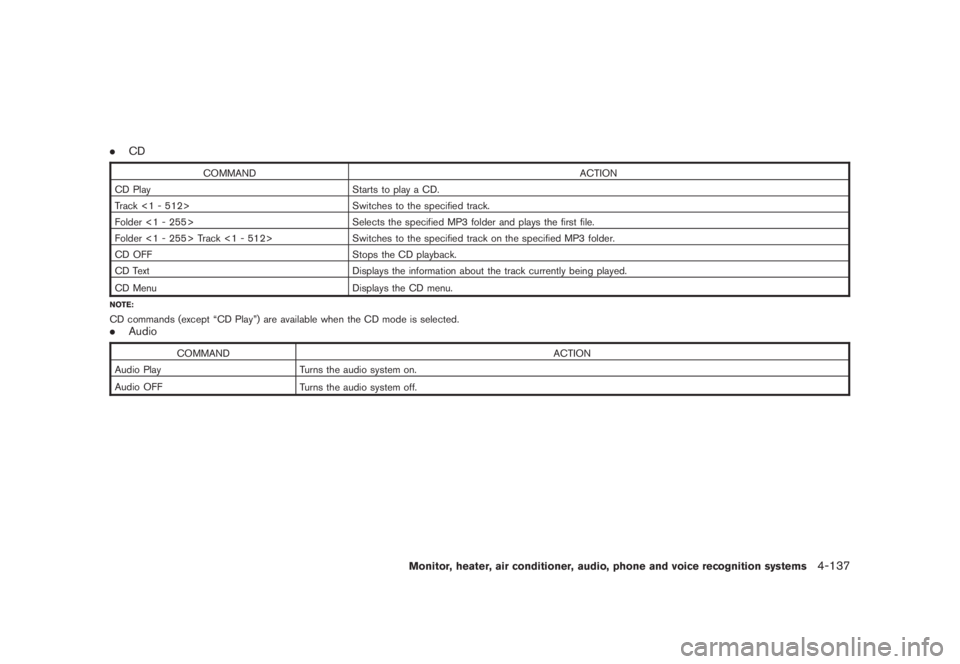
.CD
COMMAND ACTION
CD Play Starts to play a CD.
Track <1 - 512> Switches to the specified track.
Folder <1 - 255> Selects the specified MP3 folder and plays the first file.
Folder <1 - 255> Track <1 - 512> Switches to the specified track on the specified MP3 folder.
CD OFF Stops the CD playback.
CD Text Displays the information about the track currently being played.
CD Menu
Displays the CD menu.
NOTE:CD commands (except “CD Play”) are available when the CD mode is selected..Audio
COMMAND ACTION
Audio Play Turns the audio system on.
Audio OFF
Turns the audio system off.
Monitor, heater, air conditioner, audio, phone and voice recognition systems
4-137
Page 304 of 444
Black plate (300,1)
Model "Z51-D" EDITED: 2008/ 6/ 26
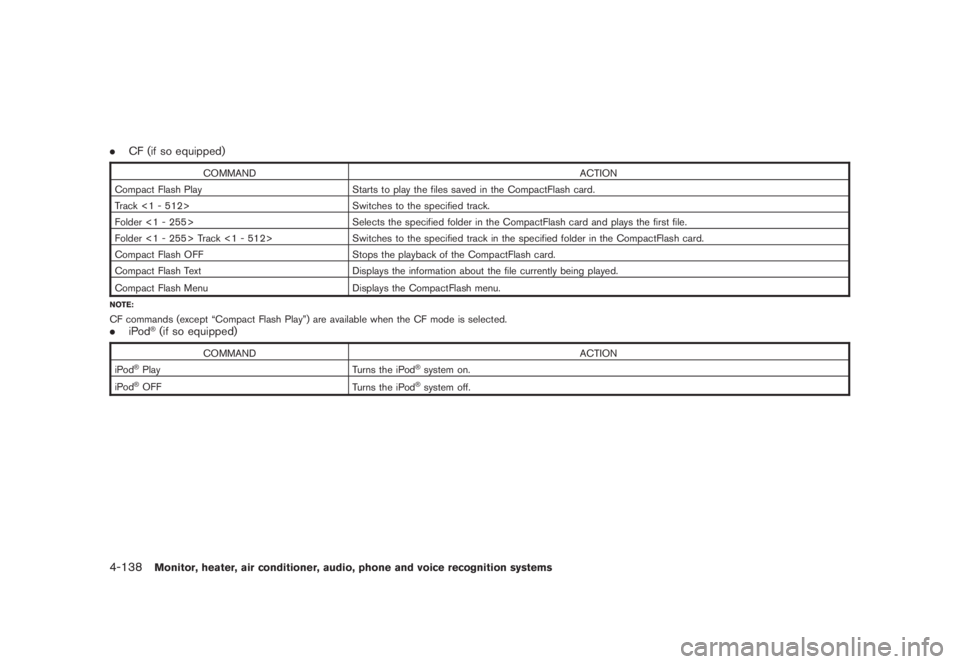
.CF (if so equipped)
COMMAND ACTION
Compact Flash Play Starts to play the files saved in the CompactFlash card.
Track <1 - 512> Switches to the specified track.
Folder <1 - 255> Selects the specified folder in the CompactFlash card and plays the first file.
Folder <1 - 255> Track <1 - 512> Switches to the specified track in the specified folder in the CompactFlash card.
Compact Flash OFF Stops the playback of the CompactFlash card.
Compact Flash Text Displays the information about the file currently being played.
Compact Flash Menu
Displays the CompactFlash menu.
NOTE:CF commands (except “Compact Flash Play”) are available when the CF mode is selected..iPod
®(if so equipped)
COMMAND ACTION
iPod
®Play Turns the iPod
®system on.
iPod
®OFF
Turns the iPod
®system off.
4-138
Monitor, heater, air conditioner, audio, phone and voice recognition systems