ECO mode NISSAN MURANO 2008 Manual Online
[x] Cancel search | Manufacturer: NISSAN, Model Year: 2008, Model line: MURANO, Model: NISSAN MURANO 2008Pages: 444, PDF Size: 6.09 MB
Page 169 of 444
Black plate (165,1)
Model "Z51-D" EDITED: 2008/ 6/ 26
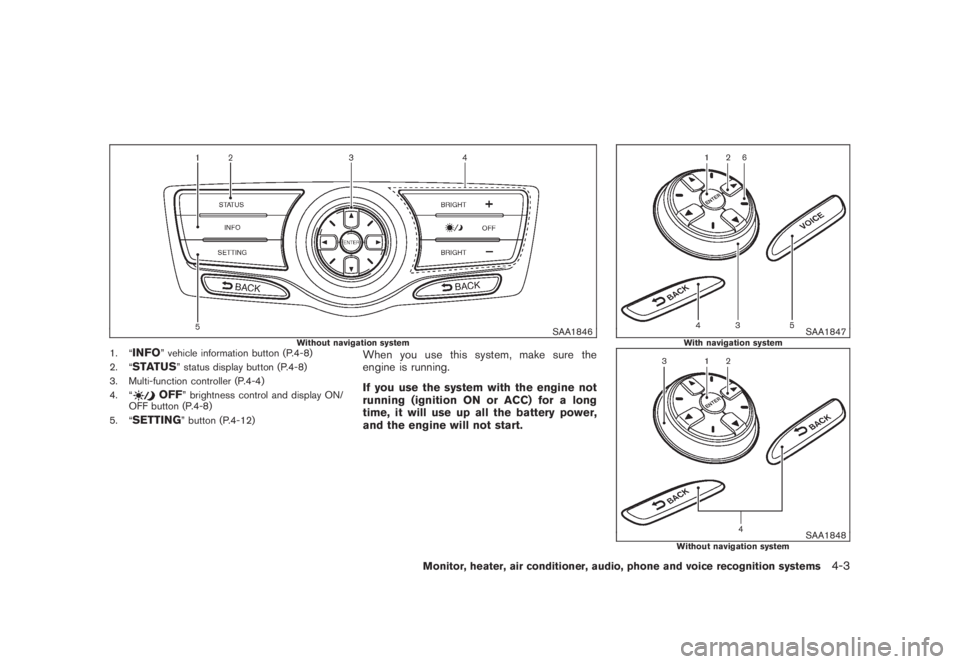
SAA1846
Without navigation system
1. “
INFO
” vehicle information button (P.4-8)
2. “
STATUS
” status display button (P.4-8)
3. Multi-function controller (P.4-4)
4. “
OFF
” brightness control and display ON/
OFF button (P.4-8)
5. “
SETTING
” button (P.4-12)
When you use this system, make sure the
engine is running.
If you use the system with the engine not
running (ignition ON or ACC) for a long
time, it will use up all the battery power,
and the engine will not start.
SAA1847
With navigation system
SAA1848
Without navigation system
Monitor, heater, air conditioner, audio, phone and voice recognition systems
4-3
Page 170 of 444
Black plate (166,1)
Model "Z51-D" EDITED: 2008/ 6/ 26
HOW TO USE MULTI-FUNCTION
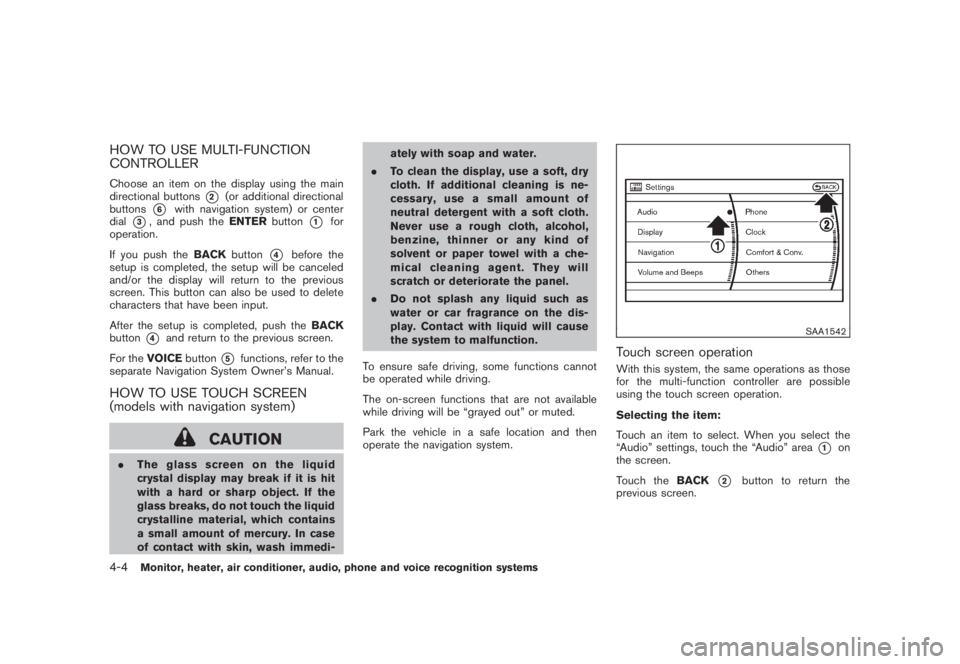
CONTROLLERChoose an item on the display using the main
directional buttons
*2
(or additional directional
buttons
*6
with navigation system) or center
dial
*3, and push theENTERbutton
*1
for
operation.
If you push theBACKbutton
*4
before the
setup is completed, the setup will be canceled
and/or the display will return to the previous
screen. This button can also be used to delete
characters that have been input.
After the setup is completed, push theBACK
button
*4
and return to the previous screen.
For theVOICEbutton
*5
functions, refer to the
separate Navigation System Owner’s Manual.
HOW TO USE TOUCH SCREEN
(models with navigation system)
CAUTION
.The glass screen on the liquid
crystal display may break if it is hit
with a hard or sharp object. If the
glass breaks, do not touch the liquid
crystalline material, which contains
a small amount of mercury. In case
of contact with skin, wash immedi-ately with soap and water.
.To clean the display, use a soft, dry
cloth. If additional cleaning is ne-
cessary, use a small amount of
neutral detergent with a soft cloth.
Never use a rough cloth, alcohol,
benzine, thinner or any kind of
solvent or paper towel with a che-
mical cleaning agent. They will
scratch or deteriorate the panel.
.Do not splash any liquid such as
water or car fragrance on the dis-
play. Contact with liquid will cause
the system to malfunction.
To ensure safe driving, some functions cannot
be operated while driving.
The on-screen functions that are not available
while driving will be “grayed out” or muted.
Park the vehicle in a safe location and then
operate the navigation system.
SAA1542
Touch screen operationWith this system, the same operations as those
for the multi-function controller are possible
using the touch screen operation.
Selecting the item:
Touch an item to select. When you select the
“Audio” settings, touch the “Audio” area
*1
on
the screen.
Touch theBACK
*2
button to return the
previous screen.
4-4
Monitor, heater, air conditioner, audio, phone and voice recognition systems
Page 171 of 444
Black plate (167,1)
Model "Z51-D" EDITED: 2008/ 6/ 26
SAA1543
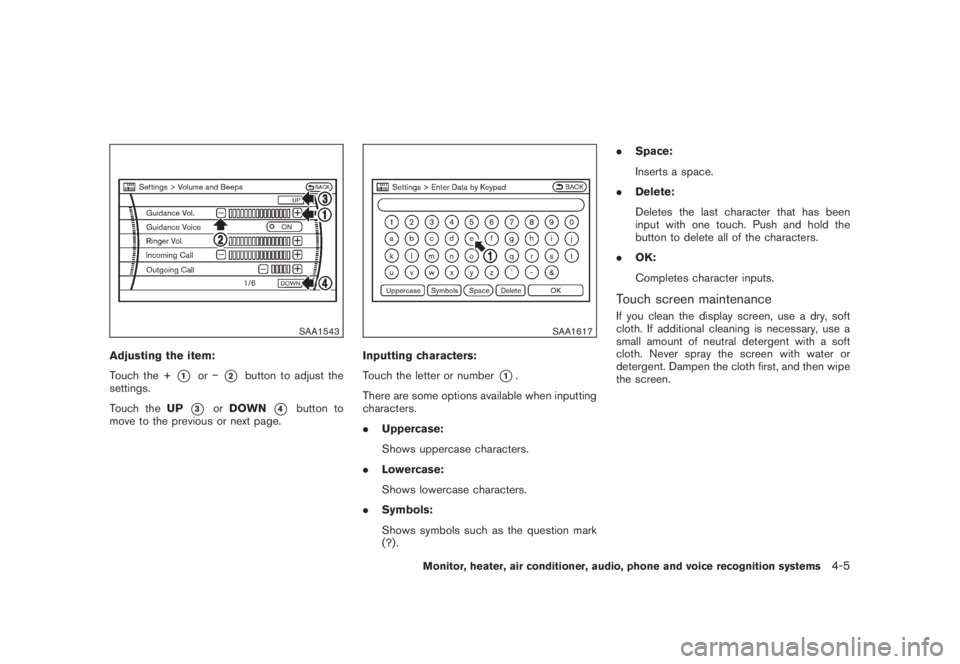
Adjusting the item:
Touch the +
*1
or
*2
button to adjust the
settings.
Touch theUP
*3
orDOWN
*4
button to
move to the previous or next page.
SAA1617
Inputting characters:
Touch the letter or number
*1.
There are some options available when inputting
characters.
.Uppercase:
Shows uppercase characters.
.Lowercase:
Shows lowercase characters.
.Symbols:
Shows symbols such as the question mark
(?) ..Space:
Inserts a space.
.Delete:
Deletes the last character that has been
input with one touch. Push and hold the
button to delete all of the characters.
.OK:
Completes character inputs.
Touch screen maintenanceIf you clean the display screen, use a dry, soft
cloth. If additional cleaning is necessary, use a
small amount of neutral detergent with a soft
cloth. Never spray the screen with water or
detergent. Dampen the cloth first, and then wipe
the screen.
Monitor, heater, air conditioner, audio, phone and voice recognition systems
4-5
Page 172 of 444
Black plate (168,1)
Model "Z51-D" EDITED: 2008/ 6/ 26
SAA1454
START-UP SCREEN (models with navi-
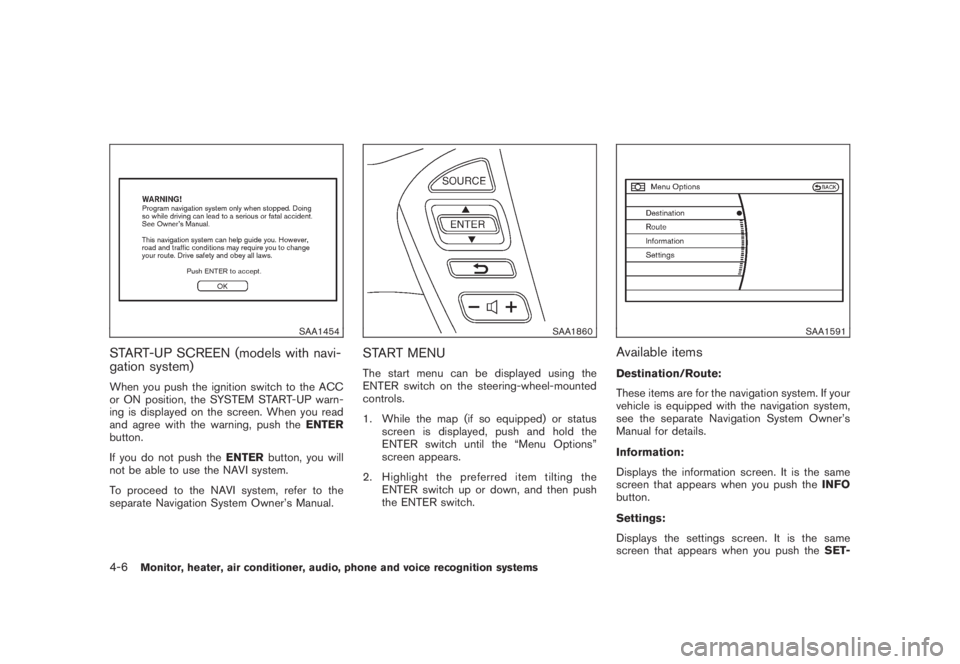
gation system)When you push the ignition switch to the ACC
or ON position, the SYSTEM START-UP warn-
ing is displayed on the screen. When you read
and agree with the warning, push theENTER
button.
If you do not push theENTERbutton, you will
not be able to use the NAVI system.
To proceed to the NAVI system, refer to the
separate Navigation System Owner’s Manual.
SAA1860
START MENUThe start menu can be displayed using the
ENTER switch on the steering-wheel-mounted
controls.
1. While the map (if so equipped) or status
screen is displayed, push and hold the
ENTER switch until the “Menu Options”
screen appears.
2. Highlight the preferred item tilting the
ENTER switch up or down, and then push
the ENTER switch.
SAA1591
Available itemsDestination/Route:
These items are for the navigation system. If your
vehicle is equipped with the navigation system,
see the separate Navigation System Owner’s
Manual for details.
Information:
Displays the information screen. It is the same
screen that appears when you push theINFO
button.
Settings:
Displays the settings screen. It is the same
screen that appears when you push theSET-
4-6
Monitor, heater, air conditioner, audio, phone and voice recognition systems
Page 173 of 444
Black plate (169,1)
Model "Z51-D" EDITED: 2008/ 6/ 26
TINGbutton.
SAA1510
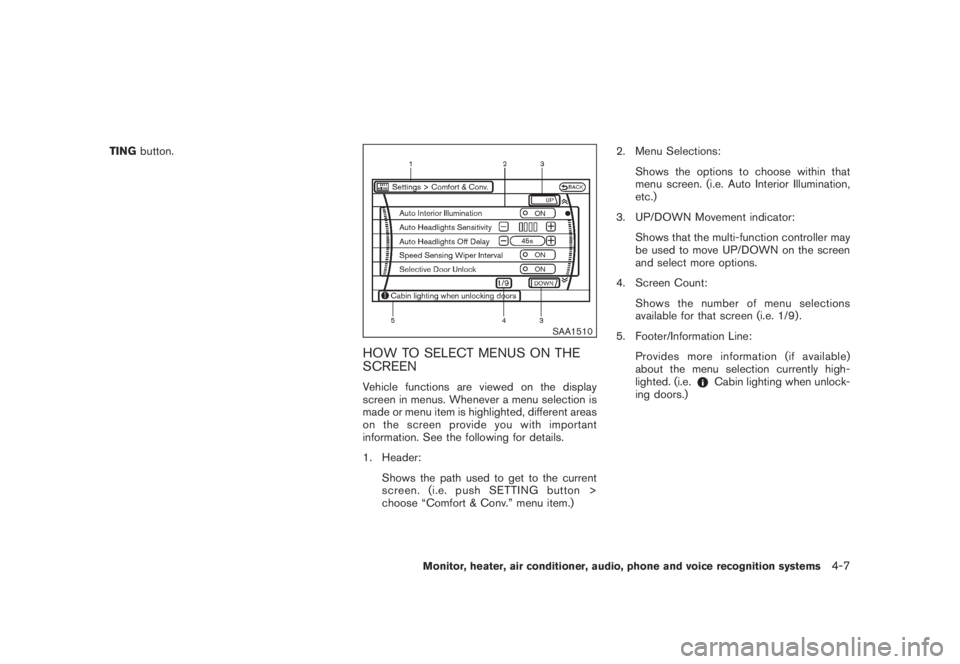
HOW TO SELECT MENUS ON THE
SCREENVehicle functions are viewed on the display
screen in menus. Whenever a menu selection is
made or menu item is highlighted, different areas
onthescreenprovideyouwithimportant
information. See the following for details.
1. Header:
Shows the path used to get to the current
screen. (i.e. push SETTING button >
choose “Comfort & Conv.” menu item.)2. Menu Selections:
Shows the options to choose within that
menu screen. (i.e. Auto Interior Illumination,
etc.)
3. UP/DOWN Movement indicator:
Shows that the multi-function controller may
be used to move UP/DOWN on the screen
and select more options.
4. Screen Count:
Shows the number of menu selections
available for that screen (i.e. 1/9) .
5. Footer/Information Line:
Provides more information (if available)
about the menu selection currently high-
lighted. (i.e.
Cabin lighting when unlock-
ing doors.)
Monitor, heater, air conditioner, audio, phone and voice recognition systems
4-7
Page 174 of 444
Black plate (170,1)
Model "Z51-D" EDITED: 2008/ 6/ 26
HOW TO USE STATUS BUTTONTo display the status of the audio, climate control
system, fuel consumption and navigation system
(if so equipped) , push theSTATUSbutton. The
following information will appear when the
STATUSbutton is pushed.
Audio?Audio and Climate control system?
Audio and fuel consumption?Audio and
Navigation system (if so equipped)?AudioHOW TO USE BRIGHTNESS CON-
TROL AND DISPLAY ON/OFF BUTTONPush the “
OFF” button to switch the
display brightness to the daytime mode or the
nighttime mode, and to adjust the display
brightness using the multi-function controller
while the indicator is displayed at the bottom of
the screen.
The display brightness can also be adjusted
using the brightness UP button (+) or bright-
ness DOWN button ().
Push the “OFF” button for more than 2
seconds to turn the display off. Push the button
again to turn the display on.
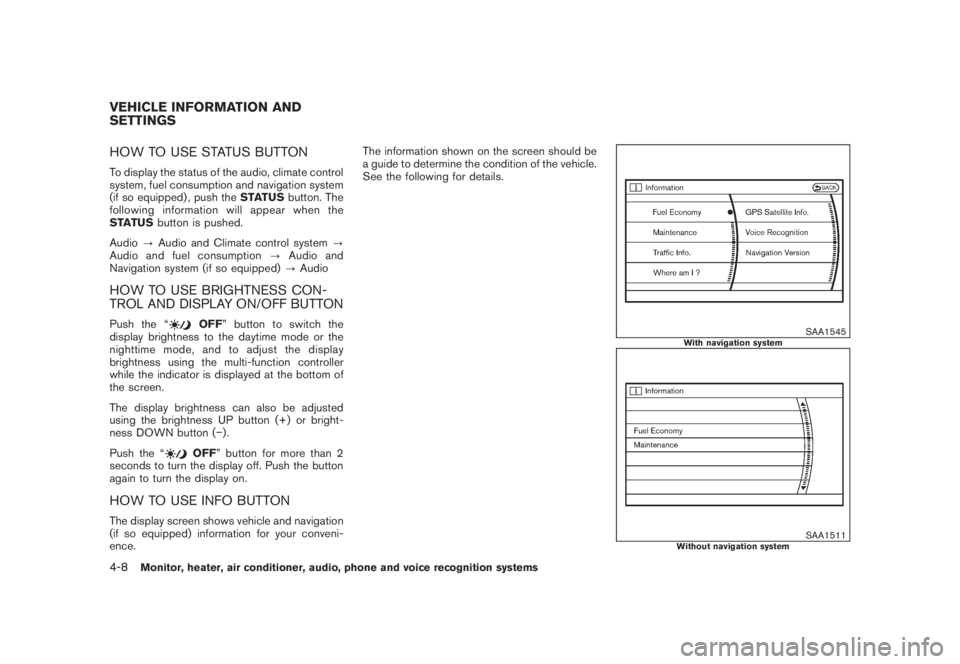
HOW TO USE INFO BUTTONThe display screen shows vehicle and navigation
(if so equipped) information for your conveni-
ence.The information shown on the screen should be
a guide to determine the condition of the vehicle.
See the following for details.
SAA1545
With navigation system
SAA1511
Without navigation system
VEHICLE INFORMATION AND
SETTINGS4-8
Monitor, heater, air conditioner, audio, phone and voice recognition systems
Page 175 of 444
Black plate (171,1)
Model "Z51-D" EDITED: 2008/ 6/ 26
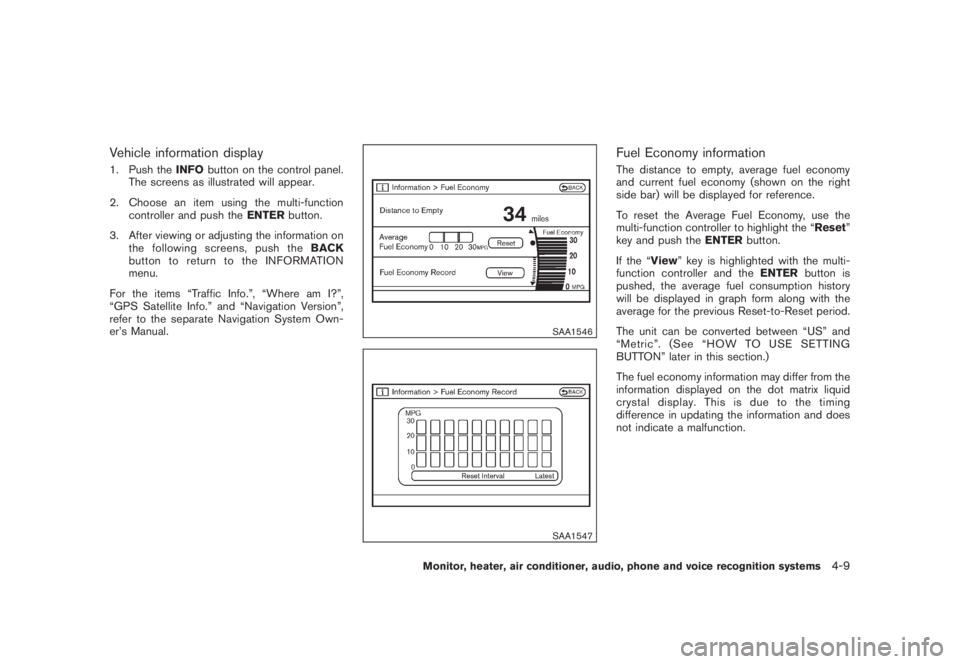
Vehicle information display1. Push theINFObutton on the control panel.
The screens as illustrated will appear.
2. Choose an item using the multi-function
controller and push theENTERbutton.
3. After viewing or adjusting the information on
the following screens, push theBACK
button to return to the INFORMATION
menu.
For the items “Traffic Info.”, “Where am I?”,
“GPS Satellite Info.” and “Navigation Version”,
refer to the separate Navigation System Own-
er’s Manual.
SAA1546SAA1547
Fuel Economy informationThe distance to empty, average fuel economy
and current fuel economy (shown on the right
side bar) will be displayed for reference.
To reset the Average Fuel Economy, use the
multi-function controller to highlight the “Reset”
key and push theENTERbutton.
If the “View” key is highlighted with the multi-
function controller and theENTERbutton is
pushed, the average fuel consumption history
will be displayed in graph form along with the
average for the previous Reset-to-Reset period.
The unit can be converted between “US” and
“Metric”. (See “HOW TO USE SETTING
BUTTON” later in this section.)
The fuel economy information may differ from the
information displayed on the dot matrix liquid
crystal display. This is due to the timing
difference in updating the information and does
not indicate a malfunction.
Monitor, heater, air conditioner, audio, phone and voice recognition systems
4-9
Page 176 of 444
Black plate (172,1)
Model "Z51-D" EDITED: 2008/ 6/ 26
SAA1554
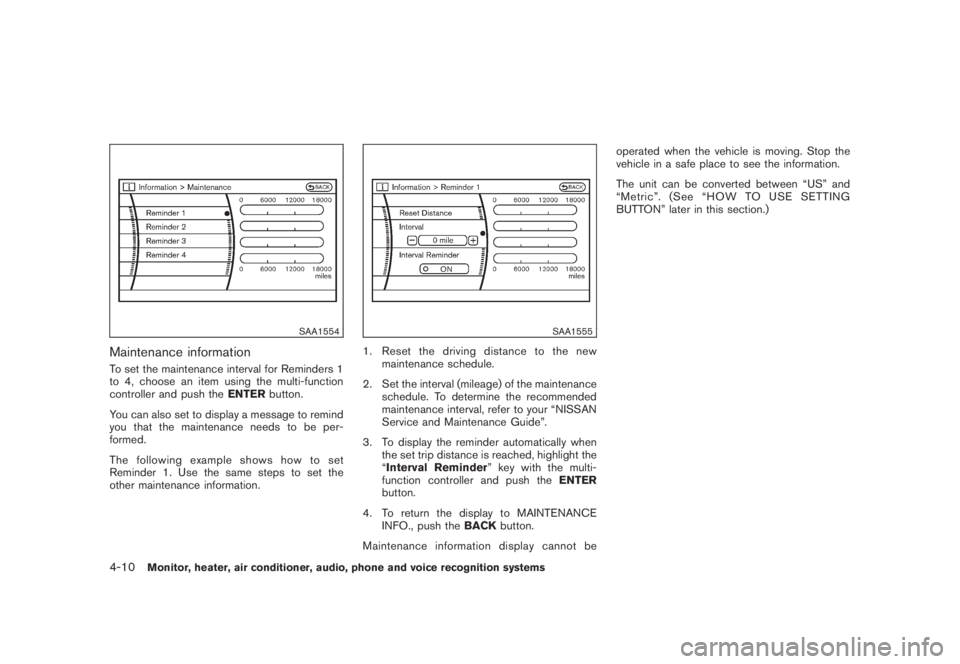
Maintenance informationTo set the maintenance interval for Reminders 1
to 4, choose an item using the multi-function
controller and push theENTERbutton.
You can also set to display a message to remind
you that the maintenance needs to be per-
formed.
The following example shows how to set
Reminder 1. Use the same steps to set the
other maintenance information.
SAA1555
1. Reset the driving distance to the new
maintenance schedule.
2. Set the interval (mileage) of the maintenance
schedule. To determine the recommended
maintenance interval, refer to your “NISSAN
Service and Maintenance Guide”.
3. To display the reminder automatically when
the set trip distance is reached, highlight the
“Interval Reminder” key with the multi-
function controller and push theENTER
button.
4. To return the display to MAINTENANCE
INFO., push theBACKbutton.
Maintenance information display cannot beoperated when the vehicle is moving. Stop the
vehicle in a safe place to see the information.
The unit can be converted between “US” and
“Metric”. (See “HOW TO USE SETTING
BUTTON” later in this section.)
4-10
Monitor, heater, air conditioner, audio, phone and voice recognition systems
Page 177 of 444
Black plate (173,1)
Model "Z51-D" EDITED: 2008/ 6/ 26
SAA1611
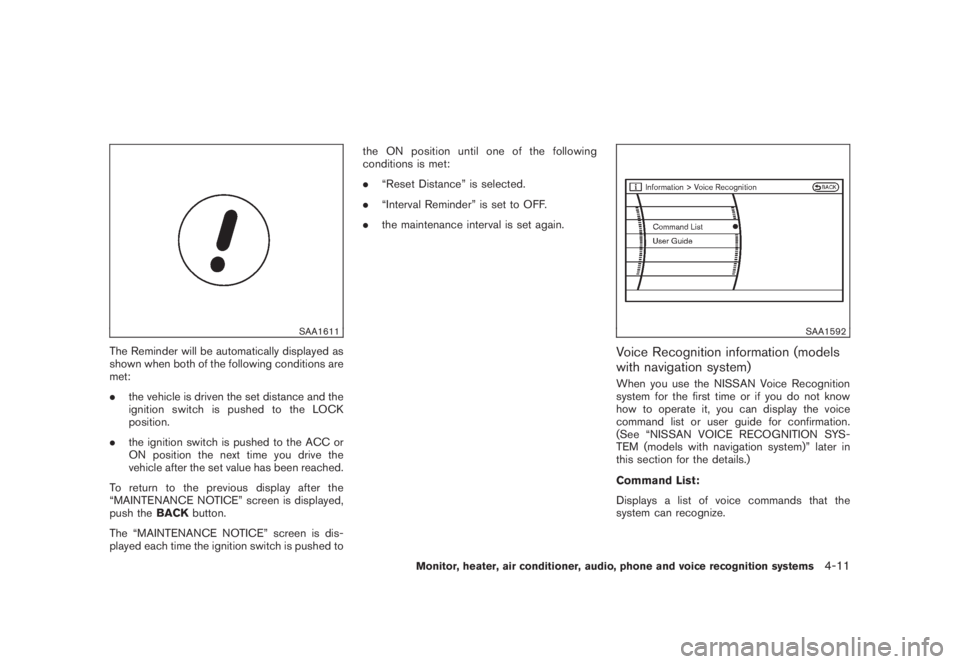
The Reminder will be automatically displayed as
shown when both of the following conditions are
met:
.the vehicle is driven the set distance and the
ignition switch is pushed to the LOCK
position.
.the ignition switch is pushed to the ACC or
ON position the next time you drive the
vehicle after the set value has been reached.
To return to the previous display after the
“MAINTENANCE NOTICE” screen is displayed,
push theBACKbutton.
The “MAINTENANCE NOTICE” screen is dis-
played each time the ignition switch is pushed tothe ON position until one of the following
conditions is met:
.“Reset Distance” is selected.
.“Interval Reminder” is set to OFF.
.the maintenance interval is set again.
SAA1592
Voice Recognition information (models
with navigation system)When you use the NISSAN Voice Recognition
system for the first time or if you do not know
how to operate it, you can display the voice
command list or user guide for confirmation.
(See “NISSAN VOICE RECOGNITION SYS-
TEM (models with navigation system)” later in
this section for the details.)
Command List:
Displays a list of voice commands that the
system can recognize.
Monitor, heater, air conditioner, audio, phone and voice recognition systems
4-11
Page 178 of 444
Black plate (174,1)
Model "Z51-D" EDITED: 2008/ 6/ 26
User Guide:
Displays a simplified operation manual of the
voice recognition system and how to use the
voice commands.
SAA1556
With navigation system
SAA1514
Without navigation system
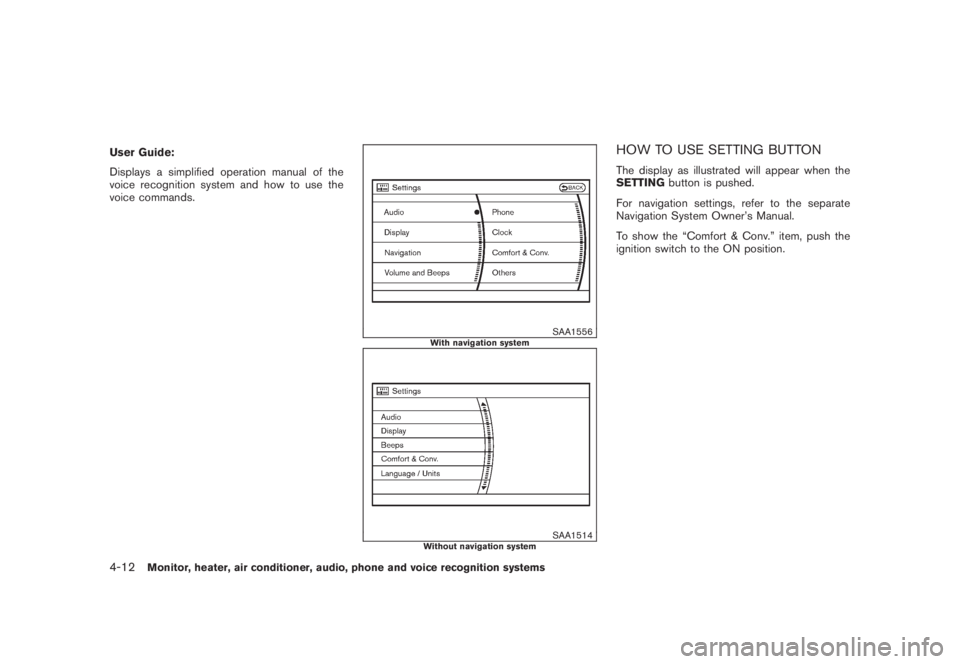
HOW TO USE SETTING BUTTONThe display as illustrated will appear when the
SETTINGbutton is pushed.
For navigation settings, refer to the separate
Navigation System Owner’s Manual.
To show the “Comfort & Conv.” item, push the
ignition switch to the ON position.
4-12
Monitor, heater, air conditioner, audio, phone and voice recognition systems