ECO mode NISSAN MURANO 2008 Service Manual
[x] Cancel search | Manufacturer: NISSAN, Model Year: 2008, Model line: MURANO, Model: NISSAN MURANO 2008Pages: 444, PDF Size: 6.09 MB
Page 102 of 444
Black plate (98,1)
Model "Z51-D" EDITED: 2008/ 6/ 26
.High — High sensitive operation
.Low — Low sensitive operation
To turn the rain-sensing auto wiper system off,
push up the lever to the OFF position, or pull
down the lever to the LO or HI position.
CAUTION
Do not touch the rain sensor and
around it when the wiper switch is in
the INT position and the ignition switch
is in the ON position. The wipers may
operate unexpectedly and cause to an
injury or a wiper damage.
.The rain-sensing auto wipers are in-
tended for use during rain. If the switch
is left in the INT position, the wipers
may operate unexpectedly when dirt,
fingerprints, oil film or insects are stuck
on or around the sensor. The wipers
may also operate when exhaust gas or
moisture affect the rain sensor.
.The rain-sensing auto wipers may not
operate if rain does not hit the rain
sensor even if it is raining.
WARNING
In freezing temperatures the washer
solution may freeze on the rear window
glass and obscure your vision. Warm
the rear window with the defroster
before you wash the rear window.
CAUTION
.Do not operate the washer continu-
ously for more than 30 seconds.
.Do not operate the washer if the
reservoir tank is empty.
.Do not fill the window washer
reservoir tank with washer fluid
concentrates at full strength. Some
methyl alcohol based washer fluid
concentrates may permanently stain
the grille if spilled while filling the
window washer reservoir tank.
.Pre-mix washer fluid concentrates
with water to the manufacturer’s
recommended levels before pouring
the fluid into the window washer
reservoir tank. Do not use the
window washer reservoir tank to
mix the washer fluid concentrateand water.
If the rear window wiper operation is
interrupted by snow or ice, the wiper may
stop moving to protect its motor. If this
occurs, turn the wiper switch to the OFF
position and remove the snow or ice that is
on and around the wiper arms. In approxi-
mately 1 minute, turn the switch on again
to operate the wiper.REAR WINDOW WIPER AND
WASHER SWITCH
2-30
Instruments and controls
Page 104 of 444
Black plate (100,1)
Model "Z51-D" EDITED: 2008/ 6/ 26
XENON HEADLIGHTS (if so equipped)
WARNINGHIGH VOLTAGE
.When xenon headlights are on, they
produce a high voltage. To prevent
an electric shock, never attempt to
modify or disassemble. Always have
your xenon headlights replaced at a
NISSAN dealer.
.Xenon headlights provide consider-
ably more light than conventional
headlights. If they are not correctly
aimed, they might temporarily blind
an oncoming driver or the driver
ahead of you and cause a serious
accident. If headlights are not aimed
correctly, immediately take your ve-
hicle to a NISSAN dealer and have
the headlights adjusted correctly.
When the xenon headlight is initially turned on,
its brightness or color varies slightly. However,
the color and brightness will soon stabilize.
.The life of xenon headlights will be
shortened by frequent on-off opera-
tion. It is generally desirable not to turnoff the headlights for short intervals
(for example, when the vehicle stops at
a traffic signal) . Even when the daytime
running lights are active (Canada only) ,
the xenon headlights do not turn on.
This way the life of the xenon head-
lights is not reduced.
.If the xenon headlight bulb is close to
burning out, the brightness will drasti-
cally decrease, the light will start
blinking, or the color of the light will
become reddish. If one or more of the
above signs appear, contact a NISSAN
dealer.
See “Headlight aiming control” later in this
section for information about adjusting the light
axis.
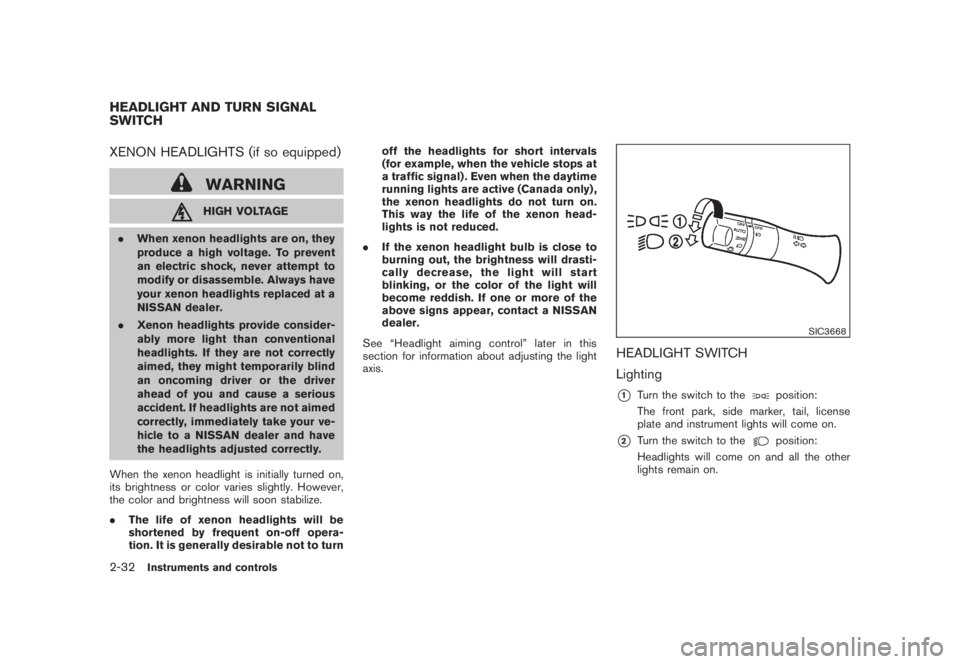
SIC3668
HEADLIGHT SWITCH
Lighting*1
Turn the switch to the
position:
The front park, side marker, tail, license
plate and instrument lights will come on.
*2
Turn the switch to the
position:
Headlights will come on and all the other
lights remain on.
HEADLIGHT AND TURN SIGNAL
SWITCH2-32
Instruments and controls
Page 105 of 444
Black plate (101,1)
Model "Z51-D" EDITED: 2008/ 6/ 26
SIC3669
Autolight system (if so equipped)The autolight system allows the headlights to be
set so they turn on and off automatically.
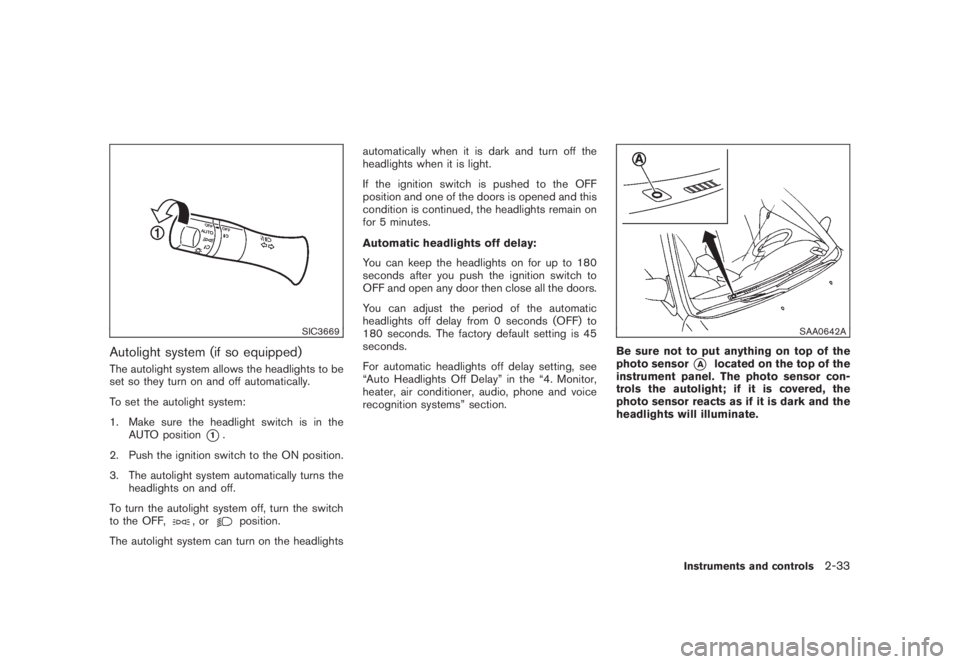
To set the autolight system:
1. Make sure the headlight switch is in the
AUTO position
*1.
2. Push the ignition switch to the ON position.
3. The autolight system automatically turns the
headlights on and off.
To turn the autolight system off, turn the switch
to the OFF,
,or
position.
The autolight system can turn on the headlightsautomatically when it is dark and turn off the
headlights when it is light.
If the ignition switch is pushed to the OFF
position and one of the doors is opened and this
condition is continued, the headlights remain on
for 5 minutes.
Automatic headlights off delay:
You can keep the headlights on for up to 180
seconds after you push the ignition switch to
OFF and open any door then close all the doors.
You can adjust the period of the automatic
headlights off delay from 0 seconds (OFF) to
180 seconds. The factory default setting is 45
seconds.
For automatic headlights off delay setting, see
“Auto Headlights Off Delay” in the “4. Monitor,
heater, air conditioner, audio, phone and voice
recognition systems” section.
SAA0642A
Be sure not to put anything on top of the
photo sensor
*A
located on the top of the
instrument panel. The photo sensor con-
trols the autolight; if it is covered, the
photo sensor reacts as if it is dark and the
headlights will illuminate.
Instruments and controls
2-33
Page 108 of 444
Black plate (104,1)
Model "Z51-D" EDITED: 2008/ 6/ 26
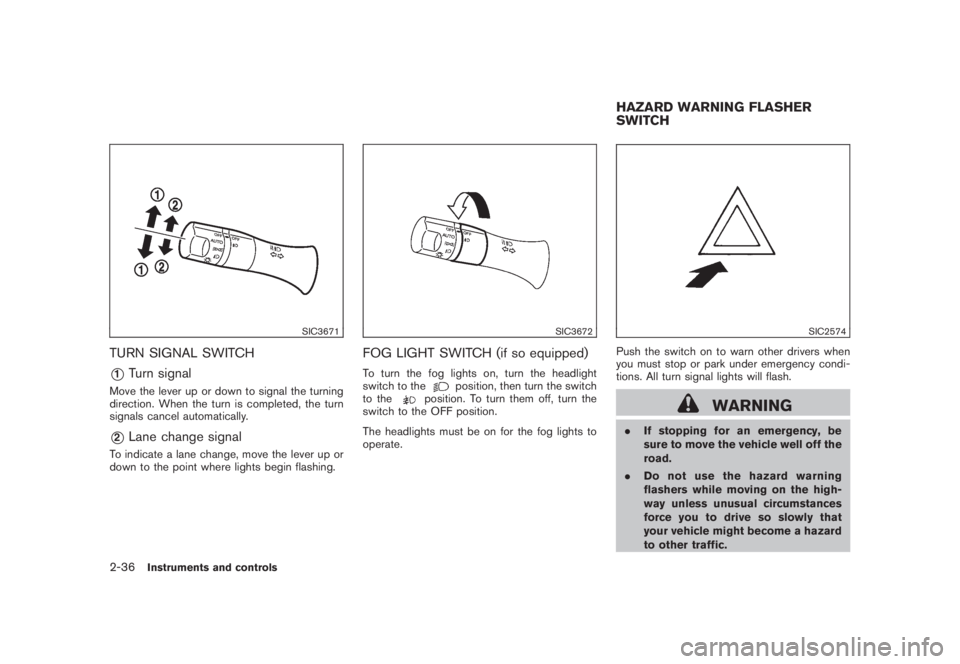
SIC3671
TURN SIGNAL SWITCH*1
Turn signal
Move the lever up or down to signal the turning
direction. When the turn is completed, the turn
signals cancel automatically.*2
Lane change signal
To indicate a lane change, move the lever up or
down to the point where lights begin flashing.
SIC3672
FOG LIGHT SWITCH (if so equipped)To turn the fog lights on, turn the headlight
switch to the
position, then turn the switch
to the
position. To turn them off, turn the
switch to the OFF position.
The headlights must be on for the fog lights to
operate.
SIC2574
Push the switch on to warn other drivers when
you must stop or park under emergency condi-
tions. All turn signal lights will flash.
WARNING
.If stopping for an emergency, be
sure to move the vehicle well off the
road.
.Do not use the hazard warning
flashers while moving on the high-
way unless unusual circumstances
force you to drive so slowly that
your vehicle might become a hazard
to other traffic.HAZARD WARNING FLASHER
SWITCH
2-36
Instruments and controls
Page 109 of 444
Black plate (105,1)
Model "Z51-D" EDITED: 2008/ 6/ 26
.Turn signals do not work when the
hazard warning flasher lights are
on.
The flasher can be actuated with the ignition
switch in any position.
Some state laws may prohibit the use of
the hazard warning flasher switch while
driving.
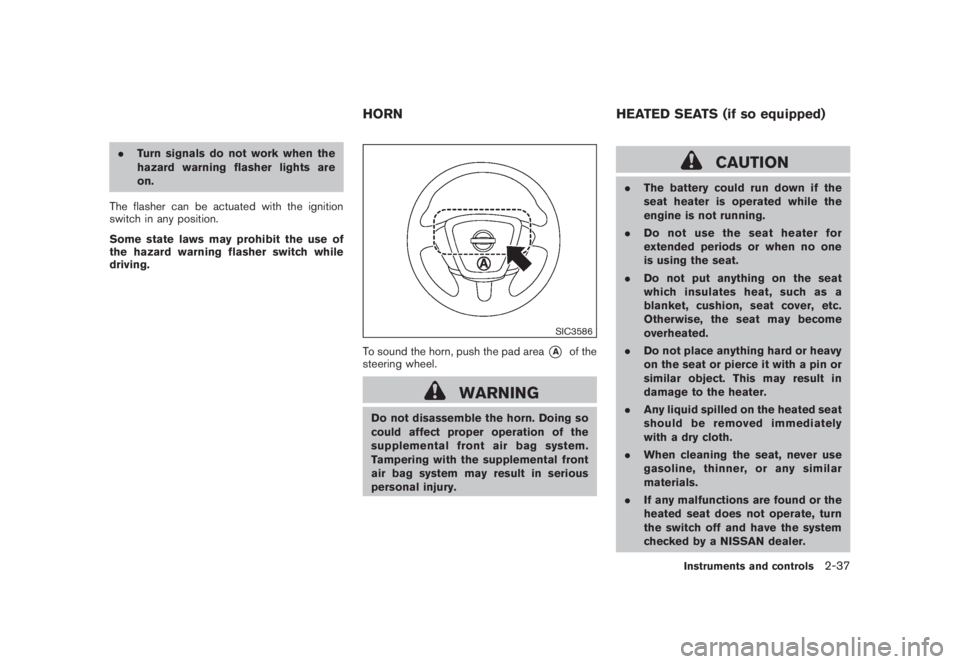
SIC3586
To sound the horn, push the pad area
*A
of the
steering wheel.
WARNING
Do not disassemble the horn. Doing so
could affect proper operation of the
supplemental front air bag system.
Tampering with the supplemental front
air bag system may result in serious
personal injury.
CAUTION
.The battery could run down if the
seat heater is operated while the
engine is not running.
.Do not use the seat heater for
extended periods or when no one
is using the seat.
.Do not put anything on the seat
which insulates heat, such as a
blanket, cushion, seat cover, etc.
Otherwise, the seat may become
overheated.
.Do not place anything hard or heavy
on the seat or pierce it with a pin or
similar object. This may result in
damage to the heater.
.Any liquid spilled on the heated seat
should be removed immediately
with a dry cloth.
.When cleaning the seat, never use
gasoline, thinner, or any similar
materials.
.If any malfunctions are found or the
heated seat does not operate, turn
the switch off and have the system
checked by a NISSAN dealer.
HORN HEATED SEATS (if so equipped)
Instruments and controls
2-37
Page 110 of 444
Black plate (106,1)
Model "Z51-D" EDITED: 2008/ 6/ 26
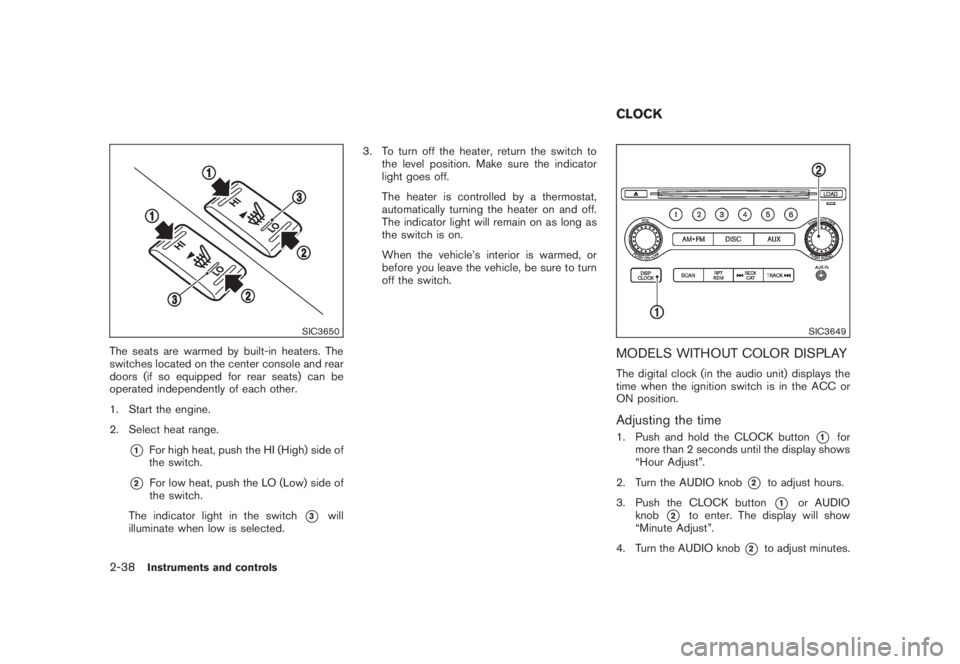
SIC3650
The seats are warmed by built-in heaters. The
switches located on the center console and rear
doors (if so equipped for rear seats) can be
operated independently of each other.
1. Start the engine.
2. Select heat range.
*1
For high heat, push the HI (High) side of
the switch.
*2
For low heat, push the LO (Low) side of
the switch.
The indicator light in the switch
*3
will
illuminate when low is selected.3. To turn off the heater, return the switch to
the level position. Make sure the indicator
light goes off.
The heater is controlled by a thermostat,
automatically turning the heater on and off.
The indicator light will remain on as long as
the switch is on.
When the vehicle’s interior is warmed, or
before you leave the vehicle, be sure to turn
off the switch.
SIC3649
MODELS WITHOUT COLOR DISPLAYThe digital clock (in the audio unit) displays the
time when the ignition switch is in the ACC or
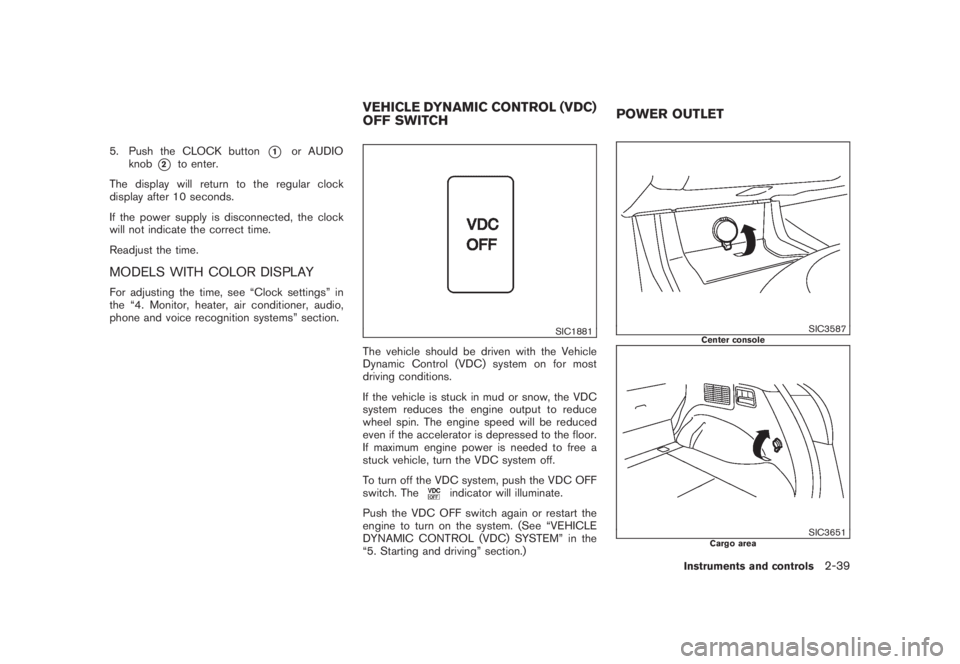
ON position.Adjusting the time1. Push and hold the CLOCK button
*1
for
more than 2 seconds until the display shows
“Hour Adjust”.
2. Turn the AUDIO knob
*2
to adjust hours.
3. Push the CLOCK button*1
or AUDIO
knob
*2
to enter. The display will show
“Minute Adjust”.
4. Turn the AUDIO knob
*2
to adjust minutes.
CLOCK
2-38
Instruments and controls
Page 111 of 444
Black plate (107,1)
Model "Z51-D" EDITED: 2008/ 6/ 26
5. Push the CLOCK button
*1
or AUDIO
knob
*2
to enter.
The display will return to the regular clock
display after 10 seconds.
If the power supply is disconnected, the clock
will not indicate the correct time.
Readjust the time.
MODELS WITH COLOR DISPLAYFor adjusting the time, see “Clock settings” in
the “4. Monitor, heater, air conditioner, audio,
phone and voice recognition systems” section.
SIC1881
The vehicle should be driven with the Vehicle
Dynamic Control (VDC) system on for most
driving conditions.
If the vehicle is stuck in mud or snow, the VDC
system reduces the engine output to reduce
wheel spin. The engine speed will be reduced
even if the accelerator is depressed to the floor.
If maximum engine power is needed to free a
stuck vehicle, turn the VDC system off.
To turn off the VDC system, push the VDC OFF
switch. The
indicator will illuminate.
Push the VDC OFF switch again or restart the
engine to turn on the system. (See “VEHICLE
DYNAMIC CONTROL (VDC) SYSTEM” in the
“5. Starting and driving” section.)
SIC3587
Center console
SIC3651
Cargo area
VEHICLE DYNAMIC CONTROL (VDC)
OFF SWITCHPOWER OUTLET
Instruments and controls
2-39
Page 113 of 444
Black plate (109,1)
Model "Z51-D" EDITED: 2008/ 6/ 26
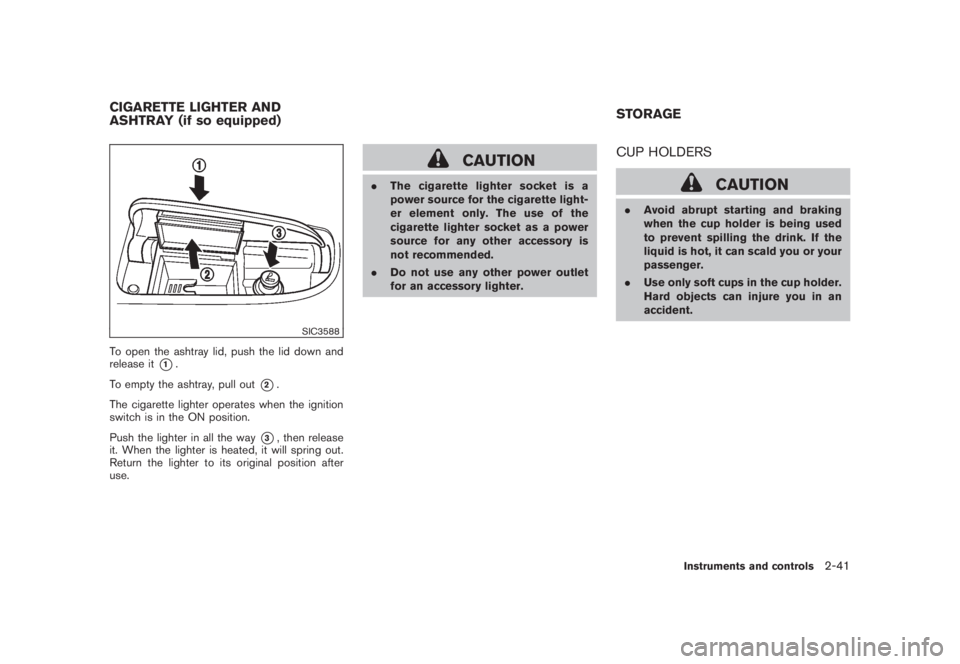
SIC3588
To open the ashtray lid, push the lid down and
release it
*1.
To empty the ashtray, pull out
*2.
The cigarette lighter operates when the ignition
switch is in the ON position.
Push the lighter in all the way
*3, then release
it. When the lighter is heated, it will spring out.
Return the lighter to its original position after
use.
CAUTION
.The cigarette lighter socket is a
power source for the cigarette light-
er element only. The use of the
cigarette lighter socket as a power
source for any other accessory is
not recommended.
.Do not use any other power outlet
for an accessory lighter.
CUP HOLDERS
CAUTION
.Avoid abrupt starting and braking
when the cup holder is being used
to prevent spilling the drink. If the
liquid is hot, it can scald you or your
passenger.
.Use only soft cups in the cup holder.
Hard objects can injure you in an
accident.
CIGARETTE LIGHTER AND
ASHTRAY (if so equipped)STORAGE
Instruments and controls
2-41
Page 119 of 444
Black plate (115,1)
Model "Z51-D" EDITED: 2008/ 6/ 26
restraint top tether strap is da-
maged.
— If the cargo cover contacts the
top tether strap when it is at-
tached to the top tether anchor,
remove the cargo cover from the
vehicle or secure it on the cargo
floor below its attachment loca-
tion. If the cargo cover is not
removed, it may damage the top
tether strap during a collision.
— Do not allow cargo to contact
the top tether strap when it is
attached to the top tether an-
chor. Properly secure the cargo
so it does not contact the top
tether strap. Cargo that is not
properly secured or that con-
tacts the top tether strap may
damage the top tether strap
during a collision.
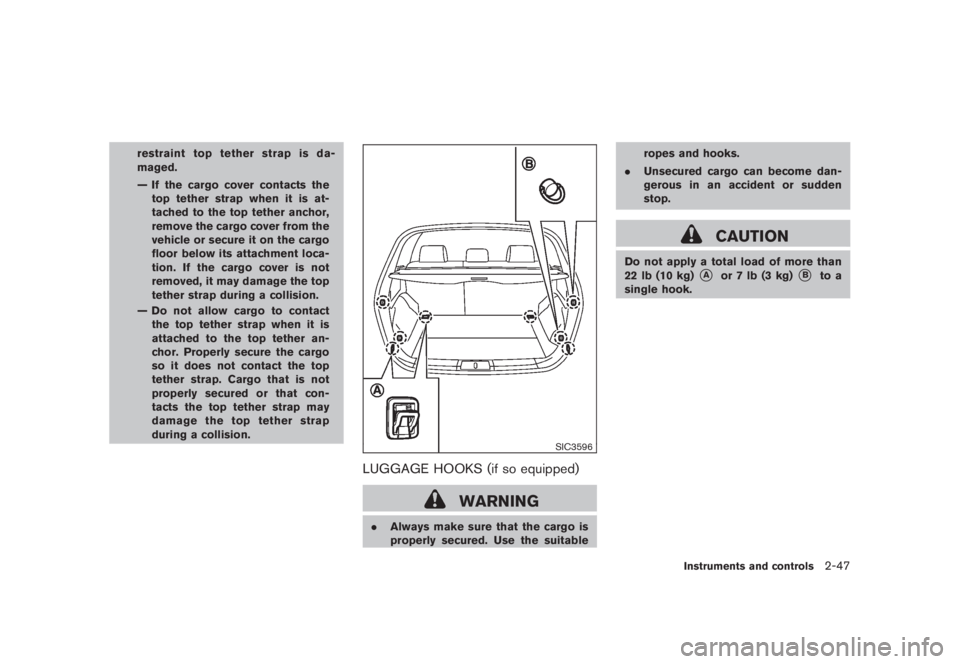
SIC3596
LUGGAGE HOOKS (if so equipped)
WARNING
.Always make sure that the cargo is
properly secured. Use the suitableropes and hooks.
.Unsecured cargo can become dan-
gerous in an accident or sudden
stop.
CAUTION
Do not apply a total load of more than
22 lb (10 kg)
*A
or 7 lb (3 kg)
*B
to a
single hook.
Instruments and controls
2-47
Page 121 of 444
Black plate (117,1)
Model "Z51-D" EDITED: 2008/ 6/ 26
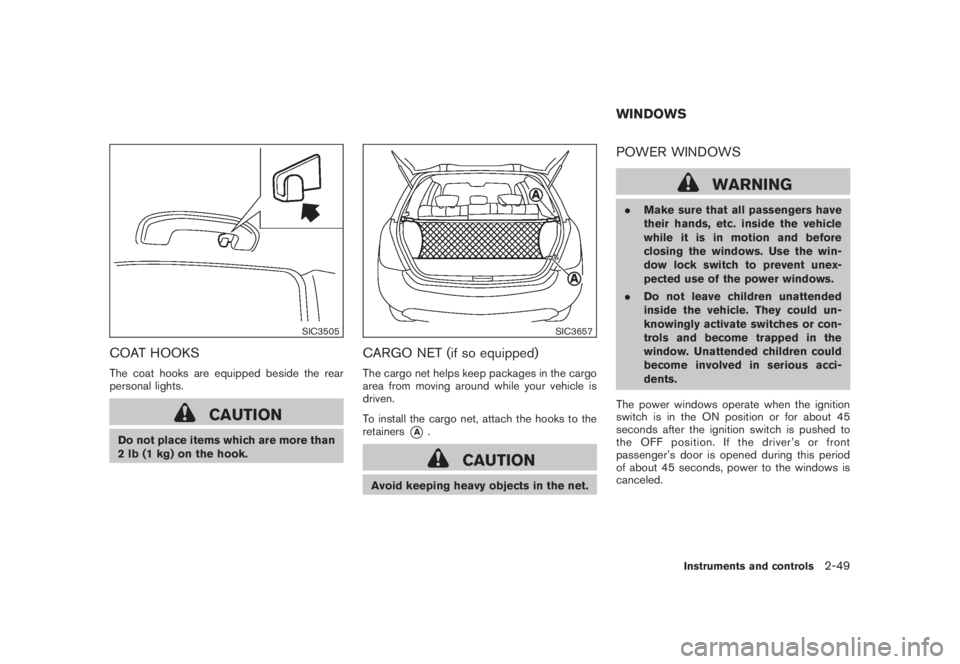
SIC3505
COAT HOOKSThe coat hooks are equipped beside the rear
personal lights.
CAUTION
Do not place items which are more than
2 lb (1 kg) on the hook.
SIC3657
CARGO NET (if so equipped)The cargo net helps keep packages in the cargo
area from moving around while your vehicle is
driven.
To install the cargo net, attach the hooks to the
retainers
*A
.
CAUTION
Avoid keeping heavy objects in the net.
POWER WINDOWS
WARNING
.Make sure that all passengers have
their hands, etc. inside the vehicle
while it is in motion and before
closing the windows. Use the win-
dow lock switch to prevent unex-
pected use of the power windows.
.Do not leave children unattended
inside the vehicle. They could un-
knowingly activate switches or con-
trols and become trapped in the
window. Unattended children could
become involved in serious acci-
dents.
The power windows operate when the ignition
switch is in the ON position or for about 45
seconds after the ignition switch is pushed to
the OFF position. If the driver’s or front
passenger’s door is opened during this period
of about 45 seconds, power to the windows is
canceled.WINDOWS
Instruments and controls
2-49