air condition NISSAN MURANO 2009 Owner´s Manual
[x] Cancel search | Manufacturer: NISSAN, Model Year: 2009, Model line: MURANO, Model: NISSAN MURANO 2009Pages: 443, PDF Size: 3.95 MB
Page 294 of 443
Black plate (292,1)
Model "Z51-D" EDITED: 2007/ 10/ 2
Continuous Learning:
When this item is turned to ON, you can have
the system learn the voice commands in
succession, without selecting commands one
by one.
MINIMIZE VOICE FEEDBACK
1. Push theSETTINGbutton on the instrument
panel, highlight the “Others” key on the
display and then push theENTERbutton.
2. Highlight the “Voice Recognition” key and
then push theENTERbutton.
3. Highlight the “Minimize Voice Feedback” key
and push theENTERbutton.
4. The item is turned to ON and the vocal
feedback is reduces if the voice recognition
system is activated.
4-130Monitor, heater, air conditioner, audio, phone and voice recognition systems
Page 295 of 443
Black plate (293,1)
Model "Z51-D" EDITED: 2007/ 10/ 2
TROUBLESHOOTING GUIDE
The system should respond correctly to all voice commands without difficulty. If problems are encountered, follow the solutions given in this guide for the
appropriate error.
Where the solutions are listed by number, try each solution in turn, starting with number one, until the problem is resolved.
Symptom/error message Solution
Displays “COMMAND NOT RECOGNIZED” or the
system fails to interpret the command correctly.1. Ensure that the command format is valid, see “Command List” earlier in this section.
2. Speak clearly without pausing between words and at a level appropriate to the ambient noise level.
3. Ensure that the ambient noise level is not excessive, for example, windows open or defrost on.
NOTE:
If it is too noisy to use the phone, it is likely that voice commands will not be recognized.
4. If optional words of the command have been omitted, then the command should be tried with these in place.
The system consistently selects the wrong voicetag in
the phonebook.1. Ensure that the voicetag requested matches what was originally stored. (See “BLUETOOTH
®HANDS-FREE
PHONE SYSTEM WITH NAVIGATION SYSTEM” earlier in this section; page 4-75.)
2. Replace one of the voicetags being confused with a different voicetag.
Monitor, heater, air conditioner, audio, phone and voice recognition systems4-131
Page 296 of 443
Black plate (294,1)
Model "Z51-D" EDITED: 2007/ 10/ 2
NISSAN Voice Recognition allows hands-free
operation of the systems equipped on this
vehicle, such as the display, audio, climate
control, phone and optional navigation systems.
To operate NISSAN Voice Recognition, push
and release the TALK
switch located on the
steering wheel. Then speak the command for the
system you wish to activate. The command given
is picked up by the microphone, and it is
performed when it is properly recognized. At
this time NISSAN Voice Recognition will provide
a voice and message (in the center display) to
inform you of the command results.
COMMAND LIST
Displaying command list
If you are controlling the system by voice
commands for the first time or do not know the
appropriate voice command, perform the follow-
ing procedure for displaying the voice command
list and help list.
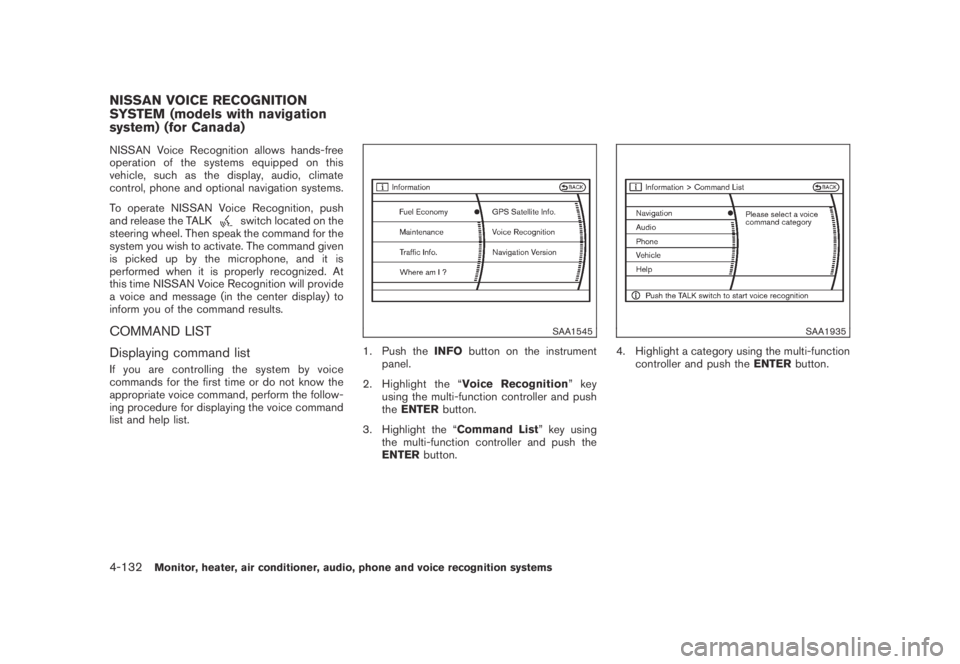
SAA1545
1. Push theINFObutton on the instrument
panel.
2. Highlight the “Voice Recognition”key
using the multi-function controller and push
theENTERbutton.
3. Highlight the “Command List” key using
the multi-function controller and push the
ENTERbutton.
SAA1935
4. Highlight a category using the multi-function
controller and push theENTERbutton.
NISSAN VOICE RECOGNITION
SYSTEM (models with navigation
system) (for Canada)
4-132Monitor, heater, air conditioner, audio, phone and voice recognition systems
Page 297 of 443
Black plate (295,1)
Model "Z51-D" EDITED: 2007/ 10/ 2
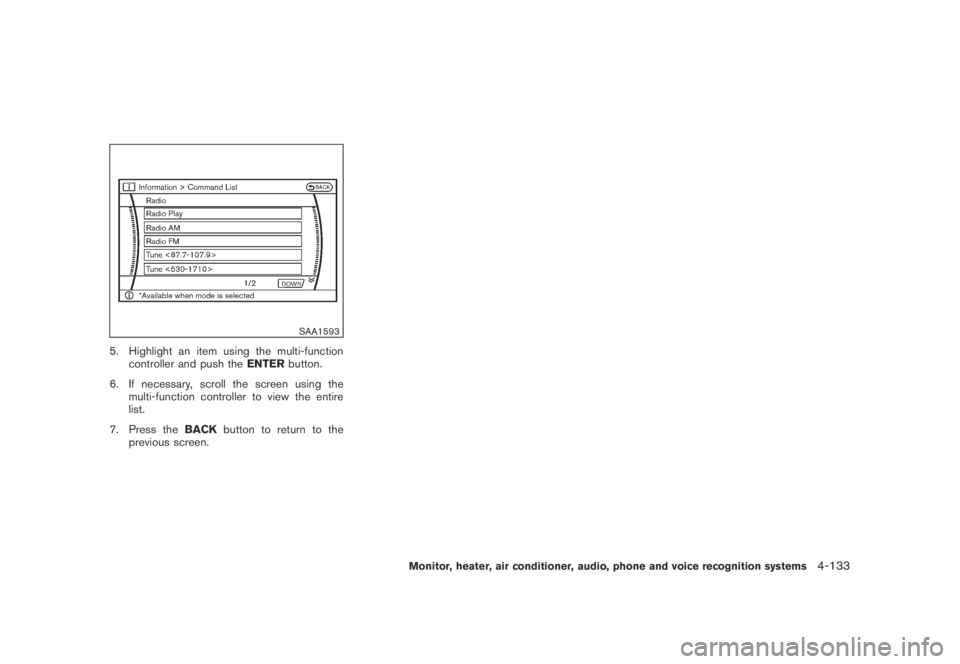
SAA1593
5. Highlight an item using the multi-function
controller and push theENTERbutton.
6. If necessary, scroll the screen using the
multi-function controller to view the entire
list.
7. Press theBACKbutton to return to the
previous screen.
Monitor, heater, air conditioner, audio, phone and voice recognition systems4-133
Page 298 of 443
Black plate (296,1)
Model "Z51-D" EDITED: 2007/ 10/ 2
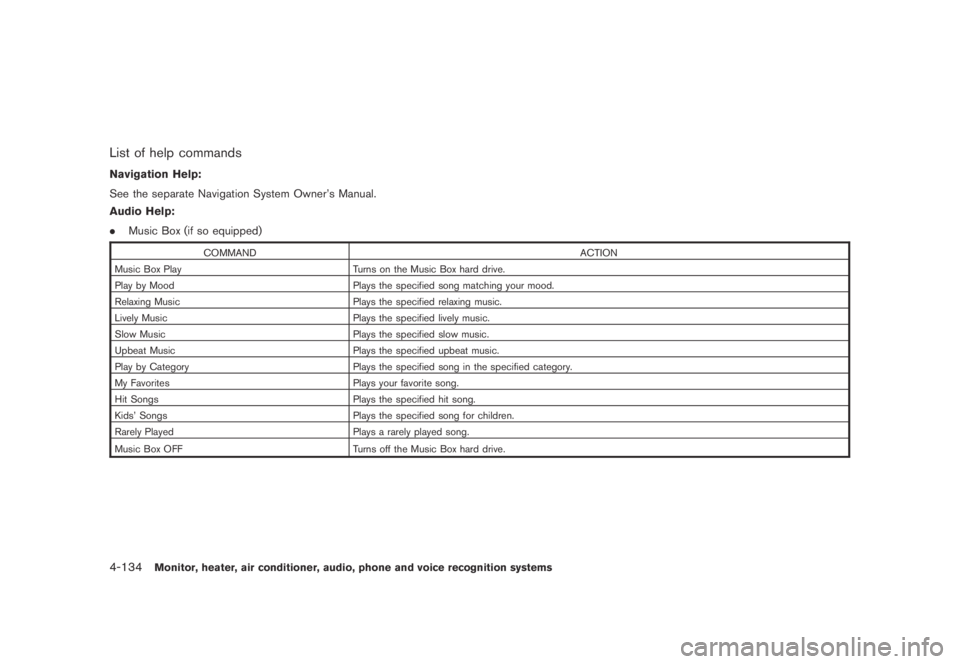
List of help commands
Navigation Help:
See the separate Navigation System Owner’s Manual.
Audio Help:
.Music Box (if so equipped)
COMMAND ACTION
Music Box Play Turns on the Music Box hard drive.
Play by Mood Plays the specified song matching your mood.
Relaxing Music Plays the specified relaxing music.
Lively Music Plays the specified lively music.
Slow Music Plays the specified slow music.
Upbeat Music Plays the specified upbeat music.
Play by Category Plays the specified song in the specified category.
My Favorites Plays your favorite song.
Hit Songs Plays the specified hit song.
Kids’ Songs Plays the specified song for children.
Rarely Played Plays a rarely played song.
Music Box OFF
Turns off the Music Box hard drive.
4-134Monitor, heater, air conditioner, audio, phone and voice recognition systems
Page 299 of 443
Black plate (297,1)
Model "Z51-D" EDITED: 2007/ 10/ 2
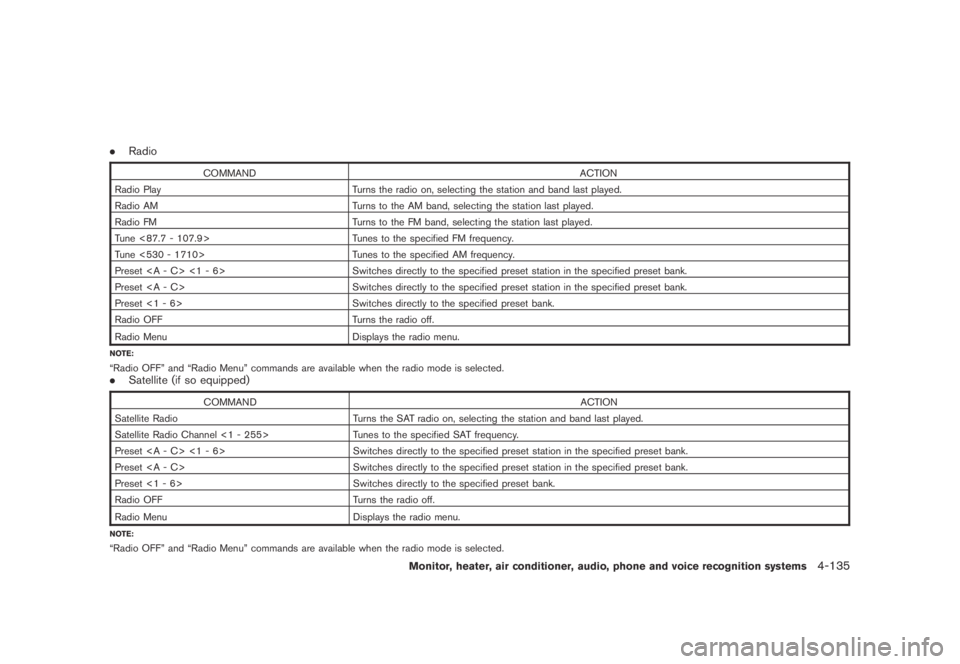
.Radio
COMMAND ACTION
Radio Play Turns the radio on, selecting the station and band last played.
Radio AM Turns to the AM band, selecting the station last played.
Radio FM Turns to the FM band, selecting the station last played.
Tune <87.7 - 107.9> Tunes to the specified FM frequency.
Tune <530 - 1710> Tunes to the specified AM frequency.
Preset <1 - 6> Switches directly to the specified preset station in the specified preset bank.
Preset Switches directly to the specified preset station in the specified preset bank.
Preset <1 - 6> Switches directly to the specified preset bank.
Radio OFF Turns the radio off.
Radio Menu
Displays the radio menu.
NOTE:
“Radio OFF” and “Radio Menu” commands are available when the radio mode is selected..Satellite (if so equipped)
COMMAND ACTION
Satellite Radio Turns the SAT radio on, selecting the station and band last played.
Satellite Radio Channel <1 - 255> Tunes to the specified SAT frequency.
Preset <1 - 6> Switches directly to the specified preset station in the specified preset bank.
Preset Switches directly to the specified preset station in the specified preset bank.
Preset <1 - 6> Switches directly to the specified preset bank.
Radio OFF Turns the radio off.
Radio Menu
Displays the radio menu.
NOTE:
“Radio OFF” and “Radio Menu” commands are available when the radio mode is selected.
Monitor, heater, air conditioner, audio, phone and voice recognition systems4-135
Page 300 of 443
Black plate (298,1)
Model "Z51-D" EDITED: 2007/ 10/ 2
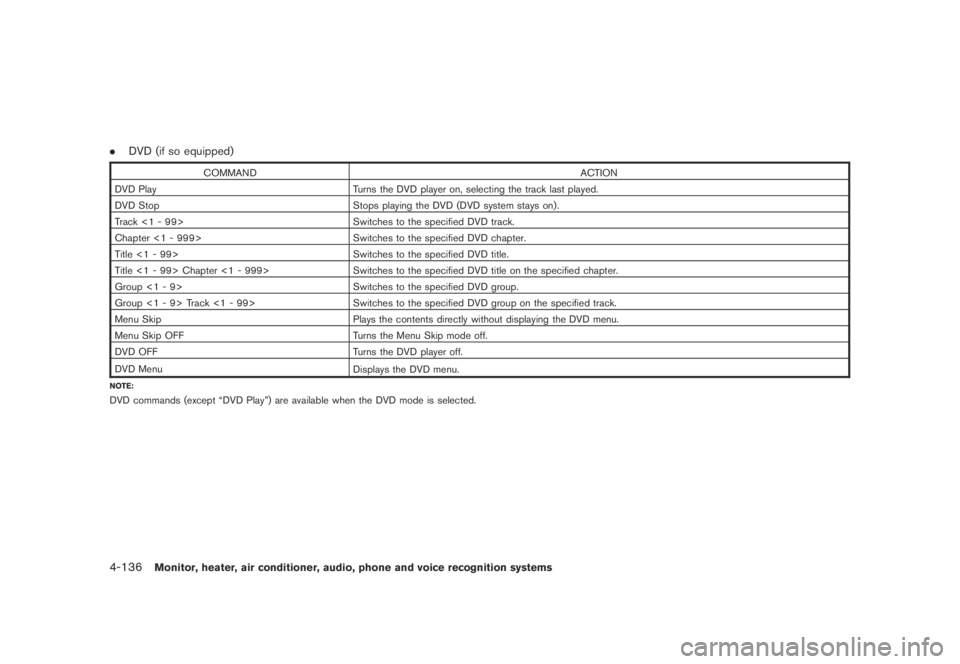
.DVD (if so equipped)
COMMAND ACTION
DVD Play Turns the DVD player on, selecting the track last played.
DVD Stop Stops playing the DVD (DVD system stays on) .
Track <1 - 99> Switches to the specified DVD track.
Chapter <1 - 999> Switches to the specified DVD chapter.
Title <1 - 99> Switches to the specified DVD title.
Title <1 - 99> Chapter <1 - 999> Switches to the specified DVD title on the specified chapter.
Group <1 - 9> Switches to the specified DVD group.
Group <1 - 9> Track <1 - 99> Switches to the specified DVD group on the specified track.
Menu Skip Plays the contents directly without displaying the DVD menu.
Menu Skip OFF Turns the Menu Skip mode off.
DVD OFF Turns the DVD player off.
DVD Menu
Displays the DVD menu.
NOTE:
DVD commands (except “DVD Play”) are available when the DVD mode is selected.
4-136Monitor, heater, air conditioner, audio, phone and voice recognition systems
Page 301 of 443
Black plate (299,1)
Model "Z51-D" EDITED: 2007/ 10/ 2
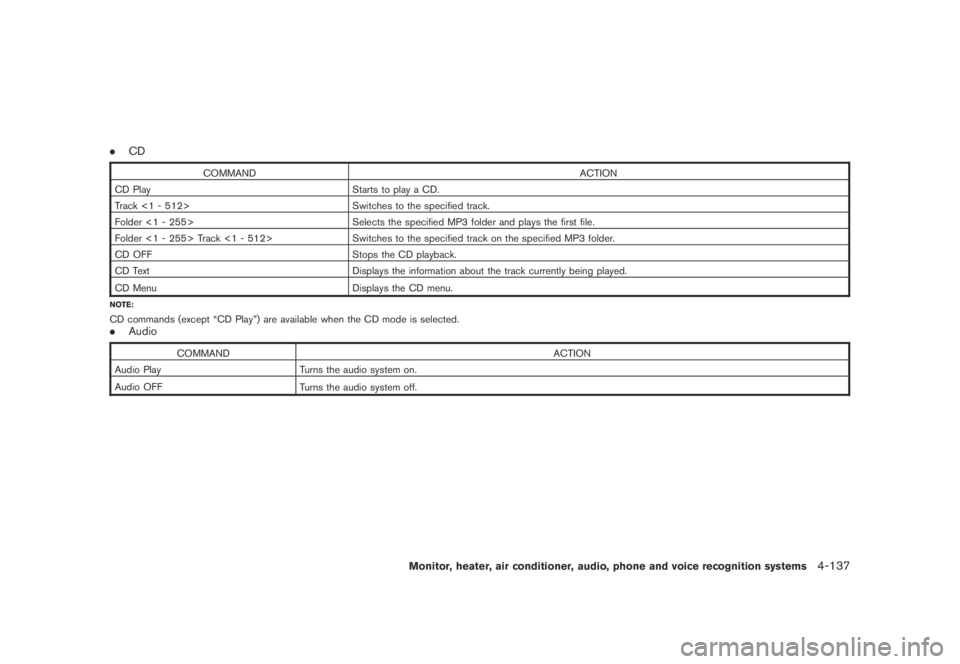
.CD
COMMAND ACTION
CD Play Starts to play a CD.
Track <1 - 512> Switches to the specified track.
Folder <1 - 255> Selects the specified MP3 folder and plays the first file.
Folder <1 - 255> Track <1 - 512> Switches to the specified track on the specified MP3 folder.
CD OFF Stops the CD playback.
CD Text Displays the information about the track currently being played.
CD Menu
Displays the CD menu.
NOTE:
CD commands (except “CD Play”) are available when the CD mode is selected..Audio
COMMAND ACTION
Audio Play Turns the audio system on.
Audio OFF
Turns the audio system off.
Monitor, heater, air conditioner, audio, phone and voice recognition systems4-137
Page 302 of 443
Black plate (300,1)
Model "Z51-D" EDITED: 2007/ 10/ 2
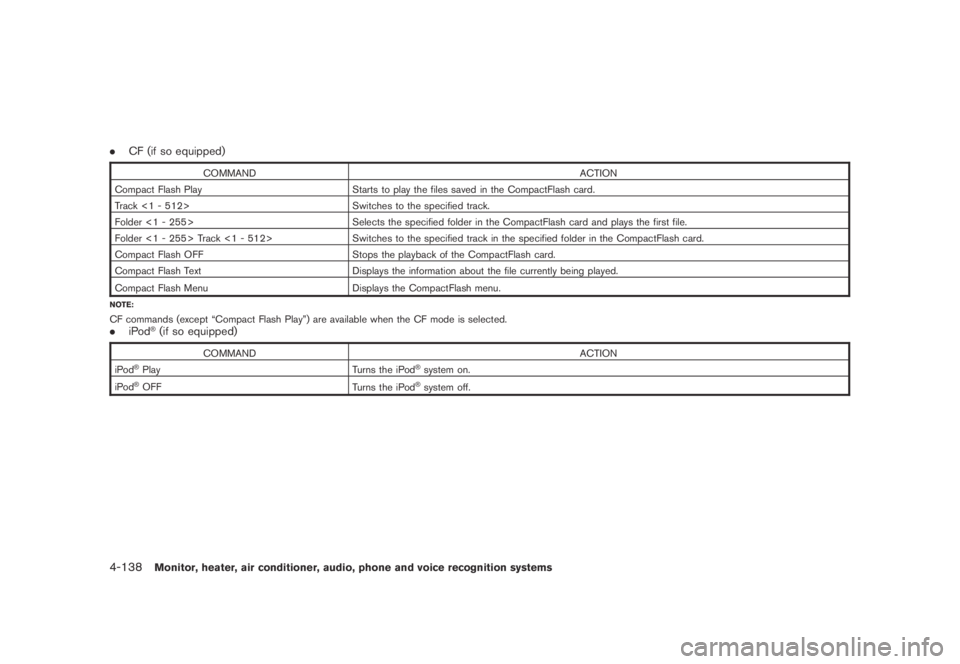
.CF (if so equipped)
COMMAND ACTION
Compact Flash Play Starts to play the files saved in the CompactFlash card.
Track <1 - 512> Switches to the specified track.
Folder <1 - 255> Selects the specified folder in the CompactFlash card and plays the first file.
Folder <1 - 255> Track <1 - 512> Switches to the specified track in the specified folder in the CompactFlash card.
Compact Flash OFF Stops the playback of the CompactFlash card.
Compact Flash Text Displays the information about the file currently being played.
Compact Flash Menu
Displays the CompactFlash menu.
NOTE:
CF commands (except “Compact Flash Play”) are available when the CF mode is selected..iPod®(if so equipped)
COMMAND ACTION
iPod®Play Turns the iPod®system on.
iPod®OFF
Turns the iPod®system off.
4-138Monitor, heater, air conditioner, audio, phone and voice recognition systems
Page 303 of 443
Black plate (301,1)
Model "Z51-D" EDITED: 2007/ 10/ 2
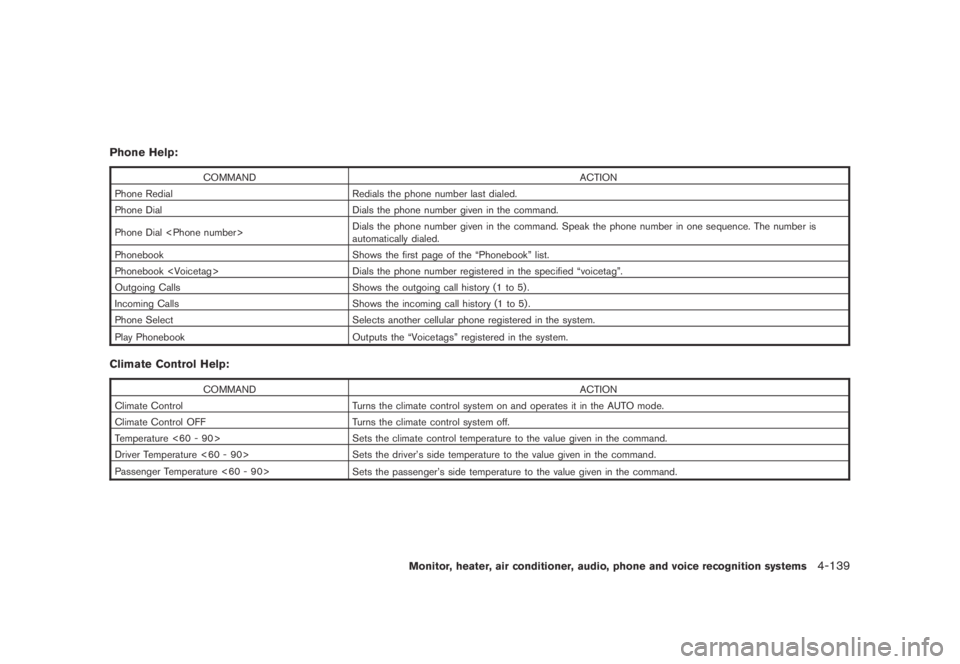
Phone Help:
COMMAND ACTION
Phone Redial Redials the phone number last dialed.
Phone Dial Dials the phone number given in the command.
Phone Dial
automatically dialed.
Phonebook Shows the first page of the “Phonebook” list.
Phonebook
Outgoing Calls Shows the outgoing call history (1 to 5) .
Incoming Calls Shows the incoming call history (1 to 5) .
Phone Select Selects another cellular phone registered in the system.
Play Phonebook
Outputs the “Voicetags” registered in the system.
Climate Control Help:
COMMAND ACTION
Climate Control Turns the climate control system on and operates it in the AUTO mode.
Climate Control OFF Turns the climate control system off.
Temperature <60 - 90> Sets the climate control temperature to the value given in the command.
Driver Temperature <60 - 90> Sets the driver’s side temperature to the value given in the command.
Passenger Temperature <60 - 90>
Sets the passenger’s side temperature to the value given in the command.
Monitor, heater, air conditioner, audio, phone and voice recognition systems4-139