CD player NISSAN MURANO 2009 Owner´s Manual
[x] Cancel search | Manufacturer: NISSAN, Model Year: 2009, Model line: MURANO, Model: NISSAN MURANO 2009Pages: 443, PDF Size: 3.95 MB
Page 213 of 443
Black plate (211,1)
Model "Z51-D" EDITED: 2007/ 10/ 2
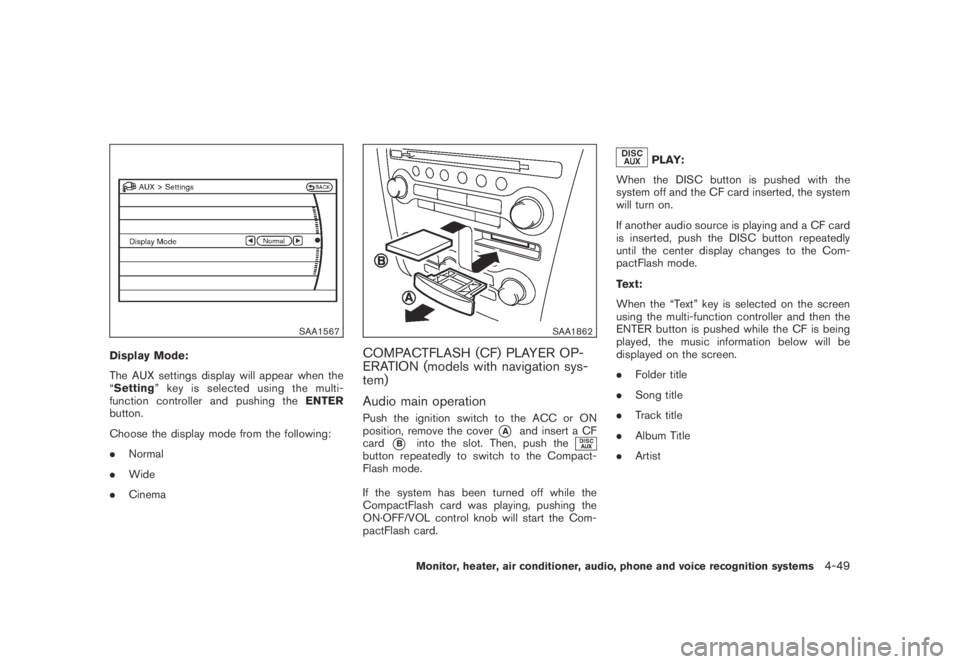
SAA1567
Display Mode:
The AUX settings display will appear when the
“Setting” key is selected using the multi-
function controller and pushing theENTER
button.
Choose the display mode from the following:
.Normal
.Wide
.Cinema
SAA1862
COMPACTFLASH (CF) PLAYER OP-
ERATION (models with navigation sys-
tem)
Audio main operation
Push the ignition switch to the ACC or ON
position, remove the cover
*Aand insert a CF
card
*Binto the slot. Then, push thebutton repeatedly to switch to the Compact-
Flash mode.
If the system has been turned off while the
CompactFlash card was playing, pushing the
ON·OFF/VOL control knob will start the Com-
pactFlash card.
PLAY:
When the DISC button is pushed with the
system off and the CF card inserted, the system
will turn on.
If another audio source is playing and a CF card
is inserted, push the DISC button repeatedly
until the center display changes to the Com-
pactFlash mode.
Text:
When the “Text” key is selected on the screen
using the multi-function controller and then the
ENTER button is pushed while the CF is being
played, the music information below will be
displayed on the screen.
.Folder title
.Song title
.Track title
.Album Title
.Artist
Monitor, heater, air conditioner, audio, phone and voice recognition systems4-49
Page 215 of 443
Black plate (213,1)
Model "Z51-D" EDITED: 2007/ 10/ 2
iPod®PLAYER OPERATION (if so
equipped)
Connecting iPod
®
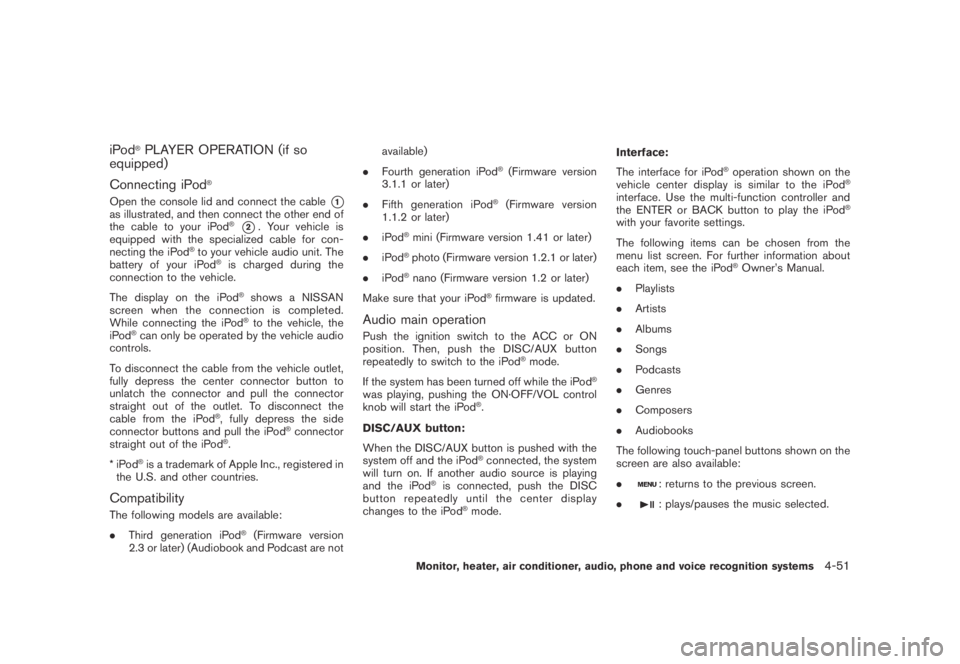
Open the console lid and connect the cable*1as illustrated, and then connect the other end of
the cable to your iPod®*2. Your vehicle is
equipped with the specialized cable for con-
necting the iPod
®to your vehicle audio unit. The
battery of your iPod®is charged during the
connection to the vehicle.
The display on the iPod
®shows a NISSAN
screen when the connection is completed.
While connecting the iPod
®to the vehicle, the
iPod®can only be operated by the vehicle audio
controls.
To disconnect the cable from the vehicle outlet,
fully depress the center connector button to
unlatch the connector and pull the connector
straight out of the outlet. To disconnect the
cable from the iPod
®, fully depress the side
connector buttons and pull the iPod®connector
straight out of the iPod®.
*iPod
®is a trademark of Apple Inc., registered in
the U.S. and other countries.
Compatibility
The following models are available:
.Third generation iPod
®(Firmware version
2.3 or later) (Audiobook and Podcast are notavailable)
.Fourth generation iPod
®(Firmware version
3.1.1 or later)
.Fifth generation iPod
®(Firmware version
1.1.2 or later)
.iPod
®mini (Firmware version 1.41 or later)
.iPod
®photo (Firmware version 1.2.1 or later)
.iPod
®nano (Firmware version 1.2 or later)
Make sure that your iPod
®firmware is updated.
Audio main operation
Push the ignition switch to the ACC or ON
position. Then, push the DISC/AUX button
repeatedly to switch to the iPod
®mode.
If the system has been turned off while the iPod
®
was playing, pushing the ON·OFF/VOL control
knob will start the iPod®.
DISC/AUX button:
When the DISC/AUX button is pushed with the
system off and the iPod
®connected, the system
will turn on. If another audio source is playing
and the iPod
®is connected, push the DISC
button repeatedly until the center display
changes to the iPod
®mode.Interface:
The interface for iPod
®operation shown on the
vehicle center display is similar to the iPod®
interface. Use the multi-function controller and
the ENTER or BACK button to play the iPod®
with your favorite settings.
The following items can be chosen from the
menu list screen. For further information about
each item, see the iPod
®Owner’s Manual.
.Playlists
.Artists
.Albums
.Songs
.Podcasts
.Genres
.Composers
.Audiobooks
The following touch-panel buttons shown on the
screen are also available:
.
: returns to the previous screen.
.
: plays/pauses the music selected.
Monitor, heater, air conditioner, audio, phone and voice recognition systems4-51
Page 216 of 443
Black plate (214,1)
Model "Z51-D" EDITED: 2007/ 10/ 2
FF (Fast Forward) , REW (Rewind)/APS
(Automatic Program Search) FF, APS REW:
When the
orbutton is pushed for
more than 1.5 seconds while the iPod®is
playing, the iPod®will play while fast forwarding
or rewinding. When the button is released, the
iPod
®will return to the normal play speed.
When the
orbutton is pushed for less
than 1.5 seconds while the iPod®is playing, the
next track or the beginning of the current track
on the iPod
®will be played.
The multi-function controller can also be used to
select tracks when the iPod
®is playing.
REPEAT (RPT) , RANDOM (RDM):
When the RPT button is pushed while a track is
being played, the play pattern can be changed
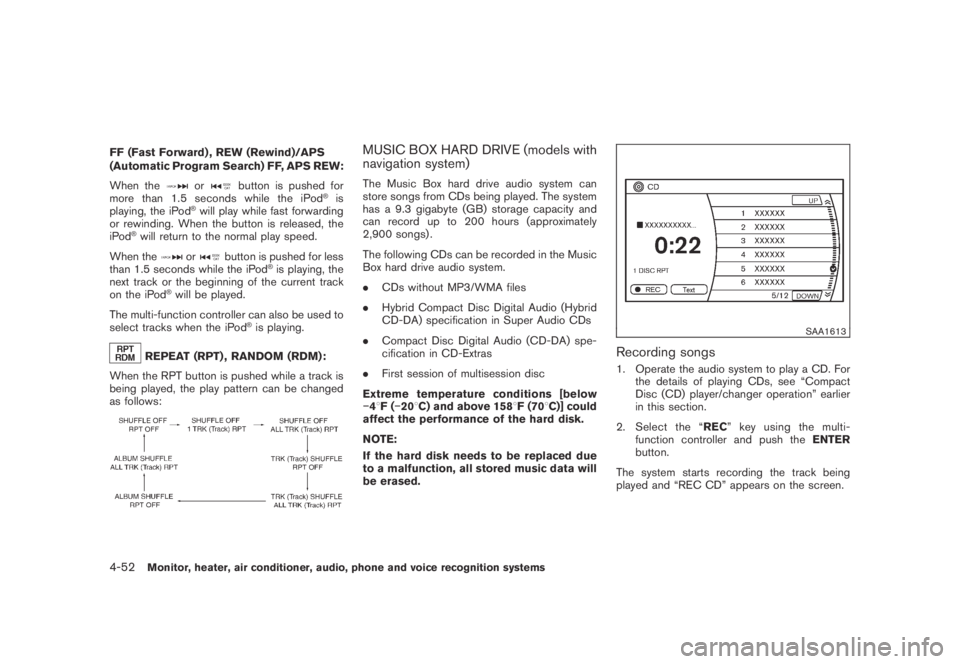
as follows:
MUSIC BOX HARD DRIVE (models with
navigation system)
The Music Box hard drive audio system can
store songs from CDs being played. The system
has a 9.3 gigabyte (GB) storage capacity and
can record up to 200 hours (approximately
2,900 songs) .
The following CDs can be recorded in the Music
Box hard drive audio system.
.CDs without MP3/WMA files
.Hybrid Compact Disc Digital Audio (Hybrid
CD-DA) specification in Super Audio CDs
.Compact Disc Digital Audio (CD-DA) spe-
cification in CD-Extras
.First session of multisession disc
Extreme temperature conditions [below
−48F(−208C) and above 1588F (708C)] could
affect the performance of the hard disk.
NOTE:
If the hard disk needs to be replaced due
to a malfunction, all stored music data will
be erased.
SAA1613
Recording songs
1. Operate the audio system to play a CD. For
the details of playing CDs, see “Compact
Disc (CD) player/changer operation” earlier
in this section.
2. Select the “REC” key using the multi-
function controller and push theENTER
button.
The system starts recording the track being
played and “REC CD” appears on the screen.
4-52Monitor, heater, air conditioner, audio, phone and voice recognition systems
Page 227 of 443
Black plate (225,1)
Model "Z51-D" EDITED: 2007/ 10/ 2
of contact with skin, wash immedi-
ately with soap and water.
.Use a damp, soft cloth when clean-
ing the Mobile Entertainment Sys-
tem components. Do not use
solvents or cleaning solutions.
.Do not attempt to use the system in extreme
temperature conditions [below−48F
(−208C) or above 1588F (708C)].
.To avoid discharging the vehicle battery, do
not operate the system more than 15
minutes without starting the engine.
Movies will not be shown on the front display
while the vehicle is in any drive position to
reduce driver distraction. Audio is available
when a movie is played. To view movies in the
front display, stop the vehicle in a safe location,
move the selector lever to the P (Park) position
and apply the parking brake.
LHA0484
DVD player operation precautions
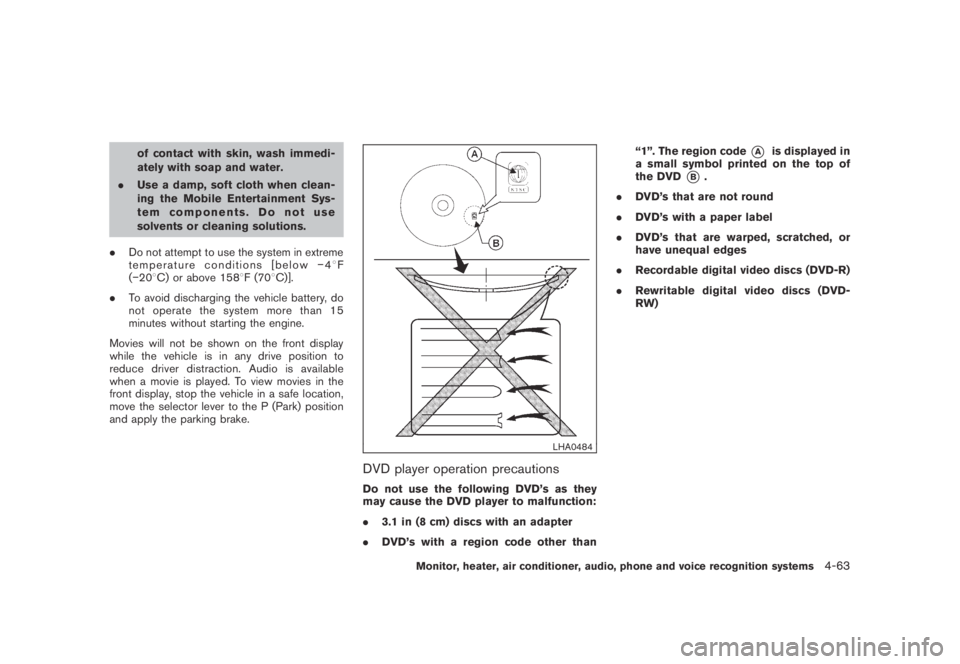
Do not use the following DVD’s as they
may cause the DVD player to malfunction:
.3.1 in (8 cm) discs with an adapter
.DVD’s with a region code other than“1”. The region code
*Ais displayed in
a small symbol printed on the top of
the DVD
*B.
.DVD’s that are not round
.DVD’s with a paper label
.DVD’s that are warped, scratched, or
have unequal edges
.Recordable digital video discs (DVD-R)
.Rewritable digital video discs (DVD-
RW)
Monitor, heater, air conditioner, audio, phone and voice recognition systems4-63
Page 228 of 443
Black plate (226,1)
Model "Z51-D" EDITED: 2007/ 10/ 2
SAA1863
DIGITAL VERSATILE DISC (DVD) SYS-
TEM COMPONENTS
DVD drive
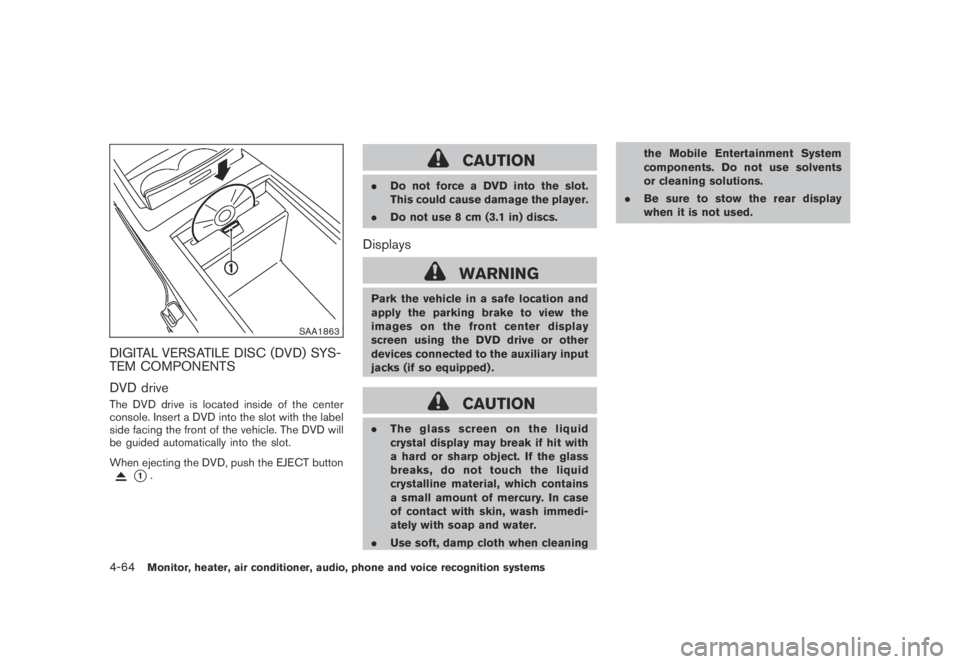
The DVD drive is located inside of the center
console. Insert a DVD into the slot with the label
side facing the front of the vehicle. The DVD will
be guided automatically into the slot.
When ejecting the DVD, push the EJECT button
*1.
CAUTION
.Do not force a DVD into the slot.
This could cause damage the player.
.Do not use 8 cm (3.1 in) discs.
Displays
WARNING
Park the vehicle in a safe location and
apply the parking brake to view the
images on the front center display
screen using the DVD drive or other
devices connected to the auxiliary input
jacks (if so equipped) .
CAUTION
.The glass screen on the liquid
crystal display may break if hit with
a hard or sharp object. If the glass
breaks, do not touch the liquid
crystalline material, which contains
a small amount of mercury. In case
of contact with skin, wash immedi-
ately with soap and water.
.Use soft, damp cloth when cleaningthe Mobile Entertainment System
components. Do not use solvents
or cleaning solutions.
.Be sure to stow the rear display
when it is not used.
4-64Monitor, heater, air conditioner, audio, phone and voice recognition systems
Page 232 of 443
Black plate (230,1)
Model "Z51-D" EDITED: 2007/ 10/ 2
firm local regulations for battery
disposal.
.When changing batteries, do not let
dust or oil get on the remote control
and headphones.
FCC Notice:
Changes or modifications not expressly
approved by the manufacturer compliance
could void the user’s authority to operate
the equipment. This device complies with
Part 15 of the FCC Rules and RSS-210 of
Industry Canada. Operation is subject to
the following two conditions: (1) This
device may not cause harmful interference,
and (2) this device must accept any inter-
ference received, including interference
that may cause undesired operation of
the device.
BEFORE OPERATING THE DVD EN-
TERTAINMENT SYSTEM
Precautions
Start the engine when using the DVD entertain-
ment system.
WARNING
The driver must not attempt to operate
the DVD system or wear the head-phones while the vehicle is in motion so
that full attention may be given to
vehicle operation.
CAUTION
.Only operate the DVD while the
vehicle engine is running. Operating
the DVD for extended periods of
time with the engine OFF can dis-
charge the vehicle battery.
.Do not allow the system to get wet.
Excessive moisture such as spilled
liquids may cause the system to
malfunction.
.While playing VIDEO-CD media, this
DVD player does not guarantee
complete functionality of all VI-
DEO-CD formats.
Copyright and trademark
.The technology protected by the U.S. patent
and other intellectual property rights owned
by Macrovision Corporation and other right
holders is adopted for this system.
.This copyright protected technology cannot
be used without a permit from Macrovision
Corporation. It is limited to be personal use,etc., as long as the permit from Macrovision
Corporation is not issued.
.Modifying or disassembling is prohibited.
.Dolby digital is manufactured under license
from Dolby Laboratories, Inc.
.Dolby and the double D mark “
” are
trademarks of Dolby Laboratories, Inc.
.DTS and DTS Digital Surround “
” are
registered trademarks of DTS, Inc.
Parental level (parental control)
DVDs with the parental control setting can be
played with this system. Please use your own
judgement to set the parental control with the
system.
Disc selection
You can play the following disc formats with the
DVD drive:
.DVD-VIDEO
.VIDEO-CD
.CD-DA (Conventional Compact Disc) (CD
with MP3/WMA cannot be played.)
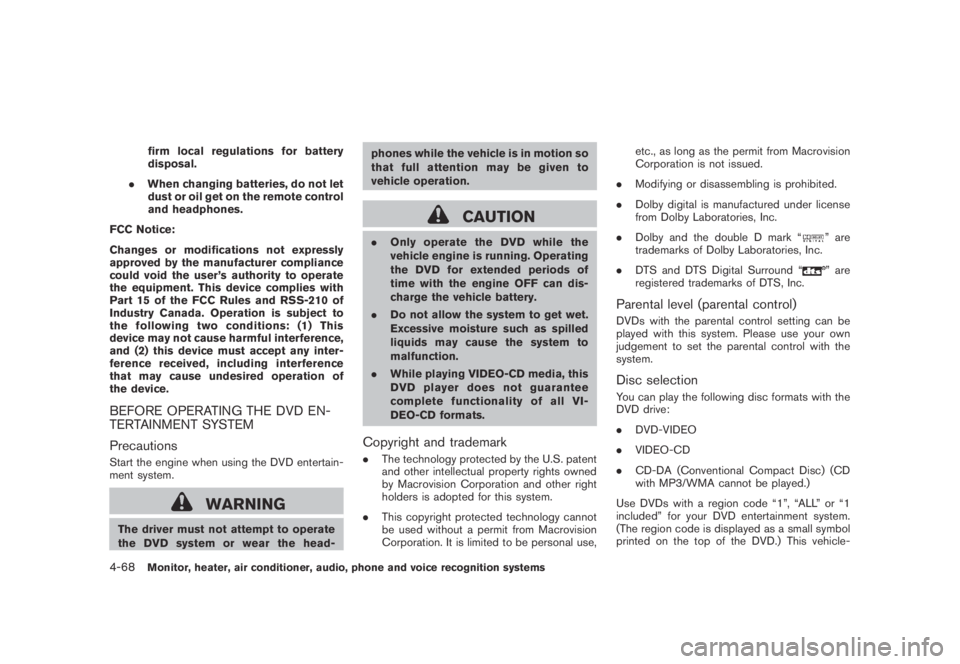
Use DVDs with a region code “1”, “ALL” or “1
included” for your DVD entertainment system.
(The region code is displayed as a small symbol
printed on the top of the DVD.) This vehicle-
4-68Monitor, heater, air conditioner, audio, phone and voice recognition systems
Page 233 of 443
Black plate (231,1)
Model "Z51-D" EDITED: 2007/ 10/ 2
installed DVD player cannot play DVDs with a
region code other than “1” or “ALL”.
Display settings
Front display:
To adjust the front display mode, press the
SETTING button while the DVD is being played,
select the “Display” key with the multi-function
controller, and then press the ENTER button.
To adjust the display ON/OFF, brightness, tint,
color, contrast and black level select each key
using the multi-function controller and press the
ENTER button.
Then you can adjust each item using the multi-
function controller. After changes have been
made press the BACK button to save the
settings.
Rear display:
To adjust the rear display mode, push the “DISP”
(Display) button on the remote controller.
To adjust the display brightness, tint, color and
contrast, select each key using the joystick on
the remote controller and tilt the joystick to right
or left.
Push the BACK button to apply the settings and
return to the previous display.
SAA1829
PLAYING A DIGITAL VERSATILE DISC
(DVD)
DISC button
Park the vehicle in a safe location for the
front seat occupants to operate the DVD
drive while watching the images.
Push the “DISC” button on the instrument panel
to turn the display to the DVD mode.
When a DVD is loaded, it will be replayed
automatically.
The operation screen will be turned on when the
“DISC” button located on the instrument panel
is pushed while a DVD is being played, and itwill turn off automatically after a period of time.
To turn it on again, push the “DISC” button once
more.
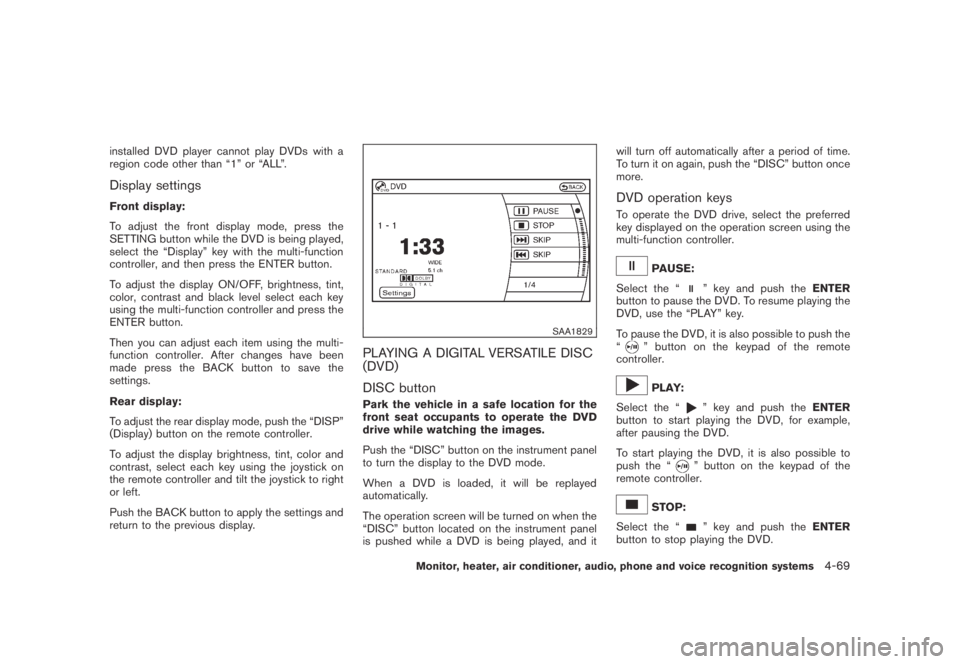
DVD operation keys
To operate the DVD drive, select the preferred
key displayed on the operation screen using the
multi-function controller.
PAUSE:
Select the “
” key and push theENTER
button to pause the DVD. To resume playing the
DVD, use the “PLAY” key.
To pause the DVD, it is also possible to push the
“
” button on the keypad of the remote
controller.
PLAY:
Select the “
” key and push theENTER
button to start playing the DVD, for example,
after pausing the DVD.
To start playing the DVD, it is also possible to
push the “
” button on the keypad of the
remote controller.
STOP:
Select the “
” key and push theENTER
button to stop playing the DVD.
Monitor, heater, air conditioner, audio, phone and voice recognition systems4-69
Page 237 of 443
Black plate (235,1)
Model "Z51-D" EDITED: 2007/ 10/ 2
Track/Channel:
Press to skip to the previous or next DVD scene
selection.
Keypad:
: PLAY/PAUSE button
: STOP button
: FORWARD button
: REWIND button
: FORWARD button for still images (for
DVD-AUDIO)
: REWIND button for still images (for DVD-
AUDIO)
CARE AND MAINTENANCE
Use a lightly dampened, lint free cloth to clean
the surfaces of your Mobile Entertainment
System. (DVD player face, screen, remote
controller, etc.)
CAUTION
.Do not use any solvents or cleaning
solutions when cleaning the video
system.
.Do not use excessive force on the
monitor screen..Avoid touching or scratching the
monitor screen as it may become
dirty or damaged.
.Do not attempt to operate the
system in extreme temperature con-
ditions [below−48F(−208C) and
above 1588F (708C)].
.Do not attempt to operate the
system in extreme humidity condi-
tions (less than 10% or more than
75%) .
SAA0451
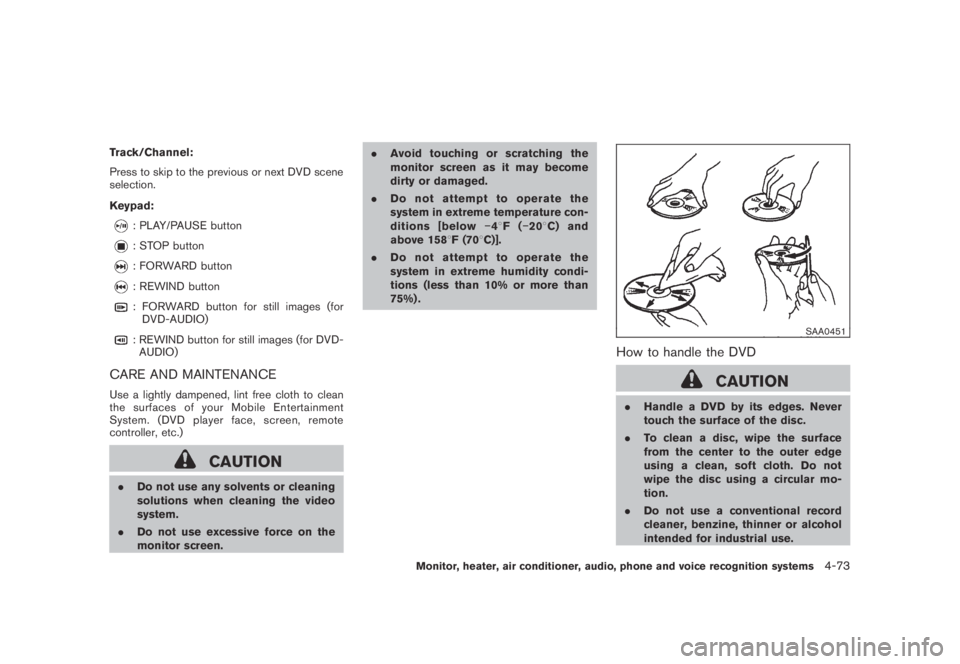
How to handle the DVD
CAUTION
.Handle a DVD by its edges. Never
touch the surface of the disc.
.To clean a disc, wipe the surface
from the center to the outer edge
using a clean, soft cloth. Do not
wipe the disc using a circular mo-
tion.
.Do not use a conventional record
cleaner, benzine, thinner or alcohol
intended for industrial use.
Monitor, heater, air conditioner, audio, phone and voice recognition systems4-73
Page 300 of 443
Black plate (298,1)
Model "Z51-D" EDITED: 2007/ 10/ 2
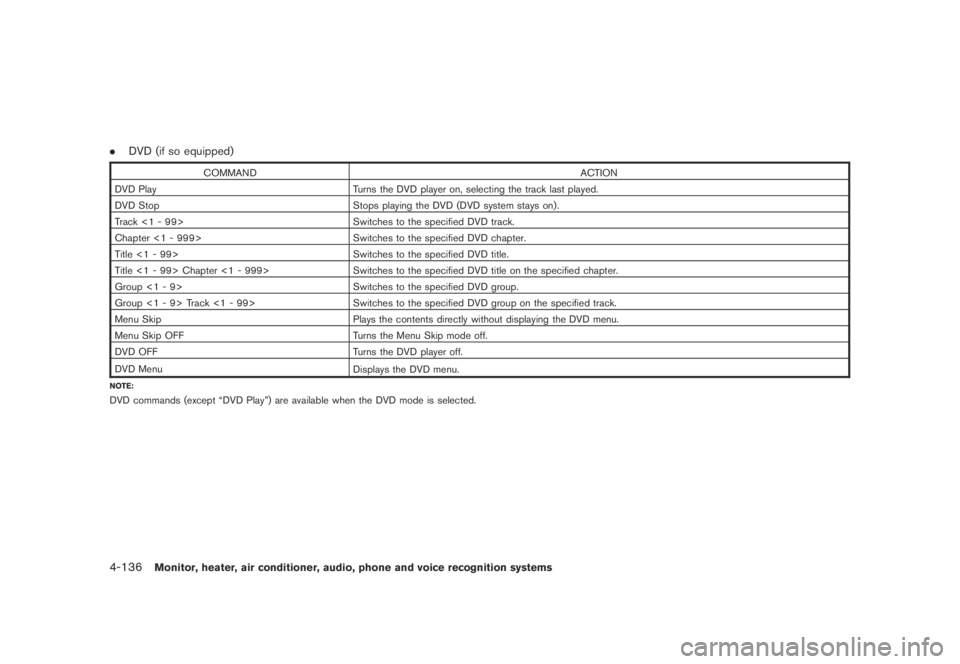
.DVD (if so equipped)
COMMAND ACTION
DVD Play Turns the DVD player on, selecting the track last played.
DVD Stop Stops playing the DVD (DVD system stays on) .
Track <1 - 99> Switches to the specified DVD track.
Chapter <1 - 999> Switches to the specified DVD chapter.
Title <1 - 99> Switches to the specified DVD title.
Title <1 - 99> Chapter <1 - 999> Switches to the specified DVD title on the specified chapter.
Group <1 - 9> Switches to the specified DVD group.
Group <1 - 9> Track <1 - 99> Switches to the specified DVD group on the specified track.
Menu Skip Plays the contents directly without displaying the DVD menu.
Menu Skip OFF Turns the Menu Skip mode off.
DVD OFF Turns the DVD player off.
DVD Menu
Displays the DVD menu.
NOTE:
DVD commands (except “DVD Play”) are available when the DVD mode is selected.
4-136Monitor, heater, air conditioner, audio, phone and voice recognition systems
Page 435 of 443
Black plate (2,1)
10-2
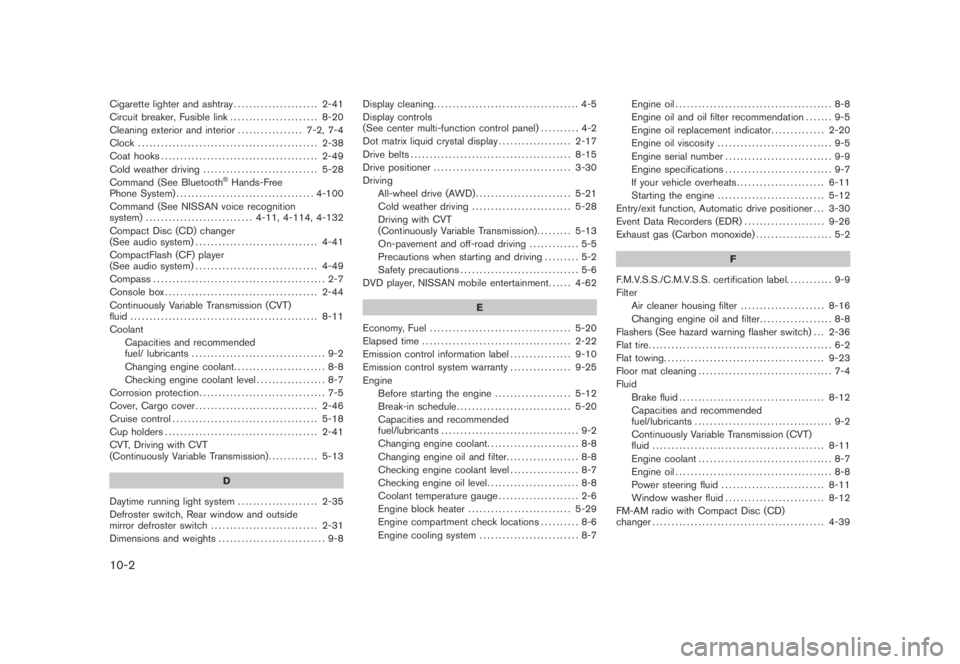
Cigarette lighter and ashtray...................... 2-41
Circuit breaker, Fusible link ....................... 8-20
Cleaning exterior and interior................. 7-2, 7-4
Clock ............................................... 2-38
Coat hooks......................................... 2-49
Cold weather driving.............................. 5-28
Command (See Bluetooth
®Hands-Free
Phone System).................................... 4-100
Command (See NISSAN voice recognition
system)............................ 4-11, 4-114, 4-132
Compact Disc (CD) changer
(See audio system)................................ 4-41
CompactFlash (CF) player
(See audio system)................................ 4-49
Compass............................................. 2-7
Console box........................................ 2-44
Continuously Variable Transmission (CVT)
fluid................................................. 8-11
Coolant
Capacities and recommended
fuel/ lubricants ................................... 9-2
Changing engine coolant........................ 8-8
Checking engine coolant level.................. 8-7
Corrosion protection................................. 7-5
Cover, Cargo cover................................ 2-46
Cruise control...................................... 5-18
Cup holders........................................ 2-41
CVT, Driving with CVT
(Continuously Variable Transmission)............. 5-13
D
Daytime running light system..................... 2-35
Defroster switch, Rear window and outside
mirror defroster switch............................ 2-31
Dimensions and weights............................ 9-8Display cleaning...................................... 4-5
Display controls
(See center multi-function control panel).......... 4-2
Dot matrix liquid crystal display................... 2-17
Drive belts.......................................... 8-15
Drive positioner.................................... 3-30
Driving
All-wheel drive (AWD)......................... 5-21
Cold weather driving.......................... 5-28
Driving with CVT
(Continuously Variable Transmission)......... 5-13
On-pavement and off-road driving............. 5-5
Precautions when starting and driving......... 5-2
Safety precautions............................... 5-6
DVD player, NISSAN mobile entertainment...... 4-62
E
Economy, Fuel ..................................... 5-20
Elapsed time ....................................... 2-22
Emission control information label................ 9-10
Emission control system warranty................ 9-25
Engine
Before starting the engine.................... 5-12
Break-in schedule.............................. 5-20
Capacities and recommended
fuel/lubricants.................................... 9-2
Changing engine coolant........................ 8-8
Changing engine oil and filter................... 8-8
Checking engine coolant level.................. 8-7
Checking engine oil level........................ 8-8
Coolant temperature gauge..................... 2-6
Engine block heater........................... 5-29
Engine compartment check locations.......... 8-6
Engine cooling system.......................... 8-7Engine oil......................................... 8-8
Engine oil and oil filter recommendation....... 9-5
Engine oil replacement indicator.............. 2-20
Engine oil viscosity .............................. 9-5
Engine serial number ............................ 9-9
Engine specifications............................ 9-7
If your vehicle overheats....................... 6-11
Starting the engine............................ 5-12
Entry/exit function, Automatic drive positioner . . . 3-30
Event Data Recorders (EDR)..................... 9-26
Exhaust gas (Carbon monoxide).................... 5-2
F
F.M.V.S.S./C.M.V.S.S. certification label............ 9-9
Filter
Air cleaner housing filter...................... 8-16
Changing engine oil and filter................... 8-8
Flashers (See hazard warning flasher switch) . . . 2-36
Flat tire................................................ 6-2
Flat towing.......................................... 9-23
Floor mat cleaning ................................... 7-4
Fluid
Brake fluid...................................... 8-12
Capacities and recommended
fuel/lubricants.................................... 9-2
Continuously Variable Transmission (CVT)
fluid............................................. 8-11
Engine coolant ................................... 8-7
Engine oil......................................... 8-8
Power steering fluid ........................... 8-11
Window washer fluid.......................... 8-12
FM-AM radio with Compact Disc (CD)
changer............................................. 4-39
Model "Z51-D" EDITED: 2007/ 10/ 2