brake NISSAN MURANO 2009 Owner´s Manual
[x] Cancel search | Manufacturer: NISSAN, Model Year: 2009, Model line: MURANO, Model: NISSAN MURANO 2009Pages: 443, PDF Size: 3.95 MB
Page 95 of 443
Black plate (93,1)
Model "Z51-D" EDITED: 2007/ 10/ 2
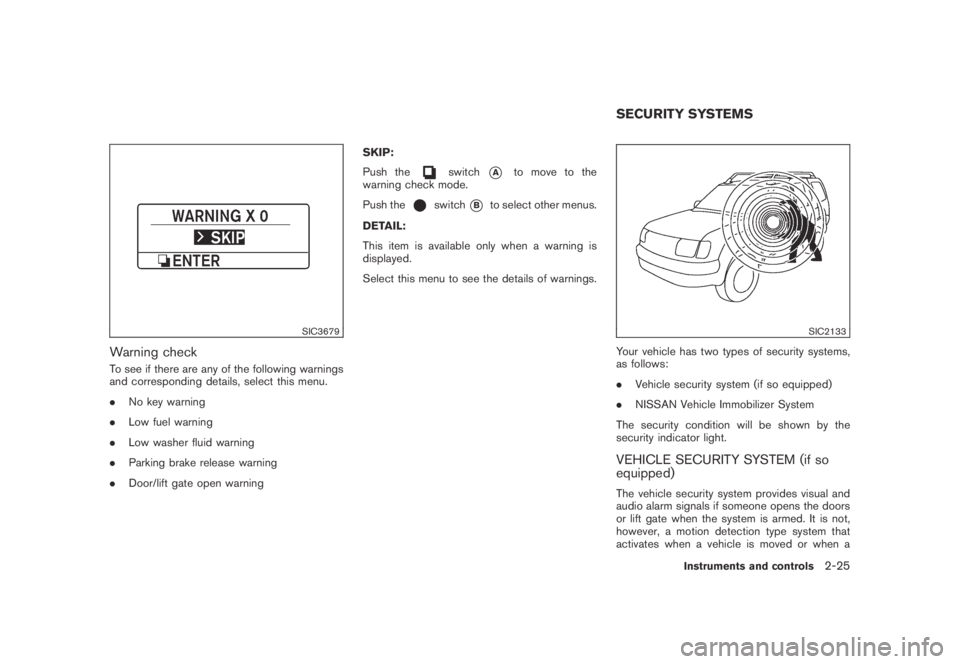
SIC3679
Warning check
To see if there are any of the following warnings
and corresponding details, select this menu.
.No key warning
.Low fuel warning
.Low washer fluid warning
.Parking brake release warning
.Door/lift gate open warningSKIP:
Push the
switch*Ato move to the
warning check mode.
Push the
switch*Bto select other menus.
DETAIL:
This item is available only when a warning is
displayed.
Select this menu to see the details of warnings.
SIC2133
Your vehicle has two types of security systems,
as follows:
.Vehicle security system (if so equipped)
.NISSAN Vehicle Immobilizer System
The security condition will be shown by the
security indicator light.
VEHICLE SECURITY SYSTEM (if so
equipped)
The vehicle security system provides visual and
audio alarm signals if someone opens the doors
or lift gate when the system is armed. It is not,
however, a motion detection type system that
activates when a vehicle is moved or when a
SECURITY SYSTEMS
Instruments and controls2-25
Page 105 of 443
Black plate (103,1)
Model "Z51-D" EDITED: 2007/ 10/ 2
WARNING
Xenon headlights are extremely bright
compared to conventional headlights. If
the xenon headlights hit the rearview
mirror of the vehicle ahead or the
windshield of oncoming vehicle, the
driver of these vehicles may have
difficulty driving because of the bright-
ness. Use the headlight aiming control
switch to lower the light axis. See
“XENON HEADLIGHTS” earlier in this
section for additional information.
Daytime running light system (Canada
only)
The daytime running lights automatically illumi-
nate when the engine is started with the parking
brake released. The daytime running lights
operate with the headlight switch in the OFF
position or in the
position. Turn the
headlight switch to theposition for full
illumination when driving at night.
If the parking brake is applied before the engine
is started, the daytime running lights do not
illuminate. The daytime running lights illuminate
once the parking brake is released. The daytime
running lights will remain on until the ignition
switch is pushed to the OFF position.
WARNING
When the daytime running light system
is active, tail lights on your vehicle are
not on. It is necessary at dusk to turn on
your headlights. Failure to do so could
cause an accident injuring yourself and
others.
SIC3585
Instrument brightness control
The instrument brightness control operates
when the ignition switch is in the ON position.
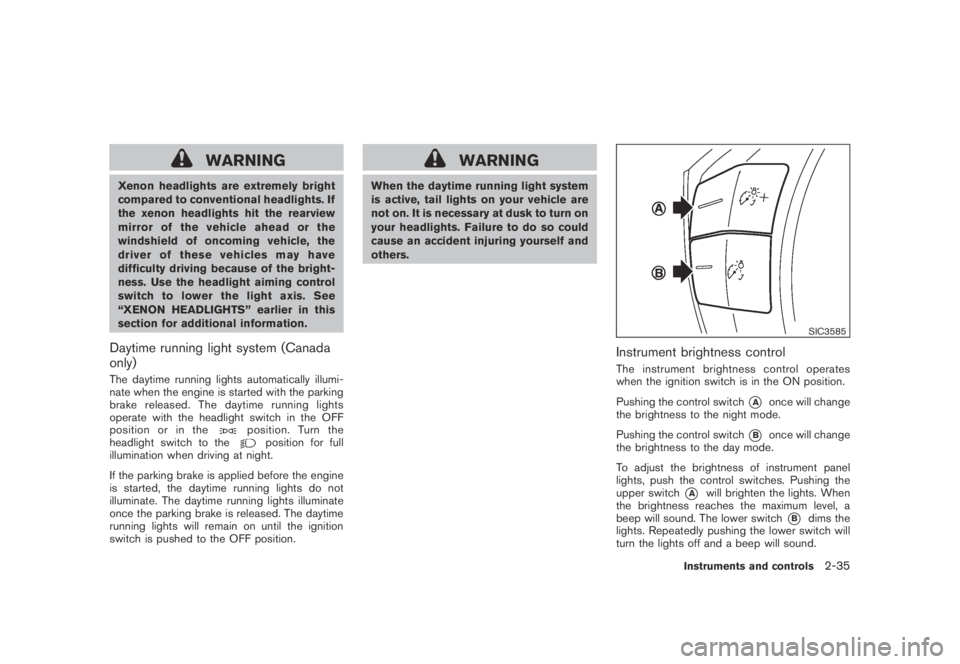
Pushing the control switch
*Aonce will change
the brightness to the night mode.
Pushing the control switch
*Bonce will change
the brightness to the day mode.
To adjust the brightness of instrument panel
lights, push the control switches. Pushing the
upper switch
*Awill brighten the lights. When
the brightness reaches the maximum level, a
beep will sound. The lower switch
*Bdims the
lights. Repeatedly pushing the lower switch will
turn the lights off and a beep will sound.
Instruments and controls2-35
Page 166 of 443
Black plate (164,1)
Model "Z51-D" EDITED: 2007/ 10/ 2
WARNING
.Do not disassemble or modify this
system. If you do, it may result in
accidents, fire, or electric shock.
.Do not use this system if you notice
any abnormality, such as a frozen
screen or lack of sound. Continued
use of the system may result in
accident, fire or electric shock.
.In case you notice any foreign
object in the system hardware, spill
liquid on it, or notice smoke or smell
coming from it, stop using the
system immediately and contact
your nearest NISSAN dealer. Ignor-
ing such conditions may lead to
accidents, fire, or electric shock.
.Park the vehicle in a safe location
and apply the parking brake to view
the images on the front center dis-
play screen using devices connected
to the auxiliary input jacks.
Do not attempt to operate the system in
extreme temperature conditions [below
−48F(−208C) and above 1588F(708C)].
Operating this system under these condi-
tions may result in system malfunctions.
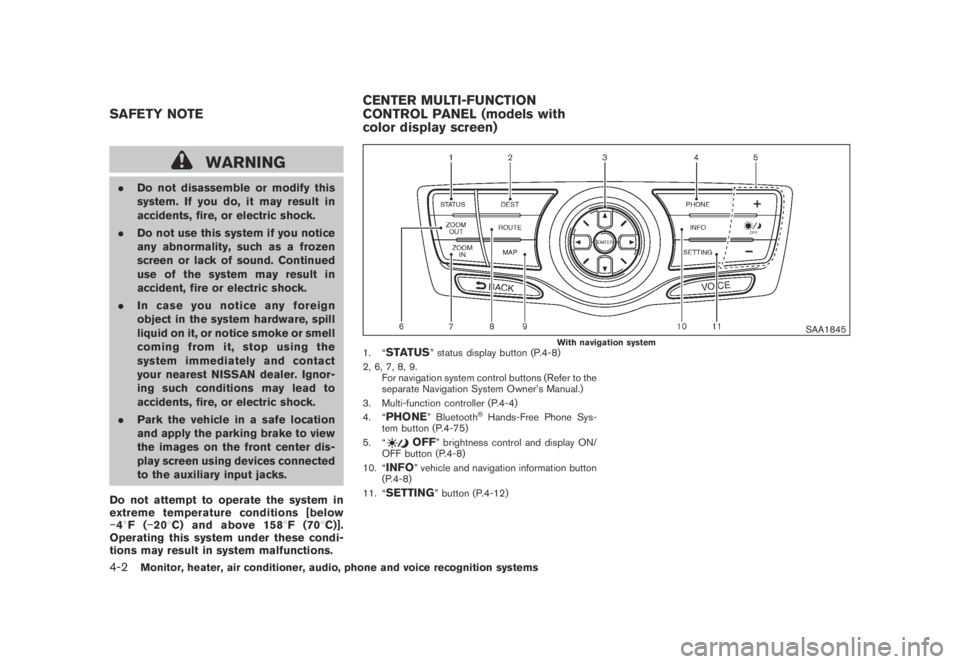
SAA1845With navigation system1. “STATUS” status display button (P.4-8)
2, 6, 7, 8, 9.
For navigation system control buttons (Refer to the
separate Navigation System Owner’s Manual.)
3. Multi-function controller (P.4-4)
4. “
PHONE” Bluetooth®Hands-Free Phone Sys-
tem button (P.4-75)
5. “
OFF” brightness control and display ON/
OFF button (P.4-8)
10. “
INFO” vehicle and navigation information button
(P.4-8)
11. “
SETTING” button (P.4-12)
SAFETY NOTECENTER MULTI-FUNCTION
CONTROL PANEL (models with
color display screen)
4-2Monitor, heater, air conditioner, audio, phone and voice recognition systems
Page 186 of 443
Black plate (184,1)
Model "Z51-D" EDITED: 2007/ 10/ 2
SAA1898
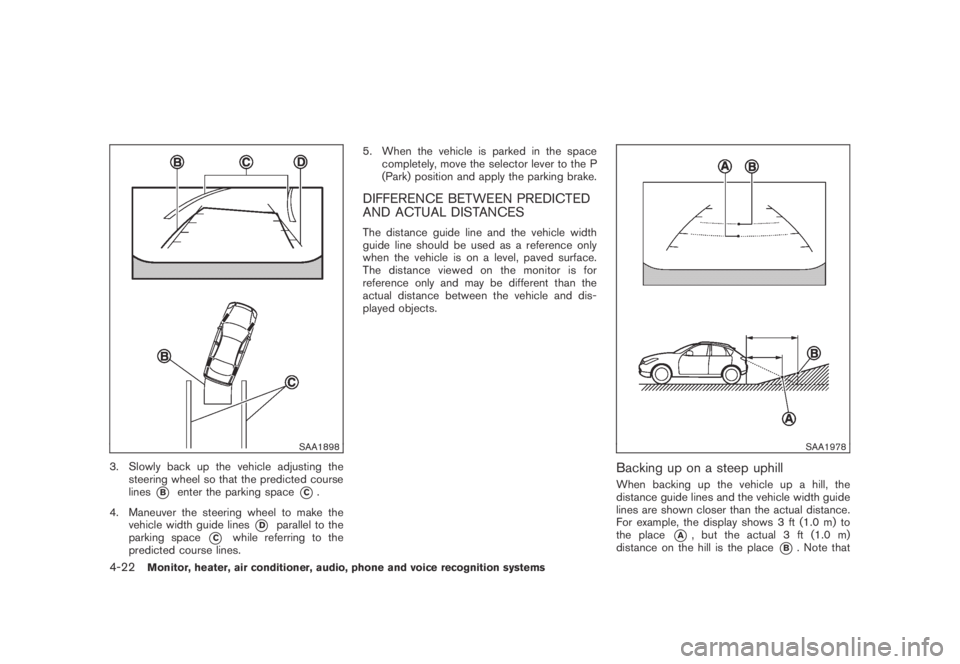
3. Slowly back up the vehicle adjusting the
steering wheel so that the predicted course
lines
*Benter the parking space*C.
4. Maneuver the steering wheel to make the
vehicle width guide lines
*Dparallel to the
parking space
*Cwhile referring to the
predicted course lines.5. When the vehicle is parked in the space
completely, move the selector lever to the P
(Park) position and apply the parking brake.
DIFFERENCE BETWEEN PREDICTED
AND ACTUAL DISTANCES
The distance guide line and the vehicle width
guide line should be used as a reference only
when the vehicle is on a level, paved surface.
The distance viewed on the monitor is for
reference only and may be different than the
actual distance between the vehicle and dis-
played objects.
SAA1978
Backing up on a steep uphill
When backing up the vehicle up a hill, the
distance guide lines and the vehicle width guide
lines are shown closer than the actual distance.
For example, the display shows 3 ft (1.0 m) to
the place
*A, but the actual 3 ft (1.0 m)
distance on the hill is the place
*B. Note that
4-22Monitor, heater, air conditioner, audio, phone and voice recognition systems
Page 188 of 443
Black plate (186,1)
Model "Z51-D" EDITED: 2007/ 10/ 2
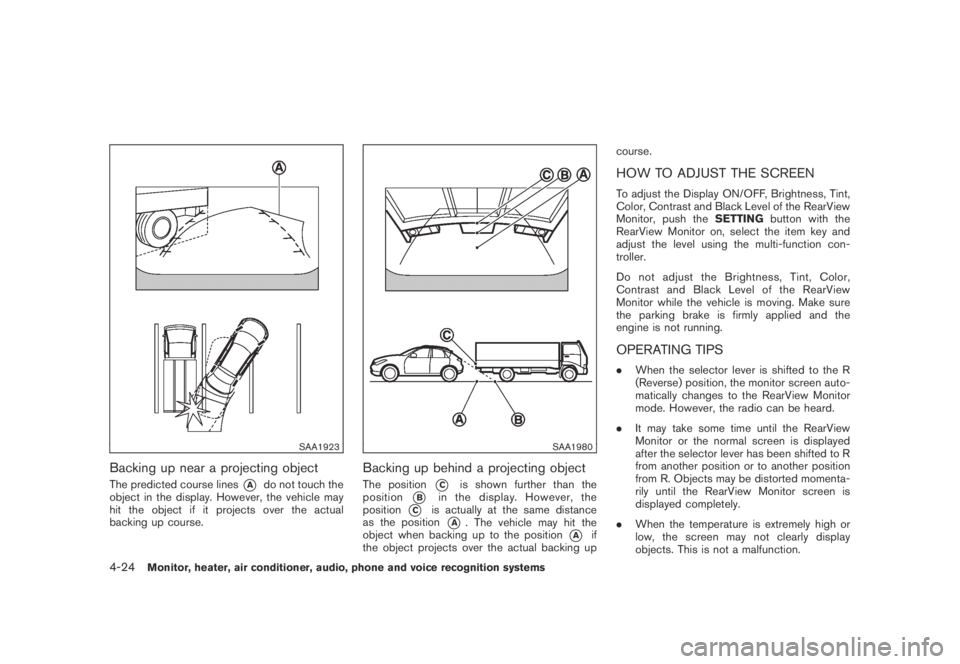
SAA1923
Backing up near a projecting object
The predicted course lines*Ado not touch the
object in the display. However, the vehicle may
hit the object if it projects over the actual
backing up course.
SAA1980
Backing up behind a projecting object
The position*Cis shown further than the
position
*Bin the display. However, the
position
*Cis actually at the same distance
as the position
*A. The vehicle may hit the
object when backing up to the position
*Aif
the object projects over the actual backing upcourse.
HOW TO ADJUST THE SCREEN
To adjust the Display ON/OFF, Brightness, Tint,
Color, Contrast and Black Level of the RearView
Monitor, push theSETTINGbutton with the
RearView Monitor on, select the item key and
adjust the level using the multi-function con-
troller.
Do not adjust the Brightness, Tint, Color,
Contrast and Black Level of the RearView
Monitor while the vehicle is moving. Make sure
the parking brake is firmly applied and the
engine is not running.
OPERATING TIPS
.When the selector lever is shifted to the R
(Reverse) position, the monitor screen auto-
matically changes to the RearView Monitor
mode. However, the radio can be heard.
.It may take some time until the RearView
Monitor or the normal screen is displayed
after the selector lever has been shifted to R
from another position or to another position
from R. Objects may be distorted momenta-
rily until the RearView Monitor screen is
displayed completely.
.When the temperature is extremely high or
low, the screen may not clearly display
objects. This is not a malfunction.
4-24Monitor, heater, air conditioner, audio, phone and voice recognition systems
Page 227 of 443
Black plate (225,1)
Model "Z51-D" EDITED: 2007/ 10/ 2
of contact with skin, wash immedi-
ately with soap and water.
.Use a damp, soft cloth when clean-
ing the Mobile Entertainment Sys-
tem components. Do not use
solvents or cleaning solutions.
.Do not attempt to use the system in extreme
temperature conditions [below−48F
(−208C) or above 1588F (708C)].
.To avoid discharging the vehicle battery, do
not operate the system more than 15
minutes without starting the engine.
Movies will not be shown on the front display
while the vehicle is in any drive position to
reduce driver distraction. Audio is available
when a movie is played. To view movies in the
front display, stop the vehicle in a safe location,
move the selector lever to the P (Park) position
and apply the parking brake.
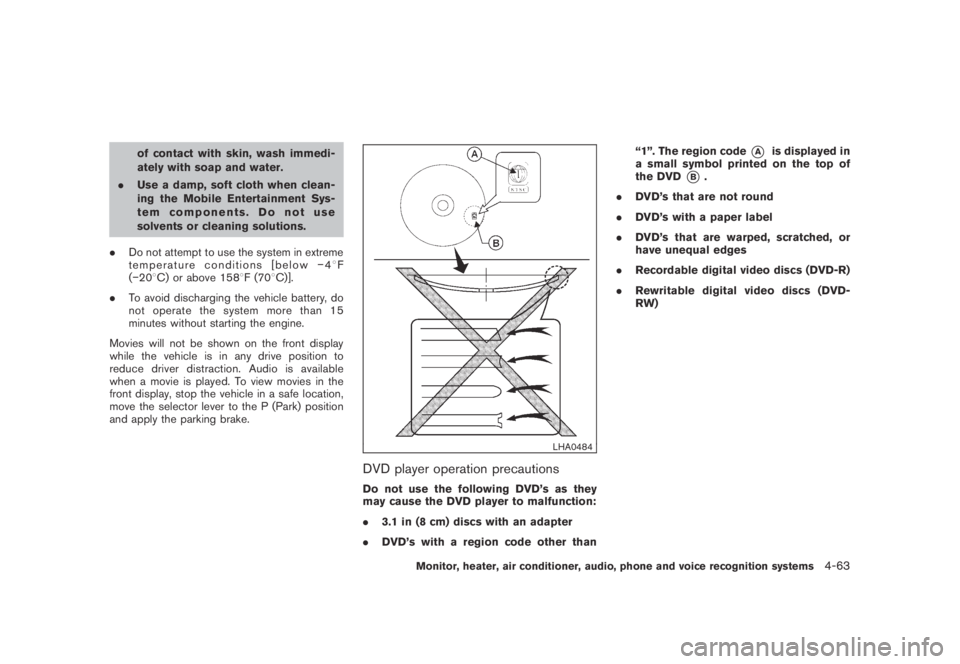
LHA0484
DVD player operation precautions
Do not use the following DVD’s as they
may cause the DVD player to malfunction:
.3.1 in (8 cm) discs with an adapter
.DVD’s with a region code other than“1”. The region code
*Ais displayed in
a small symbol printed on the top of
the DVD
*B.
.DVD’s that are not round
.DVD’s with a paper label
.DVD’s that are warped, scratched, or
have unequal edges
.Recordable digital video discs (DVD-R)
.Rewritable digital video discs (DVD-
RW)
Monitor, heater, air conditioner, audio, phone and voice recognition systems4-63
Page 228 of 443
Black plate (226,1)
Model "Z51-D" EDITED: 2007/ 10/ 2
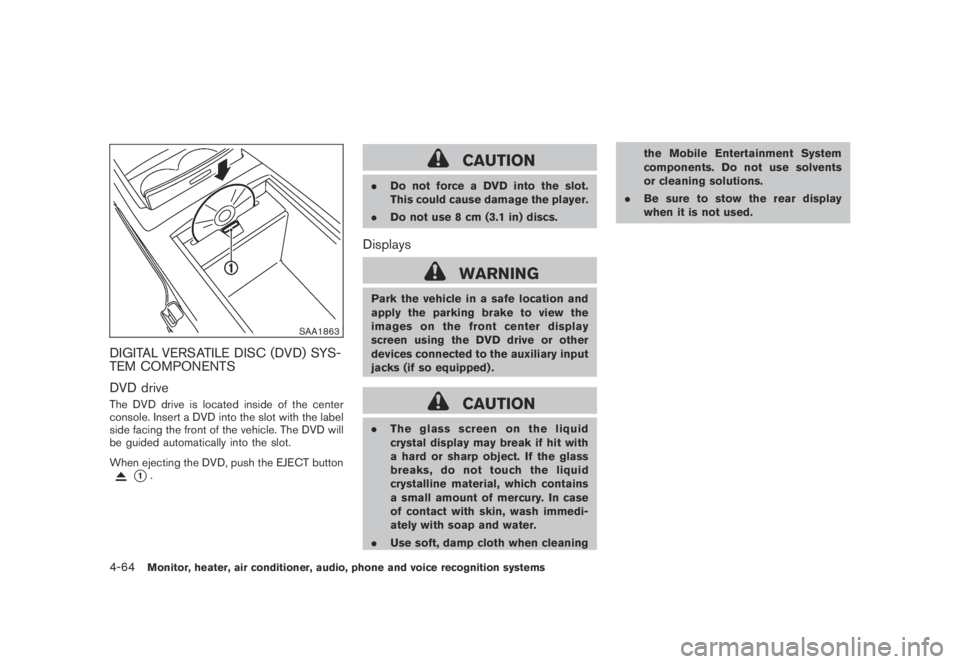
SAA1863
DIGITAL VERSATILE DISC (DVD) SYS-
TEM COMPONENTS
DVD drive
The DVD drive is located inside of the center
console. Insert a DVD into the slot with the label
side facing the front of the vehicle. The DVD will
be guided automatically into the slot.
When ejecting the DVD, push the EJECT button
*1.
CAUTION
.Do not force a DVD into the slot.
This could cause damage the player.
.Do not use 8 cm (3.1 in) discs.
Displays
WARNING
Park the vehicle in a safe location and
apply the parking brake to view the
images on the front center display
screen using the DVD drive or other
devices connected to the auxiliary input
jacks (if so equipped) .
CAUTION
.The glass screen on the liquid
crystal display may break if hit with
a hard or sharp object. If the glass
breaks, do not touch the liquid
crystalline material, which contains
a small amount of mercury. In case
of contact with skin, wash immedi-
ately with soap and water.
.Use soft, damp cloth when cleaningthe Mobile Entertainment System
components. Do not use solvents
or cleaning solutions.
.Be sure to stow the rear display
when it is not used.
4-64Monitor, heater, air conditioner, audio, phone and voice recognition systems
Page 270 of 443
Black plate (268,1)
Model "Z51-D" EDITED: 2007/ 10/ 2
SPEAKER ADAPTATION (SA) MODE
Speaker Adaptation allows up to two out-of
dialect users to train the system to improve
recognition accuracy. By repeating a number of
commands, the users can create a voice model
of their own voice that is stored in the system.
The system is capable of storing a different
speaker adaptation model for memory A and
memory B.
If memory A is available, the system will use
memory A to store the model. If memory A is in
use and memory B is available, the system will
use memory B to store the model. If both of the
memory locations are in use, the system will ask
the user to select which memory location should
be overwritten.
Training procedure
The procedure for training a voice is as follows.
1. Position the vehicle in a reasonably quiet
outdoor location.
2. Sit in the driver’s seat with the engine
running, the parking brake on, and the
transmission in the P (Park) position.
3. Press and hold the
button for more
than 5 seconds.
4. The system announces: “Press the PHONE/
SEND (
) button for the hands-free
phone system to enter the speaker adapta-tion mode.
5. Press the
button.
6. Voice memory A or memory B is selected
automatically. If both memory locations are
already in use, the system will prompt you to
overwrite one. Follow the instructions pro-
vided by the system.
7. When preparation is complete and you are
ready to begin, the press the
button.
8. The SA mode will be explained. Follow the
instructions provided by the system.
9. When training is finished, the system will tell
you an adequate number of phrases have
been recorded.
10. The system will ask you to say your name.
Follow the instructions to register your
name.
11. The system will announce that speaker
adaptation has been completed and the
system is ready.
The SA mode will stop if:
.The
button is pressed for more than 5
seconds in SA mode.
.The vehicle is driven during SA mode.
.The ignition switch is pushed to the OFF or
LOCK position.
Training phrases
During the SA mode, the system instructs you to
say the following phrases.
(The system will prompt you for each phrase.)
.phone book new entry
.dial three oh four two nine
.delete call back number
.setup pair phone
.memo pad play
.eight pause nine three two pause seven
.delete all entries
.call seven two four zero nine
.phone book delete entry
.memo pad record
.dial star two one seven oh
.Ye s
.No
.select ringtone
.dial eight five six nine two
.Bluetooth on
.setup change priority
4-106Monitor, heater, air conditioner, audio, phone and voice recognition systems
Page 313 of 443
Black plate (16,1)
5 Starting and driving
Model "Z51-D" EDITED: 2007/ 10/ 2
Precautions when starting and driving..................... 5-2
Exhaust gas (carbon monoxide)......................... 5-2
Three-way catalyst.......................................... 5-2
Tire Pressure Monitoring System (TPMS)............. 5-3
Avoiding collision and rollover........................... 5-5
On-pavement and off-road driving precautions...... 5-5
Drinking alcohol/drugs and driving...................... 5-6
Driving safety precautions................................ 5-6
Push-button ignition switch.................................. 5-8
Intelligent Key system (if so equipped)................ 5-8
Push-button ignition switch operation................5-10
Push-button ignition switch positions................5-10
Key port.....................................................5-11
Before starting the engine..................................5-12
Starting the engine...........................................5-12
Driving the vehicle............................................5-13
Continuously Variable Transmission (CVT)..........5-13
Parking brake..................................................5-17
Cruise control.................................................5-18
Precautions on cruise control..........................5-18
Cruise control operations...............................5-18Break-in schedule............................................5-20
Increasing fuel economy....................................5-20
All-Wheel Drive (AWD) (if so equipped)................5-21
All-Wheel Drive (AWD) lock switch operations....5-21
AWD warning light.......................................5-22
Parking/parking on hills......................................5-24
Power steering................................................5-25
Brake system..................................................5-25
Braking precautions......................................5-25
Parking brake break-in...................................5-25
Anti-lock Braking System (ABS)......................5-26
Vehicle Dynamic Control (VDC) system.................5-27
Cold weather driving.........................................5-28
Freeing a frozen door lock..............................5-28
Anti-freeze..................................................5-28
Battery......................................................5-28
Draining of coolant water...............................5-28
Tire equipment............................................5-29
Special winter equipment...............................5-29
Driving on SNOW or ice................................5-29
Engine block heater (if so equipped).................5-29
Page 318 of 443
Black plate (318,1)
Model "Z51-D" EDITED: 2007/ 10/ 2
DRINKING ALCOHOL/DRUGS AND
DRIVING
WARNING
Never drive under the influence of
alcohol or drugs. Alcohol in the blood-
stream reduces coordination, delays
reaction time and impairs judgement.
Driving after drinking alcohol increases
the likelihood of being involved in an
accident injuring yourself and others.
Additionally, if you are injured in an
accident, alcohol can increase the se-
verity of the injury.
NISSAN is committed to safe driving. However,
you must choose not to drive under the influence
of alcohol. Every year thousands of people are
injured or killed in alcohol-related accidents.
Although the local laws vary on what is
considered to be legally intoxicated, the fact is
that alcohol affects all people differently and
most people underestimate the effects of
alcohol.
Remember, drinking and driving don’t mix! And
that is true for drugs, too (over-the-counter,
prescription, and illegal drugs) . Don’t drive if
your ability to operate your vehicle is impaired by
alcohol, drugs, or some other physical condition.
DRIVING SAFETY PRECAUTIONS
Your NISSAN is designed for both normal and
off-road use. However, avoid driving in deep
water or mud as your NISSAN is mainly
designed for leisure use, unlike a conventional
off-road vehicle.
Remember that Two-Wheel Drive (2WD) mod-
els are less capable than All-Wheel Drive
(AWD) models for rough road driving and
extrication when stuck in deep snow, mud, or
the like.
Please observe the following precautions:
WARNING
.Drive carefully when off the road
and avoid dangerous areas. Every
person who drives or rides in this
vehicle should be seated with their
seat belt fastened. This will keep
you and your passengers in position
when driving over rough terrain.
.Do not drive across steep slopes.
Instead drive either straight up or
straight down the slopes. Off-road
vehicles can tip over sideways much
more easily than they can forward or
backward.
.Many hills are too steep for anyvehicle. If you drive up them, you
may stall. If you drive down them,
you may not be able to control your
speed. If you drive across them, you
may roll over.
.Do not shift ranges while driving on
downhill grades as this could cause
loss of control of the vehicle.
.Stay alert when driving to the top of
a hill. At the top there could be a
drop-off or other hazard that could
cause an accident.
.If your engine stalls or you cannot
make it to the top of a steep hill,
never attempt to turn around. Your
vehicle could tip or roll over. Always
back straight down in R (Reverse)
range. Never back down in N (Neu-
tral) , using only the brake, as this
could cause loss of control.
.Heavy braking going down a hill
could cause your brakes to overheat
and fade, resulting in loss of control
and an accident. Apply brakes
lightly and use a low range to
control your speed.
.Unsecured cargo can be thrown
around when driving over rough
5-6Starting and driving