wheel NISSAN MURANO 2009 Owner´s Manual
[x] Cancel search | Manufacturer: NISSAN, Model Year: 2009, Model line: MURANO, Model: NISSAN MURANO 2009Pages: 443, PDF Size: 3.95 MB
Page 73 of 443
Black plate (71,1)
Model "Z51-D" EDITED: 2007/ 10/ 2
29. All-Wheel Drive (AWD) LOCK switch*
30. Rear window and outside mirror* defroster switch
31. Heater/air conditioner control or Audio system
32. Glove box
*: if so equipped
**: Refer to the separate Navigation System Owner’s
Manual (if so equipped) .
Instruments and controls2-3
Page 80 of 443
Black plate (78,1)
Model "Z51-D" EDITED: 2007/ 10/ 2
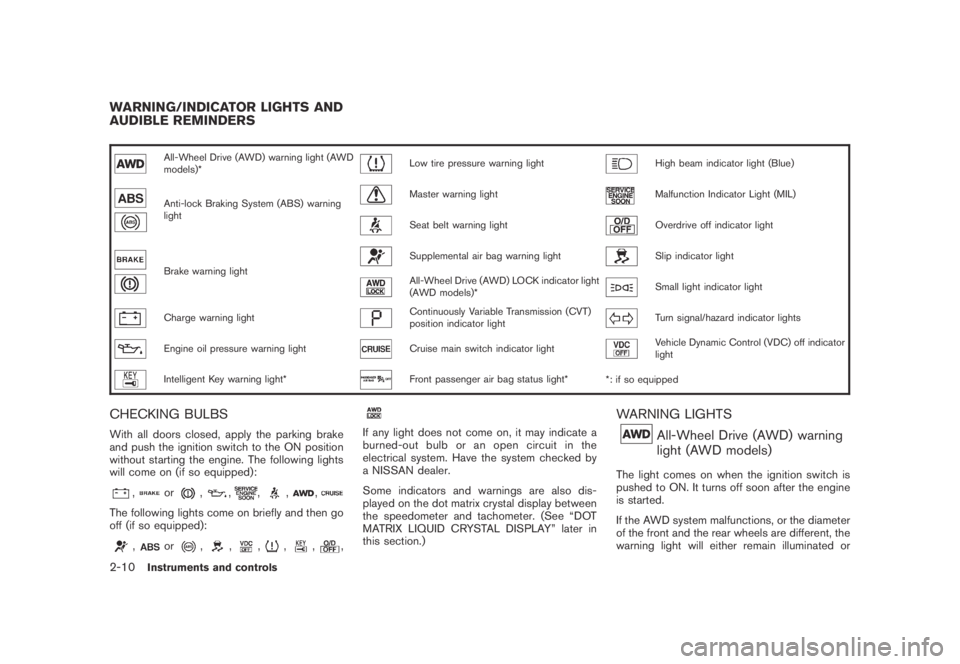
All-Wheel Drive (AWD) warning light (AWD
models)*Low tire pressure warning lightHigh beam indicator light (Blue)
Anti-lock Braking System (ABS) warning
lightMaster warning lightMalfunction Indicator Light (MIL)
Seat belt warning lightOverdrive off indicator light
Brake warning light
Supplemental air bag warning lightSlip indicator light
All-Wheel Drive (AWD) LOCK indicator light
(AWD models)*Small light indicator light
Charge warning lightContinuously Variable Transmission (CVT)
position indicator lightTurn signal/hazard indicator lights
Engine oil pressure warning lightCruise main switch indicator lightVehicle Dynamic Control (VDC) off indicator
light
Intelligent Key warning light*Front passenger air bag status light*
*: if so equipped
CHECKING BULBS
With all doors closed, apply the parking brake
and push the ignition switch to the ON position
without starting the engine. The following lights
will come on (if so equipped):
,or,,,,,
The following lights come on briefly and then go
off (if so equipped):
,or,,,,,,
If any light does not come on, it may indicate a
burned-out bulb or an open circuit in the
electrical system. Have the system checked by
a NISSAN dealer.
Some indicators and warnings are also dis-
played on the dot matrix crystal display between
the speedometer and tachometer. (See “DOT
MATRIX LIQUID CRYSTAL DISPLAY” later in
this section.)
WARNING LIGHTS
All-Wheel Drive (AWD) warning
light (AWD models)
The light comes on when the ignition switch is
pushed to ON. It turns off soon after the engine
is started.
If the AWD system malfunctions, or the diameter
of the front and the rear wheels are different, the
warning light will either remain illuminated or
WARNING/INDICATOR LIGHTS AND
AUDIBLE REMINDERS
2-10Instruments and controls
Page 81 of 443
Black plate (79,1)
Model "Z51-D" EDITED: 2007/ 10/ 2
blink. (See “ALL-WHEEL DRIVE (AWD)” in the
“5. Starting and driving” section.)
CAUTION
.If the warning light comes on while
driving there may be a malfunction
in the AWD system. Reduce the
vehicle speed and have your vehicle
checked by a NISSAN dealer as
soon as possible.
.If the AWD warning light blinks
when you are driving:
— blinks rapidly (about twice a
second):
Pull off the road in a safe area,
and idle the engine. The driving
mode will change to 2WD to
prevent the AWD system from
malfunctioning. If the warning
light turns off, you can drive
again.
— blinks slowly (about once every
2 seconds):
Pull off the road in a safe area,
and idle the engine. Check that
all tire sizes are the same, tire
pressure is correct and tires arenot worn.
.If the warning light is still on after
the above operations, have your
vehicle checked by a NISSAN dealer
as soon as possible.
orAnti-lock Braking System
(ABS) warning light
When the ignition switch is in the ON position,
the Anti-lock Braking System (ABS) warning
light illuminates and then turns off. This indicates
the ABS is operational.
If the ABS warning light illuminates while the
engine is running, or while driving, it may
indicate the ABS is not functioning properly.
Have the system checked by a NISSAN dealer.
If an ABS malfunction occurs, the anti-lock
function is turned off. The brake system then
operates normally, but without anti-lock assis-
tance. (See “BRAKE SYSTEM” in the “5.
Starting and driving” section.)
orBrake warning light
This light functions for both the parking brake
and the foot brake systems.Parking brake indicator:
When the ignition switch is in the ON position,
the light comes on when the parking brake is
applied.
Low brake fluid warning light:
When the ignition switch is in the ON position,
the light warns of a low brake fluid level. If the
light comes on while the engine is running with
the parking brake not applied, stop the vehicle
and perform the following:
1. Check the brake fluid level. Add brake fluid
as necessary. (See “BRAKE FLUID” in the
“8. Maintenance and do-it-yourself” sec-
tion.)
2. If the brake fluid level is correct, have the
warningsystemcheckedbyaNISSAN
dealer.
Anti-lock Braking System (ABS) warning
indicator:
When the parking brake is released and the
brake fluid level is sufficient, if both the brake
warning light and the Anti-lock Braking System
(ABS) warning light illuminate, it may indicate
the ABS is not functioning properly. Have the
brake system checked, and if necessary re-
paired, by a NISSAN dealer promptly. Avoid
high-speed driving and abrupt braking. (See
“Anti-lock Braking System (ABS) warning light”
Instruments and controls2-11
Page 83 of 443
Black plate (81,1)
Model "Z51-D" EDITED: 2007/ 10/ 2
Low tire pressure warning light
Your vehicle is equipped with a Tire Pressure
Monitoring System (TPMS) that monitors the tire
pressure of all tires except the spare.
The low tire pressure warning light warns of low
tire pressure or indicates that the TPMS is not
functioning properly.
After the ignition switch is pushed ON, this light
illuminates for about 1 second and turns off.
Low tire pressure warning:
If the vehicle is being driven with low tire
pressure, the warning light will illuminate.
When the low tire pressure warning light
illuminates, you should stop and adjust the tire
pressure to the recommended COLD tire
pressure shown on the Tire and Loading
Information label. The low tire pressure warning
light does not automatically turn off when the tire
pressure is adjusted. After the tire is inflated to
the recommended pressure, the vehicle must be
driven at speeds above 16 MPH (25 km/h) to
activate the TPMS and turn off the low tire
pressure warning light. Use a tire pressure
gauge to check the tire pressure.
For additional information, see “TIRE PRES-
SURE MONITORING SYSTEM (TPMS)” in the
“5. Starting and driving” section and “TIREPRESSURE MONITORING SYSTEM (TPMS)”
in the “6. In case of emergency” section.
TPMS malfunction:
If the TPMS is not functioning properly, the low
tire pressure warning light will flash for approxi-
mately 1 minute when the ignition switch is
pushed ON. The light will remain on after the 1
minute. Have the system checked by a NISSAN
dealer.
For additional information, see “TIRE PRES-
SURE MONITORING SYSTEM (TPMS)” in the
“5. Starting and driving” section.
WARNING
.If the light does not illuminate with
the ignition switch pushed ON, have
the vehicle checked by a NISSAN
dealer as soon as possible.
.If the light illuminates while driving,
avoid sudden steering maneuvers or
abrupt braking, reduce vehicle
speed, pull off the road to a safe
location and stop the vehicle as
soon as possible. Driving with un-
der-inflated tires may permanently
damage the tires and increase the
likelihood of tire failure. Serious
vehicle damage could occur andmay lead to an accident and could
result in serious personal injury.
Check the tire pressure for all four
tires. Adjust the tire pressure to the
recommended COLD tire pressure
shownontheTireandLoading
Information label to turn the low
tire pressure warning light OFF. If
the light stays on after adjusting the
tire pressure and driving over 16
MPH (25 km/h) , have the system
checked by a NISSAN dealer. If you
have a flat tire, replace it with a
spare tire as soon as possible.
.When a spare tire is mounted or a
wheel is replaced, the TPMS will not
function and the low tire pressure
warning light will flash for approxi-
mately 1 minute. The light will
remain on after 1 minute. Contact
your NISSAN dealer as soon as
possible for tire replacement and/
or system resetting.
.Replacing tires with those not ori-
ginally specified by NISSAN could
affect the proper operation of the
TPMS.
Instruments and controls2-13
Page 84 of 443
Black plate (82,1)
Model "Z51-D" EDITED: 2007/ 10/ 2
CAUTION
.The TPMS is not a substitute for the
regular tire pressure check. Be sure
to check the tire pressure regularly.
.If the vehicle is being driven at
speeds of less than 16 MPH (25
km/h) , the TPMS may not operate
correctly.
.Be sure to correctly install the
specified size of tires to the four
wheels.
Master warning light
When the ignition switch is in the ON position,
the master warning light illuminates if any of the
following are displayed on the dot matrix liquid
crystal display:
.No key warning
.Low fuel warning
.Low washer fluid warning
.Parking brake release warning
.Door/lift gate open warning
See “DOT MATRIX LIQUID CRYSTAL DIS-
PLAY” later in this section.
Seat belt warning light
The light and chime remind you to fasten seat
belts. The light illuminates whenever the ignition
switch is pushed to the ON position, and will
remain illuminated until the driver’s seat belt is
fastened.
The seat belt warning light for the front
passenger will illuminate if the seat belt is not
fastened when the front passenger’s seat is
occupied. For 6 seconds after the ignition
switch is in the ON position, the system does
not activate the warning light for the front
passenger.
See “SEAT BELTS” in the “1. Safety — Seats,
seat belts and supplemental restraint system”
section for precautions on seat belt usage.
Supplemental air bag warning light
After pushing the ignition switch to the ON
position, the supplemental air bag warning light
will illuminate. The supplemental air bag warning
light will turn off after about 7 seconds if the
supplemental front air bag and supplemental
side air bag, curtain side-impact air bag systems
and/or pretensioner seat belt are operational.
If any of the following conditions occur, the front
air bag, side air bag, curtain and rollover air bag
and pretensioner systems needs servicing andyour vehicle must be taken to your nearest
NISSAN dealer.
.The supplemental air bag warning light
remains on after approximately 7 seconds.
.The supplemental air bag warning light
flashes intermittently.
.The supplemental air bag warning light does
not come on at all.
Unless checked and repaired, the Supplemental
Restraint Systems (air bag systems) and/or the
pretensioners may not function properly.
For additional information, see “SUPPLEMEN-
TAL RESTRAINT SYSTEM” in the “1. Safety —
Seats, seat belts and supplemental restraint
system” section.
WARNING
If the supplemental air bag warning
light is on, it could mean that the front
air bag, side air bag, curtain and roll-
over air bag and/or pretensioner sys-
tems will not operate in an accident. To
help avoid injury to yourself or others,
have your vehicle checked by a NISSAN
dealer as soon as possible.
2-14Instruments and controls
Page 85 of 443
Black plate (83,1)
Model "Z51-D" EDITED: 2007/ 10/ 2
INDICATOR LIGHTS
All-Wheel Drive (AWD) LOCK
indicator light (AWD models)
This light illuminates when the ignition switch is
turned to the ON position, and turns off within 1
second.
When selecting the LOCK mode while the
engine is running, this light will illuminate. (See
“ALL-WHEEL DRIVE (AWD)” in the “5. Starting
and driving” section.)
Continuously Variable Transmis-
sion (CVT) position indicator light
When the ignition switch is pushed to the ON
position, the indicator shows the automatic
selector shift position. (See “CONTINUOUSLY
VARIABLE TRANSMISSION (CVT)” in the “5.
Starting and driving” section.)
Cruise indicator light
Cruise main switch indicator:
This light illuminates when the cruise control
main switch is pushed. The light turns off when
the main switch is pushed again. When the
cruise main switch indicator light illuminates, the
cruise control system is operational. (See“CRUISE CONTROL” in the “5. Starting and
driving” section.)
Cruise malfunction:
If the cruise indicator light blinks while the
engine is running, it may indicate the cruise
control system is not functioning properly. Have
the system checked by a NISSAN dealer. (See
“CRUISE CONTROL” in the “5. Starting and
driving” section.)
Front passenger air bag status
light
The front passenger air bag status lightwill be lit and the passenger front air bag will be
OFF depending on how the front passenger
seat is being used.
For front passenger air bag status light opera-
tion,see“NISSANADVANCEDAIRBAG
SYSTEM (front seats)” in the “1. Safety —
Seats, seat belts and supplemental restraint
system” section of this manual.
High beam indicator light (Blue)
This light comes on when the headlight high
beam is on and goes out when the low beam is
selected.
Malfunction Indicator Light (MIL)
If the malfunction indicator light comes on
steady or blinks while the engine is running, it
may indicate a potential emission control and/or
Continuously Variable Transmission (CVT) mal-
function.
The malfunction indicator light may also come on
steady if the fuel-filler cap is loose or missing, or
if the vehicle runs out of fuel. Check to make
sure the fuel-filler cap is installed and closed
tightly, and that the vehicle has at least 3 US
gallons (11.4 liters) of fuel in the fuel tank.
After a few driving trips, the
light should
turn off if no other potential emission control
system malfunction exists.
If this indicator light remains on for 20 seconds
and then blinks for 10 seconds when the engine
is not running, it indicates that the vehicle is not
ready for an emission control system inspection/
maintenance test. (See “READINESS FOR
INSPECTION/MAINTENANCE (I/M) TEST” in
the “9. Technical and consumer information”
section.)
Operation:
The malfunction indicator light will come on in
one of two ways:
.Malfunction indicator light on steady — An
Instruments and controls2-15
Page 88 of 443
Black plate (86,1)
Model "Z51-D" EDITED: 2007/ 10/ 2
SIC3577
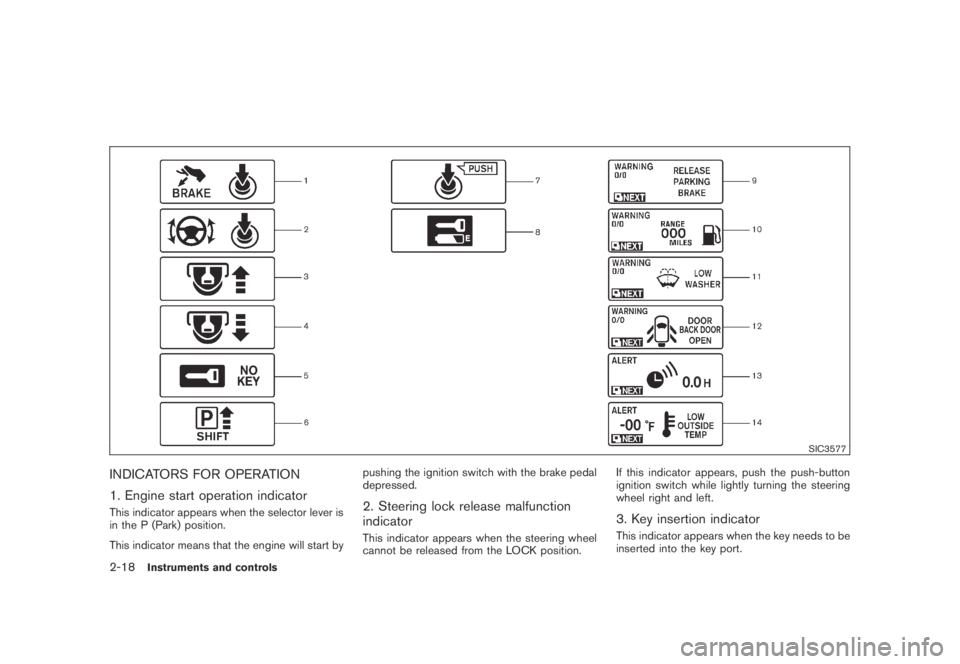
INDICATORS FOR OPERATION
1. Engine start operation indicator
This indicator appears when the selector lever is
in the P (Park) position.
This indicator means that the engine will start bypushing the ignition switch with the brake pedal
depressed.2. Steering lock release malfunction
indicator
This indicator appears when the steering wheel
cannot be released from the LOCK position.If this indicator appears, push the push-button
ignition switch while lightly turning the steering
wheel right and left.
3. Key insertion indicator
This indicator appears when the key needs to be
inserted into the key port.
2-18Instruments and controls
Page 107 of 443
Black plate (105,1)
Model "Z51-D" EDITED: 2007/ 10/ 2
.Turn signals do not work when the
hazard warning flasher lights are
on.
The flasher can be actuated with the ignition
switch in any position.
Some state laws may prohibit the use of
the hazard warning flasher switch while
driving.
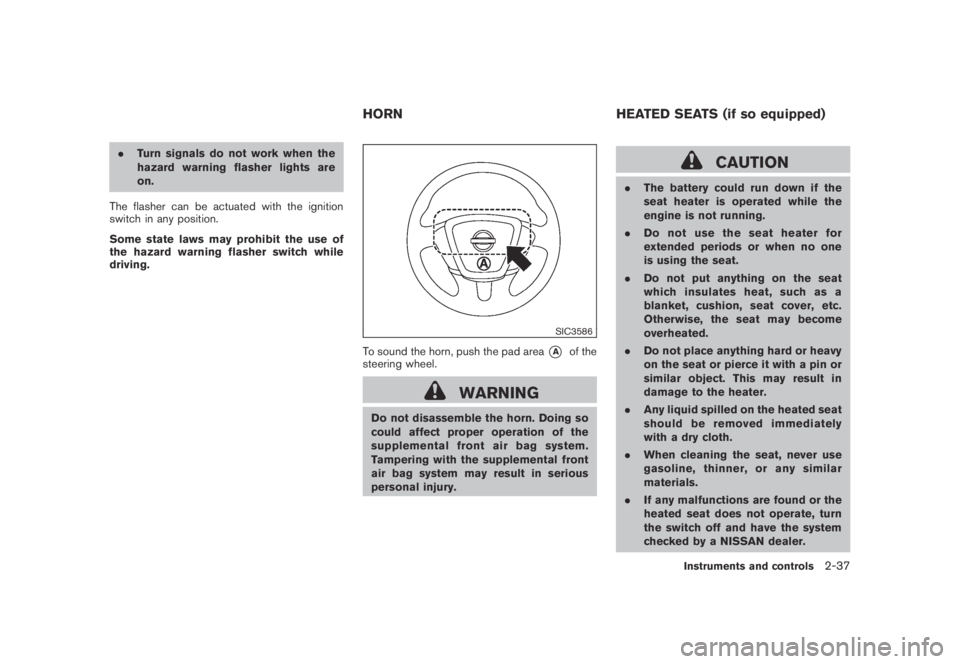
SIC3586
To sound the horn, push the pad area*Aof the
steering wheel.
WARNING
Do not disassemble the horn. Doing so
could affect proper operation of the
supplemental front air bag system.
Tampering with the supplemental front
air bag system may result in serious
personal injury.
CAUTION
.The battery could run down if the
seat heater is operated while the
engine is not running.
.Do not use the seat heater for
extended periods or when no one
is using the seat.
.Do not put anything on the seat
which insulates heat, such as a
blanket, cushion, seat cover, etc.
Otherwise, the seat may become
overheated.
.Do not place anything hard or heavy
on the seat or pierce it with a pin or
similar object. This may result in
damage to the heater.
.Any liquid spilled on the heated seat
should be removed immediately
with a dry cloth.
.When cleaning the seat, never use
gasoline, thinner, or any similar
materials.
.If any malfunctions are found or the
heated seat does not operate, turn
the switch off and have the system
checked by a NISSAN dealer.
HORN HEATED SEATS (if so equipped)
Instruments and controls2-37
Page 109 of 443
Black plate (107,1)
Model "Z51-D" EDITED: 2007/ 10/ 2
5. Push the CLOCK button*1or AUDIO
knob
*2to enter.
The display will return to the regular clock
display after 10 seconds.
If the power supply is disconnected, the clock
will not indicate the correct time.
Readjust the time.
MODELS WITH COLOR DISPLAY
For adjusting the time, see “Clock settings” in
the “4. Monitor, heater, air conditioner, audio,
phone and voice recognition systems” section.
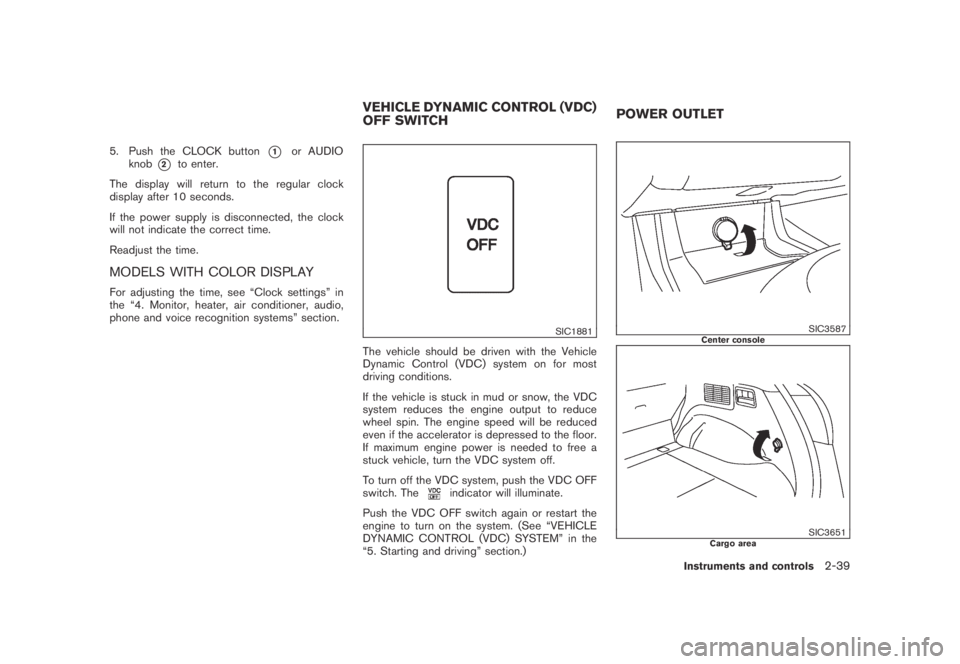
SIC1881
The vehicle should be driven with the Vehicle
Dynamic Control (VDC) system on for most
driving conditions.
If the vehicle is stuck in mud or snow, the VDC
system reduces the engine output to reduce
wheel spin. The engine speed will be reduced
even if the accelerator is depressed to the floor.
If maximum engine power is needed to free a
stuck vehicle, turn the VDC system off.
To turn off the VDC system, push the VDC OFF
switch. The
indicator will illuminate.
Push the VDC OFF switch again or restart the
engine to turn on the system. (See “VEHICLE
DYNAMIC CONTROL (VDC) SYSTEM” in the
“5. Starting and driving” section.)
SIC3587Center console
SIC3651Cargo area
VEHICLE DYNAMIC CONTROL (VDC)
OFF SWITCHPOWER OUTLET
Instruments and controls2-39
Page 138 of 443
Black plate (138,1)
Model "Z51-D" EDITED: 2007/ 10/ 2
charged, replace it with a new one.
Since the Intelligent Key is continuously receiv-
ing radio waves, if the key is left near equipment
which transmits strong radio waves, such as
signals from a TV and personal computer, the
battery life may become shorter.
For information regarding replacement of a
battery, see “BATTERY REPLACEMENT” in
the “8. Maintenance and do-it-yourself” section.
Because the steering wheel is locked electri-
cally, unlocking the steering wheel with the
ignition switch in the LOCK position is impos-
sible when the vehicle battery is completely
discharged. Pay special attention that the
vehicle battery is not completely discharged.
As many as 4 Intelligent Keys can be registered
and used with one vehicle. For information about
the purchase and use of additional Intelligent
Keys, contact a NISSAN dealer.
CAUTION
.Do not allow the Intelligent Key,
which contains electrical compo-
nents, to come into contact with
water or salt water. This could affect
the system function.
.Do not drop the Intelligent Key..Do not strike the Intelligent Key
sharply against another object.
.Do not change or modify the Intel-
ligent Key.
.Wetting may damage the Intelligent
Key. If the Intelligent Key gets wet,
immediately wipe until it is comple-
tely dry.
.Do not place the Intelligent Key for
an extended period in an area where
temperatures exceed 1408F (608C) .
.Do not attach the Intelligent Key
with a key holder that contains a
magnet.
.Do not place the Intelligent Key near
equipment that produces a mag-
netic field, such as a TV, audio
equipment and personal computers.
If an Intelligent Key is lost or stolen, NISSAN
recommends erasing the ID code of that
Intelligent Key from the vehicle. This may prevent
the unauthorized use of the Intelligent Key to
operate the vehicle. For information regarding
the erasing procedure, contact a NISSAN deal-
er.
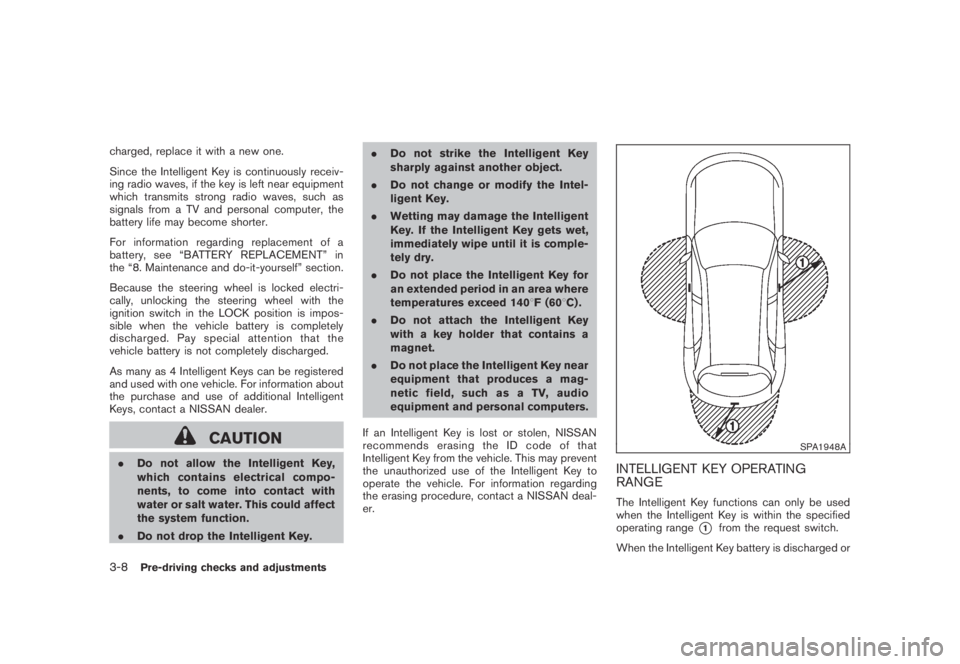
SPA1948A
INTELLIGENT KEY OPERATING
RANGE
The Intelligent Key functions can only be used
when the Intelligent Key is within the specified
operating range
*1from the request switch.
When the Intelligent Key battery is discharged or
3-8Pre-driving checks and adjustments