wheel NISSAN MURANO 2009 Owner´s Manual
[x] Cancel search | Manufacturer: NISSAN, Model Year: 2009, Model line: MURANO, Model: NISSAN MURANO 2009Pages: 443, PDF Size: 3.95 MB
Page 306 of 443
Black plate (304,1)
Model "Z51-D" EDITED: 2007/ 10/ 2
possible. Close the windows to eliminate the
surrounding noises (traffic noises, vibration
sounds, etc.) , which may prevent the system
from recognizing the voice commands cor-
rectly.
.When the climate control is in the AUTO
mode, the fan speed decreases automati-
cally for easy recognition.
.Wait until a tone sounds before speaking a
command.
.Speak in a natural voice without pausing
between words.
SAA1859
Giving voice command
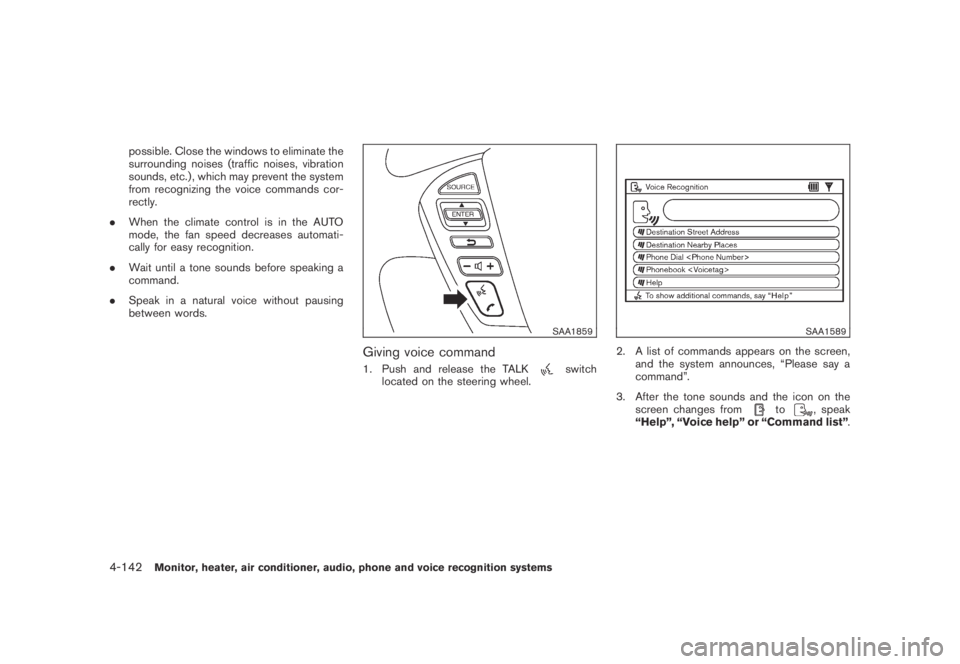
1. Push and release the TALKswitch
located on the steering wheel.
SAA1589
2. A list of commands appears on the screen,
and the system announces, “Please say a
command”.
3. After the tone sounds and the icon on the
screen changes from
to, speak
“Help”, “Voice help” or “Command list”.
4-142Monitor, heater, air conditioner, audio, phone and voice recognition systems
Page 307 of 443
Black plate (305,1)
Model "Z51-D" EDITED: 2007/ 10/ 2
SAA1935
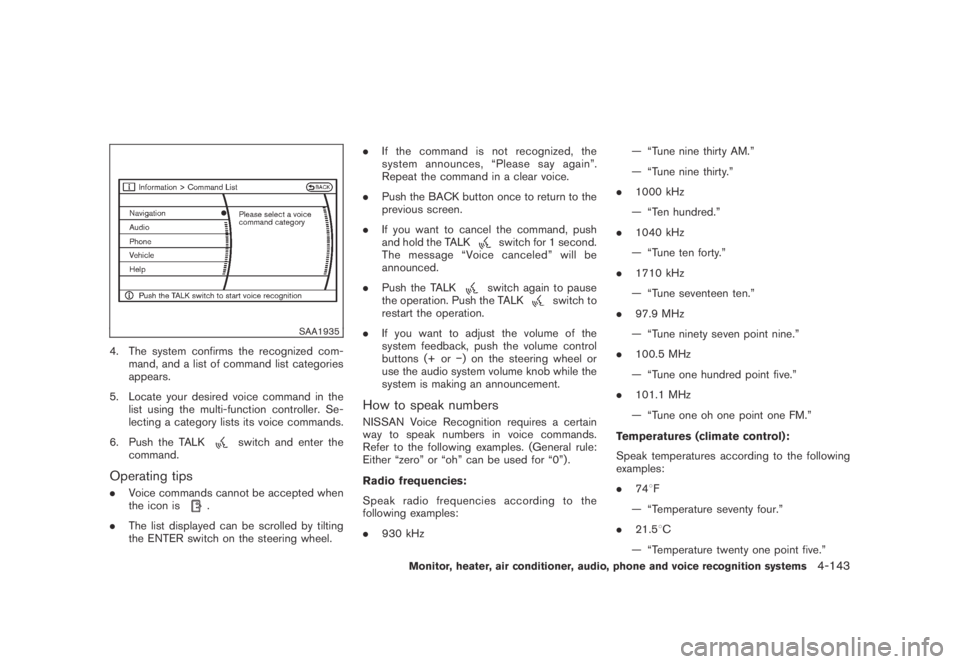
4. The system confirms the recognized com-
mand, and a list of command list categories
appears.
5. Locate your desired voice command in the
list using the multi-function controller. Se-
lecting a category lists its voice commands.
6. Push the TALK
switch and enter the
command.
Operating tips
.Voice commands cannot be accepted when
the icon is.
.The list displayed can be scrolled by tilting
the ENTER switch on the steering wheel..If the command is not recognized, the
system announces, “Please say again”.
Repeat the command in a clear voice.
.Push the BACK button once to return to the
previous screen.
.If you want to cancel the command, push
and hold the TALK
switch for 1 second.
The message “Voice canceled” will be
announced.
.Push the TALK
switch again to pause
the operation. Push the TALKswitch to
restart the operation.
.If you want to adjust the volume of the
system feedback, push the volume control
buttons (+ or−) on the steering wheel or
use the audio system volume knob while the
system is making an announcement.
How to speak numbers
NISSAN Voice Recognition requires a certain
way to speak numbers in voice commands.
Refer to the following examples. (General rule:
Either “zero” or “oh” can be used for “0”) .
Radio frequencies:
Speak radio frequencies according to the
following examples:
.930 kHz— “Tune nine thirty AM.”
— “Tune nine thirty.”
.1000 kHz
— “Ten hundred.”
.1040 kHz
— “Tune ten forty.”
.1710 kHz
— “Tune seventeen ten.”
.97.9 MHz
— “Tune ninety seven point nine.”
.100.5 MHz
— “Tune one hundred point five.”
.101.1 MHz
— “Tune one oh one point one FM.”
Temperatures (climate control):
Speak temperatures according to the following
examples:
.748F
— “Temperature seventy four.”
.21.58C
— “Temperature twenty one point five.”
Monitor, heater, air conditioner, audio, phone and voice recognition systems4-143
Page 313 of 443
Black plate (16,1)
5 Starting and driving
Model "Z51-D" EDITED: 2007/ 10/ 2
Precautions when starting and driving..................... 5-2
Exhaust gas (carbon monoxide)......................... 5-2
Three-way catalyst.......................................... 5-2
Tire Pressure Monitoring System (TPMS)............. 5-3
Avoiding collision and rollover........................... 5-5
On-pavement and off-road driving precautions...... 5-5
Drinking alcohol/drugs and driving...................... 5-6
Driving safety precautions................................ 5-6
Push-button ignition switch.................................. 5-8
Intelligent Key system (if so equipped)................ 5-8
Push-button ignition switch operation................5-10
Push-button ignition switch positions................5-10
Key port.....................................................5-11
Before starting the engine..................................5-12
Starting the engine...........................................5-12
Driving the vehicle............................................5-13
Continuously Variable Transmission (CVT)..........5-13
Parking brake..................................................5-17
Cruise control.................................................5-18
Precautions on cruise control..........................5-18
Cruise control operations...............................5-18Break-in schedule............................................5-20
Increasing fuel economy....................................5-20
All-Wheel Drive (AWD) (if so equipped)................5-21
All-Wheel Drive (AWD) lock switch operations....5-21
AWD warning light.......................................5-22
Parking/parking on hills......................................5-24
Power steering................................................5-25
Brake system..................................................5-25
Braking precautions......................................5-25
Parking brake break-in...................................5-25
Anti-lock Braking System (ABS)......................5-26
Vehicle Dynamic Control (VDC) system.................5-27
Cold weather driving.........................................5-28
Freeing a frozen door lock..............................5-28
Anti-freeze..................................................5-28
Battery......................................................5-28
Draining of coolant water...............................5-28
Tire equipment............................................5-29
Special winter equipment...............................5-29
Driving on SNOW or ice................................5-29
Engine block heater (if so equipped).................5-29
Page 315 of 443
Black plate (315,1)
Model "Z51-D" EDITED: 2007/ 10/ 2
WARNING
.The exhaust gas and the exhaust
system are very hot. Keep people,
animals or flammable materials
away from the exhaust system com-
ponents.
.Do not stop or park the vehicle over
flammable materials such as dry
grass, waste paper or rags. They
may ignite and cause a fire.
CAUTION
.Do not use leaded gasoline. Depos-
its from leaded gasoline will ser-
iously reduce the three-way
catalyst’s ability to help reduce ex-
haust pollutants.
.Keep your engine tuned up. Mal-
functions in the ignition, fuel injec-
tion, or electrical systems can cause
overrich fuel flow into the three-way
catalyst, causing it to overheat. Do
not keep driving if the engine mis-
fires, or if noticeable loss of perfor-
mance or other unusual operating
conditions are detected. Have thevehicle inspected promptly by a
NISSAN dealer.
.Avoid driving with an extremely low
fuel level. Running out of fuel could
cause the engine to misfire, dama-
ging the three-way catalyst.
.Do not race the engine while warm-
ing it up.
.Do not push or tow your vehicle to
start the engine.
TIRE PRESSURE MONITORING SYS-
TEM (TPMS)
Each tire, including the spare (if provided) ,
should be checked monthly when cold and
inflated to the inflation pressure recommended
by the vehicle manufacturer on the vehicle
placard or tire inflation pressure label. (If your
vehicle has tires of a different size than the size
indicated on the vehicle placard or tire inflation
pressure label, you should determine the proper
tire inflation pressure for those tires.)
As an added safety feature, your vehicle has
been equipped with a Tire Pressure Monitoring
System (TPMS) that illuminates a low tire
pressure telltale when one or more of your tires
is significantly under-inflated. Accordingly, when
the low tire pressure telltale illuminates, you
should stop and check your tires as soon aspossible, and inflate them to the proper pres-
sure. Driving on a significantly under-inflated tire
causes the tire to overheat and can lead to tire
failure. Under-inflation also reduces fuel effi-
ciency and tire tread life, and may affect the
vehicle’s handling and stopping ability.
Please note that the TPMS is not a substitute for
proper tire maintenance, and it is the driver’s
responsibility to maintain correct tire pressure,
even if under-inflation has not reached the level
to trigger illumination of the TPMS low tire
pressure telltale.
Your vehicle has also been equipped with a
TPMS malfunction indicator to indicate when the
system is not operating properly. The TPMS
malfunction indicator is combined with the low
tire pressure telltale. When the system detects a
malfunction, the telltale will flash for approxi-
mately one minute and then remain continuously
illuminated. This sequence will continue upon
subsequent vehicle start-ups as long as the
malfunction exists. When the malfunction indi-
cator is illuminated, the system may not be able
to detect or signal low tire pressure as intended.
TPMS malfunctions may occur for a variety of
reasons, including the installation of replace-
ment or alternate tires or wheels on the vehicle
that prevent the TPMS from functioning properly.
Always check the TPMS malfunction telltale
after replacing one or more tires or wheels on
your vehicle to ensure that the replacement or
Starting and driving5-3
Page 316 of 443
Black plate (316,1)
Model "Z51-D" EDITED: 2007/ 10/ 2
alternate tires and wheels allow the TPMS to
continue to function properly.
Additional information
.The TPMS does not monitor the tire
pressure of the spare tire.
.The TPMS will activate only when the
vehicle is driven at speeds above 16 MPH
(25 km/h) . Also, this system may not detect
a sudden drop in tire pressure (for example a
flat tire while driving) .
.The low tire pressure warning light does not
automatically turn off when the tire pressure
is adjusted. After the tire is inflated to the
recommended pressure, the vehicle must be
driven at speeds above 16 MPH (25 km/h)
to activate the TPMS and turn off the low tire
pressure warning light. Use a tire pressure
gauge to check the tire pressure.
.Tire pressure rises and falls depending on
the heat caused by the vehicle’s operation
and the outside temperature. Low outside
temperature can lower the temperature of
the air inside the tire which can cause a
lower tire inflation pressure. This may cause
the low tire pressure warning light to
illuminate. If the warning light illuminates in
low ambient temperature, check the tire
pressure for all four tires.
For additional information, see “Low tire pres-sure warning light” in the “2. Instruments and
controls” section and “TIRE PRESSURE MON-
ITORING SYSTEM (TPMS)” in the “6. In case of
emergency” section.
WARNING
.If the low tire pressure warning light
illuminates while driving, avoid sud-
den steering maneuvers or abrupt
braking, reduce vehicle speed, pull
off the road to a safe location and
stop the vehicle as soon as possi-
ble. Driving with under-inflated tires
may permanently damage the tires
and increase the likelihood of tire
failure. Serious vehicle damage
could occur and may lead to an
accident and could result in serious
personal injury. Check the tire pres-
sure for all four tires. Adjust the tire
pressure to the recommended COLD
tire pressure shown on the Tire and
Loading Information label to turn
the low tire pressure warning light
OFF. If you have a flat tire, replace it
with a spare tire as soon as possi-
ble. (See “FLAT TIRE” in the “6. In
case of emergency” section for
changing a flat tire.).When a spare tire is mounted or a
wheel is replaced, the TPMS will not
function and the low tire pressure
warning light will flash for approxi-
mately 1 minute. The light will
remain on after 1 minute. Contact
your NISSAN dealer as soon as
possible for tire replacement and/
or system resetting.
.Replacing tires with those not ori-
ginally specified by NISSAN could
affect the proper operation of the
TPMS.
.Do not inject any tire liquid or
aerosol tire sealant into the tires,
as this may cause a malfunction of
the tire pressure sensors.
CAUTION
.The TPMS may not function properly
when the wheels are equipped with
tire chains or the wheels are buried
in snow.
.Do not place metalized film or any
metal parts (antenna, etc.) on the
windows. This may cause poor re-
ception of the signals from the tire
5-4Starting and driving
Page 318 of 443
Black plate (318,1)
Model "Z51-D" EDITED: 2007/ 10/ 2
DRINKING ALCOHOL/DRUGS AND
DRIVING
WARNING
Never drive under the influence of
alcohol or drugs. Alcohol in the blood-
stream reduces coordination, delays
reaction time and impairs judgement.
Driving after drinking alcohol increases
the likelihood of being involved in an
accident injuring yourself and others.
Additionally, if you are injured in an
accident, alcohol can increase the se-
verity of the injury.
NISSAN is committed to safe driving. However,
you must choose not to drive under the influence
of alcohol. Every year thousands of people are
injured or killed in alcohol-related accidents.
Although the local laws vary on what is
considered to be legally intoxicated, the fact is
that alcohol affects all people differently and
most people underestimate the effects of
alcohol.
Remember, drinking and driving don’t mix! And
that is true for drugs, too (over-the-counter,
prescription, and illegal drugs) . Don’t drive if
your ability to operate your vehicle is impaired by
alcohol, drugs, or some other physical condition.
DRIVING SAFETY PRECAUTIONS
Your NISSAN is designed for both normal and
off-road use. However, avoid driving in deep
water or mud as your NISSAN is mainly
designed for leisure use, unlike a conventional
off-road vehicle.
Remember that Two-Wheel Drive (2WD) mod-
els are less capable than All-Wheel Drive
(AWD) models for rough road driving and
extrication when stuck in deep snow, mud, or
the like.
Please observe the following precautions:
WARNING
.Drive carefully when off the road
and avoid dangerous areas. Every
person who drives or rides in this
vehicle should be seated with their
seat belt fastened. This will keep
you and your passengers in position
when driving over rough terrain.
.Do not drive across steep slopes.
Instead drive either straight up or
straight down the slopes. Off-road
vehicles can tip over sideways much
more easily than they can forward or
backward.
.Many hills are too steep for anyvehicle. If you drive up them, you
may stall. If you drive down them,
you may not be able to control your
speed. If you drive across them, you
may roll over.
.Do not shift ranges while driving on
downhill grades as this could cause
loss of control of the vehicle.
.Stay alert when driving to the top of
a hill. At the top there could be a
drop-off or other hazard that could
cause an accident.
.If your engine stalls or you cannot
make it to the top of a steep hill,
never attempt to turn around. Your
vehicle could tip or roll over. Always
back straight down in R (Reverse)
range. Never back down in N (Neu-
tral) , using only the brake, as this
could cause loss of control.
.Heavy braking going down a hill
could cause your brakes to overheat
and fade, resulting in loss of control
and an accident. Apply brakes
lightly and use a low range to
control your speed.
.Unsecured cargo can be thrown
around when driving over rough
5-6Starting and driving
Page 319 of 443
Black plate (319,1)
Model "Z51-D" EDITED: 2007/ 10/ 2
terrain. Properly secure all cargo so
it will not be thrown forward and
cause injury to you or your passen-
gers.
.To avoid raising the center of gravity
excessively, do not exceed the rated
capacityoftheroofrack(ifso
equipped) and evenly distribute the
load. Secure heavy loads in the
cargo area as far forward and as
low as possible. Do not equip the
vehicle with tires larger than speci-
fied in this manual. This could cause
your vehicle to roll over.
.Do not grip the inside or spokes of
the steering wheel when driving off-
road. The steering wheel could
move suddenly and injure your
hands. Instead drive with your fin-
gers and thumbs on the outside of
the rim.
.Before operating the vehicle, ensure
that the driver and all passengers
have their seat belts fastened.
.Always drive with the floor mats in
place as the floor may became hot.
.Lower your speed when encounter-
ing strong crosswinds. With a highercenter of gravity, your NISSAN is
more affected by strong side winds.
Slower speeds ensure better vehicle
control.
.Do not drive beyond the perfor-
mance capability of the tires, even
with AWD engaged.
.For AWD equipped vehicles, do not
attempt to raise two wheels off the
ground and shift the transmission to
any drive or reverse position with
the engine running. Doing so may
result in drivetrain damage or un-
expected vehicle movement which
could result in serious vehicle da-
mage or personal injury.
.Do not attempt to test an AWD
equipped vehicle on a 2-wheel dy-
namometer (such as the dynam-
ometers used by some states for
emissions testing) , or similar equip-
ment even if the other two wheels
are raised off the ground. Make sure
you inform test facility personnel
that your vehicle is equipped with
AWDbeforeitisplacedona
dynamometer. Using the wrong test
equipment may result in drivetrain
damage or unexpected vehiclemovement which could result in
serious vehicle damage or personal
injury. (AWD models)
.When a wheel is off the ground due
to an unlevel surface, do not spin
the wheel excessively.
.Accelerating quickly, sharp steering
maneuvers or sudden braking may
cause loss of control.
.If at all possible, avoid sharp turning
maneuvers, particularly at high
speeds. Your vehicle has a higher
center of gravity than a conventional
passenger car. The vehicle is not
designed for cornering at the same
speeds as conventional passenger
cars. Failure to operate this vehicle
correctly could result in loss of
control and/or a rollover accident.
.Always use tires of the same type,
size, brand, construction (bias, bias-
belted or radial) , and tread pattern
on all four wheels. Install tire chains
on the front wheels when driving on
slippery roads and drive carefully.
.Be sure to check the brakes imme-
diately after driving in mud or water.
See “BRAKE SYSTEM” later in this
Starting and driving5-7
Page 320 of 443
Black plate (320,1)
Model "Z51-D" EDITED: 2007/ 10/ 2
section for wet brakes.
.Avoid parking your vehicle on steep
hills. If you get out of the vehicle
and it rolls forward, backward or
sideways, you could be injured.
.Whenever you drive off-road
through sand, mud or water as deep
as the wheel hub, more frequent
maintenance may be required. See
the maintenance information in the
“NISSAN Service and Maintenance
Guide”.
.Spinning the front wheels on slip-
pery surfaces may cause the AWD
warning light to flash and the AWD
system to automatically switch from
the AWD mode to the 2WD mode.
This could reduce traction. Be espe-
cially careful when towing a trailer.
(AWD models)WARNING
Do not operate the push-button ignition
switch while driving the vehicle except
in an emergency. (The engine will stop
when the ignition switch is pushed 3
consecutive times or the ignition switch
is pushed and held for more than 2
seconds.) If the engine stops while the
vehicle is being driven, this could lead
to a crash and serious injury.
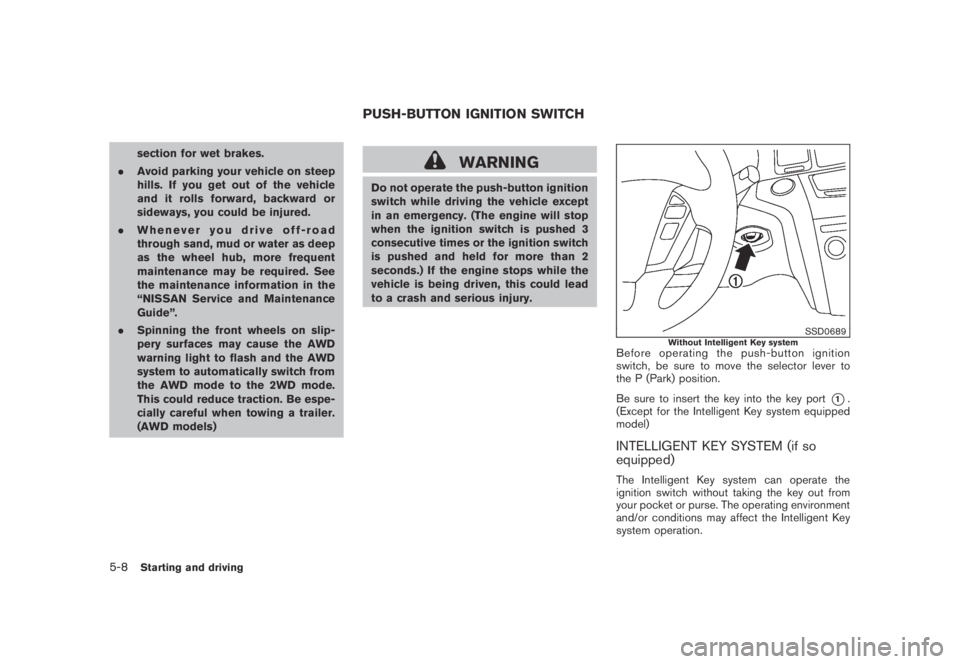
SSD0689Without Intelligent Key systemBefore operating the push-button ignition
switch, be sure to move the selector lever to
the P (Park) position.
Be sure to insert the key into the key port
*1.
(Except for the Intelligent Key system equipped
model)
INTELLIGENT KEY SYSTEM (if so
equipped)
The Intelligent Key system can operate the
ignition switch without taking the key out from
your pocket or purse. The operating environment
and/or conditions may affect the Intelligent Key
system operation.
PUSH-BUTTON IGNITION SWITCH
5-8Starting and driving
Page 322 of 443
Black plate (322,1)
Model "Z51-D" EDITED: 2007/ 10/ 2
SSD0688
PUSH-BUTTON IGNITION SWITCH
OPERATION
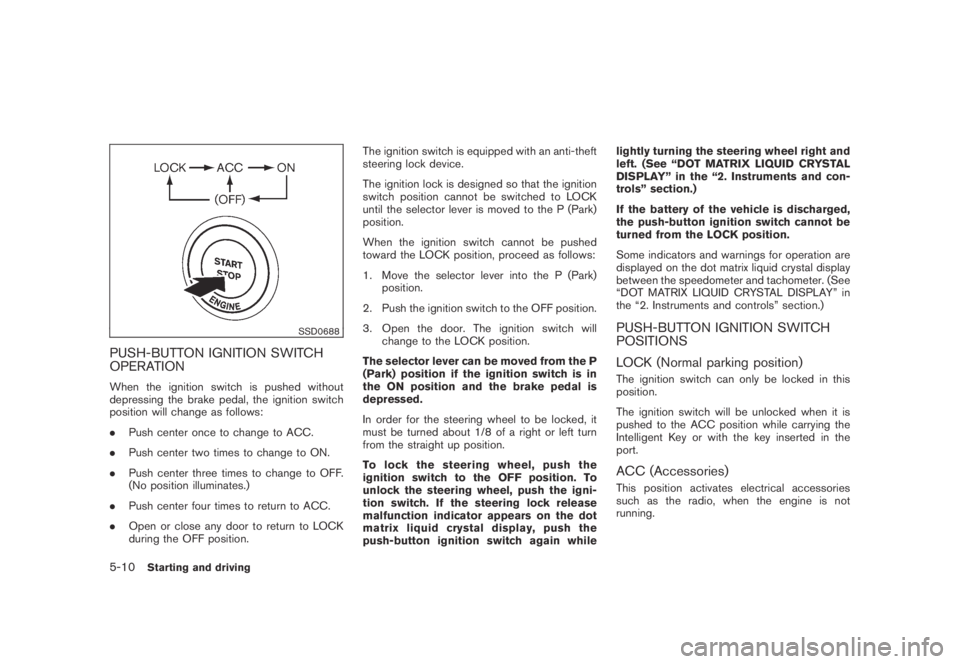
When the ignition switch is pushed without
depressing the brake pedal, the ignition switch
position will change as follows:
.Push center once to change to ACC.
.Push center two times to change to ON.
.Push center three times to change to OFF.
(No position illuminates.)
.Push center four times to return to ACC.
.Open or close any door to return to LOCK
during the OFF position.The ignition switch is equipped with an anti-theft
steering lock device.
The ignition lock is designed so that the ignition
switch position cannot be switched to LOCK
until the selector lever is moved to the P (Park)
position.
When the ignition switch cannot be pushed
toward the LOCK position, proceed as follows:
1. Move the selector lever into the P (Park)
position.
2. Push the ignition switch to the OFF position.
3. Open the door. The ignition switch will
change to the LOCK position.
The selector lever can be moved from the P
(Park) position if the ignition switch is in
the ON position and the brake pedal is
depressed.
In order for the steering wheel to be locked, it
must be turned about 1/8 of a right or left turn
from the straight up position.
To lock the steering wheel, push the
ignition switch to the OFF position. To
unlock the steering wheel, push the igni-
tion switch. If the steering lock release
malfunction indicator appears on the dot
matrix liquid crystal display, push the
push-button ignition switch again whilelightly turning the steering wheel right and
left. (See “DOT MATRIX LIQUID CRYSTAL
DISPLAY” in the “2. Instruments and con-
trols” section.)
If the battery of the vehicle is discharged,
the push-button ignition switch cannot be
turned from the LOCK position.
Some indicators and warnings for operation are
displayed on the dot matrix liquid crystal display
between the speedometer and tachometer. (See
“DOT MATRIX LIQUID CRYSTAL DISPLAY” in
the “2. Instruments and controls” section.)
PUSH-BUTTON IGNITION SWITCH
POSITIONS
LOCK (Normal parking position)
The ignition switch can only be locked in this
position.
The ignition switch will be unlocked when it is
pushed to the ACC position while carrying the
Intelligent Key or with the key inserted in the
port.
ACC (Accessories)
This position activates electrical accessories
such as the radio, when the engine is not
running.
5-10Starting and driving
Page 323 of 443
Black plate (323,1)
Model "Z51-D" EDITED: 2007/ 10/ 2
ON (Normal operating position)
This position turns on the ignition system and
electrical accessories.
OFF
The engine can be turned off without locking the
steering wheel.
The ignition lock is designed so that the ignition
switch cannot be switched to the LOCK position
until the selector lever is moved to the P (Park)
position.
CAUTION
Do not leave the vehicle with the push-
button ignition switch in ACC or ON
positions when the engine is not run-
ning for an extended period. This can
discharge the battery.
SSD0690
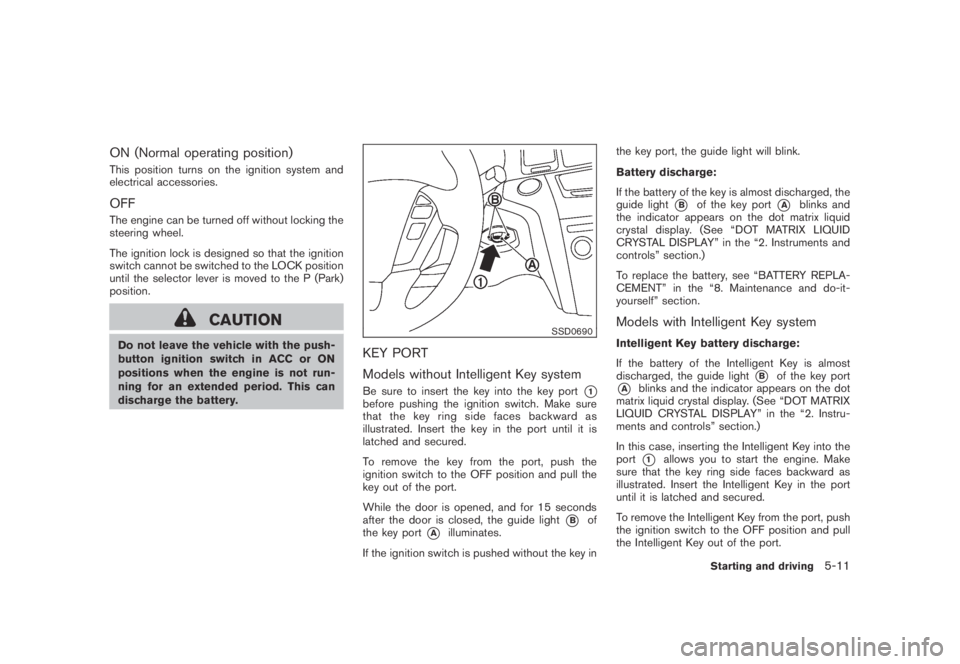
KEY PORT
Models without Intelligent Key system
Be sure to insert the key into the key port*1before pushing the ignition switch. Make sure
that the key ring side faces backward as
illustrated. Insert the key in the port until it is
latched and secured.
To remove the key from the port, push the
ignition switch to the OFF position and pull the
key out of the port.
While the door is opened, and for 15 seconds
after the door is closed, the guide light
*Bof
the key port
*Ailluminates.
If the ignition switch is pushed without the key inthe key port, the guide light will blink.
Battery discharge:
If the battery of the key is almost discharged, the
guide light
*Bof the key port*Ablinks and
the indicator appears on the dot matrix liquid
crystal display. (See “DOT MATRIX LIQUID
CRYSTAL DISPLAY” in the “2. Instruments and
controls” section.)
To replace the battery, see “BATTERY REPLA-
CEMENT” in the “8. Maintenance and do-it-
yourself” section.
Models with Intelligent Key system
Intelligent Key battery discharge:
If the battery of the Intelligent Key is almost
discharged, the guide light
*Bof the key port
*Ablinks and the indicator appears on the dot
matrix liquid crystal display. (See “DOT MATRIX
LIQUID CRYSTAL DISPLAY” in the “2. Instru-
ments and controls” section.)
In this case, inserting the Intelligent Key into the
port
*1allows you to start the engine. Make
sure that the key ring side faces backward as
illustrated. Insert the Intelligent Key in the port
until it is latched and secured.
To remove the Intelligent Key from the port, push
the ignition switch to the OFF position and pull
the Intelligent Key out of the port.
Starting and driving5-11