ECO mode NISSAN MURANO 2009 Owner´s Manual
[x] Cancel search | Manufacturer: NISSAN, Model Year: 2009, Model line: MURANO, Model: NISSAN MURANO 2009Pages: 443, PDF Size: 3.95 MB
Page 134 of 443
Black plate (134,1)
Model "Z51-D" EDITED: 2007/ 10/ 2
SPA2033
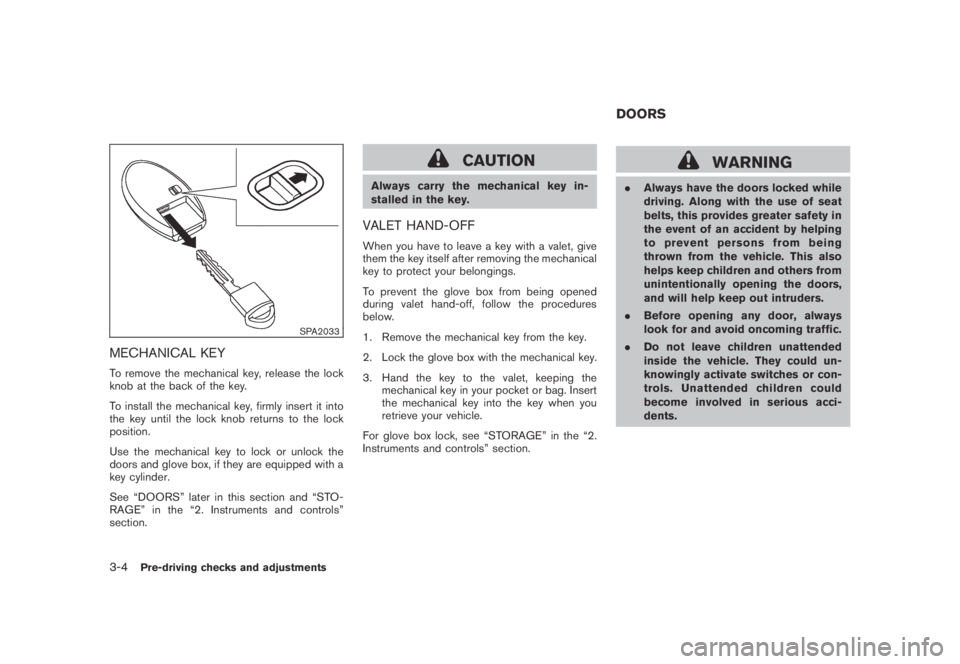
MECHANICAL KEY
To remove the mechanical key, release the lock
knob at the back of the key.
To install the mechanical key, firmly insert it into
the key until the lock knob returns to the lock
position.
Use the mechanical key to lock or unlock the
doors and glove box, if they are equipped with a
key cylinder.
See “DOORS” later in this section and “STO-
RAGE” in the “2. Instruments and controls”
section.
CAUTION
Always carry the mechanical key in-
stalled in the key.
VALET HAND-OFF
When you have to leave a key with a valet, give
them the key itself after removing the mechanical
key to protect your belongings.
To prevent the glove box from being opened
during valet hand-off, follow the procedures
below.
1. Remove the mechanical key from the key.
2. Lock the glove box with the mechanical key.
3. Hand the key to the valet, keeping the
mechanical key in your pocket or bag. Insert
the mechanical key into the key when you
retrieve your vehicle.
For glove box lock, see “STORAGE” in the “2.
Instruments and controls” section.
WARNING
.Always have the doors locked while
driving. Along with the use of seat
belts, this provides greater safety in
the event of an accident by helping
to prevent persons from being
thrown from the vehicle. This also
helps keep children and others from
unintentionally opening the doors,
and will help keep out intruders.
.Before opening any door, always
look for and avoid oncoming traffic.
.Do not leave children unattended
inside the vehicle. They could un-
knowingly activate switches or con-
trols. Unattended children could
become involved in serious acci-
dents.
DOORS
3-4Pre-driving checks and adjustments
Page 135 of 443
Black plate (135,1)
Model "Z51-D" EDITED: 2007/ 10/ 2
SPA2432
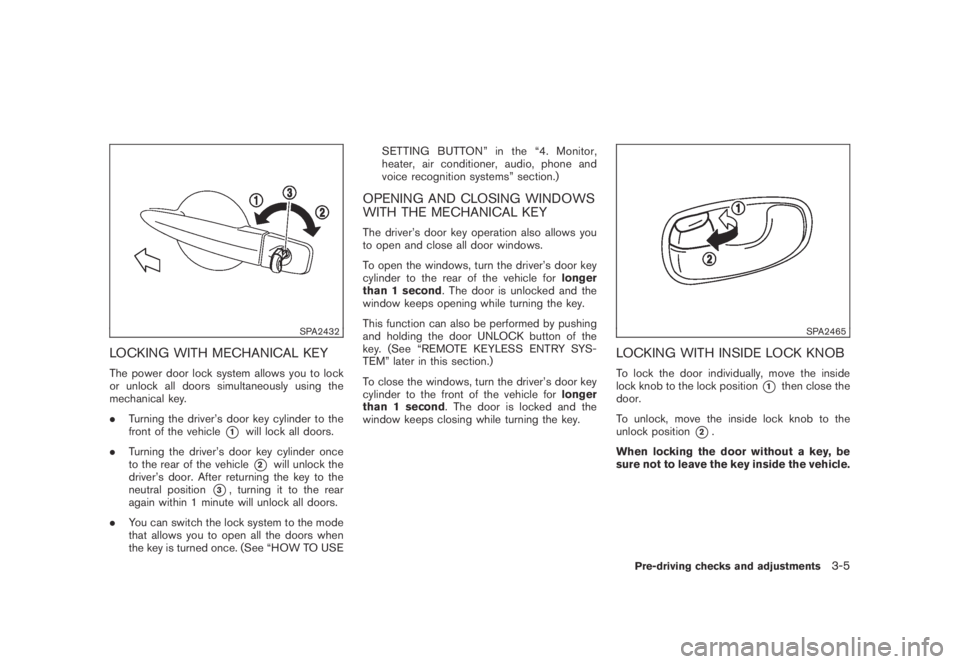
LOCKING WITH MECHANICAL KEY
The power door lock system allows you to lock
or unlock all doors simultaneously using the
mechanical key.
.Turning the driver’s door key cylinder to the
front of the vehicle
*1will lock all doors.
.Turning the driver’s door key cylinder once
to the rear of the vehicle
*2will unlock the
driver’s door. After returning the key to the
neutral position
*3, turning it to the rear
again within 1 minute will unlock all doors.
.You can switch the lock system to the mode
that allows you to open all the doors when
the key is turned once. (See “HOW TO USESETTING BUTTON” in the “4. Monitor,
heater, air conditioner, audio, phone and
voice recognition systems” section.)
OPENING AND CLOSING WINDOWS
WITH THE MECHANICAL KEY
The driver’s door key operation also allows you
to open and close all door windows.
To open the windows, turn the driver’s door key
cylinder to the rear of the vehicle forlonger
than 1 second. The door is unlocked and the
window keeps opening while turning the key.
This function can also be performed by pushing
and holding the door UNLOCK button of the
key. (See “REMOTE KEYLESS ENTRY SYS-
TEM” later in this section.)
To close the windows, turn the driver’s door key
cylinder to the front of the vehicle forlonger
than 1 second. The door is locked and the
window keeps closing while turning the key.
SPA2465
LOCKING WITH INSIDE LOCK KNOB
To lock the door individually, move the inside
lock knob to the lock position
*1then close the
door.
To unlock, move the inside lock knob to the
unlock position
*2.
When locking the door without a key, be
sure not to leave the key inside the vehicle.
Pre-driving checks and adjustments3-5
Page 136 of 443
Black plate (136,1)
Model "Z51-D" EDITED: 2007/ 10/ 2
SPA2300
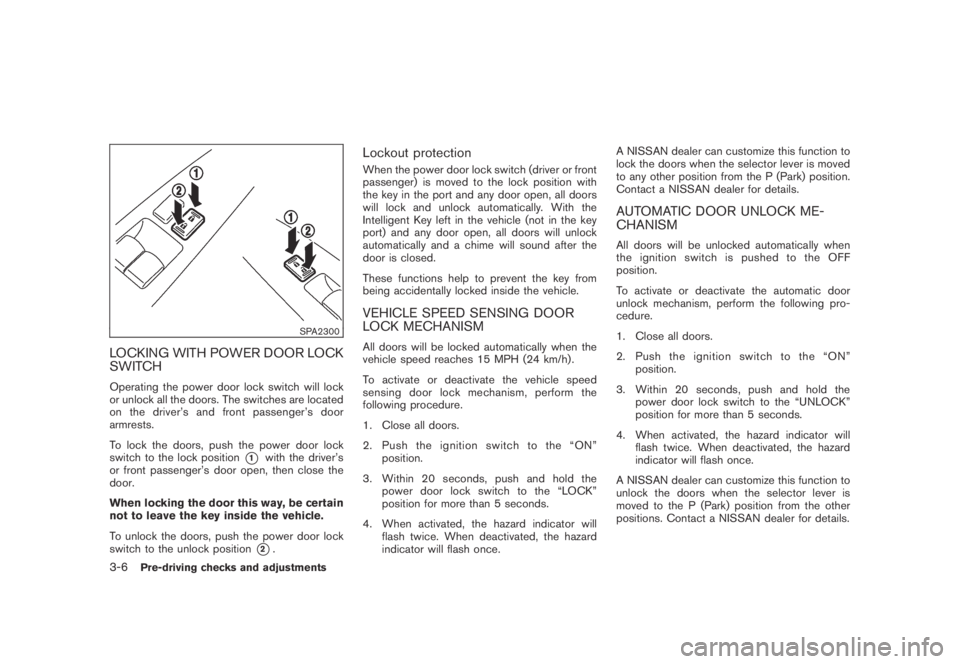
LOCKING WITH POWER DOOR LOCK
SWITCH
Operating the power door lock switch will lock
or unlock all the doors. The switches are located
on the driver’s and front passenger’s door
armrests.
To lock the doors, push the power door lock
switch to the lock position
*1with the driver’s
or front passenger’s door open, then close the
door.
When locking the door this way, be certain
not to leave the key inside the vehicle.
To unlock the doors, push the power door lock
switch to the unlock position
*2.
Lockout protection
When the power door lock switch (driver or front
passenger) is moved to the lock position with
the key in the port and any door open, all doors
will lock and unlock automatically. With the
Intelligent Key left in the vehicle (not in the key
port) and any door open, all doors will unlock
automatically and a chime will sound after the
door is closed.
These functions help to prevent the key from
being accidentally locked inside the vehicle.
VEHICLE SPEED SENSING DOOR
LOCK MECHANISM
All doors will be locked automatically when the
vehicle speed reaches 15 MPH (24 km/h) .
To activate or deactivate the vehicle speed
sensing door lock mechanism, perform the
following procedure.
1. Close all doors.
2. Pushtheignitionswitchtothe“ON”
position.
3. Within 20 seconds, push and hold the
power door lock switch to the “LOCK”
position for more than 5 seconds.
4. When activated, the hazard indicator will
flash twice. When deactivated, the hazard
indicator will flash once.A NISSAN dealer can customize this function to
lock the doors when the selector lever is moved
to any other position from the P (Park) position.
Contact a NISSAN dealer for details.
AUTOMATIC DOOR UNLOCK ME-
CHANISM
All doors will be unlocked automatically when
the ignition switch is pushed to the OFF
position.
To activate or deactivate the automatic door
unlock mechanism, perform the following pro-
cedure.
1. Close all doors.
2. Pushtheignitionswitchtothe“ON”
position.
3. Within 20 seconds, push and hold the
power door lock switch to the “UNLOCK”
position for more than 5 seconds.
4. When activated, the hazard indicator will
flash twice. When deactivated, the hazard
indicator will flash once.
A NISSAN dealer can customize this function to
unlock the doors when the selector lever is
moved to the P (Park) position from the other
positions. Contact a NISSAN dealer for details.
3-6Pre-driving checks and adjustments
Page 138 of 443
Black plate (138,1)
Model "Z51-D" EDITED: 2007/ 10/ 2
charged, replace it with a new one.
Since the Intelligent Key is continuously receiv-
ing radio waves, if the key is left near equipment
which transmits strong radio waves, such as
signals from a TV and personal computer, the
battery life may become shorter.
For information regarding replacement of a
battery, see “BATTERY REPLACEMENT” in
the “8. Maintenance and do-it-yourself” section.
Because the steering wheel is locked electri-
cally, unlocking the steering wheel with the
ignition switch in the LOCK position is impos-
sible when the vehicle battery is completely
discharged. Pay special attention that the
vehicle battery is not completely discharged.
As many as 4 Intelligent Keys can be registered
and used with one vehicle. For information about
the purchase and use of additional Intelligent
Keys, contact a NISSAN dealer.
CAUTION
.Do not allow the Intelligent Key,
which contains electrical compo-
nents, to come into contact with
water or salt water. This could affect
the system function.
.Do not drop the Intelligent Key..Do not strike the Intelligent Key
sharply against another object.
.Do not change or modify the Intel-
ligent Key.
.Wetting may damage the Intelligent
Key. If the Intelligent Key gets wet,
immediately wipe until it is comple-
tely dry.
.Do not place the Intelligent Key for
an extended period in an area where
temperatures exceed 1408F (608C) .
.Do not attach the Intelligent Key
with a key holder that contains a
magnet.
.Do not place the Intelligent Key near
equipment that produces a mag-
netic field, such as a TV, audio
equipment and personal computers.
If an Intelligent Key is lost or stolen, NISSAN
recommends erasing the ID code of that
Intelligent Key from the vehicle. This may prevent
the unauthorized use of the Intelligent Key to
operate the vehicle. For information regarding
the erasing procedure, contact a NISSAN deal-
er.
SPA1948A
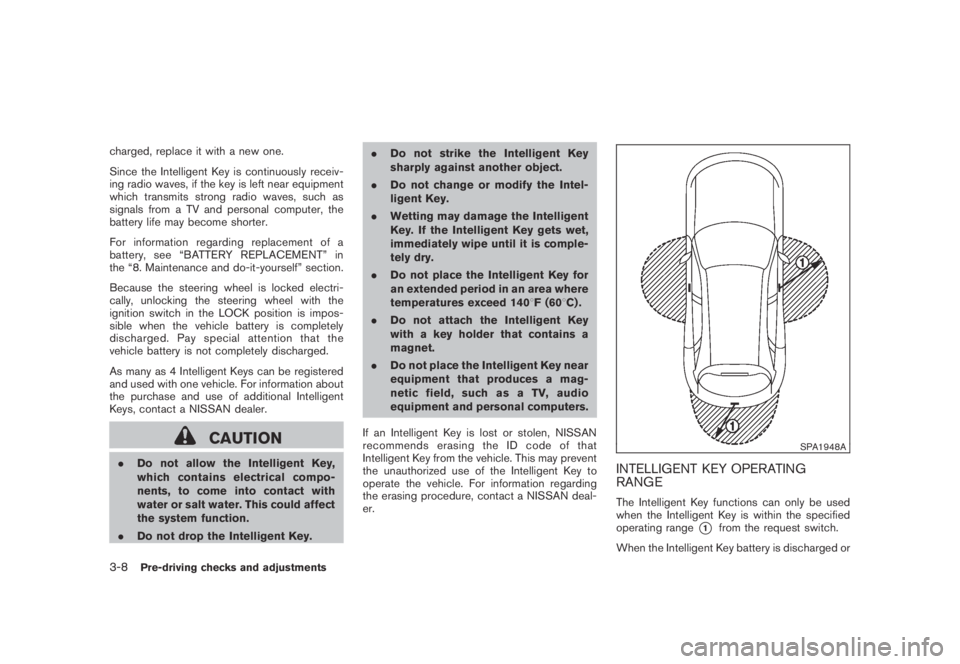
INTELLIGENT KEY OPERATING
RANGE
The Intelligent Key functions can only be used
when the Intelligent Key is within the specified
operating range
*1from the request switch.
When the Intelligent Key battery is discharged or
3-8Pre-driving checks and adjustments
Page 139 of 443
Black plate (139,1)
Model "Z51-D" EDITED: 2007/ 10/ 2
strong radio waves are present near the operat-
ing location, the Intelligent Key system’s operat-
ing range becomes narrower, and the Intelligent
Key may not function properly.
The operating range
*1is within 31.50 in (80
cm) from each request switch.
If the Intelligent Key is too close to the door
glass, handle or rear bumper the request
switches may not function.
When the Intelligent Key is within the operating
range, it is possible for anyone who does not
carry the Intelligent Key to push the request
switch to lock/unlock the doors.
SPA2407
DOOR LOCKS/UNLOCKS PRECAU-
TION
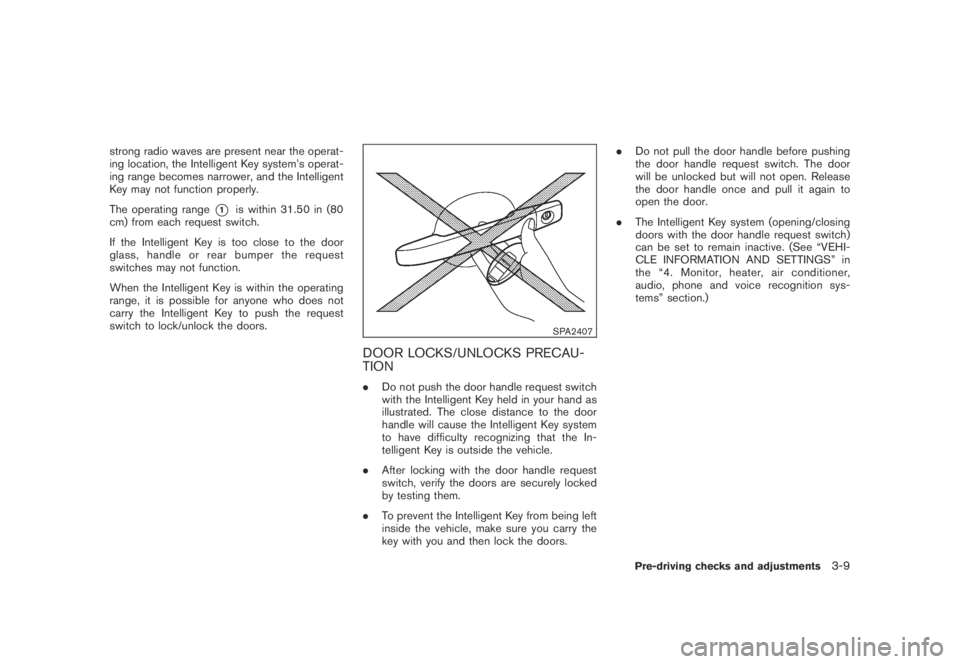
.Do not push the door handle request switch
with the Intelligent Key held in your hand as
illustrated. The close distance to the door
handle will cause the Intelligent Key system
to have difficulty recognizing that the In-
telligent Key is outside the vehicle.
.After locking with the door handle request
switch, verify the doors are securely locked
by testing them.
.To prevent the Intelligent Key from being left
inside the vehicle, make sure you carry the
key with you and then lock the doors..Do not pull the door handle before pushing
the door handle request switch. The door
will be unlocked but will not open. Release
the door handle once and pull it again to
open the door.
.The Intelligent Key system (opening/closing
doors with the door handle request switch)
can be set to remain inactive. (See “VEHI-
CLE INFORMATION AND SETTINGS” in
the “4. Monitor, heater, air conditioner,
audio, phone and voice recognition sys-
tems” section.)
Pre-driving checks and adjustments3-9
Page 142 of 443
Black plate (142,1)
Model "Z51-D" EDITED: 2007/ 10/ 2
Hazard indicator and horn mode:
DOOR LOCK DOOR UNLOCK
Intelligent Key system
(Using door handle or lift gate request switch)HAZARD -twice
OUTSIDE CHIME -twiceHAZARD -once
OUTSIDE CHIME -once
Remote keyless entry system
(Using
orbutton)HAZARD -twice
HORN -onceHAZARD -once
HORN - none
Hazard indicator mode:
DOOR LOCK DOOR UNLOCK
Intelligent Key system
(Using door handle or lift gate request switch)HAZARD -twiceHAZARD - none
Remote keyless entry system
(Using
orbutton)HAZARD -twice
HAZARD - none
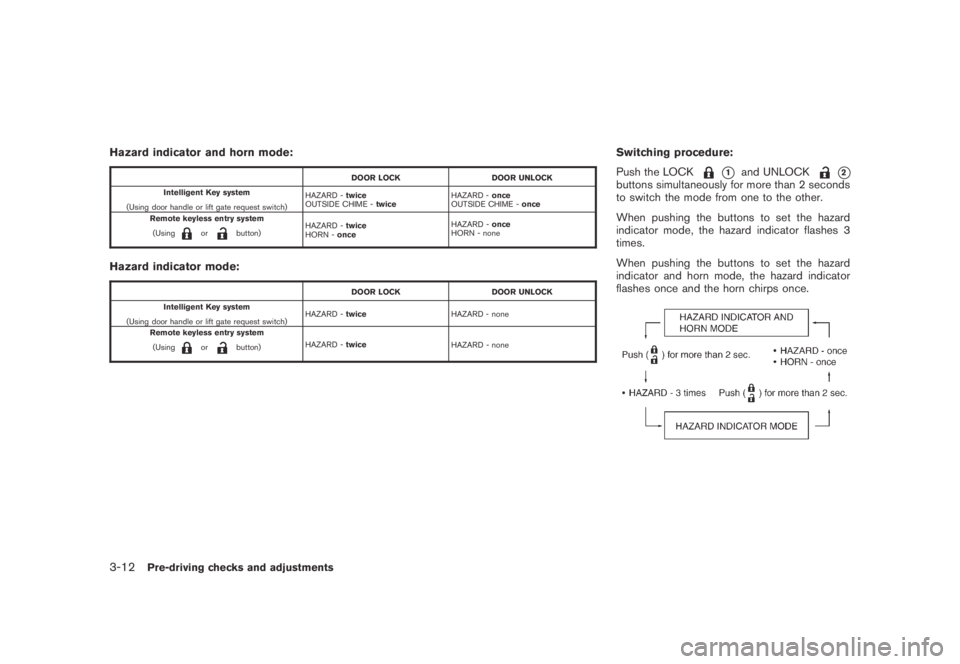
Switching procedure:
Push the LOCK
*1and UNLOCK*2buttons simultaneously for more than 2 seconds
to switch the mode from one to the other.
When pushing the buttons to set the hazard
indicator mode, the hazard indicator flashes 3
times.
When pushing the buttons to set the hazard
indicator and horn mode, the hazard indicator
flashes once and the horn chirps once.
3-12Pre-driving checks and adjustments
Page 144 of 443
Black plate (144,1)
Model "Z51-D" EDITED: 2007/ 10/ 2
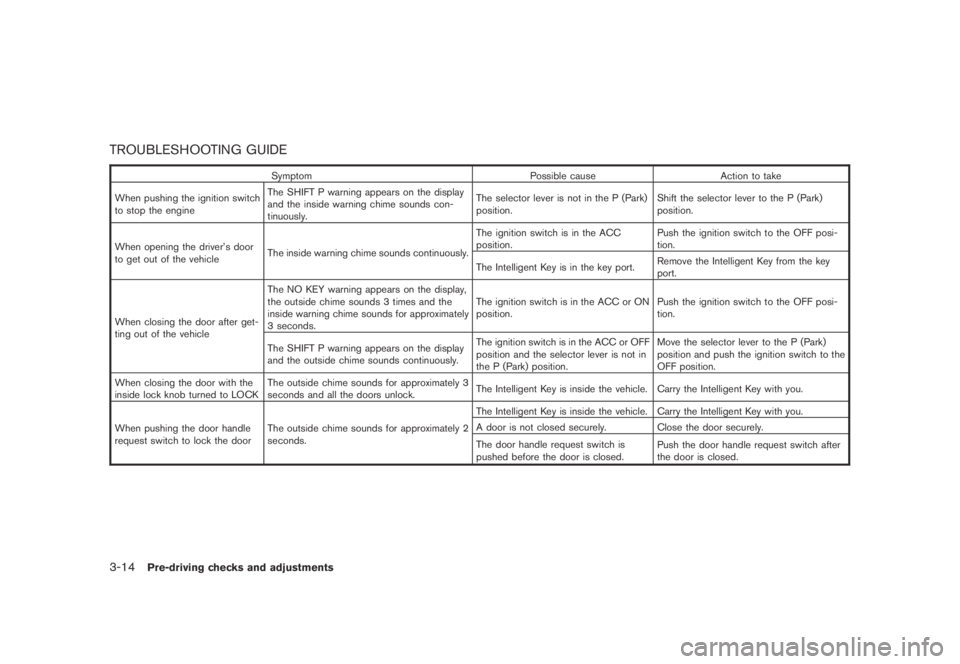
TROUBLESHOOTING GUIDE
Symptom Possible cause Action to take
When pushing the ignition switch
to stop the engineThe SHIFT P warning appears on the display
and the inside warning chime sounds con-
tinuously.The selector lever is not in the P (Park)
position.Shift the selector lever to the P (Park)
position.
When opening the driver’s door
to get out of the vehicleThe inside warning chime sounds continuously.The ignition switch is in the ACC
position.Push the ignition switch to the OFF posi-
tion.
The Intelligent Key is in the key port.Remove the Intelligent Key from the key
port.
When closing the door after get-
ting out of the vehicleThe NO KEY warning appears on the display,
the outside chime sounds 3 times and the
inside warning chime sounds for approximately
3 seconds.The ignition switch is in the ACC or ON
position.Push the ignition switch to the OFF posi-
tion.
The SHIFT P warning appears on the display
and the outside chime sounds continuously.The ignition switch is in the ACC or OFF
position and the selector lever is not in
the P (Park) position.Move the selector lever to the P (Park)
position and push the ignition switch to the
OFF position.
When closing the door with the
inside lock knob turned to LOCKThe outside chime sounds for approximately 3
seconds and all the doors unlock.The Intelligent Key is inside the vehicle. Carry the Intelligent Key with you.
When pushing the door handle
request switch to lock the doorThe outside chime sounds for approximately 2
seconds.The Intelligent Key is inside the vehicle. Carry the Intelligent Key with you.
A door is not closed securely. Close the door securely.
The door handle request switch is
pushed before the door is closed.Push the door handle request switch after
the door is closed.
3-14Pre-driving checks and adjustments
Page 146 of 443
Black plate (146,1)
Model "Z51-D" EDITED: 2007/ 10/ 2
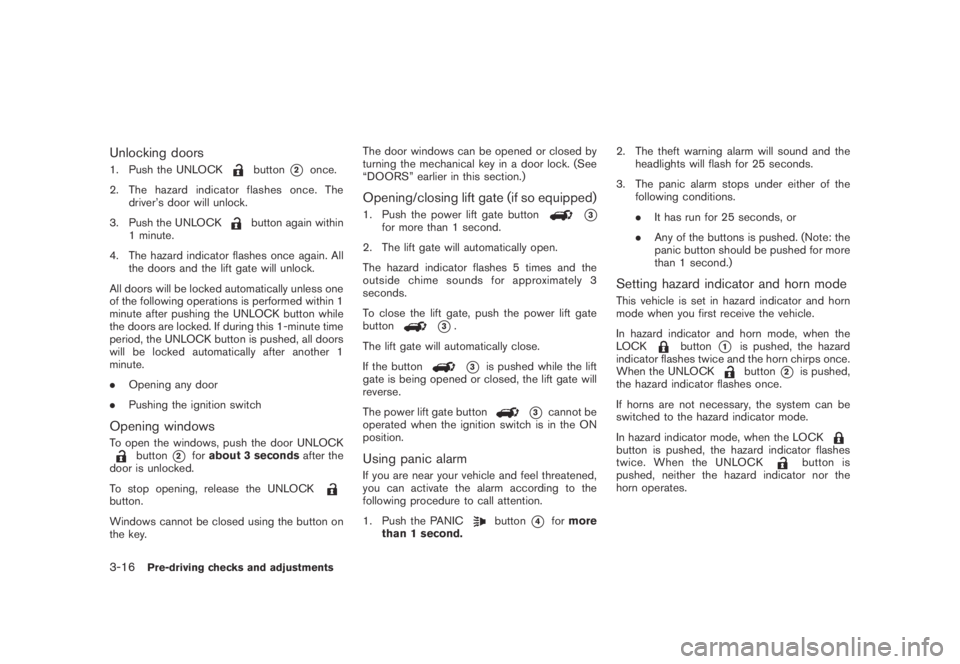
Unlocking doors
1. Push the UNLOCKbutton*2once.
2. The hazard indicator flashes once. The
driver’s door will unlock.
3. Push the UNLOCK
button again within
1 minute.
4. The hazard indicator flashes once again. All
the doors and the lift gate will unlock.
All doors will be locked automatically unless one
of the following operations is performed within 1
minute after pushing the UNLOCK button while
the doors are locked. If during this 1-minute time
period, the UNLOCK button is pushed, all doors
will be locked automatically after another 1
minute.
.Opening any door
.Pushing the ignition switch
Opening windows
To open the windows, push the door UNLOCKbutton*2forabout 3 secondsafter the
door is unlocked.
To stop opening, release the UNLOCK
button.
Windows cannot be closed using the button on
the key.The door windows can be opened or closed by
turning the mechanical key in a door lock. (See
“DOORS” earlier in this section.)
Opening/closing lift gate (if so equipped)
1. Push the power lift gate button*3for more than 1 second.
2. The lift gate will automatically open.
The hazard indicator flashes 5 times and the
outside chime sounds for approximately 3
seconds.
To close the lift gate, push the power lift gate
button
*3.
The lift gate will automatically close.
If the button
*3is pushed while the lift
gate is being opened or closed, the lift gate will
reverse.
The power lift gate button
*3cannot be
operated when the ignition switch is in the ON
position.
Using panic alarm
If you are near your vehicle and feel threatened,
you can activate the alarm according to the
following procedure to call attention.
1. Push the PANIC
button*4formore
than 1 second.2. The theft warning alarm will sound and the
headlights will flash for 25 seconds.
3. The panic alarm stops under either of the
following conditions.
.It has run for 25 seconds, or
.Any of the buttons is pushed. (Note: the
panic button should be pushed for more
than 1 second.)
Setting hazard indicator and horn mode
This vehicle is set in hazard indicator and horn
mode when you first receive the vehicle.
In hazard indicator and horn mode, when the
LOCK
button*1is pushed, the hazard
indicator flashes twice and the horn chirps once.
When the UNLOCK
button*2is pushed,
the hazard indicator flashes once.
If horns are not necessary, the system can be
switched to the hazard indicator mode.
In hazard indicator mode, when the LOCK
button is pushed, the hazard indicator flashes
twice. When the UNLOCKbutton is
pushed, neither the hazard indicator nor the
horn operates.
3-16Pre-driving checks and adjustments
Page 147 of 443
Black plate (147,1)
Model "Z51-D" EDITED: 2007/ 10/ 2
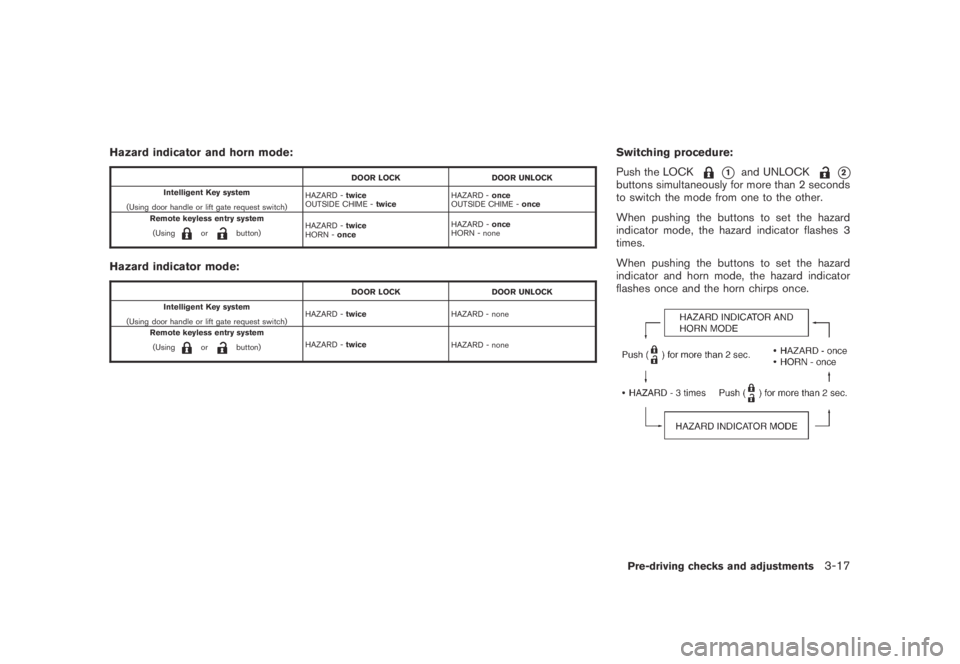
Hazard indicator and horn mode:
DOOR LOCK DOOR UNLOCK
Intelligent Key system
(Using door handle or lift gate request switch)HAZARD -twice
OUTSIDE CHIME -twiceHAZARD -once
OUTSIDE CHIME -once
Remote keyless entry system
(Using
orbutton)HAZARD -twice
HORN -onceHAZARD -once
HORN - none
Hazard indicator mode:
DOOR LOCK DOOR UNLOCK
Intelligent Key system
(Using door handle or lift gate request switch)HAZARD -twiceHAZARD - none
Remote keyless entry system
(Using
orbutton)HAZARD -twice
HAZARD - none
Switching procedure:
Push the LOCK
*1and UNLOCK*2buttons simultaneously for more than 2 seconds
to switch the mode from one to the other.
When pushing the buttons to set the hazard
indicator mode, the hazard indicator flashes 3
times.
When pushing the buttons to set the hazard
indicator and horn mode, the hazard indicator
flashes once and the horn chirps once.
Pre-driving checks and adjustments3-17
Page 148 of 443
Black plate (148,1)
Model "Z51-D" EDITED: 2007/ 10/ 2
SPA2437
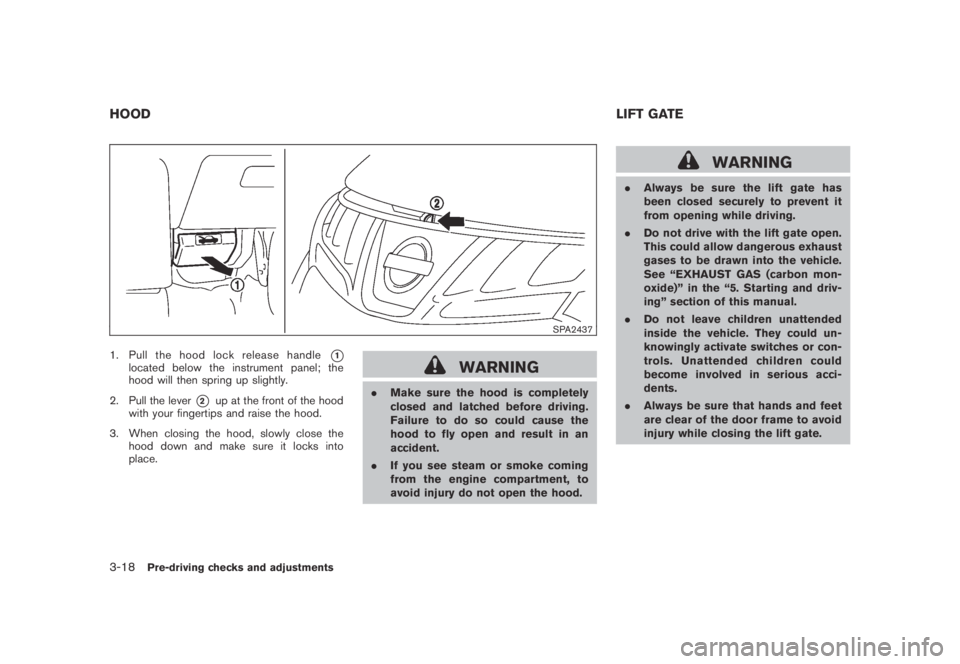
1. Pull the hood lock release handle*1located below the instrument panel; the
hood will then spring up slightly.
2. Pull the lever
*2up at the front of the hood
with your fingertips and raise the hood.
3. When closing the hood, slowly close the
hood down and make sure it locks into
place.
WARNING
.Make sure the hood is completely
closed and latched before driving.
Failure to do so could cause the
hood to fly open and result in an
accident.
.If you see steam or smoke coming
from the engine compartment, to
avoid injury do not open the hood.
WARNING
.Always be sure the lift gate has
been closed securely to prevent it
from opening while driving.
.Do not drive with the lift gate open.
This could allow dangerous exhaust
gases to be drawn into the vehicle.
See “EXHAUST GAS (carbon mon-
oxide)” in the “5. Starting and driv-
ing” section of this manual.
.Do not leave children unattended
inside the vehicle. They could un-
knowingly activate switches or con-
trols. Unattended children could
become involved in serious acci-
dents.
.Always be sure that hands and feet
are clear of the door frame to avoid
injury while closing the lift gate.
HOODLIFT GATE
3-18Pre-driving checks and adjustments