rear view mirror NISSAN MURANO 2009 Owner´s Manual
[x] Cancel search | Manufacturer: NISSAN, Model Year: 2009, Model line: MURANO, Model: NISSAN MURANO 2009Pages: 443, PDF Size: 3.95 MB
Page 10 of 443
Black plate (7,1)
Model "Z51-D" EDITED: 2007/ 10/ 2
SSI0375
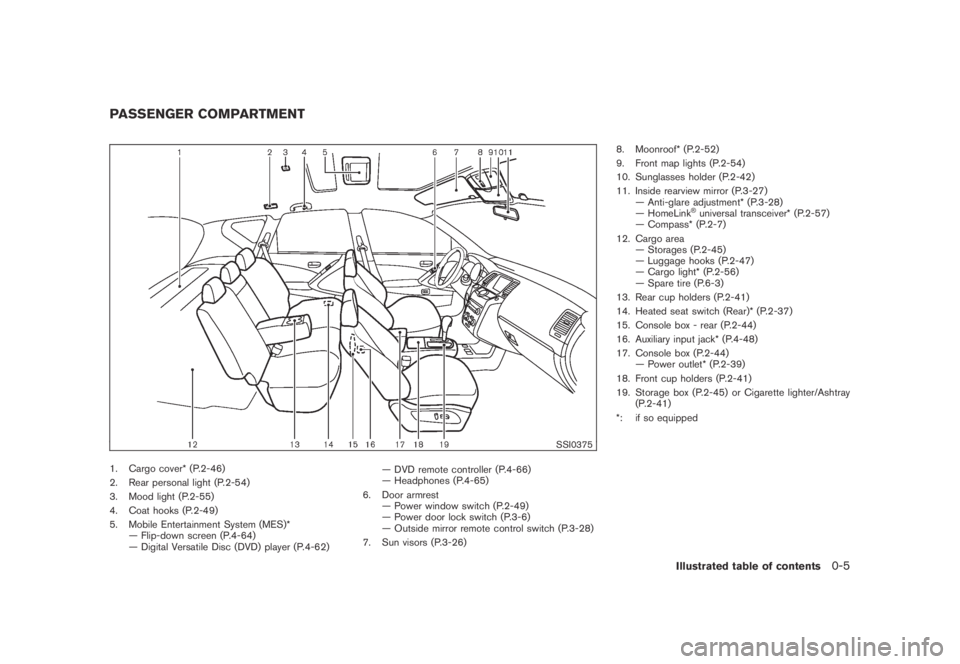
1. Cargo cover* (P.2-46)
2. Rear personal light (P.2-54)
3. Mood light (P.2-55)
4. Coat hooks (P.2-49)
5. Mobile Entertainment System (MES)*
— Flip-down screen (P.4-64)
— Digital Versatile Disc (DVD) player (P.4-62)— DVD remote controller (P.4-66)
— Headphones (P.4-65)
6. Door armrest
— Power window switch (P.2-49)
— Power door lock switch (P.3-6)
— Outside mirror remote control switch (P.3-28)
7. Sun visors (P.3-26)8. Moonroof* (P.2-52)
9. Front map lights (P.2-54)
10. Sunglasses holder (P.2-42)
11. Inside rearview mirror (P.3-27)
— Anti-glare adjustment* (P.3-28)
— HomeLink
®universal transceiver* (P.2-57)
— Compass* (P.2-7)
12. Cargo area
— Storages (P.2-45)
— Luggage hooks (P.2-47)
— Cargo light* (P.2-56)
— Spare tire (P.6-3)
13. Rear cup holders (P.2-41)
14. Heated seat switch (Rear)* (P.2-37)
15. Console box - rear (P.2-44)
16. Auxiliary input jack* (P.4-48)
17. Console box (P.2-44)
— Power outlet* (P.2-39)
18. Front cup holders (P.2-41)
19. Storage box (P.2-45) or Cigarette lighter/Ashtray
(P.2-41)
*: if so equipped
PASSENGER COMPARTMENT
Illustrated table of contents0-5
Page 104 of 443
Black plate (102,1)
Model "Z51-D" EDITED: 2007/ 10/ 2
SIC3670
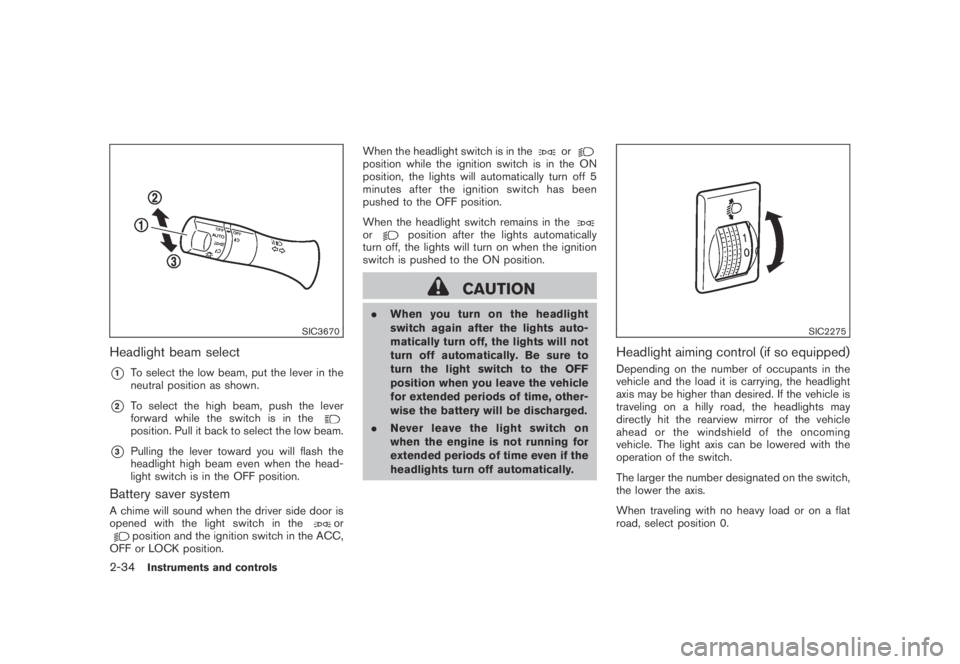
Headlight beam select
*1To select the low beam, put the lever in the
neutral position as shown.
*2To select the high beam, push the lever
forward while the switch is in the
position. Pull it back to select the low beam.
*3Pulling the lever toward you will flash the
headlight high beam even when the head-
light switch is in the OFF position.
Battery saver system
A chime will sound when the driver side door is
opened with the light switch in theorposition and the ignition switch in the ACC,
OFF or LOCK position.When the headlight switch is in the
orposition while the ignition switch is in the ON
position, the lights will automatically turn off 5
minutesaftertheignitionswitchhasbeen
pushed to the OFF position.
When the headlight switch remains in the
orposition after the lights automatically
turn off, the lights will turn on when the ignition
switch is pushed to the ON position.
CAUTION
.When you turn on the headlight
switch again after the lights auto-
matically turn off, the lights will not
turn off automatically. Be sure to
turn the light switch to the OFF
position when you leave the vehicle
for extended periods of time, other-
wise the battery will be discharged.
.Never leave the light switch on
when the engine is not running for
extended periods of time even if the
headlights turn off automatically.
SIC2275
Headlight aiming control (if so equipped)
Depending on the number of occupants in the
vehicle and the load it is carrying, the headlight
axis may be higher than desired. If the vehicle is
traveling on a hilly road, the headlights may
directly hit the rearview mirror of the vehicle
ahead or the windshield of the oncoming
vehicle. The light axis can be lowered with the
operation of the switch.
The larger the number designated on the switch,
the lower the axis.
When traveling with no heavy load or on a flat
road, select position 0.
2-34Instruments and controls
Page 105 of 443
Black plate (103,1)
Model "Z51-D" EDITED: 2007/ 10/ 2
WARNING
Xenon headlights are extremely bright
compared to conventional headlights. If
the xenon headlights hit the rearview
mirror of the vehicle ahead or the
windshield of oncoming vehicle, the
driver of these vehicles may have
difficulty driving because of the bright-
ness. Use the headlight aiming control
switch to lower the light axis. See
“XENON HEADLIGHTS” earlier in this
section for additional information.
Daytime running light system (Canada
only)
The daytime running lights automatically illumi-
nate when the engine is started with the parking
brake released. The daytime running lights
operate with the headlight switch in the OFF
position or in the
position. Turn the
headlight switch to theposition for full
illumination when driving at night.
If the parking brake is applied before the engine
is started, the daytime running lights do not
illuminate. The daytime running lights illuminate
once the parking brake is released. The daytime
running lights will remain on until the ignition
switch is pushed to the OFF position.
WARNING
When the daytime running light system
is active, tail lights on your vehicle are
not on. It is necessary at dusk to turn on
your headlights. Failure to do so could
cause an accident injuring yourself and
others.
SIC3585
Instrument brightness control
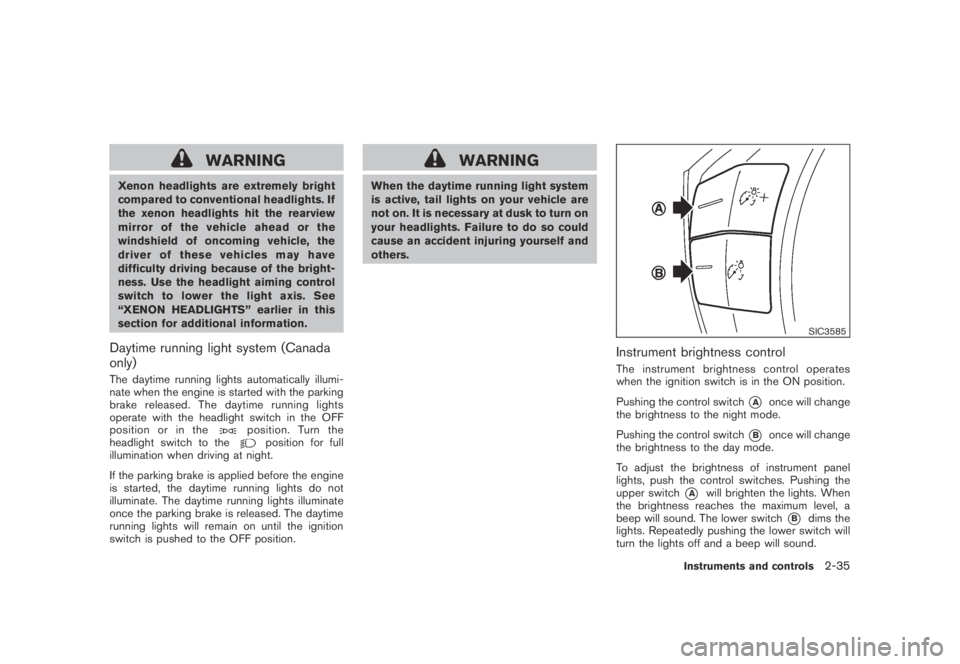
The instrument brightness control operates
when the ignition switch is in the ON position.
Pushing the control switch
*Aonce will change
the brightness to the night mode.
Pushing the control switch
*Bonce will change
the brightness to the day mode.
To adjust the brightness of instrument panel
lights, push the control switches. Pushing the
upper switch
*Awill brighten the lights. When
the brightness reaches the maximum level, a
beep will sound. The lower switch
*Bdims the
lights. Repeatedly pushing the lower switch will
turn the lights off and a beep will sound.
Instruments and controls2-35
Page 157 of 443
Black plate (157,1)
Model "Z51-D" EDITED: 2007/ 10/ 2
SPA2447
INSIDE MIRROR
Adjust the height and the angle of the inside
mirror to the desired position.
SPA2143
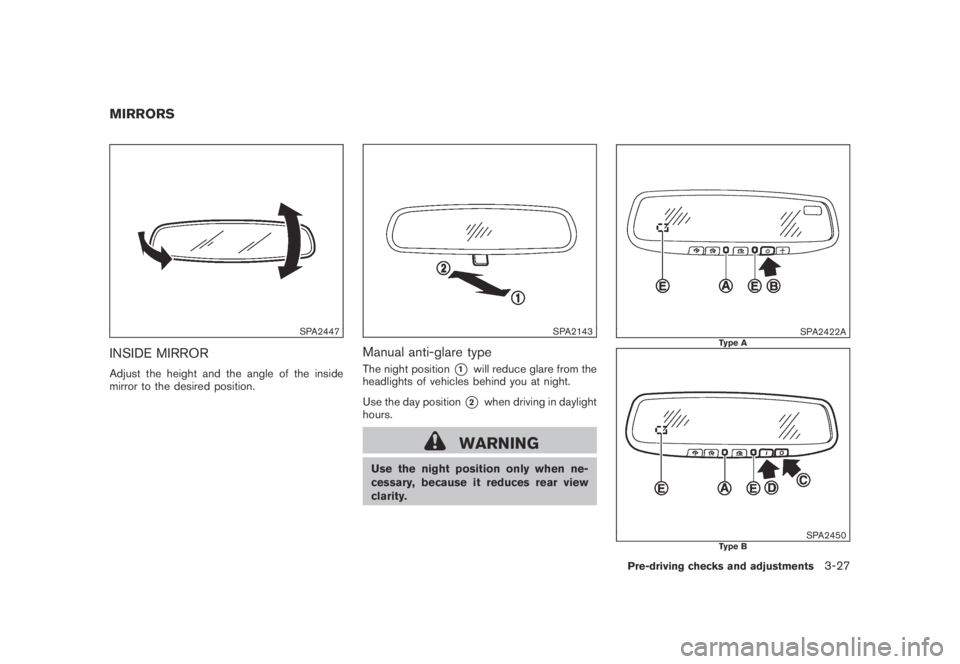
Manual anti-glare type
The night position*1will reduce glare from the
headlights of vehicles behind you at night.
Use the day position
*2when driving in daylight
hours.
WARNING
Use the night position only when ne-
cessary, because it reduces rear view
clarity.
SPA2422AType A
SPA2450Type B
MIRRORS
Pre-driving checks and adjustments3-27
Page 158 of 443
Black plate (158,1)
Model "Z51-D" EDITED: 2007/ 10/ 2
Automatic anti-glare type
The inside mirror is designed so that it
automatically changes reflection according to
the intensity of the headlights of the following
vehicle.
The anti-glare system will be automatically
turned on when the ignition switch is pushed
to the ON position.
When the anti-glare system is turned on, the
indicator light
*Awill illuminate and excessive
glare from the headlights of the vehicle behind
you will be reduced.
Type A: Push the
switch*Bto make the
inside rearview mirror operate normally and the
indicator light will turn off. Push the
switch
again to turn the system on.
Type B: Push the “*” switch
*Cto make the
inside rearview mirror operate normally. The
indicator light will turn off. Push the “I” switch
*Dto turn the system on.
Do not allow any object to cover the
sensors
*Eor apply glass cleaner on
them. Doing so will reduce the sensitivity
of the sensor, resulting in improper opera-
tion.
For the compass (if so equipped) operation, see
“COMPASS” in the “2. Instruments and con-
trols” section.For the HomeLink
®Universal Transceiver opera-
tion, see “HomeLink®UNIVERSAL TRANSCEI-
VER” in the “2. Instruments and controls”
section.
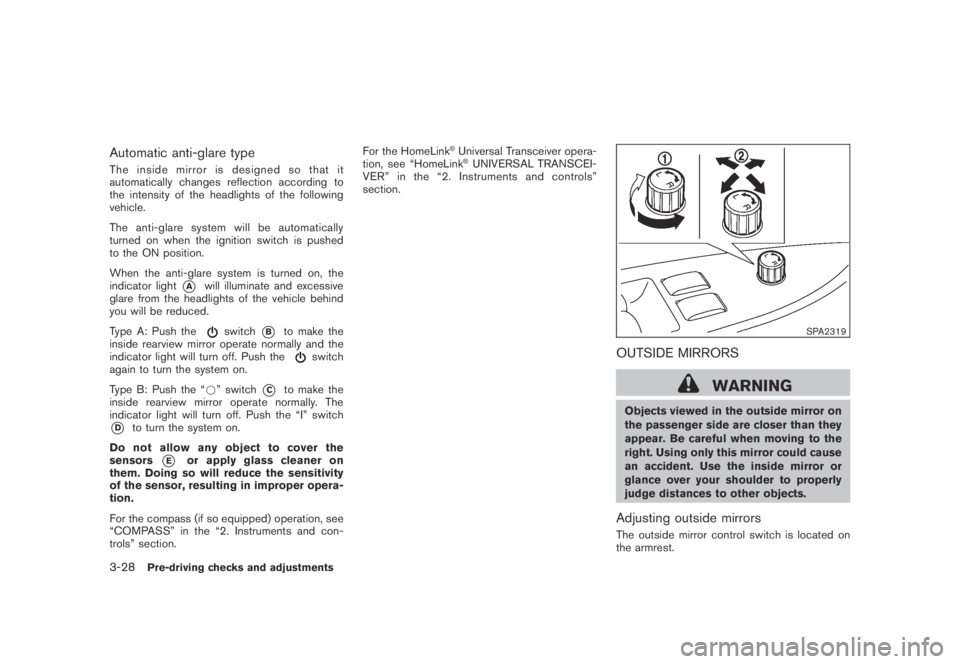
SPA2319
OUTSIDE MIRRORS
WARNING
Objects viewed in the outside mirror on
the passenger side are closer than they
appear. Be careful when moving to the
right. Using only this mirror could cause
an accident. Use the inside mirror or
glance over your shoulder to properly
judge distances to other objects.
Adjusting outside mirrors
The outside mirror control switch is located on
the armrest.
3-28Pre-driving checks and adjustments
Page 183 of 443
Black plate (181,1)
Model "Z51-D" EDITED: 2007/ 10/ 2
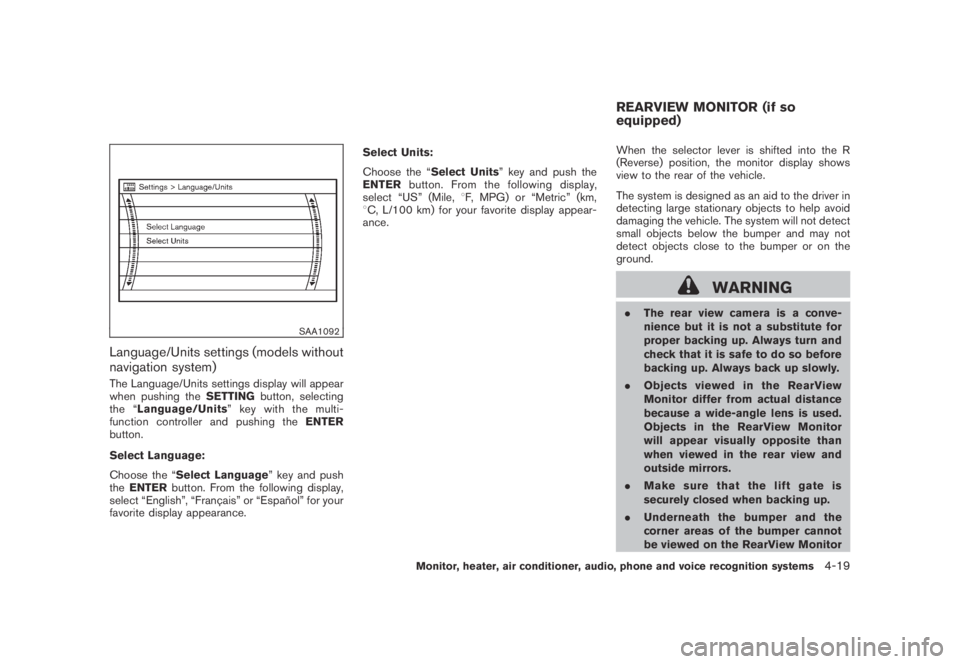
SAA1092
Language/Units settings (models without
navigation system)
The Language/Units settings display will appear
when pushing theSETTINGbutton, selecting
the “Language/Units”keywiththemulti-
function controller and pushing theENTER
button.
Select Language:
Choose the “Select Language” key and push
theENTERbutton. From the following display,
select “English”, “Franc¸ ais” or “Espan˜
ol” for your
favorite display appearance.Select Units:
Choose the “Select Units” key and push the
ENTERbutton. From the following display,
select “US” (Mile,8F, MPG) or “Metric” (km,
8C, L/100 km) for your favorite display appear-
ance.When the selector lever is shifted into the R
(Reverse) position, the monitor display shows
view to the rear of the vehicle.
The system is designed as an aid to the driver in
detecting large stationary objects to help avoid
damaging the vehicle. The system will not detect
small objects below the bumper and may not
detect objects close to the bumper or on the
ground.
WARNING
.The rear view camera is a conve-
nience but it is not a substitute for
proper backing up. Always turn and
check that it is safe to do so before
backing up. Always back up slowly.
.Objects viewed in the RearView
Monitor differ from actual distance
because a wide-angle lens is used.
Objects in the RearView Monitor
will appear visually opposite than
when viewed in the rear view and
outside mirrors.
.Make sure that the lift gate is
securely closed when backing up.
.Underneath the bumper and the
corner areas of the bumper cannot
be viewed on the RearView Monitor
REARVIEW MONITOR (if so
equipped)
Monitor, heater, air conditioner, audio, phone and voice recognition systems4-19
Page 185 of 443
Black plate (183,1)
Model "Z51-D" EDITED: 2007/ 10/ 2
.On a snow-covered or slippery road,
there may be a difference between
the predicted course line and the
actual course line.
.If the battery is disconnected or
becomes discharged, the predicted
course lines may be displayed in-
correctly. If this occurs, please per-
form the following procedures:
— Turn the steering wheel from
lock to lock while the engine is
running.
— Drive the vehicle on a straight
road for more than 5 minutes.
.When the steering wheel is turned
with the ignition switch in the ACC
position, the predicted course lines
may be displayed incorrectly.
.The displayed lines will appear
slightly off to the right because the
rear view camera is not installed in
the rear center of the vehicle.
.The distance guide line and the
vehicle width line should be used
as a reference only when the vehicle
is on a level paved surface. The
distance viewed on the monitor is
for reference only and may bedifferent than the actual distance
between the vehicle and displayed
objects.
.When backing-up the vehicle up a
hill objects viewed in the monitor
are further than they appear. When
backing-up the vehicle down a hill,
objects viewed in the monitor are
closer than they appear. Use the
inside mirror or glance over your
shoulder to properly judge dis-
tances to other objects.
The vehicle width and predicted course
lines are wider than the actual width and
course.
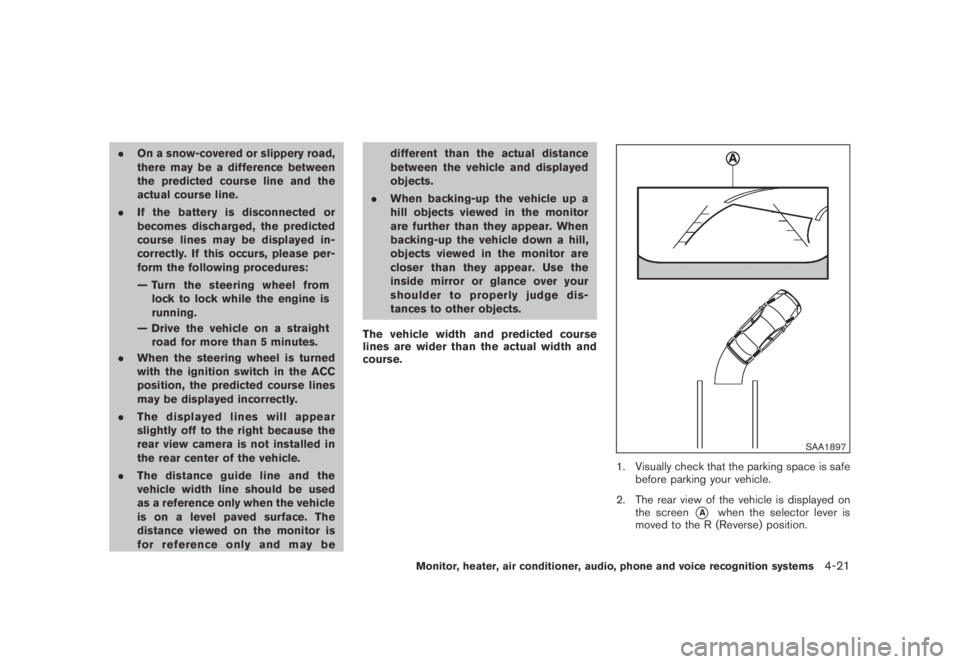
SAA1897
1. Visually check that the parking space is safe
before parking your vehicle.
2. The rear view of the vehicle is displayed on
the screen
*Awhen the selector lever is
moved to the R (Reverse) position.
Monitor, heater, air conditioner, audio, phone and voice recognition systems4-21
Page 425 of 443
Black plate (427,1)
Model "Z51-D" EDITED: 2007/ 10/ 2
trailer lights while using the vehicle tail
light, stoplight and turn signal circuits
as a signal source. The module/con-
verter must draw no more than 15
milliamps from the stop and tail lamp
circuits. Using a module/converter that
exceeds these power requirements may
damage the vehicle’s electrical system.
See a reputable trailer dealer to obtain
the proper equipment and to have it
installed.
Trailer lights should comply with federal and/or
local regulations. For assistance in hooking up
trailer lights, contact a NISSAN dealer or
reputable trailer dealer.
Trailer brakes
If your trailer is equipped with a braking system,
make sure it conforms to federal and/or local
regulations and that it is properly installed.
WARNING
Never connect a trailer brake system
directly to the vehicle brake system.
Pre-towing tips
.Be certain your vehicle maintains a level
position when a loaded or unloaded trailer is
hitched. Do not drive the vehicle if it has anabnormal nose-up or nose-down condition;
check for improper tongue load, overload,
worn suspension or other possible causes
of either condition.
.Always secure items in the trailer to prevent
load shift while driving.
.Keep the cargo load as low as possible in
the trailer to keep the trailer center of gravity
low.
.Load the trailer so approximately 60% of the
trailer load is in the front half and 40% is in
the back half. Also make sure the load is
balanced side to side.
.Check your hitch, trailer tire pressure,
vehicle tire pressure, trailer light operation,
and trailer wheel lug nuts every time you
attach a trailer to the vehicle.
.Be certain your rearview mirrors conform to
all federal, state or local regulations. If not,
install any mirrors required for towing before
driving the vehicle.
.Determine the overall height of the vehicle
and trailer so the required clearance is
known.
Trailer towing tips
In order to gain skill and an understanding of the
vehicle’s behavior, you should practice turning,
stopping and backing up in an area which is freefrom traffic. Steering stability, and braking
performance will be somewhat different than
under normal driving conditions.
.Always secure items in the trailer to prevent
load shift while driving.
.Lock the trailer hitch coupler with a pin or
lock to prevent the coupler from inadver-
tently becoming unlatched.
.Avoid abrupt starts, acceleration or stops.
.Avoid sharp turns or lane changes.
.Always drive your vehicle at a moderate
speed. Some states or provinces have
specific speed limits for vehicles that are
towing trailers. Obey the local speed limits.
.When backing up, hold the bottom of the
steering wheel with one hand. Move your
hand in the direction in which you want the
trailer to go. Make small corrections and
back up slowly. If possible, have someone
guide you when you are backing up.
Always block the wheels on both vehicle and
trailer when parking. Parking on a slope is not
recommended; however, if you must do so:CAUTION
If you move the shift selector lever to
the P (Park) position before blocking
Technical and consumer information9-21
Page 437 of 443
Black plate (4,1)
10-4
Vehicle identification number (VIN)............. 9-8
LATCH system..................................... 1-23
License plate, Installing front license plate....... 9-11
Lift gate............................................. 3-18
Light
Air bag warning light.......................... 1-54
Bulb replacement.............................. 8-24
Cargo lights .................................... 2-56
Fog light switch................................ 2-36
Headlight switch............................... 2-32
Headlights bulb replacement ................. 8-25
Indicator lights ................................. 2-15
Interior light control switch.................... 2-54
Interior lights ................................... 2-54
Map lights ...................................... 2-54
Mood lights..................................... 2-55
Personal lights ................................. 2-54
Replacement ................................... 8-24
Vanity mirror lights............................. 2-56
Warning/indicator lights and audible
reminders....................................... 2-10
Xenon headlights .............................. 2-32
Lights, Exterior and interior light replacement . . . 8-27
Loading information
(See vehicle loading information)................. 9-12
Lock
Automatic door unlock mechanism............. 3-6
Door locks........................................ 3-4
Glove box lock ................................. 2-43
Lift gate lock ................................... 3-18
Power door lock................................. 3-4
Vehicle speed sensing door lock
mechanism....................................... 3-6
Low tire pressure warning light................... 2-13Low tire pressure warning system (See tire
pressure monitoring system (TPMS)).............. 5-3
Luggage hooks..................................... 2-47
Luggage side box.................................. 2-46
M
Maintenance
Battery.......................................... 8-13
General maintenance............................ 8-2
Indicators for maintenance (dot matrix)...... 2-20
Inside the vehicle................................ 8-3
Maintenance information (display)............ 4-10
Maintenance precautions........................ 8-5
Maintenance requirements...................... 8-2
Outside the vehicle.............................. 8-2
Seat belt maintenance......................... 1-21
Malfunction indicator light (MIL).................. 2-15
Manual front seat adjustment....................... 1-3
Map lights .......................................... 2-54
Master warning light............................... 2-14
Mechanical key (Intelligent Key system)............ 3-4
Memory storage, Automatic drive positioner..... 3-30
Meter, Trip computer.............................. 2-21
Meters and gauges.................................. 2-4
Meters and gauges, Instrument brightness
control.............................................. 2-35
Mirror
Inside mirror.................................... 3-27
Outside mirrors................................ 3-28
Vanity mirror.................................... 3-29
Monitor, Rearview monitor........................ 4-19
Mood lights......................................... 2-55
Moonroof........................................... 2-52
Music box hard drive.............................. 4-52N
Net, Cargo net ..................................... 2-49
New vehicle break-in .............................. 5-20
NISSAN Mobile entertainment system (MES) . . . 4-62
NISSAN Vehicle Immobilizer System............. 2-27
NISSAN Voice recognition system (models
with navigation system) (for Canada) ........... 4-132
NISSAN Voice recognition system
(models with navigation system) (for U.S.)...... 4-109
No key warning .................................... 2-19
O
Odometer............................................. 2-5
Oil
Capacities and recommended
fuel/lubricants.................................... 9-2
Changing engine oil and filter................... 8-8
Checking engine oil level........................ 8-8
Engine oil......................................... 8-8
Engine oil viscosity .............................. 9-5
Oil filter replacement indicator................ 2-20
Operation, Indicators for operation
(dot matrix)......................................... 2-18
Outside air temperature display.................. 2-23
Outside mirrors.................................... 3-28
Overdrive OFF switch............................. 5-15
Overheat, If your vehicle overheats............... 6-11
Owner’s Manual/Service Manual order
information.......................................... 9-27
P
Panic alarm......................................... 3-16
Model "Z51-D" EDITED: 2007/ 10/ 2
Page 438 of 443
Black plate (5,1)
Parking
Brake break-in.................................. 5-25
Parking brake operation....................... 5-17
Parking on hills................................. 5-24
Personal lights ..................................... 2-54
Phone
Bluetooth
®Hands-Free Phone System
(with navigation system for Canada)......... 4-85
Bluetooth
®Hands-Free Phone System
(with navigation system for U.S.)............. 4-75
Car phone or CB radio........................ 4-74
Power
Front seat adjustment........................... 1-4
Power door lock................................. 3-4
Power outlet.................................... 2-39
Power steering fluid........................... 8-11
Power steering system........................ 5-25
Power windows................................ 2-49
Precautions
Audio operation................................ 4-31
Braking precautions........................... 5-25
Child restraints................................. 1-22
Cruise control.................................. 5-18
Driving safety..................................... 5-6
Maintenance...................................... 8-5
On-pavement and off-road driving............. 5-5
Seat belt usage ................................ 1-10
Supplemental restraint system................ 1-41
When starting and driving....................... 5-2
Push starting....................................... 6-10
Push-button ignition switch......................... 5-8R
Radio ........................................ 4-31, 4-60
Car phone or CB radio........................ 4-74
FM-AM radio with Compact Disc (CD)
changer.................................. 4-39, 4-44
Rain-sensing auto wiper system.................. 2-29
Readiness for inspection/maintenance (I/M)
test.................................................. 9-25
Rear center seat belt.............................. 1-18
Rear door lock, Child safety rear door lock........ 3-7
Rear power point.................................. 2-39
Rear seats............................................ 1-6
Rear window and outside mirror defroster
switch............................................... 2-31
Rear window wiper and washer switch.......... 2-30
Rearview monitor.................................. 4-19
Recorders, Event data............................. 9-26
Registering your vehicle in another country........ 9-8
Remote controller (DVD).......................... 4-72
Remote keyless entry system..................... 3-15
Reporting safety defects (US only)............... 9-25
Rollover............................................... 5-5
Roof, Roof rack.................................... 2-48
S
Safety
Child seat belts................................ 1-13
Reporting safety defects (US only)........... 9-25
Towing safety.................................. 9-19
Satellite radio operation........................... 4-45
Seat adjustment
Front manual seat adjustment................... 1-3
Front power seat adjustment................... 1-4Front seats ....................................... 1-3
Seat belt(s)
Child safety..................................... 1-13
Infants........................................... 1-13
Injured persons................................. 1-14
Larger children ................................. 1-13
Precautions on seat belt usage............... 1-10
Pregnant women............................... 1-14
Rear center seat belt.......................... 1-18
Seat belt cleaning............................... 7-5
Seat belt extenders............................ 1-21
Seat belt hooks................................ 1-17
Seat belt maintenance......................... 1-21
Seat belt warning light........................ 2-14
Seat belts...................................... 1-10
Seat belts with pretensioners................. 1-53
Shoulder belt height adjustment.............. 1-17
Small children.................................. 1-13
Three-point type ............................... 1-14
Seat(s)
Driver-side memory............................ 3-30
Heated seats................................... 2-37
Seats.............................................. 1-2
Security system
(NISSAN Vehicle Immobilizer System) ,
Engine start ........................................ 2-27
Security system, Vehicle security system........ 2-25
Selector lever, Shift lock release................. 5-16
Servicing air conditioner........................... 4-30
SETTING button................................... 4-12
Shift lock release, Transmission.................. 5-16
Shifting, CVT
(Continuously Variable Transmission)............. 5-13
Shoulder belt height adjustment.................. 1-17
Spare tire...................................... 8-39, 9-7
10-5
Model "Z51-D" EDITED: 2007/ 10/ 2