key NISSAN MURANO 2010 Owner´s Manual
[x] Cancel search | Manufacturer: NISSAN, Model Year: 2010, Model line: MURANO, Model: NISSAN MURANO 2010Pages: 425, PDF Size: 3.62 MB
Page 295 of 425
Black plate (16,1)
5 Starting and driving
Model "Z51-D" EDITED: 2009/ 8/ 3
Precautions when starting and driving..................... 5-2
Exhaust gas (carbon monoxide) ......................... 5-2
Three-way catalyst .......................................... 5-2
Tire Pressure Monitoring System (TPMS) ............. 5-3
Avoiding collision and rollover ........................... 5-5
On-pavement and off-road driving precautions ...... 5-5
Off-road recovery ........................................... 5-6
Rapid air pressure loss .................................... 5-6
Drinking alcohol/drugs and driving ...................... 5-7
Driving safety precautions ................................ 5-7
Push-button ignition switch .................................. 5-9
Intelligent Key system ...................................... 5-9
Push-button ignition switch operation. ............... 5-10
Steering lock (if so equipped) ......................... 5-10
Push-button ignition switch positions ................ 5-11
Key port ..................................................... 5-11
Intelligent Key battery discharge ...................... 5-12
Before starting the engine .................................. 5-12
Starting the engine ........................................... 5-13
Driving the vehicle ............................................ 5-13
Continuously Variable Transmission (CVT) .......... 5-13
Parking brake .................................................. 5-17 Cruise control
................................................. 5-18
Precautions on cruise control .......................... 5-18
Cruise control operations ............................... 5-18
Break-in schedule ............................................ 5-20
Increasing fuel economy .................................... 5-20
All-Wheel Drive (AWD) (if so equipped) ................ 5-21
All-Wheel Drive (AWD) lock switch operations .... 5-21
AWD warning light ....................................... 5-22
Parking/parking on hills ...................................... 5-24
Power steering ................................................ 5-25
Brake system .................................................. 5-25
Braking precautions ...................................... 5-25
Parking brake break-in ................................... 5-25
Anti-lock Braking System (ABS) ...................... 5-26
Vehicle Dynamic Control (VDC) system ................. 5-27
Cold weather driving ......................................... 5-29
Freeing a frozen door lock .............................. 5-29
Anti-freeze .................................................. 5-29
Battery ...................................................... 5-29
Draining of coolant water ............................... 5-29
Tire equipment ............................................ 5-29
Special winter equipment ............................... 5-30
Driving on snow or ice .................................. 5-30
Engine block heater (if so equipped) ................. 5-30
Page 303 of 425
Black plate (299,1)
Model "Z51-D" EDITED: 2009/ 8/ 3
belted or radial) , and tread pattern
on all four wheels. Install tire chains
on the front wheels when driving on
slippery roads and drive carefully.
. Be sure to check the brakes imme-
diately after driving in mud or water.
See “BRAKE SYSTEM” later in this
section for wet brakes.
. Avoid parking your vehicle on steep
hills. If you get out of the vehicle
and it rolls forward, backward or
sideways, you could be injured.
. Whenever you drive off-road
through sand, mud or water as deep
as the wheel hub, more frequent
maintenance may be required. See
the maintenance information in the
“NISSAN Service and Maintenance
Guide”.
. Spinning the front wheels on slip-
pery surfaces may cause the AWD
warning light to flash and the AWD
system to automatically switch from
the AWD mode to the 2WD mode.
This could reduce traction. Be espe-
cially careful when towing a trailer.
(AWD models)
WARNING
Do not operate the push-button ignition
switch while driving the vehicle except
in an emergency. (The engine will stop
when the ignition switch is pushed 3
consecutive times or the ignition switch
is pushed and held for more than 2
seconds.) If the engine stops while the
vehicle is being driven, this could lead
to a crash and serious injury.INTELLIGENT KEY SYSTEMThe Intelligent Key system can operate the
ignition switch without taking the Intelligent
Key out from your pocket or purse. The
operating environment and/or conditions may
affect the Intelligent Key system operation.
CAUTION
.Be sure to carry the Intelligent Key
with you when operating the vehi-
cle.
. Never leave the Intelligent Key in-
side the vehicle when you leave the
vehicle.
SSD0436
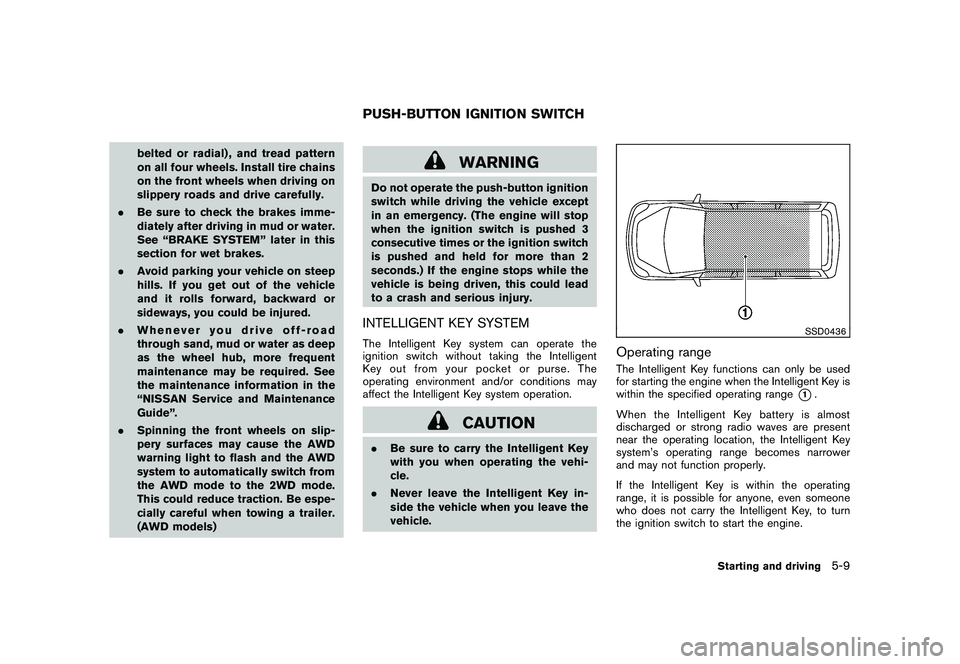
Operating rangeThe Intelligent Key functions can only be used
for starting the engine when the Intelligent Key is
within the specified operating range
*1.
When the Intelligent Key battery is almost
discharged or strong radio waves are present
near the operating location, the Intelligent Key
system’s operating range becomes narrower
and may not function properly.
If the Intelligent Key is within the operating
range, it is possible for anyone, even someone
who does not carry the Intelligent Key, to turn
the ignition switch to start the engine.
PUSH-BUTTON IGNITION SWITCH
Starting and driving
5-9
Page 304 of 425
Black plate (300,1)
Model "Z51-D" EDITED: 2009/ 8/ 3
.The cargo area is not included in the
operating range, but the Intelligent Key may
function.
. If the Intelligent Key is placed on the
instrument panel, inside the glove box or
door pocket, the Intelligent Key may not
function.
. If the Intelligent Key is placed near the door
or window outside the vehicle, the Intelligent
Key may function.
SSD0910
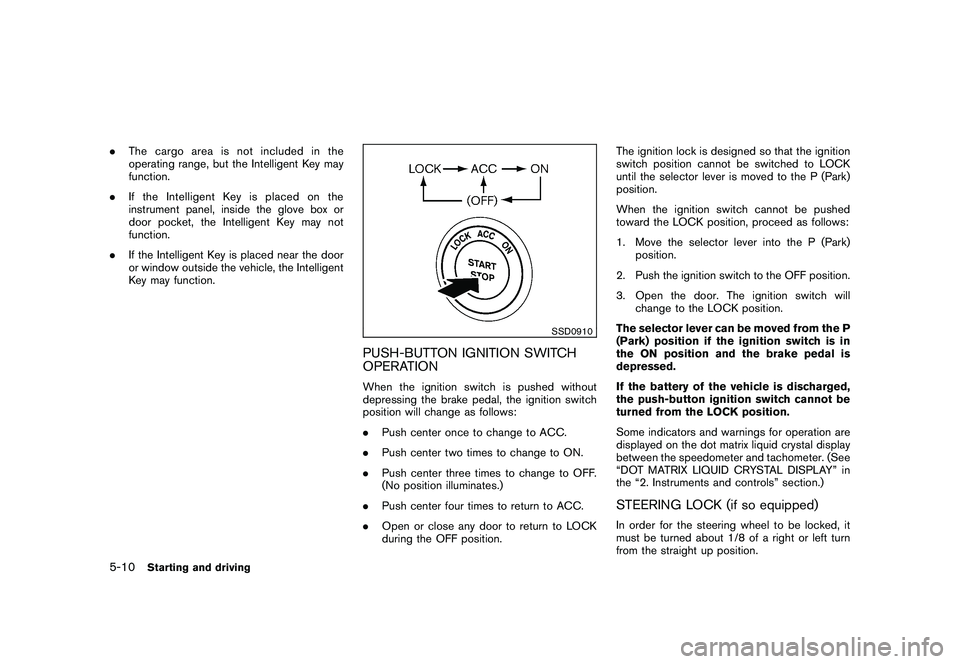
PUSH-BUTTON IGNITION SWITCH
OPERATIONWhen the ignition switch is pushed without
depressing the brake pedal, the ignition switch
position will change as follows:
.Push center once to change to ACC.
. Push center two times to change to ON.
. Push center three times to change to OFF.
(No position illuminates.)
. Push center four times to return to ACC.
. Open or close any door to return to LOCK
during the OFF position. The ignition lock is designed so that the ignition
switch position cannot be switched to LOCK
until the selector lever is moved to the P (Park)
position.
When the ignition switch cannot be pushed
toward the LOCK position, proceed as follows:
1. Move the selector lever into the P (Park)
position.
2. Push the ignition switch to the OFF position.
3. Open the door. The ignition switch will change to the LOCK position.
The selector lever can be moved from the P
(Park) position if the ignition switch is in
the ON position and the brake pedal is
depressed.
If the battery of the vehicle is discharged,
the push-button ignition switch cannot be
turned from the LOCK position.
Some indicators and warnings for operation are
displayed on the dot matrix liquid crystal display
between the speedometer and tachometer. (See
“DOT MATRIX LIQUID CRYSTAL DISPLAY” in
the “2. Instruments and controls” section.)
STEERING LOCK (if so equipped)In order for the steering wheel to be locked, it
must be turned about 1/8 of a right or left turn
from the straight up position.
5-10
Starting and driving
Page 305 of 425
Black plate (301,1)
Model "Z51-D" EDITED: 2009/ 8/ 3
To lock the steering wheel, push the
ignition switch to the OFF position and
open any door. To unlock the steering
wheel, push the ignition switch. If the
steering lock release malfunction indicator
appears on the dot matrix liquid crystal
display, push the push-button ignition
switch again while lightly turning the
steering wheel right and left. (See “DOT
MATRIX LIQUID CRYSTAL DISPLAY” in the
“2. Instruments and controls” section.)PUSH-BUTTON IGNITION SWITCH
POSITIONS
LOCK (Normal parking position)The ignition switch can only be locked in this
position.
The ignition switch will be unlocked when it is
pushed to the ACC position while carrying the
Intelligent Key or with the Intelligent Key inserted
in the Intelligent Key port.ACC (Accessories)This position activates electrical accessories
such as the radio, when the engine is not
running.
ON (Normal operating position)This position turns on the ignition system and
electrical accessories.OFFThe engine can be turned off without locking the
steering wheel.
The ignition lock is designed so that the ignition
switch cannot be switched to the LOCK position
until the selector lever is moved to the P (Park)
position.
CAUTION
Do not leave the vehicle with the push-
button ignition switch in ACC or ON
positions when the engine is not run-
ning for an extended period. This can
discharge the battery.
SSD0837
KEY PORT
Starting and driving
5-11
Page 306 of 425
Black plate (302,1)
Model "Z51-D" EDITED: 2009/ 8/ 3
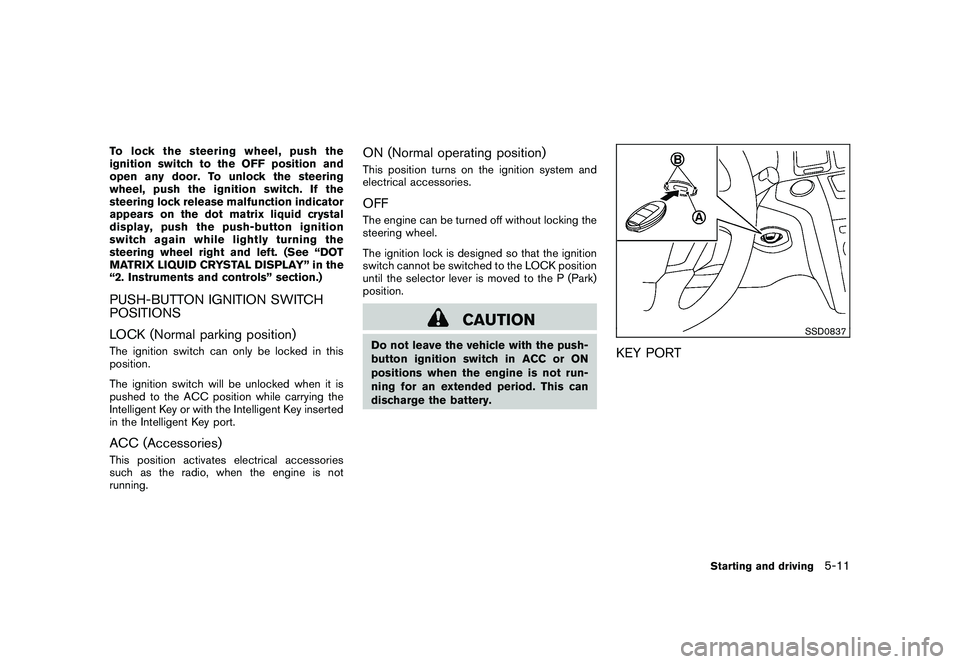
INTELLIGENT KEY BATTERY DIS-
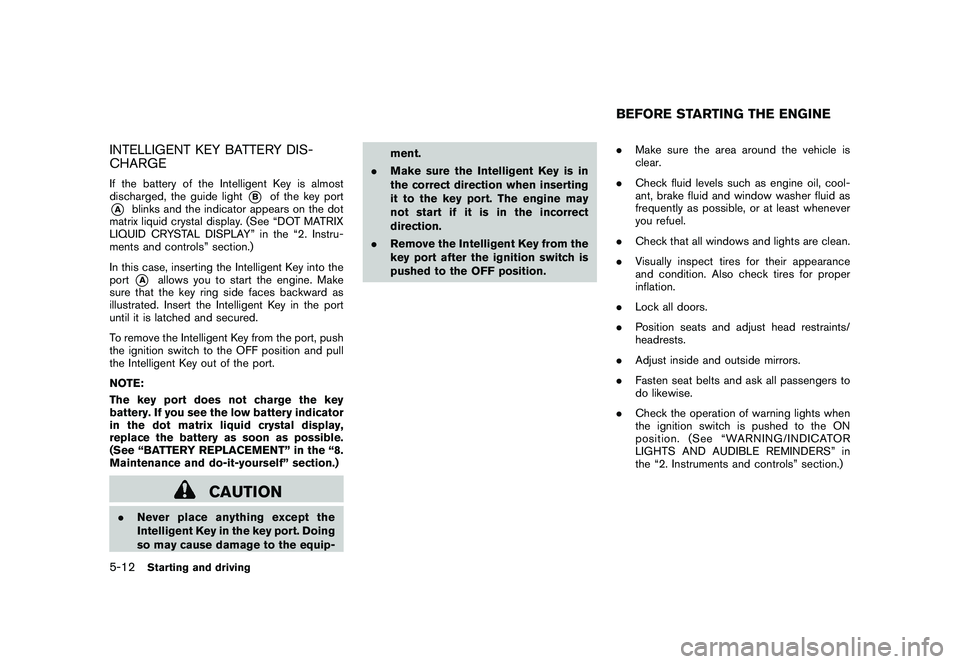
CHARGEIf the battery of the Intelligent Key is almost
discharged, the guide light
*B
of the key port
*A
blinks and the indicator appears on the dot
matrix liquid crystal display. (See “DOT MATRIX
LIQUID CRYSTAL DISPLAY” in the “2. Instru-
ments and controls” section.)
In this case, inserting the Intelligent Key into the
port*A
allows you to start the engine. Make
sure that the key ring side faces backward as
illustrated. Insert the Intelligent Key in the port
until it is latched and secured.
To remove the Intelligent Key from the port, push
the ignition switch to the OFF position and pull
the Intelligent Key out of the port.
NOTE:
The key port does not charge the key
battery. If you see the low battery indicator
in the dot matrix liquid crystal display,
replace the battery as soon as possible.
(See “BATTERY REPLACEMENT” in the “8.
Maintenance and do-it-yourself” section.)
CAUTION
. Never place anything except the
Intelligent Key in the key port. Doing
so may cause damage to the equip- ment.
. Make sure the Intelligent Key is in
the correct direction when inserting
it to the key port. The engine may
not start if it is in the incorrect
direction.
. Remove the Intelligent Key from the
key port after the ignition switch is
pushed to the OFF position. .
Make sure the area around the vehicle is
clear.
. Check fluid levels such as engine oil, cool-
ant, brake fluid and window washer fluid as
frequently as possible, or at least whenever
you refuel.
. Check that all windows and lights are clean.
. Visually inspect tires for their appearance
and condition. Also check tires for proper
inflation.
. Lock all doors.
. Position seats and adjust head restraints/
headrests.
. Adjust inside and outside mirrors.
. Fasten seat belts and ask all passengers to
do likewise.
. Check the operation of warning lights when
the ignition switch is pushed to the ON
position. (See “WARNING/INDICATOR
LIGHTS AND AUDIBLE REMINDERS” in
the “2. Instruments and controls” section.)
BEFORE STARTING THE ENGINE
5-12
Starting and driving
Page 323 of 425
Black plate (319,1)
Model "Z51-D" EDITED: 2009/ 8/ 3
cially careful when driving and cor-
nering on slippery surfaces. Always
drive carefully.
FREEING A FROZEN DOOR LOCKTo prevent a door lock from freezing, apply
deicer through the key hole. If the lock becomes
frozen, heat the key before inserting it into the
key hole or use the remote keyless entry keyfob.ANTI-FREEZEIn the winter when it is anticipated that the
outside temperature will drop below 328F(0 8C) ,
check the anti-freeze to assure proper winter
protection. For additional information, see “EN-
GINE COOLING SYSTEM” in the “8. Main-
tenance and do-it-yourself” section.BATTERYIf the battery is not fully charged during
extremely cold weather conditions, the battery
fluid may freeze and damage the battery. To
maintain maximum efficiency, the battery should
be checked regularly. For additional information,
see “BATTERY” in the “8. Maintenance and do-
it-yourself” section.DRAINING OF COOLANT WATERIf the vehicle is to be left outside without anti-
freeze, drain the cooling system, including the
engine block. Refill before operating the vehicle.
For details, see “ENGINE COOLING SYSTEM”
in the “8. Maintenance and do-it-yourself”
section.
TIRE EQUIPMENTSUMMER tires have a tread designed to provide
superior performance on dry pavement. How-
ever, the performance of these tires will be
substantially reduced in snowy and icy condi-
tions. If you operate your vehicle on snowy or icy
roads, NISSAN recommends the use of MUD &
SNOW or ALL SEASON tires on all four wheels.
Consult a NISSAN dealer for the tire type, size,
speed rating and availability information.
For additional traction on icy roads, studded
tires may be used. However, some U.S. states
and Canadian provinces prohibit their use.
Check local, state and provincial laws before
installing studded tires.
Skid and traction capabilities of studded
snow tires, on wet or dry surfaces, may be
poorer than that of non-studded snow
tires.
Tire chains may be used. For details, see “TIRE
CHAINS” in the “8. Maintenance and do-it-
yourself” section of this manual.All-Wheel Drive (AWD) modelIf you install snow tires, they must also be the
same size, brand, construction and tread pattern
on all four wheels.
COLD WEATHER DRIVING
Starting and driving
5-29
Page 353 of 425
Black plate (353,1)
Model "Z51-D" EDITED: 2009/ 8/ 3
When performing any inspection or mainte-
nance work on your vehicle, always take care
to prevent serious accidental injury to yourself or
damage to the vehicle. The following are general
precautions which should be closely observed.
WARNING
.Park the vehicle on a level surface,
apply the parking brake securely
and block the wheels to prevent
the vehicle from moving. Move the
selector lever to P (Park) .
. Be sure the ignition switch is in the
OFF or LOCK position when per-
forming any parts replacement or
repairs.
. If you must work with the engine
running, keep your hands, clothing,
hair and tools away from moving
fans, belts and any other moving
parts.
. It is advisable to secure or remove
any loose clothing and remove any
jewelry, such as rings, watches, etc.
before working on your vehicle.
. Always wear eye protection when-
ever you work on your vehicle.
. If you must run the engine in an enclosed space such as a garage, be
sure there is proper ventilation for
exhaust gases to escape.
. Never get under the vehicle while it
is supported only by a jack. If it is
necessary to work under the vehicle,
support it with safety stands.
. Keep smoking materials, flame and
sparks away from fuel tank and the
battery.
. The fuel filter or fuel lines should be
serviced by a NISSAN dealer be-
cause the fuel lines are under high
pressure even when the engine is
off.
CAUTION
.Do not work under the hood while
the engine is hot. Turn the engine
off and wait until it cools down.
. Avoid direct contact with used en-
gine oil and coolant. Improperly
disposed engine oil, and engine
coolant and/or other vehicle fluids
can damage the environment. Al-
ways conform to local regulations
for disposal of vehicle fluid. .
Never leave the engine or the CVT
related component harnesses dis-
connected while the ignition switch
is in the ON position.
. Never connect or disconnect the
battery or any transistorized com-
ponent while the ignition switch is
in the ON position.
. Your vehicle is equipped with an
automatic engine cooling fan. It may
come on at any time without warn-
ing, even if the ignition key is in the
OFF position and the engine is not
running. To avoid injury, always
disconnect the negative battery
cable before working near the fan.
This “8. Maintenance and do-it-yourself” section
gives instructions regarding only those items
which are relatively easy for an owner to perform.
A genuine NISSAN Service Manual is also
available. (See “OWNER’S MANUAL/SERVICE
MANUAL ORDER INFORMATION” in the “9.
Technical and consumer information” section.)
Youshouldbeawarethatincompleteor
improper servicing may result in operating
difficulties or excessive emissions, and could
affect warranty coverage. If in doubt about
any servicing, we recommend that it be
MAINTENANCE PRECAUTIONS
Maintenance and do-it-yourself
8-5
Page 370 of 425
Black plate (370,1)
Model "Z51-D" EDITED: 2009/ 8/ 3
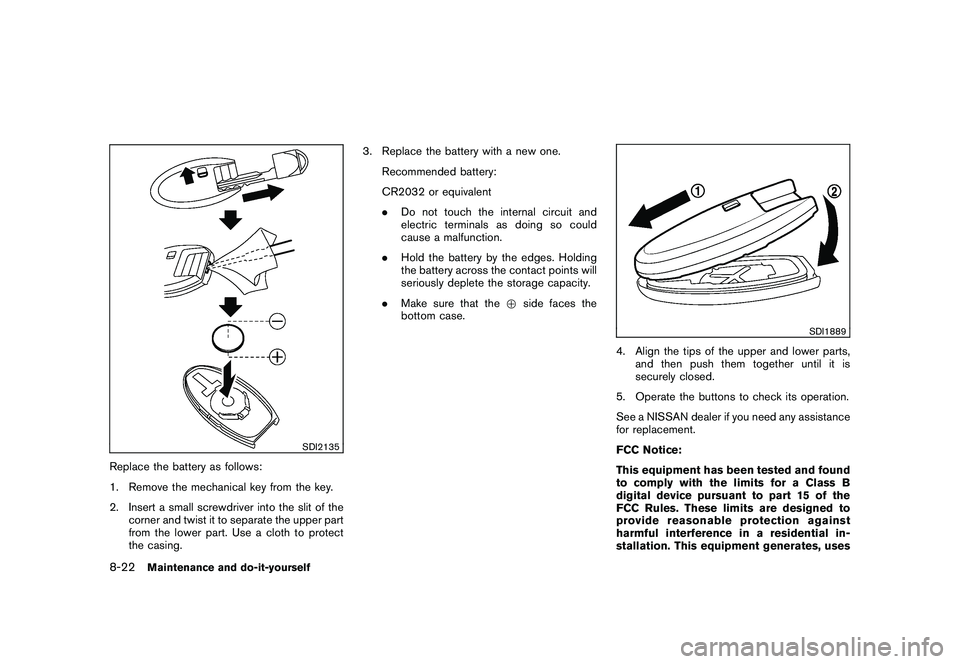
SDI2135
Replace the battery as follows:
1. Remove the mechanical key from the key.
2. Insert a small screwdriver into the slit of thecorner and twist it to separate the upper part
from the lower part. Use a cloth to protect
the casing. 3. Replace the battery with a new one.
Recommended battery:
CR2032 or equivalent
.Do not touch the internal circuit and
electric terminals as doing so could
cause a malfunction.
. Hold the battery by the edges. Holding
the battery across the contact points will
seriously deplete the storage capacity.
. Make sure that the +side faces the
bottom case.
SDI1889
4. Align the tips of the upper and lower parts, and then push them together until it is
securely closed.
5. Operate the buttons to check its operation.
See a NISSAN dealer if you need any assistance
for replacement.
FCC Notice:
This equipment has been tested and found
to comply with the limits for a Class B
digital device pursuant to part 15 of the
FCC Rules. These limits are designed to
provide reasonable protection against
harmful interference in a residential in-
stallation. This equipment generates, uses
8-22
Maintenance and do-it-yourself
Page 417 of 425
Black plate (1,1)
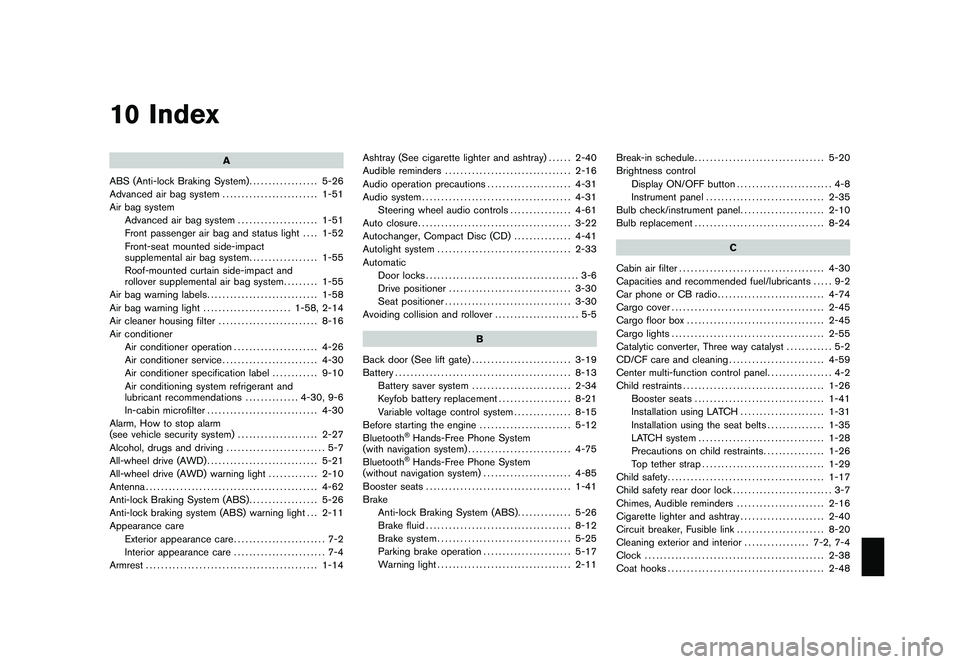
10 Index
A
ABS (Anti-lock Braking System) .................. 5-26
Advanced air bag system ......................... 1-51
Air bag system Advanced air bag system ..................... 1-51
Front passenger air bag and status light .... 1-52
Front-seat mounted side-impact
supplemental air bag system .................. 1-55
Roof-mounted curtain side-impact and
rollover supplemental air bag system ......... 1-55
Air bag warning labels ............................. 1-58
Air bag warning light ....................... 1-58, 2-14
Air cleaner housing filter .......................... 8-16
Air conditioner Air conditioner operation ...................... 4-26
Air conditioner service ......................... 4-30
Air conditioner specification label ............ 9-10
Air conditioning system refrigerant and
lubricant recommendations .............. 4-30, 9-6
In-cabin microfilter ............................. 4-30
Alarm, How to stop alarm
(see vehicle security system) ..................... 2-27
Alcohol, drugs and driving .......................... 5-7
All-wheel drive (AWD) ............................. 5-21
All-wheel drive (AWD) warning light ............. 2-10
Antenna ............................................. 4-62
Anti-lock Braking System (ABS) .................. 5-26
Anti-lock braking system (ABS) warning light . . . 2-11
Appearance care Exterior appearance care ........................ 7-2
Interior appearance care ........................ 7-4
Armrest ............................................. 1-14 Ashtray (See cigarette lighter and ashtray)
...... 2-40
Audible reminders ................................. 2-16
Audio operation precautions ...................... 4-31
Audio system ....................................... 4-31
Steering wheel audio controls ................ 4-61
Auto closure ........................................ 3-22
Autochanger, Compact Disc (CD) ............... 4-41
Autolight system ................................... 2-33
Automatic Door locks ........................................ 3-6
Drive positioner ................................ 3-30
Seat positioner ................................. 3-30
Avoiding collision and rollover ...................... 5-5
B
Back door (See lift gate) .......................... 3-19
Battery .............................................. 8-13
Battery saver system .......................... 2-34
Keyfob battery replacement ................... 8-21
Variable voltage control system ............... 8-15
Before starting the engine ........................ 5-12
Bluetooth
®Hands-Free Phone System
(with navigation system) ........................... 4-75
Bluetooth®Hands-Free Phone System
(without navigation system) ....................... 4-85
Booster seats ...................................... 1-41
Brake Anti-lock Braking System (ABS) .............. 5-26
Brake fluid ...................................... 8-12
Brake system ................................... 5-25
Parking brake operation ....................... 5-17
Warning light ................................... 2-11 Break-in schedule
.................................. 5-20
Brightness control Display ON/OFF button ......................... 4-8
Instrument panel ............................... 2-35
Bulb check/instrument panel ...................... 2-10
Bulb replacement .................................. 8-24
C
Cabin air filter ...................................... 4-30
Capacities and recommended fuel/lubricants ..... 9-2
Car phone or CB radio ............................ 4-74
Cargo cover ........................................ 2-45
Cargo floor box .................................... 2-45
Cargo lights ........................................ 2-55
Catalytic converter, Three way catalyst ............ 5-2
CD/CF care and cleaning ......................... 4-59
Center multi-function control panel ................. 4-2
Child restraints ..................................... 1-26
Booster seats .................................. 1-41
Installation using LATCH ...................... 1-31
Installation using the seat belts ............... 1-35
LATCH system ................................. 1-28
Precautions on child restraints ................ 1-26
Top tether strap ................................ 1-29
Child safety ......................................... 1-17
Child safety rear door lock .......................... 3-7
Chimes, Audible reminders ....................... 2-16
Cigarette lighter and ashtray ...................... 2-40
Circuit breaker, Fusible link ....................... 8-20
Cleaning exterior and interior ................. 7-2, 7-4
Clock ............................................... 2-38
Coat hooks ......................................... 2-48
Model "Z51-D" EDITED: 2009/ 8/ 3
Page 419 of 425
Black plate (3,1)
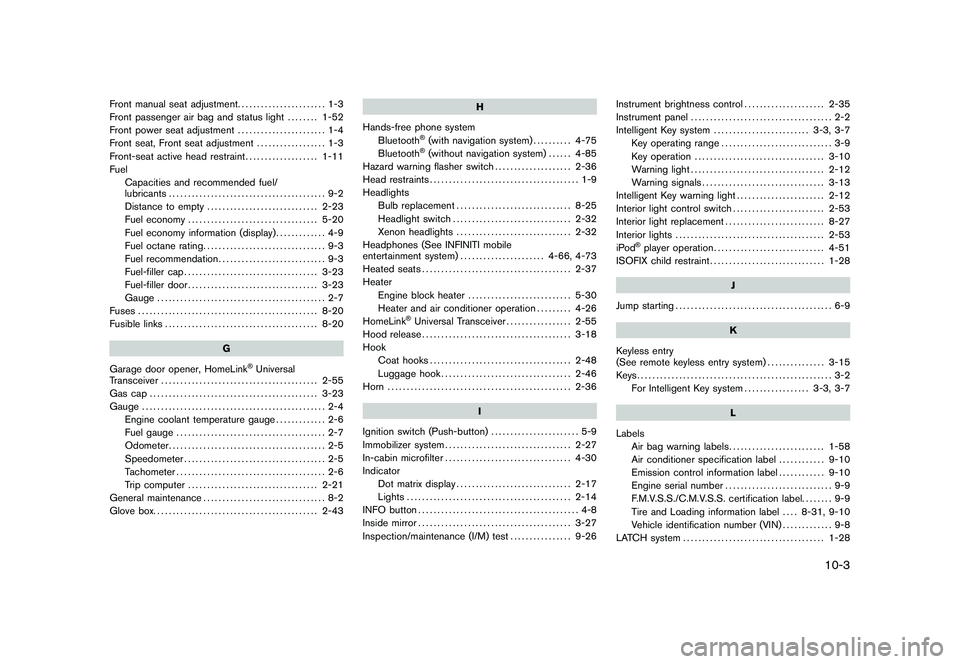
Front manual seat adjustment....................... 1-3
Front passenger air bag and status light ........ 1-52
Front power seat adjustment ....................... 1-4
Front seat, Front seat adjustment .................. 1-3
Front-seat active head restraint ................... 1-11
Fuel Capacities and recommended fuel/
lubricants ......................................... 9-2
Distance to empty ............................. 2-23
Fuel economy .................................. 5-20
Fuel economy information (display) ............. 4-9
Fuel octane rating ................................ 9-3
Fuel recommendation ............................ 9-3
Fuel-filler cap ................................... 3-23
Fuel-filler door .................................. 3-23
Gauge ............................................ 2-7
Fuses ............................................... 8-20
Fusible links ........................................ 8-20
G
Garage door opener, HomeLink
®Universal
Transceiver ......................................... 2-55
Gas cap ............................................ 3-23
Gauge ................................................ 2-4
Engine coolant temperature gauge ............. 2-6
Fuel gauge ....................................... 2-7
Odometer ......................................... 2-5
Speedometer ..................................... 2-5
Tachometer ....................................... 2-6
Trip computer .................................. 2-21
General maintenance ................................ 8-2
Glove box. .......................................... 2-43 H
Hands-free phone system Bluetooth
®(with navigation system) .......... 4-75
Bluetooth®(without navigation system) ...... 4-85
Hazard warning flasher switch .................... 2-36
Head restraints ....................................... 1-9
Headlights Bulb replacement .............................. 8-25
Headlight switch ............................... 2-32
Xenon headlights .............................. 2-32
Headphones (See INFINITI mobile
entertainment system) ...................... 4-66, 4-73
Heated seats ....................................... 2-37
Heater Engine block heater ........................... 5-30
Heater and air conditioner operation ......... 4-26
HomeLink
®Universal Transceiver ................. 2-55
Hood release ....................................... 3-18
Hook Coat hooks ..................................... 2-48
Luggage hook .................................. 2-46
Horn ................................................ 2-36
I
Ignition switch (Push-button) ....................... 5-9
Immobilizer system ................................. 2-27
In-cabin microfilter ................................. 4-30
Indicator Dot matrix display .............................. 2-17
Lights ........................................... 2-14
INFO button .......................................... 4-8
Inside mirror ........................................ 3-27
Inspection/maintenance (I/M) test ................ 9-26Instrument brightness control
..................... 2-35
Instrument panel ..................................... 2-2
Intelligent Key system ......................... 3-3, 3-7
Key operating range ............................. 3-9
Key operation .................................. 3-10
Warning light ................................... 2-12
Warning signals ................................ 3-13
Intelligent Key warning light ....................... 2-12
Interior light control switch ........................ 2-53
Interior light replacement .......................... 8-27
Interior lights ....................................... 2-53
iPod
®player operation ............................. 4-51
ISOFIX child restraint .............................. 1-28
J
Jump starting ......................................... 6-9
K
Keyless entry
(See remote keyless entry system) ............... 3-15
Keys................................................... 3-2 For Intelligent Key system ................. 3-3, 3-7
L
Labels Air bag warning labels ......................... 1-58
Air conditioner specification label ............ 9-10
Emission control information label ............ 9-10
Engine serial number ............................ 9-9
F.M.V.S.S./C.M.V.S.S. certification label. ....... 9-9
Tire and Loading information label .... 8-31, 9-10
Vehicle identification number (VIN) ............. 9-8
LATCH system ..................................... 1-28
10-3
Model "Z51-D" EDITED: 2009/ 8/ 3