CD player NISSAN MURANO 2011 Owner´s Manual
[x] Cancel search | Manufacturer: NISSAN, Model Year: 2011, Model line: MURANO, Model: NISSAN MURANO 2011Pages: 433, PDF Size: 3.7 MB
Page 221 of 433
Black plate (219,1)
Model "Z51-D" EDITED: 2010/ 7/ 23
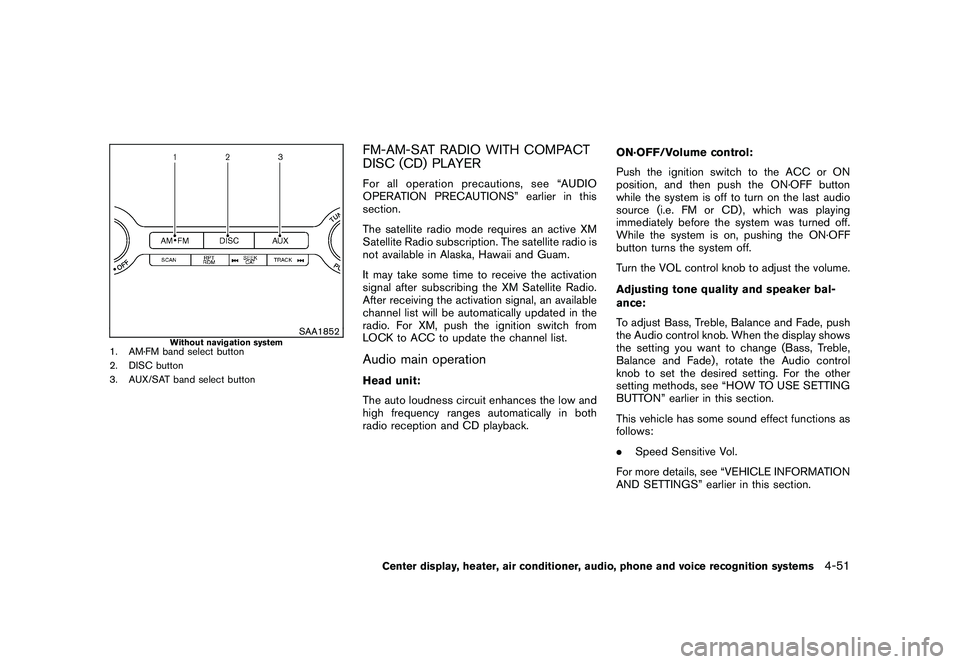
SAA1852
Without navigation system
1. AM·FM band select button
2. DISC button
3. AUX/SAT band select button
FM-AM-SAT RADIO WITH COMPACT
DISC (CD) PLAYERFor all operation precautions, see “AUDIO
OPERATION PRECAUTIONS” earlier in this
section.
The satellite radio mode requires an active XM
Satellite Radio subscription. The satellite radio is
not available in Alaska, Hawaii and Guam.
It may take some time to receive the activation
signal after subscribing the XM Satellite Radio.
After receiving the activation signal, an available
channel list will be automatically updated in the
radio. For XM, push the ignition switch from
LOCK to ACC to update the channel list.Audio main operationHead unit:
The auto loudness circuit enhances the low and
high frequency ranges automatically in both
radio reception and CD playback.ON·OFF/Volume control:
Push the ignition switch to the ACC or ON
position, and then push the ON·OFF button
while the system is off to turn on the last audio
source (i.e. FM or CD) , which was playing
immediately before the system was turned off.
While the system is on, pushing the ON·OFF
button turns the system off.
Turn the VOL control knob to adjust the volume.
Adjusting tone quality and speaker bal-
ance:
To adjust Bass, Treble, Balance and Fade, push
the Audio control knob. When the display shows
the setting you want to change (Bass, Treble,
Balance and Fade) , rotate the Audio control
knob to set the desired setting. For the other
setting methods, see “HOW TO USE SETTING
BUTTON” earlier in this section.
This vehicle has some sound effect functions as
follows:
.
Speed Sensitive Vol.
For more details, see “VEHICLE INFORMATION
AND SETTINGS” earlier in this section.
Center display, heater, air conditioner, audio, phone and voice recognition systems
4-51
Page 224 of 433
Black plate (222,1)
Model "Z51-D" EDITED: 2010/ 7/ 23
.CH Name
. Category
. Name
. Title
. OtherCompact Disc (CD) player operationPush the ignition switch to the ACC or ON
position and insert the Compact Disc (CD) into
the slot with the label side facing up. The CD will
be guided automatically into the slot and start
playing.
After loading the CD, the number of tracks on
the CD and the play time will appear on the
display.
If the radio is already operating, it will auto-
matically turn off and the CD will play.
If the system has been turned off while the CD
was playing, pushing the ON·OFF button will
start the CD.
Do not use 3.1 in (8 cm) discs.
or
PLAY:
When the DISC·AUX or DISC (CD play) button
is pushed with the system off and the CD
loaded, the system will turn on and the CD will
start to play. When the DISC·AUX or DISC button is pushed
with the CD loaded and the radio playing, the
radio will automatically be turned off and the CD
will start to play.
Menu (models with navigation system):
When the “Menu” key on the display is selected
while the CD is being played, the menu screen
will be displayed. The following menu options
are available.
.
Folder List (for CD with compressed audio
files)
Displays the folder list.
. Track List
Displays the track list.
. Play Mode
Select a play mode from the following items.
— Normal
— 1 Folder Repeat (for CD with compressed audio files)
— 1 Track Repeat
— 1 Disc Random
— 1 Folder Random (for CD with com- pressed audio files) .
Record to Music Box
®(for CD)
Select to choose specific songs on the CD
to record to the Music Box
®.
. Title Text Priority (for CD)
Set the priority to CDDB (Compact Disc
Data Base) to acquire track information from
the Gracenote Database, or set the priority
to CD-TEXT to acquire the information from
CDs.
. Automatic Recording (for CD)
When this item is turned to ON, the Music
Box
®hard drive/flash memory automatically
starts recording when a CD is inserted.
. Recording Quality (for CD)
The larger number (132) will increase the
recorded sound quality while taking up more
space on the Music Box
®leaving less room
for more songs.
For the details of Music Box®, see “MUSIC
BOX
®” later in this section.
Text (models without navigation system):
When the “Text” key is selected in the screen
using the multi-function controller and then the
ENTER button is pushed while the CD is being
played, the music information below will be
displayed on the screen.
4-54
Center display, heater, air conditioner, audio, phone and voice recognition systems
Page 225 of 433
Black plate (223,1)
Model "Z51-D" EDITED: 2010/ 7/ 23
CD:
.Disc title
. Track title
CD with compressed audio files:
. Folder title
. File title
. Song title
. Album title
. Artist
Next/Previous Track and Fast
Forward/Rewind:
When the(fast forward) or
(rewind)
button is pushed for more than 1.5 seconds
while the CD is being played, the CD will play
while fast forwarding or rewinding. When the
button is released, the CD will return to normal
play speed.
When the
or
button is pushed for less
than 1.5 seconds while the CD is being played,
the next track or the beginning of the current
track on the CD will be played.
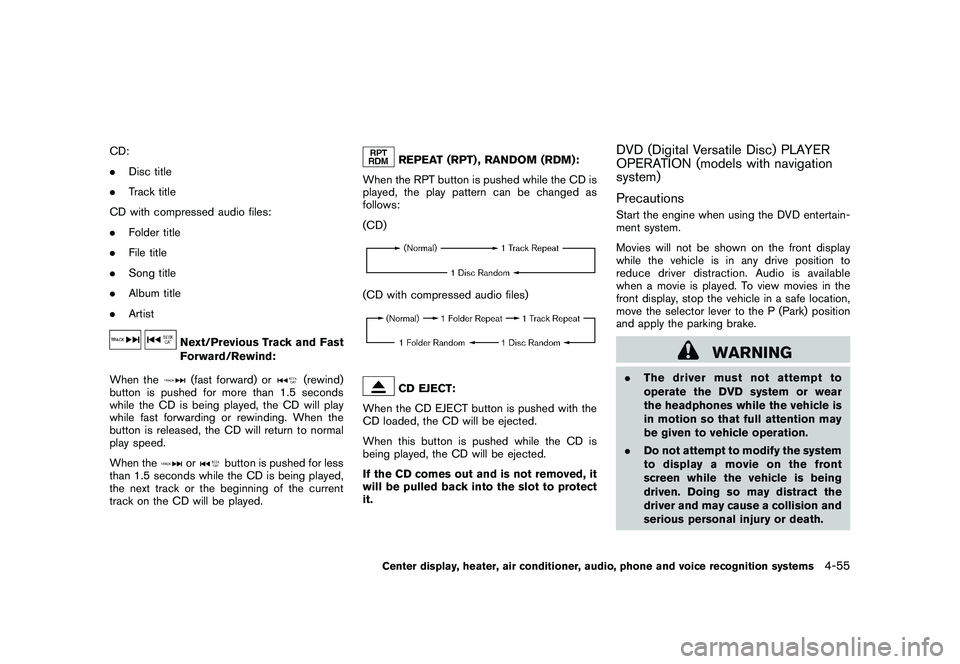
REPEAT (RPT) , RANDOM (RDM):
When the RPT button is pushed while the CD is
played, the play pattern can be changed as
follows:
(CD)
(CD with compressed audio files)
CD EJECT:
When the CD EJECT button is pushed with the
CD loaded, the CD will be ejected.
When this button is pushed while the CD is
being played, the CD will be ejected.
If the CD comes out and is not removed, it
will be pulled back into the slot to protect
it.
DVD (Digital Versatile Disc) PLAYER
OPERATION (models with navigation
system)
PrecautionsStart the engine when using the DVD entertain-
ment system.
Movies will not be shown on the front display
while the vehicle is in any drive position to
reduce driver distraction. Audio is available
when a movie is played. To view movies in the
front display, stop the vehicle in a safe location,
move the selector lever to the P (Park) position
and apply the parking brake.
WARNING
. The driver must not attempt to
operate the DVD system or wear
the headphones while the vehicle is
in motion so that full attention may
be given to vehicle operation.
. Do not attempt to modify the system
to display a movie on the front
screen while the vehicle is being
driven. Doing so may distract the
driver and may cause a collision and
serious personal injury or death.
Center display, heater, air conditioner, audio, phone and voice recognition systems
4-55
Page 226 of 433
Black plate (224,1)
Model "Z51-D" EDITED: 2010/ 7/ 23
CAUTION
.Only operate the DVD while the
vehicle engine is running. Operating
the DVD for extended periods of
time with the engine OFF can dis-
charge the vehicle battery.
. Do not allow the system to get wet.
Excessive moisture such as spilled
liquids may cause the system to
malfunction.
. While playing VIDEO-CD media, this
DVD player does not guarantee
complete functionality of all VI-
DEO-CD formats.Display settingsTo adjust the front display mode, push the
SETTING button while the DVD is being played.
To adjust the display ON/OFF, brightness, tint,
color and contrast, select the “Display Adjust-
ment” key and then select each key.
Then you can adjust each item using the multi-
function controller. After changes have been
made push the BACK button to save the setting.
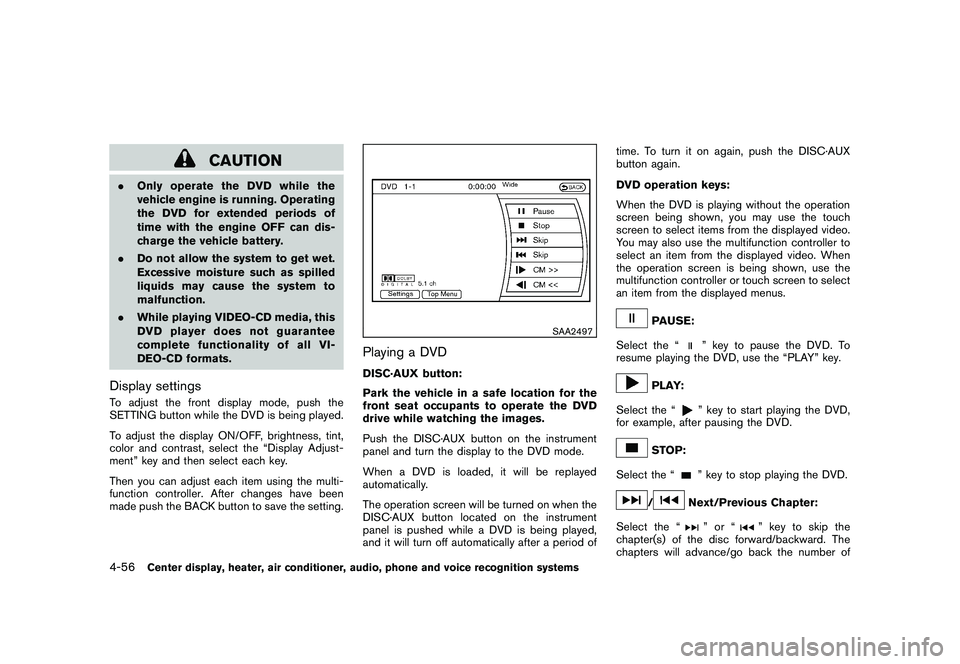
SAA2497
Playing a DVDDISC·AUX button:
Park the vehicle in a safe location for the
front seat occupants to operate the DVD
drive while watching the images.
Push the DISC·AUX button on the instrument
panel and turn the display to the DVD mode.
When a DVD is loaded, it will be replayed
automatically.
The operation screen will be turned on when the
DISC·AUX button located on the instrument
panel is pushed while a DVD is being played,
and it will turn off automatically after a period of time. To turn it on again, push the DISC·AUX
button again.
DVD operation keys:
When the DVD is playing without the operation
screen being shown, you may use the touch
screen to select items from the displayed video.
You may also use the multifunction controller to
select an item from the displayed video. When
the operation screen is being shown, use the
multifunction controller or touch screen to select
an item from the displayed menus.
PAUSE:
Select the “
” key to pause the DVD. To
resume playing the DVD, use the “PLAY” key.
PLAY:
Select the “
” key to start playing the DVD,
for example, after pausing the DVD.
STOP:
Select the “
” key to stop playing the DVD.
/
Next/Previous Chapter:
Select the “
”or“
” key to skip the
chapter(s) of the disc forward/backward. The
chapters will advance/go back the number of
4-56
Center display, heater, air conditioner, audio, phone and voice recognition systems
Page 237 of 433
Black plate (235,1)
Model "Z51-D" EDITED: 2010/ 7/ 23
Connected Devices:
Registered devices are shown on the list. Select
a Bluetooth
®device from the list, the following
options will be available.
. Select
Select “Select” to connect the selected
device to the vehicle. If there is a different
device currently connected, the selected
device will replace the current device.
. Edit
Rename the selected Bluetooth
®device
using the keypad displayed on the screen.
(See “HOW TO USE TOUCH SCREEN
(models with navigation system)” earlier in
this section.)
. Delete
Delete the selected Bluetooth
®device.
Edit Bluetooth Info:
Change the name broadcasted by this system
over Bluetooth
®. Change the PIN code that is
entered when connecting a hands free device to
this system.
Replace Connected Phone:
Replace the Bluetooth
®connection with a
connected Bluetooth
®cellular phone. For details
about Hands-Free Phone System, see “BLUE- TOOTH
®HANDS-FREE PHONE SYSTEM
(models with navigation system)” later in this
section.
SAA3344
iPod
®PLAYER OPERATION (if so
equipped)
Connecting iPod
®
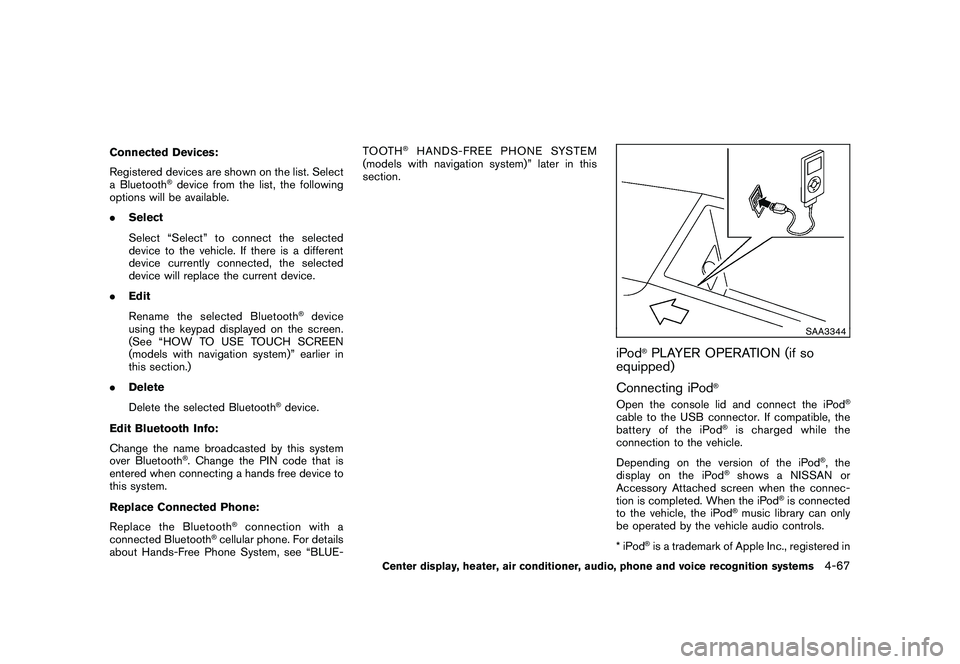
Open the console lid and connect the iPod
®
cable to the USB connector. If compatible, the
battery of the iPod
®is charged while the
connection to the vehicle.
Depending on the version of the iPod
®, the
display on the iPod
®shows a NISSAN or
Accessory Attached screen when the connec-
tion is completed. When the iPod
®is connected
to the vehicle, the iPod
®music library can only
be operated by the vehicle audio controls.
*iPod
®is a trademark of Apple Inc., registered in
Center display, heater, air conditioner, audio, phone and voice recognition systems
4-67
Page 240 of 433
Black plate (238,1)
Model "Z51-D" EDITED: 2010/ 7/ 23
SAA2513
Models with navigation system
SAA2612
Models without navigation system
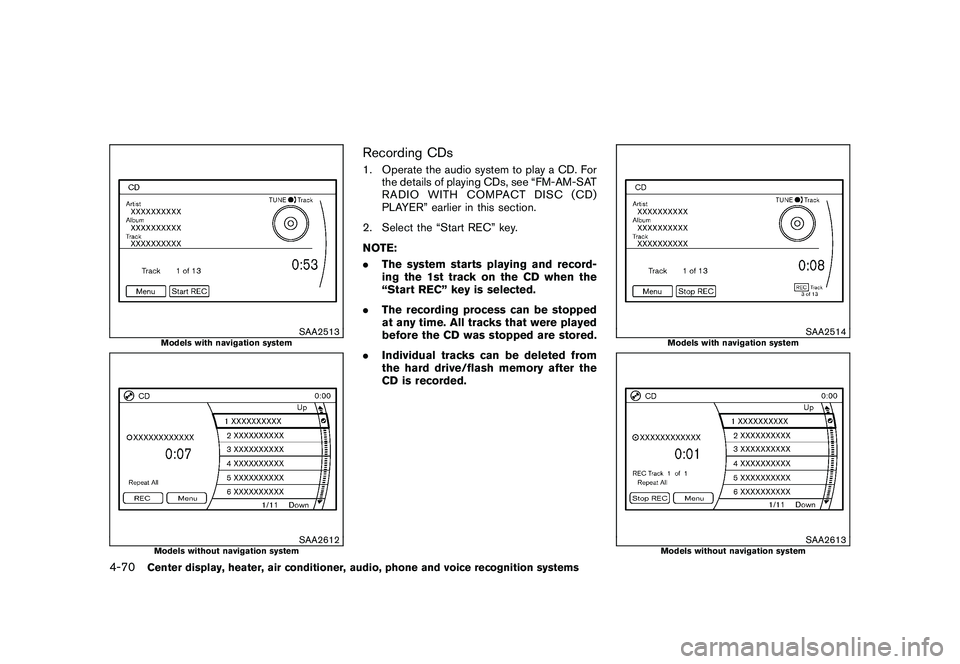
Recording CDs1. Operate the audio system to play a CD. Forthe details of playing CDs, see “FM-AM-SAT
RADIO WITH COMPACT DISC (CD)
PLAYER” earlier in this section.
2. Select the “Start REC” key.
NOTE:
. The system starts playing and record-
ing the 1st track on the CD when the
“Start REC” key is selected.
. The recording process can be stopped
at any time. All tracks that were played
before the CD was stopped are stored.
. Individual tracks can be deleted from
the hard drive/flash memory after the
CD is recorded.
SAA2514
Models with navigation system
SAA2613
Models without navigation system
4-70
Center display, heater, air conditioner, audio, phone and voice recognition systems
Page 247 of 433
Black plate (245,1)
Model "Z51-D" EDITED: 2010/ 7/ 23
SAA3342
AUXILIARY INPUT JACKS (if so
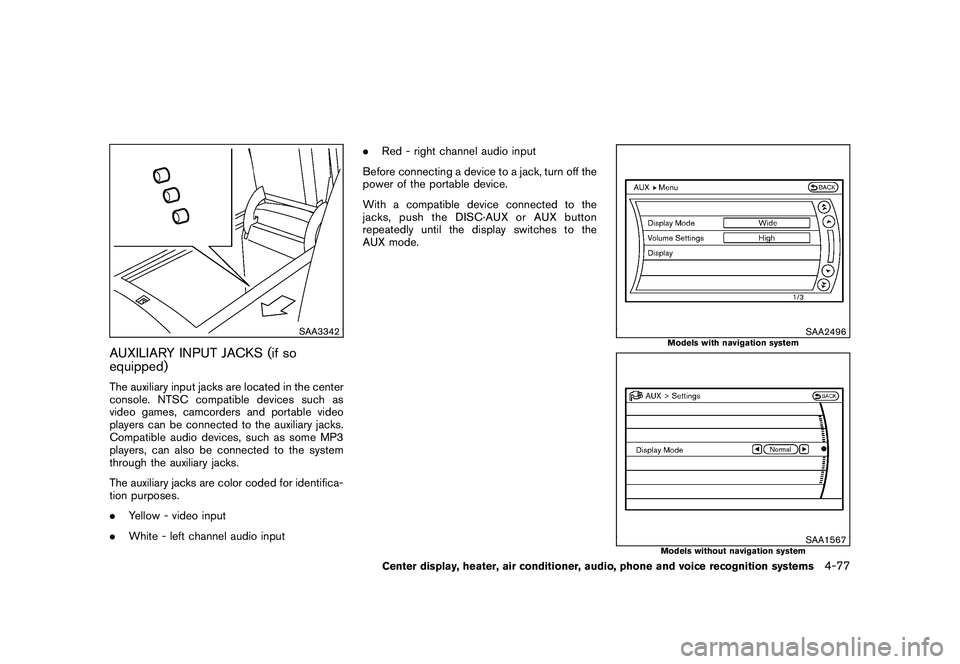
equipped)The auxiliary input jacks are located in the center
console. NTSC compatible devices such as
video games, camcorders and portable video
players can be connected to the auxiliary jacks.
Compatible audio devices, such as some MP3
players, can also be connected to the system
through the auxiliary jacks.
The auxiliary jacks are color coded for identifica-
tion purposes.
.Yellow - video input
. White - left channel audio input .
Red - right channel audio input
Before connecting a device to a jack, turn off the
power of the portable device.
With a compatible device connected to the
jacks, push the DISC·AUX or AUX button
repeatedly until the display switches to the
AUX mode.
SAA2496
Models with navigation system
SAA1567
Models without navigation system
Center display, heater, air conditioner, audio, phone and voice recognition systems
4-77
Page 293 of 433
Black plate (291,1)
Model "Z51-D" EDITED: 2010/ 7/ 23
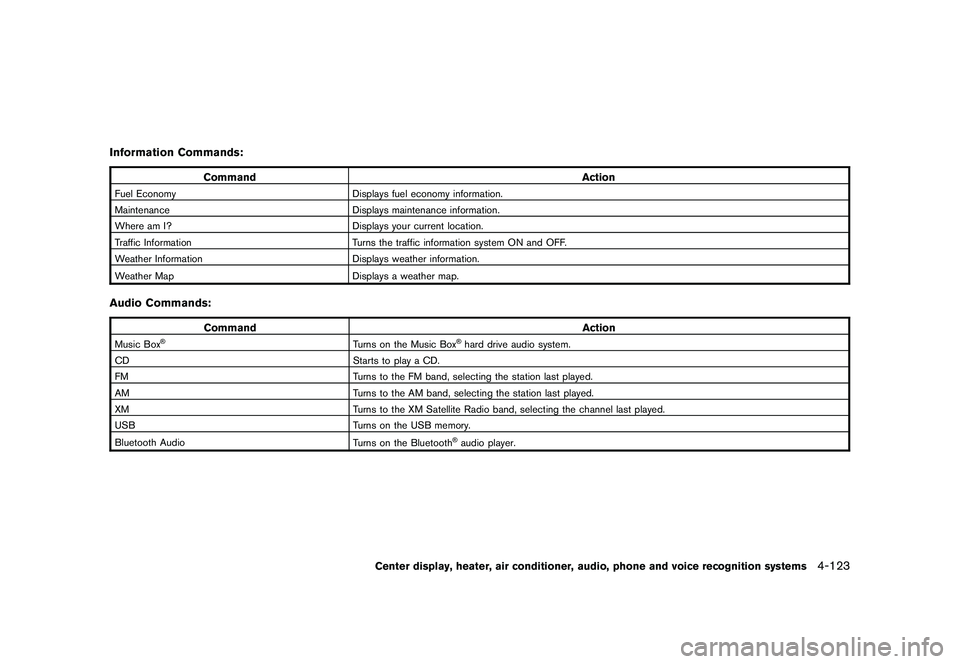
Information Commands:
CommandAction
Fuel EconomyDisplays fuel economy information.
Maintenance Displays maintenance information.
Where am I? Displays your current location.
Traffic Information Turns the traffic information system ON and OFF.
Weather Information Displays weather information.
Weather Map Displays a weather map.Audio Commands:
Command Action
Music Box
®
Turns on the Music Box
®hard drive audio system.
CD Starts to play a CD.
FM Turns to the FM band, selecting the station last played.
AM Turns to the AM band, selecting the station last played.
XM Turns to the XM Satellite Radio band, selecting the channel last played.
USB Turns on the USB memory.
Bluetooth Audio Turns on the Bluetooth®audio player.
Center display, heater, air conditioner, audio, phone and voice recognition systems
4-123
Page 426 of 433
Black plate (2,1)
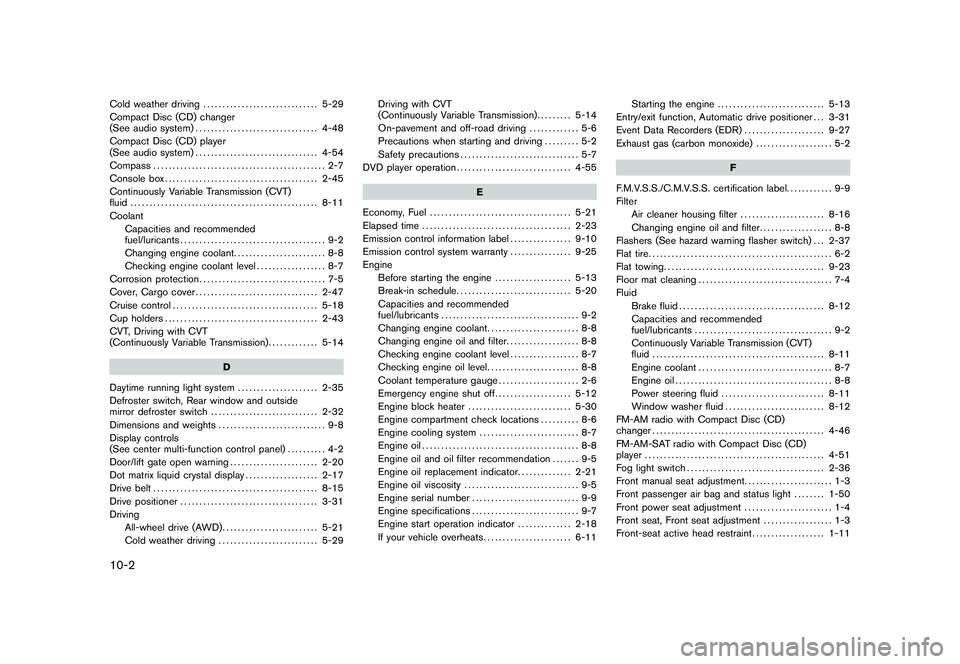
10-2Cold weather driving.............................. 5-29
Compact Disc (CD) changer
(See audio system) ................................ 4-48
Compact Disc (CD) player
(See audio system) ................................ 4-54
Compass ............................................. 2-7
Console box ........................................ 2-45
Continuously Variable Transmission (CVT)
fluid ................................................. 8-11
Coolant Capacities and recommended
fuel/luricants ...................................... 9-2
Changing engine coolant ........................ 8-8
Checking engine coolant level .................. 8-7
Corrosion protection ................................. 7-5
Cover, Cargo cover ................................ 2-47
Cruise control ...................................... 5-18
Cup holders ........................................ 2-43
CVT, Driving with CVT
(Continuously Variable Transmission) ............. 5-14
D
Daytime running light system ..................... 2-35
Defroster switch, Rear window and outside
mirror defroster switch ............................ 2-32
Dimensions and weights ............................ 9-8
Display controls
(See center multi-function control panel) .......... 4-2
Door/lift gate open warning ....................... 2-20
Dot matrix liquid crystal display ................... 2-17
Drive belt ........................................... 8-15
Drive positioner .................................... 3-31
Driving All-wheel drive (AWD) ......................... 5-21
Cold weather driving .......................... 5-29 Driving with CVT
(Continuously Variable Transmission)
......... 5-14
On-pavement and off-road driving ............. 5-6
Precautions when starting and driving ......... 5-2
Safety precautions ............................... 5-7
DVD player operation .............................. 4-55
E
Economy, Fuel ..................................... 5-21
Elapsed time ....................................... 2-23
Emission control information label ................ 9-10
Emission control system warranty ................ 9-25
Engine Before starting the engine .................... 5-13
Break-in schedule .............................. 5-20
Capacities and recommended
fuel/lubricants .................................... 9-2
Changing engine coolant ........................ 8-8
Changing engine oil and filter ................... 8-8
Checking engine coolant level .................. 8-7
Checking engine oil level ........................ 8-8
Coolant temperature gauge ..................... 2-6
Emergency engine shut off .................... 5-12
Engine block heater ........................... 5-30
Engine compartment check locations .......... 8-6
Engine cooling system .......................... 8-7
Engine oil ......................................... 8-8
Engine oil and oil filter recommendation ....... 9-5
Engine oil replacement indicator .............. 2-21
Engine oil viscosity .............................. 9-5
Engine serial number ............................ 9-9
Engine specifications ............................ 9-7
Engine start operation indicator .............. 2-18
If your vehicle overheats ....................... 6-11 Starting the engine
............................ 5-13
Entry/exit function, Automatic drive positioner . . . 3-31
Event Data Recorders (EDR) ..................... 9-27
Exhaust gas (carbon monoxide) .................... 5-2
F
F.M.V.S.S./C.M.V.S.S. certification label. ........... 9-9
Filter Air cleaner housing filter ...................... 8-16
Changing engine oil and filter ................... 8-8
Flashers (See hazard warning flasher switch) . . . 2-37
Flat tire ................................................ 6-2
Flat towing .......................................... 9-23
Floor mat cleaning ................................... 7-4
Fluid Brake fluid ...................................... 8-12
Capacities and recommended
fuel/lubricants .................................... 9-2
Continuously Variable Transmission (CVT)
fluid ............................................. 8-11
Engine coolant ................................... 8-7
Engine oil ......................................... 8-8
Power steering fluid ........................... 8-11
Window washer fluid .......................... 8-12
FM-AM radio with Compact Disc (CD)
changer ............................................. 4-46
FM-AM-SAT radio with Compact Disc (CD)
player ............................................... 4-51
Fog light switch .................................... 2-36
Front manual seat adjustment. ...................... 1-3
Front passenger air bag and status light ........ 1-50
Front power seat adjustment ....................... 1-4
Front seat, Front seat adjustment .................. 1-3
Front-seat active head restraint ................... 1-11
Model "Z51-D" EDITED: 2010/ 7/ 23
Page 427 of 433
Black plate (3,1)
FuelCapacities and recommended
fuel/lubricants .................................... 9-2
Fuel economy .................................. 5-21
Fuel economy information (display) ............. 4-9
Fuel octane rating ................................ 9-3
Fuel recommendation ............................ 9-3
Fuel-filler cap ................................... 3-24
Fuel-filler door .................................. 3-24
Gauge ............................................ 2-7
LOOSE FUEL CAP warning .................. 3-26
Fuses ............................................... 8-20
Fusible links ........................................ 8-20
G
Garage door opener, HomeLink
®Universal
Transceiver ......................................... 2-57
Gas cap ............................................ 3-24
Gauge ................................................ 2-4
Engine coolant temperature gauge ............. 2-6
Fuel gauge ....................................... 2-7
Odometer ......................................... 2-5
Speedometer ..................................... 2-5
Tachometer ....................................... 2-6
Trip computer .................................. 2-21
General maintenance ................................ 8-2
Glove box. .......................................... 2-45
H
Hands-free phone system, Bluetooth®
(models with navigation system) .................. 4-82
Hands-free phone system, Bluetooth
®
(models without navigation system) .............. 4-93
Hazard warning flasher switch .................... 2-37Head restraints
....................................... 1-9
Headlights Bulb replacement .............................. 8-25
Headlight switch ............................... 2-33
Xenon headlights .............................. 2-33
Headrest, Adjustable headrest .................... 1-12
Heated seats ....................................... 2-38
Heated steering wheel ............................ 2-38
Heater Engine block heater ........................... 5-30
Heater and air conditioner operation ......... 4-28
HomeLink
®Universal Transceiver ................. 2-57
Hood release ....................................... 3-19
Hook Coat hooks ..................................... 2-50
Luggage hook .................................. 2-48
Horn ................................................ 2-37
I
Ignition switch (Push-button) ....................... 5-9
Immobilizer system ................................. 2-27
In-cabin microfilter ................................. 4-32
Indicator Dot matrix display .............................. 2-17
Lights ........................................... 2-15
INFO button .......................................... 4-7
Inside mirror ........................................ 3-28
Inspection/maintenance (I/M) test ................ 9-26
Instrument brightness control ..................... 2-36
Instrument panel ..................................... 2-2
Intelligent Key system ......................... 3-3, 3-7
Battery replacement ........................... 8-22
Key operating range ............................. 3-9
Key operation .................................. 3-10 Warning light
................................... 2-12
Warning signals ................................ 3-13
Intelligent Key warning light ....................... 2-12
Interior light control switch ........................ 2-55
Interior light replacement .......................... 8-27
Interior lights ....................................... 2-55
iPod
®player operation ............................. 4-67
ISOFIX child restraint .............................. 1-28
J
Jump starting ......................................... 6-9
K
Keyless entry
(See remote keyless entry system) ............... 3-15
Keys................................................... 3-2 For Intelligent Key system ................. 3-3, 3-7
L
Labels Air bag warning labels ......................... 1-56
Air conditioner specification label ............ 9-10
Emission control information label ............ 9-10
Engine serial number ............................ 9-9
F.M.V.S.S./C.M.V.S.S. certification label. ....... 9-9
Tire and Loading information label .... 8-31, 9-10
Vehicle identification number (VIN) ............. 9-8
LATCH system ..................................... 1-28
License plate, Installing front license plate. ...... 9-11
Lift gate ............................................. 3-19
Light Air bag warning light .......................... 1-56
Bulb replacement .............................. 8-24
10-3
Model "Z51-D" EDITED: 2010/ 7/ 23