ESP NISSAN MURANO 2011 Owner´s Manual
[x] Cancel search | Manufacturer: NISSAN, Model Year: 2011, Model line: MURANO, Model: NISSAN MURANO 2011Pages: 433, PDF Size: 3.7 MB
Page 189 of 433
Black plate (187,1)
Model "Z51-D" EDITED: 2010/ 7/ 23
Language & Units settingsThe Language & Units settings display will
appear when pushing the SETTING button,
selecting the “Others” key, and then selecting
the “Language & Units” key.
Select Language:
Select the “Select Language” key. Choose
“English”, “Franc¸ais” or “Espan˜
ol” for your
favorite display appearance.
If you select the “Franc¸ ais” key, the French
language will be displayed, so please use the
French Owner’s Manual. To obtain a French
Owner’s Manual, see “OWNER’S MANUAL/
SERVICE MANUAL ORDER INFORMATION” in
the “9. Technical and consumer information”
section.
Select Units:
Select the “Select Units” key. Choose “US”
(Mile, 8F, MPG) or “Metric” (km, 8C, L/100 km)
for your favorite display appearance.Voice Recognition settings (models with
navigation system)For details about the “Voice Recognition”
settings, see “NISSAN VOICE RECOGNITION
SYSTEM (models with navigation system)” later
in this section.
SAA2404
Models with navigation system
SAA2606
Models without navigation system
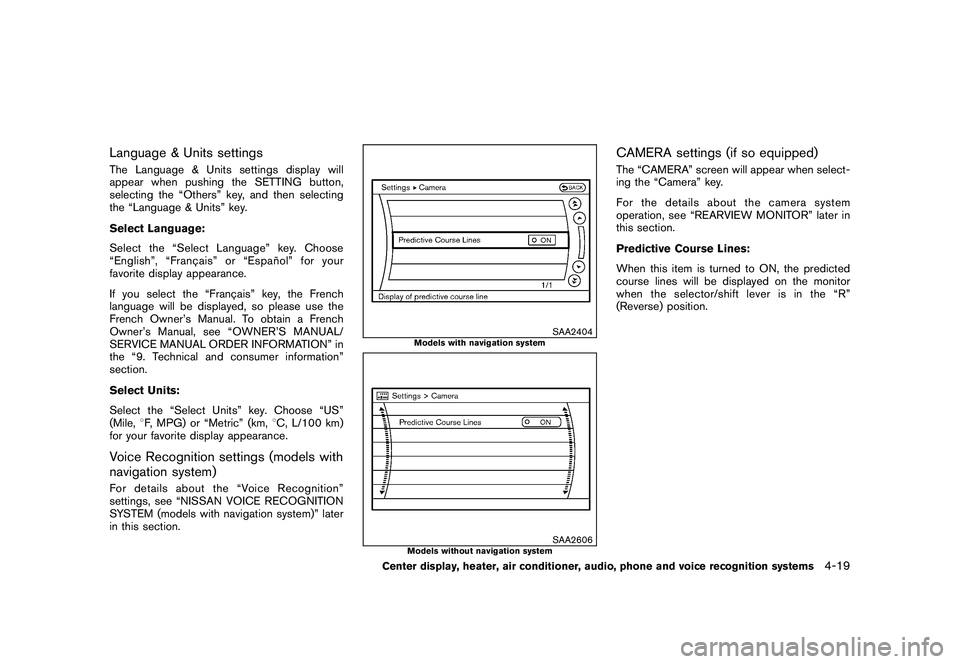
CAMERA settings (if so equipped)The “CAMERA” screen will appear when select-
ing the “Camera” key.
For the details about the camera system
operation, see “REARVIEW MONITOR” later in
this section.
Predictive Course Lines:
When this item is turned to ON, the predicted
course lines will be displayed on the monitor
when the selector/shift lever is in the “R”
(Reverse) position.
Center display, heater, air conditioner, audio, phone and voice recognition systems
4-19
Page 204 of 433
Black plate (202,1)
Model "Z51-D" EDITED: 2010/ 7/ 23
Static and flutter: During signal interference from
buildings, large hills or due to antenna position,
usually in conjunction with increased distance
from the station transmitter, static or flutter can
be heard. This can be reduced by lowering the
treble setting to reduce the treble response.
Multipath reception: Because of the reflective
characteristics of FM signals, direct and re-
flected signals reach the receiver at the same
time. The signals may cancel each other,
resulting in momentary flutter or loss of sound.
AM radio reception:
AM signals, because of their low frequency, can
bend around objects and skip along the ground.
In addition, the signals can be bounced off the
ionosphere and bent back to earth. Because of
these characteristics. AM signals are also
subject to interference as they travel from
transmitter to receiver.
Fading: Occurs while the vehicle is passing
through freeway underpasses or in areas with
many tall buildings. It can also occur for several
seconds during ionospheric turbulence even in
areas where no obstacles exist.
Static: Caused by thunderstorms, electrical
power lines, electric signs and even traffic lights.Satellite radio reception (if so equipped):
When the satellite radio is used for the first time
or the battery has been replaced, the satellite
radio may not work properly. This is not a
malfunction. Wait more than 10 minutes with the
satellite radio ON and the vehicle outside of any
metal or large building for the satellite radio to
receive all of the necessary data.
The satellite radio mode requires an active XM
®
Satellite Radio subscription. The satellite radio is
not available in Alaska, Hawaii and Guam.
The satellite radio performance may be affected
if cargo carried on the roof blocks the satellite
radio signal.
If possible, do not put cargo near the satellite
antenna.
A build up of ice on the satellite radio antenna
can affect satellite radio performance. Remove
the ice to restore satellite radio reception.
SAA0480
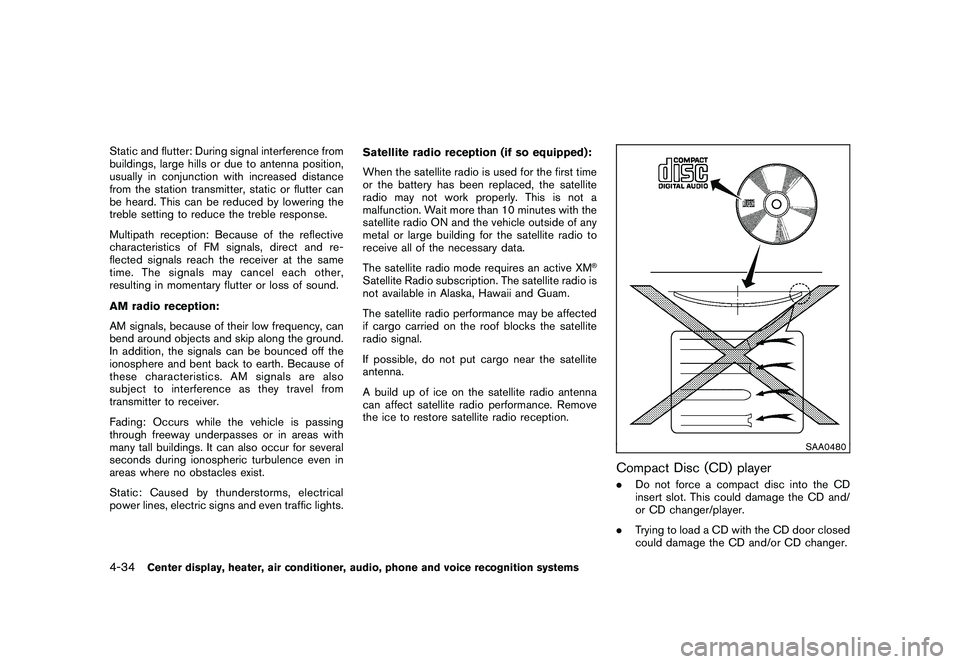
Compact Disc (CD) player.
Do not force a compact disc into the CD
insert slot. This could damage the CD and/
or CD changer/player.
. Trying to load a CD with the CD door closed
could damage the CD and/or CD changer.
4-34
Center display, heater, air conditioner, audio, phone and voice recognition systems
Page 207 of 433
Black plate (205,1)
Model "Z51-D" EDITED: 2010/ 7/ 23
.Modifying or disassembling is prohibited.
. Dolby digital is manufactured under license
from Dolby Laboratories, Inc.
. Dolby and the double D mark “
” are
trademarks of Dolby Laboratories, Inc.
. DTS and DTS 2.0 “
” are registered
trademarks of DTS, Inc.
Parental level (parental control):
DVDs with the parental control setting can be
played with this system. Please use your own
judgement to set the parental control with the
system.
Disc selection:
The following disc formats can be played with
the DVD drive.
. DVD-VIDEO
. VIDEO-CD
. CD-DA (Conventional Compact Disc)
. DTS-CD
USB (Universal Serial Bus) (if so
equipped)This system supports various USB memory
sticks, USB hard drives and iPod
®players.
There are some USB devices which may not be supported with this system.
.
Make sure that the USB device is connected
correctly into the USB connector.
. Do not force the memory stick or USB cable
into the USB connector. This could damage
the connector.
. During cold weather or rainy days, the player
may malfunction due to humidity. If this
occurs, remove the USB device and dehu-
midify or ventilate the USB player comple-
tely.
. The USB player sometimes cannot function
when the passenger compartment tempera-
ture is extremely high. Decrease the tem-
perature before use.
. Do not leave USB memory in a place prone
to static electricity or where the air condi-
tioner blows directly. The data in the USB
memory may be damaged.
. The vehicle is not equipped with a USB
memory stick.
. A USB device cannot be formatted with this
system. To format a USB device, use a
personal computer.
. Partitioned USB devices may not be played
correctly.
. Some characters used in other languages (Chinese, Japanese, etc.) are not displayed
properly on the vehicle center screen. Using
English language characters with a USB
device is recommended.
. Do not connect a USB device if a connector
or cable is wet. Allow the cable and/or
connectors to dry completely before con-
necting the USB device. If the connector is
exposed to fluids other than water, evapora-
tive residue may cause a short between the
connector pins.
. Large video podcast files cause slow
responses in an iPod
®. The vehicle center
display may momentarily black out, but it will
soon recover.
. If an iPod
®automatically selects large video
podcast files while in the shuffle mode, the
vehicle center display may momentarily
black out, but it will soon recover.
. Audiobooks may not play in the same order
as they appear on an iPod
®.
. An iPod nano
®(1st generation) may remain
in fast forward or rewind mode if it is
connected during a seek operation. In this
case, please manually reset the iPod
®.
. An iPod nano
®(2nd generation) will con-
tinue to fast forward or rewind if it is
disconnected during a seek operation.
Center display, heater, air conditioner, audio, phone and voice recognition systems
4-37
Page 250 of 433
Black plate (248,1)
Model "Z51-D" EDITED: 2010/ 7/ 23
XM Satellite Radio:
.Tilting up/down for less than 1.5 seconds
will increase or decrease the preset channel.
. Tilting up/down for more than 1.5 seconds
will go to the next or previous category.
. Pushing the menu control switch (models
with navigation system) will show the XM
Menu.
iPod
®:
. Tilting up/down for less than 1.5 seconds
will increase or decrease the track number.
. Tilting up/down for more than 1.5 seconds
will skip to the next or previous index.
. Pushing the menu control switch will show
the iPod Menu.
CD:
. Tilting up/down for less than 1.5 seconds
will increase or decrease the track number.
. Tilting up/down for more than 1.5 seconds
will increase/decrease the folder number (if
playing compressed audio files) .
. Pushing the menu control switch (models
with navigation system) will show the CD
Menu. DVD (models with navigation system):
.
Tilting up/down for less than 1.5 seconds
will increase or decrease the track number.
. Tilting up/down for more than 1.5 seconds
will increase or decrease the title number.
. Pushing the menu control switch will select
an item from the DVD display.
. When the transparent operation menu ap-
pears, the switch will control the menu.
USB:
. Tilting up/down for less than 1.5 seconds
will increase or decrease the track number.
. Tilting up/down for more than 1.5 seconds
will increase/decrease the folder number
. Pushing the menu control switch will show
the USB Menu.
Music Box
®:
. Tilting up/down for less than 1.5 seconds
will increase or decrease the track number.
. Tilting up/down for more than 1.5 seconds
will increase/decrease the album (folder)
number (if playing compressed audio files) .
. Pushing the menu control switch will show
the Music Box
®Menu. Bluetooth
®Audio (models with navigation
system):
. Tilting up/down for less than 1.5 seconds
will increase or decrease the track number.
BACK switch (models with navi-
gation system)
Push this switch to go back to the previous
screen or cancel the selection if it is not
completed.Volume control switchesPush the upper (+) or lower ( ) side switch to
increase or decrease the volume.Source select switchPush the audio source switch to change the
mode as follows.
. Models with navigation system
AM ?FM ?SAT ?CD/DVD ?Music
Box
®? USB/iPod
®? Bluetooth
®Audio
. Models without navigation system
AM ?FM ?CD ?Music Box®?USB/
iPod
®? SAT
4-80
Center display, heater, air conditioner, audio, phone and voice recognition systems
Page 262 of 433
Black plate (260,1)
Model "Z51-D" EDITED: 2010/ 7/ 23
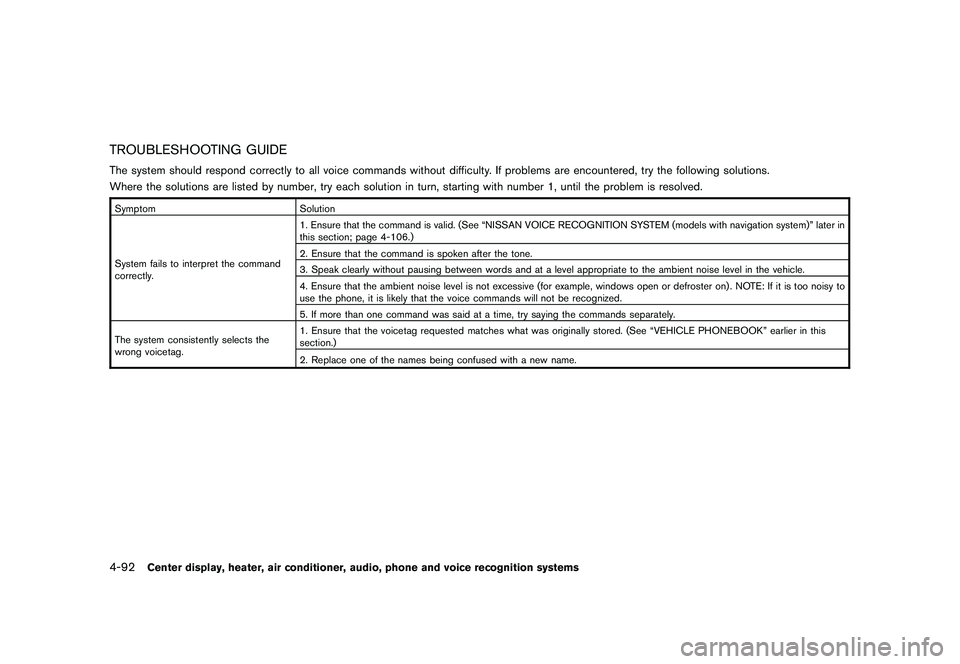
TROUBLESHOOTING GUIDEThe system should respond correctly to all voice commands without difficulty. If problems are encountered, try the following solutions.
Where the solutions are listed by number, try each solution in turn, starting with number 1, until the problem is resolved.SymptomSolution
System fails to interpret the command
correctly. 1. Ensure that the command is valid. (See “NISSAN VOICE RECOGNITION SYSTEM (models with navigation system)” later in
this section; page 4-106.)
2. Ensure that the command is spoken after the tone.
3. Speak clearly without pausing between words and at a level appropriate to the ambient noise level in the vehicle.
4. Ensure that the ambient noise level is not excessive (for example, windows open or defroster on) . NOTE: If it is too noisy to
use the phone, it is likely that the voice commands will not be recognized.
5. If more than one command was said at a time, try saying the commands separately.
The system consistently selects the
wrong voicetag. 1. Ensure that the voicetag requested matches what was originally stored. (See “VEHICLE PHONEBOOK” earlier in this
section.)
2. Replace one of the names being confused with a new name.4-92
Center display, heater, air conditioner, audio, phone and voice recognition systems
Page 266 of 433
Black plate (264,1)
Model "Z51-D" EDITED: 2010/ 7/ 23
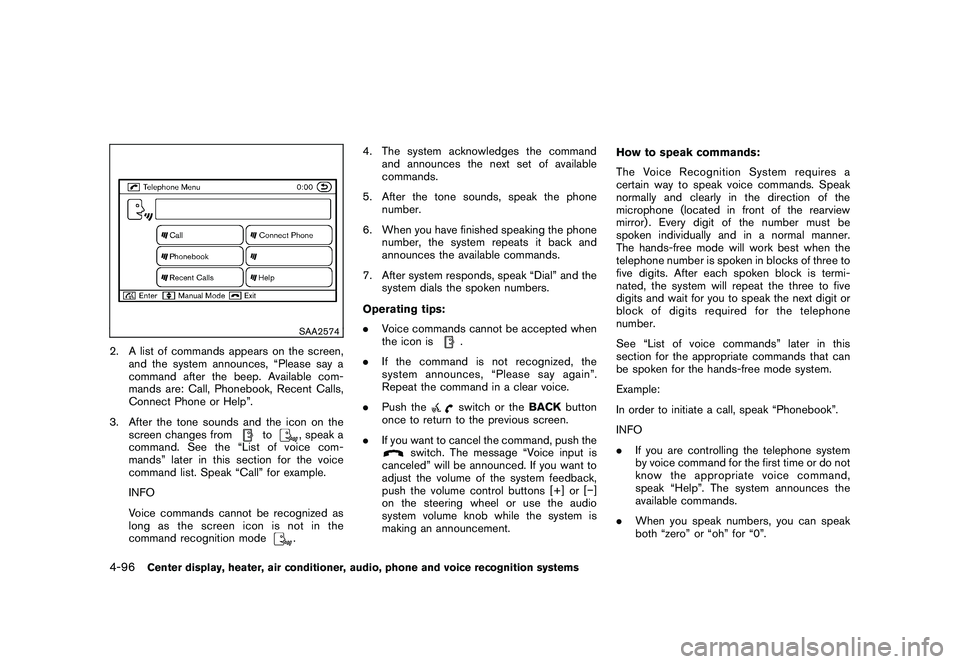
SAA2574
2. A list of commands appears on the screen,and the system announces, “Please say a
command after the beep. Available com-
mands are: Call, Phonebook, Recent Calls,
Connect Phone or Help”.
3. After the tone sounds and the icon on the screen changes from
to
, speak a
command. See the “List of voice com-
mands” later in this section for the voice
command list. Speak “Call” for example.
INFO
Voice commands cannot be recognized as
long as the screen icon is not in the
command recognition mode. 4. The system acknowledges the command
and announces the next set of available
commands.
5. After the tone sounds, speak the phone number.
6. When you have finished speaking the phone number, the system repeats it back and
announces the available commands.
7. After system responds, speak “Dial” and the system dials the spoken numbers.
Operating tips:
. Voice commands cannot be accepted when
the icon is
.
. If the command is not recognized, the
system announces, “Please say again”.
Repeat the command in a clear voice.
. Push theswitch or the BACKbutton
once to return to the previous screen.
. If you want to cancel the command, push the
switch. The message “Voice input is
canceled” will be announced. If you want to
adjust the volume of the system feedback,
push the volume control buttons [+] or [ ]
on the steering wheel or use the audio
system volume knob while the system is
making an announcement. How to speak commands:
The Voice Recognition System requires a
certain way to speak voice commands. Speak
normally and clearly in the direction of the
microphone (located in front of the rearview
mirror) . Every digit of the number must be
spoken individually and in a normal manner.
The hands-free mode will work best when the
telephone number is spoken in blocks of three to
five digits. After each spoken block is termi-
nated, the system will repeat the three to five
digits and wait for you to speak the next digit or
block of digits required for the telephone
number.
See “List of voice commands” later in this
section for the appropriate commands that can
be spoken for the hands-free mode system.
Example:
In order to initiate a call, speak “Phonebook”.
INFO
.
If you are controlling the telephone system
by voice command for the first time or do not
know the appropriate voice command,
speak “Help”. The system announces the
available commands.
. When you speak numbers, you can speak
both “zero” or “oh” for “0”.
4-96
Center display, heater, air conditioner, audio, phone and voice recognition systems
Page 267 of 433
Black plate (265,1)
Model "Z51-D" EDITED: 2010/ 7/ 23
Personal vocabulary (voicetags):
Voice Recognition System is equipped with the
function called “voicetags”, which can be
associated with the phone number and name
in the phonebook. Using the voice tag will
automatically generate a speed dial to the
registered number.
See “PHONEBOOK REGISTRATION” earlier in
this section.
You can call the identified number using the
following command: “Dial” followed by the voice
tag.
Dialling a name with a voice tag:
It is possible to call up a name via a voice tag
instead of a number, provided the name and
number of your correspondent has been pre-
viously stored in the phonebook.
Dial via a voice tag, according to the following
procedure.
1. Push the
switch.
2. The system replies “please say a command after the beep. Available commands are:
Call, Phonebook, Recent Calls, Connect
Phone or Help”.
3. Give your instructions to the system by saying: “Dial John” for example (“John” must
have been previously set as a voice tag for John’s phone number) or “Dial One” if John
is classified as one in the phonebook.
If the system cannot understand your
command, repeat it according to the re-
commendations mentioned in “How to
speak commands” earlier in this section.
4. If the given name (voice tag) is correct, the phone system will dial the number registered
for “John”.
INFO
To end the voice command phase at any stage
of the procedure, push the
switch once in
order to activate the cancel command.
Manual command selection:
Commands can be selected manually. While the
commands are displayed on the screen, select a
command by operating the Tune switch, and
then push the
button. Once a command is
manually selected, the voice command function
is cancelled. To return to voice command mode,
push the
button to cancel the current
operation, and then perform the first procedure
of voice command.
Center display, heater, air conditioner, audio, phone and voice recognition systems
4-97
Page 300 of 433
Black plate (298,1)
Model "Z51-D" EDITED: 2010/ 7/ 23
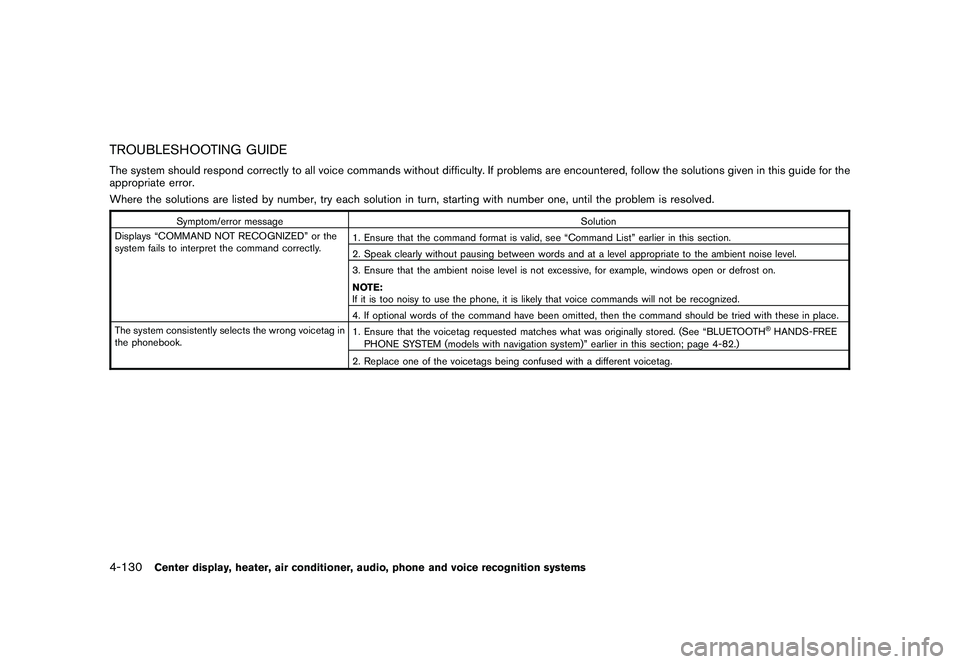
TROUBLESHOOTING GUIDEThe system should respond correctly to all voice commands without difficulty. If problems are encountered, follow the solutions given in this guide for the
appropriate error.
Where the solutions are listed by number, try each solution in turn, starting with number one, until the problem is resolved.
Symptom/error messageSolution
Displays “COMMAND NOT RECOGNIZED” or the
system fails to interpret the command correctly. 1. Ensure that the command format is valid, see “Command List” earlier in this section.
2. Speak clearly without pausing between words and at a level appropriate to the ambient noise level.
3. Ensure that the ambient noise level is not excessive, for example, windows open or defrost on.
NOTE:
If it is too noisy to use the phone, it is likely that voice commands will not be recognized.
4. If optional words of the command have been omitted, then the command should be tried with these in place.
The system consistently selects the wrong voicetag in
the phonebook. 1. Ensure that the voicetag requested matches what was originally stored. (See “BLUETOOTH
®HANDS-FREE
PHONE SYSTEM (models with navigation system)” earlier in this section; page 4-82.)
2. Replace one of the voicetags being confused with a different voicetag.
4-130
Center display, heater, air conditioner, audio, phone and voice recognition systems
Page 305 of 433
Black plate (303,1)
Model "Z51-D" EDITED: 2010/ 7/ 23
WARNING
.The exhaust gas and the exhaust
system are very hot. Keep people,
animals or flammable materials
away from the exhaust system com-
ponents.
. Do not stop or park the vehicle over
flammable materials such as dry
grass, waste paper or rags. They
may ignite and cause a fire.
CAUTION
.Do not use leaded gasoline. Depos-
its from leaded gasoline will ser-
iously reduce the three-way
catalyst’s ability to help reduce ex-
haust pollutants.
. Keep your engine tuned up. Mal-
functions in the ignition, fuel injec-
tion, or electrical systems can cause
overrich fuel flow into the three-way
catalyst, causing it to overheat. Do
not keep driving if the engine mis-
fires, or if noticeable loss of perfor-
mance or other unusual operating
conditions are detected. Have the vehicle inspected promptly by a
NISSAN dealer.
. Avoid driving with an extremely low
fuel level. Running out of fuel could
cause the engine to misfire, dama-
ging the three-way catalyst.
. Do not race the engine while warm-
ing it up.
. Do not push or tow your vehicle to
start the engine.
TIRE PRESSURE MONITORING SYS-
TEM (TPMS)Each tire, including the spare (if provided) ,
should be checked monthly when cold and
inflated to the inflation pressure recommended
by the vehicle manufacturer on the vehicle
placard or tire inflation pressure label. (If your
vehicle has tires of a different size than the size
indicated on the vehicle placard or tire inflation
pressure label, you should determine the proper
tire inflation pressure for those tires.)
As an added safety feature, your vehicle has
been equipped with a Tire Pressure Monitoring
System (TPMS) that illuminates a low tire
pressure telltale when one or more of your tires
is significantly under-inflated. Accordingly, when
the low tire pressure telltale illuminates, you
should stop and check your tires as soon as possible, and inflate them to the proper pres-
sure. Driving on a significantly under-inflated tire
causes the tire to overheat and can lead to tire
failure. Under-inflation also reduces fuel effi-
ciency and tire tread life, and may affect the
vehicle’s handling and stopping ability.
Please note that the TPMS is not a substitute for
proper tire maintenance, and it is the driver’s
responsibility to maintain correct tire pressure,
even if under-inflation has not reached the level
to trigger illumination of the TPMS low tire
pressure telltale.
Your vehicle has also been equipped with a
TPMS malfunction indicator to indicate when the
system is not operating properly. The TPMS
malfunction indicator is combined with the low
tire pressure telltale. When the system detects a
malfunction, the telltale will flash for approxi-
mately one minute and then remain continuously
illuminated. This sequence will continue upon
subsequent vehicle start-ups as long as the
malfunction exists. When the malfunction indi-
cator is illuminated, the system may not be able
to detect or signal low tire pressure as intended.
TPMS malfunctions may occur for a variety of
reasons, including the installation of replace-
ment or alternate tires or wheels on the vehicle
that prevent the TPMS from functioning properly.
Always check the TPMS malfunction telltale
after replacing one or more tires or wheels on
your vehicle to ensure that the replacement or
Starting and driving
5-3
Page 307 of 433
Black plate (305,1)
Model "Z51-D" EDITED: 2010/ 7/ 23
as this may cause a malfunction of
the tire pressure sensors.
CAUTION
.The TPMS may not function properly
when the wheels are equipped with
tire chains or the wheels are buried
in snow.
. Do not place metalized film or any
metal parts (antenna, etc.) on the
windows. This may cause poor re-
ception of the signals from the tire
pressure sensors, and the TPMS will
not function properly.
Some devices and transmitters may temporarily
interfere with the operation of the TPMS and
cause the low tire pressure warning light to
illuminate. Some examples are:
. Facilities or electric devices using similar
radio frequencies are near the vehicle.
. If a transmitter set to similar frequencies is
being used in or near the vehicle.
. If a computer (or similar equipment) or a DC/
AC converter is being used in or near the
vehicle. FCC Notice:
For USA:
This device complies with Part 15 of the
FCC Rules. Operation is subject to the
following two conditions: (1) This device
may not cause harmful interference, and
(2) this device must accept any interfer-
ence received, including interference that
may cause undesired operation.
Note: Changes or modifications not ex-
pressly approved by the party responsible
for compliance could void the user’s
authority to operate the equipment.
For Canada:
This device complies with RSS-210 of
Industry Canada. Operation is subject to
the following two conditions: (1) this
device may not cause interference, and
(2) this device must accept any interfer-
ence, including interference that may
cause undesired operation of the device.
AVOIDING COLLISION AND ROLL-
OVER
WARNING
Failure to operate this vehicle in a safe
and prudent manner may result in loss of control or an accident.
Be alert and drive defensively at all times. Obey
all traffic regulations. Avoid excessive speed,
high speed cornering, or sudden steering
maneuvers, because these driving practices
could cause you to lose control of your vehicle.
As with any vehicle, a loss of control could
result in a collision with other vehicles or
objects, or cause the vehicle to rollover,
particularly if the loss of control causes the
vehicle to slide sideways. Be attentive at all
times, and avoid driving when tired. Never drive
when under the influence of alcohol or drugs
(including prescription or over-the-counter
drugs which may cause drowsiness) . Always
wear your seat belt as outlined in the “SEAT
BELTS” in the “1. Safety — Seats, seat belts and
supplemental restraint system” section of this
manual, and also instruct your passengers to do
so.
Seat belts help reduce the risk of injury in
collisions and rollovers. In a rollover crash, an
unbelted or improperly belted person is
significantly more likely to be injured or
killed than a person properly wearing a
seat belt.
Starting and driving
5-5