ESP NISSAN MURANO 2011 Owner´s Manual
[x] Cancel search | Manufacturer: NISSAN, Model Year: 2011, Model line: MURANO, Model: NISSAN MURANO 2011Pages: 433, PDF Size: 3.7 MB
Page 23 of 433
Black plate (21,1)
Model "Z51-D" EDITED: 2010/ 7/ 23
SSS0821
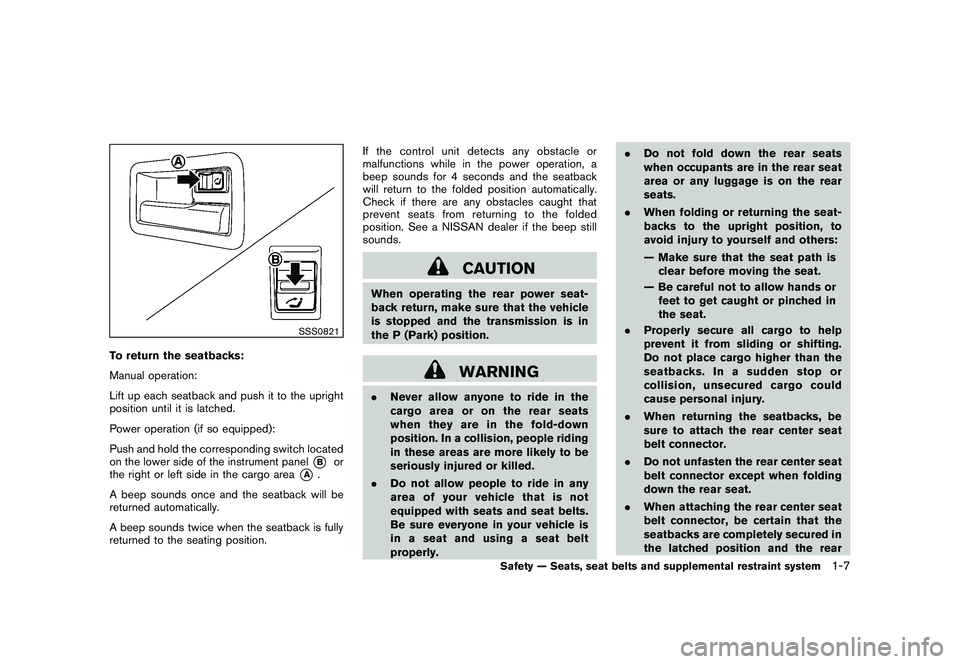
To return the seatbacks:
Manual operation:
Lift up each seatback and push it to the upright
position until it is latched.
Power operation (if so equipped):
Push and hold the corresponding switch located
on the lower side of the instrument panel
*B
or
the right or left side in the cargo area
*A
.
A beep sounds once and the seatback will be
returned automatically.
A beep sounds twice when the seatback is fully
returned to the seating position. If the control unit detects any obstacle or
malfunctions while in the power operation, a
beep sounds for 4 seconds and the seatback
will return to the folded position automatically.
Check if there are any obstacles caught that
prevent seats from returning to the folded
position. See a NISSAN dealer if the beep still
sounds.
CAUTION
When operating the rear power seat-
back return, make sure that the vehicle
is stopped and the transmission is in
the P (Park) position.
WARNING
.
Never allow anyone to ride in the
cargo area or on the rear seats
when they are in the fold-down
position. In a collision, people riding
in these areas are more likely to be
seriously injured or killed.
. Do not allow people to ride in any
area of your vehicle that is not
equipped with seats and seat belts.
Be sure everyone in your vehicle is
in a seat and using a seat belt
properly. .
Do not fold down the rear seats
when occupants are in the rear seat
area or any luggage is on the rear
seats.
. When folding or returning the seat-
backs to the upright position, to
avoid injury to yourself and others:
— Make sure that the seat path is
clear before moving the seat.
— Be careful not to allow hands or feet to get caught or pinched in
the seat.
. Properly secure all cargo to help
prevent it from sliding or shifting.
Do not place cargo higher than the
seatbacks. In a sudden stop or
collision, unsecured cargo could
cause personal injury.
. When returning the seatbacks, be
sure to attach the rear center seat
belt connector.
. Do not unfasten the rear center seat
belt connector except when folding
down the rear seat.
. When attaching the rear center seat
belt connector, be certain that the
seatbacks are completely secured in
the latched position and the rear
Safety — Seats, seat belts and supplemental restraint system
1-7
Page 41 of 433
Black plate (39,1)
Model "Z51-D" EDITED: 2010/ 7/ 23
Children need adults to help protect them.
They need to be properly restrained.
In addition to the general information in this
manual, child safety information is available from
many other sources, including doctors, teachers,
government traffic safety offices, and community
organizations. Every child is different, so be sure
to learn the best way to transport your child.
There are three basic types of child restraint
systems:
.Rear-facing child restraint
. Forward-facing child restraint
. Booster seat
The proper restraint depends on the child’s size.
Generally, infants up to about 1 year and less
than 20 lbs (9 kg) should be placed in rear-
facing child restraints . Forward-facing child
restraints are available for children who outgrow
rear-facing child restraints and are at least 1
year old. Booster seats are used to help position
a vehicle lap/shoulder belt on a child who can no
longer use a forward-facing child restraint.
WARNING
Infants and children need special pro-
tection. The vehicle’s seat belts may not
fit them properly. The shoulder belt may come too close to the face or neck. The
lap belt may not fit over their small hip
bones. In an accident, an improperly
fitting seat belt could cause serious or
fatal injury. Always use appropriate
child restraints.
All U.S. states and Canadian provinces or
territories require the use of approved child
restraints for infants and small children. See
“CHILD RESTRAINTS” later in this section.
A child restraint may be secured in the vehicle
by using either the LATCH (Lower Anchor and
Tethers for CHildren) system or with the vehicle
seat belt. See “CHILD RESTRAINTS” later in
this section for more information.
NISSAN recommends that all pre-teens
and children be restrained in the rear seat.
Studies show that children are safer when
properly restrained in the rear seat than in
the front seat.
This is especially important because your
vehicle has a supplemental restraint sys-
tem (Air bag system) for the front passen-
ger. See “SUPPLEMENTAL RESTRAINT
SYSTEM” later in this section.
INFANTSInfants up to at least 1 year old should be placed
in a rear-facing child restraint. NISSAN recom- mends that infants be placed in child restraints
that comply with Federal Motor Vehicle Safety
Standards or Canadian Motor Vehicle Safety
Standards. You should choose a child restraint
that fits your vehicle and always follow the
manufacturer’s instructions for installation and
use.
SMALL CHILDRENChildren that are over one year old and weigh at
least 20 lbs (9 kg) can be placed in a forward-
facing child restraint. Refer to the manufacturer’s
instructions for minimum and maximum weight
and height recommendations. NISSAN recom-
mends that small children be placed in child
restraints that comply with Federal Motor
Vehicle Safety Standards or Canadian Motor
Vehicle Safety Standards. You should choose a
child restraint that fits your vehicle and always
follow the manufacturer’s instructions for instal-
lation and use.LARGER CHILDRENChildren who are too large for child restraints
should be seated and restrained by the seat
belts which are provided. The seat belt may not
fit properly if the child is less than 4 ft 9 in (142.5
cm) tall and weighs between 40 lbs (18 kg) and
80 lbs (36 kg) . A booster seat should be used to
obtain proper seat belt fit.
NISSAN recommends that a child be placed in a
CHILD SAFETY
Safety — Seats, seat belts and supplemental restraint system
1-25
Page 64 of 433
Black plate (62,1)
Model "Z51-D" EDITED: 2010/ 7/ 23
.The seat belts, the side air bags and
curtain and rollover air bags are
most effective when you are sitting
well back and upright in the seat
with both feet on the floor. The side
air bag and curtain and rollover air
bag inflate with great force. Do not
allow anyone to place their hand,
leg or face near the side air bag on
the side of the seatback of the front
seat or near the side roof rails. Do
not allow anyone sitting in the front
seats or rear outboard seats to
extend their hand out of the window
or lean against the door. Some
examples of dangerous riding posi-
tions are shown in the previous
illustrations.
. When sitting in the rear seat, do not
hold onto the seatback of the front
seat. If the side air bag inflates, you
may be seriously injured. Be espe-
cially careful with children, who
should always be properly re-
strained. Some examples of danger-
ous riding positions are shown in
the illustrations.
. Do not use seat covers on the front
seatbacks. They may interfere with side air bag inflation.1-48
Safety — Seats, seat belts and supplemental restraint system
Page 99 of 433
Black plate (97,1)
Model "Z51-D" EDITED: 2010/ 9/ 28
.OTHER
Select this submenu and set or reset the
distance for replacing items other than the
engine oil, oil filter and tires.
To return to the top page of the setting mode,
select “BACK”.
OPTIONS:
The 3 option menus can be set to your
preference.
. LANGUAGE
Select this submenu to choose English,
French or Spanish for display.
. UNIT
Select this submenu to choose the unit from
MPG or l/100 km.
. EFFECTS
Select this menu to set the dial effects
described below to on or off.
— The indicator needles sweep in the meters and the ring illumination will be
brightened gradually when the engine is
started.
To return to the top page of the setting mode,
select “BACK”.
SIC3679
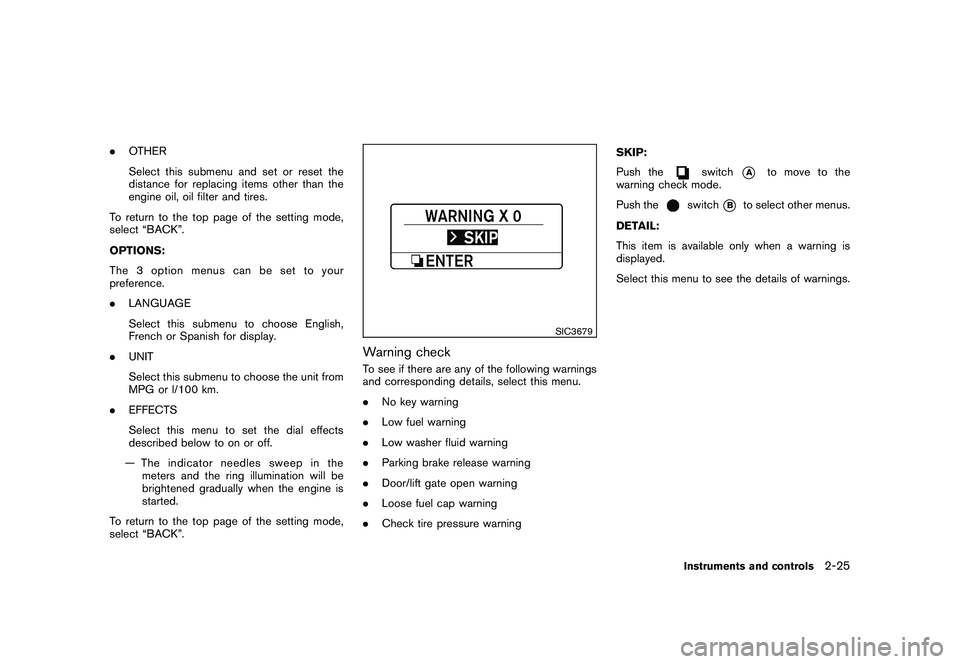
Warning checkTo see if there are any of the following warnings
and corresponding details, select this menu.
. No key warning
. Low fuel warning
. Low washer fluid warning
. Parking brake release warning
. Door/lift gate open warning
. Loose fuel cap warning
. Check tire pressure warning SKIP:
Push the
switch
*A
to move to the
warning check mode.
Push the
switch
*B
to select other menus.
DETAIL:
This item is available only when a warning is
displayed.
Select this menu to see the details of warnings.
Instruments and controls
2-25
Page 101 of 433
Black plate (99,1)
Model "Z51-D" EDITED: 2010/ 7/ 23
.the key — master or mechanical
5. Confirm that the security indicator light
*A
comes on. The security indicator light stays
on for about 30 seconds. The vehicle
security system is now pre-armed. After
about 30 seconds the vehicle security
system automatically shifts into the armed
phase. The security light begins to flash
once every approximately 3 seconds. If,
during this 30-second pre-arm time period,
the door is unlocked, or the ignition switch is
pushed to ACC or ON, the system will not
arm.
Even when the driver and/or passengers
are in the vehicle, the system will activate
with all doors, hood and lift gate locked
withtheignitionswitchintheLOCK
position. When pushing the ignition switch
to the ACC or ON position, the system will
be released.
Vehicle security system activationThe vehicle security system will give the follow-
ing alarm:
. The headlights blink and the horn sounds
intermittently.
. The alarm automatica lly turns off after
approximately 1 minute. However, the alarm
reactivates if the vehicle is tampered with
again. The alarm is activated by:
.
Unlocking the door or opening the lift gate
without using the button on the Intelligent
Key, the request switch or the key. (Even if
the door is opened by releasing the door
inside lock knob, the alarm will activate.)
. Opening the hood.
How to stop an activated alarmThe alarm will stop by unlocking a door by
pushing the unlock button
on the Intelligent
Key, pushing the request switch or using the key.
The alarm will not stop if the ignition switch is
placed in the ACC or ON position.
If the system does not operate as de-
scribed above, have it checked by a
NISSAN dealer.
NISSAN VEHICLE IMMOBILIZER SYS-
TEMThe NISSAN Vehicle Immobilizer System will not
allow the engine to start without the use of the
registered key. Never leave these keys in the
vehicle.
Statement related to section 15 of FCC
rules for NISSAN Vehicle Immobilizer
System (CONT ASSY - CARD SLOT)
This device complies with part 15 of the
FCC Rules and RSS-210 of Industry Cana- da. Operation is subject to the following
two conditions;
(1) This device may not cause harmful
interference, and (2) this device must
accept any interference received, including
interference that may cause undesired
operation of the device.
CHANGES OR MODIFICATIONS NOT EX-
PRESSLY APPROVED BY THE PARTY
RESPONSIBLE FOR COMPLIANCE COULD
VOID THE USER’S AUTHORITY TO OPER-
ATE THE EQUIPMENT.
Instruments and controls
2-27
Page 123 of 433
Black plate (121,1)
Model "Z51-D" EDITED: 2010/ 7/ 23
ropes and hooks.
. Unsecured cargo can become dan-
gerous in an accident or sudden
stop.
CAUTION
Do not apply a total load of more than
22 lb (10 kg)
*A
or 7 lb (3 kg)
*B
to a
single hook.
SIC3597
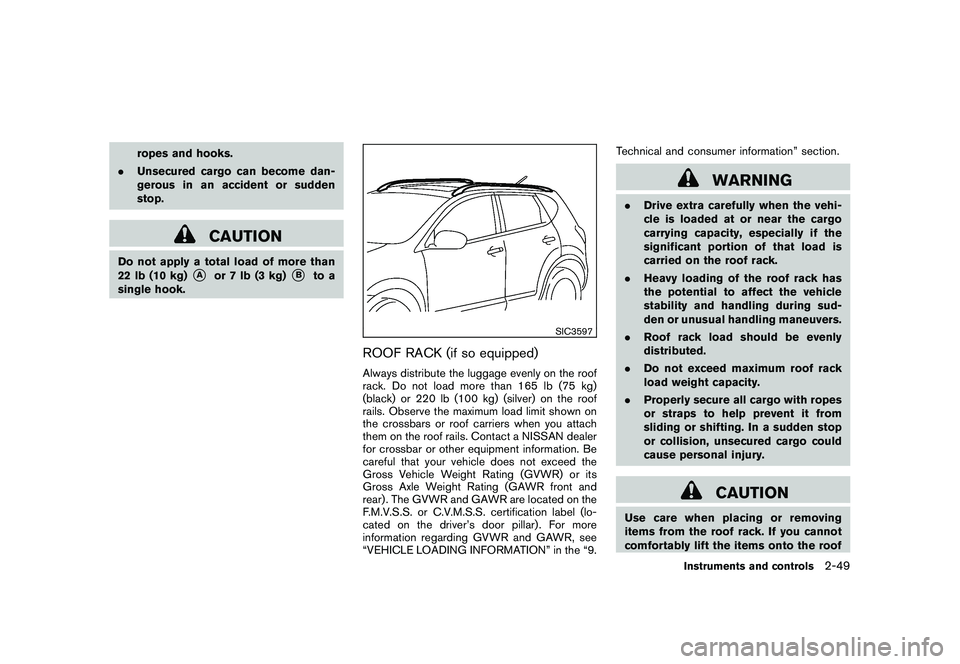
ROOF RACK (if so equipped)Always distribute the luggage evenly on the roof
rack. Do not load more than 165 lb (75 kg)
(black) or 220 lb (100 kg) (silver) on the roof
rails. Observe the maximum load limit shown on
the crossbars or roof carriers when you attach
them on the roof rails. Contact a NISSAN dealer
for crossbar or other equipment information. Be
careful that your vehicle does not exceed the
Gross Vehicle Weight Rating (GVWR) or its
Gross Axle Weight Rating (GAWR front and
rear) . The GVWR and GAWR are located on the
F.M.V.S.S. or C.V.M.S.S. certification label (lo-
cated on the driver’s door pillar). For more
information regarding GVWR and GAWR, see
“VEHICLE LOADING INFORMATION” in the “9. Technical and consumer information” section.
WARNING
.
Drive extra carefully when the vehi-
cle is loaded at or near the cargo
carrying capacity, especially if the
significant portion of that load is
carried on the roof rack.
. Heavy loading of the roof rack has
the potential to affect the vehicle
stability and handling during sud-
den or unusual handling maneuvers.
. Roof rack load should be evenly
distributed.
. Do not exceed maximum roof rack
load weight capacity.
. Properly secure all cargo with ropes
or straps to help prevent it from
sliding or shifting. In a sudden stop
or collision, unsecured cargo could
cause personal injury.
CAUTION
Use care when placing or removing
items from the roof rack. If you cannot
comfortably lift the items onto the roof
Instruments and controls
2-49
Page 125 of 433
Black plate (123,1)
Model "Z51-D" EDITED: 2010/ 7/ 23
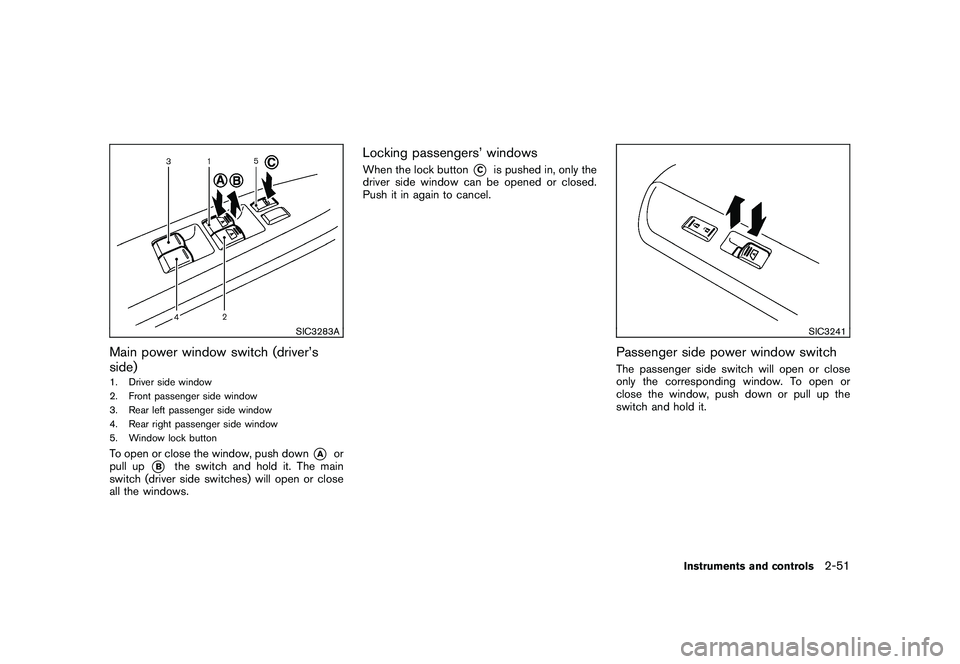
SIC3283A
Main power window switch (driver’s
side)1. Driver side window
2. Front passenger side window
3. Rear left passenger side window
4. Rear right passenger side window
5. Window lock buttonTo open or close the window, push down
*A
or
pull up
*B
the switch and hold it. The main
switch (driver side switches) will open or close
all the windows.
Locking passengers’ windowsWhen the lock button
*C
is pushed in, only the
driver side window can be opened or closed.
Push it in again to cancel.
SIC3241
Passenger side power window switchThe passenger side switch will open or close
only the corresponding window. To open or
close the window, push down or pull up the
switch and hold it.
Instruments and controls
2-51
Page 135 of 433
Black plate (133,1)
Model "Z51-D" EDITED: 2010/ 7/ 23
device must accept any interference that
may be received, including interference
that may cause undesired operation.
The transmitter has been tested and
complies with FCC and DOC/MDC rules.
Changes or modifications not expressly
approved by the party responsible for
compliance could void the user’s authority
to operate the device.
DOC: ISTC 1763K1313
FCC I.D.: CB2V67690
Instruments and controls
2-61
Page 143 of 433
Black plate (141,1)
Model "Z51-D" EDITED: 2010/ 7/ 23
SPA2433
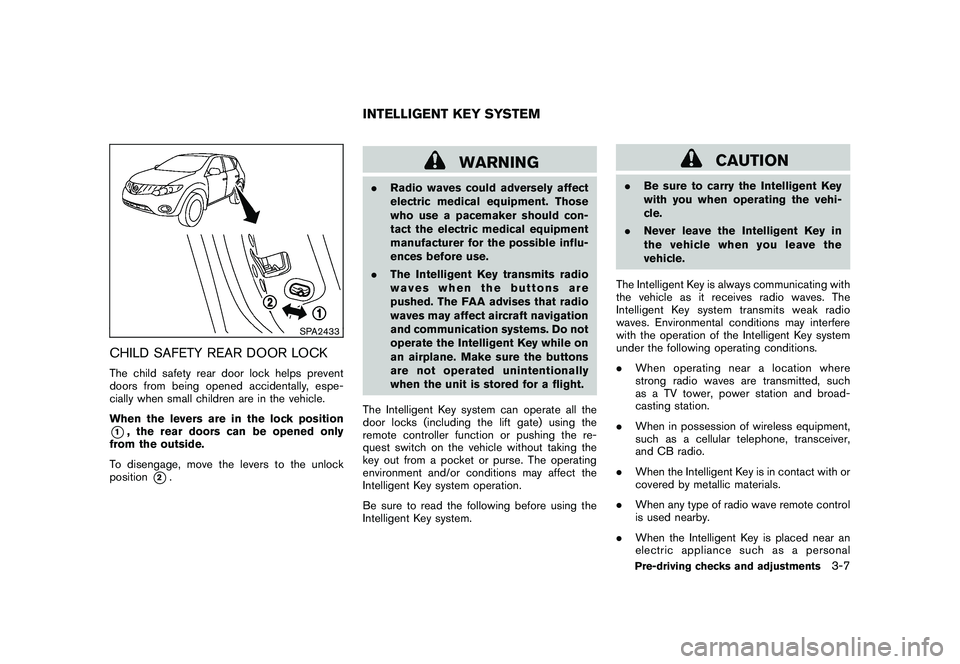
CHILD SAFETY REAR DOOR LOCKThe child safety rear door lock helps prevent
doors from being opened accidentally, espe-
cially when small children are in the vehicle.
When the levers are in the lock position*1, the rear doors can be opened only
from the outside.
To disengage, move the levers to the unlock
position
*2.
WARNING
. Radio waves could adversely affect
electric medical equipment. Those
who use a pacemaker should con-
tact the electric medical equipment
manufacturer for the possible influ-
ences before use.
. The Intelligent Key transmits radio
waves when the buttons are
pushed. The FAA advises that radio
waves may affect aircraft navigation
and communication systems. Do not
operate the Intelligent Key while on
an airplane. Make sure the buttons
are not operated unintentionally
when the unit is stored for a flight.
The Intelligent Key system can operate all the
door locks (including the lift gate) using the
remote controller function or pushing the re-
quest switch on the vehicle without taking the
key out from a pocket or purse. The operating
environment and/or conditions may affect the
Intelligent Key system operation.
Be sure to read the following before using the
Intelligent Key system.
CAUTION
. Be sure to carry the Intelligent Key
with you when operating the vehi-
cle.
. Never leave the Intelligent Key in
the vehicle when you leave the
vehicle.
The Intelligent Key is always communicating with
the vehicle as it receives radio waves. The
Intelligent Key system transmits weak radio
waves. Environmental conditions may interfere
with the operation of the Intelligent Key system
under the following operating conditions.
. When operating near a location where
strong radio waves are transmitted, such
as a TV tower, power station and broad-
casting station.
. When in possession of wireless equipment,
such as a cellular telephone, transceiver,
and CB radio.
. When the Intelligent Key is in contact with or
covered by metallic materials.
. When any type of radio wave remote control
is used nearby.
. When the Intelligent Key is placed near an
electric appliance such as a personal
INTELLIGENT KEY SYSTEM
Pre-driving checks and adjustments
3-7
Page 188 of 433
Black plate (186,1)
Model "Z51-D" EDITED: 2010/ 7/ 23
the steering wheel moves to the previous
position.
Slide Driver Seat Back on Exit (if so
equipped):
When this item is turned to ON, the driver’s seat
moves backward for easy exit if the ignition
switch is in the OFF position and the driver’s
door is opened. After getting into the vehicle and
pushing the ignition switch to the ACC position,
the driver’s seat moves to the previous position.
Light Off Delay:
Choose the duration of the automatic headlight
off timer from 0, 30, 45, 60, 90, 120, 150 and
180 second periods.
Selective Door Unlock:
When this item is turned to ON, only the driver’s
door is unlocked first after the door unlock
operation. When the door handle request switch
on the driver’s or front passenger’s side door is
pushed to be unlocked, only the corresponding
door is unlocked first. All the doors can be
unlocked if the door unlock operation is per-
formed again within 60 seconds.
When this item is turned to OFF, all the doors
will be unlocked after the door unlock operation
is performed once.Intelligent Key Lock/Unlock:
When this item is turned to ON, door lock/
unlock function by pushing the door handle
request switch will be activated.
Return All Settings to Default:
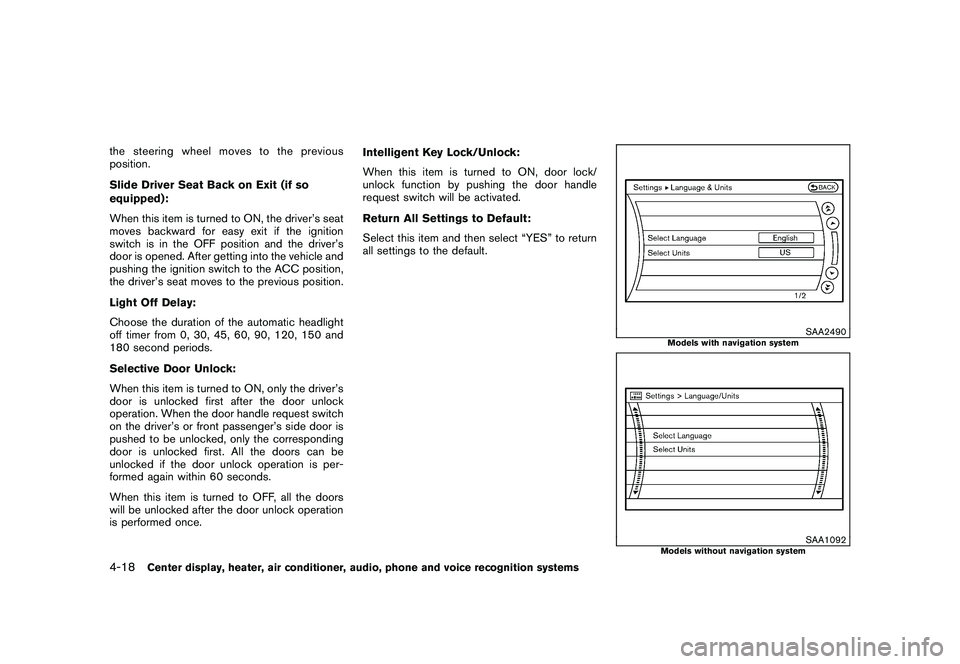
Select this item and then select “YES” to return
all settings to the default.
SAA2490
Models with navigation system
SAA1092
Models without navigation system
4-18
Center display, heater, air conditioner, audio, phone and voice recognition systems