eco mode NISSAN MURANO 2011 Owner´s Manual
[x] Cancel search | Manufacturer: NISSAN, Model Year: 2011, Model line: MURANO, Model: NISSAN MURANO 2011Pages: 433, PDF Size: 3.7 MB
Page 145 of 433
Black plate (143,1)
Model "Z51-D" EDITED: 2010/ 7/ 23
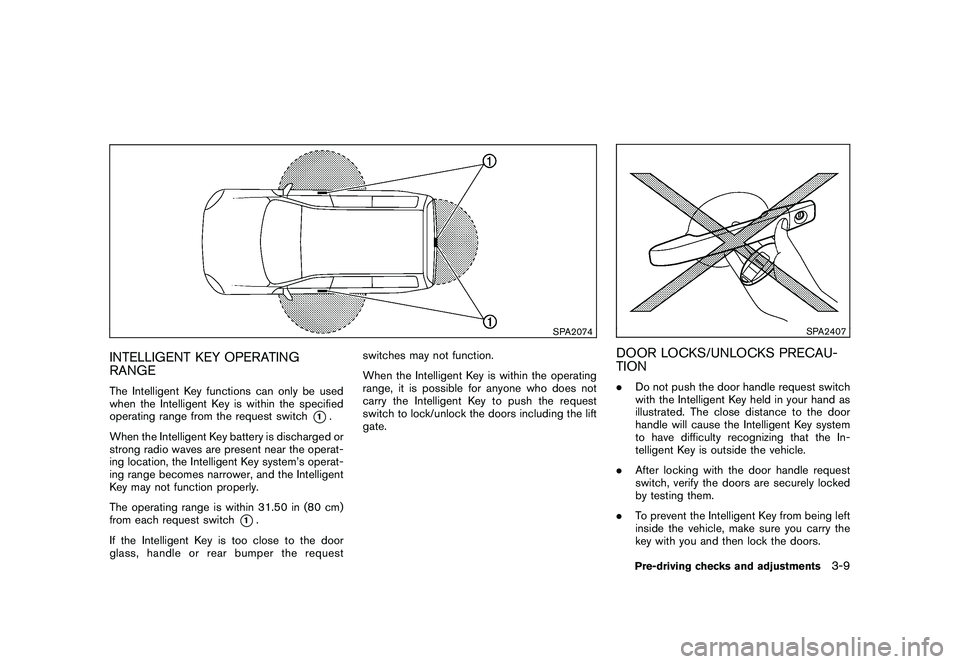
SPA2074
INTELLIGENT KEY OPERATING
RANGEThe Intelligent Key functions can only be used
when the Intelligent Key is within the specified
operating range from the request switch
*1.
When the Intelligent Key battery is discharged or
strong radio waves are present near the operat-
ing location, the Intelligent Key system’s operat-
ing range becomes narrower, and the Intelligent
Key may not function properly.
The operating range is within 31.50 in (80 cm)
from each request switch
*1.
If the Intelligent Key is too close to the door
glass, handle or rear bumper the request switches may not function.
When the Intelligent Key is within the operating
range, it is possible for anyone who does not
carry the Intelligent Key to push the request
switch to lock/unlock the doors including the lift
gate.
SPA2407
DOOR LOCKS/UNLOCKS PRECAU-
TION.
Do not push the door handle request switch
with the Intelligent Key held in your hand as
illustrated. The close distance to the door
handle will cause the Intelligent Key system
to have difficulty recognizing that the In-
telligent Key is outside the vehicle.
. After locking with the door handle request
switch, verify the doors are securely locked
by testing them.
. To prevent the Intelligent Key from being left
inside the vehicle, make sure you carry the
key with you and then lock the doors.
Pre-driving checks and adjustments
3-9
Page 146 of 433
Black plate (144,1)
Model "Z51-D" EDITED: 2010/ 7/ 23
.Do not pull the door handle before pushing
the door handle request switch. The door
will be unlocked but will not open. Release
the door handle once and pull it again to
open the door.
. The Intelligent Key system (opening/closing
doors with the door handle request switch)
can be set to remain inactive. (See “VEHI-
CLE INFORMATION AND SETTINGS” in
the “4. Center display, heater, air condi-
tioner, audio, phone and voice recognition
systems” section.)
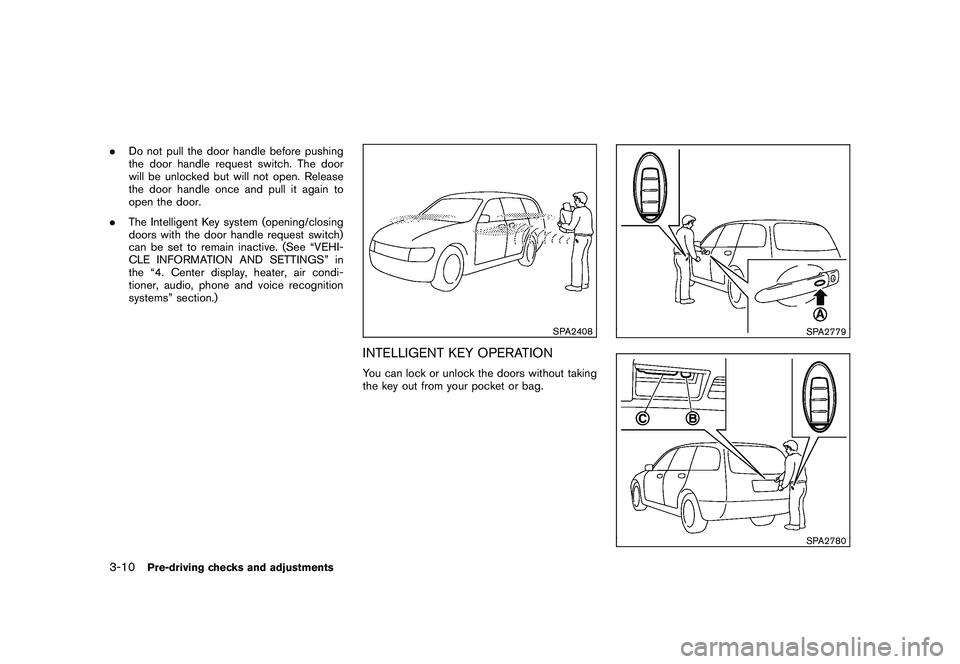
SPA2408
INTELLIGENT KEY OPERATIONYou can lock or unlock the doors without taking
the key out from your pocket or bag.
SPA2779SPA2780
3-10
Pre-driving checks and adjustments
Page 149 of 433
Black plate (147,1)
Model "Z51-D" EDITED: 2010/ 7/ 23
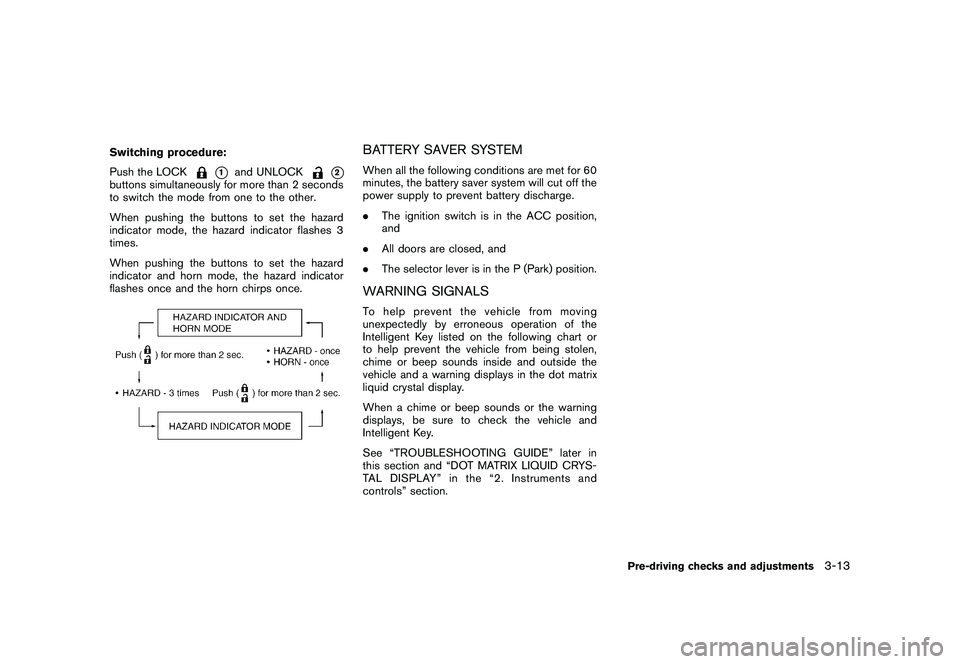
Switching procedure:
Push the LOCK
*1
and UNLOCK
*2
buttons simultaneously for more than 2 seconds
to switch the mode from one to the other.
When pushing the buttons to set the hazard
indicator mode, the hazard indicator flashes 3
times.
When pushing the buttons to set the hazard
indicator and horn mode, the hazard indicator
flashes once and the horn chirps once.
BATTERY SAVER SYSTEMWhen all the following conditions are met for 60
minutes, the battery saver system will cut off the
power supply to prevent battery discharge.
.The ignition switch is in the ACC position,
and
. All doors are closed, and
. The selector lever is in the P (Park) position.WARNING SIGNALSTo help prevent the vehicle from moving
unexpectedly by erroneous operation of the
Intelligent Key listed on the following chart or
to help prevent the vehicle from being stolen,
chime or beep sounds inside and outside the
vehicle and a warning displays in the dot matrix
liquid crystal display.
When a chime or beep sounds or the warning
displays, be sure to check the vehicle and
Intelligent Key.
See “TROUBLESHOOTING GUIDE” later in
this section and “DOT MATRIX LIQUID CRYS-
TAL DISPLAY” in the “2. Instruments and
controls” section.
Pre-driving checks and adjustments
3-13
Page 150 of 433
Black plate (148,1)
Model "Z51-D" EDITED: 2010/ 7/ 23
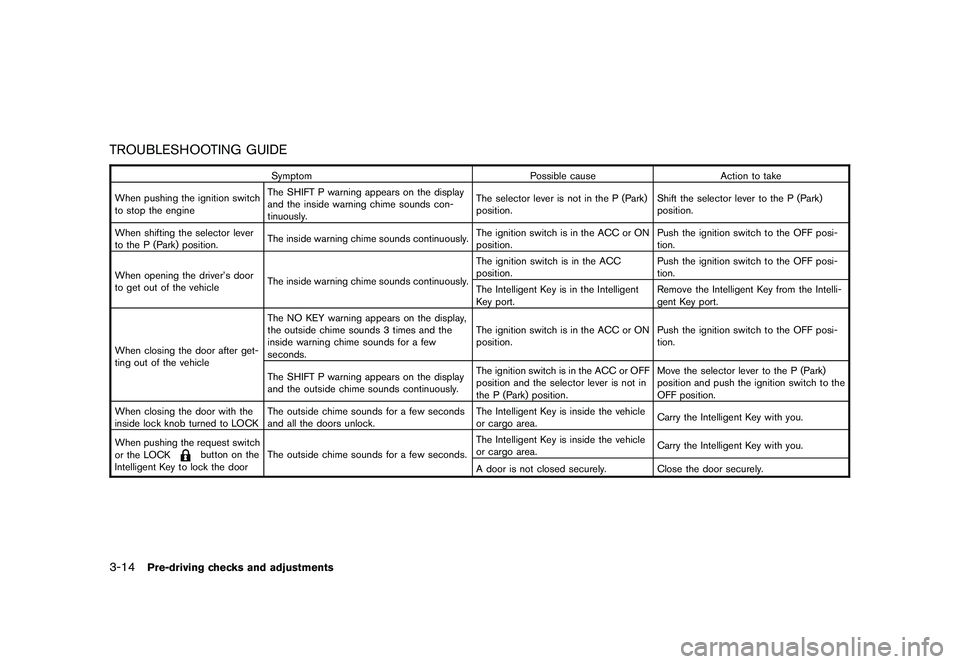
TROUBLESHOOTING GUIDE
SymptomPossible causeAction to take
When pushing the ignition switch
to stop the engine The SHIFT P warning appears on the display
and the inside warning chime sounds con-
tinuously. The selector lever is not in the P (Park)
position.
Shift the selector lever to the P (Park)
position.
When shifting the selector lever
to the P (Park) position. The inside warning chime sounds continuously. The ignition switch is in the ACC or ON
position.Push the ignition switch to the OFF posi-
tion.
When opening the driver’s door
to get out of the vehicle The inside warning chime sounds continuously. The ignition switch is in the ACC
position.
Push the ignition switch to the OFF posi-
tion.
The Intelligent Key is in the Intelligent
Key port. Remove the Intelligent Key from the Intelli-
gent Key port.
When closing the door after get-
ting out of the vehicle The NO KEY warning appears on the display,
the outside chime sounds 3 times and the
inside warning chime sounds for a few
seconds.
The ignition switch is in the ACC or ON
position.
Push the ignition switch to the OFF posi-
tion.
The SHIFT P warning appears on the display
and the outside chime sounds continuously. The ignition switch is in the ACC or OFF
position and the selector lever is not in
the P (Park) position.Move the selector lever to the P (Park)
position and push the ignition switch to the
OFF position.
When closing the door with the
inside lock knob turned to LOCK The outside chime sounds for a few seconds
and all the doors unlock. The Intelligent Key is inside the vehicle
or cargo area.
Carry the Intelligent Key with you.
When pushing the request switch
or the LOCK
button on the
Intelligent Key to lock the door The outside chime sounds for a few seconds. The Intelligent Key is inside the vehicle
or cargo area.
Carry the Intelligent Key with you.
A door is not closed securely. Close the door securely.
3-14
Pre-driving checks and adjustments
Page 152 of 433
Black plate (150,1)
Model "Z51-D" EDITED: 2010/ 7/ 23
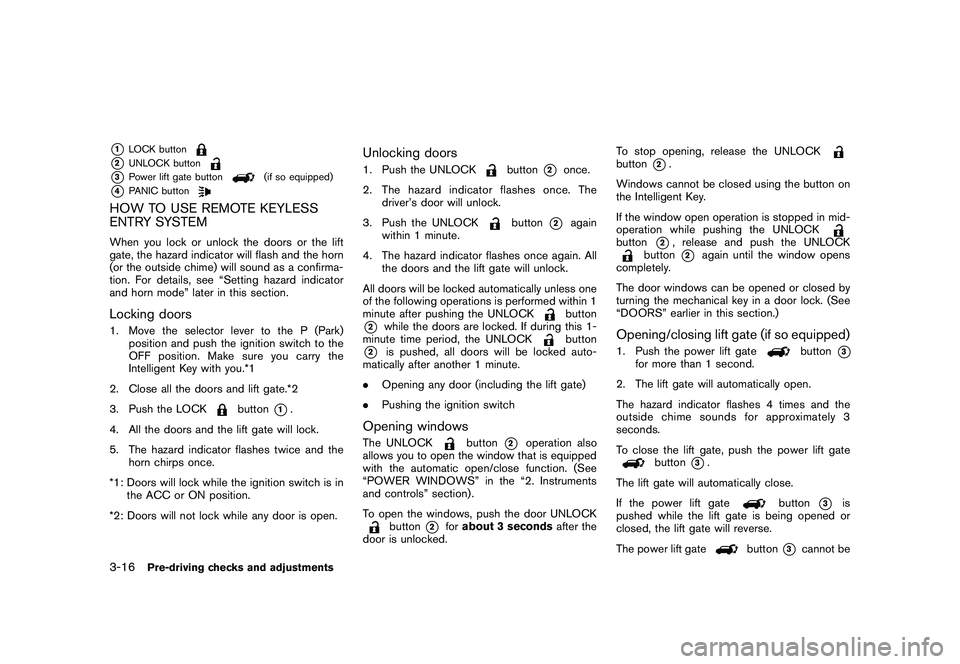
*1
LOCK button
*2
UNLOCK button
*3
Power lift gate button
(if so equipped)
*4
PANIC button
HOW TO USE REMOTE KEYLESS
ENTRY SYSTEMWhen you lock or unlock the doors or the lift
gate, the hazard indicator will flash and the horn
(or the outside chime) will sound as a confirma-
tion. For details, see “Setting hazard indicator
and horn mode” later in this section.Locking doors1. Move the selector lever to the P (Park)position and push the ignition switch to the
OFF position. Make sure you carry the
Intelligent Key with you.*1
2. Close all the doors and lift gate.*2
3. Push the LOCK
button
*1.
4. All the doors and the lift gate will lock.
5. The hazard indicator flashes twice and the horn chirps once.
*1: Doors will lock while the ignition switch is in the ACC or ON position.
*2: Doors will not lock while any door is open.
Unlocking doors1. Push the UNLOCK
button
*2
once.
2. The hazard indicator flashes once. The driver’s door will unlock.
3. Push the UNLOCK
button
*2
again
within 1 minute.
4. The hazard indicator flashes once again. All the doors and the lift gate will unlock.
All doors will be locked automatically unless one
of the following operations is performed within 1
minute after pushing the UNLOCKbutton
*2
while the doors are locked. If during this 1-
minute time period, the UNLOCK
button
*2
is pushed, all doors will be locked auto-
matically after another 1 minute.
. Opening any door (including the lift gate)
. Pushing the ignition switch
Opening windowsThe UNLOCK
button
*2
operation also
allows you to open the window that is equipped
with the automatic open/close function. (See
“POWER WINDOWS” in the “2. Instruments
and controls” section) .
To open the windows, push the door UNLOCK
button
*2
for about 3 seconds after the
door is unlocked. To stop opening, release the UNLOCK
button
*2.
Windows cannot be closed using the button on
the Intelligent Key.
If the window open operation is stopped in mid-
operation while pushing the UNLOCK
button
*2, release and push the UNLOCK
button
*2
again until the window opens
completely.
The door windows can be opened or closed by
turning the mechanical key in a door lock. (See
“DOORS” earlier in this section.)
Opening/closing lift gate (if so equipped)1. Push the power lift gate
button
*3
for more than 1 second.
2. The lift gate will automatically open.
The hazard indicator flashes 4 times and the
outside chime sounds for approximately 3
seconds.
To close the lift gate, push the power lift gate
button
*3.
The lift gate will automatically close.
If the power lift gate
button
*3
is
pushed while the lift gate is being opened or
closed, the lift gate will reverse.
The power lift gate
button
*3
cannot be
3-16
Pre-driving checks and adjustments
Page 153 of 433
Black plate (151,1)
Model "Z51-D" EDITED: 2010/ 7/ 23
operated when the ignition switch is in the ON
position.Using panic alarmIf you are near your vehicle and feel threatened,
you can activate the alarm according to the
following procedure to call attention.
1. Push the PANIC
button
*4
formore
than 1 second.
2. The theft warning alarm will sound and the headlights will flash for 25 seconds.
3. The panic alarm stops under either of the following conditions.
.It has run for 25 seconds, or
. Any of the buttons is pushed. (Note: the
PANIC
button
*4
should be
pushed for more than 1 second.)
Setting hazard indicator and horn modeThis vehicle is set in hazard indicator and horn
mode when you first receive the vehicle.
In hazard indicator and horn mode, when the
LOCK
button
*1
is pushed, the hazard
indicator flashes twice and the horn chirps once.
When the UNLOCKbutton
*2
is pushed,
the hazard indicator flashes once.
If horns are not necessary, the system can be
switched to the hazard indicator mode. In hazard indicator mode, when the LOCK
button
*1
is pushed, the hazard indicator
flashes twice. When the UNLOCK
button
*2
is pushed, neither the hazard indicator nor
the horn operates.
Pre-driving checks and adjustments
3-17
Page 154 of 433
Black plate (152,1)
Model "Z51-D" EDITED: 2010/ 7/ 23
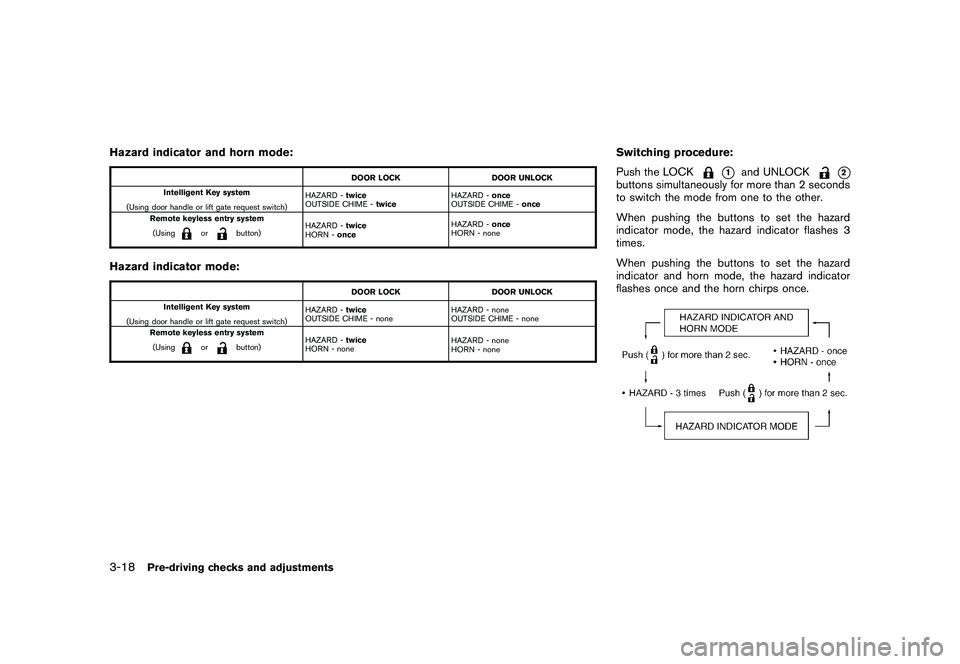
Hazard indicator and horn mode:
DOOR LOCKDOOR UNLOCK
Intelligent Key system
(Using door handle or lift gate request switch) HAZARD -
twice
OUTSIDE CHIME - twice HAZARD -
once
OUTSIDE CHIME - once
Remote keyless entry system
(Using
or
button) HAZARD -
twice
HORN - once HAZARD -
once
HORN - none
Hazard indicator mode:
DOOR LOCK DOOR UNLOCK
Intelligent Key system
(Using door handle or lift gate request switch) HAZARD -
twice
OUTSIDE CHIME - none HAZARD - none
OUTSIDE CHIME - none
Remote keyless entry system
(Using
or
button) HAZARD -
twice
HORN - none HAZARD - none
HORN - none
Switching procedure:
Push the LOCK
*1
and UNLOCK
*2
buttons simultaneously for more than 2 seconds
to switch the mode from one to the other.
When pushing the buttons to set the hazard
indicator mode, the hazard indicator flashes 3
times.
When pushing the buttons to set the hazard
indicator and horn mode, the hazard indicator
flashes once and the horn chirps once.
3-18
Pre-driving checks and adjustments
Page 155 of 433
Black plate (153,1)
Model "Z51-D" EDITED: 2010/ 7/ 23
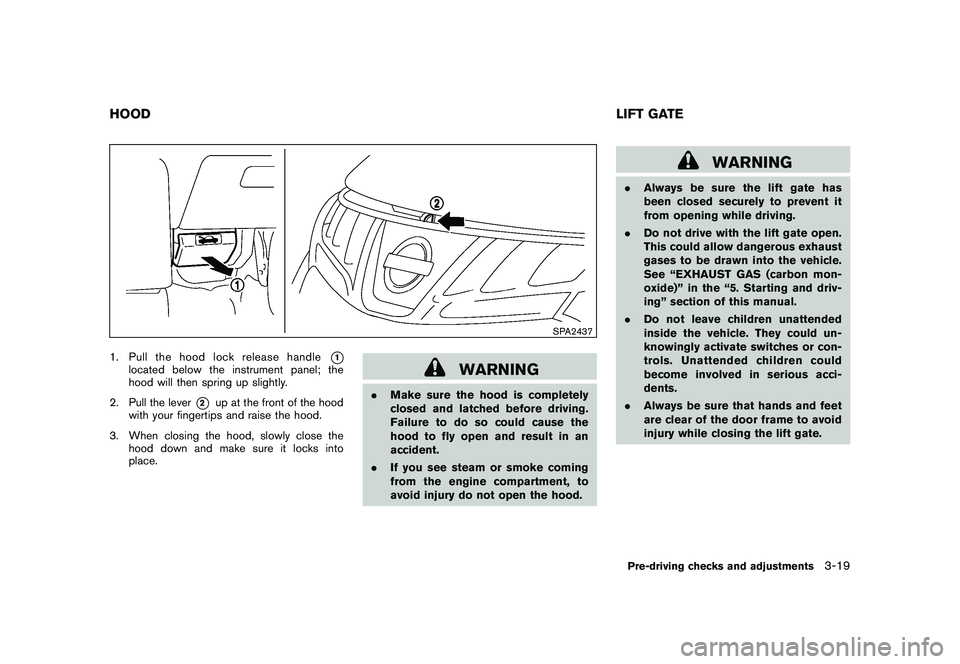
SPA2437
1. Pull the hood lock release handle
*1
located below the instrument panel; the
hood will then spring up slightly.
2. Pull the lever
*2
up at the front of the hood
with your fingertips and raise the hood.
3. When closing the hood, slowly close the hood down and make sure it locks into
place.
WARNING
.Make sure the hood is completely
closed and latched before driving.
Failure to do so could cause the
hood to fly open and result in an
accident.
. If you see steam or smoke coming
from the engine compartment, to
avoid injury do not open the hood.
WARNING
.Always be sure the lift gate has
been closed securely to prevent it
from opening while driving.
. Do not drive with the lift gate open.
This could allow dangerous exhaust
gases to be drawn into the vehicle.
See “EXHAUST GAS (carbon mon-
oxide)” in the “5. Starting and driv-
ing” section of this manual.
. Do not leave children unattended
inside the vehicle. They could un-
knowingly activate switches or con-
trols. Unattended children could
become involved in serious acci-
dents.
. Always be sure that hands and feet
are clear of the door frame to avoid
injury while closing the lift gate.
HOOD LIFT GATE
Pre-driving checks and adjustments
3-19
Page 157 of 433
Black plate (155,1)
Model "Z51-D" EDITED: 2010/ 7/ 23
SPA2439SPA2462
SPA2463SPA2440
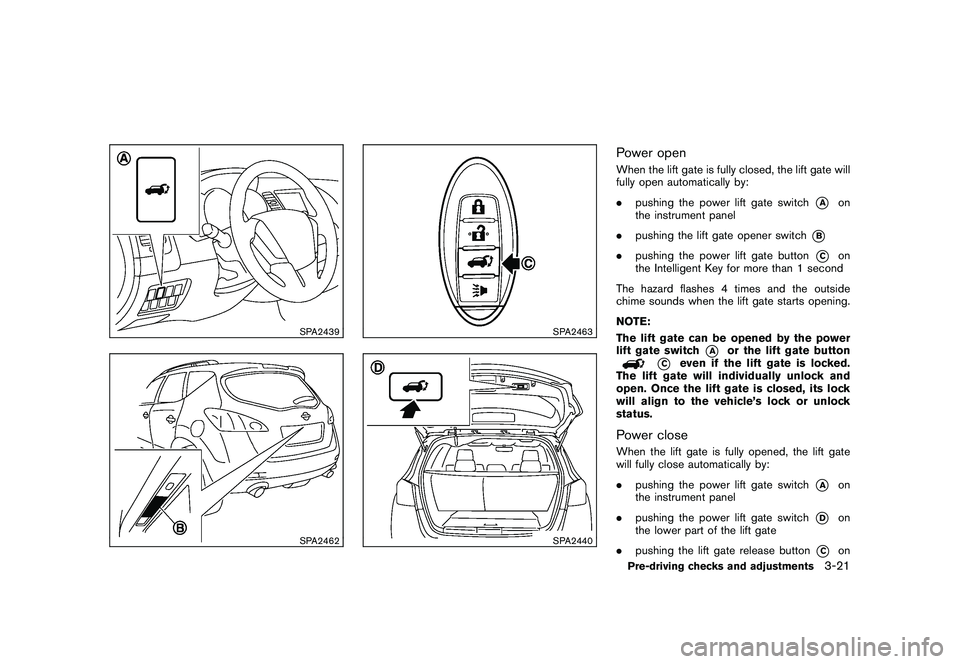
Power openWhen the lift gate is fully closed, the lift gate will
fully open automatically by:
.pushing the power lift gate switch
*A
on
the instrument panel
. pushing the lift gate opener switch
*B
.pushing the power lift gate button
*C
on
the Intelligent Key for more than 1 second
The hazard flashes 4 times and the outside
chime sounds when the lift gate starts opening.
NOTE:
The lift gate can be opened by the power
lift gate switch
*A
or the lift gate button
*C
even if the lift gate is locked.
The lift gate will individually unlock and
open. Once the lift gate is closed, its lock
will align to the vehicle’s lock or unlock
status.
Power closeWhen the lift gate is fully opened, the lift gate
will fully close automatically by:
. pushing the power lift gate switch
*A
on
the instrument panel
. pushing the power lift gate switch
*D
on
the lower part of the lift gate
. pushing the lift gate release button
*C
on
Pre-driving checks and adjustments
3-21
Page 158 of 433
Black plate (156,1)
Model "Z51-D" EDITED: 2010/ 7/ 23
the Intelligent Key for more than 1 second
The hazard flashes 4 times and the outside
chime sounds when the lift gate starts closing.
Reverse functionThe power lift gate will reverse immediately if
one of the following actions is performed during
power open or power close.
. pushing the power lift gate switch
*A
on
the instrument panel
. pushing the lift gate switch
*D
on the lower
part of the lift gate
. pushing the lift gate button
*C
on
the Intelligent Key.
The outside chime sounds when the lift gate
starts to reverse.
The power lift gate button
*C
on the
Intelligent Key cannot be operated when the
ignition switch is in the ON position.
Auto reverse functionThe auto-reverse function enables the lift gate to
automatically reverse when something is caught
in the lift gate as it is opening or closing. When
the control unit detects an obstacle, the lift gate
will reverse and return to the full open or full
close position.
If a second obstacle is detected, the lift gate motion will stop and the drive motor will
disengage. The lift gate will enter the manual
mode.
A pinch sensor is mounted on each side of the
lift gate. If an obstacle is detected by the pinch
sensor during power close, the lift gate will
reverse and return to the full open position
immediately.
NOTE:
If the pinch sensor is damaged or removed,
the power close function will not operate.
WARNING
There is a small distance immediately
before the closed position that cannot
be detected. Make sure that all passen-
gers keep their hands, etc., clear from
the lift gate opening before closing the
lift gate.Manual modeIf power operation is not available, the lift gate
can be operated manually. Power operation may
not be available if multiple obstacles have been
detected in a single power cycle or if the battery
voltage is low. When the power lift gate main
switch is in the OFF position, the lift gate can be
opened manually by pushing the lift gate opener
switch. If the power lift gate opener switch ispushed during power open or close, the power
operation will be canceled and the lift gate can
be operated manually.
3-22
Pre-driving checks and adjustments