keyless entry NISSAN MURANO 2011 Owner´s Manual
[x] Cancel search | Manufacturer: NISSAN, Model Year: 2011, Model line: MURANO, Model: NISSAN MURANO 2011Pages: 433, PDF Size: 3.7 MB
Page 10 of 433
Black plate (6,1)
Model "Z51-D" EDITED: 2010/ 7/ 23
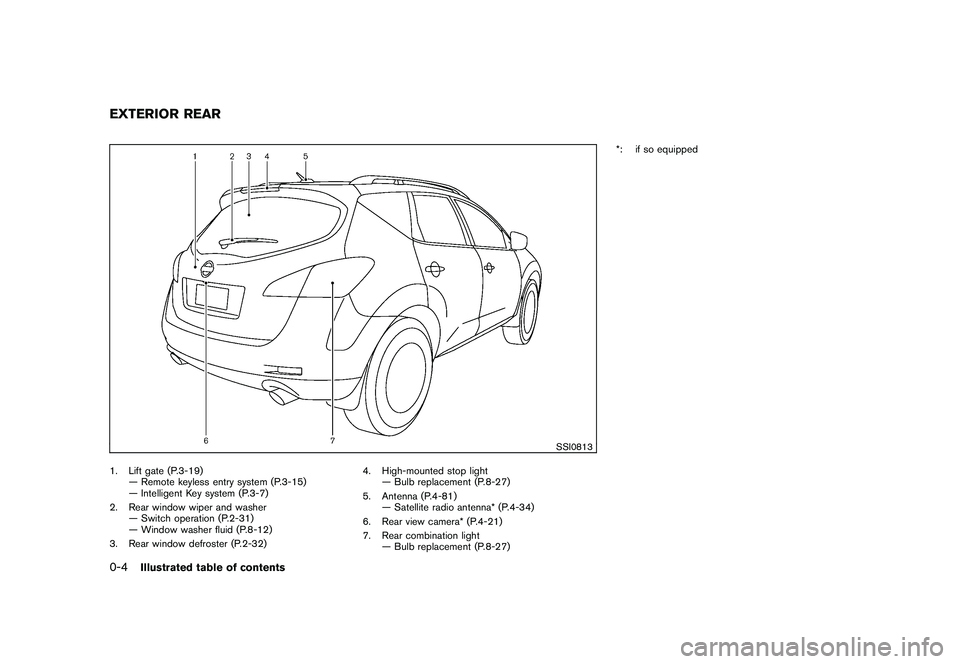
SSI0813
1. Lift gate (P.3-19)— Remote keyless entry system (P.3-15)
— Intelligent Key system (P.3-7)
2. Rear window wiper and washer — Switch operation (P.2-31)
— Window washer fluid (P.8-12)
3. Rear window defroster (P.2-32) 4. High-mounted stop light
— Bulb replacement (P.8-27)
5. Antenna (P.4-81) — Satellite radio antenna* (P.4-34)
6. Rear view camera* (P.4-21)
7. Rear combination light — Bulb replacement (P.8-27) *: if so equippedEXTERIOR REAR0-4
Illustrated table of contents
Page 137 of 433
Black plate (10,1)
3 Pre-driving checks and adjustments
Model "Z51-D" EDITED: 2010/ 7/ 23
Keys ............................................................... 3-2NISSAN Vehicle Immobilizer System keys ............ 3-2
Intelligent Key system ...................................... 3-3
Mechanical key .............................................. 3-4
Valet hand-off ................................................ 3-4
Doors .............................................................. 3-4
Locking with mechanical key ............................. 3-5
Opening and closing windows with the
mechanical key .............................................. 3-5
Locking with inside lock knob ........................... 3-5
Locking with power door lock switch .................. 3-6
Automatic door locks ...................................... 3-6
Child safety rear door lock ............................... 3-7
Intelligent Key system .......................................... 3-7
Intelligent Key operating range .......................... 3-9
Door locks/unlocks precaution .......................... 3-9
Intelligent Key operation ................................. 3-10
Battery saver system ..................................... 3-13
Warning signals ........................................... 3-13
Troubleshooting guide ................................... 3-14
Remote keyless entry system .............................. 3-15
How to use remote keyless entry system ........... 3-16Hood
............................................................ 3-19
Lift gate ......................................................... 3-19
Operating manual lift gate .............................. 3-20
Operating power lift gate (if so equipped) .......... 3-20
Auto closure ............................................... 3-23
Lift gate release ........................................... 3-24
Fuel-filler door ................................................. 3-24
Opening fuel-filler door .................................. 3-24
Fuel-filler cap .............................................. 3-24
Tilt/telescopic steering ...................................... 3-26
Manual operation ......................................... 3-26
Electric operation ......................................... 3-27
Sun visors ...................................................... 3-27
Mirrors ........................................................... 3-28
Inside mirror ................................................ 3-28
Outside mirrors ............................................ 3-30
Vanity mirror ................................................ 3-31
Automatic drive positioner (if so equipped) ............. 3-31
Entry/exit function ......................................... 3-31
Memory storage ........................................... 3-32
System operation ......................................... 3-33
Page 141 of 433
Black plate (139,1)
Model "Z51-D" EDITED: 2010/ 7/ 23
SPA2432
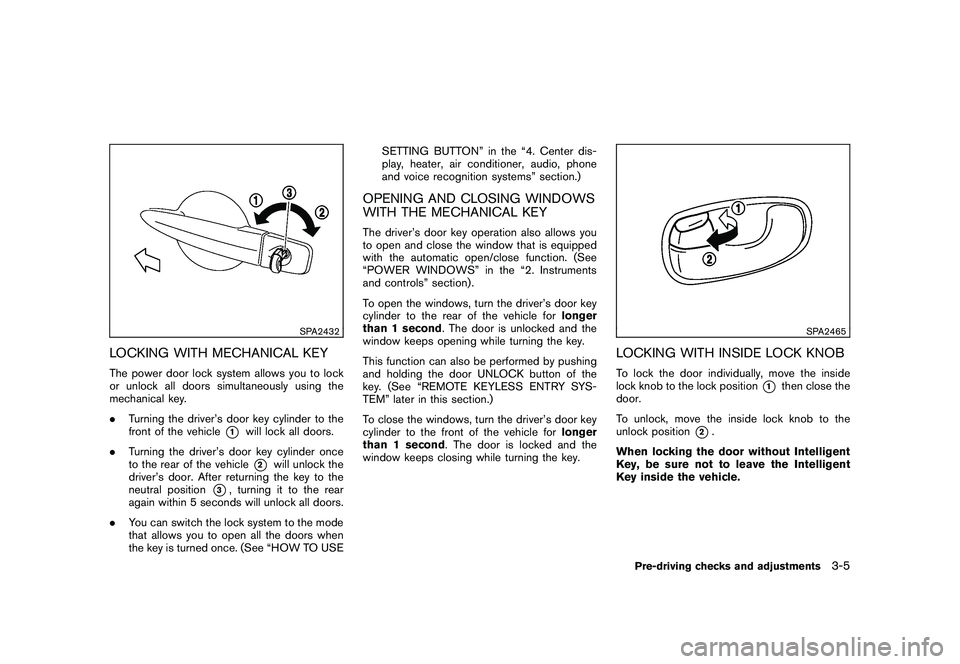
LOCKING WITH MECHANICAL KEYThe power door lock system allows you to lock
or unlock all doors simultaneously using the
mechanical key.
.Turning the driver’s door key cylinder to the
front of the vehicle
*1
will lock all doors.
. Turning the driver’s door key cylinder once
to the rear of the vehicle*2
will unlock the
driver’s door. After returning the key to the
neutral position
*3, turning it to the rear
again within 5 seconds will unlock all doors.
. You can switch the lock system to the mode
that allows you to open all the doors when
the key is turned once. (See “HOW TO USE SETTING BUTTON” in the “4. Center dis-
play, heater, air conditioner, audio, phone
and voice recognition systems” section.)
OPENING AND CLOSING WINDOWS
WITH THE MECHANICAL KEYThe driver’s door key operation also allows you
to open and close the window that is equipped
with the automatic open/close function. (See
“POWER WINDOWS” in the “2. Instruments
and controls” section) .
To open the windows, turn the driver’s door key
cylinder to the rear of the vehicle for
longer
than 1 second . The door is unlocked and the
window keeps opening while turning the key.
This function can also be performed by pushing
and holding the door UNLOCK button of the
key. (See “REMOTE KEYLESS ENTRY SYS-
TEM” later in this section.)
To close the windows, turn the driver’s door key
cylinder to the front of the vehicle for longer
than 1 second . The door is locked and the
window keeps closing while turning the key.
SPA2465
LOCKING WITH INSIDE LOCK KNOBTo lock the door individually, move the inside
lock knob to the lock position
*1
then close the
door.
To unlock, move the inside lock knob to the
unlock position
*2.
When locking the door without Intelligent
Key, be sure not to leave the Intelligent
Key inside the vehicle.
Pre-driving checks and adjustments
3-5
Page 148 of 433
Black plate (146,1)
Model "Z51-D" EDITED: 2010/ 7/ 23
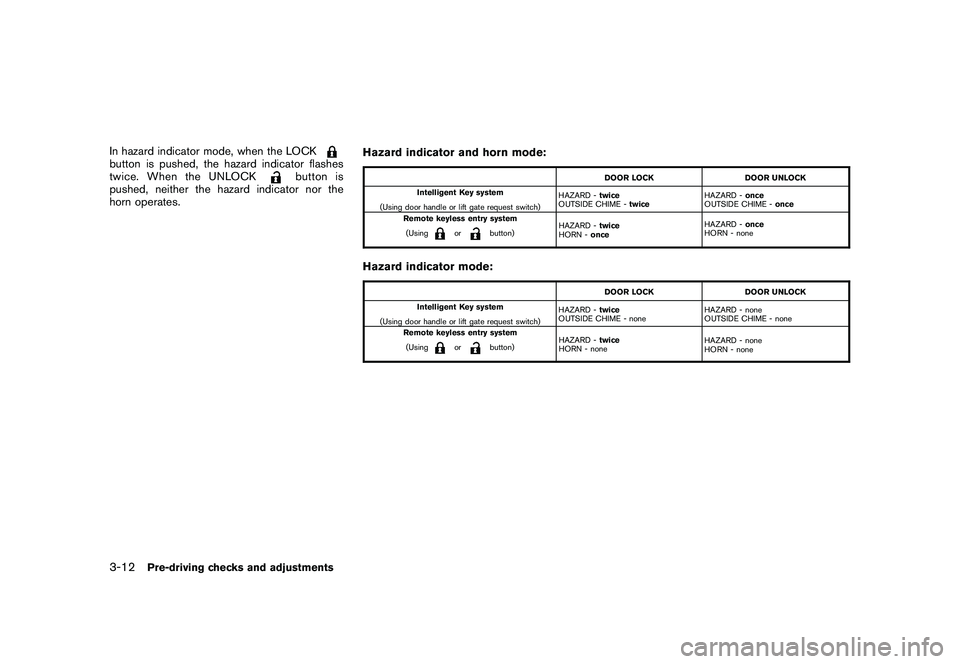
In hazard indicator mode, when the LOCKbutton is pushed, the hazard indicator flashes
twice. When the UNLOCK
button is
pushed, neither the hazard indicator nor the
horn operates. Hazard indicator and horn mode:
DOOR LOCK
DOOR UNLOCK
Intelligent Key system
(Using door handle or lift gate request switch) HAZARD -
twice
OUTSIDE CHIME - twice HAZARD -
once
OUTSIDE CHIME - once
Remote keyless entry system
(Using
or
button) HAZARD -
twice
HORN - once HAZARD -
once
HORN - none
Hazard indicator mode:
DOOR LOCK DOOR UNLOCK
Intelligent Key system
(Using door handle or lift gate request switch) HAZARD -
twice
OUTSIDE CHIME - none HAZARD - none
OUTSIDE CHIME - none
Remote keyless entry system
(Using
or
button) HAZARD -
twice
HORN - none HAZARD - none
HORN - none
3-12
Pre-driving checks and adjustments
Page 151 of 433
Black plate (149,1)
Model "Z51-D" EDITED: 2010/ 7/ 23
WARNING
The Intelligent Key transmits radio
waves when the buttons are pushed.
The FAA advises that radio waves may
affect aircraft navigation and commu-
nication systems. Do not operate the
Intelligent Key while on an airplane.
Make sure the buttons are not operated
unintentionally when the unit is stored
for a flight.
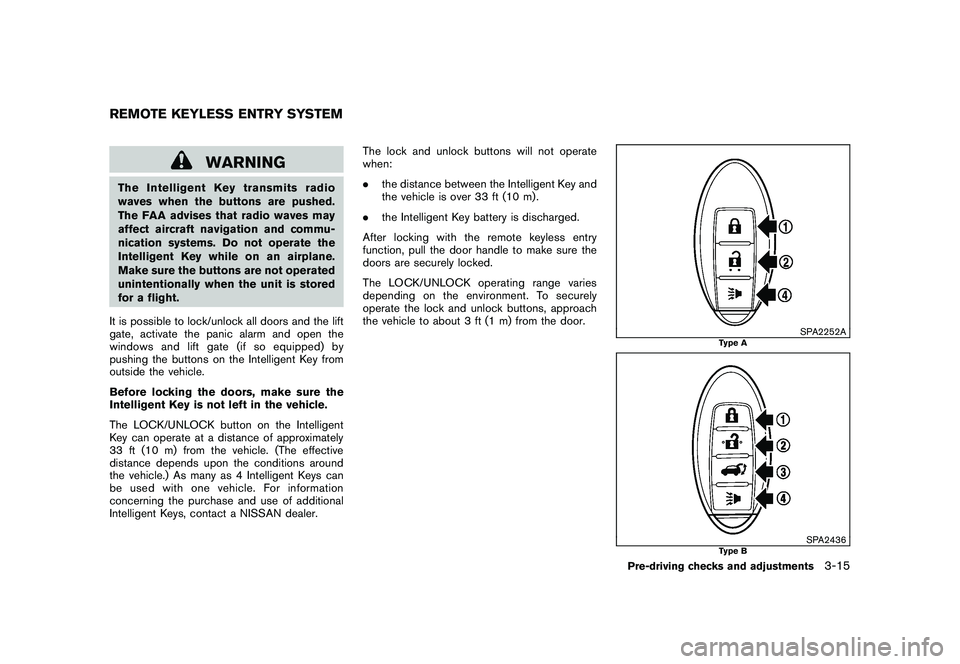
It is possible to lock/unlock all doors and the lift
gate, activate the panic alarm and open the
windows and lift gate (if so equipped) by
pushing the buttons on the Intelligent Key from
outside the vehicle.
Before locking the doors, make sure the
Intelligent Key is not left in the vehicle.
The LOCK/UNLOCK button on the Intelligent
Key can operate at a distance of approximately
33 ft (10 m) from the vehicle. (The effective
distance depends upon the conditions around
the vehicle.) As many as 4 Intelligent Keys can
be used with one vehicle. For information
concerning the purchase and use of additional
Intelligent Keys, contact a NISSAN dealer. The lock and unlock buttons will not operate
when:
.
the distance between the Intelligent Key and
the vehicle is over 33 ft (10 m) .
. the Intelligent Key battery is discharged.
After locking with the remote keyless entry
function, pull the door handle to make sure the
doors are securely locked.
The LOCK/UNLOCK operating range varies
depending on the environment. To securely
operate the lock and unlock buttons, approach
the vehicle to about 3 ft (1 m) from the door.
SPA2252A
Type A
SPA2436
Type B
REMOTE KEYLESS ENTRY SYSTEM
Pre-driving checks and adjustments
3-15
Page 152 of 433
Black plate (150,1)
Model "Z51-D" EDITED: 2010/ 7/ 23
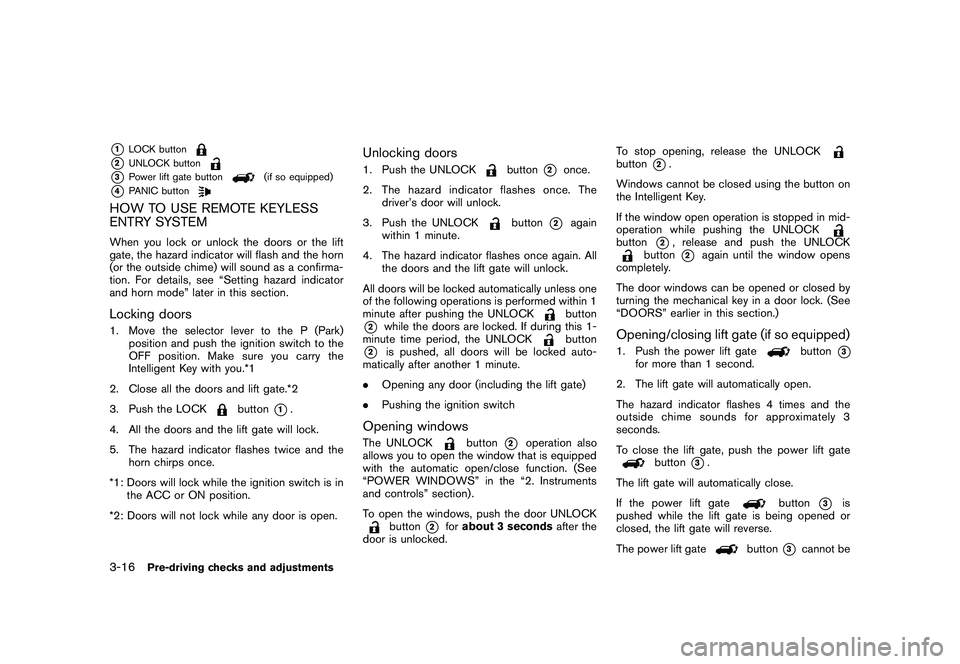
*1
LOCK button
*2
UNLOCK button
*3
Power lift gate button
(if so equipped)
*4
PANIC button
HOW TO USE REMOTE KEYLESS
ENTRY SYSTEMWhen you lock or unlock the doors or the lift
gate, the hazard indicator will flash and the horn
(or the outside chime) will sound as a confirma-
tion. For details, see “Setting hazard indicator
and horn mode” later in this section.Locking doors1. Move the selector lever to the P (Park)position and push the ignition switch to the
OFF position. Make sure you carry the
Intelligent Key with you.*1
2. Close all the doors and lift gate.*2
3. Push the LOCK
button
*1.
4. All the doors and the lift gate will lock.
5. The hazard indicator flashes twice and the horn chirps once.
*1: Doors will lock while the ignition switch is in the ACC or ON position.
*2: Doors will not lock while any door is open.
Unlocking doors1. Push the UNLOCK
button
*2
once.
2. The hazard indicator flashes once. The driver’s door will unlock.
3. Push the UNLOCK
button
*2
again
within 1 minute.
4. The hazard indicator flashes once again. All the doors and the lift gate will unlock.
All doors will be locked automatically unless one
of the following operations is performed within 1
minute after pushing the UNLOCKbutton
*2
while the doors are locked. If during this 1-
minute time period, the UNLOCK
button
*2
is pushed, all doors will be locked auto-
matically after another 1 minute.
. Opening any door (including the lift gate)
. Pushing the ignition switch
Opening windowsThe UNLOCK
button
*2
operation also
allows you to open the window that is equipped
with the automatic open/close function. (See
“POWER WINDOWS” in the “2. Instruments
and controls” section) .
To open the windows, push the door UNLOCK
button
*2
for about 3 seconds after the
door is unlocked. To stop opening, release the UNLOCK
button
*2.
Windows cannot be closed using the button on
the Intelligent Key.
If the window open operation is stopped in mid-
operation while pushing the UNLOCK
button
*2, release and push the UNLOCK
button
*2
again until the window opens
completely.
The door windows can be opened or closed by
turning the mechanical key in a door lock. (See
“DOORS” earlier in this section.)
Opening/closing lift gate (if so equipped)1. Push the power lift gate
button
*3
for more than 1 second.
2. The lift gate will automatically open.
The hazard indicator flashes 4 times and the
outside chime sounds for approximately 3
seconds.
To close the lift gate, push the power lift gate
button
*3.
The lift gate will automatically close.
If the power lift gate
button
*3
is
pushed while the lift gate is being opened or
closed, the lift gate will reverse.
The power lift gate
button
*3
cannot be
3-16
Pre-driving checks and adjustments
Page 154 of 433
Black plate (152,1)
Model "Z51-D" EDITED: 2010/ 7/ 23
Hazard indicator and horn mode:
DOOR LOCKDOOR UNLOCK
Intelligent Key system
(Using door handle or lift gate request switch) HAZARD -
twice
OUTSIDE CHIME - twice HAZARD -
once
OUTSIDE CHIME - once
Remote keyless entry system
(Using
or
button) HAZARD -
twice
HORN - once HAZARD -
once
HORN - none
Hazard indicator mode:
DOOR LOCK DOOR UNLOCK
Intelligent Key system
(Using door handle or lift gate request switch) HAZARD -
twice
OUTSIDE CHIME - none HAZARD - none
OUTSIDE CHIME - none
Remote keyless entry system
(Using
or
button) HAZARD -
twice
HORN - none HAZARD - none
HORN - none
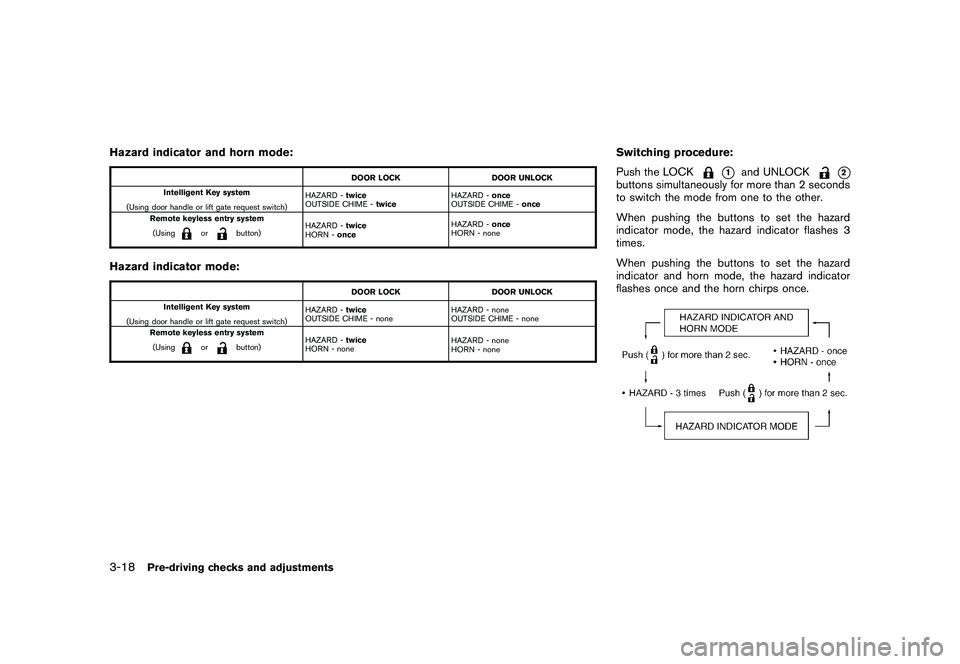
Switching procedure:
Push the LOCK
*1
and UNLOCK
*2
buttons simultaneously for more than 2 seconds
to switch the mode from one to the other.
When pushing the buttons to set the hazard
indicator mode, the hazard indicator flashes 3
times.
When pushing the buttons to set the hazard
indicator and horn mode, the hazard indicator
flashes once and the horn chirps once.
3-18
Pre-driving checks and adjustments
Page 331 of 433
Black plate (329,1)
Model "Z51-D" EDITED: 2010/ 7/ 23
surface.
. If wheels or tires other than the
NISSAN recommended ones are
used, the VDC system may not
operate properly and the
in-
dicator may flash or bothand
indicator lights may illuminate.
. The VDC system is not a substitute
for winter tires or tire chains on a
snow covered road.
FREEING A FROZEN DOOR LOCKTo prevent a door lock from freezing, apply
deicer through the key hole. If the lock becomes
frozen, heat the key before inserting it into the
key hole or use the remote keyless entry keyfob.ANTI-FREEZEIn the winter when it is anticipated that the
outside temperature will drop below 32 8F(0 8C) ,
check the anti-freeze to assure proper winter
protection. For additional information, see “EN-
GINE COOLING SYSTEM” in the “8. Main-
tenance and do-it-yourself” section.BATTERYIf the battery is not fully charged during
extremely cold weather conditions, the battery
fluid may freeze and damage the battery. To
maintain maximum efficiency, the battery should
be checked regularly. For additional information,
see “BATTERY” in the “8. Maintenance and do-
it-yourself” section.DRAINING OF COOLANT WATERIf the vehicle is to be left outside without anti-
freeze, drain the cooling system, including the
engine block. Refill before operating the vehicle.
For details, see “ENGINE COOLING SYSTEM”
in the “8. Maintenance and do-it-yourself”
section.
TIRE EQUIPMENTSUMMER tires have a tread designed to provide
superior performance on dry pavement. How-
ever, the performance of these tires will be
substantially reduced in snowy and icy condi-
tions. If you operate your vehicle on snowy or icy
roads, NISSAN recommends the use of MUD &
SNOW or ALL SEASON tires on all four wheels.
Consult a NISSAN dealer for the tire type, size,
speed rating and availability information.
For additional traction on icy roads, studded
tires may be used. However, some U.S. states
and Canadian provinces prohibit their use.
Check local, state and provincial laws before
installing studded tires.
Skid and traction capabilities of studded
snow tires, on wet or dry surfaces, may be
poorer than that of non-studded snow
tires.
Tire chains may be used. For details, see “TIRE
CHAINS” in the “8. Maintenance and do-it-
yourself” section of this manual.All-Wheel Drive (AWD) modelIf you install snow tires, they must also be the
same size, brand, construction and tread pattern
on all four wheels.
COLD WEATHER DRIVING
Starting and driving
5-29
Page 427 of 433
Black plate (3,1)
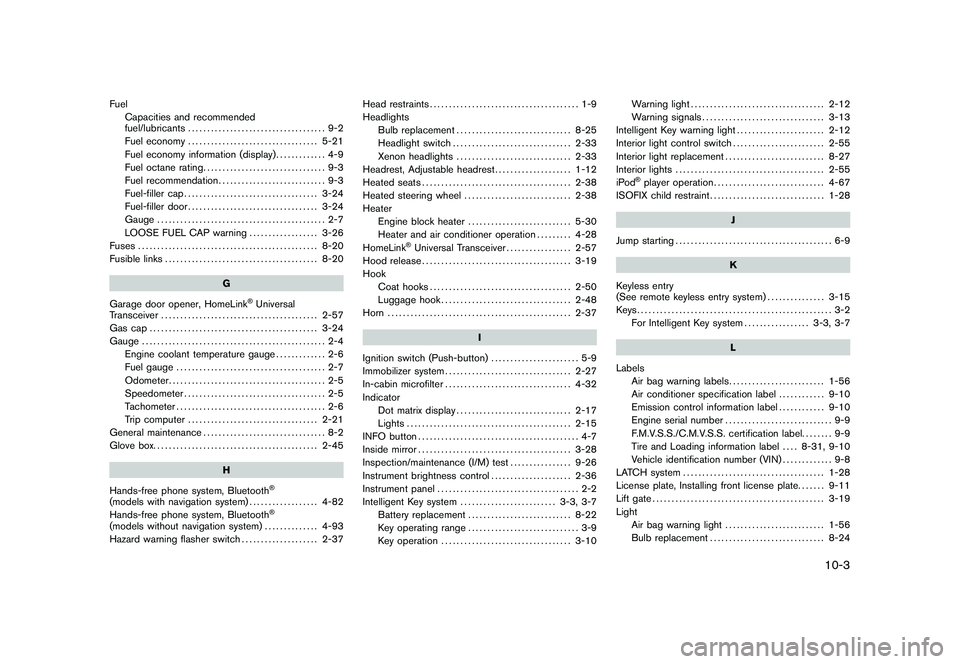
FuelCapacities and recommended
fuel/lubricants .................................... 9-2
Fuel economy .................................. 5-21
Fuel economy information (display) ............. 4-9
Fuel octane rating ................................ 9-3
Fuel recommendation ............................ 9-3
Fuel-filler cap ................................... 3-24
Fuel-filler door .................................. 3-24
Gauge ............................................ 2-7
LOOSE FUEL CAP warning .................. 3-26
Fuses ............................................... 8-20
Fusible links ........................................ 8-20
G
Garage door opener, HomeLink
®Universal
Transceiver ......................................... 2-57
Gas cap ............................................ 3-24
Gauge ................................................ 2-4
Engine coolant temperature gauge ............. 2-6
Fuel gauge ....................................... 2-7
Odometer ......................................... 2-5
Speedometer ..................................... 2-5
Tachometer ....................................... 2-6
Trip computer .................................. 2-21
General maintenance ................................ 8-2
Glove box. .......................................... 2-45
H
Hands-free phone system, Bluetooth®
(models with navigation system) .................. 4-82
Hands-free phone system, Bluetooth
®
(models without navigation system) .............. 4-93
Hazard warning flasher switch .................... 2-37Head restraints
....................................... 1-9
Headlights Bulb replacement .............................. 8-25
Headlight switch ............................... 2-33
Xenon headlights .............................. 2-33
Headrest, Adjustable headrest .................... 1-12
Heated seats ....................................... 2-38
Heated steering wheel ............................ 2-38
Heater Engine block heater ........................... 5-30
Heater and air conditioner operation ......... 4-28
HomeLink
®Universal Transceiver ................. 2-57
Hood release ....................................... 3-19
Hook Coat hooks ..................................... 2-50
Luggage hook .................................. 2-48
Horn ................................................ 2-37
I
Ignition switch (Push-button) ....................... 5-9
Immobilizer system ................................. 2-27
In-cabin microfilter ................................. 4-32
Indicator Dot matrix display .............................. 2-17
Lights ........................................... 2-15
INFO button .......................................... 4-7
Inside mirror ........................................ 3-28
Inspection/maintenance (I/M) test ................ 9-26
Instrument brightness control ..................... 2-36
Instrument panel ..................................... 2-2
Intelligent Key system ......................... 3-3, 3-7
Battery replacement ........................... 8-22
Key operating range ............................. 3-9
Key operation .................................. 3-10 Warning light
................................... 2-12
Warning signals ................................ 3-13
Intelligent Key warning light ....................... 2-12
Interior light control switch ........................ 2-55
Interior light replacement .......................... 8-27
Interior lights ....................................... 2-55
iPod
®player operation ............................. 4-67
ISOFIX child restraint .............................. 1-28
J
Jump starting ......................................... 6-9
K
Keyless entry
(See remote keyless entry system) ............... 3-15
Keys................................................... 3-2 For Intelligent Key system ................. 3-3, 3-7
L
Labels Air bag warning labels ......................... 1-56
Air conditioner specification label ............ 9-10
Emission control information label ............ 9-10
Engine serial number ............................ 9-9
F.M.V.S.S./C.M.V.S.S. certification label. ....... 9-9
Tire and Loading information label .... 8-31, 9-10
Vehicle identification number (VIN) ............. 9-8
LATCH system ..................................... 1-28
License plate, Installing front license plate. ...... 9-11
Lift gate ............................................. 3-19
Light Air bag warning light .......................... 1-56
Bulb replacement .............................. 8-24
10-3
Model "Z51-D" EDITED: 2010/ 7/ 23
Page 429 of 433
Black plate (5,1)
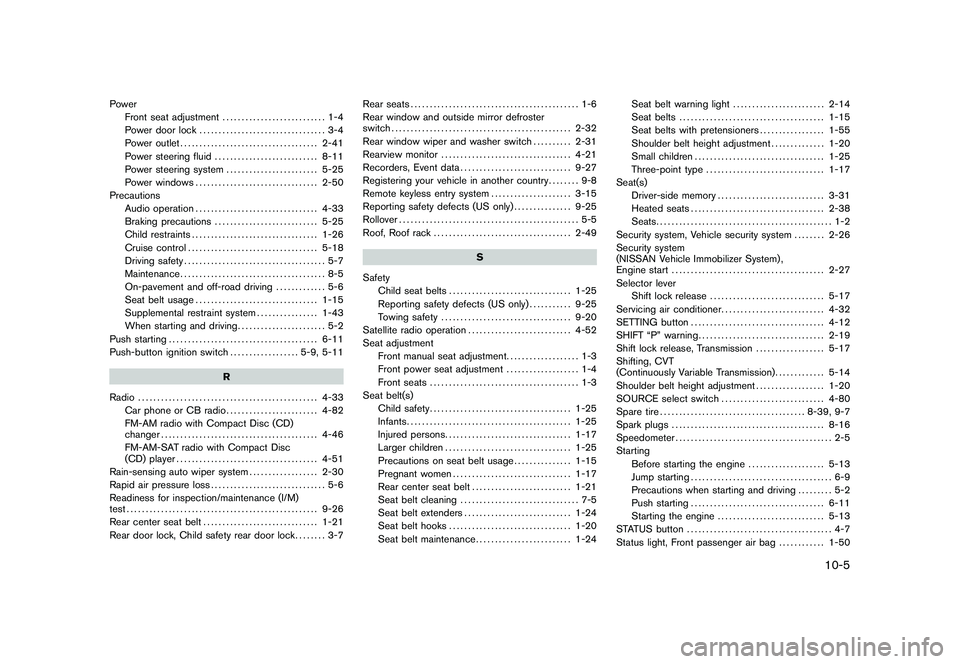
PowerFront seat adjustment ........................... 1-4
Power door lock ................................. 3-4
Power outlet .................................... 2-41
Power steering fluid ........................... 8-11
Power steering system ........................ 5-25
Power windows ................................ 2-50
Precautions Audio operation ................................ 4-33
Braking precautions ........................... 5-25
Child restraints ................................. 1-26
Cruise control .................................. 5-18
Driving safety ..................................... 5-7
Maintenance ...................................... 8-5
On-pavement and off-road driving ............. 5-6
Seat belt usage ................................ 1-15
Supplemental restraint system ................ 1-43
When starting and driving ....................... 5-2
Push starting ....................................... 6-11
Push-button ignition switch .................. 5-9, 5-11
R
Radio ............................................... 4-33
Car phone or CB radio ........................ 4-82
FM-AM radio with Compact Disc (CD)
changer ......................................... 4-46
FM-AM-SAT radio with Compact Disc
(CD) player ..................................... 4-51
Rain-sensing auto wiper system .................. 2-30
Rapid air pressure loss .............................. 5-6
Readiness for inspection/maintenance (I/M)
test .................................................. 9-26
Rear center seat belt .............................. 1-21
Rear door lock, Child safety rear door lock ........ 3-7Rear seats
............................................ 1-6
Rear window and outside mirror defroster
switch ............................................... 2-32
Rear window wiper and washer switch .......... 2-31
Rearview monitor .................................. 4-21
Recorders, Event data ............................. 9-27
Registering your vehicle in another country ........ 9-8
Remote keyless entry system ..................... 3-15
Reporting safety defects (US only) ............... 9-25
Rollover ............................................... 5-5
Roof, Roof rack .................................... 2-49
S
Safety Child seat belts ................................ 1-25
Reporting safety defects (US only) ........... 9-25
Towing safety .................................. 9-20
Satellite radio operation ........................... 4-52
Seat adjustment Front manual seat adjustment. .................. 1-3
Front power seat adjustment ................... 1-4
Front seats ....................................... 1-3
Seat belt(s) Child safety ..................................... 1-25
Infants ........................................... 1-25
Injured persons ................................. 1-17
Larger children ................................. 1-25
Precautions on seat belt usage ............... 1-15
Pregnant women ............................... 1-17
Rear center seat belt .......................... 1-21
Seat belt cleaning ............................... 7-5
Seat belt extenders ............................ 1-24
Seat belt hooks ................................ 1-20
Seat belt maintenance ......................... 1-24 Seat belt warning light
........................ 2-14
Seat belts ...................................... 1-15
Seat belts with pretensioners ................. 1-55
Shoulder belt height adjustment .............. 1-20
Small children .................................. 1-25
Three-point type ............................... 1-17
Seat(s) Driver-side memory ............................ 3-31
Heated seats ................................... 2-38
Seats .............................................. 1-2
Security system, Vehicle security system ........ 2-26
Security system
(NISSAN Vehicle Immobilizer System) ,
Engine start ........................................ 2-27
Selector lever Shift lock release .............................. 5-17
Servicing air conditioner ........................... 4-32
SETTING button ................................... 4-12
SHIFT “P” warning ................................. 2-19
Shift lock release, Transmission .................. 5-17
Shifting, CVT
(Continuously Variable Transmission) ............. 5-14
Shoulder belt height adjustment .................. 1-20
SOURCE select switch ........................... 4-80
Spare tire ...................................... 8-39, 9-7
Spark plugs ........................................ 8-16
Speedometer ......................................... 2-5
Starting Before starting the engine .................... 5-13
Jump starting ..................................... 6-9
Precautions when starting and driving ......... 5-2
Push starting ................................... 6-11
Starting the engine ............................ 5-13
STATUS button ...................................... 4-7
Status light, Front passenger air bag ............ 1-50
10-5
Model "Z51-D" EDITED: 2010/ 7/ 23