display NISSAN MURANO 2015 3.G LC2 Kai Navigation Manual
[x] Cancel search | Manufacturer: NISSAN, Model Year: 2015, Model line: MURANO, Model: NISSAN MURANO 2015 3.GPages: 203, PDF Size: 1.12 MB
Page 131 of 203
![NISSAN MURANO 2015 3.G LC2 Kai Navigation Manual INFO:
. When the location is stored in the Stored
Locations, [Stored Locations] can be used to
search for the location.
“Searching from address book”
(page 6-19)
. When 200 locations are already s](/img/5/436/w960_436-130.png "NISSAN MURANO 2015 3.G LC2 Kai Navigation Manual INFO:
. When the location is stored in the Stored
Locations, [Stored Locations] can be used to
search for the location.
“Searching from address book”
(page 6-19)
. When 200 locations are already s")
INFO:
. When the location is stored in the Stored
Locations, [Stored Locations] can be used to
search for the location.
“Searching from address book”
(page 6-19)
. When 200 locations are already stored, a
new location cannot be stored until a
currently stored location is deleted.
Storing location by moving map
1. Move to the preferred location on the map
and touch [] on the touch screen display.
2. Touch [Save Location]. A message is dis-played.
3. The icon representing the stored location is displayed on the map. Push
Page 133 of 203
![NISSAN MURANO 2015 3.G LC2 Kai Navigation Manual Editing stored home and location
1. Touch [Settings] on the Launch Bar.
2. Touch [Navigation] and touch [Address Book].
Setting itemAction
[Home Location]* [Edit] [Show Icon on Map] Displays the home](/img/5/436/w960_436-132.png "NISSAN MURANO 2015 3.G LC2 Kai Navigation Manual Editing stored home and location
1. Touch [Settings] on the Launch Bar.
2. Touch [Navigation] and touch [Address Book].
Setting itemAction
[Home Location]* [Edit] [Show Icon on Map] Displays the home")
Editing stored home and location
1. Touch [Settings] on the Launch Bar.
2. Touch [Navigation] and touch [Address Book].
Setting itemAction
[Home Location]* [Edit] [Show Icon on Map] Displays the home icon on the map.
[Icon]Selects a home icon of a preferred design.
[Sound] Sets the type of the alarm that sounds when the vehicle
approaches home.
[Direction] Sets the alarm to sound when approaching from a specific
direction.
[Distance] Sets the alarm to sound when reaching a specific distance to
home.
[Phone No.] Stores the home telephone number.
[Move Location] Adjusts the stored home location.
[Delete] Deletes the stored home location.
[OK] Confirms and saves the edited home information.
[Stored Locations] [Sort] [Sorted By Number]Sorts the stored locations.
“Searching from address book” (page 6-19)
[Sorted By Name]
[Sorted By Icon]
[Sorted By Group]
[Add New] Adds a new location.
“Storing location by searching” (page 6-46)
Stored Location List [Edit] [Show Icon on Map] Displays the icon on the map.
[Name]Registers a name of the entry.
6. Navigation
6-49
Page 134 of 203
![NISSAN MURANO 2015 3.G LC2 Kai Navigation Manual 6. Navigation
[Voicetag]Registers a voicetag for the entry which allows the entry to be
used with the voice recognition system.
[Icon] Selects an icon for the entry.
[Sound] Sets the type of the alarm](/img/5/436/w960_436-133.png "NISSAN MURANO 2015 3.G LC2 Kai Navigation Manual 6. Navigation
[Voicetag]Registers a voicetag for the entry which allows the entry to be
used with the voice recognition system.
[Icon] Selects an icon for the entry.
[Sound] Sets the type of the alarm")
6. Navigation
[Voicetag]Registers a voicetag for the entry which allows the entry to be
used with the voice recognition system.
[Icon] Selects an icon for the entry.
[Sound] Sets the type of the alarm that sounds when the vehicle
approaches the location.
[Direction] Sets the alarm to sound when approaching from a specific
direction.
[Distance] Sets the alarm to sound when reaching a specific distance to
the location.
[Phone No.] Registers a phone number of the location.
[Group] Registers a group of the entry.
[Entry Numbers] Registers an entry number for the location.
[Move Location] Adjusts the stored location information.
[Delete] Deletes the stored location information.
[OK] Confirms and saves the edited stored location information.
*: When home location has not been stored, [Home Location (None)] is displayed and a home location can be stored from the menu.
Editing stored route
1. Touch [Settings] on the Launch Bar.
2. Touch [Navigation] and touch [Address
Book].
3. Touch [Stored Routes].
4. Touch the preferred stored route from the list. Available setting items
. [Rename]:
Changes the stored route name.
. [Replace]:
Overwrites the stored tracked route to the
current tracked route. .
[Delete]:
Deletes the stored route.
. [OK]:
Applies the edited settings.
6-50
Page 135 of 203
![NISSAN MURANO 2015 3.G LC2 Kai Navigation Manual Editing avoid area
1. Touch [Settings] on the Launch Bar andtouch [Navigation].
2. Touch [Address Book] and then touch [Avoid Area].
3. Touch a preferred Avoid Area from the list. Avoid Area editing s](/img/5/436/w960_436-134.png "NISSAN MURANO 2015 3.G LC2 Kai Navigation Manual Editing avoid area
1. Touch [Settings] on the Launch Bar andtouch [Navigation].
2. Touch [Address Book] and then touch [Avoid Area].
3. Touch a preferred Avoid Area from the list. Avoid Area editing s")
Editing avoid area
1. Touch [Settings] on the Launch Bar andtouch [Navigation].
2. Touch [Address Book] and then touch [Avoid Area].
3. Touch a preferred Avoid Area from the list. Avoid Area editing screen will be displayed.
Setting
item Action
[Rename] Changes the name of an Avoid Area.
[Move Lo-
cation] Display the Avoid Area on the touch
screen display, and adjusts the loca-
tion of the Avoid Area.
[Resize
Area] Adjusts the range of the Avoid Area.
[FWY] Sets the route to include or not include freeways.
On the map, the Avoid Area will be
displayed in green if it includes a
freeway or in blue if it does not
include a freeway.
[Delete] Delete an Avoid Area.
[OK] Applies the edited setting.
INFO:
If the current vehicle location is set to an Avoid
Area, the system will not provide route guidance.
DELETING STORED ITEM
The locations and routes in the Address Book
can be deleted. Two deletion methods are
available: deleting an individual item and deleting
all stored items.
INFO:
. Deleted items cannot be restored. Before
deleting an item, always make sure that the
item is no longer needed.
6. Navigation
6-51
Page 136 of 203
![NISSAN MURANO 2015 3.G LC2 Kai Navigation Manual 6. Navigation
Deleting stored item individually
1. Touch [Settings] on the Launch Bar.
2. Touch [Navigation] and touch [Address Book].
3. Touch [Delete Stored Items].Select the preferred item and touc](/img/5/436/w960_436-135.png "NISSAN MURANO 2015 3.G LC2 Kai Navigation Manual 6. Navigation
Deleting stored item individually
1. Touch [Settings] on the Launch Bar.
2. Touch [Navigation] and touch [Address Book].
3. Touch [Delete Stored Items].Select the preferred item and touc")
6. Navigation
Deleting stored item individually
1. Touch [Settings] on the Launch Bar.
2. Touch [Navigation] and touch [Address Book].
3. Touch [Delete Stored Items].Select the preferred item and touch [Yes] to complete the deleting operation.
Step 1 Step2 Action
[Delete Home Location] Deletes home location.
[Delete Address
Book] [Delete All]
Deletes all stored locations.
[Delete one] Deletes a selected stored location.
[Delete Stored
Routes] [Delete All]
Deletes all stored routes.
[Delete one] Deletes selected stored routes.
[Delete Avoid
Areas] [Delete All]
Deletes all Avoid Areas.
[Delete one] Deletes a selected Avoid Area.
[Delete Pre-
vious Destina-
tions] [Delete All Previous Destinations] Deletes all of the previous destinations.
[Delete Previous Destination] Deletes a selected previous destination.
[Delete Previous Start Point] Deletes a previous start point.
[Delete Learned Routes] Deletes all system learned routes.
Deleting individual item on map
1. Align the cross pointer over the preferred
stored location for deletion by moving on the
map, and then touch [
].
2. Touch [Delete].
3. A confirmation message is displayed. Con-firm the contents of the message and touch
[Yes].
The stored item is deleted from the Address
Book.
TRANSFERRING INFORMATION TO/
FROM ADDRESS BOOK
The information of the stored home and ad-
dresses can be exported and imported using a
USB memory device.
“USB (Universal Serial Bus) Connection
Ports and AUX (auxiliary) input jack”
(page 2-5)
6-52
Page 137 of 203
![NISSAN MURANO 2015 3.G LC2 Kai Navigation Manual INFO:
1. Touch [Settings] on the Launch Bar.
2. Touch [Navigation].
3. Touch [Address Book].
4. Touch [Transfer Address Book].
5. Touch [Export] or [Import].
6. Touch [Home Location] or [Stored Loca-t](/img/5/436/w960_436-136.png "NISSAN MURANO 2015 3.G LC2 Kai Navigation Manual INFO:
1. Touch [Settings] on the Launch Bar.
2. Touch [Navigation].
3. Touch [Address Book].
4. Touch [Transfer Address Book].
5. Touch [Export] or [Import].
6. Touch [Home Location] or [Stored Loca-t")
INFO:
1. Touch [Settings] on the Launch Bar.
2. Touch [Navigation].
3. Touch [Address Book].
4. Touch [Transfer Address Book].
5. Touch [Export] or [Import].
6. Touch [Home Location] or [Stored Loca-tions].
7. Touch [Download].
NOTE:
Do not remove the USB memory device
until the system completely imports or
exports the data.
INFO:
. If the USB memory device already has the
data for a stored address, a confirmation
message will be displayed. Once overwrit-
ten, the original data cannot be recovered.
. Either of the two USB ports can be used for
information transfer.
. A USB memory device can be used to
transfer data but it is not possible to edit the
data using a personal computer, etc.
6. Navigation
6-53
Page 138 of 203
![NISSAN MURANO 2015 3.G LC2 Kai Navigation Manual 6. Navigation
NAVIGATION SETTINGS
The navigation system can be customized according to the user’s preference.
1. Touch [Settings] on the Launch Bar.
2. Touch [Navigation].
3. Touch the item you woul](/img/5/436/w960_436-137.png "NISSAN MURANO 2015 3.G LC2 Kai Navigation Manual 6. Navigation
NAVIGATION SETTINGS
The navigation system can be customized according to the user’s preference.
1. Touch [Settings] on the Launch Bar.
2. Touch [Navigation].
3. Touch the item you woul")
6. Navigation
NAVIGATION SETTINGS
The navigation system can be customized according to the user’s preference.
1. Touch [Settings] on the Launch Bar.
2. Touch [Navigation].
3. Touch the item you would like to set.
Available items:
[Address Book]
Stores locations and routes. Stored items can be edited.
“Storing a location/route” (page 6-46)
[Map View]
Sets the display method and direction of the map.
“Map view settings” (page 6-8)
[Map Icons]
Sets the map icons to appear on the map.
“Displaying facility icons” (page 6-11)
[Guidance Settings]
Sets the various functions for route guidance.
“Guidance settings” (page 6-39)
[Route Settings]
Changes the routing preferences.
“Route Settings” (page 6-41)
[Traffic Info Setting]
Sets the various functions of the NavTraffic information system.
“Traffic information setting” (page 6-45)
6-54
Page 139 of 203
![NISSAN MURANO 2015 3.G LC2 Kai Navigation Manual [Speed Limit Indication on Map]
Turns on/off the speed limit display function. When this item is turned on, speed limit indicator will appear on the map screen when available.
[Others]
Setting itemAct](/img/5/436/w960_436-138.png "NISSAN MURANO 2015 3.G LC2 Kai Navigation Manual [Speed Limit Indication on Map]
Turns on/off the speed limit display function. When this item is turned on, speed limit indicator will appear on the map screen when available.
[Others]
Setting itemAct")
[Speed Limit Indication on Map]
Turns on/off the speed limit display function. When this item is turned on, speed limit indicator will appear on the map screen when available.
[Others]
Setting itemAction
[Map Scrolling Information] [Address Book Icons] Information about the location, on which the center of the cross pointer is placed by scrolling on the map, can be set to be displayed.
“Displaying map scrolling information” (page 6-11)
[Destination/Waypoint Icons]
[Show pop-up for POIs]
[Latitude/Longitude Info]
[Customize Nearby POIs] Item List
Customizes the 5 nearby categories to show the categories that you frequently use.
[Reset] Resets the 5 nearby categories to dedault.
[Keyboard Type] [QWERTY] The keyboard layout of the character input screens can be selected.
[ABC]
[Tracking Dots Displayed on
Map] [Show Tracking Dots on Map] Turns the route tracking dots display on/off.
[Dist. Between Tracking Dots] Select tracking dot interval.
[Delete Track to Current Lo-
cation] Deletes the route tracking dots up to the current location.
[Adjust Current Location] If the vehicle icon indicating the current vehicle location is not in the correct position, the location
of the vehicle icon on the map screen can be adjusted.
[Delete Stored Items]
Deletes a stored location or route.
“Deleting stored item individually” (page 6-52)
6. Navigation
6-55
Page 140 of 203
![NISSAN MURANO 2015 3.G LC2 Kai Navigation Manual 6. Navigation
[Delete Previous Destinations]
Deletes all or one of the previous destinations or a previous start point.
“Deleting stored item individually” (page 6-52)
[Reset All Navigation Settin](/img/5/436/w960_436-139.png "NISSAN MURANO 2015 3.G LC2 Kai Navigation Manual 6. Navigation
[Delete Previous Destinations]
Deletes all or one of the previous destinations or a previous start point.
“Deleting stored item individually” (page 6-52)
[Reset All Navigation Settin")
6. Navigation
[Delete Previous Destinations]
Deletes all or one of the previous destinations or a previous start point.
“Deleting stored item individually” (page 6-52)
[Reset All Navigation Settings to Default]
This resets various settings (display, volume level, etc.) to the default settings.
6-56
Page 141 of 203
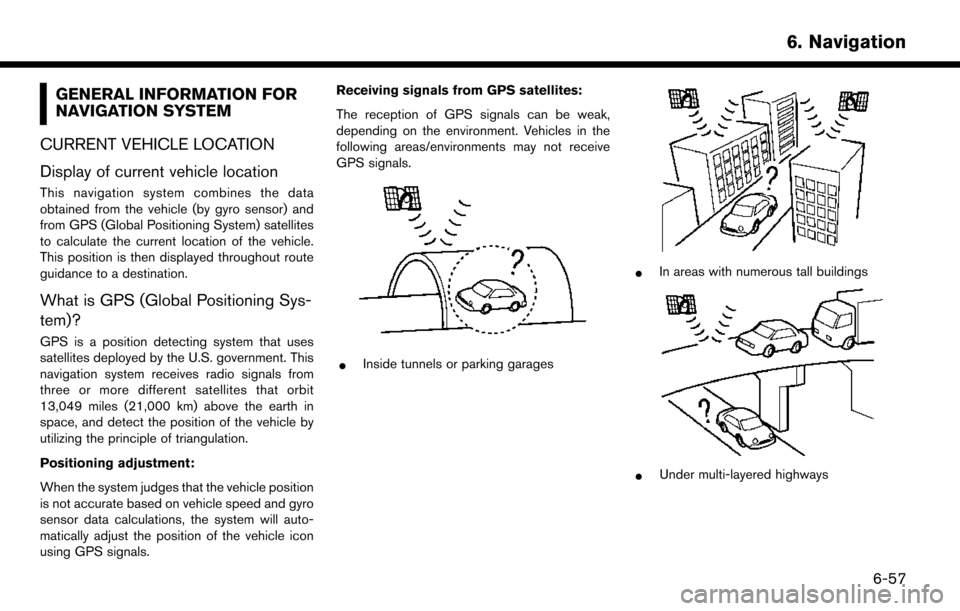
GENERAL INFORMATION FOR
NAVIGATION SYSTEM
CURRENT VEHICLE LOCATION
Display of current vehicle location
This navigation system combines the data
obtained from the vehicle (by gyro sensor) and
from GPS (Global Positioning System) satellites
to calculate the current location of the vehicle.
This position is then displayed throughout route
guidance to a destination.
What is GPS (Global Positioning Sys-
tem)?
GPS is a position detecting system that uses
satellites deployed by the U.S. government. This
navigation system receives radio signals from
three or more different satellites that orbit
13,049 miles (21,000 km) above the earth in
space, and detect the position of the vehicle by
utilizing the principle of triangulation.
Positioning adjustment:
When the system judges that the vehicle position
is not accurate based on vehicle speed and gyro
sensor data calculations, the system will auto-
matically adjust the position of the vehicle icon
using GPS signals. Receiving signals from GPS satellites:
The reception of GPS signals can be weak,
depending on the environment. Vehicles in the
following areas/environments may not receive
GPS signals.
*Inside tunnels or parking garages
*In areas with numerous tall buildings
*Under multi-layered highways
6. Navigation
6-57