display NISSAN MURANO 2015 3.G LC2 Kai Navigation Manual
[x] Cancel search | Manufacturer: NISSAN, Model Year: 2015, Model line: MURANO, Model: NISSAN MURANO 2015 3.GPages: 203, PDF Size: 1.12 MB
Page 173 of 203
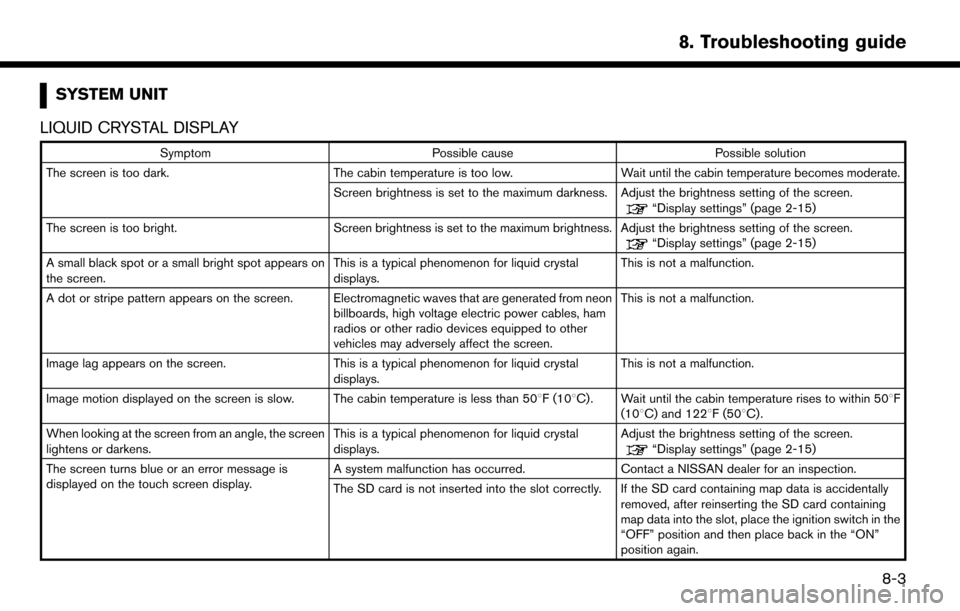
SYSTEM UNIT
LIQUID CRYSTAL DISPLAY
Symptom Possible cause Possible solution
The screen is too dark. The cabin temperature is too low. Wait until the cabin temperature becomes moderate.
Screen brightness is set to the maximum darkness. Adjust the brightness setting of the screen.
“Display settings” (page 2-15)
The screen is too bright. Screen brightness is set to the maximum brightness. Adjust the brightness setting of the screen.
“Display settings” (page 2-15)
A small black spot or a small bright spot appears on
the screen. This is a typical phenomenon for liquid crystal
displays.This is not a malfunction.
A dot or stripe pattern appears on the screen. Electromagnetic waves that are generated from neon billboards, high voltage electric power cables, ham
radios or other radio devices equipped to other
vehicles may adversely affect the screen.This is not a malfunction.
Image lag appears on the screen. This is a typical phenomenon for liquid crystal
displays. This is not a malfunction.
Image motion displayed on the screen is slow. The cabin temperature is less than 50 8F (108C). Wait until the cabin temperature rises to within 508F
(108C) and 1228F (508C).
When looking at the screen from an angle, the screen
lightens or darkens. This is a typical phenomenon for liquid crystal
displays.Adjust the brightness setting of the screen.
“Display settings” (page 2-15)
The screen turns blue or an error message is
displayed on the touch screen display. A system malfunction has occurred.
Contact a NISSAN dealer for an inspection.
The SD card is not inserted into the slot correctly. If the SD card containing map data is accidentally removed, after reinserting the SD card containing
map data into the slot, place the ignition switch in the
“OFF” position and then place back in the “ON”
position again.
8. Troubleshooting guide
8-3
Page 175 of 203
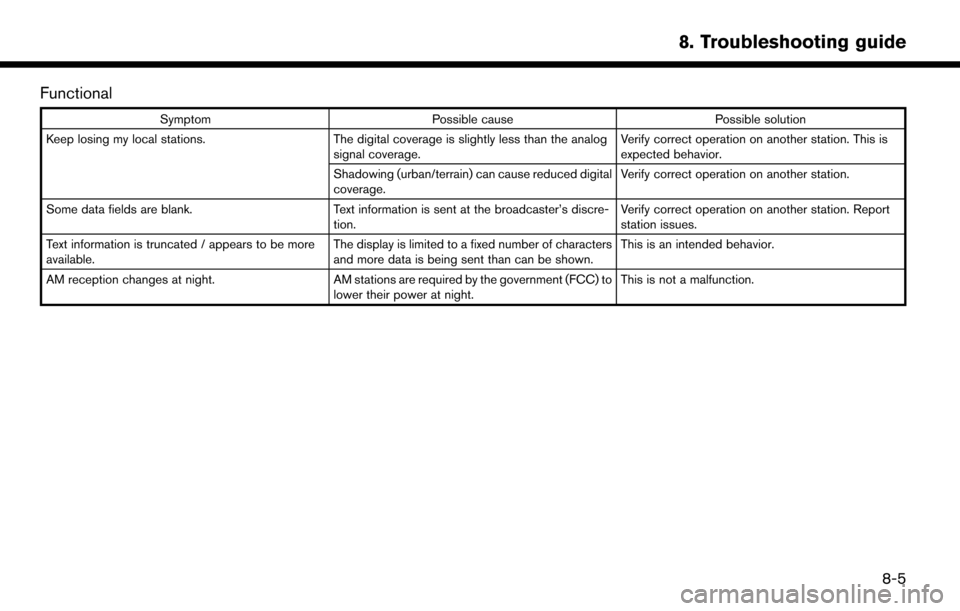
Functional
SymptomPossible cause Possible solution
Keep losing my local stations. The digital coverage is slightly less than the analog
signal coverage. Verify correct operation on another station. This is
expected behavior.
Shadowing (urban/terrain) can cause reduced digital
coverage. Verify correct operation on another station.
Some data fields are blank. Text information is sent at the broadcaster’s discre-
tion. Verify correct operation on another station. Report
station issues.
Text information is truncated / appears to be more
available. The display is limited to a fixed number of characters
and more data is being sent than can be shown.This is an intended behavior.
AM reception changes at night. AM stations are required by the government (FCC) to
lower their power at night. This is not a malfunction.
8. Troubleshooting guide
8-5
Page 177 of 203
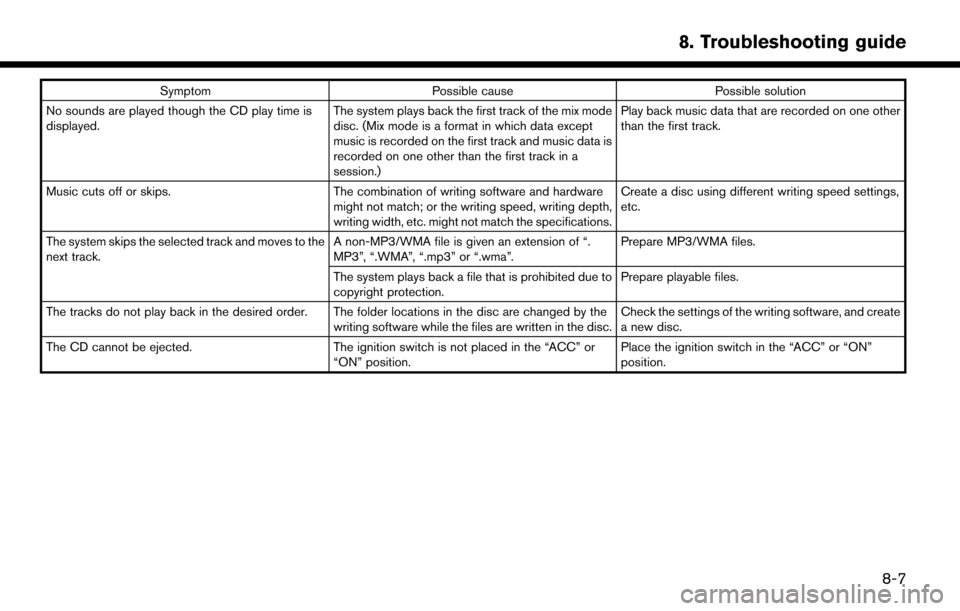
SymptomPossible cause Possible solution
No sounds are played though the CD play time is
displayed. The system plays back the first track of the mix mode
disc. (Mix mode is a format in which data except
music is recorded on the first track and music data is
recorded on one other than the first track in a
session.)Play back music data that are recorded on one other
than the first track.
Music cuts off or skips. The combination of writing software and hardware
might not match; or the writing speed, writing depth,
writing width, etc. might not match the specifications. Create a disc using different writing speed settings,
etc.
The system skips the selected track and moves to the
next track. A non-MP3/WMA file is given an extension of “.
MP3”, “.WMA”, “.mp3” or “.wma”.Prepare MP3/WMA files.
The system plays back a file that is prohibited due to
copyright protection. Prepare playable files.
The tracks do not play back in the desired order. The folder locations in the disc are changed by the writing software while the files are written in the disc.Check the settings of the writing software, and create
a new disc.
The CD cannot be ejected. The ignition switch is not placed in the “ACC” or
“ON” position. Place the ignition switch in the “ACC” or “ON”
position.
8. Troubleshooting guide
8-7
Page 181 of 203
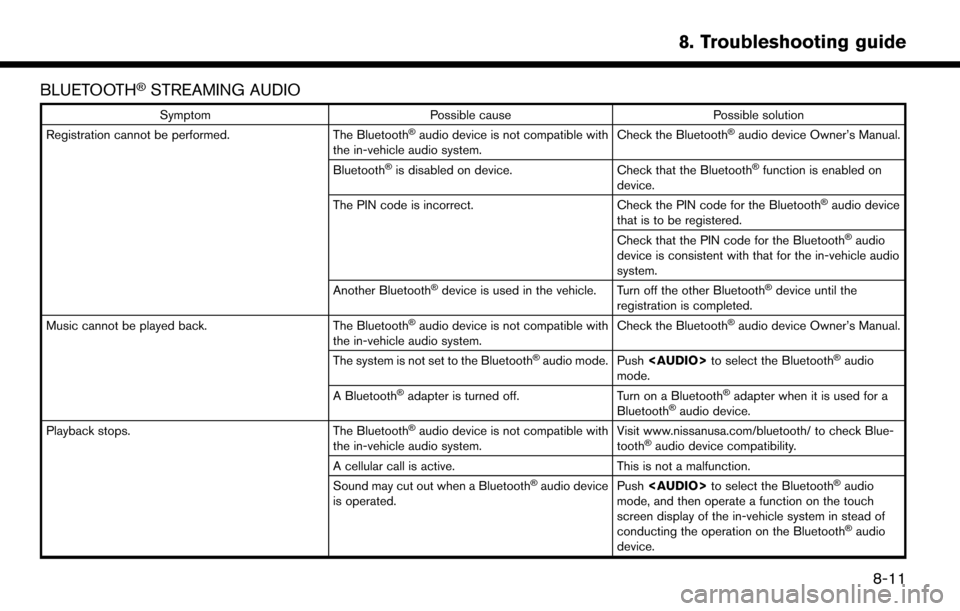
BLUETOOTHŠSTREAMING AUDIO
SymptomPossible cause Possible solution
Registration cannot be performed. The BluetoothŠaudio device is not compatible with
the in-vehicle audio system. Check the BluetoothŠaudio device Owner’s Manual.
Bluetooth
Šis disabled on device. Check that the BluetoothŠfunction is enabled on
device.
The PIN code is incorrect. Check the PIN code for the Bluetooth
Šaudio device
that is to be registered.
Check that the PIN code for the Bluetooth
Šaudio
device is consistent with that for the in-vehicle audio
system.
Another Bluetooth
Šdevice is used in the vehicle. Turn off the other BluetoothŠdevice until the
registration is completed.
Music cannot be played back. The Bluetooth
Šaudio device is not compatible with
the in-vehicle audio system. Check the BluetoothŠaudio device Owner’s Manual.
The system is not set to the Bluetooth
Šaudio mode. Push
Page 185 of 203
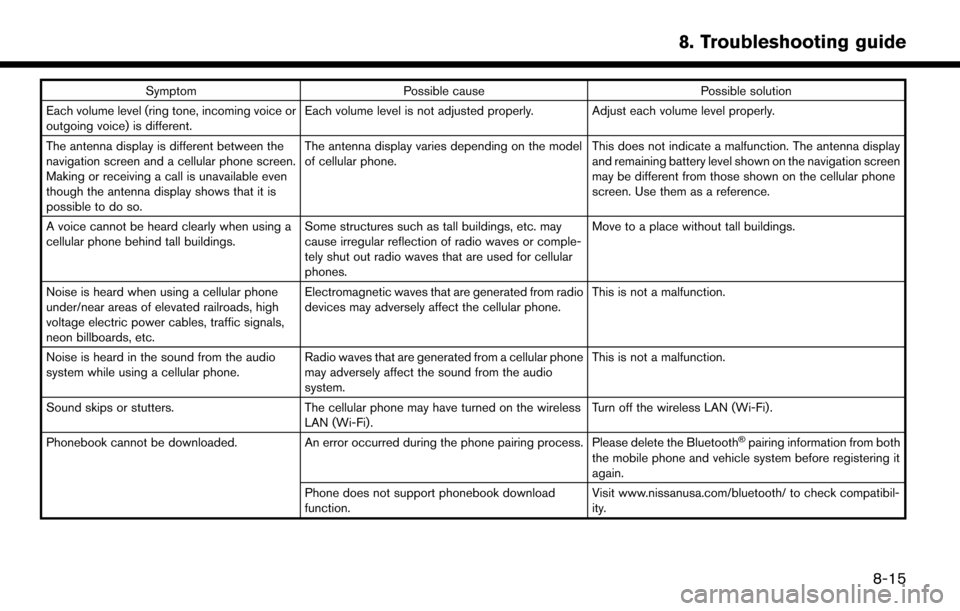
SymptomPossible cause Possible solution
Each volume level (ring tone, incoming voice or
outgoing voice) is different. Each volume level is not adjusted properly. Adjust each volume level properly.
The antenna display is different between the
navigation screen and a cellular phone screen.
Making or receiving a call is unavailable even
though the antenna display shows that it is
possible to do so. The antenna display varies depending on the model
of cellular phone.
This does not indicate a malfunction. The antenna display
and remaining battery level shown on the navigation screen
may be different from those shown on the cellular phone
screen. Use them as a reference.
A voice cannot be heard clearly when using a
cellular phone behind tall buildings. Some structures such as tall buildings, etc. may
cause irregular reflection of radio waves or comple-
tely shut out radio waves that are used for cellular
phones. Move to a place without tall buildings.
Noise is heard when using a cellular phone
under/near areas of elevated railroads, high
voltage electric power cables, traffic signals,
neon billboards, etc. Electromagnetic waves that are generated from radio
devices may adversely affect the cellular phone.
This is not a malfunction.
Noise is heard in the sound from the audio
system while using a cellular phone. Radio waves that are generated from a cellular phone
may adversely affect the sound from the audio
system. This is not a malfunction.
Sound skips or stutters. The cellular phone may have turned on the wireless
LAN (Wi-Fi). Turn off the wireless LAN (Wi-Fi).
Phonebook cannot be downloaded. An error occurred during the phone pairing process. Please delete the Bluetooth
Špairing information from both
the mobile phone and vehicle system before registering it
again.
Phone does not support phonebook download
function. Visit www.nissanusa.com/bluetooth/ to check compatibil-
ity.
8. Troubleshooting guide
8-15
Page 186 of 203
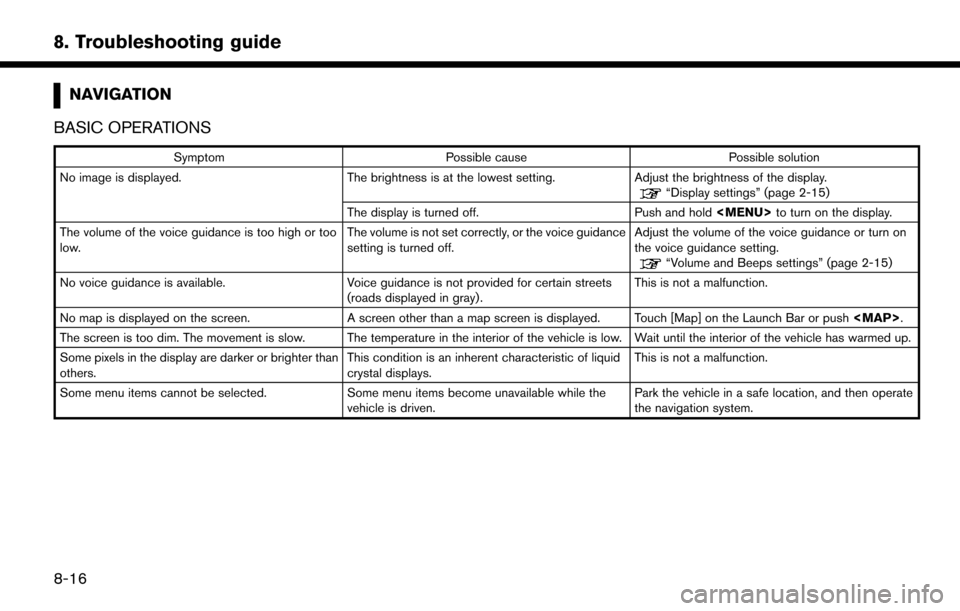
8. Troubleshooting guide
NAVIGATION
BASIC OPERATIONS
Symptom Possible cause Possible solution
No image is displayed. The brightness is at the lowest setting. Adjust the brightness of the display.
“Display settings” (page 2-15)
The display is turned off. Push and hold
Page 187 of 203
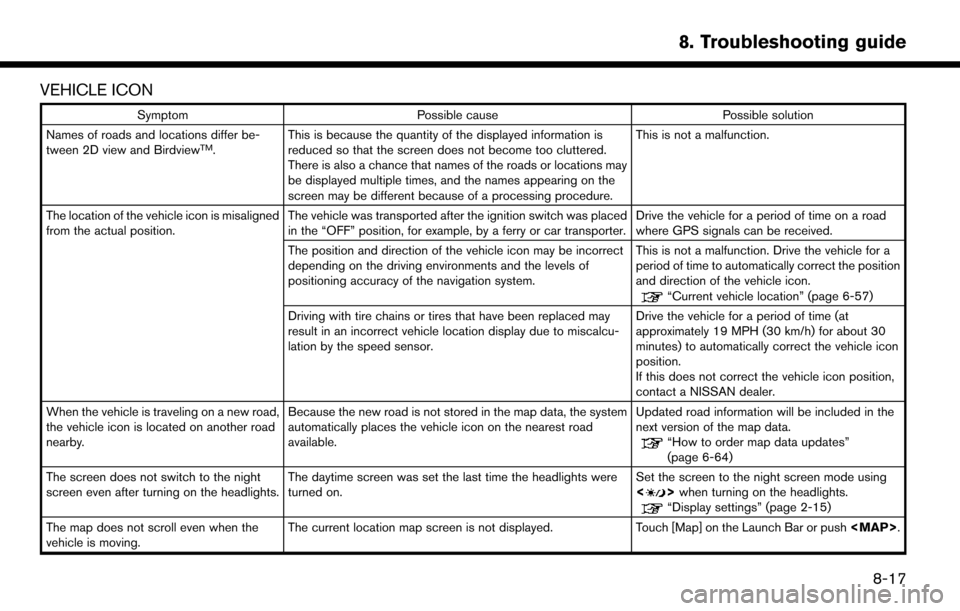
VEHICLE ICON
SymptomPossible cause Possible solution
Names of roads and locations differ be-
tween 2D view and Birdview
TM. This is because the quantity of the displayed information is
reduced so that the screen does not become too cluttered.
There is also a chance that names of the roads or locations may
be displayed multiple times, and the names appearing on the
screen may be different because of a processing procedure. This is not a malfunction.
The location of the vehicle icon is misaligned
from the actual position. The vehicle was transported after the ignition switch was placed
in the “OFF” position, for example, by a ferry or car transporter. Drive the vehicle for a period of time on a road
where GPS signals can be received.
The position and direction of the vehicle icon may be incorrect
depending on the driving environments and the levels of
positioning accuracy of the navigation system. This is not a malfunction. Drive the vehicle for a
period of time to automatically correct the position
and direction of the vehicle icon.
“Current vehicle location” (page 6-57)
Driving with tire chains or tires that have been replaced may
result in an incorrect vehicle location display due to miscalcu-
lation by the speed sensor. Drive the vehicle for a period of time (at
approximately 19 MPH (30 km/h) for about 30
minutes) to automatically correct the vehicle icon
position.
If this does not correct the vehicle icon position,
contact a NISSAN dealer.
When the vehicle is traveling on a new road,
the vehicle icon is located on another road
nearby. Because the new road is not stored in the map data, the system
automatically places the vehicle icon on the nearest road
available. Updated road information will be included in the
next version of the map data.
“How to order map data updates”
(page 6-64)
The screen does not switch to the night
screen even after turning on the headlights. The daytime screen was set the last time the headlights were
turned on. Set the screen to the night screen mode using
<
>
when turning on the headlights.“Display settings” (page 2-15)
The map does not scroll even when the
vehicle is moving. The current location map screen is not displayed.
Touch [Map] on the Launch Bar or push
Page 188 of 203
![NISSAN MURANO 2015 3.G LC2 Kai Navigation Manual 8. Troubleshooting guide
SymptomPossible cause Possible solution
The vehicle icon is not displayed. The current location map screen is not displayed. Touch [Map] on the Launch Bar or push<MAP>.
ROUTE](/img/5/436/w960_436-187.png "NISSAN MURANO 2015 3.G LC2 Kai Navigation Manual 8. Troubleshooting guide
SymptomPossible cause Possible solution
The vehicle icon is not displayed. The current location map screen is not displayed. Touch [Map] on the Launch Bar or push<MAP>.
ROUTE")
8. Troubleshooting guide
SymptomPossible cause Possible solution
The vehicle icon is not displayed. The current location map screen is not displayed. Touch [Map] on the Launch Bar or push
Page 189 of 203
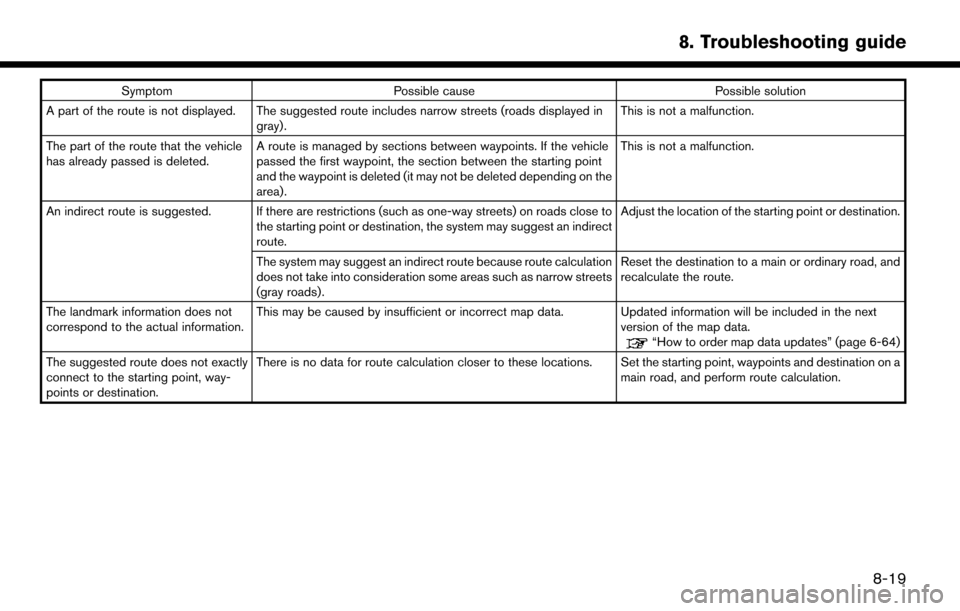
SymptomPossible cause Possible solution
A part of the route is not displayed. The suggested route includes narrow streets (roads displayed in gray). This is not a malfunction.
The part of the route that the vehicle
has already passed is deleted. A route is managed by sections between waypoints. If the vehicle
passed the first waypoint, the section between the starting point
and the waypoint is deleted (it may not be deleted depending on the
area). This is not a malfunction.
An indirect route is suggested. If there are restrictions (such as one-way streets) on roads close to the starting point or destination, the system may suggest an indirect
route. Adjust the location of the starting point or destination.
The system may suggest an indirect route because route calculation
does not take into consideration some areas such as narrow streets
(gray roads). Reset the destination to a main or ordinary road, and
recalculate the route.
The landmark information does not
correspond to the actual information. This may be caused by insufficient or incorrect map data. Updated information will be included in the next
version of the map data.
“How to order map data updates” (page 6-64)
The suggested route does not exactly
connect to the starting point, way-
points or destination. There is no data for route calculation closer to these locations. Set the starting point, waypoints and destination on a
main road, and perform route calculation.
8. Troubleshooting guide
8-19
Page 191 of 203
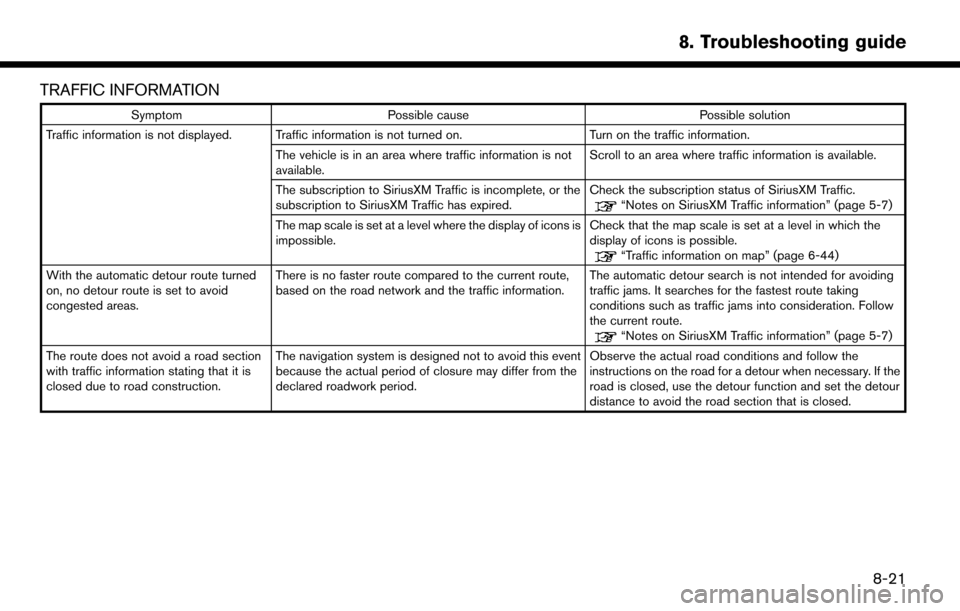
TRAFFIC INFORMATION
SymptomPossible cause Possible solution
Traffic information is not displayed. Traffic information is not turned on. Turn on the traffic information.
The vehicle is in an area where traffic information is not
available. Scroll to an area where traffic information is available.
The subscription to SiriusXM Traffic is incomplete, or the
subscription to SiriusXM Traffic has expired. Check the subscription status of SiriusXM Traffic.
“Notes on SiriusXM Traffic information” (page 5-7)
The map scale is set at a level where the display of icons is
impossible. Check that the map scale is set at a level in which the
display of icons is possible.
“Traffic information on map” (page 6-44)
With the automatic detour route turned
on, no detour route is set to avoid
congested areas. There is no faster route compared to the current route,
based on the road network and the traffic information.
The automatic detour search is not intended for avoiding
traffic jams. It searches for the fastest route taking
conditions such as traffic jams into consideration. Follow
the current route.
“Notes on SiriusXM Traffic information” (page 5-7)
The route does not avoid a road section
with traffic information stating that it is
closed due to road construction. The navigation system is designed not to avoid this event
because the actual period of closure may differ from the
declared roadwork period. Observe the actual road conditions and follow the
instructions on the road for a detour when necessary. If the
road is closed, use the detour function and set the detour
distance to avoid the road section that is closed.
8. Troubleshooting guide
8-21