display NISSAN MURANO 2015 3.G LC2 Kai Navigation Manual
[x] Cancel search | Manufacturer: NISSAN, Model Year: 2015, Model line: MURANO, Model: NISSAN MURANO 2015 3.GPages: 203, PDF Size: 1.12 MB
Page 44 of 203
![NISSAN MURANO 2015 3.G LC2 Kai Navigation Manual 3. Audio system
frequencies and stop at each broadcasting
station/channel for several seconds. Touching
[Scan] again during this period of several
seconds will stop scan tuning and the radio will
rema](/img/5/436/w960_436-43.png "NISSAN MURANO 2015 3.G LC2 Kai Navigation Manual 3. Audio system
frequencies and stop at each broadcasting
station/channel for several seconds. Touching
[Scan] again during this period of several
seconds will stop scan tuning and the radio will
rema")
3. Audio system
frequencies and stop at each broadcasting
station/channel for several seconds. Touching
[Scan] again during this period of several
seconds will stop scan tuning and the radio will
remain tuned to that station/channel.
Pushing<
>/<>will also scan tune the
stations/channels.
Presetting:
Up to 6 for AM, 12 for FM, and 18 for SXM
stations/channels can be registered in the preset
list.
1. Select a radio band (AM, FM or SXM) .
2. Tune to the station/channel you wish to store in the preset list.
3. Touch and hold one of the preset numbers in the preset list.
4. The information such as frequency (AM/FM) , channel number (SXM) , etc. will be dis-
played on the preset list.
INFO:
Tilting <
>/<> on the steering wheel
briefly will scroll up/down the preset stations/
channels.
Radio Menu
Touch [FM Menu], [AM Menu], and [SXM Menu]
on the FM, AM or SXM screen to display the
corresponding screen.
The following items are available.
3-14
Page 45 of 203
![NISSAN MURANO 2015 3.G LC2 Kai Navigation Manual FM/AM menu:
[Scan]Touch to scan tune the stations.“Radio operation” (page 3-13)
[Tag]
(HD Radio broadcasts only) Touch to register the tag information for iTunesŠTagging. If an iPodŠis plugged](/img/5/436/w960_436-44.png "NISSAN MURANO 2015 3.G LC2 Kai Navigation Manual FM/AM menu:
[Scan]Touch to scan tune the stations.“Radio operation” (page 3-13)
[Tag]
(HD Radio broadcasts only) Touch to register the tag information for iTunesŠTagging. If an iPodŠis plugged")
FM/AM menu:
[Scan]Touch to scan tune the stations.“Radio operation” (page 3-13)
[Tag]
(HD Radio broadcasts only) Touch to register the tag information for iTunesŠTagging. If an iPodŠis plugged in after the
registration, the tag information can be stored in an iPodŠand be used to purchase the songs via
iTunesŠ.
[Station List] Touch to display the available station list.
Touch [Update Station List] to update the station list.
[HD Radio Mode]
(HD Radio broadcasts only) When this item is turned on, the analog and digital reception switches automatically. When this
item is turned off, the reception is fixed in the analog mode.
SXM menu:
[Scan]
Touch to scan tune the channels.“Radio operation” (page 3-13)
[Tag] Touch to register the tag information for iTunesŠTagging. If an iPodŠis plugged in after the
registration, the tag information can be stored in an iPodŠand be used to purchase the songs via
iTunesŠ.
[Replay] Up to 30 minutes of the broadcast of the channel that has been tuned in to can be replayed. Touch to select from [
], [], [], [], [] and [].
[Favorite] Touch to display a pop-up screen to register the content of an active channel. On the registration screen, touch [Artist] to save to a list of favorite artist. Touch [Song] to save to a list of favorite
songs. Touch [Cancel] to close the registration screen.
[Categories/Genres] Touch to display the category/genre list.
[Customize Channel List] Touch to customize the channel list. Only the selected channels will be tuned in to when you seek or scan the channels. You can select each item or select [All Select]/[All Clear].
3. Audio system
3-15
Page 46 of 203
![NISSAN MURANO 2015 3.G LC2 Kai Navigation Manual 3. Audio system
[Favorite Artists]Touch to display a list of saved artists. Up to 8 artists can be stored. To turn on alerts for a favorite
artist, select the artist and touch [Turn Alerts ON].
[Favor](/img/5/436/w960_436-45.png "NISSAN MURANO 2015 3.G LC2 Kai Navigation Manual 3. Audio system
[Favorite Artists]Touch to display a list of saved artists. Up to 8 artists can be stored. To turn on alerts for a favorite
artist, select the artist and touch [Turn Alerts ON].
[Favor")
3. Audio system
[Favorite Artists]Touch to display a list of saved artists. Up to 8 artists can be stored. To turn on alerts for a favorite
artist, select the artist and touch [Turn Alerts ON].
[Favorite Songs] Touch to display a list of saved songs. Up to 8 songs can be stored. To turn on alerts for a favorite
song, select the song and touch [Turn Alerts ON].
[Direct Tune] Touch to display the keypad to enter the frequency and directly tune to the channel.
[Artist Alert History] Touch to display the artist alert history.
[Song Alert History] Touch to display the song alert history.
[Alert Settings] [Alerts for Artists]Touch to turn on/off the alert notice.
Favorite artists and songs can be registered to receive an alert notice when a song of the
registered conditions is on the radio. To tune to the respective channel, touch [Tune] on the alert
screen. The alert can be ignored by touching [Cancel].
[Alerts for Songs]
[Alerts on non-Audio
screens]
[Channel Lock Settings] Touch to select or unselect the channel that you wish to lock out. A passcode is required to
change the settings. The default passcode is “1234” and it can be changed from this menu.
INFO:
. SiriusXM services require a subscription
after trial period and are sold separately or
as a package. The satellite service is avail-
able only in the 48 contiguous USA and DC.
SiriusXM satellite service is also available in
Canada; see www.siriusxm.ca.
. It may take some time to receive the
activation signal after the initiation of the
SiriusXM Satellite Radio subscription. After
receiving the activation signal, an available
channel list will automatically be updated in
the radio. Change the position of the ignition switch from “LOCK” to “ACC” to update the
SiriusXM channel list.
3-16
Page 47 of 203
![NISSAN MURANO 2015 3.G LC2 Kai Navigation Manual COMPACT DISC (CD) PLAYER
How to view CD screen*1[CD Menu]:
Touch to display the CD Menu screen.
“CD Menu” (page 3-19)
*2[Source]:
Touch to switch to the source select screen.
“Selecting audio so](/img/5/436/w960_436-46.png "NISSAN MURANO 2015 3.G LC2 Kai Navigation Manual COMPACT DISC (CD) PLAYER
How to view CD screen*1[CD Menu]:
Touch to display the CD Menu screen.
“CD Menu” (page 3-19)
*2[Source]:
Touch to switch to the source select screen.
“Selecting audio so")
COMPACT DISC (CD) PLAYER
How to view CD screen*1[CD Menu]:
Touch to display the CD Menu screen.
“CD Menu” (page 3-19)
*2[Source]:
Touch to switch to the source select screen.
“Selecting audio source” (page 3-11)
*3Track information:
Track information such as the song title,
artist name and album name are displayed.
*4Audio source indicator:
Indicates that CD is currently selected
among other sources.
*5Turn direction indicator:
When a route to the destination is set, the
turn direction and the distance to the next
turn are displayed.
*6Play time and progress bar:
The play time of the track is displayed. The
bar indicates the progress in playing the
current track.
*7CD operation keys:
Touch an icon for operations.
3. Audio system
3-17
Page 48 of 203
![NISSAN MURANO 2015 3.G LC2 Kai Navigation Manual 3. Audio system
[] Each time [] is touched, the
repeat mode changes.
“Changing play mode”
(page 3-18)
[
] Touch once to return to the begin- ning of the current track. Touch again
to select the pr](/img/5/436/w960_436-47.png "NISSAN MURANO 2015 3.G LC2 Kai Navigation Manual 3. Audio system
[] Each time [] is touched, the
repeat mode changes.
“Changing play mode”
(page 3-18)
[
] Touch once to return to the begin- ning of the current track. Touch again
to select the pr")
3. Audio system
[] Each time [] is touched, the
repeat mode changes.
“Changing play mode”
(page 3-18)
[
] Touch once to return to the begin- ning of the current track. Touch again
to select the previous track. Touch
and hold to rewind the current track.
[
] Touch to play the track.
[
] Touch to pause the track.
[
] Touch to select the next tack. Touch and hold to fast-forward the track.
[
] Each time [] is touched, the
random mode changes.
“Changing play mode”
(page 3-18)
*8Track and folder number:
Indicates the track number and the folder
number.
*9Data type indicator:
Indicates the type of data currently playing.
CD player operation
Loading:
Insert a CD into the slot with the label side facing
up. The CD will be guided automatically into the
slot and start playing.
After loading the CD, the CD screen will appear
on the display.
Activation and playing:
The CD mode can be also selected from the
source list with a CD loaded.
“Selecting audio source” (page 3-11)
To play the CD, touch [
].
Touch [
] to pause.
Skipping tracks:
To skip to the previous or the next track, push
<
>/<>, touch []/[] on the CD
screen, or tilt up/down <>/<>on the
steering wheel briefly.
Skipping folders:
Turn
different folders. If no folders are found, tracks
will be skipped. Fast-forwarding/rewinding:
The following operation methods are available for
rewinding and fast-forwarding the track.
Control panel operation:
. Push and hold <
>/<>.
. Touch and hold [
]/[].
Steering wheel switch operation: . Tilt and hold <
>/<>.
Changing play mode:
Repeat mode
Touch [
] on the CD screen to change the
repeat mode as follows.
. CD:
[Disc] œ[1 Track]
. CD with compressed audio files:
[All] ?[1 Track] ?[1 Folder] ?[All]
Random mode
Touch [
] on the CD screen to change the
random mode as follows.
. CD:
(off) œ[Disc]
. CD with compressed audio files:
(off) ?[1 Folder] ?[All] ?(off)
3-18
Page 49 of 203
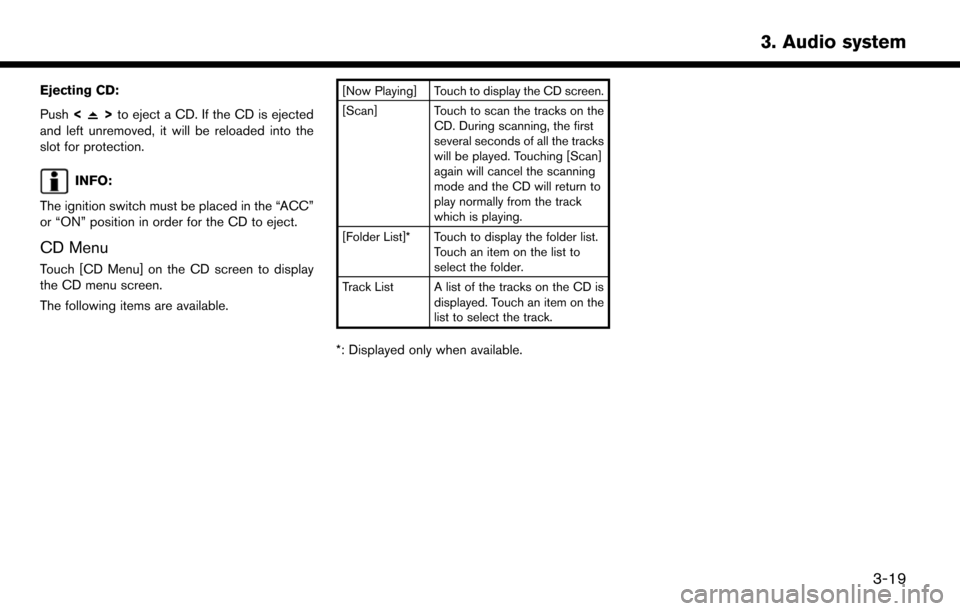
Ejecting CD:
Push<
>to eject a CD. If the CD is ejected
and left unremoved, it will be reloaded into the
slot for protection.
INFO:
The ignition switch must be placed in the “ACC”
or “ON” position in order for the CD to eject.
CD Menu
Touch [CD Menu] on the CD screen to display
the CD menu screen.
The following items are available.
[Now Playing] Touch to display the CD screen.
[Scan] Touch to scan the tracks on the CD. During scanning, the first
several seconds of all the tracks
will be played. Touching [Scan]
again will cancel the scanning
mode and the CD will return to
play normally from the track
which is playing.
[Folder List]* Touch to display the folder list. Touch an item on the list to
select the folder.
Track List A list of the tracks on the CD is displayed. Touch an item on the
list to select the track.
*: Displayed only when available.
3. Audio system
3-19
Page 51 of 203
![NISSAN MURANO 2015 3.G LC2 Kai Navigation Manual How to view USB screen*1[USB Menu]:
Touch to switch to the USB Menu screen.
“USB Menu” (page 3-22)
*2[Source]:
Touch to switch to the source select screen.
“Selecting audio source” (page 3-11)](/img/5/436/w960_436-50.png "NISSAN MURANO 2015 3.G LC2 Kai Navigation Manual How to view USB screen*1[USB Menu]:
Touch to switch to the USB Menu screen.
“USB Menu” (page 3-22)
*2[Source]:
Touch to switch to the source select screen.
“Selecting audio source” (page 3-11)")
How to view USB screen*1[USB Menu]:
Touch to switch to the USB Menu screen.
“USB Menu” (page 3-22)
*2[Source]:
Touch to switch to the source select screen.
“Selecting audio source” (page 3-11)
*3Track information:
Track information such as the song title,
artist name and album name are displayed.
*4Audio source indicator:
Indicates which USB memory device
(USB1 or USB2) is currently selected.
*5Album artwork/Turn direction indicator:
Image of an album artwork is displayed
when available if the setting is turned on.
“USB Menu” (page 3-22)
When the album artwork display setting is
turned off, the turn direction and the
distance to the next turn are displayed when
a route is set with the navigation system.
*6Play time and progress bar:
The play time of the track is displayed. The
bar indicates the progress in playing a track.
*7USB operation keys:
Touch an icon for operations.
3. Audio system
3-21
Page 52 of 203
![NISSAN MURANO 2015 3.G LC2 Kai Navigation Manual 3. Audio system
[] Each time [] is touched, the
repeat mode changes.
“Changing play mode”
(page 3-22)
[
] Touch to return to the beginning of the current track. Touch again to
select the previous](/img/5/436/w960_436-51.png "NISSAN MURANO 2015 3.G LC2 Kai Navigation Manual 3. Audio system
[] Each time [] is touched, the
repeat mode changes.
“Changing play mode”
(page 3-22)
[
] Touch to return to the beginning of the current track. Touch again to
select the previous")
3. Audio system
[] Each time [] is touched, the
repeat mode changes.
“Changing play mode”
(page 3-22)
[
] Touch to return to the beginning of the current track. Touch again to
select the previous track. Touch and
hold to rewind the current track.
[
] Touch to play the track.
[
] Touch to pause the track.
[
] Touch to select the next tack. Touch and hold to fast-forward the track.
[
] Each time [] is touched, the
random mode changes.
“Changing play mode”
(page 3-22)
*8Track and folder number:
Indicates the track number and the folder
number.
*9Data type indicator:
Indicates the type of data currently playing.
USB memory device player operation
Activation and playing:
Connecting the USB memory device into the
port will activate the USB mode.
USB memory device can also be played by
selecting the source on the audio source menu
screen.
“Selecting audio source” (page 3-11)
To pause playing the USB memory device, touch
[
]. To resume playing, touch [].
Skipping tracks:
To skip to the previous or the next track, push
<
>/<>, touch []/[] on the CD
screen, or tilt up/down <>/<>on the
steering wheel briefly.
Skipping folders:
Turn
different folders. If no folders are found, tracks
will be skipped.
Fast-forwarding/rewinding:
To rewind or fast-forward the track, push and
hold <
>/<>, touch and hold []/[],
or tilt and hold <
>/<>on the steering
wheel. Changing play mode:
Repeat mode
Touch [
] on the screen to change the repeat
mode as follows.
. Data without compressed audio files:
[Disc] œ[1 Track]
. Data with compressed audio files:
[All] ?[1 Track] ?[1 Folder] ?[All]
Random mode
Touch [
] on the screen to change the random
mode as follows.
. Data without compressed audio files:
(off) œ[Disc]
. Data with compressed audio files:
(off) ?[1 Folder] ?[All] ?(off)
USB Menu
Touch [USB Menu] on the USB screen to display
the USB Menu screen.
The following items are available.
3-22
Page 53 of 203
![NISSAN MURANO 2015 3.G LC2 Kai Navigation Manual [Now Playing] Touch to display the USB screen.
[Scan] Touch to scan the tracks in theUSB memory device. During
scanning, the first several sec-
onds of all the tracks will be
played. Touching [Scan] a](/img/5/436/w960_436-52.png "NISSAN MURANO 2015 3.G LC2 Kai Navigation Manual [Now Playing] Touch to display the USB screen.
[Scan] Touch to scan the tracks in theUSB memory device. During
scanning, the first several sec-
onds of all the tracks will be
played. Touching [Scan] a")
[Now Playing] Touch to display the USB screen.
[Scan] Touch to scan the tracks in theUSB memory device. During
scanning, the first several sec-
onds of all the tracks will be
played. Touching [Scan] again will
cancel the scanning mode and
the USB memory device will
return to play normally from the
track which is playing.
[Folder List]* Touch to display the folder list. Touch an item on the list to select
the folder.
[Album Art-
work] Touch to turn on/off the album
artwork display on the USB
screen.
Track List A list of the tracks in the USB is displayed. Touch an item on the
list to select the track.
*: Displayed only when available.
iPodŠPLAYER
Connecting iPod
Š
WARNING
Do not connect, disconnect or operate
the USB device while driving. Doing so
can be a distraction. If distracted you
could lose control of your vehicle and
cause an accident or serious injury.
CAUTION
. Do not force the USB device into the
USB port. Inserting the USB device
tilted or up-side-down into the port
may damage the port. Make sure that
the USB device is connected correctly
into the USB port.
. Do not grab the USB port cover (if so
equipped) when pulling the USB
device out of the port. This could
damage the port and the cover.
. Do not leave the USB cable in a place
where it can be pulled unintention-
ally. Pulling the cable may damage
the port. Connect the iPod
Što the USB port(s) .“USB (Universal Serial Bus) Connection
Ports and AUX (auxiliary) input jack”
(page 2-5)
The battery of the iPod
Šwill be charged while the
device is connected to the vehicle if the iPodŠ
supports charging via a USB connection.
Depending on the model and firmware version of
the iPod
Š, the display on the iPodŠshows a
NISSAN or Accessory Attached screen when
the connection is completed. When the iPod
Šis
connected to the vehicle, the iPodŠmusic library
can only be operated by the vehicle audio
controls.
Compatibility:
Made for
. iPod
Š(5th generation)
. iPod touch
Š(4th generation)
. iPod touch
Š(3rd generation)
. iPod touch
Š(2nd generation)
. iPod touch
Š(1st generation)
. iPod touch
Š
.iPod classicŠ(80G/160GB)
3. Audio system
3-23
Page 55 of 203
![NISSAN MURANO 2015 3.G LC2 Kai Navigation Manual How to view iPodŠscreen*1[iPod Menu]:
Touch to display the iPodŠMenu screen.“iPodŠMenu” (page 3-26)
*2[Source]:
Touch to switch to the source list screen.
“Selecting audio source” (page](/img/5/436/w960_436-54.png "NISSAN MURANO 2015 3.G LC2 Kai Navigation Manual How to view iPodŠscreen*1[iPod Menu]:
Touch to display the iPodŠMenu screen.“iPodŠMenu” (page 3-26)
*2[Source]:
Touch to switch to the source list screen.
“Selecting audio source” (page")
How to view iPodŠscreen*1[iPod Menu]:
Touch to display the iPodŠMenu screen.“iPodŠMenu” (page 3-26)
*2[Source]:
Touch to switch to the source list screen.
“Selecting audio source” (page 3-11)
*3Track information:
Track information such as the song title,
artist name and album name are displayed.
*4Audio source indicator:
Indicates that iPodŠis currently selected
among other sources.
*5Album artwork/Turn direction indicator:
Image of an album artwork is displayed
when available if the setting is turned on.
“iPodŠMenu” (page 3-26)
When the album artwork display setting is
turned off, the turn direction and the
distance to the next turn are displayed when
a route is set with the navigation system.
*6Play time and progress bar:
The play time of the track is displayed. The
progress bar indicates the progress in
playing the current track.
*7iPodŠoperation keys:
Touch an icon for operations.
3. Audio system
3-25