display NISSAN MURANO 2015 3.G LC2 Kai Navigation Manual
[x] Cancel search | Manufacturer: NISSAN, Model Year: 2015, Model line: MURANO, Model: NISSAN MURANO 2015 3.GPages: 203, PDF Size: 1.12 MB
Page 56 of 203
![NISSAN MURANO 2015 3.G LC2 Kai Navigation Manual 3. Audio system
[] Each time [] is touched, the
mode changes.
“Changing play mode”
(page 3-26)
[
] Touch to return to the beginning of the current track. Touch again to
select the previous track.](/img/5/436/w960_436-55.png "NISSAN MURANO 2015 3.G LC2 Kai Navigation Manual 3. Audio system
[] Each time [] is touched, the
mode changes.
“Changing play mode”
(page 3-26)
[
] Touch to return to the beginning of the current track. Touch again to
select the previous track.")
3. Audio system
[] Each time [] is touched, the
mode changes.
“Changing play mode”
(page 3-26)
[
] Touch to return to the beginning of the current track. Touch again to
select the previous track. Touch and
hold to rewind the current track.
[
] Touch to play the track.
[
] Touch to pause the track.
[
] Touch to select the next tack. Touch and hold to fast-forward the track.
[
] Each time [] is touched, the
mode changes.
“Changing play mode”
(page 3-26)
*8Track number:
Indicates the track number and the total
number of tracks.
iPodŠplayer operation
Activation and playing:
Connecting iPod
Što the vehicle via USB cable
will activate the iPodŠmode.
The iPodŠcan also be played by selecting the
source on the audio source menu screen.
“Selecting audio source” (page 3-11) To play the iPod
Štouch []. Touch []to
pause.
Selecting search method:
A list of search methods is displayed in the iPod
Š
menu. Touch and select an item to play the iPodŠ
in your preferred settings.
Skipping tracks:
Push <
>/<>, touch []/[] on the
screen, or tilt up/down <>/<>on the
steering wheel briefly to skip to the next or the
previous track.
Turning
track is playing will also skip the tracks.
Skipping items:
When a list is displayed, turn
Fast-forwarding/rewinding:
To fast-forward or rewind the track, push and
hold <
>/<>, touch and hold []/[],
or tilt and hold <>/<>on the steering
wheel. Changing play mode:
Repeat mode
Touch [
] on the screen to change the repeat
mode as follows.
(off) ?[One] ?[All] ?(off)
Random mode
Touch [
] on the screen to change the random
mode as follows.
(off) ?[Songs] ?[Albums] ?(off)
INFO:
Even when iPod
Šor iPhoneŠare inserted into
both of the two USB ports, the system recog-
nizes only one connected iPod
Šor iPhoneŠat a
time.
iPodŠMenu
Touch [iPod Menu] on the iPodŠscreen to
display the iPodŠmenu screen.
The following items are available.
3-26
Page 57 of 203
![NISSAN MURANO 2015 3.G LC2 Kai Navigation Manual [Now Play-
ing]Touch to display the iPodŠscreen.
[Current
List] Touch to display the menu list
which was displayed most recently.
[Album Art-
work] Touch to turn on/off the album
artwork display on](/img/5/436/w960_436-56.png "NISSAN MURANO 2015 3.G LC2 Kai Navigation Manual [Now Play-
ing]Touch to display the iPodŠscreen.
[Current
List] Touch to display the menu list
which was displayed most recently.
[Album Art-
work] Touch to turn on/off the album
artwork display on")
[Now Play-
ing]Touch to display the iPodŠscreen.
[Current
List] Touch to display the menu list
which was displayed most recently.
[Album Art-
work] Touch to turn on/off the album
artwork display on the iPod
Š
screen.
[Playlists] Touch to display the playlist and touch an item on the list to select
the playlist.
[Artists] Touch to display the artist list and touch an item on the list to select
the artist.
[Albums] Touch to display the album list and touch an item on the list to select
the album.
[Songs] Touch to display the song list and touch an item on the list to select
the song.
[Podcasts] Touch to display the podcast list and touch an item on the list to
select the podcast.
[Genres] Touch to display the genre list and touch an item on the list to select
the genre.
[Compo-
sers] Touch to display the composer list
and touch an item on the list to
select the composer. [Audio-
books]
Touch to display the audiobook list
and touch an item on the list to
select the audiobook.
INFO:
On the list screen, touch and hold [
]or[]
on the right side of the screen to jump by letter
for faster scrolling.
BLUETOOTHŠAUDIO
Your vehicle is equipped with BluetoothŠAudio.
If you have a compatible BluetoothŠdevice with
streaming audio (A2DP profile) , you can set up a
wireless connection between your Bluetooth
Š
device and the in-vehicle audio system. This
connection allows you to listen to the audio from
the Bluetooth
Šdevice using your vehicle speak-
ers. It also may allow basic control of the device
for playing and skipping audio files using the
AVRCP Bluetooth
Šprofile. Not all BluetoothŠ
devices have the same level of controls for
AVRCP. Please consult the manual for your
Bluetooth
Šdevice for more details.
Wireless LAN (Wi-Fi) and the BluetoothŠfunc-
tions share the same frequency band (2.4 GHz) .
Using the Bluetooth
Šand the wireless LAN
functions at the same time may slow down or
disconnect the communication and cause un-
desired noise. It is recommended that you turn off the wireless LAN (Wi-Fi) when using the
Bluetooth
Šfunctions.
Connecting BluetoothŠaudio device
A BluetoothŠaudio device must be connected to
the vehicle before operation.
“Connecting BluetoothŠdevice”
(page 2-17)
3. Audio system
3-27
Page 58 of 203
![NISSAN MURANO 2015 3.G LC2 Kai Navigation Manual 3. Audio system
How to view BluetoothŠaudio screen*1[BT Menu]:
Touch to display the BluetoothŠaudio menu
screen.
“BT Menu” (page 3-30)
*2[Source]:
Touch to switch to the source list screen.
â€](/img/5/436/w960_436-57.png "NISSAN MURANO 2015 3.G LC2 Kai Navigation Manual 3. Audio system
How to view BluetoothŠaudio screen*1[BT Menu]:
Touch to display the BluetoothŠaudio menu
screen.
“BT Menu” (page 3-30)
*2[Source]:
Touch to switch to the source list screen.
â€")
3. Audio system
How to view BluetoothŠaudio screen*1[BT Menu]:
Touch to display the BluetoothŠaudio menu
screen.
“BT Menu” (page 3-30)
*2[Source]:
Touch to switch to the source list screen.
“Selecting audio source” (page 3-11)
*3Track information:
Track information such as the song title,
artist name and album name are displayed.
*4Audio source indicator:
Indicates that BluetoothŠaudio is currently
selected among other sources.
*5Turn direction indicator:
When a route to the destination is set, the
turn direction and the distance to the next
turn are displayed.
*6Play time and Progress bar:
The play time of the track is displayed. The
Progress bar indicates the progress in
playing the current track.
*7BluetoothŠaudio operation keys:
Touch an icon for operations.
3-28
Page 59 of 203
![NISSAN MURANO 2015 3.G LC2 Kai Navigation Manual []Each time [] is touched,
the repeat mode changes.
“Changing play mode”
(page 3-29)
[
] Touch to return to the be-
ginning of the current track.
Touch again to select the
previous track. Touch an](/img/5/436/w960_436-58.png "NISSAN MURANO 2015 3.G LC2 Kai Navigation Manual []Each time [] is touched,
the repeat mode changes.
“Changing play mode”
(page 3-29)
[
] Touch to return to the be-
ginning of the current track.
Touch again to select the
previous track. Touch an")
[]Each time [] is touched,
the repeat mode changes.
“Changing play mode”
(page 3-29)
[
] Touch to return to the be-
ginning of the current track.
Touch again to select the
previous track. Touch and
hold to rewind the current
track.
[
/] Touch to play and pause the track.
[
] Touch to select the next
track. Touch and hold to
fast-forward the track.
[
] Each time [] is touched,
the random mode changes.
“Changing play mode”
(page 3-29)
*8Track number and device name:
Indicates the track number and the selected
Bluetooth
Šdevice name.
INFO:
Depending on the audio device that is connected
to the vehicle, track information may not be
displayed.
BluetoothŠaudio operation
The ability to pause, change tracks, fast forward,
rewind, randomize and repeat music may be
different between devices. Some or all of these
functions may not be supported on each device.
INFO:
Depending on the Bluetooth
Šaudio device that
is connected, it may not be possible to perform
audio operations or a time lag may occur before
music is played back.
Activation and playing:
A Bluetooth
Šaudio device can be selected by
selecting the source on the audio source menu
screen.
“Selecting audio source” (page 3-11)
To pause playing the BluetoothŠaudio, touch
[/]. Touch again to resume playing.
Skipping tracks:
Push <
>/<>, touch []/[] on the
BluetoothŠaudio screen, or tilt up/down <
>/<>
on the steering wheel briefly to
skip to the next or the previous track.
While a track is playing, turning
Skipping folders:
Turn
different folders. If no folders are found, tracks
will be skipped.
Fast-forwarding/rewinding:
To fast-forward or rewind the track, push and
hold <
>/<>, touch and hold []/[],
or tilt and hold <
>/<>on the steering
wheel.
Changing play mode:
Repeat mode
Touch [
] on the screen to change the repeat
mode as follows.
(off) ?[All] ?[1 Track]? (off)
Random mode
Touch [
] on the screen to change the random
mode as follows.
[All] œ(off)
3. Audio system
3-29
Page 60 of 203
![NISSAN MURANO 2015 3.G LC2 Kai Navigation Manual 3. Audio system
BT Menu
Touch [BT Menu] on the BluetoothŠaudio
screen to display the BluetoothŠaudio menu
screen.
The following items are available.
[Now Play-
ing] Touch to display the Bluetooth](/img/5/436/w960_436-59.png "NISSAN MURANO 2015 3.G LC2 Kai Navigation Manual 3. Audio system
BT Menu
Touch [BT Menu] on the BluetoothŠaudio
screen to display the BluetoothŠaudio menu
screen.
The following items are available.
[Now Play-
ing] Touch to display the Bluetooth")
3. Audio system
BT Menu
Touch [BT Menu] on the BluetoothŠaudio
screen to display the BluetoothŠaudio menu
screen.
The following items are available.
[Now Play-
ing] Touch to display the BluetoothŠ
audio screen.
[Bluetooth
Settings] Touch to display the BluetoothŠ
settings screen.“BluetoothŠsettings”
(page 2-17)
[Folder List]* Touch to display the folder list. Touch an item on the list to select
the folder.
Track List A list of the tracks is displayed. Touch an item on the list to select
the track.
*: Displayed only when available.
AUXILIARY (AUX) DEVICES
Connecting auxiliary devices
The auxiliary input jack is located in the media
pocket.
“USB (Universal Serial Bus) Connection
Ports and AUX (auxiliary) input jack”
(page 2-5)
The auxiliary input jack accepts any standard
analog audio input such as from a portable
cassette player, CD player or MP3 player.
INFO:
Insert a 1/4 in (3.5 mm) stereo mini plug in the
audio input jack. If a cable with a mono plug is
used, the audio output may not function normally.
How to view AUX screen
*1[Source]:
Touch to switch to the source list screen.
“Selecting audio source” (page 3-11)
*2Audio source indicator:
Indicates that an AUX device is currently
selected among other sources.
*3Turn direction indicator:
When a route to the destination is set, the
turn direction and the distance to the next
turn are displayed.
*4Volume Setting keys:
Touch one of the keys to select the sound
output gain from [Low], [Medium] and
[High].
3-30
Page 62 of 203
3. Audio system
AUDIO ADJUSTMENTS WHEN MAP,
AUDIO OR HOME MENU IS DIS-
PLAYED
When Map, Audio or HOME MENU screen is
displayed, some audio settings can be adjusted
with
selected setting item will change as follows.
[Bass] ?[Treble] ?[Balance] ?[Fade]
Rotate
the level of the selected setting item.
CD/USB MEMORY DEVICE
CARE AND CLEANING
CD
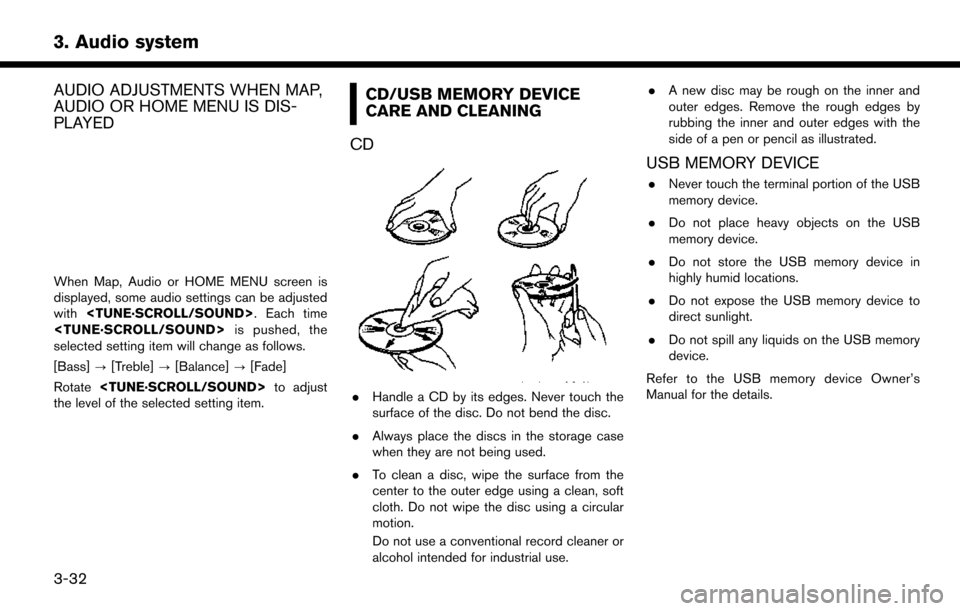
. Handle a CD by its edges. Never touch the
surface of the disc. Do not bend the disc.
. Always place the discs in the storage case
when they are not being used.
. To clean a disc, wipe the surface from the
center to the outer edge using a clean, soft
cloth. Do not wipe the disc using a circular
motion.
Do not use a conventional record cleaner or
alcohol intended for industrial use. .
A new disc may be rough on the inner and
outer edges. Remove the rough edges by
rubbing the inner and outer edges with the
side of a pen or pencil as illustrated.
USB MEMORY DEVICE
.Never touch the terminal portion of the USB
memory device.
. Do not place heavy objects on the USB
memory device.
. Do not store the USB memory device in
highly humid locations.
. Do not expose the USB memory device to
direct sunlight.
. Do not spill any liquids on the USB memory
device.
Refer to the USB memory device Owner’s
Manual for the details.
3-32
Page 65 of 203
of time.
. Do not place the cellular phone in an area
surrounded by metal or far away from the in-
vehicle phone module to prevent tone quality
degradation and wireless connection disrup-
tion.
. While a cellular phone is connected through
the Bluetooth
Šwireless connection, the
battery power of the cellular phone may
discharge quicker than usual.
. Visit the web site below for troubleshooting
help if the Bluetooth
ŠHands-Free Phone
System seems to be malfunctioning.
www.nissanusa.com/bluetooth/
. Some cellular phones or other devices may
cause interference or a buzzing noise to
come from the audio system speakers.
Storing the device in a different location
may reduce or eliminate the noise.
. Refer to the cellular phone Owner’s Manual
regarding the telephone pairing procedure
specific to your phone, battery charging,
cellular phone antenna, etc.
. The antenna display on the monitor may not
coincide with the antenna display of some
cellular phones. .
The battery display on the monitor may not
coincide with the battery display of some
cellular phones.
. Keep the interior of the vehicle as quiet as
possible to hear the caller’s voice clearly as
well as to minimize its echoes.
. If reception between callers is unclear,
adjusting the incoming or outgoing call
volume may improve the clarity.
. The microphone is located near the map
light.INDICATORS
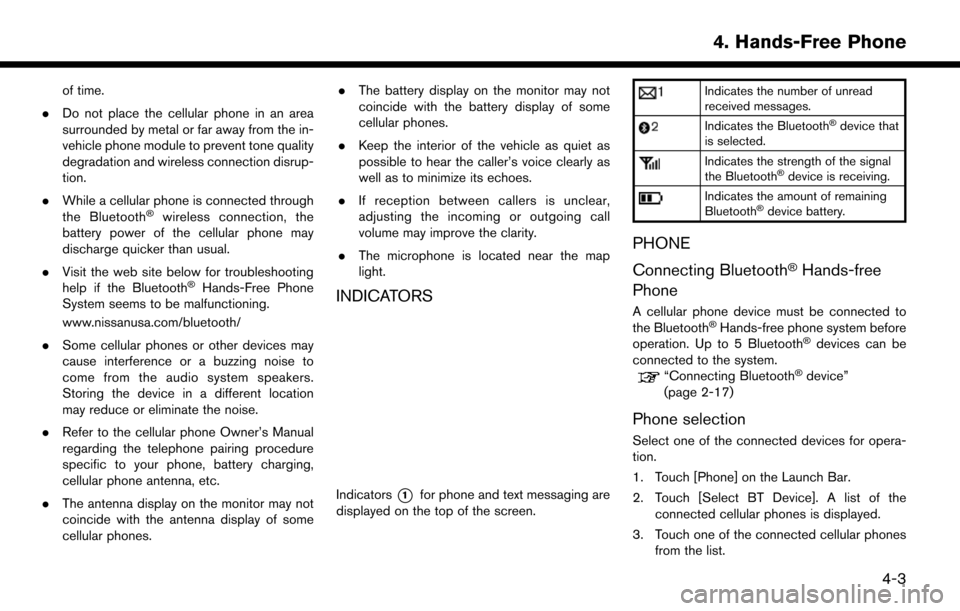
Indicators*1for phone and text messaging are
displayed on the top of the screen.
Indicates the number of unread
received messages.
Indicates the BluetoothŠdevice that
is selected.
Indicates the strength of the signal
the BluetoothŠdevice is receiving.
Indicates the amount of remaining
BluetoothŠdevice battery.
PHONE
Connecting Bluetooth
ŠHands-free
Phone
A cellular phone device must be connected to
the BluetoothŠHands-free phone system before
operation. Up to 5 BluetoothŠdevices can be
connected to the system.
“Connecting BluetoothŠdevice”
(page 2-17)
Phone selection
Select one of the connected devices for opera-
tion.
1. Touch [Phone] on the Launch Bar.
2. Touch [Select BT Device]. A list of the connected cellular phones is displayed.
3. Touch one of the connected cellular phones from the list.
4. Hands-Free Phone
4-3
Page 66 of 203
![NISSAN MURANO 2015 3.G LC2 Kai Navigation Manual 4. Hands-Free Phone
4. Touch [Connect].
INFO:
Touch [Edit] to change the device name.
Touch [Delete] to delete the device from the
device list.
5. When the device selection is successful, a message on](/img/5/436/w960_436-65.png "NISSAN MURANO 2015 3.G LC2 Kai Navigation Manual 4. Hands-Free Phone
4. Touch [Connect].
INFO:
Touch [Edit] to change the device name.
Touch [Delete] to delete the device from the
device list.
5. When the device selection is successful, a message on")
4. Hands-Free Phone
4. Touch [Connect].
INFO:
Touch [Edit] to change the device name.
Touch [Delete] to delete the device from the
device list.
5. When the device selection is successful, a message on the touch screen display
indicates that the cellular phone was se-
lected.
INFO:
To select a phone, Bluetooth
Šof the phone
device needs to be turned on.
Making a call
1. Touch [Phone] on the Launch Bar.
2. Select one of the following methods to make
a call.
*1[Quick Dial] :
Select a telephone number from a list of
personally selected numbers.
“Quick Dial” (page 4-11)
*2[Phonebook] :
Select a person and the phone number you
wish to call from the phonebook.
The telephone number must be transferred
to the phonebook from the cellular phone
prior to using this method.
“Phone settings” (page 4-9)
*3[Call History] :
Select a telephone number from recent
incoming, outgoing or missed calls.
*4[Dial Number] :
Enter the phone number manually using the
keypad displayed on the screen and touch
[OK].
“How to input letters and numbers”
(page 2-10)
3. Dialing will start and the screen will change to the call in progress screen.
Receiving a call
When you receive a phone call, a notification
message is displayed on the touch screen
display with a ring tone.
4-4
Page 67 of 203
![NISSAN MURANO 2015 3.G LC2 Kai Navigation Manual Taking a call:
To answer the call, take one of the following
actions.. Push <
>on the steering wheel.
. Touch [Answer].
Rejecting a call:
To reject the call, touch [Decline].
Holding a call:
To hold t](/img/5/436/w960_436-66.png "NISSAN MURANO 2015 3.G LC2 Kai Navigation Manual Taking a call:
To answer the call, take one of the following
actions.. Push <
>on the steering wheel.
. Touch [Answer].
Rejecting a call:
To reject the call, touch [Decline].
Holding a call:
To hold t")
Taking a call:
To answer the call, take one of the following
actions.. Push <
>on the steering wheel.
. Touch [Answer].
Rejecting a call:
To reject the call, touch [Decline].
Holding a call:
To hold the call, touch [Hold Call].
INFO:
Operation for answering and rejecting a received
phone call is also available on the vehicle
information display.
“Receiving a call” (page 5-9)
During a call
The screen as illustrated will appear during a call.
When another phone call is received during a
call, the screen as illustrated will appear.
There are some options available during a call.
Touch one of the following displayed keys on the
screen to take action.
Available item Action
[Hang up] Hang up the line you are currently on and you will be
connected to the line that is on
hold.
[Use Handset] Transfer the call to the cellular phone.
[Mute]/[Cancel
Mute] When muted, your voice will
not be heard by the person on
the other end of the line.
[Dial Number] Using the touch tone, send digits to the connected party
for using services such as
voicemail.
[Switch Call]* Answer another incoming call. The person you are talking to
will be placed on hold. Push
once more to speak to the
person on hold again.
*: Available when a call is received while on the
line with another person. The availability of this
function depends on the phone device.
4. Hands-Free Phone
4-5
Page 68 of 203
4. Hands-Free Phone
INFO:
To adjust the person’s voice to be louder or
quieter, push <
+>or<-> on the
steering wheel or turn
on the phone.
HANDS-FREE TEXT MESSAGING
ASSISTANT
WARNING
Use the text messaging feature after
parking your vehicle in a safe location.
If you have to use the feature while
driving, exercise extreme caution at all
times so full attention may be given to
vehicle operation.
CAUTION
This feature is disabled if the connected
device does not support it. See the
phone’s Owner’s Manual for details and
instructions.
Laws in some jurisdictions may restrict the use of
some of the applications and features, such as
social networking and texting. Check local
regulations for any requirements. Laws in some jurisdictions may restrict the use of
“Text-to-Speech.” Check local regulations be-
fore using this feature.
The system allows for the sending and receiving
of text messages through the vehicle interface.
Receiving a message
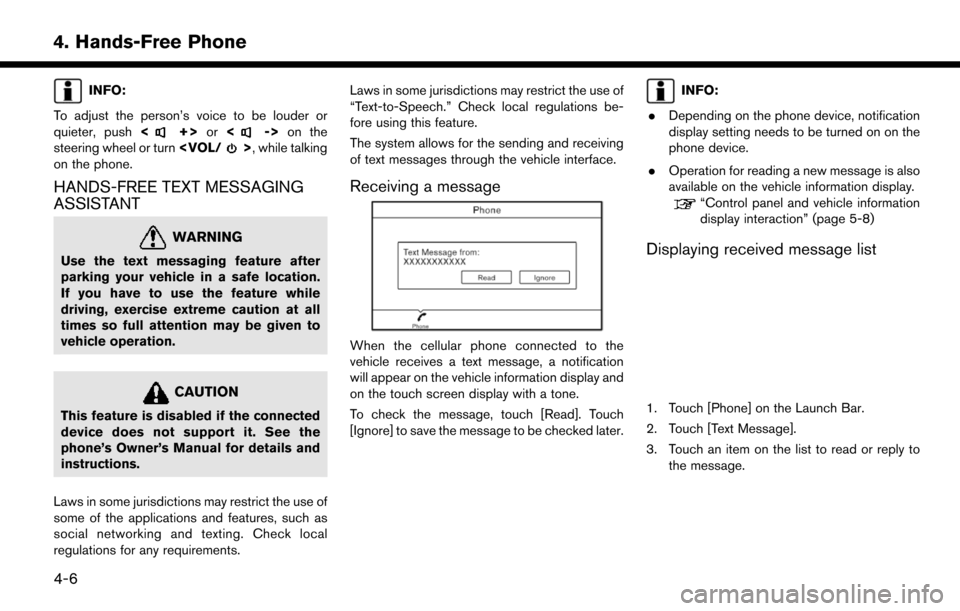
When the cellular phone connected to the
vehicle receives a text message, a notification
will appear on the vehicle information display and
on the touch screen display with a tone.
To check the message, touch [Read]. Touch
[Ignore] to save the message to be checked later.
INFO:
. Depending on the phone device, notification
display setting needs to be turned on on the
phone device.
. Operation for reading a new message is also
available on the vehicle information display.
“Control panel and vehicle information
display interaction” (page 5-8)
Displaying received message list
1. Touch [Phone] on the Launch Bar.
2. Touch [Text Message].
3. Touch an item on the list to read or reply to
the message.
4-6