remote control NISSAN MURANO 2019 Owner´s Manual
[x] Cancel search | Manufacturer: NISSAN, Model Year: 2019, Model line: MURANO, Model: NISSAN MURANO 2019Pages: 507, PDF Size: 6.1 MB
Page 4 of 507
∙ ALWAYS provide information aboutthe proper use of vehicle safety fea-
tures to all occupants of the vehicle.
∙ ALWAYS review this Owner’s Manual for important safety information.
For descriptions specified for all-wheel
drive models, an AWDmark is placed at the
beginning of the applicable
sections/items.
As with other vehicles with features for
off-road use, failure to operate all-wheel
drive models correctly may result in loss
of control or an accident. For additional
information, refer to “Driving safety pre-
cautions” in the “Starting and driving”
section of this manual.
ON-PAVEMENT AND OFF-ROAD
DRIVING
This vehicle will handle and maneuver
differently from an ordinary passen-
ger car because it has a higher center
of gravity for off-road use. As with
other vehicles with features of this
type, failure to operate this vehicle
correctly may result in loss of control
or an accident.
For additional information, refer to
“On-pavement and off-road driving
precautions”, “Avoiding collision and
rollover” and “Driving safety precau-
tions” in the “Starting and driving”
section of this manual.
MODIFICATION OF YOUR VEHICLE
This vehicle should not be modified.
Modification could affect its
performance, safety, emissions or du-
rability and may even violate govern-
mental regulations. In addition, dam-
age or performance problems
resulting from modifications may not
be covered under NISSAN warranties.
WARNING
Installing an af termarket On-Board Di-
agnostic (OBD) plug-in device that uses
the port during normal driving, for ex-
ample remote insurance company
monitoring, remote vehicle diagnostics,
telematics or engine reprogramming,
may cause interference or damage to
vehicle systems. We do not recommend
or endorse the use of any af termarket
OBD plug-in devices, unless specifically
approved by NISSAN. The vehicle war-
ranty may not cover damage caused by
any af termarket plug-in device.
Page 101 of 507
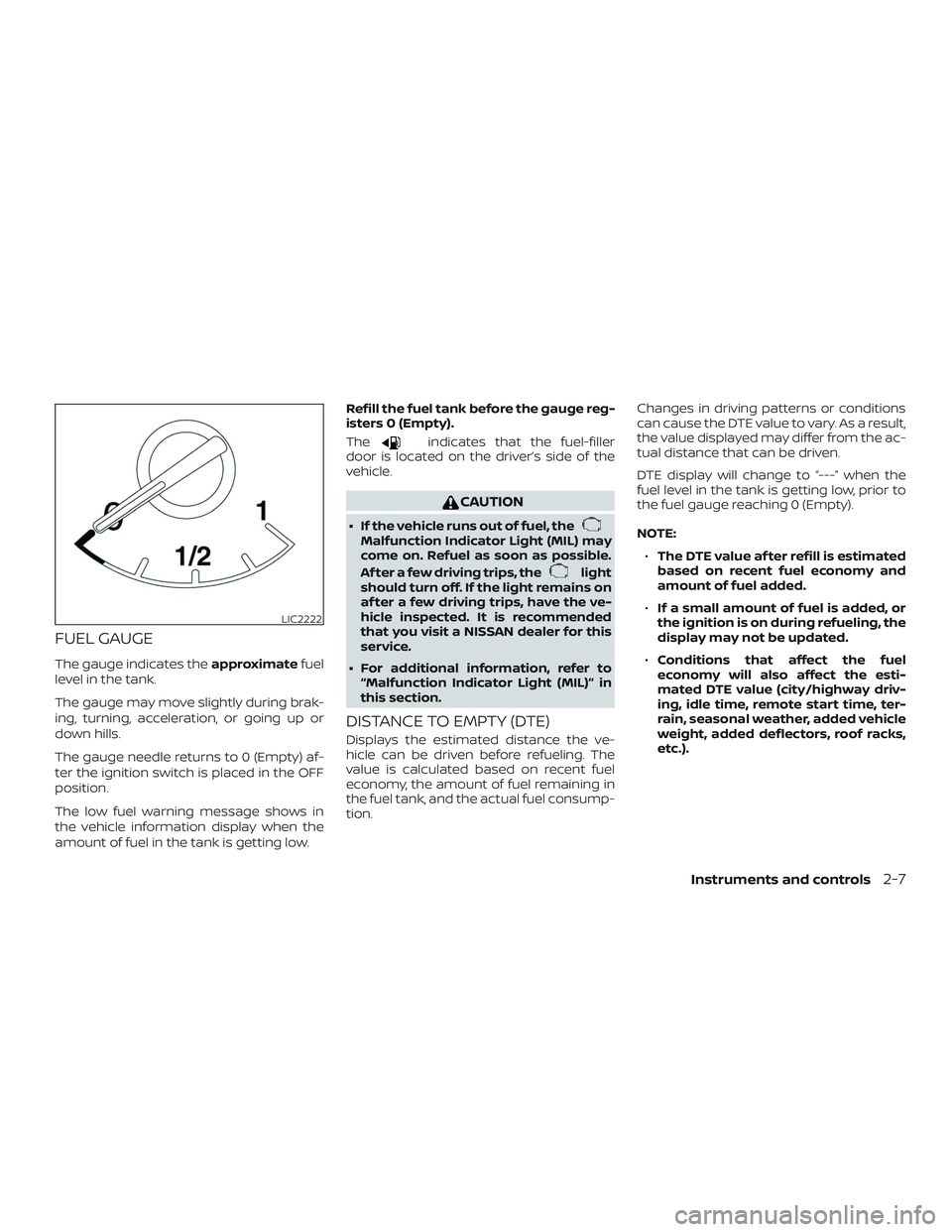
FUEL GAUGE
The gauge indicates theapproximatefuel
level in the tank.
The gauge may move slightly during brak-
ing, turning, acceleration, or going up or
down hills.
The gauge needle returns to 0 (Empty) af-
ter the ignition switch is placed in the OFF
position.
The low fuel warning message shows in
the vehicle information display when the
amount of fuel in the tank is getting low. Refill the fuel tank before the gauge reg-
isters 0 (Empty).
The
indicates that the fuel-filler
door is located on the driver’s side of the
vehicle.
CAUTION
∙ If the vehicle runs out of fuel, theMalfunction Indicator Light (MIL) may
come on. Refuel as soon as possible.
Af ter a few driving trips, the
light
should turn off. If the light remains on
af ter a few driving trips, have the ve-
hicle inspected. It is recommended
that you visit a NISSAN dealer for this
service.
∙ For additional information, refer to “Malfunction Indicator Light (MIL)” in
this section.
DISTANCE TO EMPTY (DTE)
Displays the estimated distance the ve-
hicle can be driven before refueling. The
value is calculated based on recent fuel
economy, the amount of fuel remaining in
the fuel tank, and the actual fuel consump-
tion. Changes in driving patterns or conditions
can cause the DTE value to vary. As a result,
the value displayed may differ from the ac-
tual distance that can be driven.
DTE display will change to “---” when the
fuel level in the tank is getting low, prior to
the fuel gauge reaching 0 (Empty).
NOTE:
∙ The DTE value af ter refill is estimated
based on recent fuel economy and
amount of fuel added.
∙ If a small amount of fuel is added, or
the ignition is on during refueling, the
display may not be updated.
∙ Conditions that affect the fuel
economy will also affect the esti-
mated DTE value (city/highway driv-
ing, idle time, remote start time, ter-
rain, seasonal weather, added vehicle
weight, added deflectors, roof racks,
etc.).
LIC2222
Instruments and controls2-7
Page 116 of 507
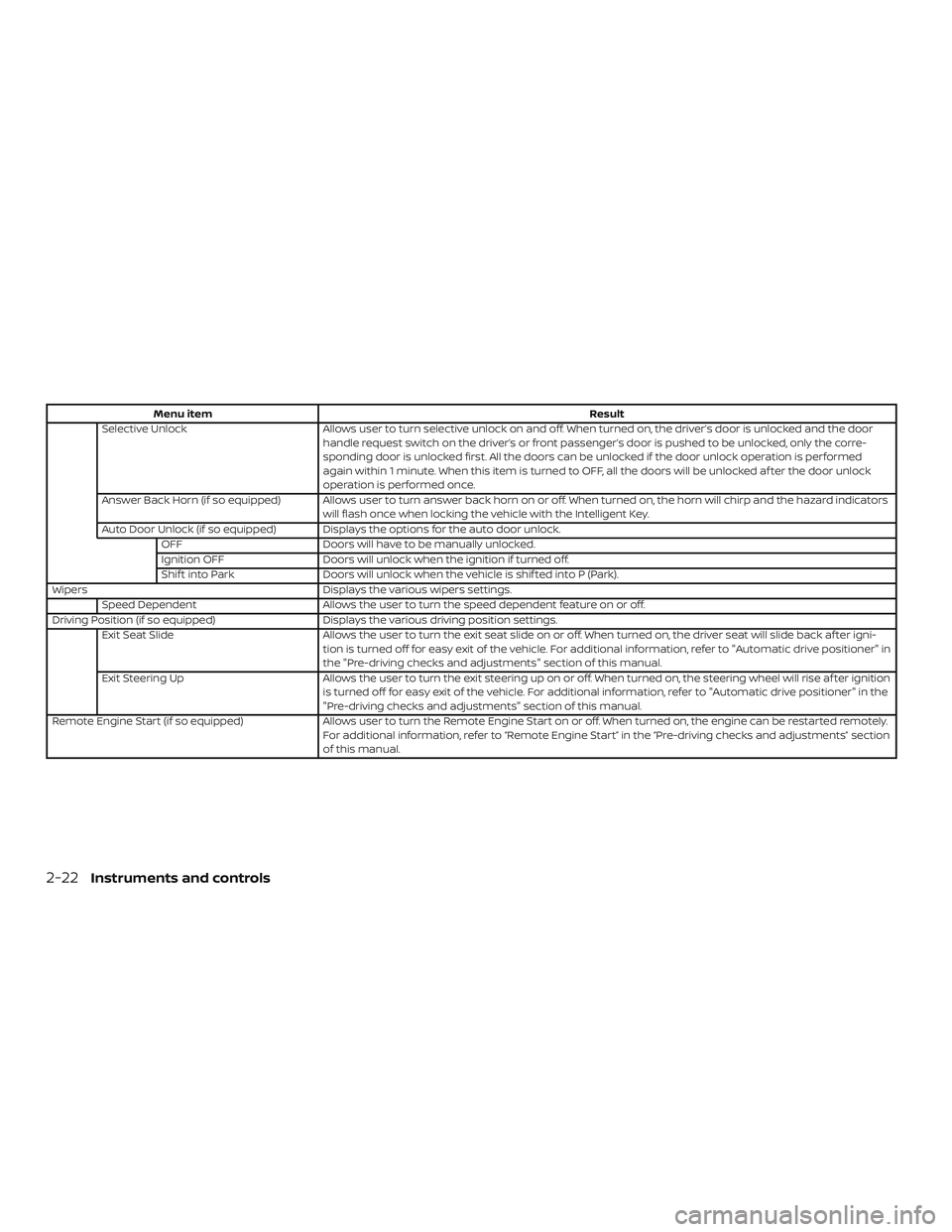
Menu itemResult
Selective Unlock Allows user to turn selective unlock on and off. When turned on, the driver’s door is unlocked and the door
handle request switch on the driver’s or front passenger’s door is pushed to be unlocked, only the corre-
sponding door is unlocked first. All the doors can be unlocked if the door unlock operation is performed
again within 1 minute. When this item is turned to OFF, all the doors will be unlocked af ter the door unlock
operation is performed once.
Answer Back Horn (if so equipped) Allows user to turn answer back horn on or off. When turned on, the horn will chirp and the hazard indicators will flash once when locking the vehicle with the Intelligent Key.
Auto Door Unlock (if so equipped) Displays the options for the auto door unlock. OFF Doors will have to be manually unlocked.
Ignition OFF Doors will unlock when the ignition if turned off.
Shif t into Park Doors will unlock when the vehicle is shif ted into P (Park).
Wipers Displays the various wipers settings.
Speed Dependent Allows the user to turn the speed dependent feature on or off.
Driving Position (if so equipped) Displays the various driving position settings.
Exit Seat Slide Allows the user to turn the exit seat slide on or off. When turned on, the driver seat will slide back af ter igni-
tion is turned off for easy exit of the vehicle. For additional information, refer to "Automatic drive positioner" in
the "Pre-driving checks and adjustments" section of this manual.
Exit Steering Up Allows the user to turn the exit steering up on or off. When turned on, the steering wheel will rise af ter ignition
is turned off for easy exit of the vehicle. For additional information, refer to "Automatic drive positioner" in the
"Pre-driving checks and adjustments" section of this manual.
Remote Engine Start (if so equipped) Allows user to turn the Remote Engine Start on or off. When turned on, the engine can be restarted remotely.
For additional information, refer to “Remote Engine Start” in the “Pre-driving checks and adjustments” section
of this manual.
2-22Instruments and controls
Page 122 of 507
This indicator also appears when the ve-
hicle has been started using the Remote
Engine Start (if so equipped) function.
This indicator means that the engine will
start by pushing the ignition switch with
the brake pedal depressed. You can start
the engine from any position of the ignition
switch.
No Key Detected
This warning appears when the Intelligent
Key is lef t outside the vehicle with the igni-
tion switch in the ON position. Make sure
the Intelligent Key is inside the vehicle.
For additional information, refer to “NISSAN
Intelligent Key®” in the “Pre-driving checks
and adjustments” section of this manual.
Shif t to Park
This warning illuminates when the ignition
switch is in the ACC or OFF position and the
shif t lever is not in the P (Park) position. Also,
a chime sounds when the ignition switch is
in the ACC or OFF position.
If this warning illuminates, move the shif t
lever to the P (Park) position or start the
engine.Key Battery Low
This indicator illuminates when the Intelli-
gent Key battery is running out of power.
If this indicator illuminates, replace the bat-
tery with a new one. For additional infor-
mation, refer to “Battery replacement” in
the “Do-it-yourself ” section of this manual.
Engine start operation for Intelligent
Key system (if I-Key battery level is low)
This indicator appears when the battery of
the Intelligent Key is low and when the In-
telligent Key system and the vehicle are not
communicating normally.
If this appears, touch the ignition switch
with the Intelligent Key while depressing
the brake pedal. For additional information,
refer to “NISSAN Intelligent Key® battery dis-
charge” in the “Starting and driving” section
of this manual.
Key ID Incorrect
This warning appears when the ignition
switch is placed from the OFF position and
the Intelligent Key is not recognized by the
system. You cannot start the engine with
an unregistered key.For additional information, refer to “NISSAN
Intelligent Key®” in the “Pre-driving checks
and adjustments” section of this manual.
Release Parking Brake
This warning illuminates in the message
area of the vehicle information display
when the parking brake is set and the ve-
hicle is driven.
Low Fuel
This warning illuminates when the fuel level
in the fuel tank is getting low. Refuel as
soon as it is convenient, preferably before
the fuel gauge reaches 0 (Empty).
There
will be a small reserve of fuel in the tank
when the fuel gauge needle reaches 0
(Empty).
Low Washer Fluid
This warning illuminates when the
windshield-washer fluid is at a low level.
Add windshield-washer fluid as necessary.
For additional information, refer to
“Windshield-washer fluid” in the “Do-it-
yourself ” section of this manual.
Door/lif tgate Open
This warning illuminates when a door or
the lif tgate has been opened.
2-28Instruments and controls
Page 178 of 507
WARNING
∙ Radio waves could adversely affectelectric medical equipment. Those
who use a pacemaker should contact
the electric medical equipment
manufacturer for the possible influ-
ences before use.
∙ The Intelligent Key transmits radio waves when the buttons are pressed.
The FAA advises the radio waves may
affect aircraf t navigation and com-
munication systems. Do not operate
the Intelligent Key while on an air-
plane. Make sure the buttons are not
operated unintentionally when the
unit is stored for a flight.
∙ Never leave the Intelligent Key in the vehicle when you leave the vehicle.
The Intelligent Key system can operate all
the door locks using the remote control
function or pushing the request switch on
the vehicle without taking the key out from
a pocket or purse. The operating environ-
ment and/or conditions may affect the In-
telligent Key system operation.
Be sure to read the following before using
the Intelligent Key system.
CAUTION
Be sure to carry the Intelligent Key with
you when operating the vehicle.
The Intelligent Key is capable of receiving
and transmitting radio waves. The Intelli-
gent Key system transmits weak radio
waves from various distances. Environ-
mental conditions may interfere with the
operation of the Intelligent Key system un-
der the following operating conditions: ∙ When operating near a location where strong radio waves are transmitted,
such as a TV tower, power station and
broadcasting station.
∙ When in possession of wireless equip- ment, such as a cellular telephone,
transceiver or a CB radio.
∙ When the Intelligent Key is in contact with or covered by metallic materials.
∙ When any type of radio wave remote control is used nearby.
∙ When the Intelligent Key is placed near an electric appliance such as a personal
computer.
∙ When the vehicle is parked near a park- ing meter. In such cases, correct the operating condi-
tions before using the Intelligent Key func-
tion or use the mechanical key.
Although the life of the battery varies de-
pending on the operating conditions, the
battery’s life is approximately two years. If
the battery is discharged, replace it with a
new one.
When the Intelligent Key battery is low, the
“Key Battery Low” indicator illuminates in
the vehicle information display. For addi-
tional information, refer to “Vehicle infor-
mation display” in the “Instruments and
controls” section of this manual.
Since the Intelligent Key is capable of re-
ceiving radio waves, if the key is lef t near
equipment which transmits strong radio
waves, such as signals from a TV and per-
sonal computer, the battery life may be-
come shorter.
For additional information, refer to “Battery
replacement” in the “Do-it-yourself ” section
of this manual.
As many as four Intelligent Keys can be
registered and used with one vehicle. For
information about the purchase and use of
additional Intelligent Keys, it is recom-
mended that you visit a NISSAN dealer.
NISSAN INTELLIGENT KEY®
3-8Pre-driving checks and adjustments
Page 183 of 507
handle, push the door handle request
switch to unlock the door.
All doors will be locked automatically un-
less one of the following operations is per-
formed within 1 minute af ter pushing the
request switch.∙ Opening any door.
∙ Pushing the ignition switch.
The interior light timer illuminates for a pe-
riod of time when a door is unlocked and
the room light switch is in the DOOR posi-
tion.
The interior light can be turned off without
waiting by performing one of the following
operations: ∙ Placing the ignition switch in the ON po- sition.
∙ Locking the doors with the remote con- trol.
∙ Switching the room light switch to the OFF position. ∙ Switching the Auto Room Lamp to the
OFF position in “Vehicle Settings” of the
vehicle information display. For addi-
tional information, refer to “Vehicle in-
formation display” in the “Instruments
and controls” section of this manual.
HOW TO USE THE REMOTE
KEYLESS ENTRY FUNCTION
The remote keyless entry function can op-
erate all door locks using the remote key-
less function of the Intelligent Key. The re-
mote keyless function can operate at a
distance of 33 f t (10 m) away from the ve-
hicle. The operating distance depends
upon the conditions around the vehicle.
The remote keyless entry function will not
function under the following conditions:
∙ When the Intelligent Key is not within the operational range.
∙ When the Intelligent Key battery is dis- charged.
CAUTION
When locking the doors using the Intel-
ligent Key, be sure not to leave the key in
the vehicle.
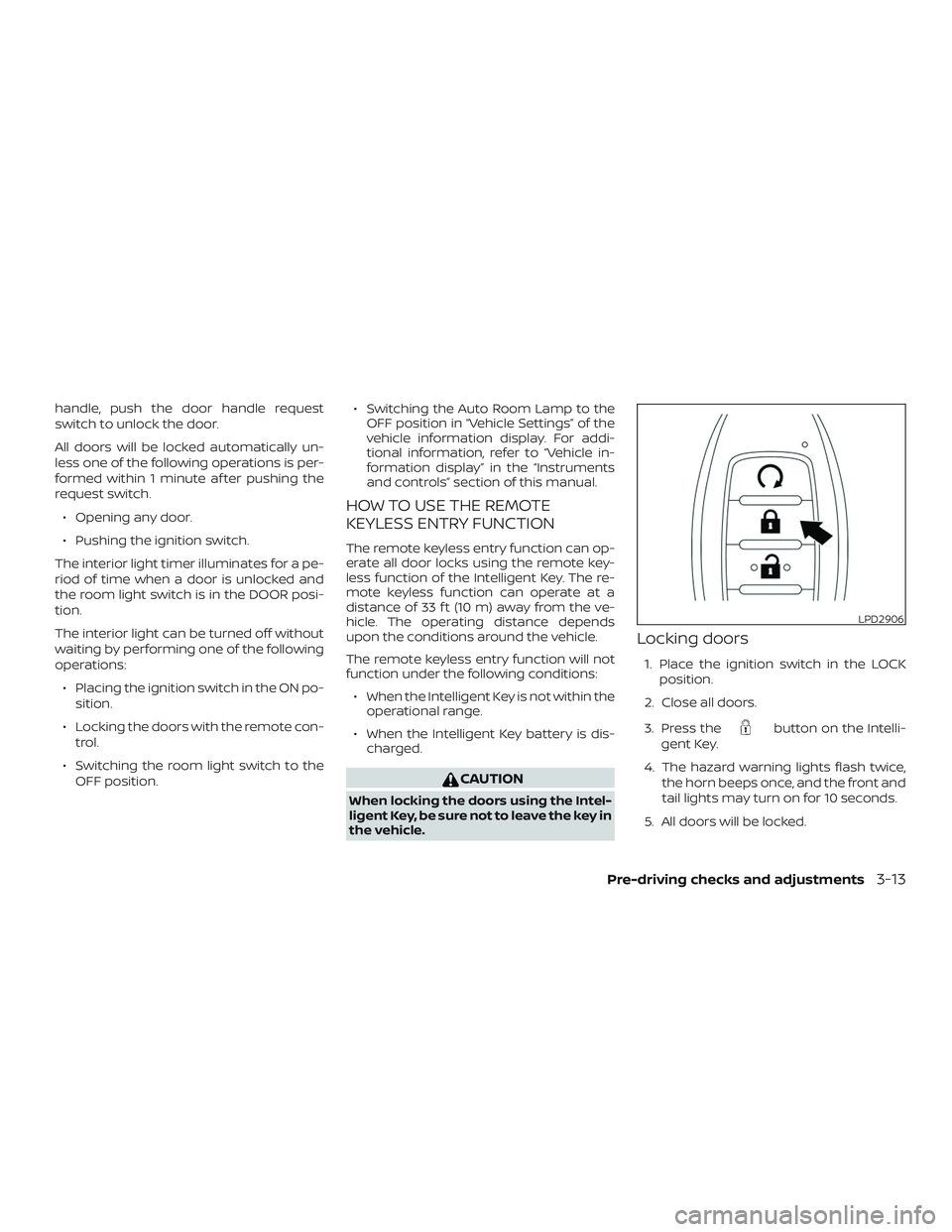
Locking doors
1. Place the ignition switch in the LOCK
position.
2. Close all doors.
3. Press the
button on the Intelli-
gent Key.
4. The hazard warning lights flash twice, the horn beeps once, and the front and
tail lights may turn on for 10 seconds.
5. All doors will be locked.
LPD2906
Pre-driving checks and adjustments3-13
Page 184 of 507
CAUTION
Af ter locking the doors using the Intel-
ligent Key, be sure that the doors have
been securely locked by operating the
door handles.
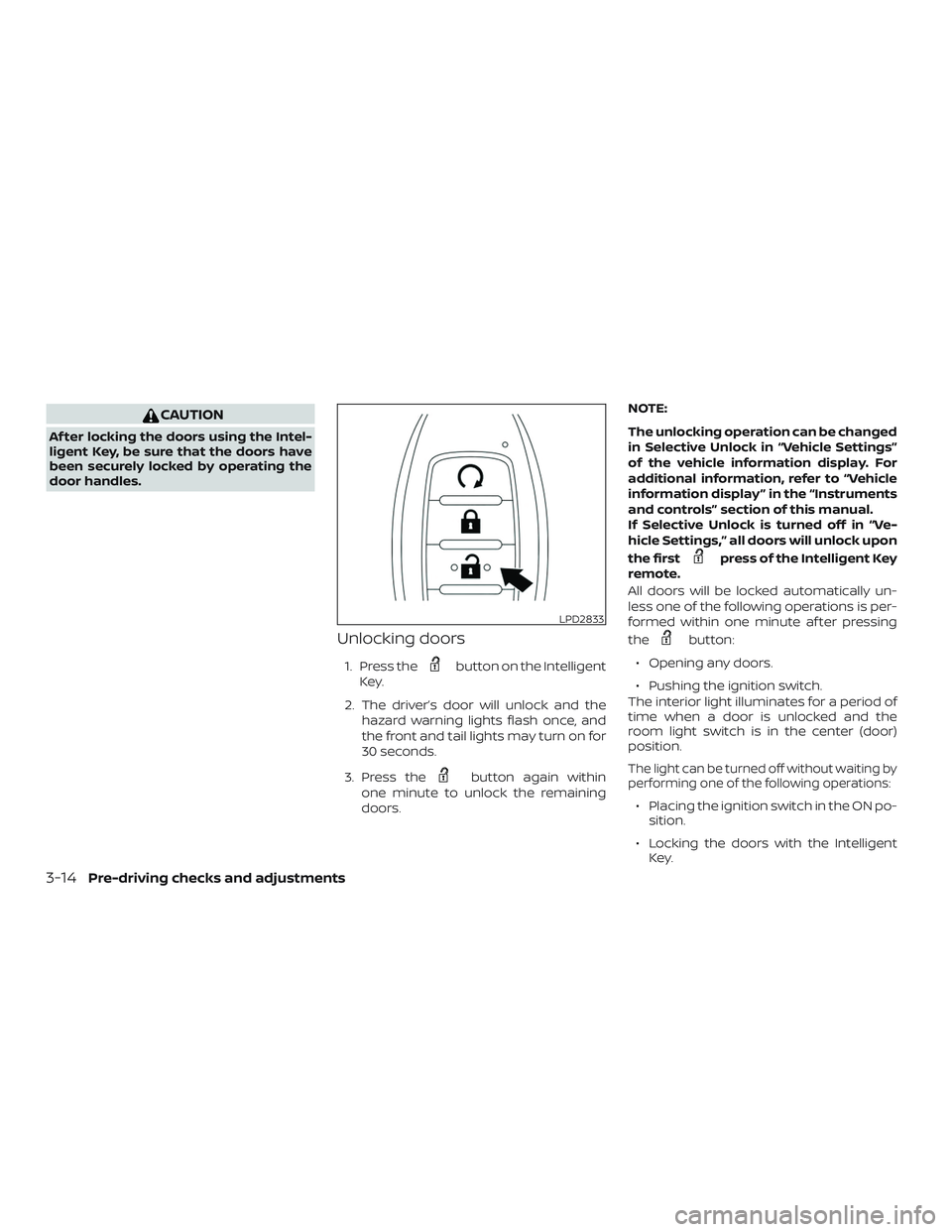
Unlocking doors
1. Press thebutton on the Intelligent
Key.
2. The driver’s door will unlock and the hazard warning lights flash once, and
the front and tail lights may turn on for
30 seconds.
3. Press the
button again within
one minute to unlock the remaining
doors. NOTE:
The unlocking operation can be changed
in Selective Unlock in “Vehicle Settings”
of the vehicle information display. For
additional information, refer to “Vehicle
information display ” in the “Instruments
and controls” section of this manual.
If Selective Unlock is turned off in “Ve-
hicle Settings,” all doors will unlock upon
the first
press of the Intelligent Key
remote.
All doors will be locked automatically un-
less one of the following operations is per-
formed within one minute af ter pressing
the
button:
∙ Opening any doors.
∙ Pushing the ignition switch.
The interior light illuminates for a period of
time when a door is unlocked and the
room light switch is in the center (door)
position.
The light can be turned off without waiting by
performing one of the following operations:
∙ Placing the ignition switch in the ON po- sition.
∙ Locking the doors with the Intelligent Key.
LPD2833
3-14Pre-driving checks and adjustments
Page 190 of 507
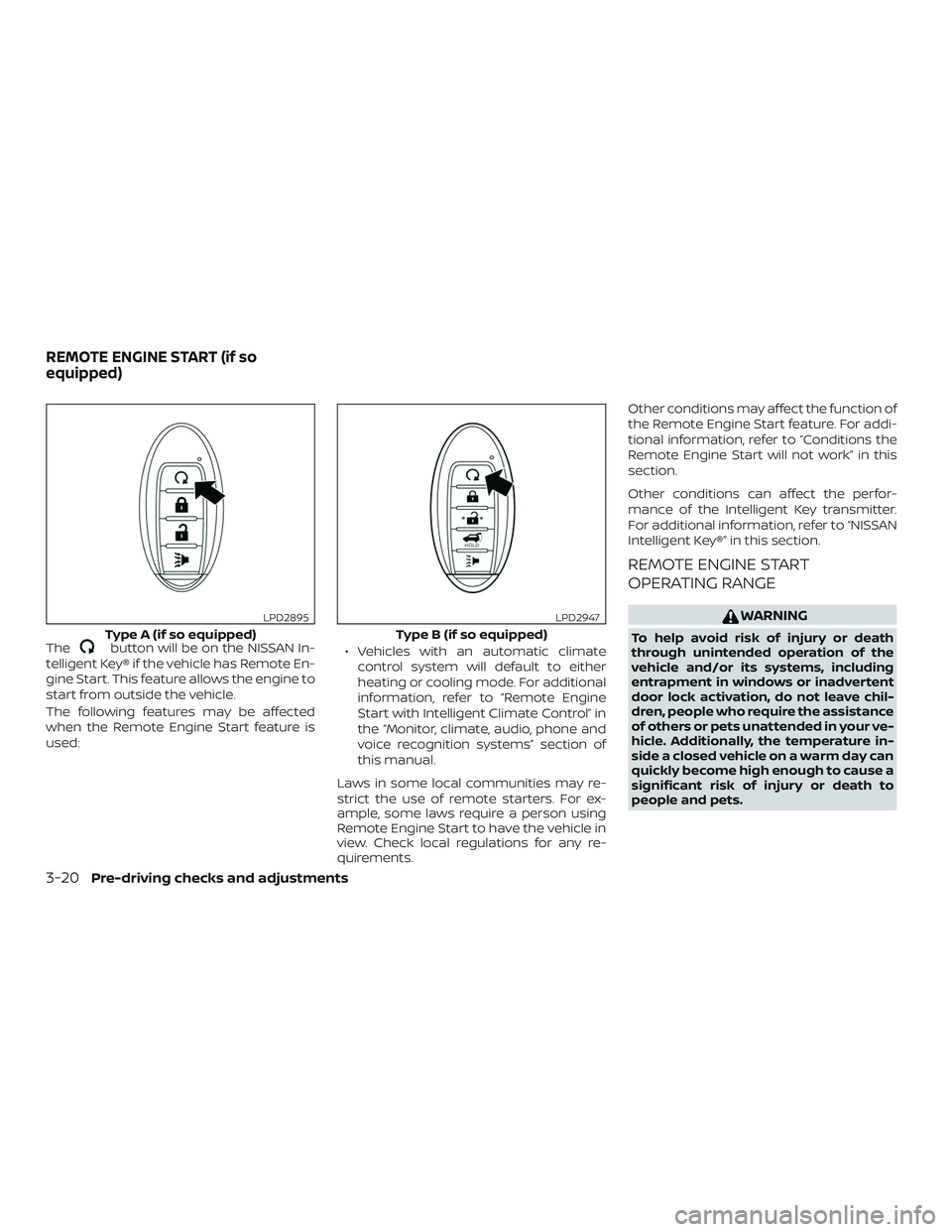
Thebutton will be on the NISSAN In-
telligent Key® if the vehicle has Remote En-
gine Start. This feature allows the engine to
start from outside the vehicle.
The following features may be affected
when the Remote Engine Start feature is
used: ∙ Vehicles with an automatic climate
control system will default to either
heating or cooling mode. For additional
information, refer to “Remote Engine
Start with Intelligent Climate Control” in
the “Monitor, climate, audio, phone and
voice recognition systems” section of
this manual.
Laws in some local communities may re-
strict the use of remote starters. For ex-
ample, some laws require a person using
Remote Engine Start to have the vehicle in
view. Check local regulations for any re-
quirements. Other conditions may affect the function of
the Remote Engine Start feature. For addi-
tional information, refer to “Conditions the
Remote Engine Start will not work” in this
section.
Other conditions can affect the perfor-
mance of the Intelligent Key transmitter.
For additional information, refer to “NISSAN
Intelligent Key®” in this section.
REMOTE ENGINE START
OPERATING RANGE
WARNING
To help avoid risk of injury or death
through unintended operation of the
vehicle and/or its systems, including
entrapment in windows or inadvertent
door lock activation, do not leave chil-
dren, people who require the assistance
of others or pets unattended in your ve-
hicle. Additionally, the temperature in-
side a closed vehicle on a warm day can
quickly become high enough to cause a
significant risk of injury or death to
people and pets.Type A (if so equipped)
LPD2895
Type B (if so equipped)
LPD2947
REMOTE ENGINE START (if so
equipped)
3-20Pre-driving checks and adjustments
Page 191 of 507
CAUTION
When the Intelligent Key battery is dis-
charged or other strong radio wave
sources are present near the operating
location, the Intelligent Key operating
range becomes narrower, and the Intel-
ligent Key may not function properly.
The Remote Engine Start function can only
be used when the Intelligent Key is within
the specified operating range from the ve-
hicle.
The Remote Engine Start operating range
is approximately 197 f t (60 m) from the ve-
hicle.
REMOTE STARTING THE VEHICLE
To use the Remote Engine Start feature
perform the following: 1. Aim the Intelligent Key at the vehicle.
2. Press the
button to lock all
doors.
3. Within 5 seconds press and hold the
button until the turn signal
lights flash and the tail lamps turn on. If
the vehicle is not within view press and
hold the
button for at least 2 sec-
onds. The following events will occur when the
engine starts:
∙ The parking lights will turn on and re- main on as long as the engine is run-
ning.
∙ The doors will be locked and the climate control system may come on.
∙ The engine will continue to run for 10 minutes. Repeat the steps to extend
the time for an additional 10 minutes.
For additional information, refer to “Ex-
tending engine run time” in this section.
Press and hold the brake pedal while
switching the ignition to the ON position
before driving. For additional information,
refer to “Driving the vehicle” in the “Starting
and driving” section of this manual.
EXTENDING ENGINE RUN TIME
The Remote Engine Start feature can be
extended one time by performing the
steps listed in “Remote starting the vehicle”
in this section. Run time will be calculated
as follows: ∙ The first 10 minute run time will start when the Remote Engine Start function
is performed. ∙ The second 10 minutes will start imme-
diately when the Remote Engine Start
function is performed again. For ex-
ample, if the engine has been running
for 5 minutes, and 10 minutes are
added, the engine will run for a total of
15 minutes.
∙ Extending engine run time will bring you to the two Remote Engine Start limit.
A maximum of two Remote Engine Starts,
or a single Remote Engine Start with an
extension, are allowed between ignition
cycles. The ignition switch must be cycled
to the ON position and then back to the
OFF position before the Remote Engine
Start procedure can be used again.
CANCELING A REMOTE ENGINE
START
To cancel a Remote Engine Start, perform
one of the following: ∙ Aim the Intelligent Key at the vehicle and press
until the parking lights
turn off.
∙ Turn on the hazard warning flashers.
∙ Cycle the ignition switch on and then off.
Pre-driving checks and adjustments3-21
Page 192 of 507
∙ The extended engine run time has ex-pired.
∙ The first 10 minute timer has expired.
∙ Opening the engine hood.
∙ Shif ting the vehicle out of P (Park).
∙ The alarm sounds due to illegal entry into the vehicle.
∙ Pushing the ignition switch without the Intelligent Key in the vehicle.
∙ Not pressing the brake pedal while pressing the ignition switch with the In-
telligent Key in the vehicle.
CONDITIONS THE REMOTE ENGINE
START WILL NOT WORK
The Remote Engine Start will not operate if
any of the following conditions are present:
∙ The ignition switch is placed in the ON position.
∙ The hood is not securely closed.
∙ The hazard indicator lights are on. ∙ The engine is still running. The engine
must be completely stopped. Wait at
least 6 seconds if the engine goes from
running to off. This is not applicable
when extending engine run time.
∙ The
button is not pressed and
held for at least 2 seconds.
∙ The
button is not pressed and
held within 5 seconds of pressing the
lock button.
∙ The brake is pressed.
∙ The doors are not closed and locked.
∙ The lif tgate is open.
∙ The I–Key Indicator Light remains solid is in the vehicle information display.
∙ The alarm sounds due to illegal entry into the vehicle.
∙ Two Remote Engine Starts, or a single Remote Engine Start with an extension,
have already been used.
∙ The vehicle is not in P (Park).
∙ There is a detected registered key al- ready inside of the vehicle. ∙ The Remote Engine Start function has
been switched to the OFF position in
Vehicle Settings of the vehicle informa-
tion display. For additional information,
refer to “Vehicle information display” in
the “Instruments and controls” section
of this manual.
The Remote Engine Start may display a
warning or indicator in the vehicle informa-
tion display. For additional information, re-
fer to “Vehicle information display” in the
“Instruments and controls” section of this
manual.
3-22Pre-driving checks and adjustments