light NISSAN MURANO 2020 Owner´s Manual
[x] Cancel search | Manufacturer: NISSAN, Model Year: 2020, Model line: MURANO, Model: NISSAN MURANO 2020Pages: 518, PDF Size: 3.52 MB
Page 17 of 518
Action to take:
When the above conditions no longer exist,
the I-FCW system will resume automati-
cally.
Condition B
When there is inclement weather (rain, fog,
snow, etc.) blocking the front radar sensor,
the I-FCW system will automatically be
canceled. The chime will sound and the
“Unavailable: Front Radar Obstruction” or
“Forward Driving Aids Temporarily Disabled
Front Sensor Blocked” warning message
will appear in the vehicle information dis-
play.
Action to take:
When the conditions listed above are no
longer present, the warning message will
no longer be available in the vehicle infor-
mation display. If the “Unavailable: Front Ra-
dar Obstruction” or “Forward Driving Aids
Temporarily Disabled Front Sensor
Blocked” warning message continues to
be displayed, have the system checked. It is
recommended that you visit a NISSAN
dealer for this service.Condition C
When the radar sensor of the front bumper
is covered with mud, dirt, snow, ice, etc., or is
obstructed, the I-FCW system will auto-
matically be canceled, the chime will sound
and the “Unavailable: Front Radar Obstruc-
tion” or “Forward Driving Aids Temporarily
Disabled Front Sensor Blocked” warning
message will appear in the vehicle infor-
mation display.
Action to take:
If the warning message appears, stop the
vehicle in a safe place, place the shif t lever
in the P (Park) position, and turn the engine
off. When the radar signal is temporarily
interrupted, clean the sensor area of the
front bumper and restart the engine. If the
“Unavailable: Front Radar Obstruction” or
“Forward Driving Aids Temporarily Disabled
Front Sensor Blocked” warning message
continues to be displayed, have the system
checked. It is recommended that you visit a
NISSAN dealer for this service.
Condition D
When driving on roads with limited road
structures or buildings (for example, long
bridges, deserts, snowfields, driving next to
long walls), the system may illuminate the
system warning light and display the “Un-
available: Front Radar Obstruction” or “For-
ward Driving Aids Temporarily Disabled
Front Sensor Blocked” message.
Action to take:
When the above driving conditions no lon-
ger exist, turn the system back on.
NOTE:
If the AEB system stops working, the
I-FCW system will also stop working.
Page 18 of 518
![NISSAN MURANO 2020 Owner´s Manual SYSTEM MALFUNCTION
If the I-FCW system malfunctions, it will be
turned off automatically, a chime will
sound, the AEB warning light (orange) will
illuminate and the warning message [Mal-
function] wil](/img/5/40353/w960_40353-17.png "NISSAN MURANO 2020 Owner´s Manual SYSTEM MALFUNCTION
If the I-FCW system malfunctions, it will be
turned off automatically, a chime will
sound, the AEB warning light (orange) will
illuminate and the warning message [Mal-
function] wil")
SYSTEM MALFUNCTION
If the I-FCW system malfunctions, it will be
turned off automatically, a chime will
sound, the AEB warning light (orange) will
illuminate and the warning message [Mal-
function] will appear in the vehicle informa-
tion display.Action to take
If the warning light (orange) comes on, stop
the vehicle in a safe location, turn the en-
gine off and restart the engine. If the warn-
ing light continues to illuminate, have the
I-FCW system checked. It is recommended
that you visit a NISSAN dealer for this ser-
vice.
SYSTEM MAINTENANCE
The sensorO1is located on the front of the
vehicle.
To keep the system operating properly, be
sure to observe the following:
• Always keep the sensor area of the front bumper/emblem clean.
• Do not strike or damage the areas around the sensor.
• Do not cover or attach stickers or similar objects on the front bumper near the
sensor area. This could cause failure or
malfunction.
LSD3767LSD3435
Page 27 of 518
0 Illustrated table of contents
Air bags, seat belts and child restraints..........0-2
Exterior front ....................................0-3
Exterior rear .....................................0-4
Passenger compartment .......................0-5 Instrument panel
................................0-6
Engine compartment check locations ...........0-7
Warning and indicator lights .....................0-9
Page 29 of 518
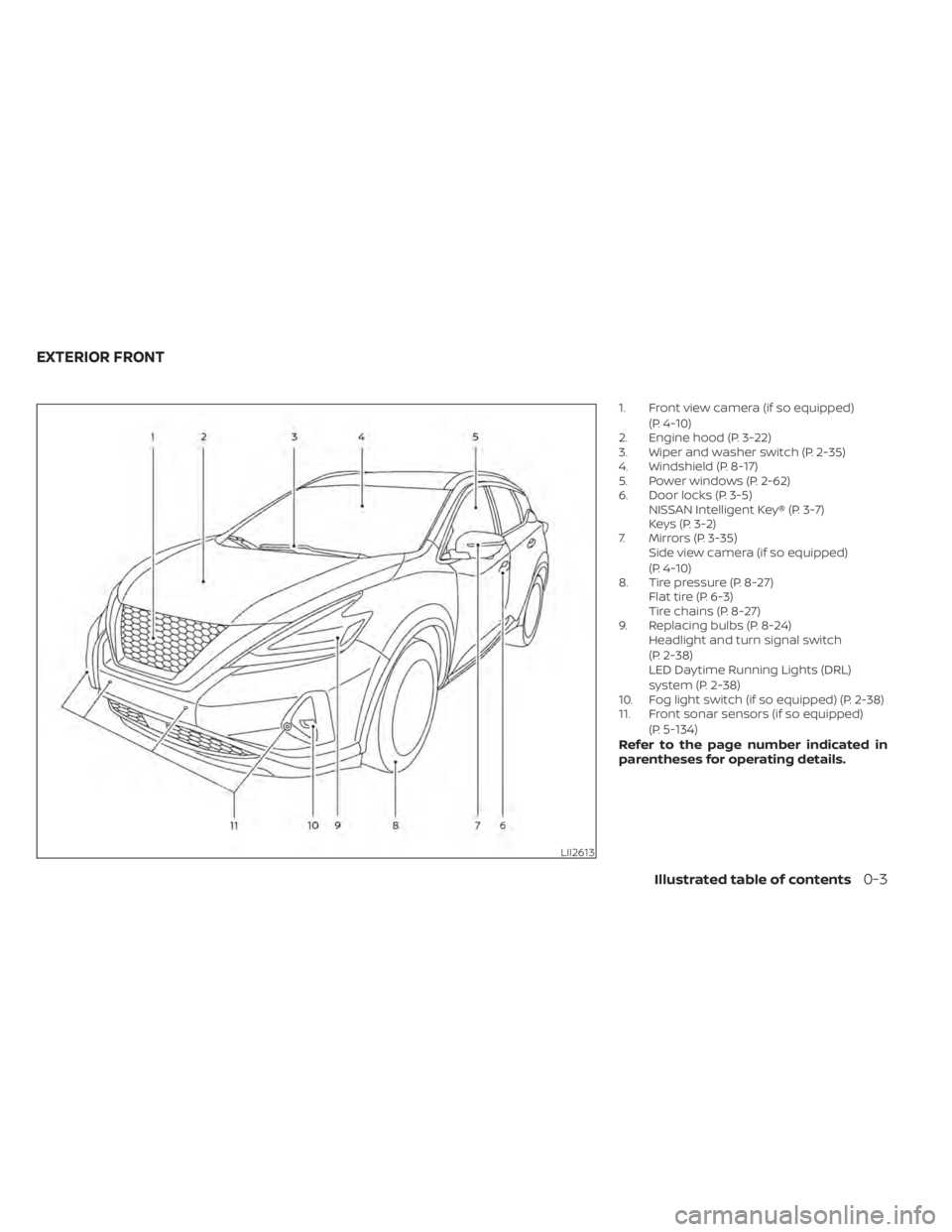
1. Front view camera (if so equipped)(P. 4-10)
2. Engine hood (P. 3-22)
3. Wiper and washer switch (P. 2-35)
4. Windshield (P. 8-17)
5. Power windows (P. 2-62)
6. Door locks (P. 3-5) NISSAN Intelligent Key® (P. 3-7)
Keys (P. 3-2)
7. Mirrors (P. 3-35) Side view camera (if so equipped)
(P. 4-10)
8. Tire pressure (P. 8-27) Flat tire (P. 6-3)
Tire chains (P. 8-27)
9. Replacing bulbs (P. 8-24) Headlight and turn signal switch
(P. 2-38)
LED Daytime Running Lights (DRL)
system (P. 2-38)
10. Fog light switch (if so equipped) (P. 2-38)
11. Front sonar sensors (if so equipped)
(P.
5-134)Refer to the page number indicated in
parentheses for operating details.
LII2613
EXTERIOR FRONT
Illustrated table of contents0-3
Page 31 of 518
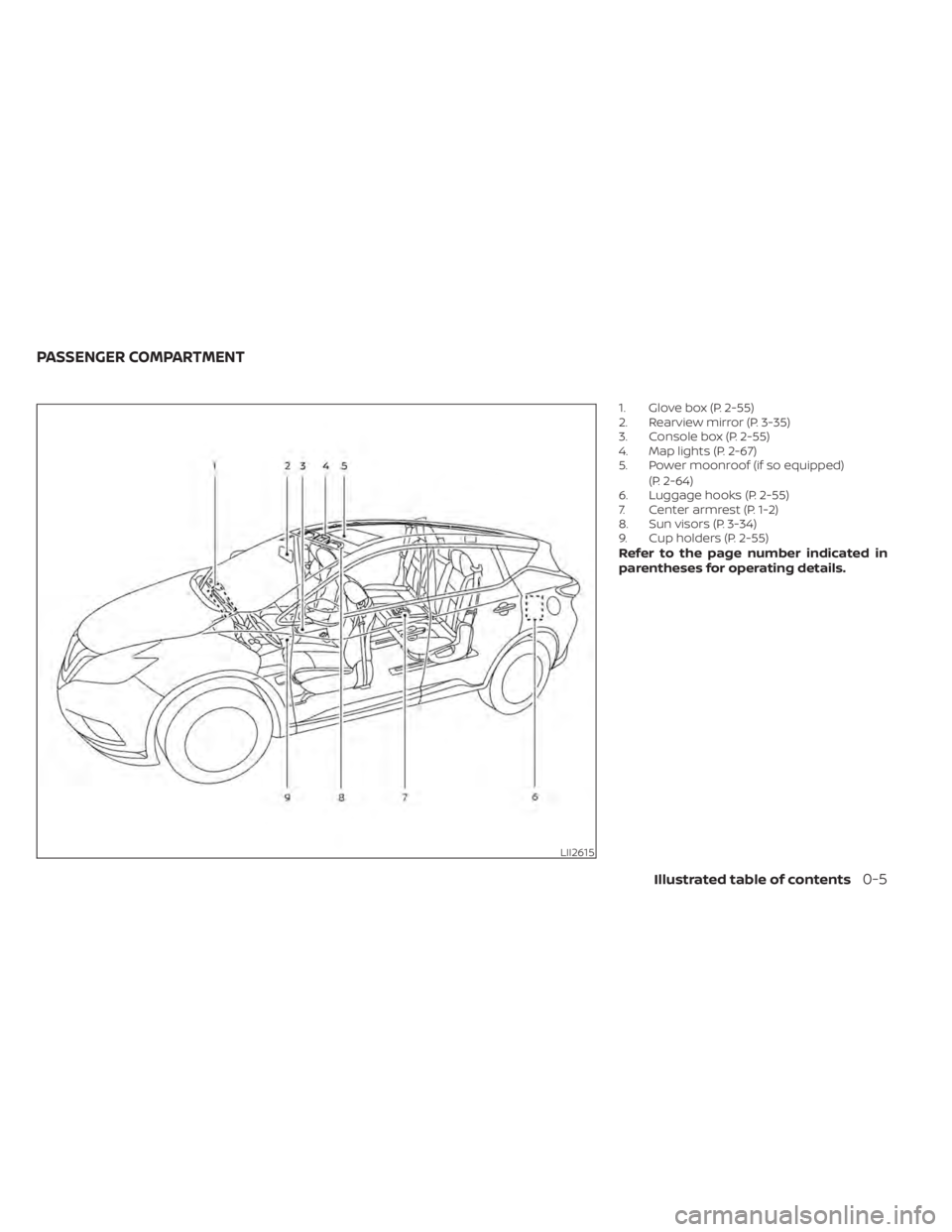
1. Glove box (P. 2-55)
2. Rearview mirror (P. 3-35)
3. Console box (P. 2-55)
4. Map lights (P. 2-67)
5. Power moonroof (if so equipped)(P. 2-64)
6. Luggage hooks (P. 2-55)
7. Center armrest (P. 1-2)
8. Sun visors (P. 3-34)
9. Cup holders (P. 2-55)
Refer to the page number indicated in
parentheses for operating details.
LII2615
PASSENGER COMPARTMENT
Illustrated table of contents0-5
Page 32 of 518
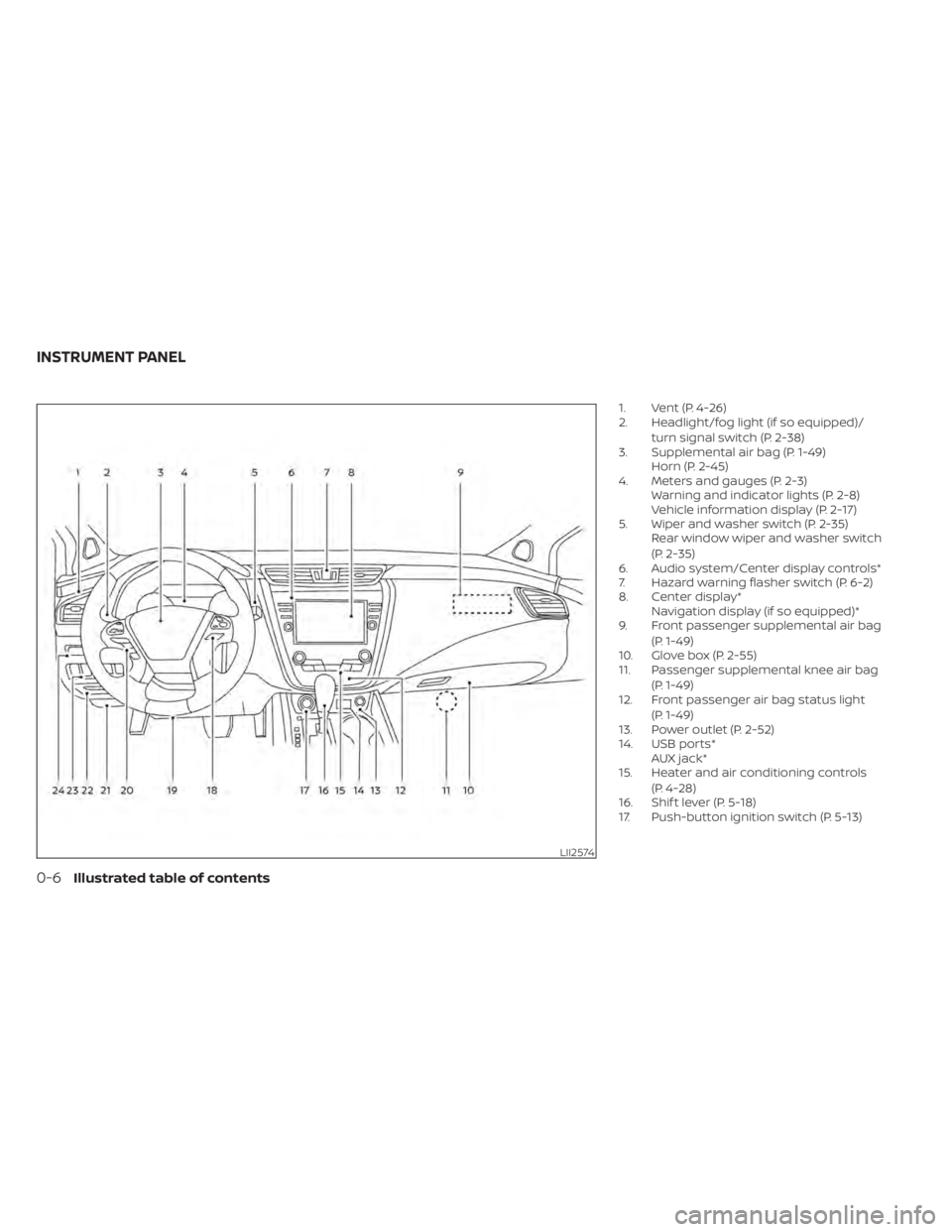
1. Vent (P. 4-26)
2. Headlight/fog light (if so equipped)/turn signal switch (P. 2-38)
3. Supplemental air bag (P. 1-49) Horn (P. 2-45)
4. Meters and gauges (P. 2-3) Warning and indicator lights (P. 2-8)
Vehicle information display (P. 2-17)
5. Wiper and washer switch (P. 2-35) Rear window wiper and washer switch
(P. 2-35)
6. Audio system/Center display controls*
7. Hazard warning flasher switch (P. 6-2)
8. Center display* Navigation display (if so equipped)*
9. Front passenger supplemental air bag
(P. 1-49)
10. Glove box (P. 2-55)
11. Passenger supplemental knee air bag
(P. 1-49)
12. Front passenger air bag status light
(P. 1-49)
13. Power outlet (P. 2-52)
14. USB ports* AUX jack*
15. Heater and air conditioning controls
(P. 4-28)
16. Shif t lever (P. 5-18)
17. Push-button ignition switch (P. 5-13)
LII2574
INSTRUMENT PANEL
0-6Illustrated table of contents
Page 35 of 518
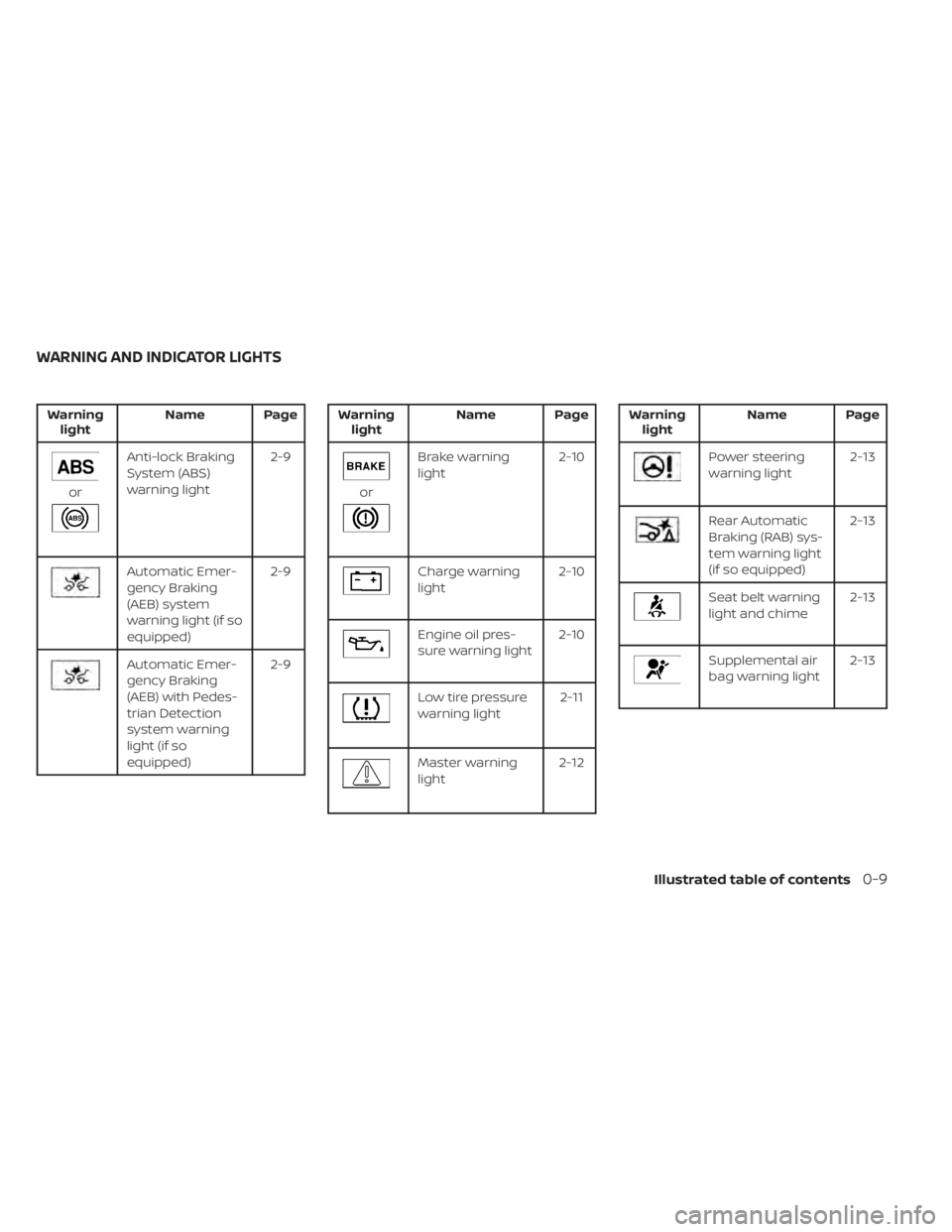
Warninglight Name Page
or
Anti-lock Braking
System (ABS)
warning light 2-9
Automatic Emer-
gency Braking
(AEB) system
warning light (if so
equipped)2-9
Automatic Emer-
gency Braking
(AEB) with Pedes-
trian Detection
system warning
light (if so
equipped)2-9
Warning
light Name Page
or
Brake warning
light 2-10
Charge warning
light2-10
Engine oil pres-
sure warning light2-10
Low tire pressure
warning light 2-11
Master warning
light2-12
Warning
light Name Page
Power steering
warning light 2-13
Rear Automatic
Braking (RAB) sys-
tem warning light
(if so equipped)2-13
Seat belt warning
light and chime
2-13
Supplemental air
bag warning light2-13
WARNING AND INDICATOR LIGHTS
Illustrated table of contents0-9
Page 36 of 518
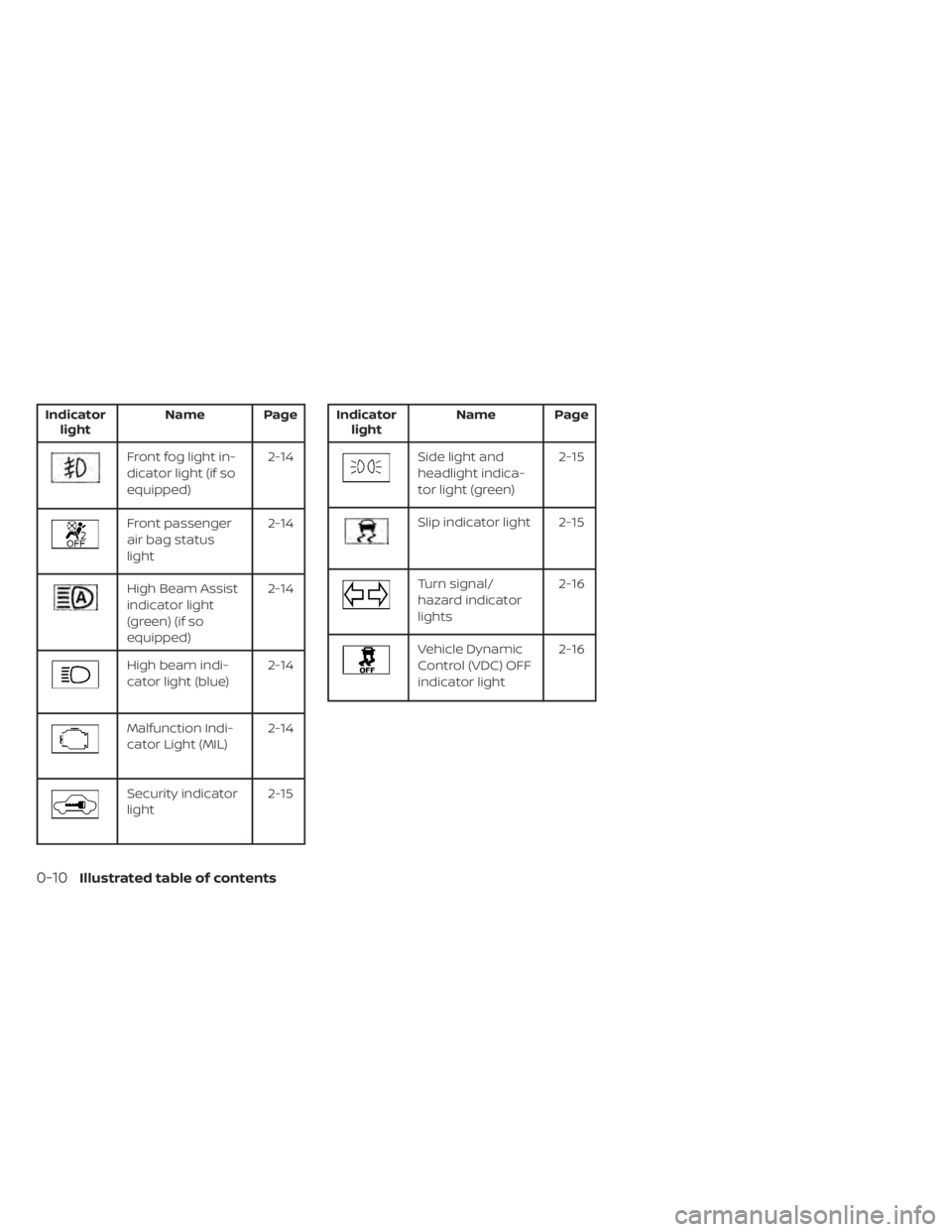
Indicatorlight Name Page
Front fog light in-
dicator light (if so
equipped) 2-14
Front passenger
air bag status
light2-14
High Beam Assist
indicator light
(green) (if so
equipped)2-14
High beam indi-
cator light (blue)
2-14
Malfunction Indi-
cator Light (MIL)2-14
Security indicator
light 2-15
Indicator
light Name Page
Side light and
headlight indica-
tor light (green) 2-15
Slip indicator light 2-15
Turn signal/
hazard indicator
lights2-16
Vehicle Dynamic
Control (VDC) OFF
indicator light2-16
0-10Illustrated table of contents
Page 37 of 518
1 Safety-Seats, seat belts and
supplemental restraint system
Seats............................................ 1-2Front manual seat adjustment
(if so equipped) ................................1-3
Front power seat adjustment
(if so equipped) ............................... 1-4
Rear bench seat adjustment ................. 1-6
Armrests ..................................... 1-6
Flexible seating ................................1-7
Head restraints/headrests ...................... 1-9
Adjustable head restraint/headrest
components ................................. 1-10
Non-adjustable head restraint/
headrest components .......................1-10
Remove...................................... 1-10
Install ........................................ 1-11
Adjust ........................................ 1-11
Seatbelts ....................................... 1-13
Precautions on seat belt usage ...............1-13
Seat belt warning light and chime ............1-16
Pregnant women ............................ 1-16
Injured persons .............................. 1-16
Three-point type seat belt with
retractor ..................................... 1-17
Seat belt extenders ......................... 1-24Seat belt maintenance
......................1-24
Child safety .................................... 1-25
Infants ...................................... 1-25
Small children ............................... 1-26
Larger children .............................. 1-26
Child restraints ................................. 1-27
Precautions on child restraints ..............1-27
LATCH (Lower Anchors and Tethers for
CHildren) system ............................ 1-29
Rear-facing child restraint installation
using LATCH ................................ 1-32
Rear-facing child restraint installation
using the seat belts ......................... 1-34
Forward-facing child restraint
installation using LATCH .....................1-37
Forward-facing child restraint
installation using the seat belts .............1-40
Booster seats ............................... 1-44
Supplemental Restraint System (SRS) ..........1-49
Precautions on SRS ......................... 1-49
Supplemental air bag warning labels ........1-69
Supplemental air bag warning light .........1-70
Page 51 of 518
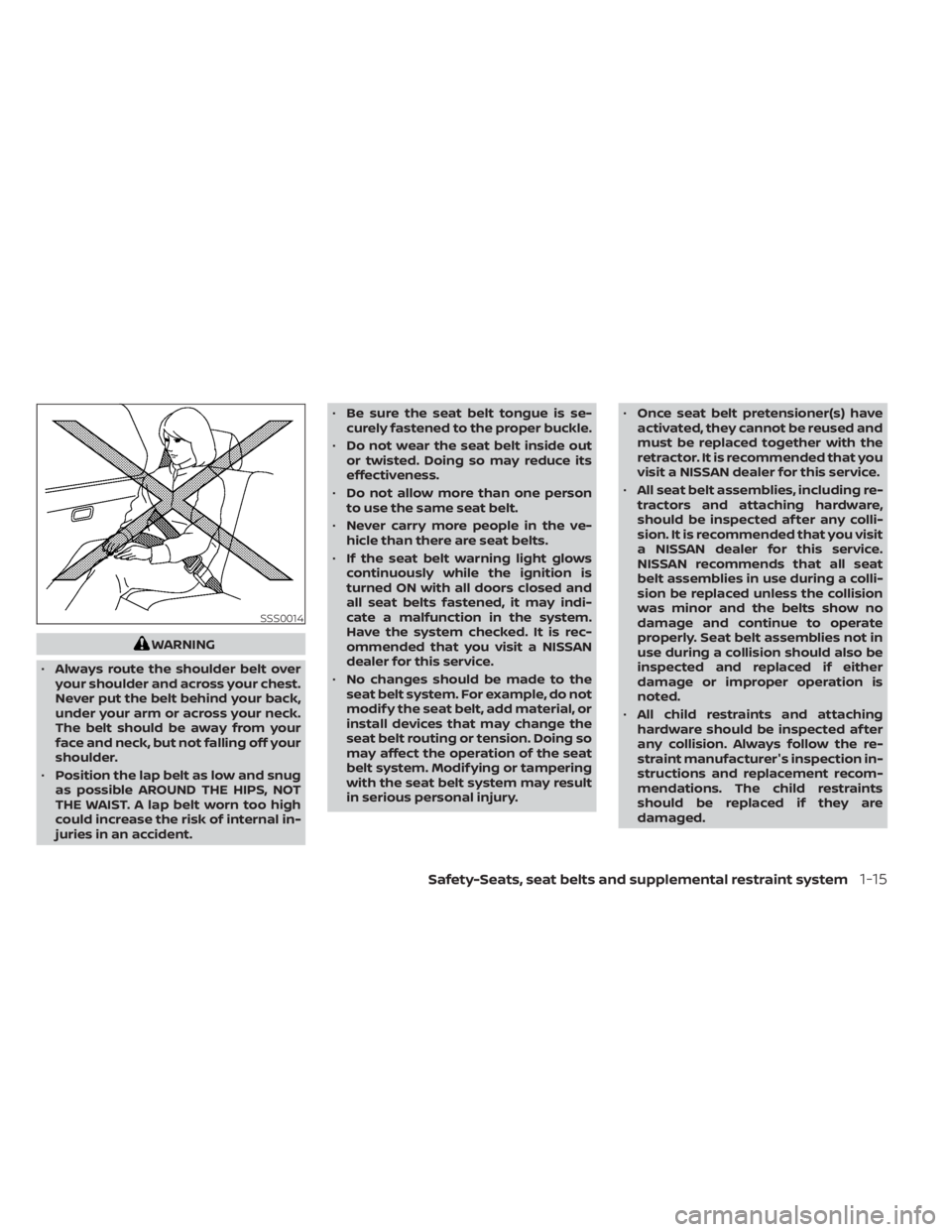
WARNING
• Always route the shoulder belt over
your shoulder and across your chest.
Never put the belt behind your back,
under your arm or across your neck.
The belt should be away from your
face and neck, but not falling off your
shoulder.
• Position the lap belt as low and snug
as possible AROUND THE HIPS, NOT
THE WAIST. A lap belt worn too high
could increase the risk of internal in-
juries in an accident. •
Be sure the seat belt tongue is se-
curely fastened to the proper buckle.
• Do not wear the seat belt inside out
or twisted. Doing so may reduce its
effectiveness.
• Do not allow more than one person
to use the same seat belt.
• Never carry more people in the ve-
hicle than there are seat belts.
• If the seat belt warning light glows
continuously while the ignition is
turned ON with all doors closed and
all seat belts fastened, it may indi-
cate a malfunction in the system.
Have the system checked. It is rec-
ommended that you visit a NISSAN
dealer for this service.
• No changes should be made to the
seat belt system. For example, do not
modif y the seat belt, add material, or
install devices that may change the
seat belt routing or tension. Doing so
may affect the operation of the seat
belt system. Modif ying or tampering
with the seat belt system may result
in serious personal injury. •
Once seat belt pretensioner(s) have
activated, they cannot be reused and
must be replaced together with the
retractor. It is recommended that you
visit a NISSAN dealer for this service.
• All seat belt assemblies, including re-
tractors and attaching hardware,
should be inspected af ter any colli-
sion. It is recommended that you visit
a NISSAN dealer for this service.
NISSAN recommends that all seat
belt assemblies in use during a colli-
sion be replaced unless the collision
was minor and the belts show no
damage and continue to operate
properly. Seat belt assemblies not in
use during a collision should also be
inspected and replaced if either
damage or improper operation is
noted.
• All child restraints and attaching
hardware should be inspected af ter
any collision. Always follow the re-
straint manufacturer's inspection in-
structions and replacement recom-
mendations. The child restraints
should be replaced if they are
damaged.
SSS0014
Safety-Seats, seat belts and supplemental restraint system1-15