roof NISSAN MURANO 2023 User Guide
[x] Cancel search | Manufacturer: NISSAN, Model Year: 2023, Model line: MURANO, Model: NISSAN MURANO 2023Pages: 518, PDF Size: 5.46 MB
Page 125 of 518
The system helps deter vehicle thef t but
cannot prevent it, nor can it prevent the
thef t of interior or exterior vehicle compo-
nents in all situations. Always secure your
vehicle even if parking for a brief period.
Never leave your Intelligent Key in the ve-
hicle, and always lock the vehicle when un-
attended. Be aware of your surroundings,
and park in secure, well-lit areas whenever
possible.
Many devices offering additional protec-
tion, such as component locks, identifica-
tion markers, and tracking systems, are
available at auto supply stores and spe-
cialty shops. A NISSAN dealer may also offer
such equipment. Check with your insur-
ance company to see if you may be eligible
for discounts for various thef t protection
features.
How to arm the vehicle security
system
1.Close all windows and the moonroof (if so
equipped). The system can be armed
even if the windows and moonroof are
open.
2. Remove the Intelligent Key from the vehicle. 3. Close all doors, hood and lif tgate. Lock
all doors. The doors can be locked with
the Intelligent Key, door handle request
switch or power door lock switch.
Key fob operation:
4. Confirm that the
indicator light
comes on. Theindicator stays
illuminated for a period of time indicat-
ing that the system is in the pre-armed
phase.
The
indicator light will blink every
3 seconds once the security system is
armed.
If during the pre-armed phase one of
the following occurs, the system will not
arm:
• A door is opened with the release button with the Intelligent Key on your person.
• The doors are unlocked using the unlock button on the Intelligent Key.
• The ignition switch is placed in the ACC or ON position. •
Even when the driver and/or passen-
gers are in the vehicle, the system will
activate when all the doors, hood and
lif tgate are locked with the ignition
switch placed in the LOCK position.
When placing the ignition switch in the
ACC or ON position, the system will be
released.
Vehicle security system activation
The vehicle security system will give the
following alarm:
• The turn signals blink and the horn sounds intermittently.
• The alarm automatically turns off af ter a period of time. However, the alarm reacti-
vates if the vehicle is tampered with
again. The alarm can be shut off by un-
locking the driver's door or lif tgate by
pressing the
button on the Intelli-
gent Key.
The alarm is activated by:
• Opening the door or lif tgate without us- ing the Intelligent Key (even if the door is
unlocked by releasing the door inside
lock switch).
Instruments and controls2-33
Page 155 of 518
ROOF RACK (if so equipped)
WARNING
• Always install the crossbars onto the
roof side rails before loading cargo of
any kind. Loading cargo directly onto
the roof side rails or the vehicle’s roof
may cause vehicle damage.
• Roof rack cross bars should be evenly
distributed.
• Do not exceed maximum roof rack
crossbars load capacity and always
distribute the load uniformly. •
Heavy loading of the crossbars has
the potential to affect the vehicle
stability and handling during sudden
or unusual handling maneuvers.
• Properly secure all cargo with ropes
or straps to help prevent it from slid-
ing or shif ting. In a sudden stop or
collision, unsecured cargo could
cause personal injury.
• Drive extra carefully when the vehicle
is loaded at or near the cargo carry-
ing capacity, especially if the signifi-
cant portion of that load is carried on
the crossbars.CAUTION
• Use care when placing or removing
items from the roof rack. If you can-
not comfortably lif t the items onto
the roof rack from the ground, use a
ladder or a stool.
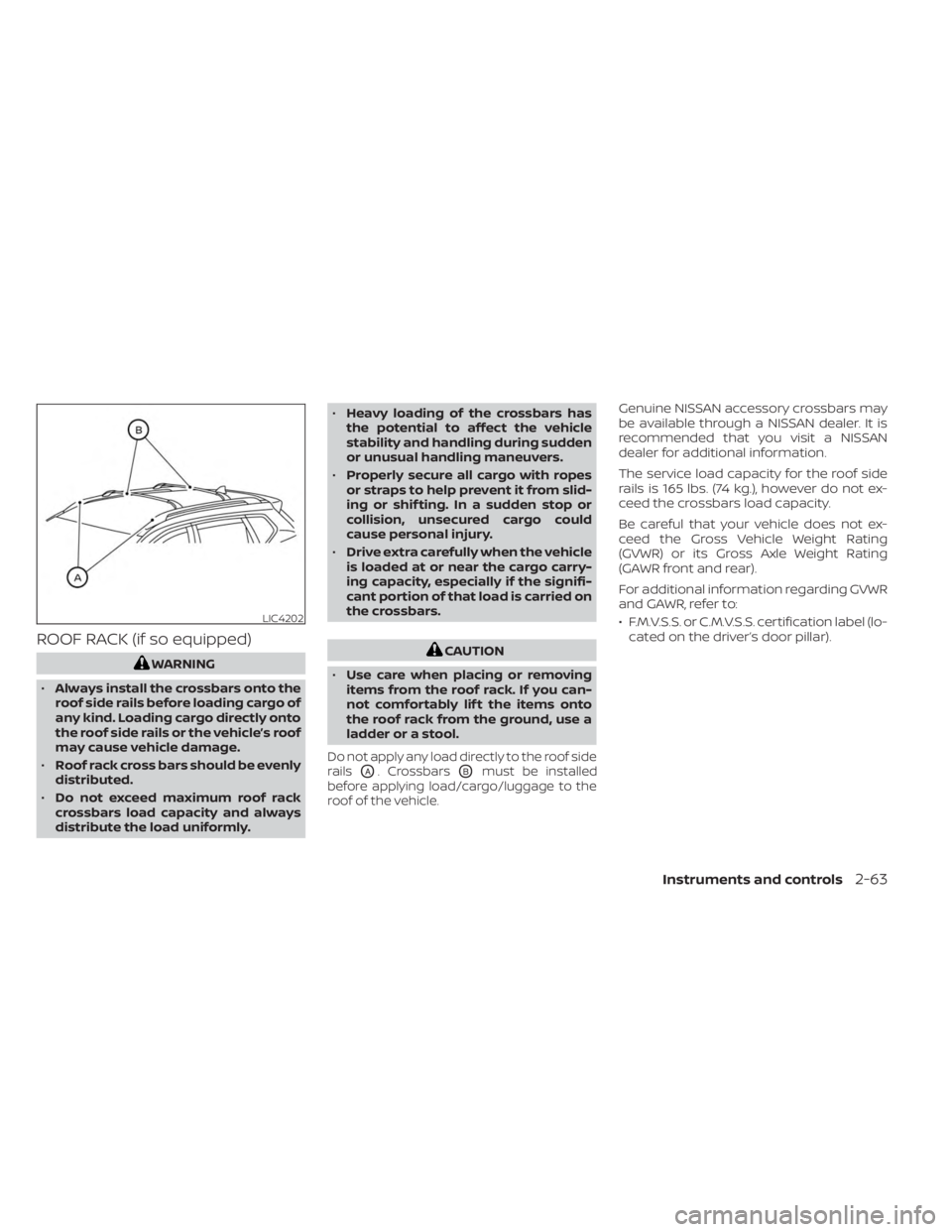
Do not apply any load directly to the roof side
rails
OA. CrossbarsOBmust be installed
before applying load/cargo/luggage to the
roof of the vehicle.
Genuine NISSAN accessory crossbars may
be available through a NISSAN dealer. It is
recommended that you visit a NISSAN
dealer for additional information.
The service load capacity for the roof side
rails is 165 lbs. (74 kg.), however do not ex-
ceed the crossbars load capacity.
Be careful that your vehicle does not ex-
ceed the Gross Vehicle Weight Rating
(GVWR) or its Gross Axle Weight Rating
(GAWR front and rear).
For additional information regarding GVWR
and GAWR, refer to:
• F.M.V.S.S. or C.M.V.S.S. certification label (lo- cated on the driver’s door pillar).
LIC4202
Instruments and controls2-63
Page 156 of 518
Installing crossbars (if so
equipped)
WARNING
• It is recommended that you have the
roof rack crossbars installed by a
NISSAN dealer.
•
Protect the painted area on the vehi-
cle’s roof under the crossbars by plac-
ing a piece of cloth under the cross
bars to prevent scratch damage.
• Make sure the moonroof (if so
equipped) is in the closed position
during the installation process.
POWER WINDOWS
WARNING
• Make sure that all passengers have
their hands, etc., inside the vehicle
while it is in motion and before clos-
ing the windows. Use the window
lock switch to prevent unexpected
use of the power windows.
• To help avoid risk of injury or death
through unintended operation of the
vehicle and/or its systems, including
entrapment in windows or inadver-
tent door lock activation, do not
leave children, people who require
the assistance of others or pets unat-
tended in your vehicle. Additionally,
the temperature inside a closed ve-
hicle on a warm day can quickly be-
come high enough to cause a signifi-
cant risk of injury or death to people
and pets.
The power windows operate when the ig-
nition switch is placed in the ON position or
for a period of time af ter the ignition switch
is placed in the OFF position. If the driver's
or passenger's door is opened during this
period of time, the power to the windows is
canceled.
Driver's side power window
switch
The driver's side control panel is equipped
with switches to open or close all of the
windows.
LIC3238
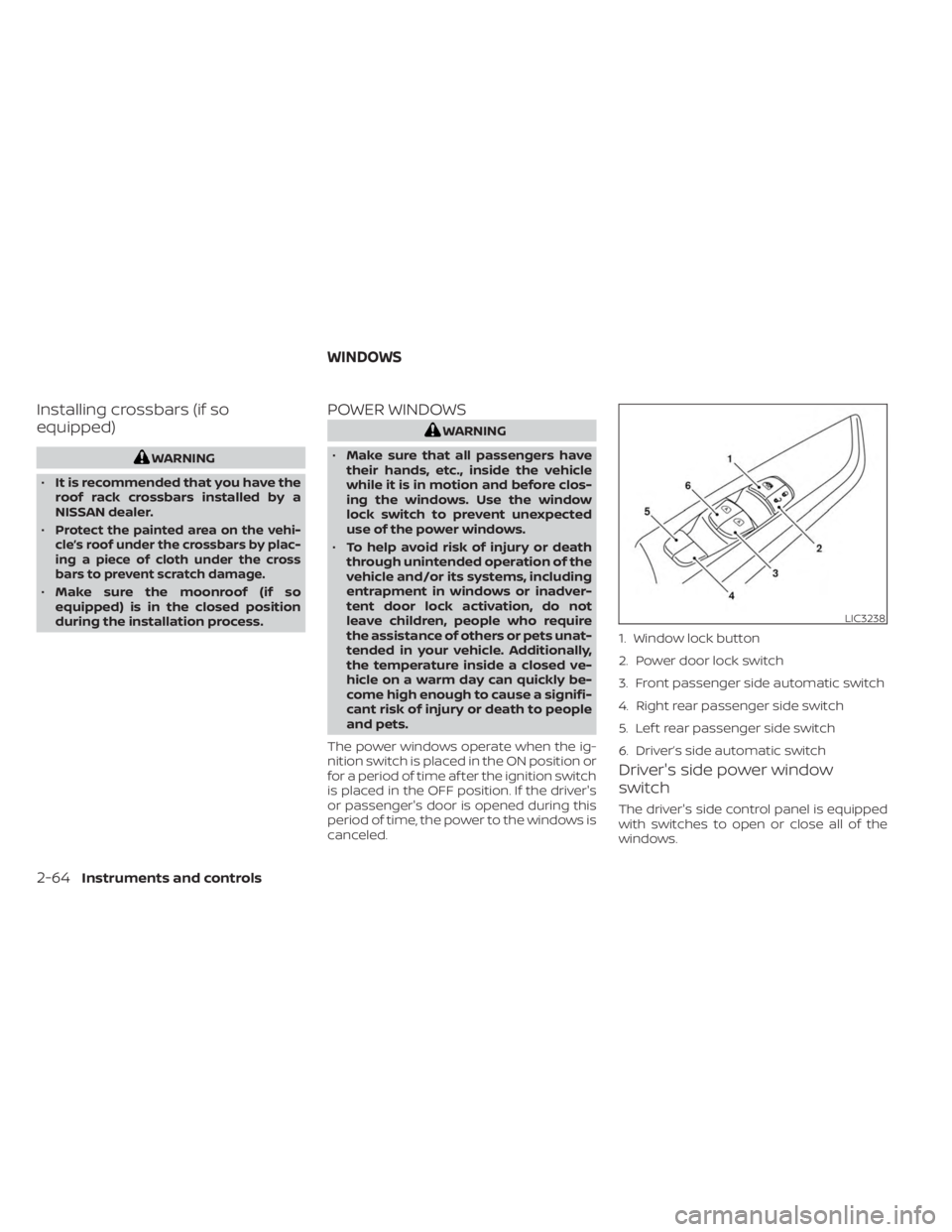
1. Window lock button
2. Power door lock switch
3. Front passenger side automatic switch
4. Right rear passenger side switch
5. Lef t rear passenger side switch
6. Driver’s side automatic switch
WINDOWS
2-64Instruments and controls
Page 159 of 518
The moonroof will only operate when the
ignition switch is placed in the ON position.
The moonroof is operational for a period of
time, even if the ignition switch is placed in
the ACC (if so equipped) or OFF position. If
the driver's door or the front passenger's
door is opened during this period of time,
the power to the moonroof is canceled.
When operating the power moonroof or
panoramic sunshade, the switch need not
be held continuously. To stop the moon-
roof or sunshade at any point while it is
opening or closing, push the switch
momentarily.
Sliding the moonroof
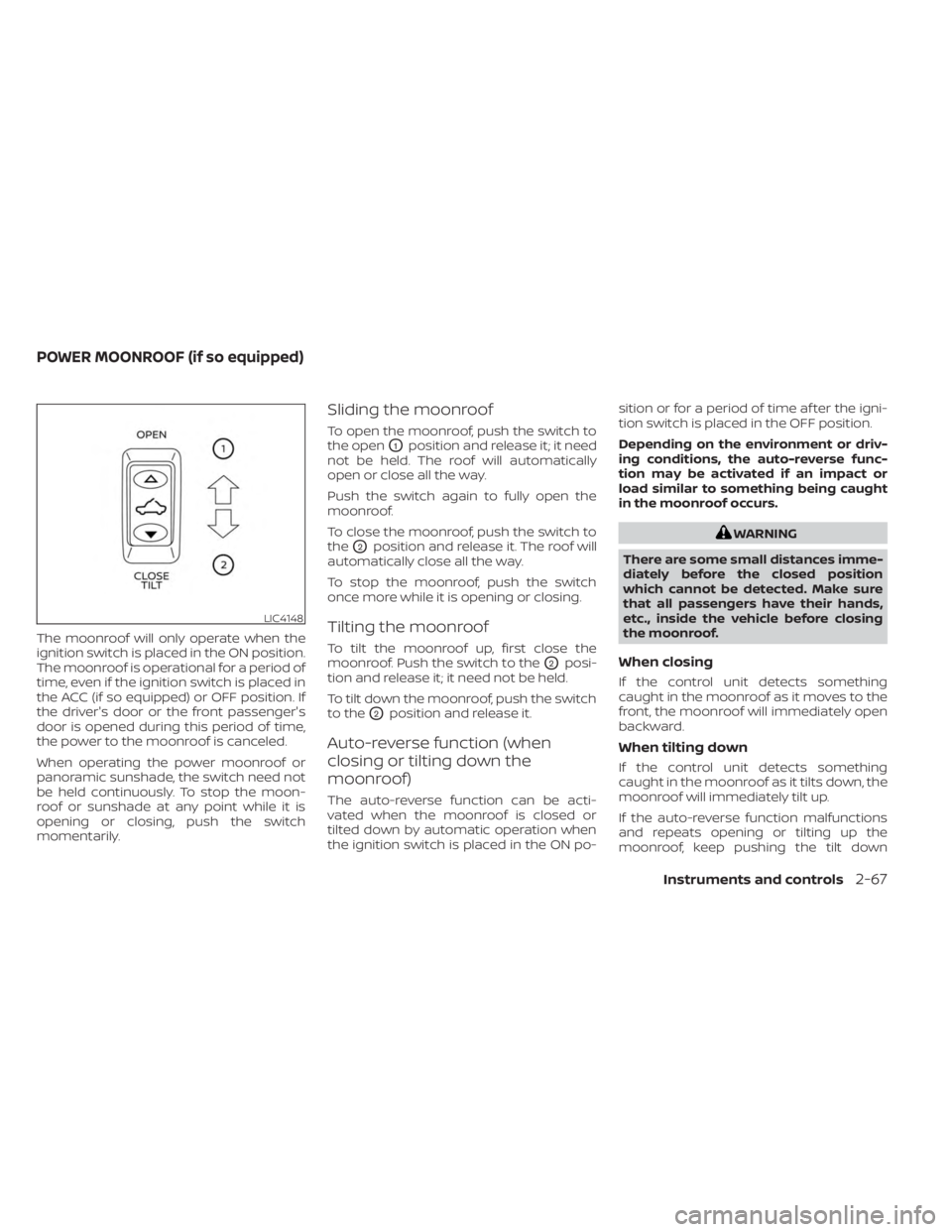
To open the moonroof, push the switch to
the open
O1position and release it; it need
not be held. The roof will automatically
open or close all the way.
Push the switch again to fully open the
moonroof.
To close the moonroof, push the switch to
the
O2position and release it. The roof will
automatically close all the way.
To stop the moonroof, push the switch
once more while it is opening or closing.
Tilting the moonroof
To tilt the moonroof up, first close the
moonroof. Push the switch to the
O2posi-
tion and release it; it need not be held.
To tilt down the moonroof, push the switch
to the
O2position and release it.
Auto-reverse function (when
closing or tilting down the
moonroof)
The auto-reverse function can be acti-
vated when the moonroof is closed or
tilted down by automatic operation when
the ignition switch is placed in the ON po- sition or for a period of time af ter the igni-
tion switch is placed in the OFF position.
Depending on the environment or driv-
ing conditions, the auto-reverse func-
tion may be activated if an impact or
load similar to something being caught
in the moonroof occurs.
WARNING
There are some small distances imme-
diately before the closed position
which cannot be detected. Make sure
that all passengers have their hands,
etc., inside the vehicle before closing
the moonroof.
When closing
If the control unit detects something
caught in the moonroof as it moves to the
front, the moonroof will immediately open
backward.
When tilting down
If the control unit detects something
caught in the moonroof as it tilts down, the
moonroof will immediately tilt up.
If the auto-reverse function malfunctions
and repeats opening or tilting up the
moonroof, keep pushing the tilt down
LIC4148
POWER MOONROOF (if so equipped)
Instruments and controls2-67
Page 160 of 518
switch within 5 seconds af ter it happens;
the moonroof will fully close gradually.
Make sure nothing is caught in the
moonroof.
WARNING
• In an accident you could be thrown
from the vehicle through an open
moonroof. Always use seat belts and
child restraints.
• Do not allow anyone to stand up or
extend any portion of their body out
of the moonroof opening while the
vehicle is in motion or while the
moonroof is closing.
CAUTION
• Remove water drops, snow, ice or
sand from the moonroof before
opening.
• Do not place heavy objects on the
moonroof or surrounding area.
Panoramic sunshade
The panoramic sunshade operates when
the ignition switch is in the ON position. The
sunshade switch is located near the roof
console. When opening or closing the sun-
shade the switch need not be held.
To open the sunshade:
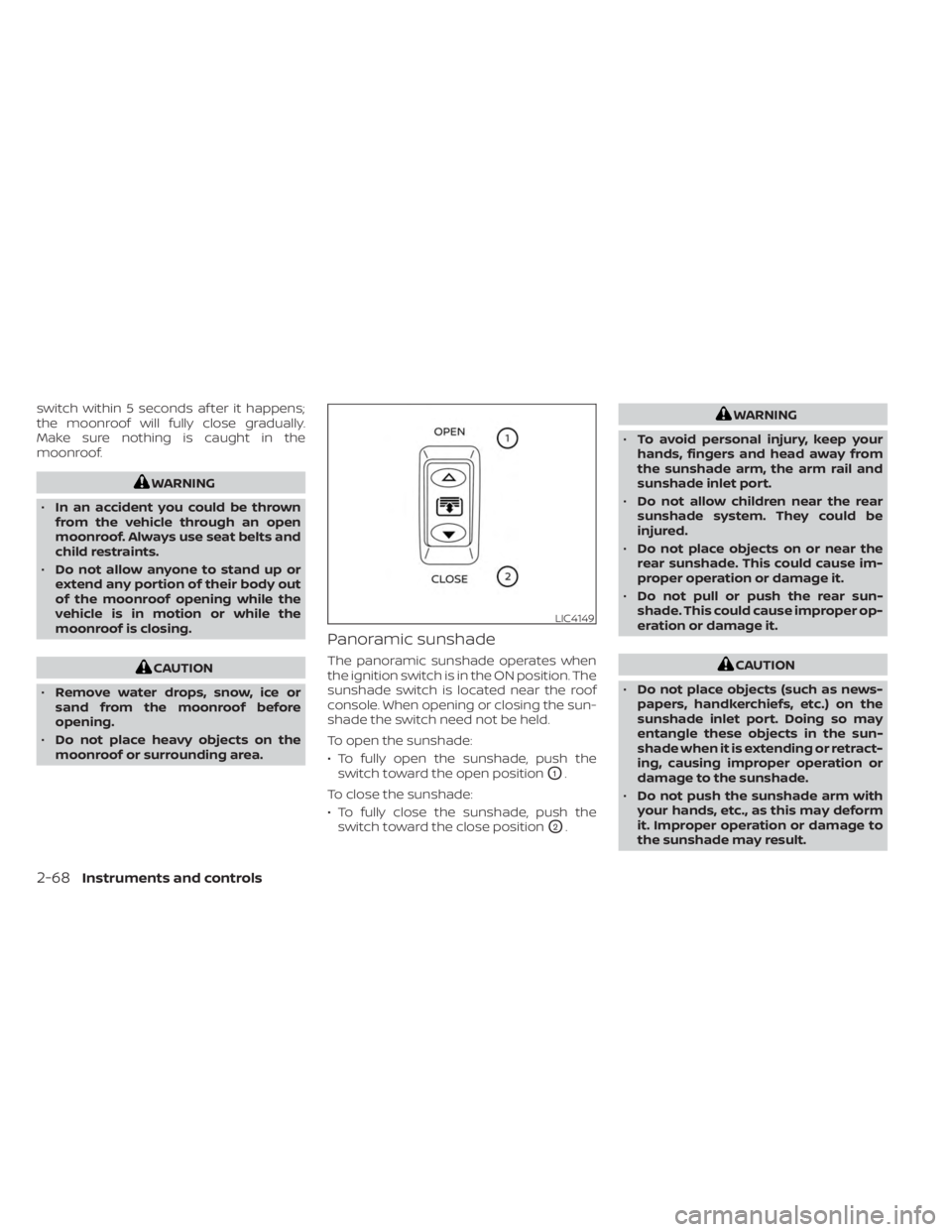
• To fully open the sunshade, push the switch toward the open position
O1.
To close the sunshade:
• To fully close the sunshade, push the switch toward the close position
O2.
WARNING
• To avoid personal injury, keep your
hands, fingers and head away from
the sunshade arm, the arm rail and
sunshade inlet port.
• Do not allow children near the rear
sunshade system. They could be
injured.
• Do not place objects on or near the
rear sunshade. This could cause im-
proper operation or damage it.
• Do not pull or push the rear sun-
shade. This could cause improper op-
eration or damage it.
CAUTION
• Do not place objects (such as news-
papers, handkerchiefs, etc.) on the
sunshade inlet port. Doing so may
entangle these objects in the sun-
shade when it is extending or retract-
ing, causing improper operation or
damage to the sunshade.
• Do not push the sunshade arm with
your hands, etc., as this may deform
it. Improper operation or damage to
the sunshade may result.
LIC4149
2-68Instruments and controls
Page 161 of 518
•Do not put any object into the sun-
shade inlet port as this may result in
improper operation or damage the
sunshade.
• Do not hang any object on the arm
rail as this may result in improper op-
eration or damage the sunshade.
• Do not forcefully pull the sunshade.
Doing so may elongate the sun-
shade. Improper operation or dam-
age to the sunshade may result.
If the moonroof does not close
Have your moonroof checked and re-
paired. It is recommended that you visit a
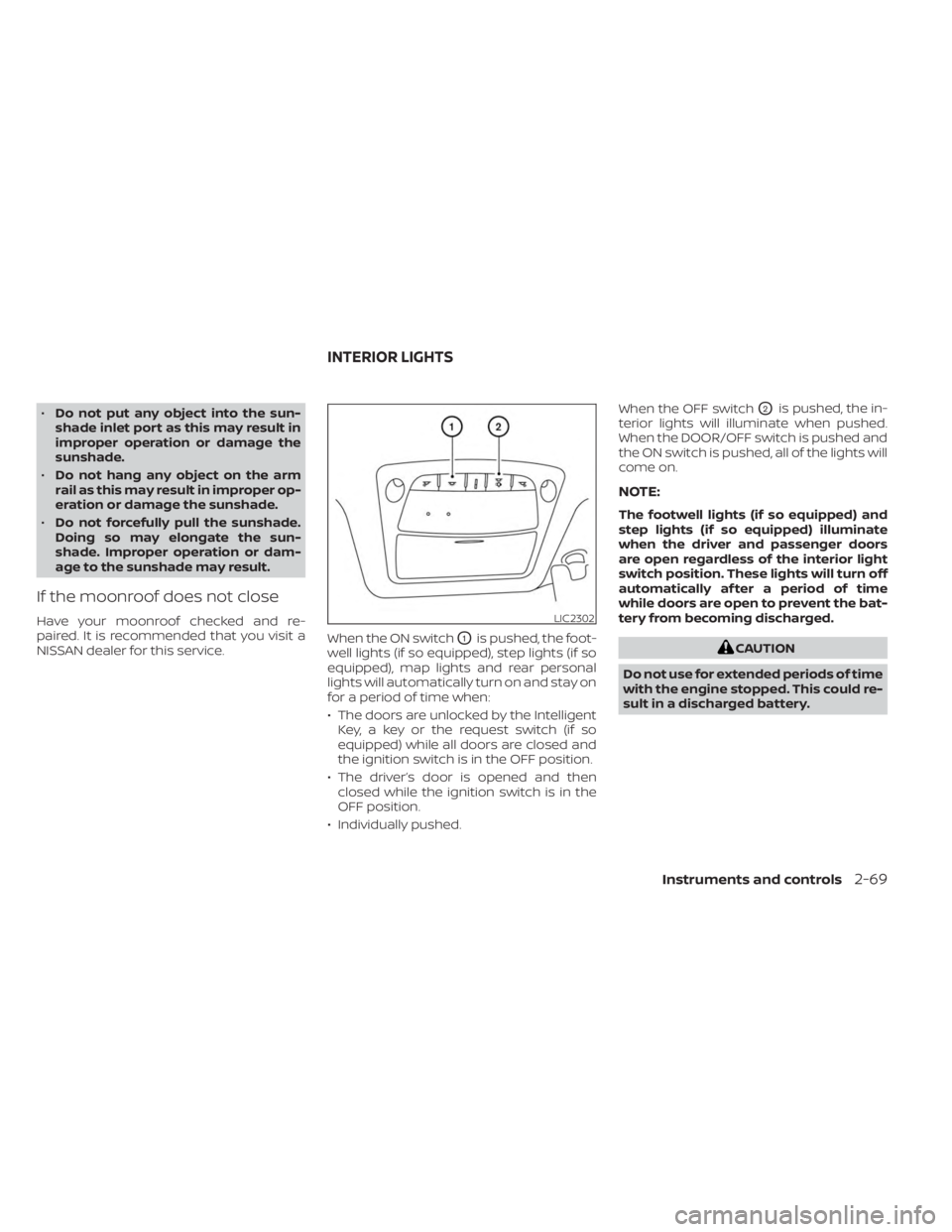
NISSAN dealer for this service. When the ON switch
O1is pushed, the foot-
well lights (if so equipped), step lights (if so
equipped), map lights and rear personal
lights will automatically turn on and stay on
for a period of time when:
• The doors are unlocked by the Intelligent Key, a key or the request switch (if so
equipped) while all doors are closed and
the ignition switch is in the OFF position.
• The driver’s door is opened and then closed while the ignition switch is in the
OFF position.
• Individually pushed. When the OFF switch
O2is pushed, the in-
terior lights will illuminate when pushed.
When the DOOR/OFF switch is pushed and
the ON switch is pushed, all of the lights will
come on.
NOTE:
The footwell lights (if so equipped) and
step lights (if so equipped) illuminate
when the driver and passenger doors
are open regardless of the interior light
switch position. These lights will turn off
automatically af ter a period of time
while doors are open to prevent the bat-
tery from becoming discharged.
CAUTION
Do not use for extended periods of time
with the engine stopped. This could re-
sult in a discharged battery.
LIC2302
INTERIOR LIGHTS
Instruments and controls2-69
Page 207 of 518

4 Monitor, climate, audio, phone and
voice recognition systems
NissanConnect® Owner’s Manual...............4-2
RearView Monitor (if so equipped) ...............4-3
RearView Monitor system operation ..........4-4
How to read the displayed lines ..............4-4
Difference between predicted and
actual distances .............................4-5
How to park with predicted course
lines ..........................................4-7
Adjusting the screen .........................4-8
How to turn on and off predicted
course lines ..................................4-8
RearView Monitor system limitations .........4-9
System maintenance ....................... 4-10
Intelligent Around View® Monitor (if so
equipped) ....................................... 4-11
Intelligent Around View® Monitor
system operation ........................... 4-12
Difference between predicted and
actual distances ............................ 4-16
How to park with predicted course
lines ......................................... 4-17
How to switch the display ...................4-18Adjusting the screen
........................ 4-19
Intelligent Around View® Monitor
system limitations .......................... 4-20
System maintenance .......................4-22
Moving Object Detection (MOD)
(if so equipped) ................................. 4-23
MOD system operation ......................4-24
Turning MOD on and off .....................4-26
MOD system limitations .....................4-26
System maintenance .......................4-27
Vents .......................................... 4-27
Heater and Air Conditioner (automatic) .........4-29
Automatic operation ........................ 4-30
Manual operation ........................... 4-31
Operating tips ............................... 4-32
Servicing air conditioner ........................4-32
Antenna ........................................ 4-33
Roof Mounted Antenna ......................4-33
Car phone or CB radio .......................... 4-33
iPod®/iPhone® ................................. 4-34
Page 238 of 518
OPERATING TIPS
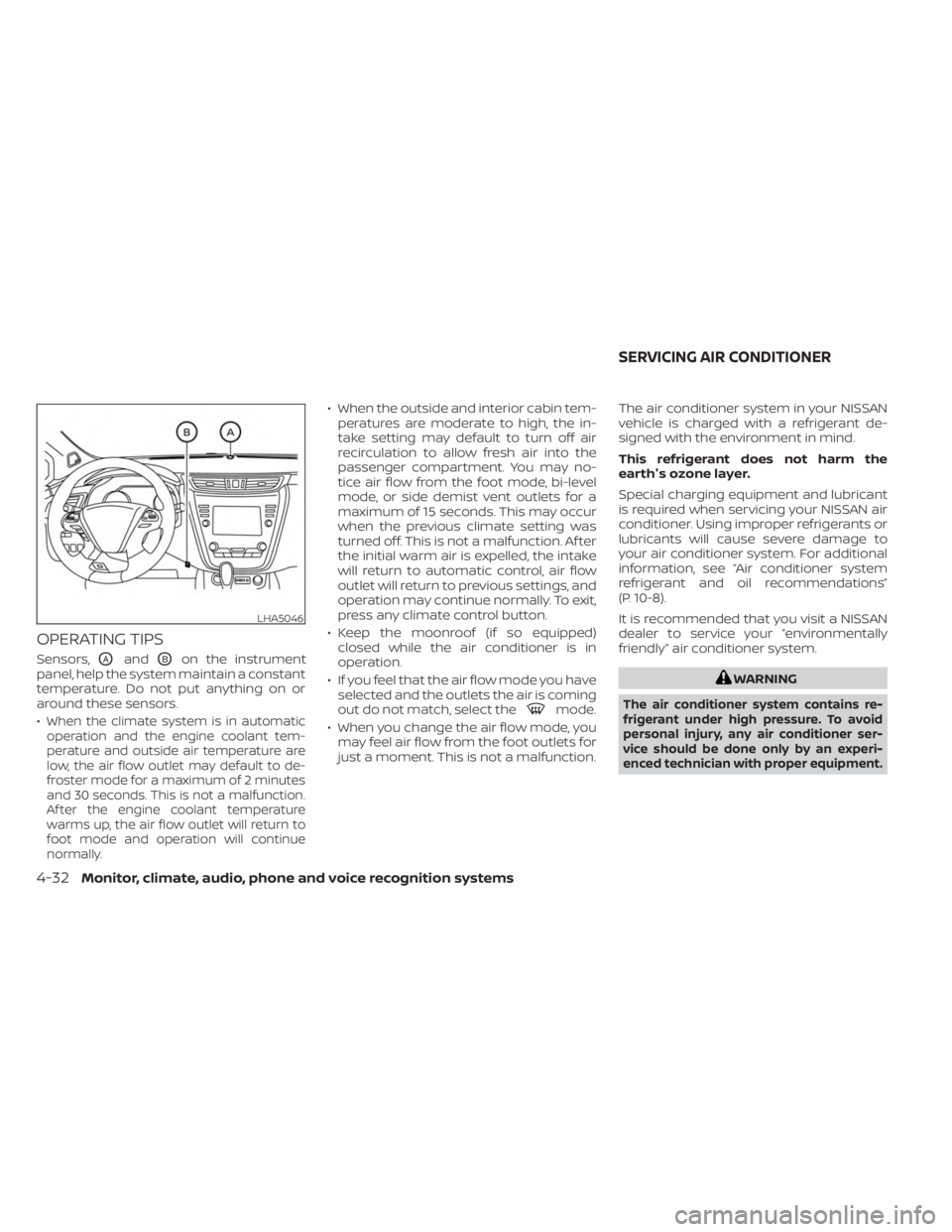
Sensors,OAandOBon the instrument
panel, help the system maintain a constant
temperature. Do not put anything on or
around these sensors.
•
When the climate system is in automatic
operation and the engine coolant tem-
perature and outside air temperature are
low, the air flow outlet may default to de-
froster mode for a maximum of 2 minutes
and 30 seconds. This is not a malfunction.
Af ter the engine coolant temperature
warms up, the air flow outlet will return to
foot mode and operation will continue
normally.
• When the outside and interior cabin tem- peratures are moderate to high, the in-
take setting may default to turn off air
recirculation to allow fresh air into the
passenger compartment. You may no-
tice air flow from the foot mode, bi-level
mode, or side demist vent outlets for a
maximum of 15 seconds. This may occur
when the previous climate setting was
turned off. This is not a malfunction. Af ter
the initial warm air is expelled, the intake
will return to automatic control, air flow
outlet will return to previous settings, and
operation may continue normally. To exit,
press any climate control button.
• Keep the moonroof (if so equipped) closed while the air conditioner is in
operation.
• If you feel that the air flow mode you have selected and the outlets the air is coming
out do not match, select the
mode.
• When you change the air flow mode, you may feel air flow from the foot outlets for
just a moment. This is not a malfunction. The air conditioner system in your NISSAN
vehicle is charged with a refrigerant de-
signed with the environment in mind.
This refrigerant does not harm the
earth's ozone layer.
Special charging equipment and lubricant
is required when servicing your NISSAN air
conditioner. Using improper refrigerants or
lubricants will cause severe damage to
your air conditioner system. For additional
information, see “Air conditioner system
refrigerant and oil recommendations”
(P. 10-8).
It is recommended that you visit a NISSAN
dealer to service your “environmentally
friendly” air conditioner system.
WARNING
The air conditioner system contains re-
frigerant under high pressure. To avoid
personal injury, any air conditioner ser-
vice should be done only by an experi-
enced technician with proper equipment.
LHA5046
SERVICING AIR CONDITIONER
4-32Monitor, climate, audio, phone and voice recognition systems
Page 239 of 518
ROOF MOUNTED ANTENNA
The antenna is located on the rear part of
the vehicle roof and an antenna pattern is
printed inside the rear window.
CAUTION
• A build-up of ice on the antenna can
affect radio performance. Remove
the ice to restore radio reception.
• When removing snow from the roof,
do not apply strong force to the an-
tenna. That may cause broken an-
tenna and roof panel dent.
• When using a high pressure car wash,
keep the high pressure nozzle away
from the antenna. The seal may be
deformed or damaged.
• The radio performance may be af-
fected if cargo carried on the roof
blocks the radio signal. If possible, do
not put cargo near the antenna.
• Do not place metalized film near the
rear window glass or attach any
metal parts to it. This may cause poor
reception or noise. •
When cleaning the inside of the rear
window, be careful not to scratch or
damage the rear window antenna.
Lightly wipe along the antenna with a
dampened sof t cloth. When installing a CB, ham radio or car
phone in your vehicle, be sure to observe
the following precautions; otherwise, the
new equipment may adversely affect the
engine control system and other electronic
parts.
WARNING
• A cellular phone should not be used
for any purpose while driving so full
attention may be given to vehicle op-
eration. Some jurisdictions prohibit
the use of cellular phones while
driving.
• If you must make a call while your
vehicle is in motion, the hands free
cellular phone operational mode is
highly recommended. Exercise ex-
treme caution at all times so full at-
tention may be given to vehicle
operation.
• If you are unable to devote full atten-
tion to vehicle operation while talk-
ing on the phone, pull off the road to
a safe location and stop your vehicle.
ANTENNA CAR PHONE OR CB RADIO
Monitor, climate, audio, phone and voice recognition systems4-33
Page 244 of 518
WARNING
• Do not leave children or adults who
would normally require the assis-
tance of others alone in your vehicle.
Pets should also not be lef t alone.
They could accidentally injure them-
selves or others through inadvertent
operation of the vehicle. Also, on hot,
sunny days, temperatures in a closed
vehicle could quickly become high
enough to cause severe or possibly
fatal injuries to people or animals.
• Properly secure all cargo with ropes
or straps to help prevent it from slid-
ing or shif ting. Do not place cargo
higher than the seatbacks. In a sud-
den stop or collision, unsecured
cargo could cause personal injury.
• Exceeding the roof rack capacity can
change the vehicle's center of gravity
and adversely affect the handling
and stability of the vehicle resulting
in an accident causing death or seri-
ous injury.EXHAUST GAS (carbon monoxide)
WARNING
• Do not breathe exhaust gases; they
contain colorless and odorless car-
bon monoxide. Carbon monoxide is
dangerous. It can cause uncon-
sciousness or death.
• If you suspect that exhaust fumes
are entering the vehicle, drive with all
windows fully open, and have the ve-
hicle inspected immediately.
• Do not run the engine in closed
spaces such as a garage.
• Do not park the vehicle with the en-
gine running for any extended length
of time.
• Keep the lif tgate and rear vent win-
dows closed while driving, otherwise
exhaust gases could be drawn into
the passenger compartment. If you
must drive with the lif tgate or rear
vent windows open, follow these pre-
cautions:
1. Open all the windows.
2. Set the
air recirculation but-
ton to off and the fan control dial
to high to circulate the air. •
If electrical wiring or other cable con-
nections must pass to a trailer
through the seal on the lif tgate or the
body, follow the manufacturer's rec-
ommendation to prevent carbon
monoxide entry into the vehicle.
• The exhaust system and body should
be inspected by a qualified mechanic
whenever:
a. The vehicle is raised for service.
b. You suspect that exhaust fumes are entering into the passenger
compartment.
c. You notice a change in the sound of the exhaust system.
d. You have had an accident involv- ing damage to the exhaust sys-
tem, underbody, or rear of the
vehicle.
THREE-WAY CATALYST
The three-way catalyst is an emission con-
trol device installed in the exhaust system.
Exhaust gases in the three-way catalyst
are burned at high temperatures to help
reduce pollutants.
PRECAUTIONS WHEN STARTING AND
DRIVING
5-4Starting and driving