seat adjustment NISSAN NAVARA 2005 Repair Owner's Manual
[x] Cancel search | Manufacturer: NISSAN, Model Year: 2005, Model line: NAVARA, Model: NISSAN NAVARA 2005Pages: 3171, PDF Size: 49.59 MB
Page 2730 of 3171
![NISSAN NAVARA 2005 Repair Owners Manual REAR FINAL DRIVE ASSEMBLY
RFD-27
[WITH LIMITED SLIP DIFFERENTIAL]
C
E
F
G
H
I
J
K
L
MA
B
RFD
12. Align the matching mark of the drive pinion with the mark of the
companion flange, then install the com](/img/5/57362/w960_57362-2729.png "NISSAN NAVARA 2005 Repair Owners Manual REAR FINAL DRIVE ASSEMBLY
RFD-27
[WITH LIMITED SLIP DIFFERENTIAL]
C
E
F
G
H
I
J
K
L
MA
B
RFD
12. Align the matching mark of the drive pinion with the mark of the
companion flange, then install the com")
REAR FINAL DRIVE ASSEMBLY
RFD-27
[WITH LIMITED SLIP DIFFERENTIAL]
C
E
F
G
H
I
J
K
L
MA
B
RFD
12. Align the matching mark of the drive pinion with the mark of the
companion flange, then install the companion flange.
13. Insert companion flange onto drive pinion. Tap the companion
flange with a soft hammer until fully seated.
CAUTION:
Be careful not to damage companion flange and front oil
seal.
14. Apply anti-corrosive oil to the thread and seat of drive pinion
lock nut, and temporarily tighten drive pinion lock nut and
washer to drive pinion.
CAUTION:
Do not reuse drive pinion lock nut and washer.
15. Rotate drive pinion at least 20 times to check for smooth opera-
tion of the bearing.
16. Tighten to drive pinion lock nut, while adjust pinion bearing pre-
load torque.
CAUTION:
lAdjust the lower limit of the drive pinion lock nut tighten-
ing torque first.
lIf the preload torque exceeds the specified value, replace collapsible spacer and tighten it again
to adjust. Never loosen drive pinion lock nut to adjust the preload torque.
lAfter adjustment, rotate drive pinion back and forth 2 to 3 times to check for unusual noise, rota-
tion malfunction, and other malfunctions.
17. Install differential case assembly. Refer toRFD-28, "
Differential Assembly".
CAUTION:
Do not install carrier cover yet.
18. Check and adjust backlash, tooth contact and companion flange runout. Refer toRFD-17, "
Backlash",
RFD-16, "
Tooth Contact"andRFD-18, "Companion Flange Runout". Recheck above items. Readjust the
above description, if necessary.
SDIA2590E
PDIA0328E
Tool number : KV40104000
PDIA0313E
Tool number : ST3127S000
Drive pinion lock nut tightening torque:
298 - 678 N·m (31 - 69 kg-m, 220 - 500 ft-lb)
Pinion bearing preload:
1.7 - 3.1 N·m (0.18 - 0.31 kg-m, 15 - 27 in-lb)
PDIA0309E
Page 2736 of 3171
![NISSAN NAVARA 2005 Repair Owners Manual PRECAUTIONS
RFD-33
[WITH ELECTRONIC LOCKING DIFFERENTIAL]
C
E
F
G
H
I
J
K
L
MA
B
RFD
[WITH ELECTRONIC LOCKING DIFFERENTIAL]PRECAUTIONSPFP:00001
Precautions for Supplemental Restraint System (SRS) “A](/img/5/57362/w960_57362-2735.png "NISSAN NAVARA 2005 Repair Owners Manual PRECAUTIONS
RFD-33
[WITH ELECTRONIC LOCKING DIFFERENTIAL]
C
E
F
G
H
I
J
K
L
MA
B
RFD
[WITH ELECTRONIC LOCKING DIFFERENTIAL]PRECAUTIONSPFP:00001
Precautions for Supplemental Restraint System (SRS) “A")
PRECAUTIONS
RFD-33
[WITH ELECTRONIC LOCKING DIFFERENTIAL]
C
E
F
G
H
I
J
K
L
MA
B
RFD
[WITH ELECTRONIC LOCKING DIFFERENTIAL]PRECAUTIONSPFP:00001
Precautions for Supplemental Restraint System (SRS) “AIR BAG” and “SEAT
BELT PRE-TENSIONER”
EDS003IE
The Supplemental Restraint System such as “AIR BAG” and “SEAT BELT PRE-TENSIONER”, used along
with a front seat belt, helps to reduce the risk or severity of injury to the driver and front passenger for certain
types of collision. Information necessary to service the system safely is included in the SRS and SB section of
this Service Manual.
WARNING:
lTo avoid rendering the SRS inoperative, which could increase the risk of personal injury or death
in the event of a collision which would result in air bag inflation, all maintenance must be per-
formed by an authorized NISSAN/INFINITI dealer.
lImproper maintenance, including incorrect removal and installation of the SRS, can lead to per-
sonal injury caused by unintentional activation of the system. For removal of Spiral Cable and Air
Bag Module, see the SRS section.
lDo not use electrical test equipment on any circuit related to the SRS unless instructed to in this
Service Manual. SRS wiring harnesses can be identified by yellow and/or orange harnesses or
harness connectors.
Precautions for Differential Case Assembly and Differential Lock Control Unit
Replacement
EDS003AG
lWhen replacing differential case assembly or differential lock control unit, check the DIFF LOCK indicator
pattern and adjustment of the position between differential case assembly and differential lock control unit
if necessary.
CHECK DIFF LOCK INDICATOR LAMP
1. Start engine. Run engine for at least 10 seconds.
2. Turn 4WD shift switch to “4LO” and confirm 4LO indicator lamp is turned on. Refer toTF-16, "
4WD SHIFT
SWITCH AND INDICATOR LAMP".
3. Stop vehicle and turn differential lock mode switch to “ON”.
4. Drive vehicle at 7 km/h (4 MPH) or less.
NOTE:
Differential case assembly must be given a rotation from rear left wheel and rear right wheel.
5. Check if DIFF LOCK indicator lamp flashes to turn on.
6. Check if DIFF LOCK indicator lamp and 4LO indicator lamp are changed properly as follows.
lIf each indication and state is OK, rear final drive assembly and differential lock control unit is working cor-
rectly.
lIf each indication and state is NG, rear final drive assembly and differential lock control unit is not working
correctly. Refer toRFD-34, "
METHOD FOR ADJUSTMENT".
Differential lock mode
switch4LO indicator lamp Vehicle speed (VSS)Differential case assem-
bly stateDIFF LOCK indicator
lamp
ONOFF7 km/h (4 MPH) < VSS
Disengage Flash VSS£7km/h(4MPH)
ON7 km/h (4 MPH) < VSS
VSS£7 km/h (4 MPH) Disengage®Engage Flash®ON
OFFOFF7 km/h (4 MPH) < VSS
Disengage OFF VSS£7km/h(4MPH)
ON7 km/h (4 MPH) < VSS
VSS£7km/h(4MPH)
Page 2798 of 3171
![NISSAN NAVARA 2005 Repair Owners Manual REAR FINAL DRIVE ASSEMBLY
RFD-95
[WITH ELECTRONIC LOCKING DIFFERENTIAL]
C
E
F
G
H
I
J
K
L
MA
B
RFD
14. Apply anti-corrosive oil to the thread and seat of drive pinion
lock nut, and temporarily tighten](/img/5/57362/w960_57362-2797.png "NISSAN NAVARA 2005 Repair Owners Manual REAR FINAL DRIVE ASSEMBLY
RFD-95
[WITH ELECTRONIC LOCKING DIFFERENTIAL]
C
E
F
G
H
I
J
K
L
MA
B
RFD
14. Apply anti-corrosive oil to the thread and seat of drive pinion
lock nut, and temporarily tighten")
REAR FINAL DRIVE ASSEMBLY
RFD-95
[WITH ELECTRONIC LOCKING DIFFERENTIAL]
C
E
F
G
H
I
J
K
L
MA
B
RFD
14. Apply anti-corrosive oil to the thread and seat of drive pinion
lock nut, and temporarily tighten drive pinion lock nut and
washer to drive pinion.
CAUTION:
Do not reuse drive pinion lock nut and washer.
15. Rotate drive pinion at least 20 times to check for smooth opera-
tion of the bearing.
16. Tighten to drive pinion lock nut, while adjust pinion bearing pre-
load torque.
CAUTION:
lAdjust the lower limit of the drive pinion lock nut tighten-
ing torque first.
lIf the preload torque exceeds the specified value, replace collapsible spacer and tighten it again
to adjust. Never loosen drive pinion lock nut to adjust the preload torque.
lAfter adjustment, rotate drive pinion back and forth 2 to 3 times to check for unusual noise, rota-
tion malfunction, and other malfunctions.
17. Install differential case assembly. Refer toRFD-96, "
Differential Assembly".
CAUTION:
Do not install carrier cover yet.
18. Check and adjust backlash, tooth contact and companion flange runout. Refer toRFD-84, "
Backlash",
RFD-83, "
Tooth Contact"andRFD-85, "Companion Flange Runout". Recheck above items. Readjust the
above description, if necessary.
19. Check total preload torque. Refer toRFD-83, "
To t a l P r e l o a d To r q u e".
20. Apply sealant to mating surface of carrier cover. Refer toRFD-
82, "COMPONENTS".
CAUTION:
Remove old sealant adhering to mounting surfaces. Also
remove any moisture, oil, or foreign material adhering to
application and mounting surfaces.Tool number : KV40104000
PDIA0313E
Tool number : ST3127S000
Drive pinion lock nut tightening torque:
298 - 678 N·m (31 - 69 kg-m, 220 - 500 ft-lb)
Pinion bearing preload:
1.7 - 3.1 N·m (0.18 - 0.31 kg-m, 15 - 27 in-lb)
PDIA0309E
PDIA1042E
Page 2878 of 3171

SQUEAK AND RATTLE TROUBLE DIAGNOSES
SE-7
C
D
E
F
G
H
J
K
L
MA
B
SE
TRUNK
Trunk noises are often caused by a loose jack or loose items put into the trunk by the owner.
In addition look for:
1. Trunk lid dumpers out of adjustment
2. Trunk lid striker out of adjustment
3. Trunk lid torsion bars knocking together
4. A loose license plate or bracket
Most of these incidents can be repaired by adjusting, securing or insulating the item(s) or component(s) caus-
ing the noise.
SUNROOF/HEADLINING
Noises in the sunroof/headlining area can often be traced to one of the following:
1. Sunroof lid, rail, linkage or seals making a rattle or light knocking noise
2. Sunvisor shaft shaking in the holder
3. Front or rear windshield touching headlining and squeaking
Again, pressing on the components to stop the noise while duplicating the conditions can isolate most of these
incidents. Repairs usually consist of insulating with felt cloth tape.
SEATS
When isolating seat noise it's important to note the position the seat is in and the load placed on the seat when
the noise is present. These conditions should be duplicated when verifying and isolating the cause of the
noise.
Cause of seat noise include:
1. Headrest rods and holder
2. A squeak between the seat pad cushion and frame
3. Rear seatback lock and bracket
These noises can be isolated by moving or pressing on the suspected components while duplicating the con-
ditions under which the noise occurs. Most of these incidents can be repaired by repositioning the component
or applying urethane tape to the contact area.
UNDERHOOD
Some interior noise may be caused by components under the hood or on the engine wall. The noise is then
transmitted into the passenger compartment.
Causes of transmitted underhood noise include:
1. Any component mounted to the engine wall
2. Components that pass through the engine wall
3. Engine wall mounts and connectors
4. Loose radiator mounting pins
5. Hood bumpers out of adjustment
6. Hood striker out of adjustment
These noises can be difficult to isolate since they cannot be reached from the interior of the vehicle. The best
method is to secure, move or insulate one component at a time and test drive the vehicle. Also, engine RPM
or load can be changed to isolate the noise. Repairs can usually be made by moving, adjusting, securing, or
insulating the component causing the noise.
Page 2968 of 3171

TF-1
TRANSFER
D DRIVELINE/AXLE
CONTENTS
C
E
F
G
H
I
J
K
L
M
SECTIONTF
A
B
TF
TRANSFER
PRECAUTIONS .......................................................... 4
Precautions for Supplemental Restraint System
(SRS)“AIRBAG”and“SEATBELTPRE-TEN-
SIONER” .................................................................. 4
Precautions for Transfer Assembly and Transfer
Control Unit Replacement ........................................ 4
CHECK 4WD SHIFT INDICATOR PATTERN ....... 4
METHOD FOR ADJUSTMENT WITH 4WD
SHIFT SWITCH AT “2WD” .................................... 5
METHOD FOR ADJUSTMENT WITH 4WD
SHIFT SWITCH AT “4H” OR “4LO” ....................... 5
Precautions .............................................................. 6
Service Notice .......................................................... 6
Wiring Diagrams and Trouble Diagnosis .................. 7
PREPARATION ........................................................... 8
Special Service Tools ............................................... 8
Commercial Service Tools ...................................... 10
NOISE, VIBRATION AND HARSHNESS (NVH)
TROUBLESHOOTING ...............................................11
NVH Troubleshooting Chart .................................... 11
TRANSFER FLUID ................................................... 12
Replacement .......................................................... 12
DRAINING ........................................................... 12
FILLING ............................................................... 12
Inspection ............................................................... 12
FLUID LEAKAGE AND FLUID LEVEL ................ 12
4WD SYSTEM .......................................................... 13
Cross-Section View ................................................ 13
Power Transfer ....................................................... 14
POWER TRANSFER DIAGRAM ........................ 14
POWER TRANSFER FLOW ............................... 15
System Description ................................................ 15
TRANSFER CONTROL DEVICE ........................ 15
WAIT DETECTION SWITCH .............................. 15
4LO SWITCH ...................................................... 15
ATP SWITCH ...................................................... 15
TRANSFER CONTROL UNIT ............................. 15
TRANSFER SHIFT RELAY ................................. 15
TRANSFER SHUT OFF RELAY ......................... 15
4WD SHIFT SWITCH AND INDICATOR LAMP... 164WD WARNING LAMP ....................................... 17
ATP WARNING LAMP (A/T MODELS) ................ 17
System Diagram ..................................................... 18
COMPONENTS FUNCTION ............................... 18
CAN Communication .............................................. 19
SYSTEM DESCRIPTION .................................... 19
TROUBLE DIAGNOSIS ............................................ 20
How to Perform Trouble Diagnosis ......................... 20
BASIC CONCEPT ............................................... 20
Location of Electrical Parts ..................................... 21
A/T MODELS ....................................................... 21
M/T MODELS ...................................................... 22
Circuit Diagram ....................................................... 23
A/T MODELS ....................................................... 23
M/T MODELS ...................................................... 24
Wiring Diagram — T/F — ....................................... 25
A/T MODELS ....................................................... 25
M/T MODELS ...................................................... 31
Trouble Diagnosis Chart for Symptoms .................. 38
Transfer Control Unit Input/Output Signal Refer-
ence Values ............................................................ 38
TRANSFER CONTROL UNIT INSPECTION
TABLE ................................................................. 38
CONSULT-II Function (ALL MODE AWD/4WD) ..... 44
FUNCTION .......................................................... 44
CONSULT-II SETTING PROCEDURE ................ 44
SELF-DIAG RESULT MODE ............................... 45
DATA MONITOR MODE ...................................... 47
Self-Diagnostic Procedure ...................................... 49
SELF-DIAGNOSTIC PROCEDURE (WITH
CONSULT-II) ....................................................... 49
SELF-DIAGNOSTIC PROCEDURE (WITHOUT
CONSULT-II) ....................................................... 49
ERASE SELF-DIAGNOSIS ................................. 51
TROUBLE DIAGNOSIS FOR SYSTEM .................... 52
Power Supply Circuit For Transfer Control Unit ...... 52
CONSULT-II REFERENCE VALUE IN DATA
MONITOR MODE ................................................ 52
TRANSFER CONTROL UNIT TERMINALS AND
REFERENCE VALUE .......................................... 52
Page 2971 of 3171
TF-4
PRECAUTIONS
PRECAUTIONS
PFP:00001
Precautions for Supplemental Restraint System (SRS) “AIR BAG” and “SEAT
BELT PRE-TENSIONER”
EDS003ID
The Supplemental Restraint System such as “AIR BAG” and “SEAT BELT PRE-TENSIONER”, used along
with a front seat belt, helps to reduce the risk or severity of injury to the driver and front passenger for certain
types of collision. Information necessary to service the system safely is included in the SRS and SB section of
this Service Manual.
WARNING:
lTo avoid rendering the SRS inoperative, which could increase the risk of personal injury or death
in the event of a collision which would result in air bag inflation, all maintenance must be per-
formed by an authorized NISSAN/INFINITI dealer.
lImproper maintenance, including incorrect removal and installation of the SRS, can lead to per-
sonal injury caused by unintentional activation of the system. For removal of Spiral Cable and Air
Bag Module, see the SRS section.
lDo not use electrical test equipment on any circuit related to the SRS unless instructed to in this
Service Manual. SRS wiring harnesses can be identified by yellow and/or orange harnesses or
harness connectors.
Precautions for Transfer Assembly and Transfer Control Unit ReplacementEDS0031A
lWhen replacing transfer assembly or transfer control unit, check the 4WD shift indicator pattern and
adjustment of the position between transfer assembly and transfer control unit if necessary.
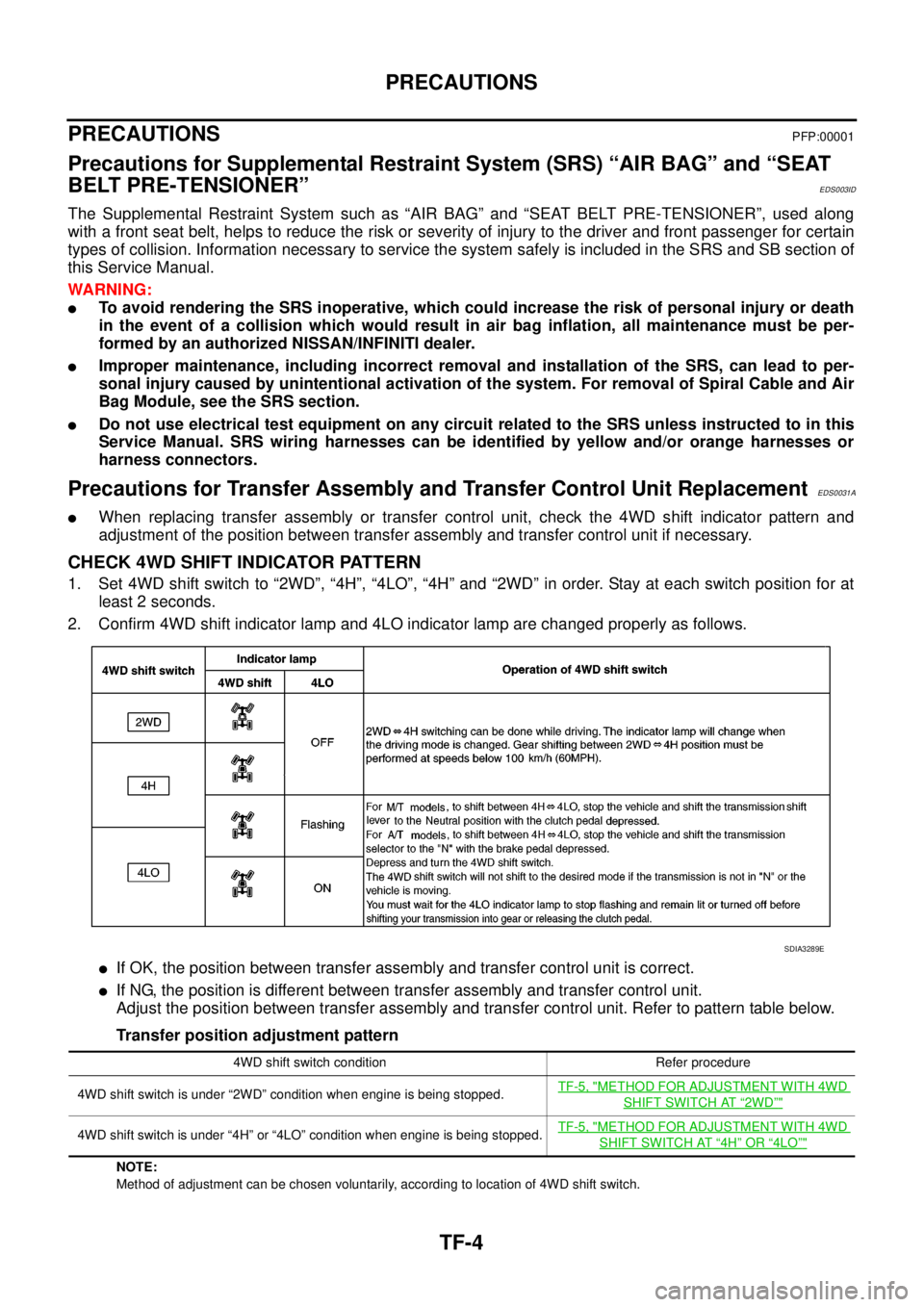
CHECK 4WD SHIFT INDICATOR PATTERN
1. Set 4WD shift switch to “2WD”, “4H”, “4LO”, “4H” and “2WD” in order. Stay at each switch position for at
least 2 seconds.
2. Confirm 4WD shift indicator lamp and 4LO indicator lamp are changed properly as follows.
lIf OK, the position between transfer assembly and transfer control unit is correct.
lIf NG, the position is different between transfer assembly and transfer control unit.
Adjust the position between transfer assembly and transfer control unit. Refer to pattern table below.
Transfer position adjustment pattern
NOTE:
Method of adjustment can be chosen voluntarily, according to location of 4WD shift switch.
SDIA3289E
4WD shift switch condition Refer procedure
4WD shift switch is under “2WD” condition when engine is being stopped.TF-5, "
METHOD FOR ADJUSTMENT WITH 4WD
SHIFT SWITCH AT“2WD”"
4WD shift switch is under “4H” or “4LO” condition when engine is being stopped.TF-5, "METHOD FOR ADJUSTMENT WITH 4WD
SHIFT SWITCH AT“4H”OR“4LO”"
Page 3112 of 3171

WW-1
WIPER, WASHER & HORN
K ELECTRICAL
CONTENTS
C
D
E
F
G
H
I
J
L
M
SECTIONWW
A
B
WW
WIPER, WASHER & HORN
PRECAUTION ............................................................ 3
Precautions for Supplemental Restraint System
(SRS)“AIRBAG”and“SEATBELTPRE-TEN-
SIONER” .................................................................. 3
Wiring Diagrams and Trouble Diagnosis .................. 3
FRONT WIPER AND WASHER SYSTEM .................. 4
Components Parts and Harness Connector Loca-
tion ........................................................................... 4
System Description .................................................. 4
LOW SPEED WIPER OPERATION ...................... 5
HI SPEED WIPER OPERATION ........................... 5
INTERMITTENT OPERATION .............................. 6
AUTO STOP OPERATION .................................... 6
FRONT WASHER OPERATION ........................... 6
MIST OPERATION ................................................ 7
FAIL-SAFE FUNCTION ......................................... 7
COMBINATION SWITCH READING FUNCTION..... 8
CAN Communication System Description .............. 10
Schematic ............................................................... 11
Wiring Diagram — WIPER — ................................ 12
Terminals and Reference Values for BCM ............. 15
Terminals and Reference Values for IPDM E/R ..... 16
How To Proceed With Trouble Diagnosis ............... 16
Preliminary Inspection ............................................ 16
INSPECTION FOR POWER SUPPLY AND
GROUND CIRCUIT ............................................. 16
CONSULT-II Function (BCM) ................................. 18
CONSULT-II OPERATION .................................. 18
WORK SUPPORT ............................................... 19
DATA MONITOR ................................................. 19
ACTIVE TEST ..................................................... 20
CONSULT-II Function (IPDM E/R) ......................... 21
CONSULT-II OPERATION .................................. 21
DATA MONITOR ................................................. 22
ACTIVE TEST ..................................................... 22
Front Wiper Does Not Operate in Rain (Front Wiper
Switch Turned to INT Position) ............................... 23
Front Wiper Does Not Operate .............................. 25
Front Wiper Does Not Return to Stop Position (After
Front Wiper for 10 Seconds, They Stop for 20 sec-onds, and After Repeating the Operations Five
Times, They Become Inoperative) .......................... 28
Only Front Wiper LO Does Not Operate ................. 29
Only Front Wiper HI Does Not Operate .................. 31
Only Front Wiper INT Does Not Operate ................ 32
Front Wiper Intermittent Operation Switch Position
Cannot Be Adjusted ................................................ 33
Front Wiper Interval Time Is Not Controlled by Vehi-
cle Speed ................................................................ 33
Wipers Do Not Wipe When Front Washer Operates... 33
Removal and Installation of Front Wiper Arms,
Adjustment of Wiper Arms Stop Location ............... 34
REMOVAL ........................................................... 34
INSTALLATION ................................................... 34
Removal and Installation of Wiper Motor and Link-
age .......................................................................... 35
REMOVAL ........................................................... 35
INSTALLATION ................................................... 35
Washer Nozzle Adjustment .................................... 36
Washer Tube Layout .............................................. 36
Removal and Installation of Wiper and Washer
Switch ..................................................................... 36
REMOVAL ........................................................... 36
INSTALLATION ................................................... 36
Removal and Installation of Front Washer Tank ..... 37
REMOVAL ........................................................... 37
INSTALLATION ................................................... 37
Removal and Installation of Front Washer Motor ... 38
REMOVAL ........................................................... 38
INSTALLATION ................................................... 38
Removal and Installation of Washer Fluid Level Sen-
sor ........................................................................... 38
REMOVAL ........................................................... 38
INSTALLATION ................................................... 38
HEADLAMP WASHER ............................................. 39
Components Parts and Harness Connector Loca-
tion .......................................................................... 39
System Description ................................................. 39
OUTLINE ............................................................. 40
HEADLAMP WASHER OPERATION .................. 40