check engine NISSAN NAVARA 2005 Repair Workshop Manual
[x] Cancel search | Manufacturer: NISSAN, Model Year: 2005, Model line: NAVARA, Model: NISSAN NAVARA 2005Pages: 3171, PDF Size: 49.59 MB
Page 2774 of 3171
![NISSAN NAVARA 2005 Repair Workshop Manual TROUBLE DIAGNOSIS FOR SYMPTOMS
RFD-71
[WITH ELECTRONIC LOCKING DIFFERENTIAL]
C
E
F
G
H
I
J
K
L
MA
B
RFD
3.CHECK DIFFERENTIAL LOCK CONTROL UNIT GROUND CIRCUIT
1. Turn ignition switch “OFF”.
2. Disc](/img/5/57362/w960_57362-2773.png "NISSAN NAVARA 2005 Repair Workshop Manual TROUBLE DIAGNOSIS FOR SYMPTOMS
RFD-71
[WITH ELECTRONIC LOCKING DIFFERENTIAL]
C
E
F
G
H
I
J
K
L
MA
B
RFD
3.CHECK DIFFERENTIAL LOCK CONTROL UNIT GROUND CIRCUIT
1. Turn ignition switch “OFF”.
2. Disc")
TROUBLE DIAGNOSIS FOR SYMPTOMS
RFD-71
[WITH ELECTRONIC LOCKING DIFFERENTIAL]
C
E
F
G
H
I
J
K
L
MA
B
RFD
3.CHECK DIFFERENTIAL LOCK CONTROL UNIT GROUND CIRCUIT
1. Turn ignition switch “OFF”.
2. Disconnect differential lock control unit harness connector.
3. Check continuity between differential lock control unit harness
connector M107 terminals 3, 10 and ground.
Also check harness for short to ground and short to power.
OK or NG
OK >> GO TO 4.
NG >> Repair open circuit or short to ground or short to power
in harness or connectors.
4.CHECK COMBINATION METER POWER SUPPLY CIRCUIT
1. Turn ignition switch “OFF”.
2. Disconnect combination meter harness connector.
3. Check voltage between combination meter harness connector
terminal and ground.
4. Turn ignition switch “ON”. (Do not start engine.)
5. Check voltage between combination meter harness connector
terminal and ground.
OK or NG
OK >> GO TO 5.
NG >> Check the following. If any items are damaged, repair or
replace damaged parts.
l10A fuse [No.14, located in the fuse block (J/B)]
lHarness for short or open between ignition switch and combination meter harness connector
terminal 16.
lIgnition switch. Refer toPG-4, "POWER SUPPLY ROUTING CIRCUIT". Continuity should exist.
SDIA2564E
Connector Terminal Voltage (Approx.)
M23 16 - Ground 0V
WDIA0250E
Connector Terminal Voltage (Approx.)
M23 16 - Ground 0V
WDIA0251E
Page 2775 of 3171
![NISSAN NAVARA 2005 Repair Workshop Manual RFD-72
[WITH ELECTRONIC LOCKING DIFFERENTIAL]
TROUBLE DIAGNOSIS FOR SYMPTOMS
5.CHECK HARNESS BETWEEN DIFFERENTIAL LOCK CONTROL UNIT AND COMBINATION METER
1. Turn ignition switch “OFF”.
2. Disconne](/img/5/57362/w960_57362-2774.png "NISSAN NAVARA 2005 Repair Workshop Manual RFD-72
[WITH ELECTRONIC LOCKING DIFFERENTIAL]
TROUBLE DIAGNOSIS FOR SYMPTOMS
5.CHECK HARNESS BETWEEN DIFFERENTIAL LOCK CONTROL UNIT AND COMBINATION METER
1. Turn ignition switch “OFF”.
2. Disconne")
RFD-72
[WITH ELECTRONIC LOCKING DIFFERENTIAL]
TROUBLE DIAGNOSIS FOR SYMPTOMS
5.CHECK HARNESS BETWEEN DIFFERENTIAL LOCK CONTROL UNIT AND COMBINATION METER
1. Turn ignition switch “OFF”.
2. Disconnect differential lock control unit harness connector and combination meter harness connector.
3. Check continuity between differential lock control unit harness
connector M107 terminal 21 and combination meter harness
connector M23 terminal 25.
Also check harness for short to ground and short to power.
OK or NG
OK >> GO TO 6.
NG >> Repair or replace damaged parts.
6.CHECK INDICATOR LAMP CIRCUIT
1. Turn ignition switch “OFF”. (Stay for at least 5 seconds.)
2. Connect combination meter harness connector.
3. Disconnect differential lock control unit harness connector.
4. Turn ignition switch “ON”. (Do not start engine.)
5. Ground the following terminals using suitable wiring.
–Differential lock control unit harness connector M107 terminal 21
and ground.
Do indicator lamps turn on?
OK >> GO TO 7.
NG >> Replace combination meter. Refer toDI-27, "
Removal
and Installation of Combination Meter".
7.CHECK SYMPTOM
Check again.
OK or NG
OK >>INSPECTION END
NG >> GO TO 8.
8.CHECK DIFFERENTIAL LOCK CONTROL UNIT
Check differential lock control unit input/output signal. Refer toRFD-48, "
Differential Lock Control Unit Input/
Output Signal Reference Values".
OK or NG
OK >>INSPECTION END
NG >> Check differential lock control unit pin terminals for damage or loose connection with harness con-
nector. If any items are damaged, repair or replace damaged parts. Continuity should exist.
WDIA0252E
SDIA3453E
Page 2776 of 3171
![NISSAN NAVARA 2005 Repair Workshop Manual TROUBLE DIAGNOSIS FOR SYMPTOMS
RFD-73
[WITH ELECTRONIC LOCKING DIFFERENTIAL]
C
E
F
G
H
I
J
K
L
MA
B
RFD
DIFF LOCK Indicator Lamp Does Not ChangeEDS003BA
SYMPTOM:
DIFF LOCK indicator lamp does not chan](/img/5/57362/w960_57362-2775.png "NISSAN NAVARA 2005 Repair Workshop Manual TROUBLE DIAGNOSIS FOR SYMPTOMS
RFD-73
[WITH ELECTRONIC LOCKING DIFFERENTIAL]
C
E
F
G
H
I
J
K
L
MA
B
RFD
DIFF LOCK Indicator Lamp Does Not ChangeEDS003BA
SYMPTOM:
DIFF LOCK indicator lamp does not chan")
TROUBLE DIAGNOSIS FOR SYMPTOMS
RFD-73
[WITH ELECTRONIC LOCKING DIFFERENTIAL]
C
E
F
G
H
I
J
K
L
MA
B
RFD
DIFF LOCK Indicator Lamp Does Not ChangeEDS003BA
SYMPTOM:
DIFF LOCK indicator lamp does not change when turning differential lock mode switch to “ON” after
engine start.
DIAGNOSTIC PROCEDURE
1.CHECK DIFF LOCK INDICATOR LAMP
Confirm DIFF LOCK indicator lamp when ignition switch is turned to ON.
Does DIFF LOCK indicator lamp turn on?
YES >> GO TO 2.
NO >> Go toRFD-70, "
DIFF LOCK Indicator Lamp Does Not Turn ON".
2.CHECK SELF-DIAGNOSTIC RESULTS
Perform self-diagnosis. Refer toRFD-51, "
SELF-DIAG RESULTS MODE".
Is any malfunction detected by self-diagnosis?
YES >> Check the malfunctioning system.
NO >> GO TO 3.
3.CHECK SYSTEM FOR DIFFERENTIAL LOCK MODE SWITCH
Perform trouble diagnosis for differential lock mode switch system. Refer toRFD-56, "
Differential Lock Mode
Switch".
OK or NG
OK >> GO TO 4.
NG >> Repair or replace damaged parts.
4.CHECK SYMPTOM
Check again.
OK or NG
OK >>INSPECTION END
NG >> GO TO 5.
5.CHECK DIFFERENTIAL LOCK CONTROL UNIT
Check differential lock control unit input/output signal. Refer toRFD-48, "
Differential Lock Control Unit Input/
Output Signal Reference Values".
OK or NG
OK >>INSPECTION END
NG >> Check differential lock control unit pin terminals for damage or loose connection with harness con-
nector. If any items are damaged, repair or replace damaged parts.
Page 2810 of 3171
REAR SUSPENSION ASSEMBLY
RSU-5
C
D
F
G
H
I
J
K
L
MA
B
RSU
CAUTION:
When installing the components with rubber bushings, the final tightening of the nuts and bolts must
be done with the vehicle in an unladen condition (the fuel, engine coolant, and engine oil full; the
spare tire, jack, hand tools and mats in their designated positions) with the tires on the ground.
On-Vehicle Inspection and ServiceEES002JH
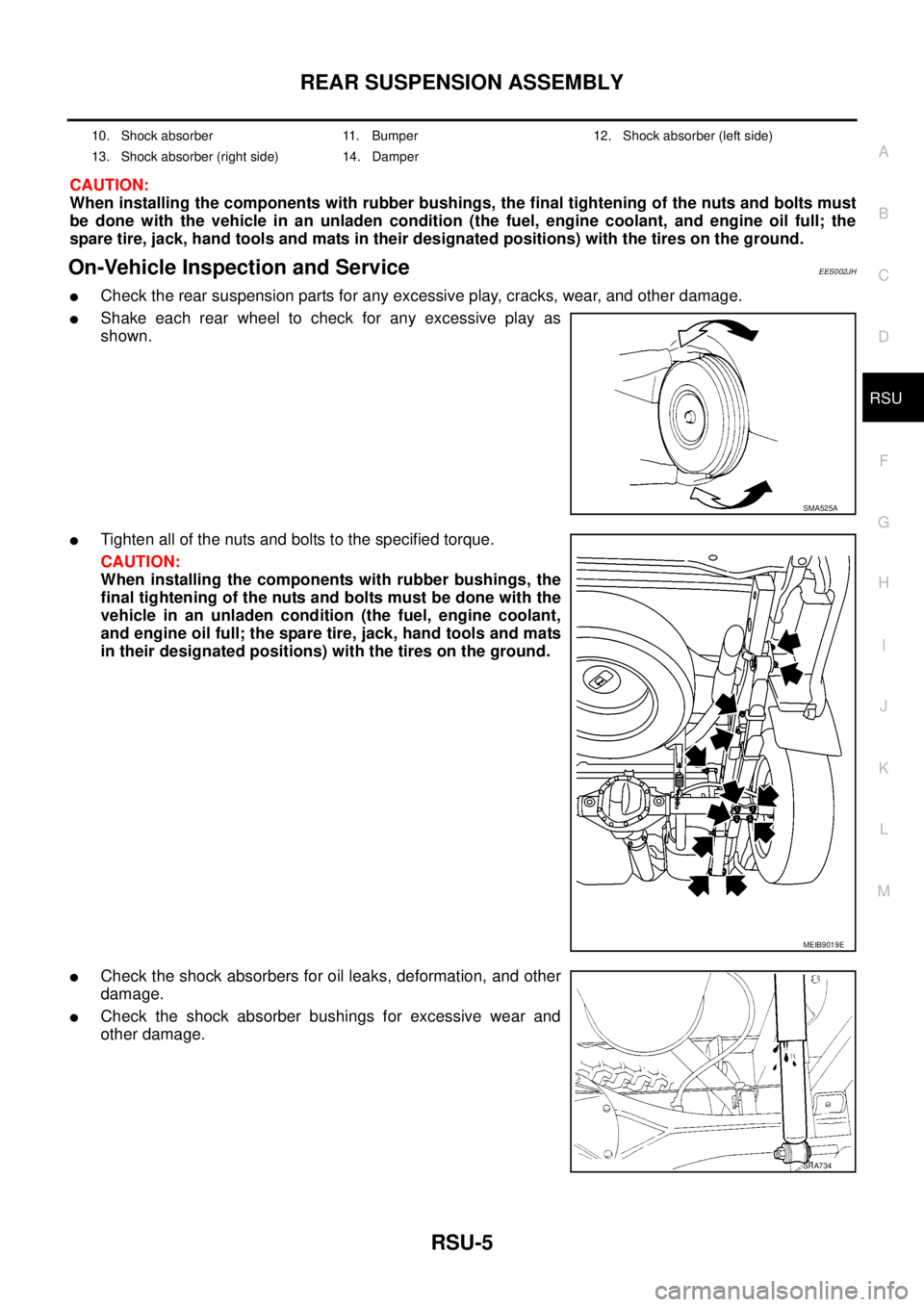
lCheck the rear suspension parts for any excessive play, cracks, wear, and other damage.
lShake each rear wheel to check for any excessive play as
shown.
lTighten all of the nuts and bolts to the specified torque.
CAUTION:
When installing the components with rubber bushings, the
final tightening of the nuts and bolts must be done with the
vehicle in an unladen condition (the fuel, engine coolant,
and engine oil full; the spare tire, jack, hand tools and mats
in their designated positions) with the tires on the ground.
lCheck the shock absorbers for oil leaks, deformation, and other
damage.
lCheck the shock absorber bushings for excessive wear and
other damage.
10. Shock absorber 11. Bumper 12. Shock absorber (left side)
13. Shock absorber (right side) 14. Damper
SMA525A
MEIB9019E
SRA734
Page 2838 of 3171
BATTERY
SC-5
C
D
E
F
G
H
I
J
L
MA
B
SC
BATTERYPFP:00011
How to Handle BatteryEKS00MZ7
CAUTION:
lIf it becomes necessary to start the engine with a booster battery and jumper cables, use a 12-volt
booster battery.
lAfter connecting battery cables, ensure that they are tightly clamped to battery terminals for good
contact.
lNever add distilled water through the hole used to check specific gravity.
METHODS OF PREVENTING OVER-DISCHARGE
The following precautions must be taken to prevent over-discharging a battery.
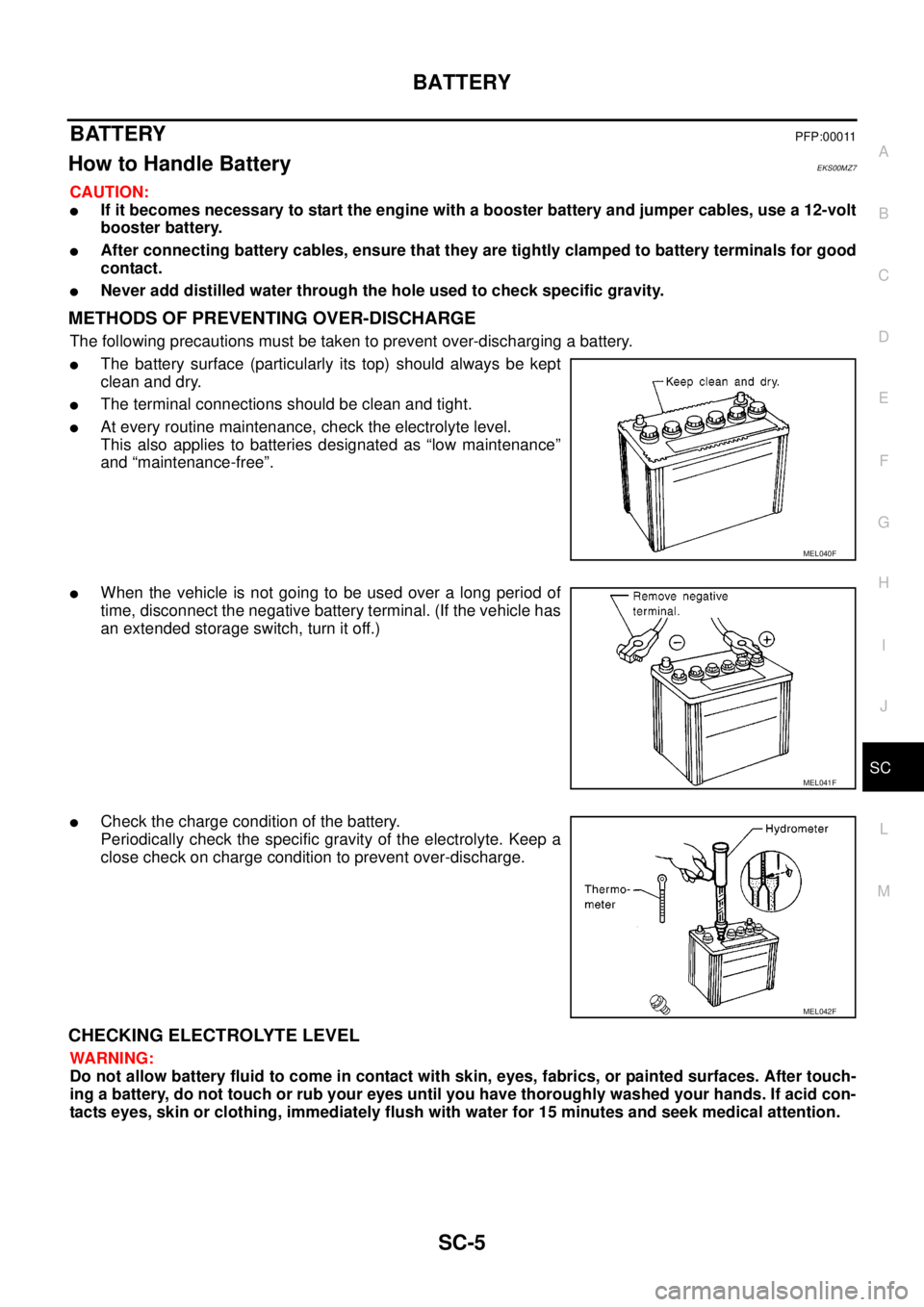
lThe battery surface (particularly its top) should always be kept
clean and dry.
lThe terminal connections should be clean and tight.
lAt every routine maintenance, check the electrolyte level.
This also applies to batteries designated as “low maintenance”
and “maintenance-free”.
lWhen the vehicle is not going to be used over a long period of
time, disconnect the negative battery terminal. (If the vehicle has
an extended storage switch, turn it off.)
lCheck the charge condition of the battery.
Periodically check the specific gravity of the electrolyte. Keep a
close check on charge condition to prevent over-discharge.
CHECKING ELECTROLYTE LEVEL
WARNING:
Do not allow battery fluid to come in contact with skin, eyes, fabrics, or painted surfaces. After touch-
ing a battery, do not touch or rub your eyes until you have thoroughly washed your hands. If acid con-
tacts eyes, skin or clothing, immediately flush with water for 15 minutes and seek medical attention.
MEL040F
MEL041F
MEL042F
Page 2849 of 3171
SC-16
CHARGING SYSTEM
Trouble Diagnosis
EKS00MZD
DIAGNOSIS PROCEDURE
1. Check malfunction symptoms or customer's remarks.
2. Perform pre-diagnosis inspection. Refer toSC-16, "
PRE-DIAGNOSIS INSPECTION".
3. Perform trouble diagnosis for each trouble symptom. Refer toSC-16, "
DIAGNOSIS CHART BY SYMP-
TOM"
4. Repair or replace parts indicated inspection flow based on the charge warning lamp. Refer toSC-16,
"INSPECTION FLOW BY CHARGE WARNING LAMP".
5. End
PRE-DIAGNOSIS INSPECTION
1. Perform alternator belt inspection. Refer toEM-12, "DRIVE BELTS".
2. Inspect battery.
3. Check alternator terminal 1 for loose or improper connection.
4. Check alternator connector 4 and 3 terminals for loose connection, disconnection and bend.
5. Check connecting condition of harness for charging system harness (fusible link terminal and battery ter-
minal).
6. After performing 1 to 5 above, go to trouble diagnosis for symptoms. Refer toSC-16, "
DIAGNOSIS
CHART BY SYMPTOM".
DIAGNOSIS CHART BY SYMPTOM
INSPECTION FLOW BY CHARGE WARNING LAMP
1.CHARGE WARNING LAMP INSPECTION
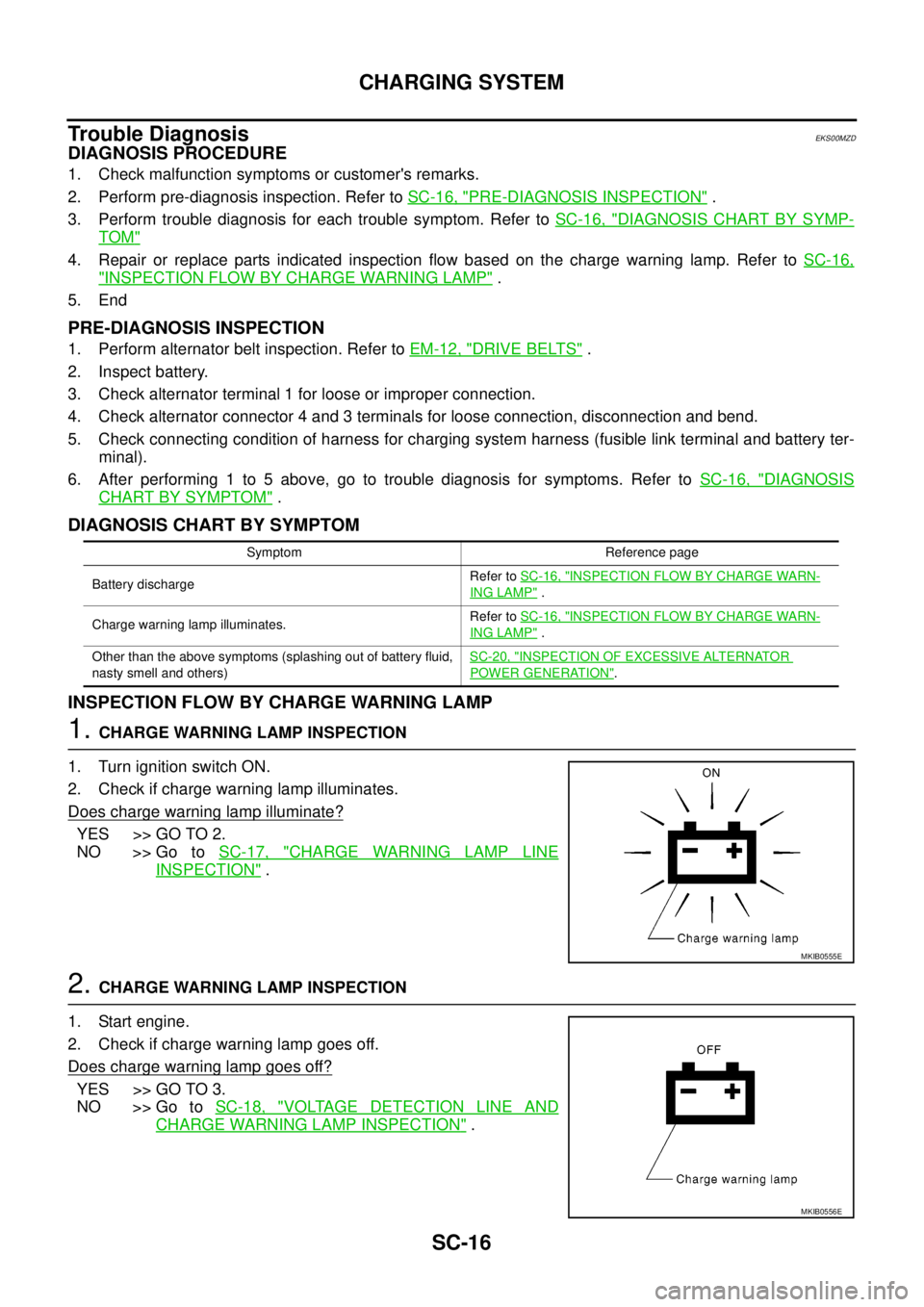
1. Turn ignition switch ON.
2. Check if charge warning lamp illuminates.
Does charge warning lamp illuminate?
YES >> GO TO 2.
NO >> Go toSC-17, "
CHARGE WARNING LAMP LINE
INSPECTION".
2.CHARGE WARNING LAMP INSPECTION
1. Start engine.
2. Check if charge warning lamp goes off.
Does charge warning lamp goes off?
YES >> GO TO 3.
NO >> Go toSC-18, "
VOLTAGE DETECTION LINE AND
CHARGE WARNING LAMP INSPECTION".
Symptom Reference page
Battery dischargeRefer toSC-16, "
INSPECTION FLOW BY CHARGE WARN-
ING LAMP".
Charge warning lamp illuminates.Refer toSC-16, "
INSPECTION FLOW BY CHARGE WARN-
ING LAMP".
Other than the above symptoms (splashing out of battery fluid,
nasty smell and others)SC-20, "
INSPECTION OF EXCESSIVE ALTERNATOR
POWER GENERATION".
MKIB0555E
MKIB0556E
Page 2850 of 3171
CHARGING SYSTEM
SC-17
C
D
E
F
G
H
I
J
L
MA
B
SC
3.CHARGE WARNING LAMP INSPECTION
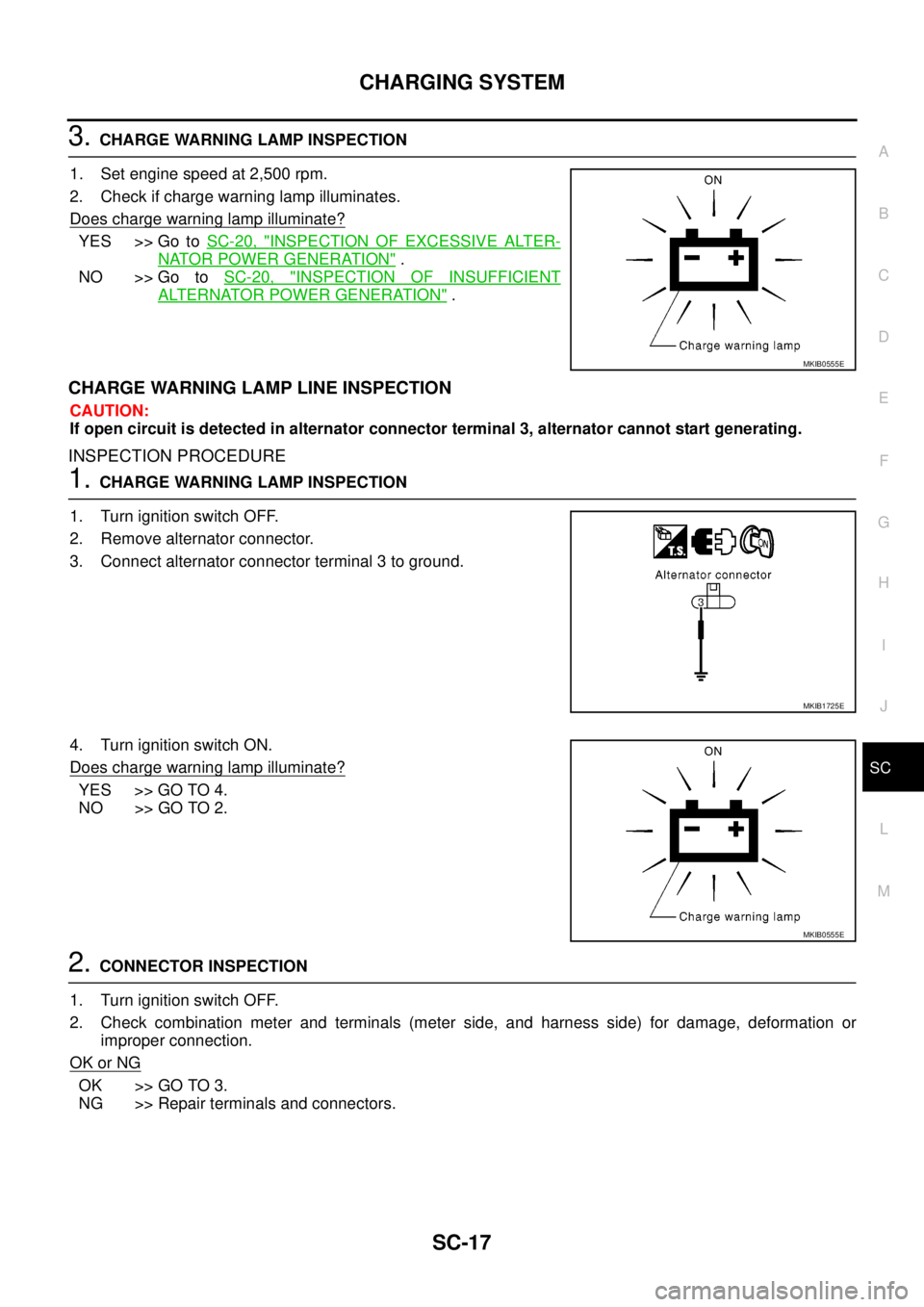
1. Set engine speed at 2,500 rpm.
2. Check if charge warning lamp illuminates.
Does charge warning lamp illuminate?
YES >> Go toSC-20, "INSPECTION OF EXCESSIVE ALTER-
NATOR POWER GENERATION".
NO >> Go toSC-20, "
INSPECTION OF INSUFFICIENT
ALTERNATOR POWER GENERATION".
CHARGE WARNING LAMP LINE INSPECTION
CAUTION:
If open circuit is detected in alternator connector terminal 3, alternator cannot start generating.
INSPECTION PROCEDURE
1.CHARGE WARNING LAMP INSPECTION
1. Turn ignition switch OFF.
2. Remove alternator connector.
3. Connect alternator connector terminal 3 to ground.
4. Turn ignition switch ON.
Does charge warning lamp illuminate?
YES >> GO TO 4.
NO >> GO TO 2.
2.CONNECTOR INSPECTION
1. Turn ignition switch OFF.
2. Check combination meter and terminals (meter side, and harness side) for damage, deformation or
improper connection.
OK or NG
OK >> GO TO 3.
NG >> Repair terminals and connectors.
MKIB0555E
MKIB1725E
MKIB0555E
Page 2853 of 3171
SC-20
CHARGING SYSTEM
INSPECTION OF INSUFFICIENT ALTERNATOR POWER GENERATION
CAUTION:
Check them using charged battery performed battery inspection.
1.VOLTAGE INSPECTION
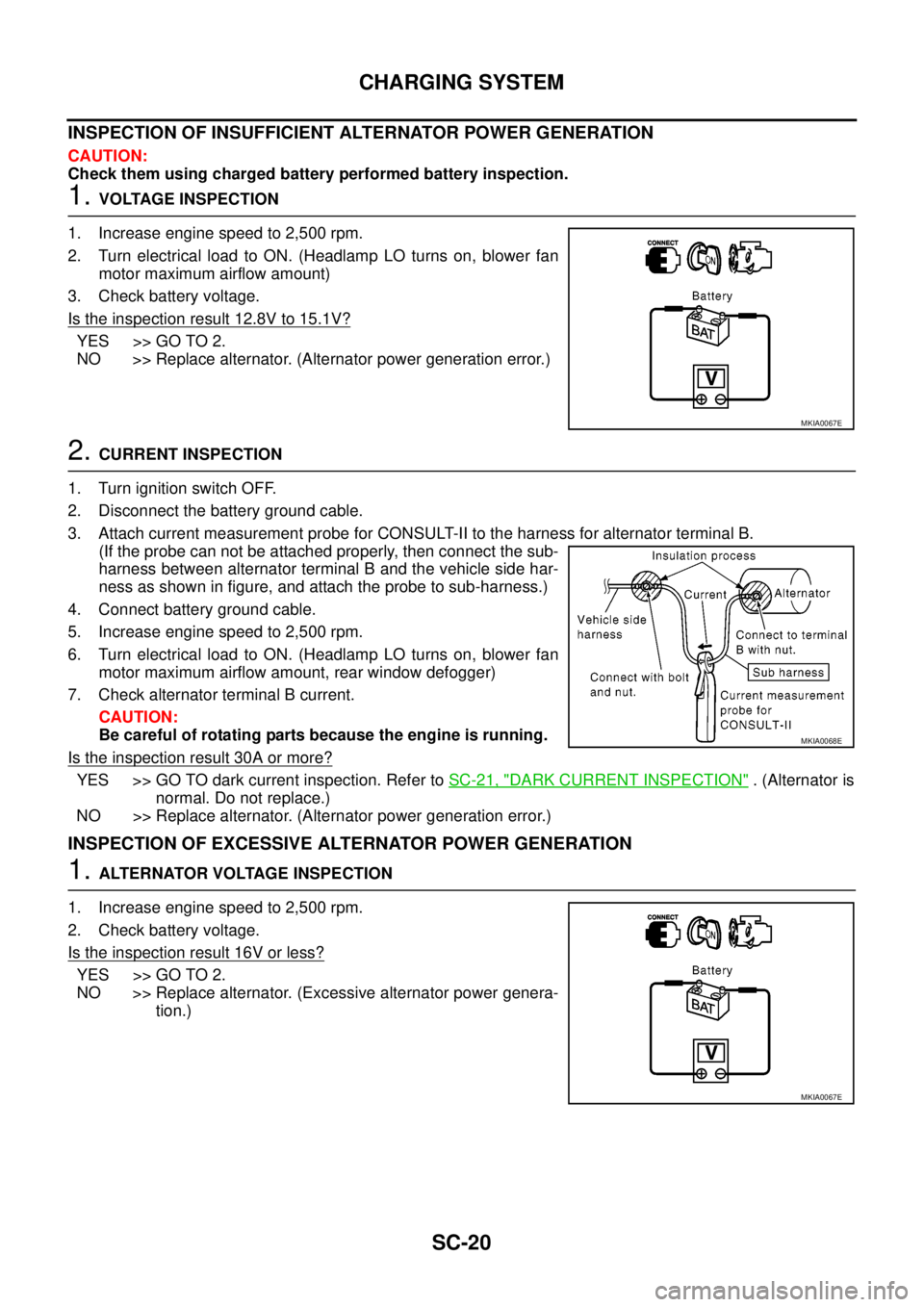
1. Increase engine speed to 2,500 rpm.
2. Turn electrical load to ON. (Headlamp LO turns on, blower fan
motor maximum airflow amount)
3. Check battery voltage.
Is the inspection result 12.8V to 15.1V?
YES >> GO TO 2.
NO >> Replace alternator. (Alternator power generation error.)
2.CURRENT INSPECTION
1. Turn ignition switch OFF.
2. Disconnect the battery ground cable.
3. Attach current measurement probe for CONSULT-II to the harness for alternator terminal B.
(If the probe can not be attached properly, then connect the sub-
harness between alternator terminal B and the vehicle side har-
ness as shown in figure, and attach the probe to sub-harness.)
4. Connect battery ground cable.
5. Increase engine speed to 2,500 rpm.
6. Turn electrical load to ON. (Headlamp LO turns on, blower fan
motor maximum airflow amount, rear window defogger)
7. Check alternator terminal B current.
CAUTION:
Be careful of rotating parts because the engine is running.
Is the inspection result 30A or more?
YES >> GO TO dark current inspection. Refer toSC-21, "DARK CURRENT INSPECTION". (Alternator is
normal. Do not replace.)
NO >> Replace alternator. (Alternator power generation error.)
INSPECTION OF EXCESSIVE ALTERNATOR POWER GENERATION
1.ALTERNATOR VOLTAGE INSPECTION
1. Increase engine speed to 2,500 rpm.
2. Check battery voltage.
Is the inspection result 16V or less?
YES >> GO TO 2.
NO >> Replace alternator. (Excessive alternator power genera-
tion.)
MKIA0067E
MKIA0068E
MKIA0067E
Page 2856 of 3171

CHARGING SYSTEM
SC-23
C
D
E
F
G
H
I
J
L
MA
B
SC
Removal and InstallationEKS00MZE
REMOVAL
1. Disconnect negative battery cable.
2. Remove intercooler hose and duct
3. Disconnect alternator harness.
4. Remove drive belt. Refer toEM-12, "
Checking Drive Belts".
5. Remove alternator upper mounting bolt.
6. Remove alternator lower mounting nut and bolt .
7. Remove alternator.
INSTALLATION
Install in the reverse order of removal, taking care of the following point.
lInstall alternator, and check tension of drive belt. Refer toEM-13, "Deflection Adjustment".
CAUTION:
Be sure to tighten alternator terminal 1 mounting nut carefully.
Disassembly and AssemblyEKS00PD1
LHD MODELS
MKIB1992E
YD engine models - B terminal nut:
: 7.9 - 11.0 N·m (0.8 - 1.11 kg-m, 70 - 97 in-lb)
1. Rear bearing 2. Rotor 3. Retainer
4. Front bearing 5. Through bolt 6. Front cover
7. Washer 8. Pulley 9. Stator
10. IC voltage regulator assembly 11. Diode assembly 12. Rear cover
13. B terminal
MKIB2000E
Page 2876 of 3171
SQUEAK AND RATTLE TROUBLE DIAGNOSES
SE-5
C
D
E
F
G
H
J
K
L
MA
B
SE
DUPLICATE THE NOISE AND TEST DRIVE
If possible, drive the vehicle with the customer until the noise is duplicated. Note any additional information on
the Diagnostic Worksheet regarding the conditions or location of the noise. This information can be used to
duplicate the same conditions when you confirm the repair.
If the noise can be duplicated easily during the test drive, to help identify the source of the noise, try to dupli-
cate the noise with the vehicle stopped by doing one or all of the following:
1) Close a door.
2) Tap or push/pull around the area where the noise appears to be coming from.
3) Rev the engine.
4) Use a floor jack to recreate vehicle “twist”.
5) At idle, apply engine load (electrical load, half-clutch on M/T models, drive position on A/T models).
6) Raisethevehicleonahoistandhitatirewitharubberhammer.
lDrive the vehicle and attempt to duplicate the conditions the customer states exist when the noise occurs.
lIf it is difficult to duplicate the noise, drive the vehicle slowly on an undulating or rough road to stress the
vehicle body.
CHECK RELATED SERVICE BULLETINS
After verifying the customer concern or symptom, check ASIST for Technical Service Bulletins (TSBs) related
to that concern or symptom.
If a TSB relates to the symptom, follow the procedure to repair the noise.
LOCATE THE NOISE AND IDENTIFY THE ROOT CAUSE
1. Narrow down the noise to a general area. To help pinpoint the source of the noise, use a listening tool
(Engine Ear or mechanics stethoscope).
2. Narrow down the noise to a more specific area and identify the cause of the noise by:
lremoving the components in the area that you suspect the noise is coming from.
Do not use too much force when removing clips and fasteners, otherwise clips and fastener can be broken
or lost during the repair, resulting in the creation of new noise.
ltapping or pushing/pulling the component that you suspect is causing the noise.
Do not tap or push/pull the component with excessive force, otherwise the noise will be eliminated only
temporarily.
lfeeling for a vibration with your hand by touching the component(s) that you suspect is (are) causing the
noise.
lplacing a piece of paper between components that you suspect are causing the noise.
llooking for loose components and contact marks.
Refer toSE-6, "
Generic Squeak and Rattle Troubleshooting".
REPAIR THE CAUSE
lIf the cause is a loose component, tighten the component securely.
lIf the cause is insufficient clearance between components:
–separate components by repositioning or loosening and retightening the component, if possible.
–insulate components with a suitable insulator such as urethane pads, foam blocks, felt cloth tape or ure-
thane tape are available through your authorized Nissan Parts Department.
CAUTION:
Do not use excessive force as many components are constructed of plastic and may be damaged.
NOTE:
Always check with the Parts Department for the latest parts information.
Each item can be ordered separately as needed.
URETHANE PADS [1.5 mm (0.059 in) thick]
Insulates connectors, harness, etc.
76268-9E005: 100´135 mm (3.94´5.31 in)/76884-71L01: 60´85 mm (2.36´3.35 in)/76884-71L02: 15´
25 mm (0.59´0.98 in)
INSULATOR (Foam blocks)
Insulates components from contact. Can be used to fill space behind a panel.
73982-9E000: 45 mm (1.77 in) thick, 50´50 mm (1.97´1.97 in)/73982-50Y00: 10 mm (0.39 in) thick, 50
´50 mm (1.97´1.97 in)
INSULATOR (Light foam block)
80845-71L00: 30 mm (1.18 in) thick, 30´50 mm (1.18´1.97 in)