phone NISSAN NAVARA 2005 Repair Workshop Manual
[x] Cancel search | Manufacturer: NISSAN, Model Year: 2005, Model line: NAVARA, Model: NISSAN NAVARA 2005Pages: 3171, PDF Size: 49.59 MB
Page 1 of 3171
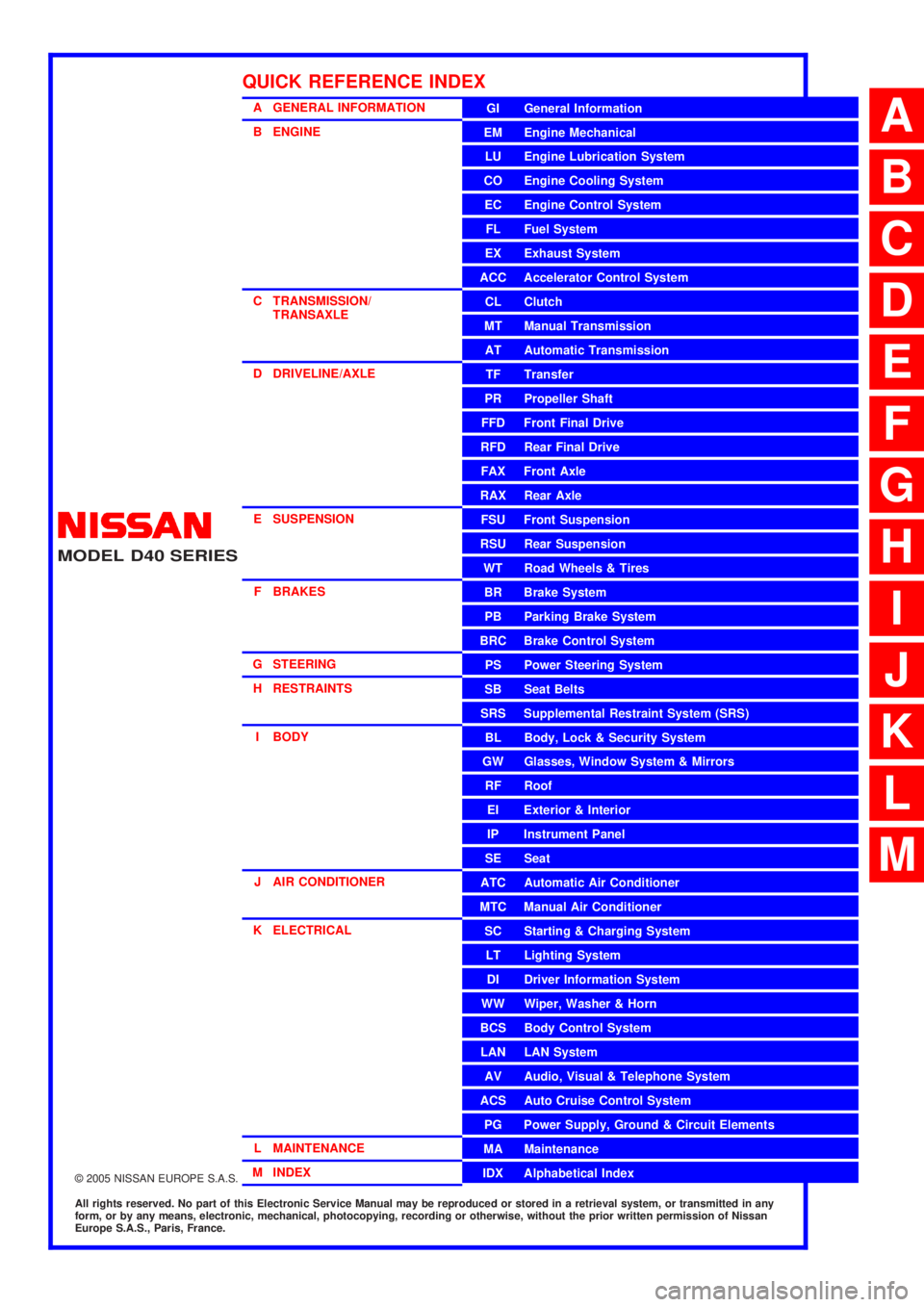
MODELD40 SERIES
2005 NISSAN EUROPE S.A.S.
All rights reserved. No part of this Electronic Service Manual may be reproduced or stored in a retrieval system, or transmitted in any
form, or by any means, electronic, mechanical, photocopying, recording or otherwise, without the prior written permission of Nissan
Europe S.A.S., Paris, France.
A GENERAL INFORMATION
B ENGINE
C TRANSMISSION/TRANSAXLE
D DRIVELINE/AXLE
E SUSPENSION F BRAKES
G STEERING H RESTRAINTS
I BODY
J AIR CONDITIONER
K ELECTRICAL
L MAINTENANCE
M INDEXGI General Information
EM Engine Mechanical
LU Engine Lubrication System
CO Engine Cooling System
EC Engine Control System
FL Fuel System
EX Exhaust System
ACC Accelerator Control System
CL Clutch
MTManualTransmission
AT Automatic Transmission
TF Transfer
PR Propeller Shaft
FFD Front Final Drive
RFD Rear Final Drive
FAX Front Axle
RAX Rear Axle
FSU Front Suspension
RSU Rear Suspension
WT Road Wheels & Tires
BR Brake System
PB Parking Brake System
BRC Brake Control System
PS Power Steering System
SB Seat Belts
SRS Supplemental Restraint System (SRS)
BL Body, Lock & Security System
GW Glasses, Window System & Mirrors
RF Roof
EI Exterior & Interior
IP Instrument Panel
SE Seat
ATC Automatic Air Conditioner
MTC Manual Air Conditioner
SC Starting & Charging System
LT Lighting System
DI Driver Information System
WW Wiper, Washer & Horn
BCS Body Control System
LAN LAN System
AV Audio, Visual & Telephone System
ACS Auto Cruise Control System
PG Power Supply, Ground & Circuit Elements
MA Maintenance
IDX Alphabetical Index
QUICK REFERENCE INDEX
A
B
C
D
E
F
G
H
I
J
K
L
M
Page 489 of 3171

AV-1
AUDIO-VISUAL SYSTEM
K ELECTRICAL
CONTENTS
C
D
E
F
G
H
I
J
L
M
SECTIONAV
A
B
AV
AUDIO-VISUAL SYSTEM
PRECAUTIONS .......................................................... 3
Precautions for Supplemental Restraint System
(SRS)“AIRBAG”and“SEATBELTPRE-TEN-
SIONER” .................................................................. 3
Wiring Diagrams and Trouble Diagnosis .................. 3
SYSTEM DESCRIPTION ............................................ 4
System Functions ..................................................... 4
AUDIO ................................................................... 4
NATS AUDIO LINK (WITHOUT NAVIGATION
SYSTEM) .............................................................. 4
VEHICLE INFORMATION SYSTEM ..................... 5
NAVIGATION SYSTEM ......................................... 5
HANDS-FREE PHONE ......................................... 7
Component Description ............................................ 8
AUDIO UNIT ......................................................... 8
NAVI CONTROL UNIT .......................................... 8
GPS ANTENNA .................................................... 9
DISPLAY UNIT ...................................................... 9
AV SWITCH .......................................................... 9
Component Parts Location ..................................... 10
Location Of Antenna .............................................. 10
Schematic — AUDIO — / With 1CD Player Type... 12
Wiring Diagram — AUDIO — / With 1CD Player Type
... 13
Schematic — AUDIO — / With 6CD Player Type... 16
Wiring Diagram — AUDIO — / With 6CD Player Type
... 17
Schematic — NAVI — ............................................ 20
Wiring Diagram — NAVI — .................................... 21
Schematic — NAVI — / COMM .............................. 28
Wiring Diagram — NAVI — / COMM ...................... 29
Wiring Diagram — TELEPHONE (PRE WIRE) —
/ Without NAVI ........................................................ 32
CAN Communication .............................................. 33
SYSTEM DESCRIPTION .................................... 33
TERMINALS AND REFERENCE VALUE FOR CON-
TROL UNIT ............................................................... 34
Audio Unit (1CD Player Type) ................................ 34
Audio Unit (6CD Player Type) Without NAVI .......... 35Audio Unit (With NAVI) ........................................... 37
NAVI Control Unit ................................................... 38
Display Unit ............................................................ 41
DIAGNOSIS SYSTEM ............................................... 44
Navigation System Diagnosis Function .................. 44
On Bord Self-Diagnosis Function ........................... 44
DESCRIPTION .................................................... 44
DIAGNOSIS ITEM ............................................... 44
OPERATION PROCEDURE ................................ 45
Self Diagnosis Mode ............................................... 46
ERROR DETECTION RANGE OF SELF-DIAG-
NOSIS MODE ..................................................... 47
DIAGNOSIS RESULTS ....................................... 47
Confirmation/Adjustment Mode .............................. 48
SCREEN TROUBLE DIAGNOSIS ...................... 49
VEHICLE SIGNALS ............................................ 49
SPEAKER TEST ................................................. 50
NAVIGATION ....................................................... 50
ERROR HISTORY ............................................... 51
VEHICLE CAN DIAGNOSIS ............................... 53
AV COMM DIAGNOSIS ....................................... 54
HANDSFREE PHONE ........................................ 54
BLUETOOTH ....................................................... 54
DELETE UNIT CONNECTION LOG ................... 55
CONSULT-II Functions ........................................... 56
CONSULT-II FUNCTIONS ................................... 56
CONSULT-II BASIC OPERATION PROCEDURE
... 56
SELF-DIAG RESULTS ........................................ 56
DATA MONITOR ................................................. 58
AV COMM MONITOR .......................................... 59
ECU PART NUMBER .......................................... 60
TROUBLE DIAGNOSIS ............................................ 61
Navigation System .................................................. 61
RGB Image ............................................................. 61
Voice Activated Control System ............................. 62
Steering Wheel Switch ............................................ 63
Component Parts Inspection .................................. 63
STEERING WHEEL SWITCH UNIT INSPEC-
Page 490 of 3171

AV-2
TION .................................................................... 63
Example of Symptoms Not Malfunction .................. 65
BASIC OPERATION ............................................ 65
VEHICLE ICON ................................................... 65
MAP DVD-ROM ................................................... 66
ROUTE CALCULATION AND VISUAL GUID-
ANCE ................................................................... 66
VOICE GUIDANCE ............................................. 67
VOICE RECOGNITION ....................................... 67
EXAMPLES OF CURRENT LOCATION MARK
DISPLACEMENT ................................................. 68
THE CURRENT POSITION MARK SHOWS A
POSITION THAT IS COMPLETELY INCOR-
RECT. .................................................................. 71
THE CURRENT POSITION MARK JUMPS. ....... 72
THE CURRENT LOCATION MARK IS IN A
RIVER OR THE SEA. .......................................... 72
CURRENT LOCATION MARK ROTATES WITH-
OUT OPERATION ............................................... 72
WHEN DRIVING ON THE SAME ROAD, SOME-
TIMES THE CURRENT LOCATION MARK IS IN
THE CORRECT PLACE AND SOMETIMES IT IS
IN THE INCORRECT PLACE. ............................. 72
LOCATION CORRECTION BY MAP MATCHING
IS SLOW. ............................................................. 72
ALTHOUGH THE GPS RECEIVING DISPLAY IS
GREEN, THE VEHICLE MARK DOES NOT
RETURN TO THE CORRECT LOCATION. ......... 72
THE NAME OF THE CURRENT PLACE IS NOT
DISPLAYED. ........................................................ 72
THE DISPLAY IS DIFFERENT BETWEEN BIRD-
VIEW® AND (FLAT) MAP DISPLAY. ................... 72
REMOVAL AND INSTALLATION ............................. 73
Auido Unit (1CD Player Type) ................................ 73
REMOVAL ........................................................... 73INSTALLATION .................................................... 73
Audio Unit ( 6CD Player Type ) Without NAVI ........ 73
REMOVAL ............................................................ 73
INSTALLATION .................................................... 73
Audio Unit (6CD Player Type) With NAVI ............... 74
REMOVAL ............................................................ 74
INSTALLATION .................................................... 74
Front Door Speaker ................................................ 74
REMOVAL ............................................................ 74
INSTALLATION .................................................... 74
Rear Door Speaker ................................................. 74
REMOVAL ............................................................ 74
INSTALLATION .................................................... 74
Tweeter ................................................................... 75
REMOVAL ............................................................ 75
INSTALLATION .................................................... 75
Roof Antenna .......................................................... 75
REMOVAL ............................................................ 75
INSTALLATION .................................................... 75
NAVI Control Unit .................................................... 75
REMOVAL ............................................................ 75
INSTALLATION .................................................... 75
GPS Antenna .......................................................... 76
REMOVAL ............................................................ 76
INSTALLATION .................................................... 76
Display Unit ............................................................. 77
REMOVAL ............................................................ 77
INSTALLATION .................................................... 77
AV Switch ................................................................ 77
REMOVAL ............................................................ 77
INSTALLATION .................................................... 77
Microphone ............................................................. 77
REMOVAL ............................................................ 77
INSTALLATION .................................................... 77
Page 495 of 3171
SYSTEM DESCRIPTION
AV-7
C
D
E
F
G
H
I
J
L
MA
B
AV
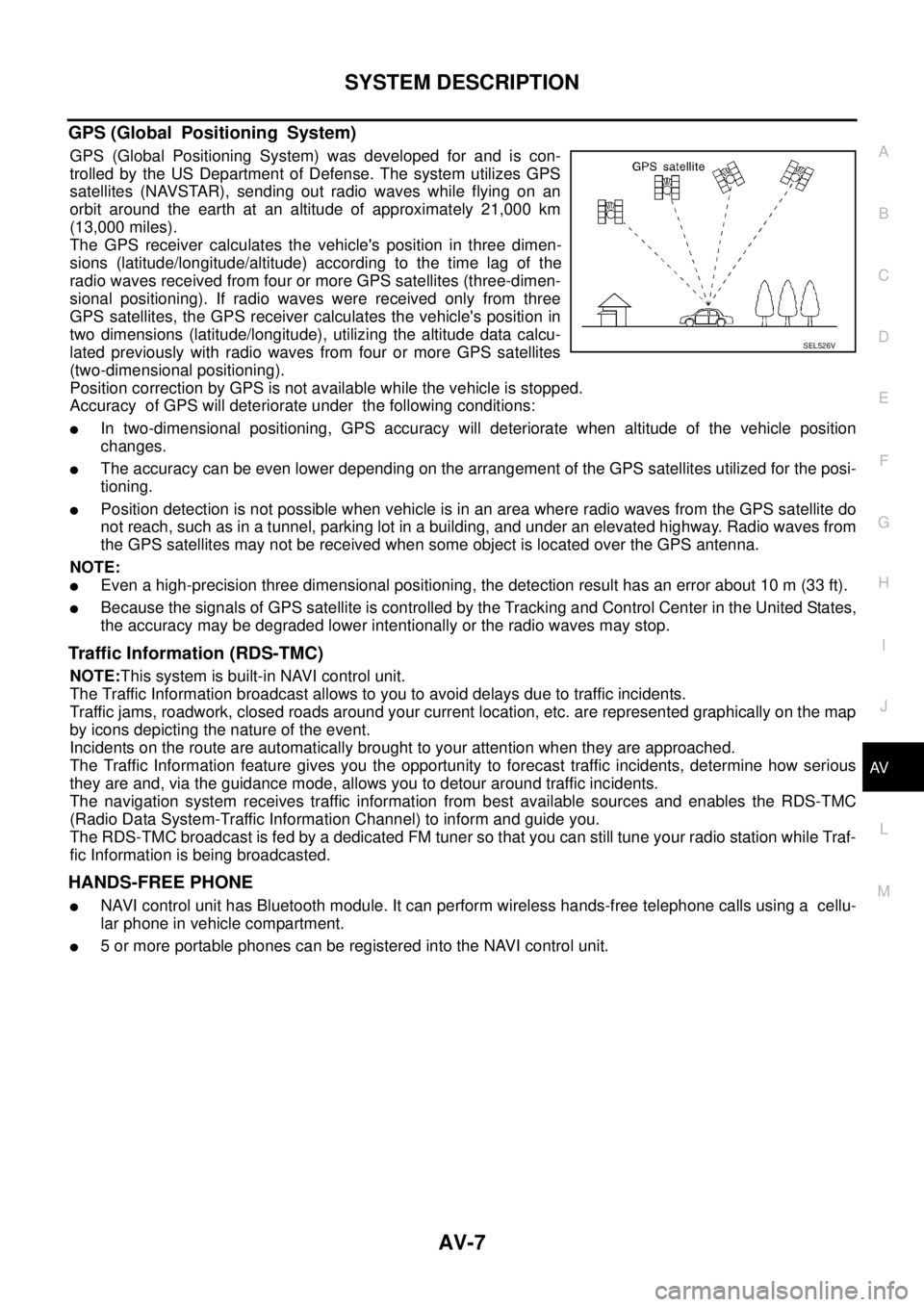
GPS (Global Positioning System)
GPS (Global Positioning System) was developed for and is con-
trolled by the US Department of Defense. The system utilizes GPS
satellites (NAVSTAR), sending out radio waves while flying on an
orbit around the earth at an altitude of approximately 21,000 km
(13,000 miles).
The GPS receiver calculates the vehicle's position in three dimen-
sions (latitude/longitude/altitude) according to the time lag of the
radio waves received from four or more GPS satellites (three-dimen-
sional positioning). If radio waves were received only from three
GPS satellites, the GPS receiver calculates the vehicle's position in
two dimensions (latitude/longitude), utilizing the altitude data calcu-
lated previously with radio waves from four or more GPS satellites
(two-dimensional positioning).
Position correction by GPS is not available while the vehicle is stopped.
Accuracy of GPS will deteriorate under the following conditions:
lIn two-dimensional positioning, GPS accuracy will deteriorate when altitude of the vehicle position
changes.
lThe accuracy can be even lower depending on the arrangement of the GPS satellites utilized for the posi-
tioning.
lPosition detection is not possible when vehicle is in an area where radio waves from the GPS satellite do
not reach, such as in a tunnel, parking lot in a building, and under an elevated highway. Radio waves from
the GPS satellites may not be received when some object is located over the GPS antenna.
NOTE:
lEven a high-precision three dimensional positioning, the detection result has an error about 10 m (33 ft).
lBecause the signals of GPS satellite is controlled by the Tracking and Control Center in the United States,
the accuracy may be degraded lower intentionally or the radio waves may stop.
Traffic Information (RDS-TMC)
NOTE:This system is built-in NAVI control unit.
The Traffic Information broadcast allows to you to avoid delays due to traffic incidents.
Traffic jams, roadwork, closed roads around your current location, etc. are represented graphically on the map
by icons depicting the nature of the event.
Incidents on the route are automatically brought to your attention when they are approached.
The Traffic Information feature gives you the opportunity to forecast traffic incidents, determine how serious
they are and, via the guidance mode, allows you to detour around traffic incidents.
The navigation system receives traffic information from best available sources and enables the RDS-TMC
(Radio Data System-Traffic Information Channel) to inform and guide you.
The RDS-TMC broadcast is fed by a dedicated FM tuner so that you can still tune your radio station while Traf-
fic Information is being broadcasted.
HANDS-FREE PHONE
lNAVI control unit has Bluetooth module. It can perform wireless hands-free telephone calls using a cellu-
lar phone in vehicle compartment.
l5 or more portable phones can be registered into the NAVI control unit.
SEL526V
Page 520 of 3171
AV-32
SYSTEM DESCRIPTION
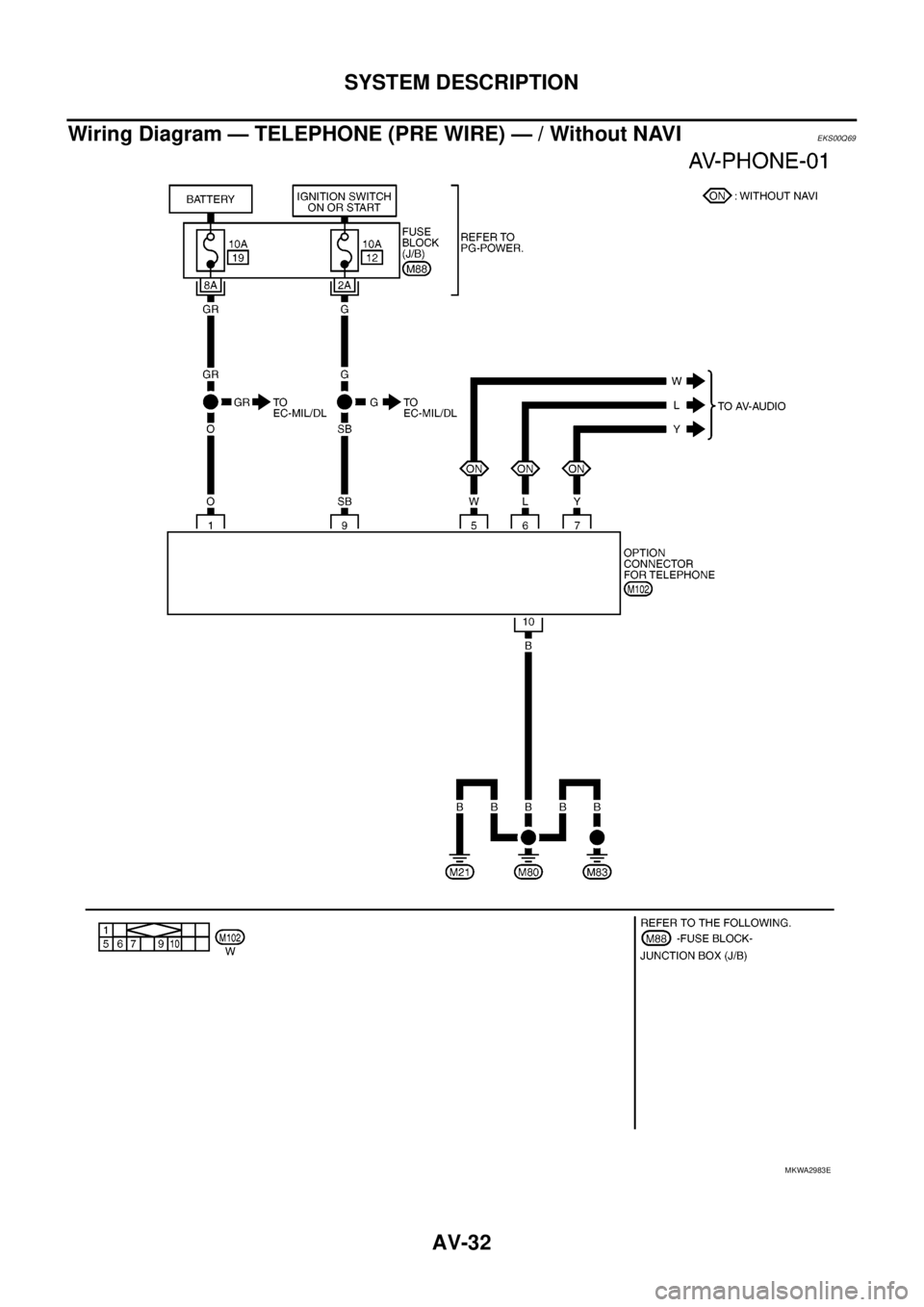
Wiring Diagram — TELEPHONE (PRE WIRE) — / Without NAVI
EKS00Q69
MKWA2983E
Page 532 of 3171

AV-44
DIAGNOSIS SYSTEM
DIAGNOSIS SYSTEM
PFP:00000
Navigation System Diagnosis FunctionEKS00Q6H
lThere are 2 diagnosis functions (on board diagnosis and diagnosis using CONSULT-II), and it is neces-
sary to use them properly according to the condition. If the on board diagnosis starts, perform diagnosis
with on board diagnosis. If the on board diagnosis does not start (the cause being that the system is not
started, the switch operation is not activated, etc.), perform diagnosis using CONSULT-II.
lAt on board diagnosis, the NAVI control unit diagnosis function starts by switch operation and the NAVI
control unit performs the diagnosis for each unit of system.
lAt diagnosis using CONSULT-II, the NAVI control unit diagnosis function starts by the communication
between CONSULT-II and NAVI control unit, and the NAVI control unit performs the diagnosis for each
unit of system.
On Bord Self-Diagnosis FunctionEKS00Q6I
DESCRIPTION
lThe on board diagnosis function has a self-diagnosis mode for performing trouble diagnosis automatically
and a Confirmation/Adjustment mode for operating manually.
lSelf-diagnosis mode performs the diagnosis at NAVI control unit, connections between each unit that
composes the system, and connections between NAVI control unit and GPS antenna. It displays the
results on the display.
lConfirmation/Adjustment mode is used to monitor the vehicle signals requiring operation and judgement
by a technician (malfunctions that cannot be automatically judged by the system), the confirmation/adjust-
ment of setting value, the error history of system, and the communication condition of system.
DIAGNOSIS ITEM
Mode Description
Self Diagnosis
lNAVI control unit diagnosis (DVD-ROM drive will not be diagnosed when
no map DVD-ROM is in it.)
lThe connection diagnosis between NAVI control unit and GPS antenna
and the connection diagnosis between NAVI control unit and each unit
can be performed.
Confirma-
tion/Adjust-
mentDisplay DiagnosisThe tint can be confirmed by the color spectrum bar display. The shading
of color can be confirmed by the gradation bar display.
Vehicle SignalsDiagnosis of signals can be performed for vehicle speed, parking brake,
lights, ignition (ignition switch), and reverse.
Speaker Test The connection of a speaker can be confirmed by test tone.
NavigationSteering Angle
AdjustmentWhen there is a difference between the actual turning angle and the vehi-
cle mark turning angle, it can be adjusted.
Speed CalibrationWhen there is a difference between the current location mark and the
actual location, it can be adjusted.
Error HistoryThe system malfunction and its frequency that occurred in the past are dis-
played. When the malfunctioning item is selected, the time and place that
the selected malfunction last occurred are displayed.
Vehicle CAN Diagnosis The transmitting/receiving of CAN communication can be monitored.
AV COMM DiagnosisThe communication condition of each unit that composes the system can
be monitored.
Handsfree PhoneEach setting of hands-free volume adjustment, voice microphone test,
delete hands-free memory can be performed.
Bluetooth Passkey and device name can be confirmed/changed.
Delete Unit Commection Log The connection history and error history of unit can be deleted.
Page 542 of 3171
AV-54
DIAGNOSIS SYSTEM
AV COMM DIAGNOSIS
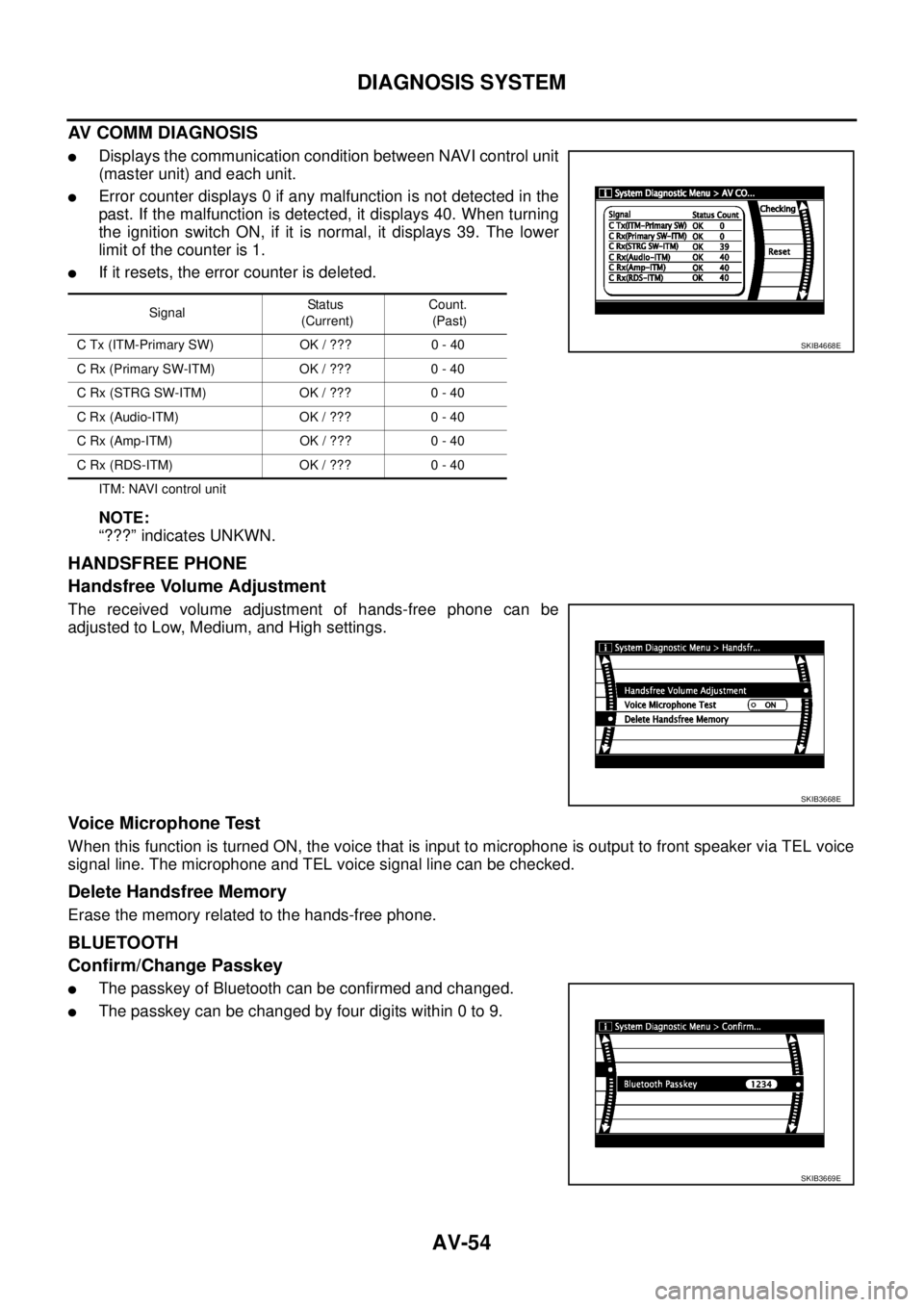
lDisplays the communication condition between NAVI control unit
(master unit) and each unit.
lError counter displays 0 if any malfunction is not detected in the
past. If the malfunction is detected, it displays 40. When turning
the ignition switch ON, if it is normal, it displays 39. The lower
limitofthecounteris1.
lIf it resets, the error counter is deleted.
ITM: NAVI control unit
NOTE:
“???” indicates UNKWN.
HANDSFREE PHONE
Handsfree Volume Adjustment
The received volume adjustment of hands-free phone can be
adjusted to Low, Medium, and High settings.
Voice Microphone Test
When this function is turned ON, the voice that is input to microphone is output to front speaker via TEL voice
signal line. The microphone and TEL voice signal line can be checked.
Delete Handsfree Memory
Erase the memory related to the hands-free phone.
BLUETOOTH
Confirm/Change Passkey
lThe passkey of Bluetooth can be confirmed and changed.
lThe passkey can be changed by four digits within 0 to 9.
SignalStatus
(Current)Count.
(Past)
C Tx (ITM-Primary SW) OK / ??? 0 - 40
CRx(PrimarySW-ITM) OK/??? 0-40
C Rx (STRG SW-ITM) OK / ??? 0 - 40
C Rx (Audio-ITM) OK / ??? 0 - 40
C Rx (Amp-ITM) OK / ??? 0 - 40
C Rx (RDS-ITM) OK / ??? 0 - 40
SKIB4668E
SKIB3668E
SKIB3669E
Page 550 of 3171

AV-62
TROUBLE DIAGNOSIS
Voice Activated Control System
EKS00Q6Q
Symptoms Check items Probable malfunction location
The voice cannot be controlled
even if the voice control screen is
displayedVoice sounds at “Speaker Test” and
“Voice Microphone Test” of Confir-
mation/Adjustment modeNAVI control unit
Voice does not sound at “Speaker
Test” and “Voice Microphone Test” of
Confirmation/Adjustment mode
lMIC. power supply circuit
lShield (MIC.) circuit
lMIC. signal circuit
lMicrophone
lNAVI control unit
The voice cannot be controlled
(Voice control screen is not dis-
played)TEL operation screen is displayed by
pressing and holding “TEL/PPT”
switch of steering wheel switchNAVI control unit
lTEL operation screen is not dis-
played by pressing and holding
“TEL/PPT” switch of steering
wheel switch
lOther steering wheel switches are
normalSteering wheel switch
“BACK”, “VOL UP”, “VOL DOWN”,
and “TEL/PPT” switches of steering
wheel switch are not operated
lRemote control signal B circuit
lSteering wheel switch
lAudio unit
All steering wheel switches are not
operated
lRemote control signal ground circuit
lSteering wheel switch
lAudio unit
Page 565 of 3171
REMOVAL AND INSTALLATION
AV-77
C
D
E
F
G
H
I
J
L
MA
B
AV
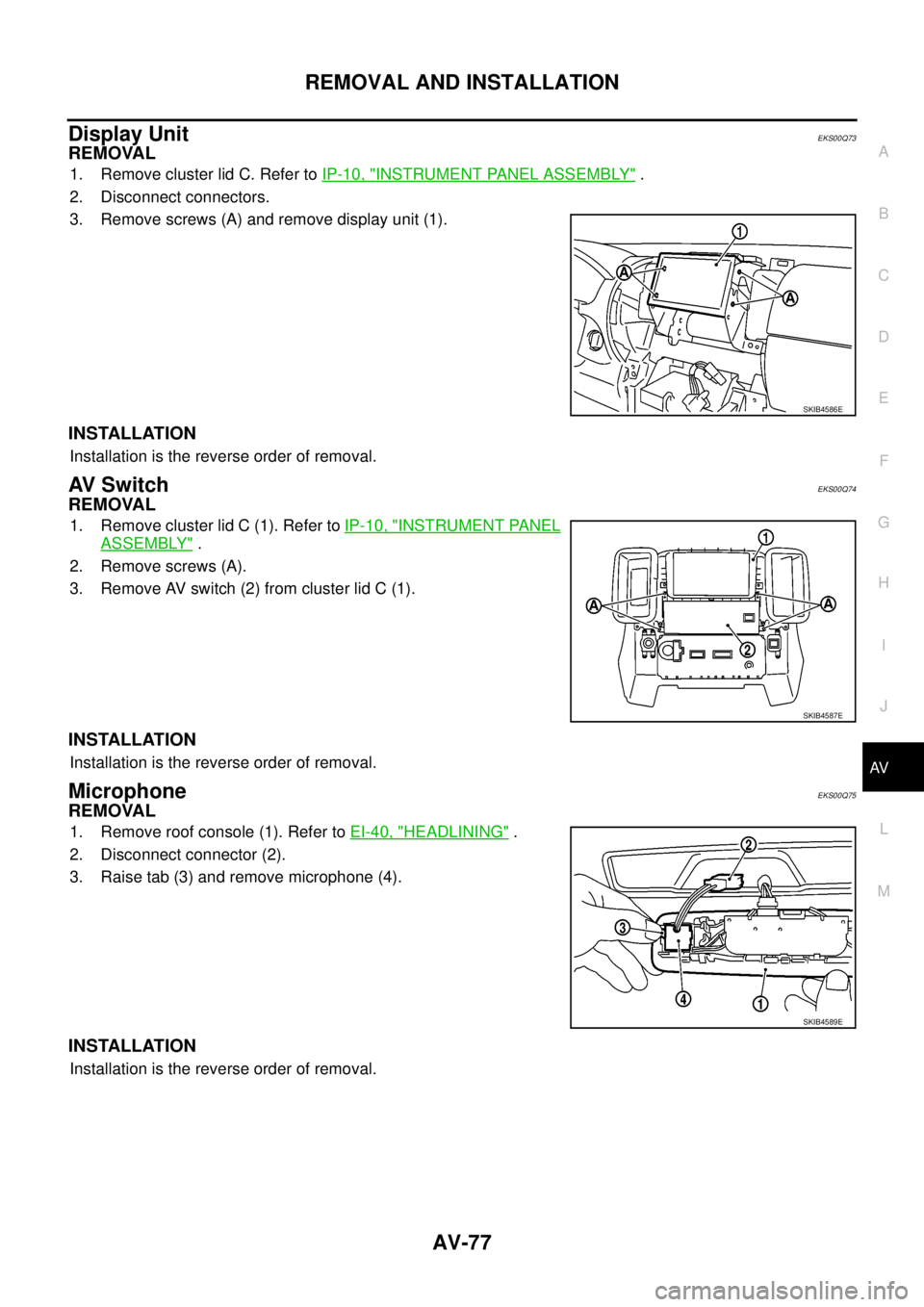
Display UnitEKS00Q73
REMOVAL
1. Remove cluster lid C. Refer toIP-10, "INSTRUMENT PANEL ASSEMBLY".
2. Disconnect connectors.
3. Remove screws (A) and remove display unit (1).
INSTALLATION
Installation is the reverse order of removal.
AV S w i t c hEKS00Q74
REMOVAL
1. Remove cluster lid C (1). Refer toIP-10, "INSTRUMENT PANEL
ASSEMBLY".
2. Remove screws (A).
3. Remove AV switch (2) from cluster lid C (1).
INSTALLATION
Installation is the reverse order of removal.
MicrophoneEKS00Q75
REMOVAL
1. Remove roof console (1). Refer toEI-40, "HEADLINING".
2. Disconnect connector (2).
3. Raise tab (3) and remove microphone (4).
INSTALLATION
Installation is the reverse order of removal.
SKIB4586E
SKIB4587E
SKIB4589E
Page 992 of 3171
EC-12
PRECAUTIONS
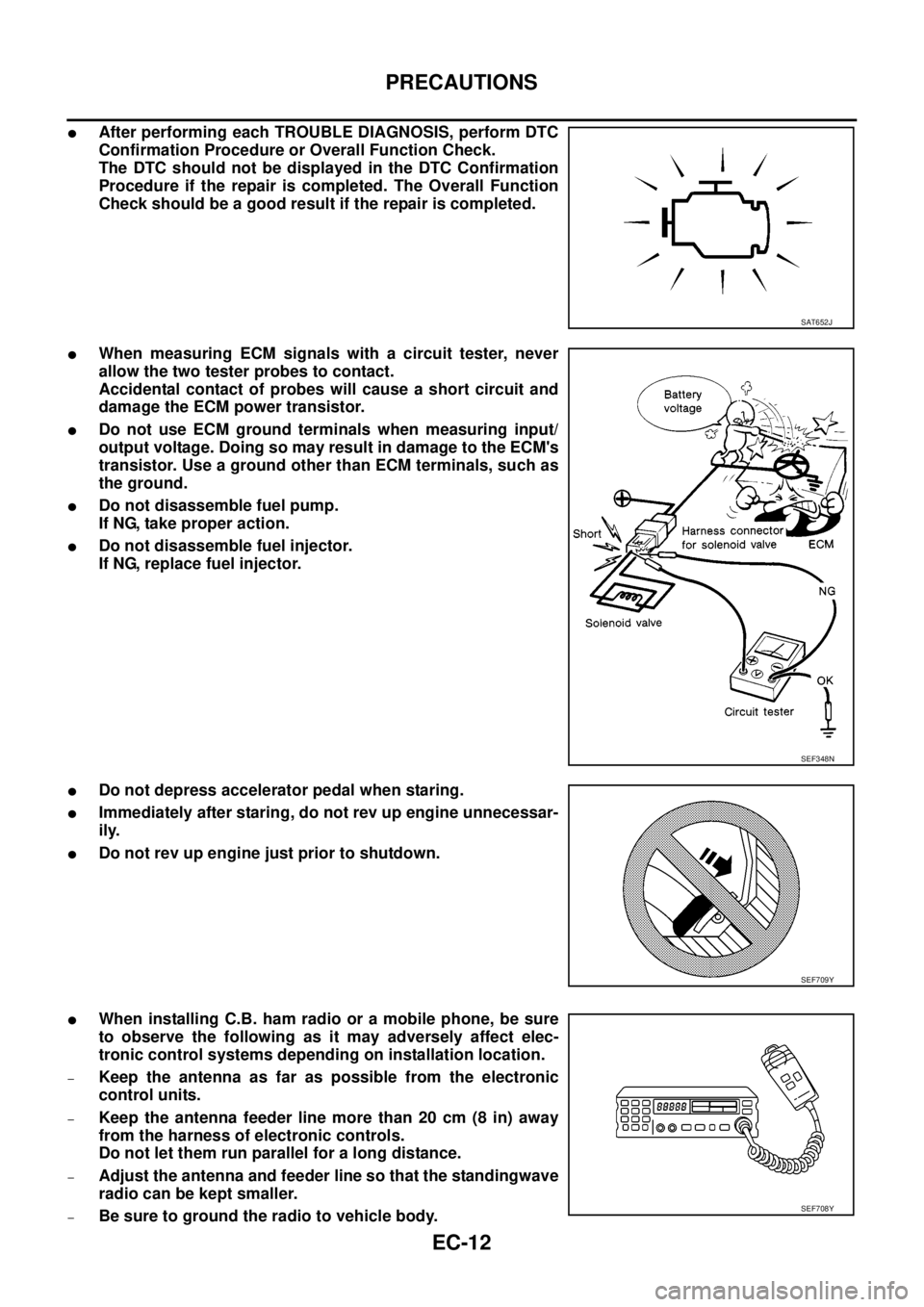
lAfter performing each TROUBLE DIAGNOSIS, perform DTC
Confirmation Procedure or Overall Function Check.
The DTC should not be displayed in the DTC Confirmation
Procedure if the repair is completed. The Overall Function
Check should be a good result if the repair is completed.
lWhen measuring ECM signals with a circuit tester, never
allow the two tester probes to contact.
Accidental contact of probes will cause a short circuit and
damage the ECM power transistor.
lDo not use ECM ground terminals when measuring input/
output voltage. Doing so may result in damage to the ECM's
transistor. Use a ground other than ECM terminals, such as
the ground.
lDo not disassemble fuel pump.
If NG, take proper action.
lDo not disassemble fuel injector.
If NG, replace fuel injector.
lDo not depress accelerator pedal when staring.
lImmediately after staring, do not rev up engine unnecessar-
ily.
lDo not rev up engine just prior to shutdown.
lWhen installing C.B. ham radio or a mobile phone, be sure
to observe the following as it may adversely affect elec-
tronic control systems depending on installation location.
–Keep the antenna as far as possible from the electronic
control units.
–Keep the antenna feeder line more than 20 cm (8 in) away
from the harness of electronic controls.
Do not let them run parallel for a long distance.
–Adjust the antenna and feeder line so that the standingwave
radio can be kept smaller.
–Be sure to ground the radio to vehicle body.
SAT652J
SEF348N
SEF709Y
SEF708Y