Clock adjustment NISSAN NOTE 2008 Owners Manual
[x] Cancel search | Manufacturer: NISSAN, Model Year: 2008, Model line: NOTE, Model: NISSAN NOTE 2008Pages: 235, PDF Size: 2.29 MB
Page 47 of 235
puter (where fitted) mode that was displayed before
the ignition switch was turned to the Acc, “OFF” or
LOCK position.
HR16DE or K9K engine oil level status
The Oil level status provides specific information
regarding the engine oil level.
If the oil level is sufficient, “Oil Good” is displayed
for approximately 10 seconds. If the oil level is low,
“Oil Lo” blinks for approximately 30 seconds in or-
der to draw your attention on necessary action.
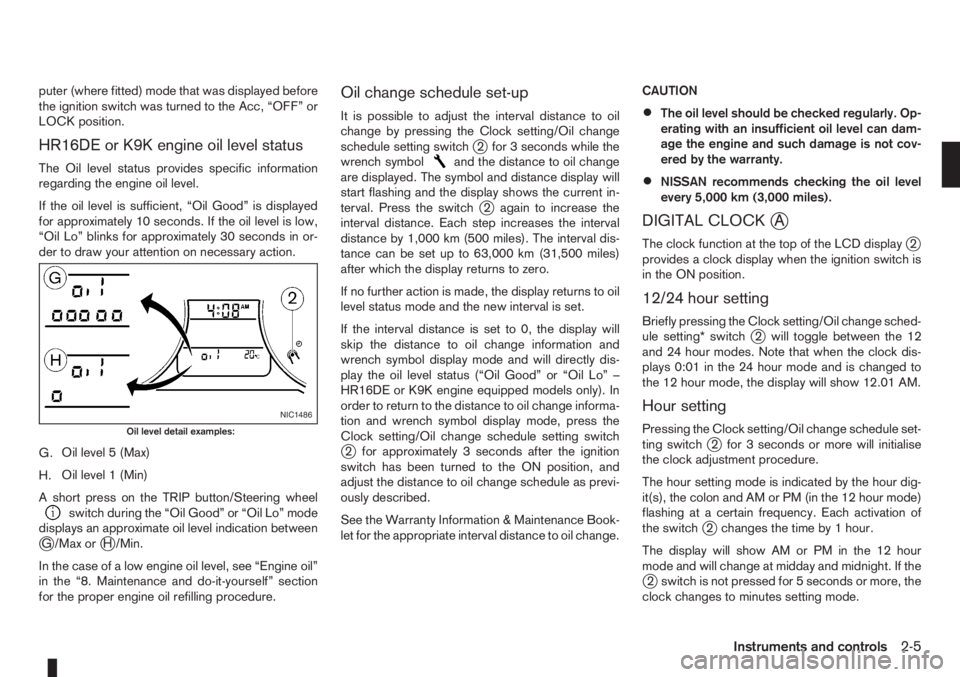
G.Oil level 5 (Max)
H.Oil level 1 (Min)
A short press on the TRIP button/Steering wheel
switch during the “Oil Good” or “Oil Lo” mode
displays an approximate oil level indication between
jG /Max orjH /Min.
In the case of a low engine oil level, see “Engine oil”
in the “8. Maintenance and do-it-yourself” section
for the proper engine oil refilling procedure.
Oil change schedule set-up
It is possible to adjust the interval distance to oil
change by pressing the Clock setting/Oil change
schedule setting switch
j2 for 3 seconds while the
wrench symboland the distance to oil change
are displayed. The symbol and distance display will
start flashing and the display shows the current in-
terval. Press the switch
j2 again to increase the
interval distance. Each step increases the interval
distance by 1,000 km (500 miles). The interval dis-
tance can be set up to 63,000 km (31,500 miles)
after which the display returns to zero.
If no further action is made, the display returns to oil
level status mode and the new interval is set.
If the interval distance is set to 0, the display will
skip the distance to oil change information and
wrench symbol display mode and will directly dis-
play the oil level status (“Oil Good” or “Oil Lo” –
HR16DE or K9K engine equipped models only). In
order to return to the distance to oil change informa-
tion and wrench symbol display mode, press the
Clock setting/Oil change schedule setting switch
j2 for approximately 3 seconds after the ignition
switch has been turned to the ON position, and
adjust the distance to oil change schedule as previ-
ously described.
See the Warranty Information & Maintenance Book-
let for the appropriate interval distance to oil change.CAUTION
•The oil level should be checked regularly. Op-
erating with an insufficient oil level can dam-
age the engine and such damage is not cov-
ered by the warranty.
•NISSAN recommends checking the oil level
every 5,000 km (3,000 miles).
DIGITAL CLOCKjA
The clock function at the top of the LCD displayj2
provides a clock display when the ignition switch is
in the ON position.
12/24 hour setting
Briefly pressing the Clock setting/Oil change sched-
ule setting* switchj2 will toggle between the 12
and 24 hour modes. Note that when the clock dis-
plays 0:01 in the 24 hour mode and is changed to
the 12 hour mode, the display will show 12.01 AM.
Hour setting
Pressing the Clock setting/Oil change schedule set-
ting switchj2 for 3 seconds or more will initialise
the clock adjustment procedure.
The hour setting mode is indicated by the hour dig-
it(s), the colon and AM or PM (in the 12 hour mode)
flashing at a certain frequency. Each activation of
the switch
j2 changes the time by 1 hour.
The display will show AM or PM in the 12 hour
mode and will change at midday and midnight. If the
j2 switch is not pressed for 5 seconds or more, the
clock changes to minutes setting mode.
NIC1486
Oil level detail examples:
Instruments and controls2-5
Page 81 of 235
FUEL FILLER LID OPENER LEVER
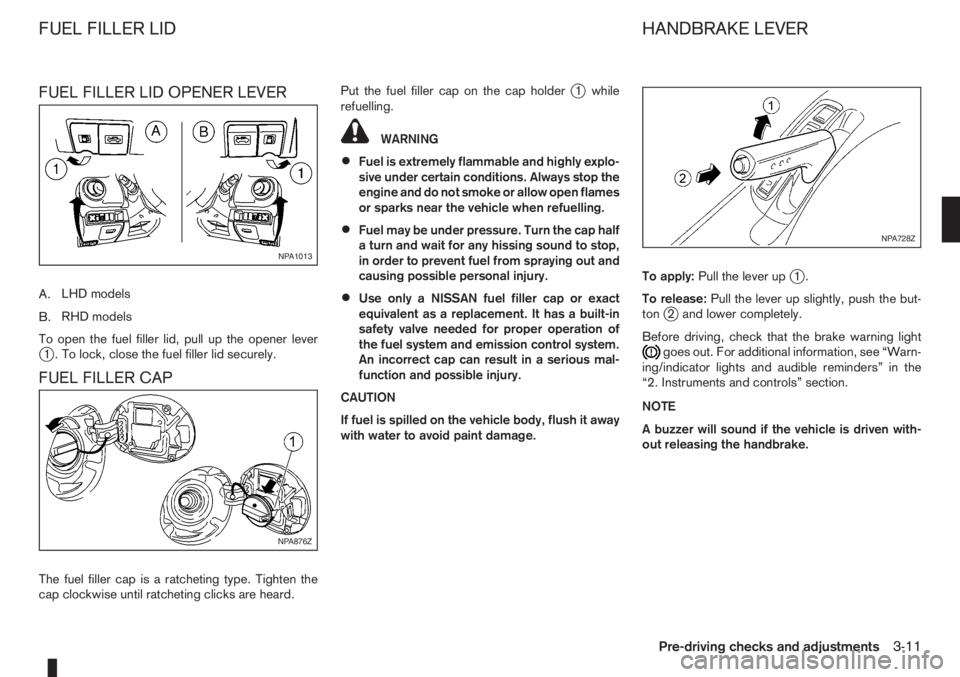
A.LHD models
B.RHD models
To open the fuel filler lid, pull up the opener lever
j1 . To lock, close the fuel filler lid securely.
FUEL FILLER CAP
The fuel filler cap is a ratcheting type. Tighten the
cap clockwise until ratcheting clicks are heard.Put the fuel filler cap on the cap holder
j1 while
refuelling.
WARNING
•Fuel is extremely flammable and highly explo-
sive under certain conditions. Always stop the
engine and do not smoke or allow open flames
or sparks near the vehicle when refuelling.
•Fuel may be under pressure. Turn the cap half
a turn and wait for any hissing sound to stop,
in order to prevent fuel from spraying out and
causing possible personal injury.
•Use only a NISSAN fuel filler cap or exact
equivalent as a replacement. It has a built-in
safety valve needed for proper operation of
the fuel system and emission control system.
An incorrect cap can result in a serious mal-
function and possible injury.
CAUTION
If fuel is spilled on the vehicle body, flush it away
with water to avoid paint damage.To apply:Pull the lever up
j1.
To release:Pull the lever up slightly, push the but-
ton
j2 and lower completely.
Before driving, check that the brake warning light
goes out. For additional information, see “Warn-
ing/indicator lights and audible reminders” in the
“2. Instruments and controls” section.
NOTE
A buzzer will sound if the vehicle is driven with-
out releasing the handbrake.
NPA1013
NPA876Z
NPA728Z
FUEL FILLER LID HANDBRAKE LEVER
Pre-driving checks and adjustments3-11
Page 110 of 235
TA Traffic announcement
This function operates in FM (Radio), CD or AUX
mode.
•Pressing the
The TA indicator is displayed while TA mode is
on.
•When
switched off and the TA indicator will disappear
from the display.
Traffic announcement interrupt function:
When a traffic announcement is received, the an-
nouncement is tuned in and the display shows a
notification message with the radio station name e.g.
[TA: Radio 1].
Once the traffic announcement has finished, the unit
returns to the source that was active before the traf-
fic announcement started.
If
the traffic announcement interrupt mode is can-
celled. The TA mode returns to the standby mode
and the audio unit returns to the previous source.
SETUP BUTTON
To configure Audio, Clock, Bluetooth, Language or
Scroll direction settings, perform the following pro-
cedure:
1. Press the
2. Press the
clockwise, the display will appear in the following
order:
[Audio]⇔[Clock]⇔[Bluetooth]⇔[Language]
⇔[Scroll Direction]
After the desired levels have been set, press either
the <
> (Back) button repeatedly, the
pressing any buttons to exit the menu screen.
Display brightness (Day/Night mode)
Press the
switch the display brightness between the daytime
and nighttime mode.
Audio adjustments
Press the
screen then select [Audio].
Each time the
will change as follows:
[Bass]→[Treble]→[Balance]→[Fade]→[AUX
VOL]→[SPD VOL]→setup menu screen [Audio]
→[Bass]
Bass control:
Use this control to enhance or attenuate bass re-
sponse sound.
Turn the
clockwise to adjust the bass settings then press
Use this control to enhance or attenuate the treble.
Turn the
clockwise to adjust the treble settings then press
Balance control:
Use this control to adjust the balance of the volume
between the left and right speakers.
Turn the
clockwise to adjust the left/right balance then press
Fade (Fader) control:
Use this control to adjust the balance of the volume
between the front and rear (where fitted) speakers.
Turn the
clockwise to adjust the front/rear balance then press
AUX VOL (Auxiliary volume) control:
Use this control to adjust the volume output from the
auxiliary source.
Turn the
clockwise to select [LO], [MID], or [HI] mode then
press
4-26Heater and air conditioner, and audio system
Page 111 of 235
![NISSAN NOTE 2008 Owners Manual SPD VOL (Speed volume) control:
This mode controls the volume output from the
speakers automatically in relation to vehicle speed.
When [SPD VOL] is displayed, turn the<TUNE/
MENU>dial clockwise or an](/img/5/56795/w960_56795-110.png "NISSAN NOTE 2008 Owners Manual SPD VOL (Speed volume) control:
This mode controls the volume output from the
speakers automatically in relation to vehicle speed.
When [SPD VOL] is displayed, turn the<TUNE/
MENU>dial clockwise or an")
SPD VOL (Speed volume) control:
This mode controls the volume output from the
speakers automatically in relation to vehicle speed.
When [SPD VOL] is displayed, turn the
the volume level.
Adjusting the setting to 0 (zero) turns off the speed
volume feature. Increasing the speed volume setting
results in the audio volume increasing more rapidly
with vehicle speed. Once chosen, press
to save the setting.
Clock setting
The [Clock] set up screen will appear when select-
ing the [Clock] item from the set up menu.
[Set Time]:
Select [Set Time] then adjust the clock as follows:
1. The hour display will start flashing. Turn the
2. Press the
will start flashing.
3. Turn the
minute.
4. Press
[On/Off]:
Set the clock display between on or off when the
audio unit is turned off.
If set in the [ON] position, the clock will be dis-
played when the audio unit is turned off either bypressing the<
>button or when the ignition
switch is placed in the “OFF” position.
[Clock Format):
Set the clock display between 24-hour mode and
12-hour clock mode.
Bluetooth®
For activation or deactivation details, see “BLUE-
TOOTH® settings” later in this section
Language
Select the appropriate language and press the
automatically adapt the language setting.
•[French]
•[English]
•[German]
•[Spanish]
•[Portuguese]
•[Italian]
•[Dutch]
•[Turkish]
•[Russian]
Scroll direction
Sets the scroll direction of the
For example, to change the way in which you turn
the dial (anticlockwise or clockwise) in order to scroll
up or down a list.
COMPACT DISC (CD) OPERATION
The CD player can play a music CD or an encoded
MP3/WMA CD and while listening to those CD’s
certain text might be able to be displayed (when CD
encoded with text is being used).
Press the
start to play.
When
mode is already operating, it will automatically turn
off the playing source and the CD play mode will
start.
However, if the CD disc is not loaded, then a notifi-
cation message will be displayed and the audio unit
remains in radio or AUX source mode.
CAUTION
•Do not force the CD into the slot. This could
damage the player.
•Do not use 8 cm (3.1 in) discs.
CD insert (CD player)
Insert the CD disc into the slot with the label side
facing up. The disc will be guided automatically into
the slot and will start playing. After loading the disc,
track information will be displayed.
NOTE
•The CD player accepts normal audio CD or
CD recorded with MP3/WMA files.
Heater and air conditioner, and audio system4-27
Page 131 of 235
2. Turn the key slightly in the ON direction.
3. Turn the key towards the LOCK position.
4. Remove the key.
STEERING LOCK
To lock the steering wheel
1. Turn the key to the LOCK position.
2. Remove the key from the ignition switch.
3. Turn the steering wheel 1/6 of a turn clockwise
from the straight up position.
To unlock the steering wheel
1. Insert the key into the ignition switch.
2. Gently turn the key while rotating the steering
wheel slightly right and left.
KEY POSITIONS
LOCK (Normal parking position) (0)
The ignition key can only be removed when in this
position.
The steering lock can only be locked in this position.
“OFF” (1)
The engine is turned off without locking the steering
wheel.
Acc (Accessories) (2)
This position activates electrical accessories, such
as the radio, when the engine is not running.
ON (Normal operating position) (3)
This position turns on the ignition system and elec-
trical accessories.
START (4)
The engine starter activates and the engine will start.
As soon as the engine has started, release the key
immediately. It will return to the ON position.
NISSAN ANTI-THEFT SYSTEM (NATS)
The NISSAN Anti Theft System (NATS)* will stop
the engine if someone tries to start the engine with-
out using the registered NATS key.
* Immobilizer
If you failed to start the engine using the NATS Key,
turn the ignition knob to the LOCK position, wait for
5 seconds and turn the key to the START position
again to start the engine.
For additional information, see “Security system” in
the “3. Pre-driving checks and adjustments” sec-
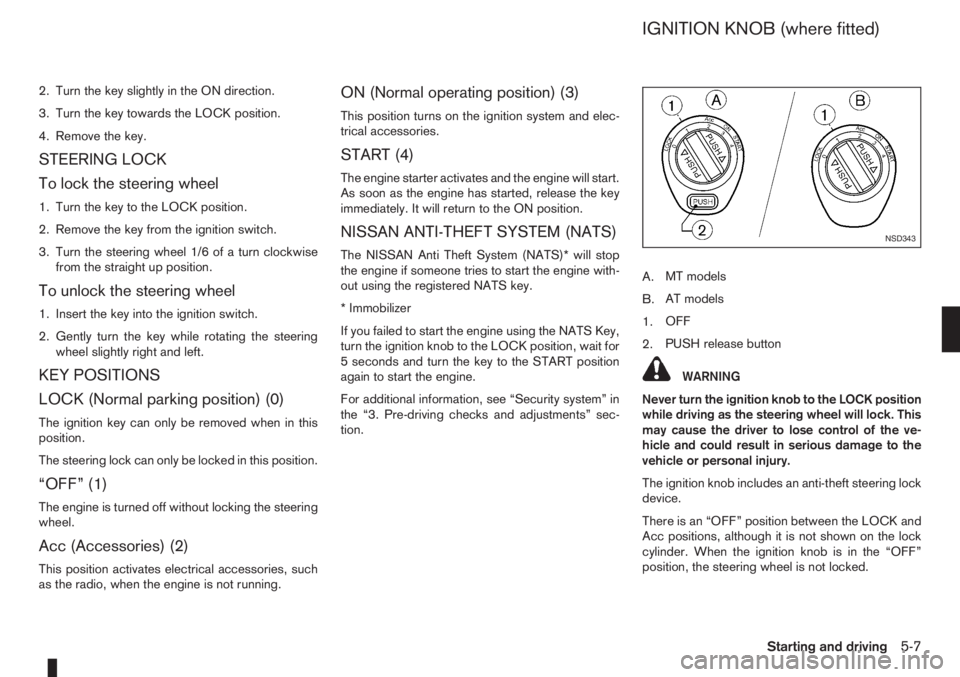
tion.A.MT models
B.AT models
1.OFF
2.PUSH release button
WARNING
Never turn the ignition knob to the LOCK position
while driving as the steering wheel will lock. This
may cause the driver to lose control of the ve-
hicle and could result in serious damage to the
vehicle or personal injury.
The ignition knob includes an anti-theft steering lock
device.
There is an “OFF” position between the LOCK and
Acc positions, although it is not shown on the lock
cylinder. When the ignition knob is in the “OFF”
position, the steering wheel is not locked.
NSD343
IGNITION KNOB (where fitted)
Starting and driving5-7