parking NISSAN NOTE 2012 User Guide
[x] Cancel search | Manufacturer: NISSAN, Model Year: 2012, Model line: NOTE, Model: NISSAN NOTE 2012Pages: 235, PDF Size: 2.29 MB
Page 146 of 235
•Push the cruise control main “ON/OFF” switchj5 . The cruise control symbolj7 , the CRUISE
indicatorj6 , the SET indicatorj8 , and the set
speed valuej9 will turn off in the combination
meter display.
•Push the speed limiter main “ON/OFF” switchj5 . The cruise control system information in the
combination meter will be replaced with the
speed limiter information. For details see “Speed
limiter” earlier in this section.
•When the vehicle is stopped and the ignition is
turned to the off position.
Turning off the cruise control system will erase
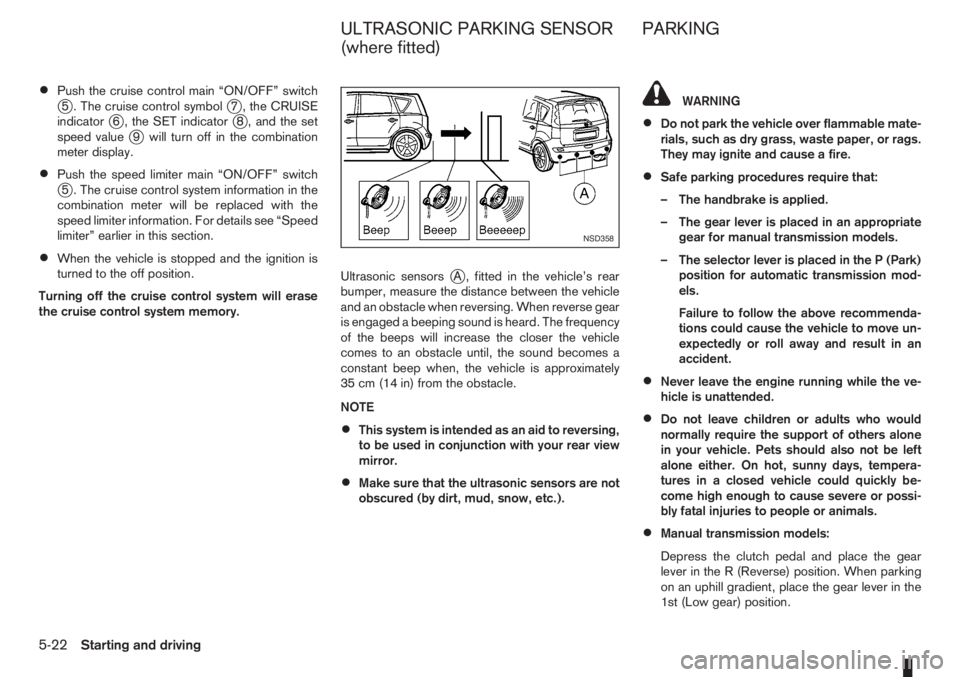
the cruise control system memory.Ultrasonic sensors
jA , fitted in the vehicle’s rear
bumper, measure the distance between the vehicle
and an obstacle when reversing. When reverse gear
is engaged a beeping sound is heard. The frequency
of the beeps will increase the closer the vehicle
comes to an obstacle until, the sound becomes a
constant beep when, the vehicle is approximately
35 cm (14 in) from the obstacle.
NOTE
•This system is intended as an aid to reversing,
to be used in conjunction with your rear view
mirror.
•Make sure that the ultrasonic sensors are not
obscured (by dirt, mud, snow, etc.).
WARNING
•Do not park the vehicle over flammable mate-
rials, such as dry grass, waste paper, or rags.
They may ignite and cause a fire.
•Safe parking procedures require that:
– The handbrake is applied.
– The gear lever is placed in an appropriate
gear for manual transmission models.
– The selector lever is placed in the P (Park)
position for automatic transmission mod-
els.
Failure to follow the above recommenda-
tions could cause the vehicle to move un-
expectedly or roll away and result in an
accident.
•Never leave the engine running while the ve-
hicle is unattended.
•Do not leave children or adults who would
normally require the support of others alone
in your vehicle. Pets should also not be left
alone either. On hot, sunny days, tempera-
tures in a closed vehicle could quickly be-
come high enough to cause severe or possi-
bly fatal injuries to people or animals.
•Manual transmission models:
Depress the clutch pedal and place the gear
lever in the R (Reverse) position. When parking
on an uphill gradient, place the gear lever in the
1st (Low gear) position.
NSD358
ULTRASONIC PARKING SENSOR
(where fitted)PARKING
5-22Starting and driving
Page 148 of 235
•Turn the ignition switch to the LOCK position
and remove the key/Intelligent Key (where fit-
ted).Your new vehicle was designed to be used primarily
to carry passengers and luggage.
Remember that towing a trailer will place additional
loads on your vehicle’s engine, drive-train, steering,
braking and other systems. Towing a trailer will also
exaggerate other conditions, such as sway caused
by crosswinds, rough road surfaces or passing
trucks. Driving style and speed must be adjusted
according to the circumstances. Before towing a
trailer, see a NISSAN dealer or qualified workshop
for an explanation of towing equipment and its
proper use.
OPERATING PRECAUTIONS
•Avoid towing a trailer during the running-in
schedule.
•Choose proper coupling devices (trailer hitch,
safety chain, roof carrier, etc.) for your vehicle
and trailer. These devices are available from a
NISSAN dealer or qualified workshop where you
can also obtain more detailed information about
trailer towing.
Heavy-duty kits are available at a NISSAN dealer
or qualified workshop.
•It is advisable to contact a NISSAN dealer or
qualified workshop for towing details, before
towing a trailer up steep slopes for long dis-
tances.
•Never allow the total trailer load (trailer weight
plus its cargo weight) to exceed the maximum
set for the coupling device.Contact a NISSAN dealer or qualified workshop
for more information on this matter.
•The trailer must be loaded so that heavy goods
are distributed over the axle and as low in the
trailer as possible. Poor load distribution can se-
riously affect the stability of the trailer and tow
vehicle.
•Do not exceed the maximum permitted vertical
load on the trailer hitch.
•Before driving, make sure that the lighting sys-
tem of the trailer works properly.
•Avoid abrupt starts, accelerations and stops.
•Avoid sharp turns and lane changes.
•Always drive your vehicle at a moderate speed.
•Always block the wheels on both vehicle and
trailer when parking. Apply the handbrake (where
fitted) on the trailer. Parking on a steep slope is
not recommended.
If parking on a steep slope is unavoidable it is
also advisable to put the vehicle into gear, or
select P (Park, AT models), and turn the front
wheels into the kerb (in addition to the other pre-
cautions described). Before parking on a steep
slope consider the incline (the towing weights
quoted are for a 12% slope).
•Follow the trailer manufacturer’s instructions.
TRAILER TOWING
5-24Starting and driving
Page 151 of 235
WARNING
•If the Electrically Power Assisted Steering
warning light (EPAS) illuminates while driv-
ing, the power assist for steering will be dis-
abled. Greater steering efforts are required to
operate the steering wheel, especially in
sharp turns and at low speed. Stop the ve-
hicle as soon as safely possible and contact a
NISSAN dealer or qualified workshop for fur-
ther assistance.
•In certain circumstances, factors external to
the EPAS system may contribute to the illumi-
nation of the warning light. If the warning light
illuminates, stop the vehicle as soon as safely
possible if driving. Turn the ignition switch to
the “OFF” position and wait for approximately
20 seconds, then turn the ignition switch to
the ON position again. If the light remains illu-
minated, we recommend you to contact a
NISSAN dealer or qualified workshop. See
“Warning/indicator lights and audible
reminders” in the “2. Instruments and
controls” section for further details regarding
the EPAS warning light.
The EPAS (Electrically Power Assisted Steering)
system is designed to assist steering.
The steering may appear to feel slightly stiff follow-
ing parking manoeuvres including a great deal of
steering. This is not a malfunction; it is caused by a
control system designed to prevent the motor fromoverheating. No servicing is required. The EPAS
system will return to normal operation the next time
the vehicle is driven.
Similarly, the EPAS system may not provide full as-
sistance during periods of reduced battery voltage
but will recover once normal battery voltage is re-
stored.
If the EPAS warning light comes on while the engine
is running, it may indicate that the EPAS system is
not working properly. As result greater steering ef-
forts are required to steer the steering wheel, espe-
cially in sharp turns and at low speeds. Have the
system checked by a NISSAN dealer or qualified
workshop as soon as possible.
NOTE
Incorrectly inflated tyres can lead to poor steer-
ing ability and make the driver suspect a steering
problem: keep the vehicle’s tyres inflated to the
correct pressure at all times.
CAUTION
Any malfunction or accident that could have dam-
aged the steering components (including actual
or attempted theft damage) should be reported
to a NISSAN dealer or qualified workshop.The brake system has two separate hydraulic cir-
cuits. If one circuit malfunctions, you will still have
braking ability with two wheels.
BRAKE PRECAUTIONS
Vacuum assisted brake
The brake booster aids braking by using engine
vacuum. If the engine stops or the drive belt is bro-
ken, you can stop the vehicle by depressing the
brake pedal. However, greater foot pressure on the
brake pedal will be required to stop the vehicle and
the stopping distance will be longer.
Wet brakes
When the vehicle is washed or driven through wa-
ter, the brakes may get wet. As a result, your brak-
ing distance will be longer and the vehicle may pull
to one side during braking.
To dry brakes, drive the vehicle at a safe speed
while lightly pressing the brake pedal to heat up the
brakes. Do this until the brakes return to normal.
Avoid driving the vehicle at high speeds until the
brakes function correctly.
Using the brakes
Avoid resting your foot on the brake pedal while
driving. This will overheat the brakes, wear out the
brake linings and pads faster and reduce fuel
economy performance.
To help reduce brake wear and to prevent the brakes
from overheating, reduce speed and downshift to a
lower gear before going down a slope or long down-
POWER STEERING SYSTEM BRAKE SYSTEM
Starting and driving5-27
Page 179 of 235
Lights*:
Clean the headlights on a regular basis. Make sure
that the headlights, stop lights, tail lights, turn signal
lights, and other lights are all operating properly and
installed securely. Also check headlight aim.
Tyres*:
Check the pressure with a gauge periodically when
at a service station (including the spare) and adjust
to the specified pressure if necessary. Check care-
fully for damage, cuts or excessive wear.
Tyre rotation*:
Tyres should be rotated at least every 10,000 km
(6,000 miles). However, the timing for tyre rotation
may vary according to your driving habits and road
surface conditions.
Wheel alignment and balance:
If the vehicle pull to either side while driving on a
straight and level road, or if you detect uneven or
abnormal tyre wear, there may be a need for wheel
alignment. If the steering wheel or seat vibrates at
normal highway speeds, wheel balancing may be
needed.
Wheel bolts:
When checking the tyres, make sure no wheel bolts
are missing, and check for any loose wheel bolts.
Tighten if necessary.Windscreen:
Clean the windscreen on a regular basis. Check the
windscreen at least every six months for cracks or
other damage. Have a damaged windscreen re-
paired by a qualified repair facility.
Wiper blades*:
Check for cracks or wear if they do not wipe prop-
erly.
Under the bonnet and vehicle
The maintenance items listed here should be
checked periodically, e.g. each time you check the
engine oil or refuel.
Battery*:
Check if the green indicator on the top of the main-
tenance free battery is visible. If it is not visible,
replace the battery as soon as possible.
Vehicles operated in high temperatures or under
severe conditions, check the fluid level frequently.
Brake and clutch fluid level*:
Make sure that the brake and clutch fluid level is
between the MAX and MIN lines on the reservoir.
Engine coolant level*:
Check the coolant level when the engine is cold.
Engine drive belts*:
Make sure that the drive belts are not frayed, worn,
cracked or oily.Engine oil level*:
Check the level after parking the vehicle on a level
surface and turning off the engine.
Fluid leaks:
Check under the vehicle for fuel, oil, water or other
fluid leaks after the vehicle has been parked for a
while. Water dripping from the air conditioner after
use is normal. If you should notice any leaks or if
petrol fumes are evident, check for the cause and
have it corrected immediately.
Window washer fluid*:
Check that there is adequate fluid in the tank.
Inside the vehicle
The maintenance items listed here should be
checked on a regular basis, such as when perform-
ing periodic maintenance, cleaning the vehicle, etc.
Accelerator pedal:
Check the pedal for smooth operation and make
sure that the pedal does not catch or require uneven
effort. Keep the floor mats away from the pedal.
Brake pedal*:
Check the pedal for smooth operation. If the brake
pedal suddenly goes down further than normal, the
pedal feels spongy or the vehicle seems to take
longer to stop, contact a NISSAN dealer or qualified
workshop immediately. Keep the floor mat away
from the pedal.
Maintenance and do-it-yourself8-3
Page 189 of 235
When checking or replacement is required, NISSAN
recommends contacting a NISSAN dealer or quali-
fied workshop for servicing.
CAUTION
•Use only Genuine NISSAN Matic D ATF. Do
not mix with other fluids.
•Using automatic transmission fluid other than
Genuine NISSAN Matic D ATF will cause dete-
rioration in driveability and automatic trans-
mission durability, and may damage the auto-
matic transmission, which is not covered by
the warranty.
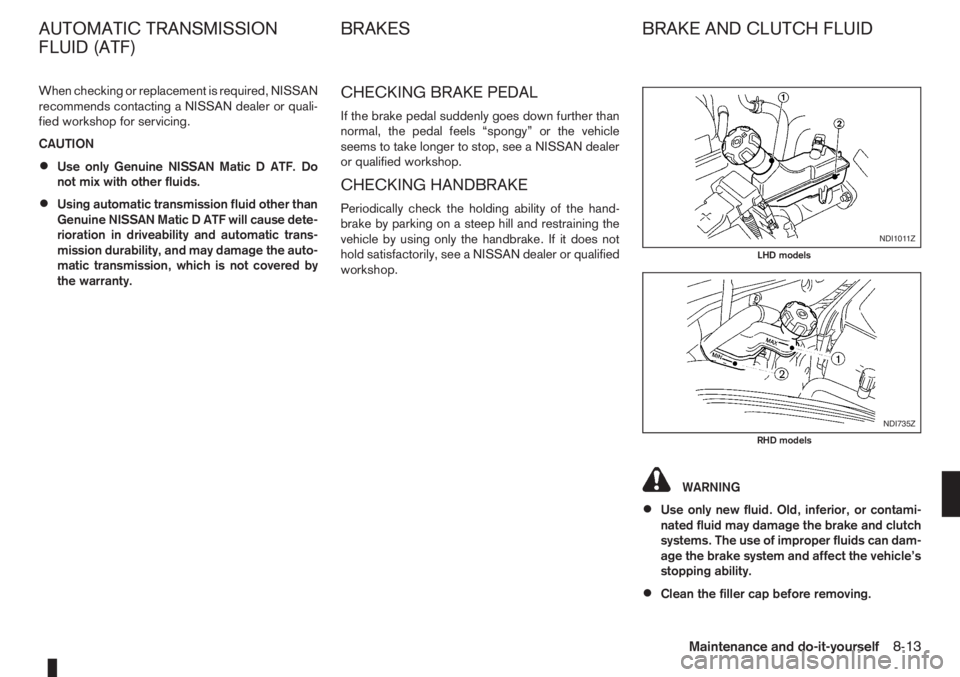
CHECKING BRAKE PEDAL
If the brake pedal suddenly goes down further than
normal, the pedal feels “spongy” or the vehicle
seems to take longer to stop, see a NISSAN dealer
or qualified workshop.
CHECKING HANDBRAKE
Periodically check the holding ability of the hand-
brake by parking on a steep hill and restraining the
vehicle by using only the handbrake. If it does not
hold satisfactorily, see a NISSAN dealer or qualified
workshop.
WARNING
•Use only new fluid. Old, inferior, or contami-
nated fluid may damage the brake and clutch
systems. The use of improper fluids can dam-
age the brake system and affect the vehicle’s
stopping ability.
•Clean the filler cap before removing.
NDI1011Z
LHD models
NDI735Z
RHD models
AUTOMATIC TRANSMISSION
FLUID (ATF)BRAKES BRAKE AND CLUTCH FLUID
Maintenance and do-it-yourself8-13
Page 225 of 235
– Power door lock switch ................................................... 3-7
– Steering lock ............................................................ 5-7, 5-8
– Super Lock system .......................................................... 3-6
M
Maintenance
– General maintenance ....................................................... 8-2
– Maintenance precautions ................................................. 8-4
– Maintenance requirements ............................................... 8-2
– Seat belt maintenance ..................................................... 1-9
Manual transmission
– Driving with manual transmission ................................... 5-11
Meters and gauges ............................................................... 2-2
– Digital clock ..................................................................... 2-5
– Fuel gauge ...................................................................... 2-2
– Odometer ........................................................................ 2-3
– Oil change schedule set-up ............................................. 2-4
– Outside temperature display ............................................ 2-4
– Speedometer .................................................................. 2-2
– Tachometer ..................................................................... 2-2
– Trip computer .................................................................. 2-3
– Twin trip odometer .......................................................... 2-3
Mirror .................................................................................. 3-12
– Inside rear-view mirror ................................................... 3-12
– Outside rear-view mirrors .............................................. 3-12
– Vanity mirror .................................................................. 3-13
Mobile phone integration ..................................................... 4-34
N
NISSAN Anti-Theft System (NATS) ................................ 5-7, 5-9
– NATS immobilizer radio approval number ......................... 9-8
– NATS security indicator light ............................................ 3-9O
Odometer ............................................................................. 2-3
– Twin trip .......................................................................... 2-3
Oil
– Changing engine oil ......................................................... 8-9
– Changing engine oil filter ............................................... 8-11
– Checking engine oil level ................................................. 8-9
– Engine oil ........................................................................ 8-8
– Oil change schedule set-up ............................................. 2-4
– Recommended lubricants ................................................ 9-2
– Recommended SAE viscosity number .............................. 9-4
Outside temperature display .................................................. 2-4
Overheat
– Engine overheat ............................................................. 6-11
P
Parking ............................................................................... 5-22
– Ultrasonic parking sensor .............................................. 5-22
Phone
– Bluetooth® .................................................................... 4-34
– Mobile phone integration ............................................... 4-34
Power
– Power steering system .................................................. 5-27
– Power window — Driver’s side (Reinitialisation
procedure) .................................................................... 8-16
Power outlet ........................................................................ 2-20
Power windows ................................................................... 2-25
– Automatic operation ....................................................... 2-26
– Driver’s side main switch ............................................... 2-26
– Passenger’s side switch ................................................ 2-26
Pre-tensioner seat belt system ............................................... 1-9
Precaution
– Seat belt usage ............................................................... 1-6
Index10-5
Page 228 of 235
– Tyre age ........................................................................ 8-31
– Tyre equipment .............................................................. 5-31
– Tyre inflation pressure ................................................... 8-29
– Tyre placard .................................................................... 9-7
– Tyre pressure (Trailer) ................................................... 5-25
– Tyre rotation .................................................................. 8-30
– Tyre wear and damage .................................................. 8-30
– Wheels and tyres ................................................... 8-29, 9-5
U
Ultrasonic sensor
– Parking sensor .............................................................. 5-22
USB Memory operation ....................................................... 4-29
V
Vehicle identification
– Vehicle identification number (VIN) (chassis number) ....... 9-6
– Vehicle identification plate ................................................ 9-6
Vehicle security ............................................................ 3-9, 5-26
Vents .................................................................................... 4-2
W
Warning/indicator lights and audible reminders ...................... 2-7
– Audible reminders ......................................................... 2-12
– Checking bulbs ............................................................... 2-7
– Indicator lights ............................................................... 2-11
– Warning lights ................................................................. 2-7
Washer nozzle ..................................................................... 8-20
Washing ............................................................................... 7-2
Waxing .................................................................................. 7-2Wheel
– Blocking the wheels ........................................................ 6-3
– Care of wheels ................................................................ 7-3
– Changing tyres and wheels ........................................... 8-31
– Getting the tools and spare wheel .................................... 6-4
– Installing the wheel .......................................................... 6-6
– Removing the wheel ........................................................ 6-4
– Removing the wheel cover ............................................... 6-4
– Stowing the wheel and tools ............................................ 6-6
– Wheel balance .............................................................. 8-31
– Wheels and tyres ................................................... 8-29, 9-5
Windows
– Power window — Driver’s side (Reinitialisation
procedure) .................................................................... 8-16
– Power windows ............................................................. 2-25
Winter (Special winter equipment) ....................................... 5-32
Wiper
– Front window wiper replacement ................................... 8-20
– Rain sensor ................................................................... 2-14
– Rear window wiper and washer switch .......................... 2-14
– Window washer/headlight cleaner fluid .......................... 8-14
– Windscreen wiper and washer switch ............................ 2-13
– Wiper blades replacement ............................................. 8-19
10-8Index
Page 230 of 235
Manufacturing phase
NISSAN plants based in the UK and Spain already
achieve a recycling rate of over 90% and are look-
ing for further improvements. The UK plant installed
8 windmills to cut carbon dioxide emissions at power
plants by more than 3,000 tonnes per year. Since
the end of March 2007, NMISA (Spain) uses a solar
panel water heating system to save energy. This will
generate 33% of the energy consumed in the baths
during the painting of your vehicle.
Production and distribution phase
Using resources efficiently to reduce the amount of
waste generated during the production and distribu-
tion stage. NISSAN promotes activities based on
Reducing, Reusing, and Recycling materials when-
ever possible. The NISSAN GREEN PROGRAM
2010 (NGP2010) is our midterm environmental ac-
tion plan defining our goals for achieving a 100%
recycling rate for operations in Japan and globally.
Use and service phase
NISSAN dealers are our window to you, our cus-
tomer. In order to meet your expectations they pro-
vide not only high quality services but are also envi-
ronmentally responsible. NISSAN promotes activi-
ties to recycle the waste generated as a result of
service centre activities.
Disposal phase
Recycle your end of life vehicle or its components.
When your NISSAN reaches the end of its life, and
is no longer suitable for daily use, it still has value.You can help prevent waste affecting the environ-
ment by bringing your NISSAN to be recycled at our
collection networks in your area. Our collection net-
works guarantee no cost for the treatment of your
ELV. For further information on how and where to
dispose of your ELV refer to your local NISSAN
dealer or consult: www.nissan.eu.
PROTECT THE ENVIRONMENT
WHEN DRIVING
Your driving behaviour has significant impact on fuel
economy and the environment. Follow the tips be-
low for better fuel-efficiency, better driving habits,
and to be environmentally friendly by reducing emis-
sions:
Defensive driving
Anticipating traffic conditions and acting accordingly
reduces fuel consumption, helping to protect of our
natural environment. Take your foot off the accelera-
tor while approaching traffic lights and avoid last
minute braking when the light turns red.
Avoid speeding, harsh acceleration, and strong
braking. The gain in time does not offset pollution of
the environment. Try to maintain speed when driving
uphill to reduce fuel consumption and pollution.
Maintain speed or allow the vehicle to go slower
where traffic allows.
Close windows when driving
Driving with a window open at 100 km/h (62 MPH)
increases fuel consumption by up to 4%. Driving
with the windows closed allows for better fuel
economy.
Optimise the use of air conditioning
The air conditioning system has a positive effect on
driving and vehicle safety through comfort cooling
and dehumidifying, drivers are more alert and have
better visibility when window demisting/defogging
becomes necessary. However, use of the air condi-
tioning system will increase fuel consumption sub-
stantially in an urban environment. Optimise the use
of air conditioning by using the vents as much as
possible.
Use the parking brake on slopes
Use the parking brake when holding your vehicle on
a slope. Avoid using the clutch (manual transmis-
sion) or the accelerator (automatic transmission) to
hold your vehicle as this leads to unnecessary fuel
consumption and wear.
Maintain a safe distance
Anticipate traffic conditions for a smoother drive and
to assure comfort and safety during your trip. Drive
and maintain a safe distance from other vehicles
while in traffic. This will help reduce fuel consump-
tion as you will not be constantly tapping your
brakes.
Check your tyre pressure
Low tyre pressure increases fuel consumption as
well as the use of non-recommended tyres. Correct
tyre pressure will maximise the grip of your vehicle
and optimise fuel consumption.